Introduction to Meteor
Intoduction to
By Meghna Gogna
Introduction to Meteor
Agenda
â—Ź Introduction To Meteor
â—Ź What is DDP ?
â—Ź Installing Meteor and create first App
â—Ź Meteor packages and App structure
â—Ź Meteor Template and Template Helpers
â—Ź Collections
â—Ź Routing
â—Ź Security in Meteor
â—Ź Deploying Apps build with Meteor
â—Ź Hands-on exercises
Introduction to Meteor
Founder of Meteor
➢ Meteor was first introduced in December
2011 under the name “Skybreak.
➢ Meteor is developed by the Meteor
Development Group.
Introduction to Meteor
INTRODUCTION
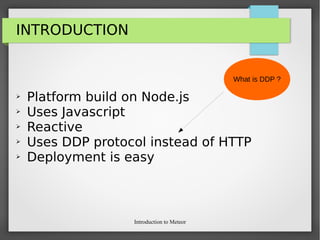
➢ Platform build on Node.js
➢ Uses Javascript
➢ Reactive
➢ Uses DDP protocol instead of HTTP
➢ Deployment is easy
What is this ?
Introduction to Meteor
INTRODUCTION
Meteor is a platform. Why ??
Because it sits between your app’s database and its user
interface and makes sure that both are kept in sync.
Introduction to Meteor
INTRODUCTION
➢ Platform build on Node.js
➢ Uses Javascript
➢ Reactive
➢ Uses DDP protocol instead of HTTP
➢ Deployment is easy
What is this ?
Introduction to Meteor
INTRODUCTION
Meteor is a platform. Why ??
Because it sits between your app’s database and
its user interface and makes sure that both are
kept in sync.
Introduction to Meteor
INTRODUCTION
It’s all JavaScript, so you don’t need to deal with
one language in the browser and another on the
server.
Meaning you can make the same code accessible
from both the client and server if you need to.
Introduction to Meteor
INTRODUCTION
➢ Platform build on Node.js
➢ Uses Javascript
➢ Reactive
➢ Uses DDP protocol instead of HTTP
➢ Deployment is easy
Why Reactive ?
Introduction to Meteor
INTRODUCTION
REACTIVE -
Meaning that any change to your data is automatically
reflected everywhere throughout the app without the
need for callbacks.
Both your changes and the changes made by other
users are instantly reflected in the UI.
Introduction to Meteor
INTRODUCTION
Instead of refreshing the whole browser window
every time the user changes the page or performs
an action, Meteor modifies only the part of the
app that actually changes without reloading the
rest,
Introduction to Meteor
INTRODUCTION
➢ Platform build on Node.js
➢ Uses Javascript
➢ Reactive
➢ Uses DDP protocol instead of HTTP
➢ Deployment is easy
What is DDP ?
Introduction to Meteor
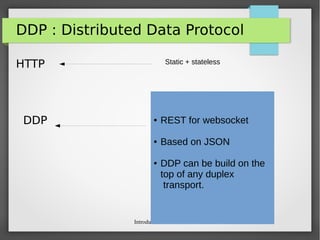
DDP : Distributed Data Protocol
HTTP
DDP
Static + stateless
â—Ź REST for websocket
â—Ź Based on JSON
â—Ź DDP can be build on the
top of any duplex
transport.
Introduction to Meteor
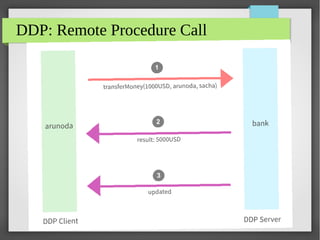
DDP: Remote Procedure Call
Introduction to Meteor
INTRODUCTION
➢ Platform build on Node.js
➢ Uses Javascript
➢ Reactive
➢ Uses DDP protocol instead of HTTP
➢ Deployment is easy
Deploy ?
Introduction to Meteor
INTRODUCTION
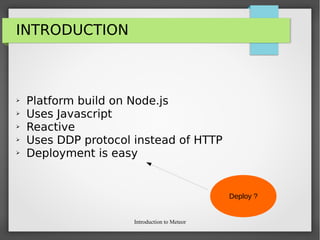
Meteor deploy Applications just in a single
command.
We'll see this in a while !!
Introduction to Meteor
INSTALLING METEOR
Installing meteor takes a few seconds:
curl https://install.meteor.com | /bin/sh
Introduction to Meteor
CREATE FIRST APP
Creating new app also takes a couple of seconds:
meteor create myApp
Introduction to Meteor
PACKAGES
 Adding packages is made very simple by
meteor
 You just need to type following in the terminal:
meteor add <package-name>
Introduction to Meteor
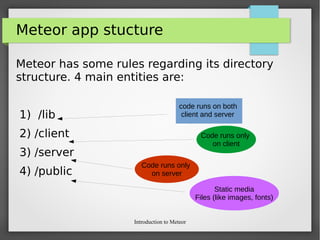
Meteor app stucture
Meteor has some rules regarding its directory
structure. 4 main entities are:
1) /lib
2) /client
3) /server
4) /public
code runs on both
client and server
Code runs only
on client
Code runs only
on server
Static media
Files (like images, fonts)
Introduction to Meteor
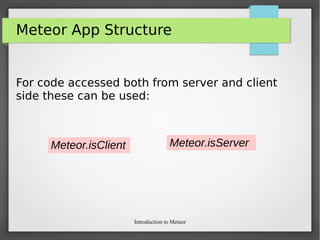
Meteor App Structure
For code accessed both from server and client
side these can be used:
Meteor.isClient Meteor.isServer
Introduction to Meteor
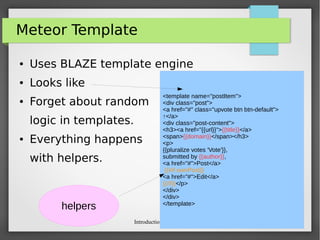
Meteor Template
â—Ź Uses BLAZE template engine
â—Ź Looks like
â—Ź Forget about random
logic in templates.
â—Ź Everything happens
with helpers.
<template name="postItem">
<div class="post">
<a href="#" class="upvote btn btn-default">
↑</a>
<div class="post-content">
<h3><a href="{{url}}">{{title}}</a>
<span>{{domain}}</span></h3>
<p>
{{pluralize votes 'Vote'}},
submitted by {{author}},
<a href="#">Post</a>
{{#if ownPost}}
<a href="#">Edit</a>
{{/if}}</p>
</div>
</div>
</template>
helpers
Introduction to Meteor
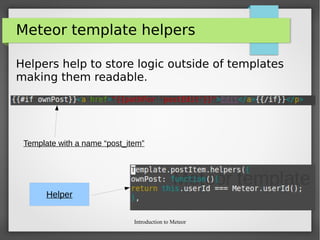
Meteor template helpers
Helpers help to store logic outside of templates
making them readable.
Template with a name “post_item”
Helper
Introduction to Meteor
Meteor Collections
â—Ź Collections are defined really simple.
â—Ź After that MyCollection.[insert|update|remove]
methods can be called both on client ans
server.
â—Ź They can be fired by any user from console in
browser.
MyCollection = new Mongo.Collection(“my-collection”);
Introduction to Meteor
Creating a simple app in
Meteor
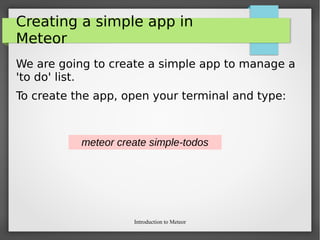
We are going to create a simple app to manage a
'to do' list.
To create the app, open your terminal and type:
meteor create simple-todos
Introduction to Meteor
Creating a simple app in
Meteor
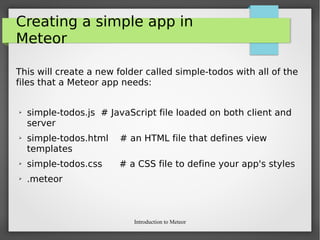
This will create a new folder called simple-todos with all of the
files that a Meteor app needs:
➢ simple-todos.js # JavaScript file loaded on both client and
server
➢ simple-todos.html # an HTML file that defines view
templates
➢ simple-todos.css # a CSS file to define your app's styles
➢ .meteor
Introduction to Meteor
Creating a simple app in
Meteor
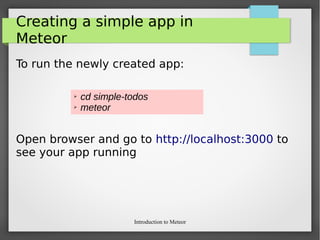
To run the newly created app:
Open browser and go to http://localhost:3000 to
see your app running
➢ cd simple-todos
➢ meteor
Introduction to Meteor
Creating a simple app in Meteor
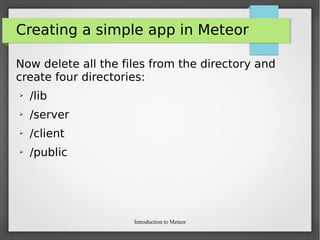
Now delete all the files from the directory and
create four directories:
➢ /lib
➢ /server
➢ /client
➢ /public
Introduction to Meteor
Creating a simple app in
Meteor
All the designing part goes to client hence
templating is done in “client” folder
Open “/client” directory and create templates
folder.
Introduction to Meteor
Creating a simple app in
Meteor
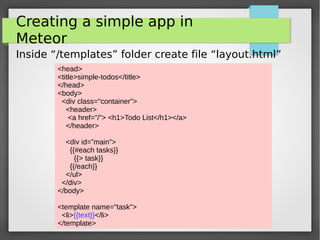
Inside “/templates” folder create file “layout.html”
<head>
<title>simple-todos</title>
</head>
<body>
<div class="container">
<header>
<a href=”/”> <h1>Todo List</h1></a>
</header>
<div id=”main”>
{{#each tasks}}
{{> task}}
{{/each}}
</ul>
</div>
</body>
<template name="task">
<li>{{text}}</li>
</template>
Introduction to Meteor
Creating a simple app in
Meteor
Create “simple-todos.js” for writing helpers code:
Template.simpleTodos.helpers({
tasks: [
{ text: "This is task 1" },
{ text: "This is task 2" },
{ text: "This is task 3" }
]
});
Introduction to Meteor
Adding CSS
Create a folder name stylesheet and add
stylesheet.css file
Introduction to Meteor
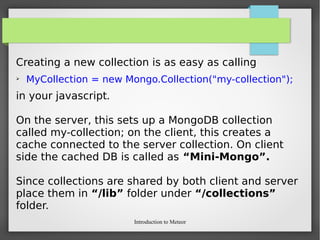
Creating a new collection is as easy as calling
➢ MyCollection = new Mongo.Collection("my-collection");
in your javascript.
On the server, this sets up a MongoDB collection
called my-collection; on the client, this creates a
cache connected to the server collection. On client
side the cached DB is called as “Mini-Mongo”.
Since collections are shared by both client and server
place them in “/lib” folder under “/collections”
folder.
Introduction to Meteor
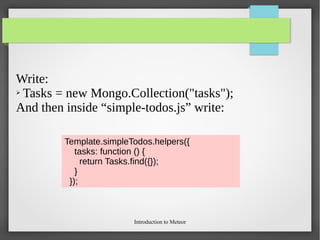
Write:
➢ Tasks = new Mongo.Collection("tasks");
And then inside “simple-todos.js” write:
Template.simpleTodos.helpers({
tasks: function () {
return Tasks.find({});
}
});
Introduction to Meteor
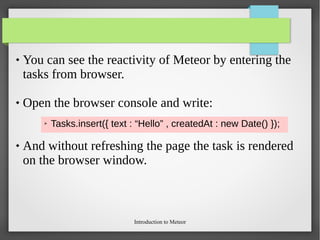
 You can see the reactivity of Meteor by entering the
tasks from browser.
 Open the browser console and write:
 And without refreshing the page the task is rendered
on the browser window.
➢ Tasks.insert({ text : “Hello” , createdAt : new Date() });
Introduction to Meteor
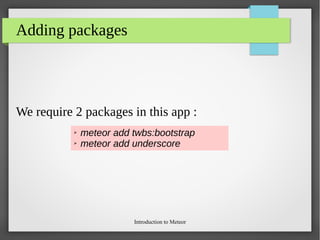
Adding packages
We require 2 packages in this app :
➢ meteor add twbs:bootstrap
➢ meteor add underscore
Introduction to Meteor
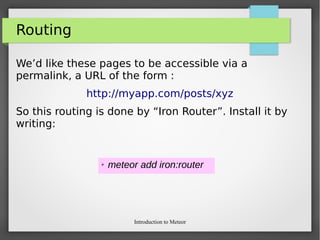
Routing
We’d like these pages to be accessible via a
permalink, a URL of the form :
http://myapp.com/posts/xyz
So this routing is done by “Iron Router”. Install it by
writing:
➢ meteor add iron:router
Introduction to Meteor
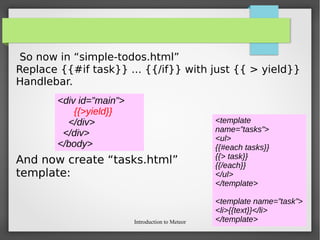
So now in “simple-todos.html”
Replace {{#if task}} ... {{/if}} with just {{ > yield}}
Handlebar.
And now create “tasks.html”
template:
<div id=”main”>
{{>yield}}
</div>
</div>
</body>
<template
name=”tasks”>
<ul>
{{#each tasks}}
{{> task}}
{{/each}}
</ul>
</template>
<template name=”task”>
<li>{{text}}</li>
</template>
Introduction to Meteor
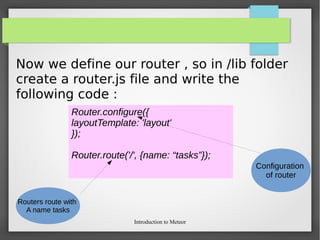
Now we define our router , so in /lib folder
create a router.js file and write the
following code :
Router.configure({
layoutTemplate: 'layout'
});
Router.route('/', {name: “tasks”});
Configuration
of router
Routers route with
A name tasks
Introduction to Meteor
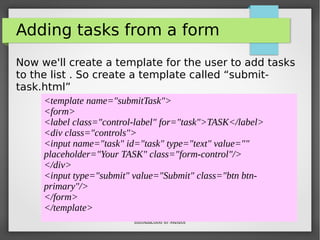
Adding tasks from a form
Now we'll create a template for the user to add tasks
to the list . So create a template called “submit-
task.html”
<template name="submitTask">
<form>
<label class="control-label" for="task">TASK</label>
<div class="controls">
<input name="task" id="task" type="text" value=""
placeholder="Your TASK" class="form-control"/>
</div>
<input type="submit" value="Submit" class="btn btn-
primary"/>
</form>
</template>
Introduction to Meteor
Adding JS file
Insert in Tasks DB:
Template.taskSubmit.events({
'submit form': function(e) {
e.preventDefault();
var tasks = {
text: $(e.target).find('[name=task]').val(),
createdAt : new Date()
};
task._id = Tasks.insert(tasks);
Router.go(“tasks”, tasks);
}
});
Introduction to Meteor
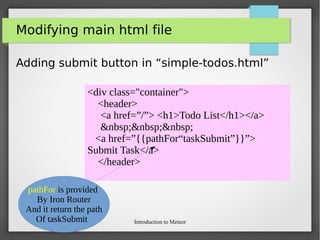
Modifying main html file
Adding submit button in “simple-todos.html”
<div class="container">
<header>
<a href=”/”> <h1>Todo List</h1></a>
&nbsp;&nbsp;&nbsp;
<a href=”{{pathFor“taskSubmit”}}”>
Submit Task</a>
</header>
pathFor is provided
By Iron Router
And it return the path
Of taskSubmit
Introduction to Meteor
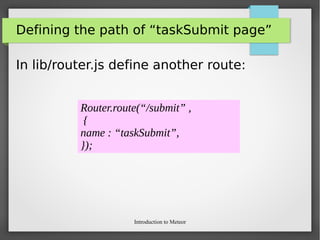
Defining the path of “taskSubmit page”
In lib/router.js define another route:
Router.route(“/submit” ,
{
name : “taskSubmit”,
});
Introduction to Meteor
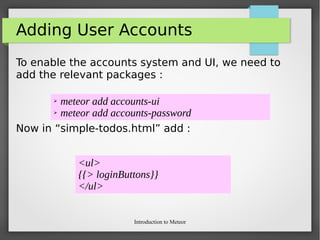
Adding User Accounts
To enable the accounts system and UI, we need to
add the relevant packages :
Now in “simple-todos.html” add :
➢ meteor add accounts-ui
➢ meteor add accounts-password
<ul>
{{> loginButtons}}
</ul>
Introduction to Meteor
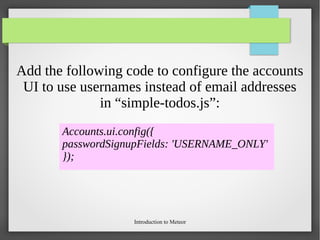
Add the following code to configure the accounts
UI to use usernames instead of email addresses
in “simple-todos.js”:
Accounts.ui.config({
passwordSignupFields: 'USERNAME_ONLY'
});
Introduction to Meteor
Security
Introduction to Meteor
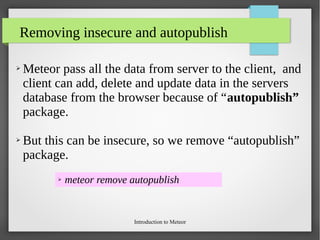
Removing insecure and autopublish
➢ Meteor pass all the data from server to the client, and
client can add, delete and update data in the servers
database from the browser because of “autopublish”
package.
➢ But this can be insecure, so we remove “autopublish”
package.
➢ meteor remove autopublish
Introduction to Meteor
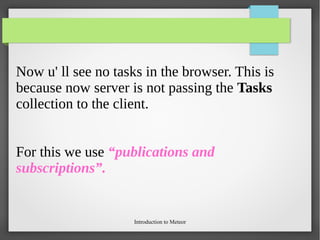
Now u' ll see no tasks in the browser. This is
because now server is not passing the Tasks
collection to the client.
For this we use “publications and
subscriptions”.
Introduction to Meteor
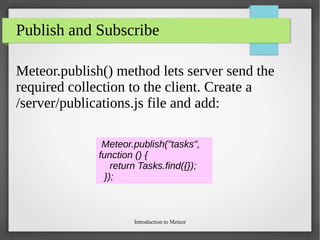
Publish and Subscribe
Meteor.publish() method lets server send the
required collection to the client. Create a
/server/publications.js file and add:
Meteor.publish("tasks",
function () {
return Tasks.find({});
});
Introduction to Meteor
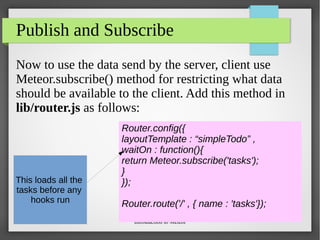
Publish and Subscribe
Now to use the data send by the server, client use
Meteor.subscribe() method for restricting what data
should be available to the client. Add this method in
lib/router.js as follows:
Router.config({
layoutTemplate : “simpleTodo” ,
waitOn : function(){
return Meteor.subscribe('tasks');
}
});
Router.route('/' , { name : 'tasks'});
This loads all the
tasks before any
hooks run
Introduction to Meteor
Deploying Meteor App
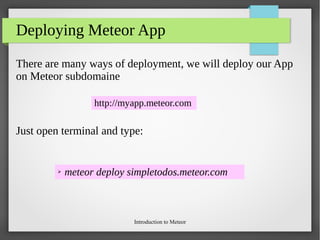
There are many ways of deployment, we will deploy our App
on Meteor subdomaine
Just open terminal and type:
http://myapp.meteor.com
➢ meteor deploy simpletodos.meteor.com
Introduction to Meteor
Deploying Your App
After a few seconds you’ll be able to access your app at
http://simpletodos.meteor.com
Introduction to Meteor
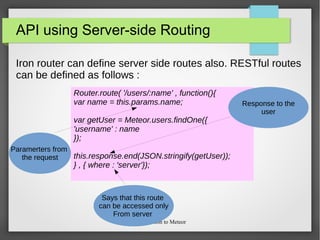
API using Server-side Routing
Iron router can define server side routes also. RESTful routes
can be defined as follows :
Router.route( '/users/:name' , function(){
var name = this.params.name;
var getUser = Meteor.users.findOne({
'username' : name
});
this.response.end(JSON.stringify(getUser));
} , { where : 'server'});
Paramerters from
the request
Response to the
user
Says that this route
can be accessed only
From server
Introduction to Meteor
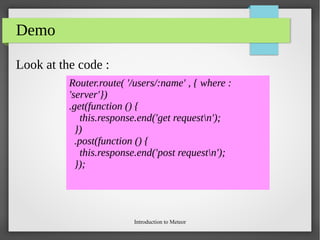
Type of request
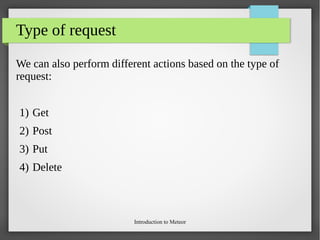
We can also perform different actions based on the type of
request:
1) Get
2) Post
3) Put
4) Delete
Introduction to Meteor
Demo
Look at the code :
Router.route( '/users/:name' , { where :
'server'})
.get(function () {
this.response.end('get requestn');
})
.post(function () {
this.response.end('post requestn');
});
Introduction to Meteor
HandOn Exercises
Introduction to Meteor
We will now create our own app
named as
“post-by-me”
Introduction to Meteor
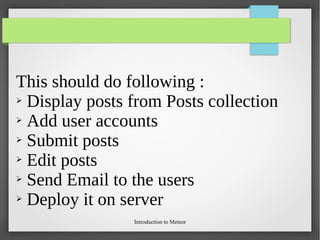
This should do following :
➢ Display posts from Posts collection
➢ Add user accounts
➢ Submit posts
➢ Edit posts
➢ Send Email to the users
➢ Deploy it on server
Introduction to Meteor
We have our own app deployed on server that
too in just very less time !!
Introduction to Meteor
The End

code-camp-meteor

  • 1.
  • 2.
    Introduction to Meteor Agenda â—ŹIntroduction To Meteor â—Ź What is DDP ? â—Ź Installing Meteor and create first App â—Ź Meteor packages and App structure â—Ź Meteor Template and Template Helpers â—Ź Collections â—Ź Routing â—Ź Security in Meteor â—Ź Deploying Apps build with Meteor â—Ź Hands-on exercises
  • 3.
    Introduction to Meteor Founderof Meteor ➢ Meteor was first introduced in December 2011 under the name “Skybreak. ➢ Meteor is developed by the Meteor Development Group.
  • 4.
    Introduction to Meteor INTRODUCTION ➢Platform build on Node.js ➢ Uses Javascript ➢ Reactive ➢ Uses DDP protocol instead of HTTP ➢ Deployment is easy What is this ?
  • 5.
    Introduction to Meteor INTRODUCTION Meteoris a platform. Why ?? Because it sits between your app’s database and its user interface and makes sure that both are kept in sync.
  • 6.
  • 7.
    Introduction to Meteor INTRODUCTION ➢Platform build on Node.js ➢ Uses Javascript ➢ Reactive ➢ Uses DDP protocol instead of HTTP ➢ Deployment is easy What is this ?
  • 8.
    Introduction to Meteor INTRODUCTION Meteoris a platform. Why ?? Because it sits between your app’s database and its user interface and makes sure that both are kept in sync.
  • 9.
    Introduction to Meteor INTRODUCTION It’sall JavaScript, so you don’t need to deal with one language in the browser and another on the server. Meaning you can make the same code accessible from both the client and server if you need to.
  • 10.
    Introduction to Meteor INTRODUCTION ➢Platform build on Node.js ➢ Uses Javascript ➢ Reactive ➢ Uses DDP protocol instead of HTTP ➢ Deployment is easy Why Reactive ?
  • 11.
    Introduction to Meteor INTRODUCTION REACTIVE- Meaning that any change to your data is automatically reflected everywhere throughout the app without the need for callbacks. Both your changes and the changes made by other users are instantly reflected in the UI.
  • 12.
    Introduction to Meteor INTRODUCTION Insteadof refreshing the whole browser window every time the user changes the page or performs an action, Meteor modifies only the part of the app that actually changes without reloading the rest,
  • 13.
    Introduction to Meteor INTRODUCTION ➢Platform build on Node.js ➢ Uses Javascript ➢ Reactive ➢ Uses DDP protocol instead of HTTP ➢ Deployment is easy What is DDP ?
  • 14.
    Introduction to Meteor DDP: Distributed Data Protocol HTTP DDP Static + stateless â—Ź REST for websocket â—Ź Based on JSON â—Ź DDP can be build on the top of any duplex transport.
  • 15.
    Introduction to Meteor DDP:Remote Procedure Call
  • 16.
    Introduction to Meteor INTRODUCTION ➢Platform build on Node.js ➢ Uses Javascript ➢ Reactive ➢ Uses DDP protocol instead of HTTP ➢ Deployment is easy Deploy ?
  • 17.
    Introduction to Meteor INTRODUCTION Meteordeploy Applications just in a single command. We'll see this in a while !!
  • 18.
    Introduction to Meteor INSTALLINGMETEOR Installing meteor takes a few seconds: curl https://install.meteor.com | /bin/sh
  • 19.
    Introduction to Meteor CREATEFIRST APP Creating new app also takes a couple of seconds: meteor create myApp
  • 20.
    Introduction to Meteor PACKAGES Adding packages is made very simple by meteor  You just need to type following in the terminal: meteor add <package-name>
  • 21.
    Introduction to Meteor Meteorapp stucture Meteor has some rules regarding its directory structure. 4 main entities are: 1) /lib 2) /client 3) /server 4) /public code runs on both client and server Code runs only on client Code runs only on server Static media Files (like images, fonts)
  • 22.
    Introduction to Meteor MeteorApp Structure For code accessed both from server and client side these can be used: Meteor.isClient Meteor.isServer
  • 23.
    Introduction to Meteor MeteorTemplate ● Uses BLAZE template engine ● Looks like ● Forget about random logic in templates. ● Everything happens with helpers. <template name="postItem"> <div class="post"> <a href="#" class="upvote btn btn-default"> ↑</a> <div class="post-content"> <h3><a href="{{url}}">{{title}}</a> <span>{{domain}}</span></h3> <p> {{pluralize votes 'Vote'}}, submitted by {{author}}, <a href="#">Post</a> {{#if ownPost}} <a href="#">Edit</a> {{/if}}</p> </div> </div> </template> helpers
  • 24.
    Introduction to Meteor Meteortemplate helpers Helpers help to store logic outside of templates making them readable. Template with a name “post_item” Helper
  • 25.
    Introduction to Meteor MeteorCollections ● Collections are defined really simple. ● After that MyCollection.[insert|update|remove] methods can be called both on client ans server. ● They can be fired by any user from console in browser. MyCollection = new Mongo.Collection(“my-collection”);
  • 26.
    Introduction to Meteor Creatinga simple app in Meteor We are going to create a simple app to manage a 'to do' list. To create the app, open your terminal and type: meteor create simple-todos
  • 27.
    Introduction to Meteor Creatinga simple app in Meteor This will create a new folder called simple-todos with all of the files that a Meteor app needs: ➢ simple-todos.js # JavaScript file loaded on both client and server ➢ simple-todos.html # an HTML file that defines view templates ➢ simple-todos.css # a CSS file to define your app's styles ➢ .meteor
  • 28.
    Introduction to Meteor Creatinga simple app in Meteor To run the newly created app: Open browser and go to http://localhost:3000 to see your app running ➢ cd simple-todos ➢ meteor
  • 29.
    Introduction to Meteor Creatinga simple app in Meteor Now delete all the files from the directory and create four directories: ➢ /lib ➢ /server ➢ /client ➢ /public
  • 30.
    Introduction to Meteor Creatinga simple app in Meteor All the designing part goes to client hence templating is done in “client” folder Open “/client” directory and create templates folder.
  • 31.
    Introduction to Meteor Creatinga simple app in Meteor Inside “/templates” folder create file “layout.html” <head> <title>simple-todos</title> </head> <body> <div class="container"> <header> <a href=”/”> <h1>Todo List</h1></a> </header> <div id=”main”> {{#each tasks}} {{> task}} {{/each}} </ul> </div> </body> <template name="task"> <li>{{text}}</li> </template>
  • 32.
    Introduction to Meteor Creatinga simple app in Meteor Create “simple-todos.js” for writing helpers code: Template.simpleTodos.helpers({ tasks: [ { text: "This is task 1" }, { text: "This is task 2" }, { text: "This is task 3" } ] });
  • 33.
    Introduction to Meteor AddingCSS Create a folder name stylesheet and add stylesheet.css file
  • 34.
    Introduction to Meteor Creatinga new collection is as easy as calling ➢ MyCollection = new Mongo.Collection("my-collection"); in your javascript. On the server, this sets up a MongoDB collection called my-collection; on the client, this creates a cache connected to the server collection. On client side the cached DB is called as “Mini-Mongo”. Since collections are shared by both client and server place them in “/lib” folder under “/collections” folder.
  • 35.
    Introduction to Meteor Write: ➢Tasks = new Mongo.Collection("tasks"); And then inside “simple-todos.js” write: Template.simpleTodos.helpers({ tasks: function () { return Tasks.find({}); } });
  • 36.
    Introduction to Meteor You can see the reactivity of Meteor by entering the tasks from browser.  Open the browser console and write:  And without refreshing the page the task is rendered on the browser window. ➢ Tasks.insert({ text : “Hello” , createdAt : new Date() });
  • 37.
    Introduction to Meteor Addingpackages We require 2 packages in this app : ➢ meteor add twbs:bootstrap ➢ meteor add underscore
  • 38.
    Introduction to Meteor Routing We’dlike these pages to be accessible via a permalink, a URL of the form : http://myapp.com/posts/xyz So this routing is done by “Iron Router”. Install it by writing: ➢ meteor add iron:router
  • 39.
    Introduction to Meteor Sonow in “simple-todos.html” Replace {{#if task}} ... {{/if}} with just {{ > yield}} Handlebar. And now create “tasks.html” template: <div id=”main”> {{>yield}} </div> </div> </body> <template name=”tasks”> <ul> {{#each tasks}} {{> task}} {{/each}} </ul> </template> <template name=”task”> <li>{{text}}</li> </template>
  • 40.
    Introduction to Meteor Nowwe define our router , so in /lib folder create a router.js file and write the following code : Router.configure({ layoutTemplate: 'layout' }); Router.route('/', {name: “tasks”}); Configuration of router Routers route with A name tasks
  • 41.
    Introduction to Meteor Addingtasks from a form Now we'll create a template for the user to add tasks to the list . So create a template called “submit- task.html” <template name="submitTask"> <form> <label class="control-label" for="task">TASK</label> <div class="controls"> <input name="task" id="task" type="text" value="" placeholder="Your TASK" class="form-control"/> </div> <input type="submit" value="Submit" class="btn btn- primary"/> </form> </template>
  • 42.
    Introduction to Meteor AddingJS file Insert in Tasks DB: Template.taskSubmit.events({ 'submit form': function(e) { e.preventDefault(); var tasks = { text: $(e.target).find('[name=task]').val(), createdAt : new Date() }; task._id = Tasks.insert(tasks); Router.go(“tasks”, tasks); } });
  • 43.
    Introduction to Meteor Modifyingmain html file Adding submit button in “simple-todos.html” <div class="container"> <header> <a href=”/”> <h1>Todo List</h1></a> &nbsp;&nbsp;&nbsp; <a href=”{{pathFor“taskSubmit”}}”> Submit Task</a> </header> pathFor is provided By Iron Router And it return the path Of taskSubmit
  • 44.
    Introduction to Meteor Definingthe path of “taskSubmit page” In lib/router.js define another route: Router.route(“/submit” , { name : “taskSubmit”, });
  • 45.
    Introduction to Meteor AddingUser Accounts To enable the accounts system and UI, we need to add the relevant packages : Now in “simple-todos.html” add : ➢ meteor add accounts-ui ➢ meteor add accounts-password <ul> {{> loginButtons}} </ul>
  • 46.
    Introduction to Meteor Addthe following code to configure the accounts UI to use usernames instead of email addresses in “simple-todos.js”: Accounts.ui.config({ passwordSignupFields: 'USERNAME_ONLY' });
  • 47.
  • 48.
    Introduction to Meteor Removinginsecure and autopublish ➢ Meteor pass all the data from server to the client, and client can add, delete and update data in the servers database from the browser because of “autopublish” package. ➢ But this can be insecure, so we remove “autopublish” package. ➢ meteor remove autopublish
  • 49.
    Introduction to Meteor Nowu' ll see no tasks in the browser. This is because now server is not passing the Tasks collection to the client. For this we use “publications and subscriptions”.
  • 50.
    Introduction to Meteor Publishand Subscribe Meteor.publish() method lets server send the required collection to the client. Create a /server/publications.js file and add: Meteor.publish("tasks", function () { return Tasks.find({}); });
  • 51.
    Introduction to Meteor Publishand Subscribe Now to use the data send by the server, client use Meteor.subscribe() method for restricting what data should be available to the client. Add this method in lib/router.js as follows: Router.config({ layoutTemplate : “simpleTodo” , waitOn : function(){ return Meteor.subscribe('tasks'); } }); Router.route('/' , { name : 'tasks'}); This loads all the tasks before any hooks run
  • 52.
    Introduction to Meteor DeployingMeteor App There are many ways of deployment, we will deploy our App on Meteor subdomaine Just open terminal and type: http://myapp.meteor.com ➢ meteor deploy simpletodos.meteor.com
  • 53.
    Introduction to Meteor DeployingYour App After a few seconds you’ll be able to access your app at http://simpletodos.meteor.com
  • 54.
    Introduction to Meteor APIusing Server-side Routing Iron router can define server side routes also. RESTful routes can be defined as follows : Router.route( '/users/:name' , function(){ var name = this.params.name; var getUser = Meteor.users.findOne({ 'username' : name }); this.response.end(JSON.stringify(getUser)); } , { where : 'server'}); Paramerters from the request Response to the user Says that this route can be accessed only From server
  • 55.
    Introduction to Meteor Typeof request We can also perform different actions based on the type of request: 1) Get 2) Post 3) Put 4) Delete
  • 56.
    Introduction to Meteor Demo Lookat the code : Router.route( '/users/:name' , { where : 'server'}) .get(function () { this.response.end('get requestn'); }) .post(function () { this.response.end('post requestn'); });
  • 57.
  • 58.
    Introduction to Meteor Wewill now create our own app named as “post-by-me”
  • 59.
    Introduction to Meteor Thisshould do following : ➢ Display posts from Posts collection ➢ Add user accounts ➢ Submit posts ➢ Edit posts ➢ Send Email to the users ➢ Deploy it on server
  • 60.
    Introduction to Meteor Wehave our own app deployed on server that too in just very less time !!
  • 61.