Module 12: IPv6 Addressing
Introduction to Networks v7.0
(ITN)
2
© 2016 Cisco and/or its affiliates. All rights reserved. Cisco Confidential
Module Objectives
Module Title: IPv6 Addressing
Module Objective: Implement an IPv6 Addressing scheme.
Topic Title Topic Objective
IPv4 Issues
Explain the need for IPv6 addressing.
IPv6 Address Representation
Explain how IPv6 addresses are represented.
IPv6 Address Types
Compare types of IPv6 network addresses.
GUA and LLA Static Configuration
Explain how to Configure static global unicast and link-local
IPv6 network addresses.
Dynamic Addressing for IPv6 GUAs
Explain how to configure global unicast addresses
dynamically.
3
© 2016 Cisco and/or its affiliates. All rights reserved. Cisco Confidential
Module Objectives (Cont.)
Module Title: IPv6 Addressing
Module Objective: Implement an IPv6 Addressing scheme.
Topic Title Topic Objective
Dynamic Addressing for IPv6 LLAs Configure link-local addresses dynamically.
IPv6 Multicast Addresses Identify IPv6 addresses.
Subnet an IPv6 Network Implement a subnetted IPv6 addressing scheme.
4
© 2016 Cisco and/or its affiliates. All rights reserved. Cisco Confidential
12.1 IPv4 Issues
5
© 2016 Cisco and/or its affiliates. All rights reserved. Cisco Confidential
IPv4 Issues
Need for IPv6
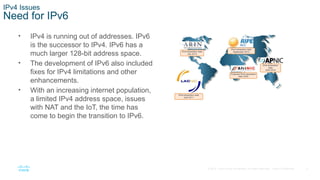
• IPv4 is running out of addresses. IPv6
is the successor to IPv4. IPv6 has a
much larger 128-bit address space.
• The development of IPv6 also included
fixes for IPv4 limitations and other
enhancements.
• With an increasing internet population,
a limited IPv4 address space, issues
with NAT and the IoT, the time has
come to begin the transition to IPv6.
6
© 2016 Cisco and/or its affiliates. All rights reserved. Cisco Confidential
IPv4 Issues
IPv4 and IPv6 Coexistence
Both IPv4 and IPv6 will coexist in the near future and the transition will take several
years.
The IETF has created various protocols and tools to help network administrators
migrate their networks to IPv6. These migration techniques can be divided into three
categories:
• Dual stack -The devices run both IPv4 and IPv6 protocol stacks simultaneously.
• Tunneling – A method of transporting an IPv6 packet over an IPv4 network. The IPv6
packet is encapsulated inside an IPv4 packet.
• Translation - Network Address Translation 64 (NAT64) allows IPv6-enabled devices to
communicate with IPv4-enabled devices using a translation technique similar to NAT for
IPv4.
Note: Tunneling and translation are for transitioning to native IPv6 and should only be used
where needed. The goal should be native IPv6 communications from source to destination.
7
© 2016 Cisco and/or its affiliates. All rights reserved. Cisco Confidential
12.2 IPv6 Address
Representation
8
© 2016 Cisco and/or its affiliates. All rights reserved. Cisco Confidential
IPv6 Address Representation
IPv6 Addressing Formats
• IPv6 addresses are 128 bits in length and written in hexadecimal.
• IPv6 addresses are not case-sensitive and can be written in either lowercase or
uppercase.
• The preferred format for writing an IPv6 address is x:x:x:x:x:x:x:x, with each “x”
consisting of four hexadecimal values.
• In IPv6, a hextet is the unofficial term used to refer to a segment of 16 bits, or four
hexadecimal values.
• Examples of IPv6 addresses in the preferred format:
2001:0db8:0000:1111:0000:0000:0000:0200
2001:0db8:0000:00a3:abcd:0000:0000:1234
9
© 2016 Cisco and/or its affiliates. All rights reserved. Cisco Confidential
IPv6 Address Representation
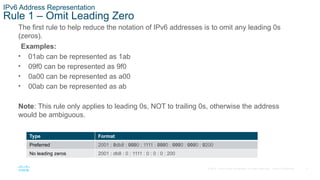
Rule 1 – Omit Leading Zero
The first rule to help reduce the notation of IPv6 addresses is to omit any leading 0s
(zeros).
Examples:
• 01ab can be represented as 1ab
• 09f0 can be represented as 9f0
• 0a00 can be represented as a00
• 00ab can be represented as ab
Note: This rule only applies to leading 0s, NOT to trailing 0s, otherwise the address
would be ambiguous.
Type Format
Preferred 2001 : 0db8 : 0000 : 1111 : 0000 : 0000 : 0000 : 0200
No leading zeros 2001 : db8 : 0 : 1111 : 0 : 0 : 0 : 200
10
© 2016 Cisco and/or its affiliates. All rights reserved. Cisco Confidential
IPv6 Address Representation
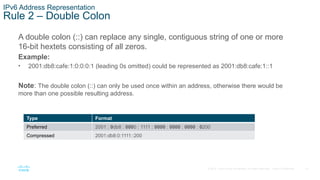
Rule 2 – Double Colon
A double colon (::) can replace any single, contiguous string of one or more
16-bit hextets consisting of all zeros.
Example:
• 2001:db8:cafe:1:0:0:0:1 (leading 0s omitted) could be represented as 2001:db8:cafe:1::1
Note: The double colon (::) can only be used once within an address, otherwise there would be
more than one possible resulting address.
Type Format
Preferred 2001 : 0db8 : 0000 : 1111 : 0000 : 0000 : 0000 : 0200
Compressed 2001:db8:0:1111::200
11
© 2016 Cisco and/or its affiliates. All rights reserved. Cisco Confidential
12.3 IPv6 Address Types
12
© 2016 Cisco and/or its affiliates. All rights reserved. Cisco Confidential
IPv6 Address Types
Unicast, Multicast, Anycast
There are three broad categories of IPv6 addresses:
• Unicast – Unicast uniquely identifies an interface on an IPv6-enabled device.
• Multicast – Multicast is used to send a single IPv6 packet to multiple destinations.
• Anycast – This is any IPv6 unicast address that can be assigned to multiple devices.
A packet sent to an anycast address is routed to the nearest device having that
address.
Note: Unlike IPv4, IPv6 does not have a broadcast address. However, there is an IPv6 all-
nodes multicast address that essentially gives the same result.
13
© 2016 Cisco and/or its affiliates. All rights reserved. Cisco Confidential
IPv6 Address Types
IPv6 Prefix Length
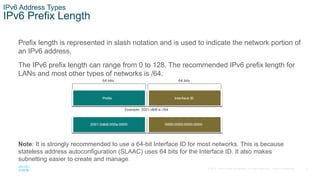
Prefix length is represented in slash notation and is used to indicate the network portion of
an IPv6 address.
The IPv6 prefix length can range from 0 to 128. The recommended IPv6 prefix length for
LANs and most other types of networks is /64.
Note: It is strongly recommended to use a 64-bit Interface ID for most networks. This is because
stateless address autoconfiguration (SLAAC) uses 64 bits for the Interface ID. It also makes
subnetting easier to create and manage.
14
© 2016 Cisco and/or its affiliates. All rights reserved. Cisco Confidential
IPv6 Address Types
Types of IPv6 Unicast Addresses
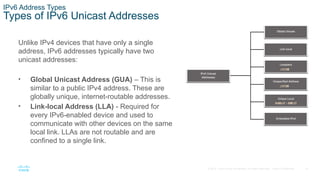
Unlike IPv4 devices that have only a single
address, IPv6 addresses typically have two
unicast addresses:
• Global Unicast Address (GUA) – This is
similar to a public IPv4 address. These are
globally unique, internet-routable addresses.
• Link-local Address (LLA) - Required for
every IPv6-enabled device and used to
communicate with other devices on the same
local link. LLAs are not routable and are
confined to a single link.
15
© 2016 Cisco and/or its affiliates. All rights reserved. Cisco Confidential
IPv6 Address Types
A Note About the Unique Local Address
The IPv6 unique local addresses (range fc00::/7 to fdff::/7) have some
similarity to RFC 1918 private addresses for IPv4, but there are significant
differences:
• Unique local addresses are used for local addressing within a site or between a
limited number of sites.
• Unique local addresses can be used for devices that will never need to access
another network.
• Unique local addresses are not globally routed or translated to a global IPv6
address.
Note: Many sites use the private nature of RFC 1918 addresses to attempt to
secure or hide their network from potential security risks. This was never the
intended use of ULAs.
16
© 2016 Cisco and/or its affiliates. All rights reserved. Cisco Confidential
IPv6 Address Types
IPv6 GUA
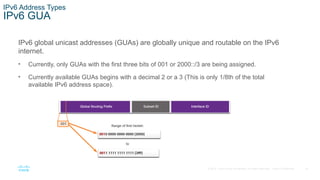
IPv6 global unicast addresses (GUAs) are globally unique and routable on the IPv6
internet.
• Currently, only GUAs with the first three bits of 001 or 2000::/3 are being assigned.
• Currently available GUAs begins with a decimal 2 or a 3 (This is only 1/8th of the total
available IPv6 address space).
17
© 2016 Cisco and/or its affiliates. All rights reserved. Cisco Confidential
IPv6 Address Types
IPv6 GUA Structure
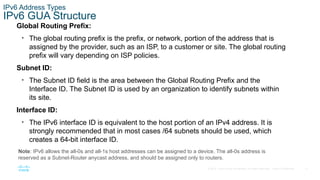
Global Routing Prefix:
• The global routing prefix is the prefix, or network, portion of the address that is
assigned by the provider, such as an ISP, to a customer or site. The global routing
prefix will vary depending on ISP policies.
Subnet ID:
• The Subnet ID field is the area between the Global Routing Prefix and the
Interface ID. The Subnet ID is used by an organization to identify subnets within
its site.
Interface ID:
• The IPv6 interface ID is equivalent to the host portion of an IPv4 address. It is
strongly recommended that in most cases /64 subnets should be used, which
creates a 64-bit interface ID.
Note: IPv6 allows the all-0s and all-1s host addresses can be assigned to a device. The all-0s address is
reserved as a Subnet-Router anycast address, and should be assigned only to routers.
18
© 2016 Cisco and/or its affiliates. All rights reserved. Cisco Confidential
IPv6 Address Types
IPv6 LLA
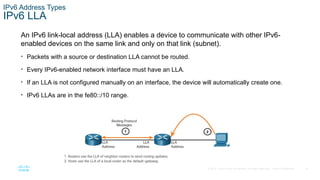
An IPv6 link-local address (LLA) enables a device to communicate with other IPv6-
enabled devices on the same link and only on that link (subnet).
• Packets with a source or destination LLA cannot be routed.
• Every IPv6-enabled network interface must have an LLA.
• If an LLA is not configured manually on an interface, the device will automatically create one.
• IPv6 LLAs are in the fe80::/10 range.
19
© 2016 Cisco and/or its affiliates. All rights reserved. Cisco Confidential
12.4 GUA and LLA Static
Configuration
20
© 2016 Cisco and/or its affiliates. All rights reserved. Cisco Confidential
GUA and LLA Static Configuration
Static GUA Configuration on a Router
Most IPv6 configuration and verification commands in the Cisco IOS are similar to their
IPv4 counterparts. In many cases, the only difference is the use of ipv6 in place of ip
within the commands.
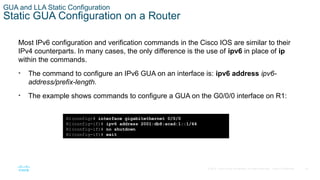
• The command to configure an IPv6 GUA on an interface is: ipv6 address ipv6-
address/prefix-length.
• The example shows commands to configure a GUA on the G0/0/0 interface on R1:
R1(config)# interface gigabitethernet 0/0/0
R1(config-if)# ipv6 address 2001:db8:acad:1::1/64
R1(config-if)# no shutdown
R1(config-if)# exit
21
© 2016 Cisco and/or its affiliates. All rights reserved. Cisco Confidential
GUA and LLA Static Configuration
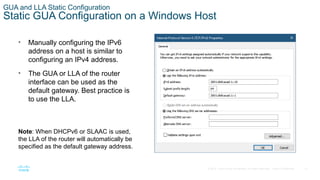
Static GUA Configuration on a Windows Host
• Manually configuring the IPv6
address on a host is similar to
configuring an IPv4 address.
• The GUA or LLA of the router
interface can be used as the
default gateway. Best practice is
to use the LLA.
Note: When DHCPv6 or SLAAC is used,
the LLA of the router will automatically be
specified as the default gateway address.
22
© 2016 Cisco and/or its affiliates. All rights reserved. Cisco Confidential
GUA and LLA Static Configuration
Static GUA Configuration of a Link-Local Unicast Address
Configuring the LLA manually lets you create an address that is recognizable and
easier to remember.
• LLAs can be configured manually using the ipv6 address ipv6-link-local-address
link-local command.
• The example shows commands to configure a LLA on the G0/0/0 interface on R1
R1(config)# interface gigabitethernet 0/0/0
R1(config-if)# ipv6 address fe80::1:1 link-local
R1(config-if)# no shutdown
R1(config-if)# exit
Note: The same LLA can be configured on each link as long as it is unique on that
link. Common practice is to create a different LLA on each interface of the router to
make it easy to identify the router and the specific interface.
23
© 2016 Cisco and/or its affiliates. All rights reserved. Cisco Confidential
Start Here on Tuesday
24
© 2016 Cisco and/or its affiliates. All rights reserved. Cisco Confidential
12.5 Dynamic Addressing for
IPv6 GUAs
25
© 2016 Cisco and/or its affiliates. All rights reserved. Cisco Confidential
Dynamic Addressing for IPv6 GUAs
RS and RA Messages
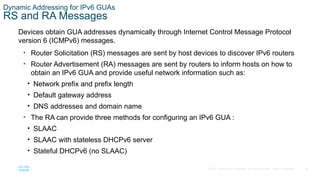
Devices obtain GUA addresses dynamically through Internet Control Message Protocol
version 6 (ICMPv6) messages.
• Router Solicitation (RS) messages are sent by host devices to discover IPv6 routers
• Router Advertisement (RA) messages are sent by routers to inform hosts on how to
obtain an IPv6 GUA and provide useful network information such as:
• Network prefix and prefix length
• Default gateway address
• DNS addresses and domain name
• The RA can provide three methods for configuring an IPv6 GUA :
• SLAAC
• SLAAC with stateless DHCPv6 server
• Stateful DHCPv6 (no SLAAC)
26
© 2016 Cisco and/or its affiliates. All rights reserved. Cisco Confidential
Dynamic Addressing for IPv6 GUAs
Method 1: SLAAC
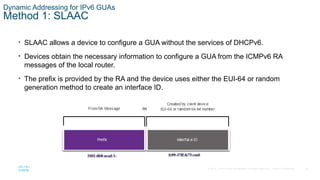
• SLAAC allows a device to configure a GUA without the services of DHCPv6.
• Devices obtain the necessary information to configure a GUA from the ICMPv6 RA
messages of the local router.
• The prefix is provided by the RA and the device uses either the EUI-64 or random
generation method to create an interface ID.
27
© 2016 Cisco and/or its affiliates. All rights reserved. Cisco Confidential
Dynamic Addressing for IPv6 GUAs
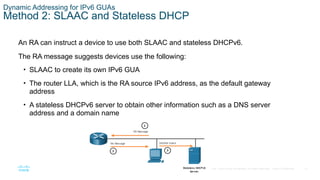
Method 2: SLAAC and Stateless DHCP
An RA can instruct a device to use both SLAAC and stateless DHCPv6.
The RA message suggests devices use the following:
• SLAAC to create its own IPv6 GUA
• The router LLA, which is the RA source IPv6 address, as the default gateway
address
• A stateless DHCPv6 server to obtain other information such as a DNS server
address and a domain name
28
© 2016 Cisco and/or its affiliates. All rights reserved. Cisco Confidential
Dynamic Addressing for IPv6 GUAs
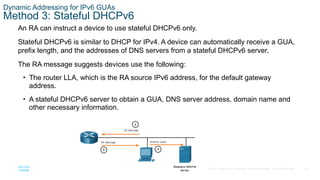
Method 3: Stateful DHCPv6
An RA can instruct a device to use stateful DHCPv6 only.
Stateful DHCPv6 is similar to DHCP for IPv4. A device can automatically receive a GUA,
prefix length, and the addresses of DNS servers from a stateful DHCPv6 server.
The RA message suggests devices use the following:
• The router LLA, which is the RA source IPv6 address, for the default gateway
address.
• A stateful DHCPv6 server to obtain a GUA, DNS server address, domain name and
other necessary information.
29
© 2016 Cisco and/or its affiliates. All rights reserved. Cisco Confidential
Dynamic Addressing for IPv6 GUAs
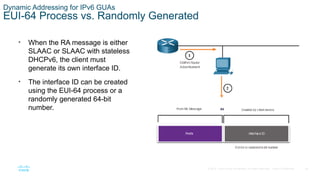
EUI-64 Process vs. Randomly Generated
• When the RA message is either
SLAAC or SLAAC with stateless
DHCPv6, the client must
generate its own interface ID.
• The interface ID can be created
using the EUI-64 process or a
randomly generated 64-bit
number.
30
© 2016 Cisco and/or its affiliates. All rights reserved. Cisco Confidential
Dynamic Addressing for IPv6 GUAs
EUI-64 Process
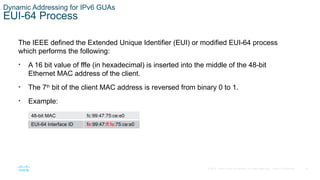
The IEEE defined the Extended Unique Identifier (EUI) or modified EUI-64 process
which performs the following:
• A 16 bit value of fffe (in hexadecimal) is inserted into the middle of the 48-bit
Ethernet MAC address of the client.
• The 7th
bit of the client MAC address is reversed from binary 0 to 1.
• Example:
48-bit MAC fc:99:47:75:ce:e0
EUI-64 Interface ID fe:99:47:ff:fe:75:ce:e0
31
© 2016 Cisco and/or its affiliates. All rights reserved. Cisco Confidential
Dynamic Addressing for IPv6 GUAs
Randomly Generated Interface IDs
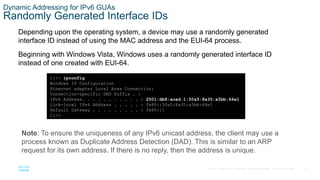
Depending upon the operating system, a device may use a randomly generated
interface ID instead of using the MAC address and the EUI-64 process.
Beginning with Windows Vista, Windows uses a randomly generated interface ID
instead of one created with EUI-64.
C:> ipconfig
Windows IP Configuration
Ethernet adapter Local Area Connection:
Connection-specific DNS Suffix . :
IPv6 Address. . . . . . . . . . . : 2001:db8:acad:1:50a5:8a35:a5bb:66e1
Link-local IPv6 Address . . . . . : fe80::50a5:8a35:a5bb:66e1
Default Gateway . . . . . . . . . : fe80::1
C:>
Note: To ensure the uniqueness of any IPv6 unicast address, the client may use a
process known as Duplicate Address Detection (DAD). This is similar to an ARP
request for its own address. If there is no reply, then the address is unique.
32
© 2016 Cisco and/or its affiliates. All rights reserved. Cisco Confidential
12.6 Dynamic Addressing for
IPv6 LLAs
33
© 2016 Cisco and/or its affiliates. All rights reserved. Cisco Confidential
Dynamic Addressing for IPv6 LLAs
Dynamic LLAs
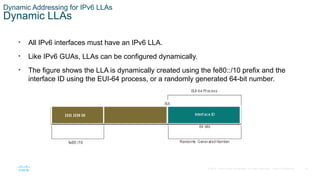
• All IPv6 interfaces must have an IPv6 LLA.
• Like IPv6 GUAs, LLAs can be configured dynamically.
• The figure shows the LLA is dynamically created using the fe80::/10 prefix and the
interface ID using the EUI-64 process, or a randomly generated 64-bit number.
34
© 2016 Cisco and/or its affiliates. All rights reserved. Cisco Confidential
Dynamic Addressing for IPv6 LLAs
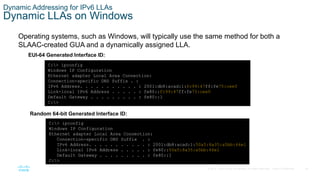
Dynamic LLAs on Windows
Operating systems, such as Windows, will typically use the same method for both a
SLAAC-created GUA and a dynamically assigned LLA.
EUI-64 Generated Interface ID:
C:> ipconfig
Windows IP Configuration
Ethernet adapter Local Area Connection:
Connection-specific DNS Suffix . :
IPv6 Address. . . . . . . . . . . : 2001:db8:acad:1:fc99:47ff:fe75:cee0
Link-local IPv6 Address . . . . . : fe80::fc99:47ff:fe75:cee0
Default Gateway . . . . . . . . . : fe80::1
C:>
Random 64-bit Generated Interface ID:
C:> ipconfig
Windows IP Configuration
Ethernet adapter Local Area Connection:
Connection-specific DNS Suffix . :
IPv6 Address. . . . . . . . . . . : 2001:db8:acad:1:50a5:8a35:a5bb:66e1
Link-local IPv6 Address . . . . . : fe80::50a5:8a35:a5bb:66e1
Default Gateway . . . . . . . . . : fe80::1
C:>
35
© 2016 Cisco and/or its affiliates. All rights reserved. Cisco Confidential
Dynamic Addressing for IPv6 LLAs
Dynamic LLAs on Cisco Routers
Cisco routers automatically create an IPv6 LLA whenever a GUA is assigned to the
interface. By default, Cisco IOS routers use EUI-64 to generate the interface ID for all
LLAs on IPv6 interfaces.
Here is an example of a LLA dynamically configured on the G0/0/0 interface of R1:
R1# show interface gigabitEthernet 0/0/0
GigabitEthernet0/0/0 is up, line protocol is up
Hardware is ISR4221-2x1GE, address is 7079.b392.3640 (bia 7079.b392.3640)
(Output omitted)
R1# show ipv6 interface brief
GigabitEthernet0/0/0 [up/up]
FE80::7279:B3FF:FE92:3640
2001:DB8:ACAD:1::1
36
© 2016 Cisco and/or its affiliates. All rights reserved. Cisco Confidential
Dynamic Addressing for IPv6 LLAs
Verify IPv6 Address Configuration
Cisco routers automatically create an IPv6 LLA whenever a GUA is assigned to the
interface. By default, Cisco IOS routers use EUI-64 to generate the interface ID for all
LLAs on IPv6 interfaces.
Here is an example of a LLA dynamically configured on the G0/0/0 interface of R1:
R1# show interface gigabitEthernet 0/0/0
GigabitEthernet0/0/0 is up, line protocol is up
Hardware is ISR4221-2x1GE, address is 7079.b392.3640 (bia 7079.b392.3640)
(Output omitted)
R1# show ipv6 interface brief
GigabitEthernet0/0/0 [up/up]
FE80::7279:B3FF:FE92:3640
2001:DB8:ACAD:1::1
37
© 2016 Cisco and/or its affiliates. All rights reserved. Cisco Confidential
12.7 IPv6 Multicast Addresses
38
© 2016 Cisco and/or its affiliates. All rights reserved. Cisco Confidential
IPv6 Multicast Addresses
Assigned IPv6 Multicast Addresses
IPv6 multicast addresses have the prefix ff00::/8. There are two types of IPv6
multicast addresses:
• Well-Known multicast addresses
• Solicited node multicast addresses
Note: Multicast addresses can only be destination addresses and not source addresses.
39
© 2016 Cisco and/or its affiliates. All rights reserved. Cisco Confidential
IPv6 Multicast Addresses
Well-Known IPv6 Multicast Addresses
Well-known IPv6 multicast addresses are assigned and are reserved for predefined
groups of devices.
There are two common IPv6 Assigned multicast groups:
• ff02::1 All-nodes multicast group - This is a multicast group that all IPv6-enabled devices
join. A packet sent to this group is received and processed by all IPv6 interfaces on the link
or network.
• ff02::2 All-routers multicast group - This is a multicast group that all IPv6 routers join. A
router becomes a member of this group when it is enabled as an IPv6 router with the ipv6
unicast-routing global configuration command.
40
© 2016 Cisco and/or its affiliates. All rights reserved. Cisco Confidential
IPv6 Multicast Addresses
Solicited-Node IPv6 Multicast
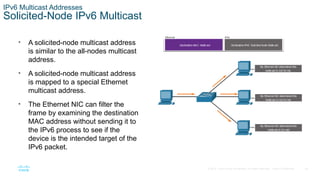
• A solicited-node multicast address
is similar to the all-nodes multicast
address.
• A solicited-node multicast address
is mapped to a special Ethernet
multicast address.
• The Ethernet NIC can filter the
frame by examining the destination
MAC address without sending it to
the IPv6 process to see if the
device is the intended target of the
IPv6 packet.
41
© 2016 Cisco and/or its affiliates. All rights reserved. Cisco Confidential
12.8 Subnet an IPv6 Network
42
© 2016 Cisco and/or its affiliates. All rights reserved. Cisco Confidential
Subnet an IPv6 Network
Subnet Using the Subnet ID
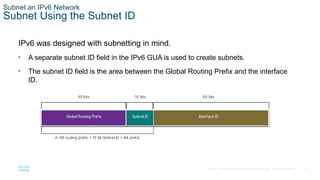
IPv6 was designed with subnetting in mind.
• A separate subnet ID field in the IPv6 GUA is used to create subnets.
• The subnet ID field is the area between the Global Routing Prefix and the interface
ID.
43
© 2016 Cisco and/or its affiliates. All rights reserved. Cisco Confidential
Subnet an IPv6 Network
IPv6 Subnetting Example
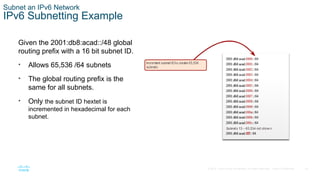
Given the 2001:db8:acad::/48 global
routing prefix with a 16 bit subnet ID.
• Allows 65,536 /64 subnets
• The global routing prefix is the
same for all subnets.
• Only the subnet ID hextet is
incremented in hexadecimal for each
subnet.
44
© 2016 Cisco and/or its affiliates. All rights reserved. Cisco Confidential
Subnet an IPv6 Network
IPv6 Subnet Allocation
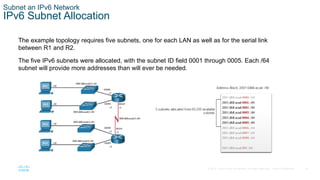
The example topology requires five subnets, one for each LAN as well as for the serial link
between R1 and R2.
The five IPv6 subnets were allocated, with the subnet ID field 0001 through 0005. Each /64
subnet will provide more addresses than will ever be needed.
45
© 2016 Cisco and/or its affiliates. All rights reserved. Cisco Confidential
Subnet an IPv6 Network
Router Configured with IPv6 Subnets
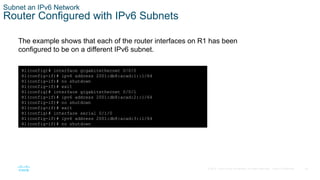
The example shows that each of the router interfaces on R1 has been
configured to be on a different IPv6 subnet.
R1(config)# interface gigabitethernet 0/0/0
R1(config-if)# ipv6 address 2001:db8:acad:1::1/64
R1(config-if)# no shutdown
R1(config-if)# exit
R1(config)# interface gigabitethernet 0/0/1
R1(config-if)# ipv6 address 2001:db8:acad:2::1/64
R1(config-if)# no shutdown
R1(config-if)# exit
R1(config)# interface serial 0/1/0
R1(config-if)# ipv6 address 2001:db8:acad:3::1/64
R1(config-if)# no shutdown
CNET146+ITN_Module_12+-+IPv6+Addressing.pptx

CNET146+ITN_Module_12+-+IPv6+Addressing.pptx

  • 1.
    Module 12: IPv6Addressing Introduction to Networks v7.0 (ITN)
  • 2.
    2 © 2016 Ciscoand/or its affiliates. All rights reserved. Cisco Confidential Module Objectives Module Title: IPv6 Addressing Module Objective: Implement an IPv6 Addressing scheme. Topic Title Topic Objective IPv4 Issues Explain the need for IPv6 addressing. IPv6 Address Representation Explain how IPv6 addresses are represented. IPv6 Address Types Compare types of IPv6 network addresses. GUA and LLA Static Configuration Explain how to Configure static global unicast and link-local IPv6 network addresses. Dynamic Addressing for IPv6 GUAs Explain how to configure global unicast addresses dynamically.
  • 3.
    3 © 2016 Ciscoand/or its affiliates. All rights reserved. Cisco Confidential Module Objectives (Cont.) Module Title: IPv6 Addressing Module Objective: Implement an IPv6 Addressing scheme. Topic Title Topic Objective Dynamic Addressing for IPv6 LLAs Configure link-local addresses dynamically. IPv6 Multicast Addresses Identify IPv6 addresses. Subnet an IPv6 Network Implement a subnetted IPv6 addressing scheme.
  • 4.
    4 © 2016 Ciscoand/or its affiliates. All rights reserved. Cisco Confidential 12.1 IPv4 Issues
  • 5.
    5 © 2016 Ciscoand/or its affiliates. All rights reserved. Cisco Confidential IPv4 Issues Need for IPv6 • IPv4 is running out of addresses. IPv6 is the successor to IPv4. IPv6 has a much larger 128-bit address space. • The development of IPv6 also included fixes for IPv4 limitations and other enhancements. • With an increasing internet population, a limited IPv4 address space, issues with NAT and the IoT, the time has come to begin the transition to IPv6.
  • 6.
    6 © 2016 Ciscoand/or its affiliates. All rights reserved. Cisco Confidential IPv4 Issues IPv4 and IPv6 Coexistence Both IPv4 and IPv6 will coexist in the near future and the transition will take several years. The IETF has created various protocols and tools to help network administrators migrate their networks to IPv6. These migration techniques can be divided into three categories: • Dual stack -The devices run both IPv4 and IPv6 protocol stacks simultaneously. • Tunneling – A method of transporting an IPv6 packet over an IPv4 network. The IPv6 packet is encapsulated inside an IPv4 packet. • Translation - Network Address Translation 64 (NAT64) allows IPv6-enabled devices to communicate with IPv4-enabled devices using a translation technique similar to NAT for IPv4. Note: Tunneling and translation are for transitioning to native IPv6 and should only be used where needed. The goal should be native IPv6 communications from source to destination.
  • 7.
    7 © 2016 Ciscoand/or its affiliates. All rights reserved. Cisco Confidential 12.2 IPv6 Address Representation
  • 8.
    8 © 2016 Ciscoand/or its affiliates. All rights reserved. Cisco Confidential IPv6 Address Representation IPv6 Addressing Formats • IPv6 addresses are 128 bits in length and written in hexadecimal. • IPv6 addresses are not case-sensitive and can be written in either lowercase or uppercase. • The preferred format for writing an IPv6 address is x:x:x:x:x:x:x:x, with each “x” consisting of four hexadecimal values. • In IPv6, a hextet is the unofficial term used to refer to a segment of 16 bits, or four hexadecimal values. • Examples of IPv6 addresses in the preferred format: 2001:0db8:0000:1111:0000:0000:0000:0200 2001:0db8:0000:00a3:abcd:0000:0000:1234
  • 9.
    9 © 2016 Ciscoand/or its affiliates. All rights reserved. Cisco Confidential IPv6 Address Representation Rule 1 – Omit Leading Zero The first rule to help reduce the notation of IPv6 addresses is to omit any leading 0s (zeros). Examples: • 01ab can be represented as 1ab • 09f0 can be represented as 9f0 • 0a00 can be represented as a00 • 00ab can be represented as ab Note: This rule only applies to leading 0s, NOT to trailing 0s, otherwise the address would be ambiguous. Type Format Preferred 2001 : 0db8 : 0000 : 1111 : 0000 : 0000 : 0000 : 0200 No leading zeros 2001 : db8 : 0 : 1111 : 0 : 0 : 0 : 200
  • 10.
    10 © 2016 Ciscoand/or its affiliates. All rights reserved. Cisco Confidential IPv6 Address Representation Rule 2 – Double Colon A double colon (::) can replace any single, contiguous string of one or more 16-bit hextets consisting of all zeros. Example: • 2001:db8:cafe:1:0:0:0:1 (leading 0s omitted) could be represented as 2001:db8:cafe:1::1 Note: The double colon (::) can only be used once within an address, otherwise there would be more than one possible resulting address. Type Format Preferred 2001 : 0db8 : 0000 : 1111 : 0000 : 0000 : 0000 : 0200 Compressed 2001:db8:0:1111::200
  • 11.
    11 © 2016 Ciscoand/or its affiliates. All rights reserved. Cisco Confidential 12.3 IPv6 Address Types
  • 12.
    12 © 2016 Ciscoand/or its affiliates. All rights reserved. Cisco Confidential IPv6 Address Types Unicast, Multicast, Anycast There are three broad categories of IPv6 addresses: • Unicast – Unicast uniquely identifies an interface on an IPv6-enabled device. • Multicast – Multicast is used to send a single IPv6 packet to multiple destinations. • Anycast – This is any IPv6 unicast address that can be assigned to multiple devices. A packet sent to an anycast address is routed to the nearest device having that address. Note: Unlike IPv4, IPv6 does not have a broadcast address. However, there is an IPv6 all- nodes multicast address that essentially gives the same result.
  • 13.
    13 © 2016 Ciscoand/or its affiliates. All rights reserved. Cisco Confidential IPv6 Address Types IPv6 Prefix Length Prefix length is represented in slash notation and is used to indicate the network portion of an IPv6 address. The IPv6 prefix length can range from 0 to 128. The recommended IPv6 prefix length for LANs and most other types of networks is /64. Note: It is strongly recommended to use a 64-bit Interface ID for most networks. This is because stateless address autoconfiguration (SLAAC) uses 64 bits for the Interface ID. It also makes subnetting easier to create and manage.
  • 14.
    14 © 2016 Ciscoand/or its affiliates. All rights reserved. Cisco Confidential IPv6 Address Types Types of IPv6 Unicast Addresses Unlike IPv4 devices that have only a single address, IPv6 addresses typically have two unicast addresses: • Global Unicast Address (GUA) – This is similar to a public IPv4 address. These are globally unique, internet-routable addresses. • Link-local Address (LLA) - Required for every IPv6-enabled device and used to communicate with other devices on the same local link. LLAs are not routable and are confined to a single link.
  • 15.
    15 © 2016 Ciscoand/or its affiliates. All rights reserved. Cisco Confidential IPv6 Address Types A Note About the Unique Local Address The IPv6 unique local addresses (range fc00::/7 to fdff::/7) have some similarity to RFC 1918 private addresses for IPv4, but there are significant differences: • Unique local addresses are used for local addressing within a site or between a limited number of sites. • Unique local addresses can be used for devices that will never need to access another network. • Unique local addresses are not globally routed or translated to a global IPv6 address. Note: Many sites use the private nature of RFC 1918 addresses to attempt to secure or hide their network from potential security risks. This was never the intended use of ULAs.
  • 16.
    16 © 2016 Ciscoand/or its affiliates. All rights reserved. Cisco Confidential IPv6 Address Types IPv6 GUA IPv6 global unicast addresses (GUAs) are globally unique and routable on the IPv6 internet. • Currently, only GUAs with the first three bits of 001 or 2000::/3 are being assigned. • Currently available GUAs begins with a decimal 2 or a 3 (This is only 1/8th of the total available IPv6 address space).
  • 17.
    17 © 2016 Ciscoand/or its affiliates. All rights reserved. Cisco Confidential IPv6 Address Types IPv6 GUA Structure Global Routing Prefix: • The global routing prefix is the prefix, or network, portion of the address that is assigned by the provider, such as an ISP, to a customer or site. The global routing prefix will vary depending on ISP policies. Subnet ID: • The Subnet ID field is the area between the Global Routing Prefix and the Interface ID. The Subnet ID is used by an organization to identify subnets within its site. Interface ID: • The IPv6 interface ID is equivalent to the host portion of an IPv4 address. It is strongly recommended that in most cases /64 subnets should be used, which creates a 64-bit interface ID. Note: IPv6 allows the all-0s and all-1s host addresses can be assigned to a device. The all-0s address is reserved as a Subnet-Router anycast address, and should be assigned only to routers.
  • 18.
    18 © 2016 Ciscoand/or its affiliates. All rights reserved. Cisco Confidential IPv6 Address Types IPv6 LLA An IPv6 link-local address (LLA) enables a device to communicate with other IPv6- enabled devices on the same link and only on that link (subnet). • Packets with a source or destination LLA cannot be routed. • Every IPv6-enabled network interface must have an LLA. • If an LLA is not configured manually on an interface, the device will automatically create one. • IPv6 LLAs are in the fe80::/10 range.
  • 19.
    19 © 2016 Ciscoand/or its affiliates. All rights reserved. Cisco Confidential 12.4 GUA and LLA Static Configuration
  • 20.
    20 © 2016 Ciscoand/or its affiliates. All rights reserved. Cisco Confidential GUA and LLA Static Configuration Static GUA Configuration on a Router Most IPv6 configuration and verification commands in the Cisco IOS are similar to their IPv4 counterparts. In many cases, the only difference is the use of ipv6 in place of ip within the commands. • The command to configure an IPv6 GUA on an interface is: ipv6 address ipv6- address/prefix-length. • The example shows commands to configure a GUA on the G0/0/0 interface on R1: R1(config)# interface gigabitethernet 0/0/0 R1(config-if)# ipv6 address 2001:db8:acad:1::1/64 R1(config-if)# no shutdown R1(config-if)# exit
  • 21.
    21 © 2016 Ciscoand/or its affiliates. All rights reserved. Cisco Confidential GUA and LLA Static Configuration Static GUA Configuration on a Windows Host • Manually configuring the IPv6 address on a host is similar to configuring an IPv4 address. • The GUA or LLA of the router interface can be used as the default gateway. Best practice is to use the LLA. Note: When DHCPv6 or SLAAC is used, the LLA of the router will automatically be specified as the default gateway address.
  • 22.
    22 © 2016 Ciscoand/or its affiliates. All rights reserved. Cisco Confidential GUA and LLA Static Configuration Static GUA Configuration of a Link-Local Unicast Address Configuring the LLA manually lets you create an address that is recognizable and easier to remember. • LLAs can be configured manually using the ipv6 address ipv6-link-local-address link-local command. • The example shows commands to configure a LLA on the G0/0/0 interface on R1 R1(config)# interface gigabitethernet 0/0/0 R1(config-if)# ipv6 address fe80::1:1 link-local R1(config-if)# no shutdown R1(config-if)# exit Note: The same LLA can be configured on each link as long as it is unique on that link. Common practice is to create a different LLA on each interface of the router to make it easy to identify the router and the specific interface.
  • 23.
    23 © 2016 Ciscoand/or its affiliates. All rights reserved. Cisco Confidential Start Here on Tuesday
  • 24.
    24 © 2016 Ciscoand/or its affiliates. All rights reserved. Cisco Confidential 12.5 Dynamic Addressing for IPv6 GUAs
  • 25.
    25 © 2016 Ciscoand/or its affiliates. All rights reserved. Cisco Confidential Dynamic Addressing for IPv6 GUAs RS and RA Messages Devices obtain GUA addresses dynamically through Internet Control Message Protocol version 6 (ICMPv6) messages. • Router Solicitation (RS) messages are sent by host devices to discover IPv6 routers • Router Advertisement (RA) messages are sent by routers to inform hosts on how to obtain an IPv6 GUA and provide useful network information such as: • Network prefix and prefix length • Default gateway address • DNS addresses and domain name • The RA can provide three methods for configuring an IPv6 GUA : • SLAAC • SLAAC with stateless DHCPv6 server • Stateful DHCPv6 (no SLAAC)
  • 26.
    26 © 2016 Ciscoand/or its affiliates. All rights reserved. Cisco Confidential Dynamic Addressing for IPv6 GUAs Method 1: SLAAC • SLAAC allows a device to configure a GUA without the services of DHCPv6. • Devices obtain the necessary information to configure a GUA from the ICMPv6 RA messages of the local router. • The prefix is provided by the RA and the device uses either the EUI-64 or random generation method to create an interface ID.
  • 27.
    27 © 2016 Ciscoand/or its affiliates. All rights reserved. Cisco Confidential Dynamic Addressing for IPv6 GUAs Method 2: SLAAC and Stateless DHCP An RA can instruct a device to use both SLAAC and stateless DHCPv6. The RA message suggests devices use the following: • SLAAC to create its own IPv6 GUA • The router LLA, which is the RA source IPv6 address, as the default gateway address • A stateless DHCPv6 server to obtain other information such as a DNS server address and a domain name
  • 28.
    28 © 2016 Ciscoand/or its affiliates. All rights reserved. Cisco Confidential Dynamic Addressing for IPv6 GUAs Method 3: Stateful DHCPv6 An RA can instruct a device to use stateful DHCPv6 only. Stateful DHCPv6 is similar to DHCP for IPv4. A device can automatically receive a GUA, prefix length, and the addresses of DNS servers from a stateful DHCPv6 server. The RA message suggests devices use the following: • The router LLA, which is the RA source IPv6 address, for the default gateway address. • A stateful DHCPv6 server to obtain a GUA, DNS server address, domain name and other necessary information.
  • 29.
    29 © 2016 Ciscoand/or its affiliates. All rights reserved. Cisco Confidential Dynamic Addressing for IPv6 GUAs EUI-64 Process vs. Randomly Generated • When the RA message is either SLAAC or SLAAC with stateless DHCPv6, the client must generate its own interface ID. • The interface ID can be created using the EUI-64 process or a randomly generated 64-bit number.
  • 30.
    30 © 2016 Ciscoand/or its affiliates. All rights reserved. Cisco Confidential Dynamic Addressing for IPv6 GUAs EUI-64 Process The IEEE defined the Extended Unique Identifier (EUI) or modified EUI-64 process which performs the following: • A 16 bit value of fffe (in hexadecimal) is inserted into the middle of the 48-bit Ethernet MAC address of the client. • The 7th bit of the client MAC address is reversed from binary 0 to 1. • Example: 48-bit MAC fc:99:47:75:ce:e0 EUI-64 Interface ID fe:99:47:ff:fe:75:ce:e0
  • 31.
    31 © 2016 Ciscoand/or its affiliates. All rights reserved. Cisco Confidential Dynamic Addressing for IPv6 GUAs Randomly Generated Interface IDs Depending upon the operating system, a device may use a randomly generated interface ID instead of using the MAC address and the EUI-64 process. Beginning with Windows Vista, Windows uses a randomly generated interface ID instead of one created with EUI-64. C:> ipconfig Windows IP Configuration Ethernet adapter Local Area Connection: Connection-specific DNS Suffix . : IPv6 Address. . . . . . . . . . . : 2001:db8:acad:1:50a5:8a35:a5bb:66e1 Link-local IPv6 Address . . . . . : fe80::50a5:8a35:a5bb:66e1 Default Gateway . . . . . . . . . : fe80::1 C:> Note: To ensure the uniqueness of any IPv6 unicast address, the client may use a process known as Duplicate Address Detection (DAD). This is similar to an ARP request for its own address. If there is no reply, then the address is unique.
  • 32.
    32 © 2016 Ciscoand/or its affiliates. All rights reserved. Cisco Confidential 12.6 Dynamic Addressing for IPv6 LLAs
  • 33.
    33 © 2016 Ciscoand/or its affiliates. All rights reserved. Cisco Confidential Dynamic Addressing for IPv6 LLAs Dynamic LLAs • All IPv6 interfaces must have an IPv6 LLA. • Like IPv6 GUAs, LLAs can be configured dynamically. • The figure shows the LLA is dynamically created using the fe80::/10 prefix and the interface ID using the EUI-64 process, or a randomly generated 64-bit number.
  • 34.
    34 © 2016 Ciscoand/or its affiliates. All rights reserved. Cisco Confidential Dynamic Addressing for IPv6 LLAs Dynamic LLAs on Windows Operating systems, such as Windows, will typically use the same method for both a SLAAC-created GUA and a dynamically assigned LLA. EUI-64 Generated Interface ID: C:> ipconfig Windows IP Configuration Ethernet adapter Local Area Connection: Connection-specific DNS Suffix . : IPv6 Address. . . . . . . . . . . : 2001:db8:acad:1:fc99:47ff:fe75:cee0 Link-local IPv6 Address . . . . . : fe80::fc99:47ff:fe75:cee0 Default Gateway . . . . . . . . . : fe80::1 C:> Random 64-bit Generated Interface ID: C:> ipconfig Windows IP Configuration Ethernet adapter Local Area Connection: Connection-specific DNS Suffix . : IPv6 Address. . . . . . . . . . . : 2001:db8:acad:1:50a5:8a35:a5bb:66e1 Link-local IPv6 Address . . . . . : fe80::50a5:8a35:a5bb:66e1 Default Gateway . . . . . . . . . : fe80::1 C:>
  • 35.
    35 © 2016 Ciscoand/or its affiliates. All rights reserved. Cisco Confidential Dynamic Addressing for IPv6 LLAs Dynamic LLAs on Cisco Routers Cisco routers automatically create an IPv6 LLA whenever a GUA is assigned to the interface. By default, Cisco IOS routers use EUI-64 to generate the interface ID for all LLAs on IPv6 interfaces. Here is an example of a LLA dynamically configured on the G0/0/0 interface of R1: R1# show interface gigabitEthernet 0/0/0 GigabitEthernet0/0/0 is up, line protocol is up Hardware is ISR4221-2x1GE, address is 7079.b392.3640 (bia 7079.b392.3640) (Output omitted) R1# show ipv6 interface brief GigabitEthernet0/0/0 [up/up] FE80::7279:B3FF:FE92:3640 2001:DB8:ACAD:1::1
  • 36.
    36 © 2016 Ciscoand/or its affiliates. All rights reserved. Cisco Confidential Dynamic Addressing for IPv6 LLAs Verify IPv6 Address Configuration Cisco routers automatically create an IPv6 LLA whenever a GUA is assigned to the interface. By default, Cisco IOS routers use EUI-64 to generate the interface ID for all LLAs on IPv6 interfaces. Here is an example of a LLA dynamically configured on the G0/0/0 interface of R1: R1# show interface gigabitEthernet 0/0/0 GigabitEthernet0/0/0 is up, line protocol is up Hardware is ISR4221-2x1GE, address is 7079.b392.3640 (bia 7079.b392.3640) (Output omitted) R1# show ipv6 interface brief GigabitEthernet0/0/0 [up/up] FE80::7279:B3FF:FE92:3640 2001:DB8:ACAD:1::1
  • 37.
    37 © 2016 Ciscoand/or its affiliates. All rights reserved. Cisco Confidential 12.7 IPv6 Multicast Addresses
  • 38.
    38 © 2016 Ciscoand/or its affiliates. All rights reserved. Cisco Confidential IPv6 Multicast Addresses Assigned IPv6 Multicast Addresses IPv6 multicast addresses have the prefix ff00::/8. There are two types of IPv6 multicast addresses: • Well-Known multicast addresses • Solicited node multicast addresses Note: Multicast addresses can only be destination addresses and not source addresses.
  • 39.
    39 © 2016 Ciscoand/or its affiliates. All rights reserved. Cisco Confidential IPv6 Multicast Addresses Well-Known IPv6 Multicast Addresses Well-known IPv6 multicast addresses are assigned and are reserved for predefined groups of devices. There are two common IPv6 Assigned multicast groups: • ff02::1 All-nodes multicast group - This is a multicast group that all IPv6-enabled devices join. A packet sent to this group is received and processed by all IPv6 interfaces on the link or network. • ff02::2 All-routers multicast group - This is a multicast group that all IPv6 routers join. A router becomes a member of this group when it is enabled as an IPv6 router with the ipv6 unicast-routing global configuration command.
  • 40.
    40 © 2016 Ciscoand/or its affiliates. All rights reserved. Cisco Confidential IPv6 Multicast Addresses Solicited-Node IPv6 Multicast • A solicited-node multicast address is similar to the all-nodes multicast address. • A solicited-node multicast address is mapped to a special Ethernet multicast address. • The Ethernet NIC can filter the frame by examining the destination MAC address without sending it to the IPv6 process to see if the device is the intended target of the IPv6 packet.
  • 41.
    41 © 2016 Ciscoand/or its affiliates. All rights reserved. Cisco Confidential 12.8 Subnet an IPv6 Network
  • 42.
    42 © 2016 Ciscoand/or its affiliates. All rights reserved. Cisco Confidential Subnet an IPv6 Network Subnet Using the Subnet ID IPv6 was designed with subnetting in mind. • A separate subnet ID field in the IPv6 GUA is used to create subnets. • The subnet ID field is the area between the Global Routing Prefix and the interface ID.
  • 43.
    43 © 2016 Ciscoand/or its affiliates. All rights reserved. Cisco Confidential Subnet an IPv6 Network IPv6 Subnetting Example Given the 2001:db8:acad::/48 global routing prefix with a 16 bit subnet ID. • Allows 65,536 /64 subnets • The global routing prefix is the same for all subnets. • Only the subnet ID hextet is incremented in hexadecimal for each subnet.
  • 44.
    44 © 2016 Ciscoand/or its affiliates. All rights reserved. Cisco Confidential Subnet an IPv6 Network IPv6 Subnet Allocation The example topology requires five subnets, one for each LAN as well as for the serial link between R1 and R2. The five IPv6 subnets were allocated, with the subnet ID field 0001 through 0005. Each /64 subnet will provide more addresses than will ever be needed.
  • 45.
    45 © 2016 Ciscoand/or its affiliates. All rights reserved. Cisco Confidential Subnet an IPv6 Network Router Configured with IPv6 Subnets The example shows that each of the router interfaces on R1 has been configured to be on a different IPv6 subnet. R1(config)# interface gigabitethernet 0/0/0 R1(config-if)# ipv6 address 2001:db8:acad:1::1/64 R1(config-if)# no shutdown R1(config-if)# exit R1(config)# interface gigabitethernet 0/0/1 R1(config-if)# ipv6 address 2001:db8:acad:2::1/64 R1(config-if)# no shutdown R1(config-if)# exit R1(config)# interface serial 0/1/0 R1(config-if)# ipv6 address 2001:db8:acad:3::1/64 R1(config-if)# no shutdown

Editor's Notes

  • #1 Cisco Networking Academy Program Introduction to Networks v7.0 (ITN) Module 12: IPv6 Addressing
  • #2 12- IPv6 Addressing 12.0.2 What will I learn to do in this module
  • #3 12- IPv6 Addressing 12.0.2 What will I learn to do in this module
  • #4 12-IPv6 Addressing 12.1 IPv4 Issues
  • #5 12 – IPv6 Addressing 12.1 – IPv4 Issues 12.1.1 – Need for IPv6
  • #6 12 – IPv6 Addressing 12.1 – IPv4 Issues 12.1.2 – IPv4 and IPv6 Coexistence 12.1.3 – Check Your Understanding – IPv4 Issues
  • #7 12-IPv6 Addressing 12.2 IPv4 Address Representation
  • #8 12 – IPv6 Addressing 12.2 – IPv6 Address Representation 12.2.1 – IPv6 Addressing Formats
  • #9 12 – IPv6 Addressing 12.2 – IPv6 Address Representation 12.2.2 – Omit Leading Zero
  • #10 12 – IPv6 Addressing 12.2 – IPv6 Address Representation 12.2.2 – Rule 2 – Double Colon 12.2.4 – Activity – IPv6 Address Representation
  • #11 12-IPv6 Addressing 12.2 IPv4 Address Types
  • #12 12 – IPv6 Addressing 12.3 – IPv6 Address Types 12.3.1 – Unicast, Multicast, Anycast
  • #13 12 – IPv6 Addressing 12.3 – IPv6 Address Types 12.3.2 – IPv6 Prefix Length
  • #14 12 – IPv6 Addressing 12.3 – IPv6 Address Types 12.3.3 – Types of IPv6 unicast Addresses
  • #15 12 – IPv6 Addressing 12.3 – IPv6 Address Types 12.3.4 – A Note About the Unique Local Address
  • #16 12 – IPv6 Addressing 12.3 – IPv6 Address Types 12.3.5 – IPv6 GUA
  • #17 12 – IPv6 Addressing 12.3 – IPv6 Address Types 12.3.5 – IPv6 GUA Structure
  • #18 12 – IPv6 Addressing 12.3 – IPv6 Address Types 12.3.6 – IPv6 LLA 12.3.7 – Check Your Understanding – IPv6 Address Types
  • #19 12-IPv6 Addressing 12.4- GUA and LLA Static Configuration
  • #20 12 – IPv6 Addressing 12.4 – GUA and LLA Static Configuration 12.4.1 – Static GUA Configuration on a Router
  • #21 12 – IPv6 Addressing 12.4 – GUA and LLA Static Configuration 12.4.2 – Static GUA Configuration on a Windows Host
  • #22 12 – IPv6 Addressing 12.4 – GUA and LLA Static Configuration 12.4.3 – Static GUA Configuration of a Link-Local Unicast Address 12.4.4 – Syntax Checker – GUA and LLA Static Configuration
  • #24 12-IPv6 Addressing 12.5 IPv4 Dynamic Addressing for IPv6 GUAs
  • #25 12 – IPv6 Addressing 12.5 – Dynamic Addressing for IPv6 GUAs 12.5.1 – RS and RA Messages
  • #26 12 – IPv6 Addressing 12.5 – Dynamic Addressing for IPv6 GUAs 12.5.2 – Method 1: SLAAC
  • #27 12 – IPv6 Addressing 12.5 – Dynamic Addressing for IPv6 GUAs 12.5.3 – Method 2: SLAAC and Stateless DHCP
  • #28 12 – IPv6 Addressing 12.5 – Dynamic Addressing for IPv6 GUAs 12.5.4 – Method 3: Stateful DHCPv6
  • #29 12 – IPv6 Addressing 12.5 – Dynamic Addressing for IPv6 GUAs 12.5.5 – EUI-64 Process vs. Randomly Generated
  • #30 12 – IPv6 Addressing 12.5 – Dynamic Addressing for IPv6 GUAs 12.5.6 – EUI-64 Process
  • #31 12 – IPv6 Addressing 12.5 – Dynamic Addressing for IPv6 GUAs 12.5.7 – Randomly Generated Interface IDs 12.5.8 – Check Your Understanding – Dynamic Address for IPv6 GUAs
  • #32 12-IPv6 Addressing 12.6 IPv4 Dynamic Addressing for IPv6 LLAs
  • #33 12 – IPv6 Addressing 12.6 – Dynamic Addressing for IPv6 LLAs 12.6.1 – Dynamic LLAs
  • #34 12 – IPv6 Addressing 12.6 – Dynamic Addressing for IPv6 LLAs 12.6.2 – Dynamic LLAs on Windows
  • #35 12 – IPv6 Addressing 12.6 – Dynamic Addressing for IPv6 LLAs 12.6.3 – Dynamic LLAs on Cisco Routers
  • #36 12 – IPv6 Addressing 12.6 – Dynamic Addressing for IPv6 LLAs 12.6.4 – Verify IPv6 Address Configuration 12.6.5 – Syntax Checker – Verify IPv6 Address Configuration
  • #37 12-IPv6 Addressing 12.7 IPv4 Multicast Addresses
  • #38 12 – IPv6 Addressing 12.7 – IPv6 Multicast Addresses 12.7.1 – Assigned IPv6 Multicast Addresses
  • #39 12 – IPv6 Addressing 12.7 – IPv6 Multicast Addresses 12.7.2 – Well-Known IPv6 Multicast Addresses
  • #40 12 – IPv6 Addressing 12.7 – IPv6 Multicast Addresses 12.7.3 – Solicited-Node IPv6 Multicast Address 12.7.4 – Lab – Identify IPv6 Addresses
  • #41 12-IPv6 Addressing 12.8 Subnet an IPv6 Network
  • #42 12 – IPv6 Addressing 12.8 – Subnet an IPv6 Network 12.8.1 – Subnet Using the Subnet ID
  • #43 12 – IPv6 Addressing 12.8 – Subnet an IPv6 Network 12.8.2 – IPv6 Subnetting Example
  • #44 12 – IPv6 Addressing 12.8 – Subnet an IPv6 Network 12.8.3 – IPv6 Subnet Allocation
  • #45 12 – IPv6 Addressing 12.8 – Subnet an IPv6 Network 12.8.4 – Router Configured with IPv6 Subnets 12.8.5 – Check Your Understanding – Subnet an IPv6 Network