Basics of Cloud Printing
Sangeetha Subramani
20/1/2017
Bangalore
INTRODUCTION
2
 Any Developer or Tester who is interested in learning cloud printing needs
to learn what cloud is and the basic printing operations in Cloud. You can
find the basics of Cloud and cloud printing in this document and get an idea
of how cloud perform with the help of Embedded device and cloud Server.
 Here I have explained how you can print the document with the help of
cloud.
 The documents which are in cloud can be printed without installing Printer
driver on our PC with the help of cloud.
BACK
TABLE OF CONTENTS
3
 CLOUD
 TYPES OF CLOUD
 CLOUD SERVICES
 SOFTWARE AS A SERVICE (SaaS)
 THE BENEFITS OF SaaS
 CLOUD PRINT
 CLOUD PRINTING SERVICE
 PRINCIPLES OF CLOUD PRINT
 WHAT DO I NEED?
 FLOW OF CLOUD PRINT
CLOUD
4
‘Cloud computing’ is an emerging information technology for storing,
processing and use of data from remotely located computers that can be
accessed over the internet. Although Cloud computing can be seen as a new
technology which revolutionize the way of using the Internet. However one
must be very careful to understand the limitations and security risks posed in
utilizing these technologies.
BACK
TYPES OF CLOUD
5
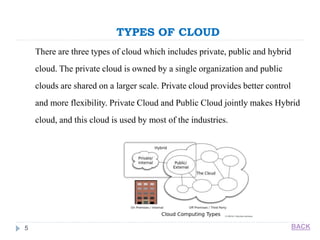
There are three types of cloud which includes private, public and hybrid
cloud. The private cloud is owned by a single organization and public
clouds are shared on a larger scale. Private cloud provides better control
and more flexibility. Private Cloud and Public Cloud jointly makes Hybrid
cloud, and this cloud is used by most of the industries.
BACK
CLOUD SERVICES
6
Computing as a service over the internet
 Cloud computing, often referred to as simply “the cloud,” is the delivery of
on-demand computing resources—everything from applications to data
centers over the internet on a pay-for-use basis.
 Elastic resources—Scale up or down quickly and easily to meet demand
 Metered service so you only pay for what you use
 Self service—All the IT resources you need with self-service access.
BACK
CONTINUED…
7
Listed cloud services below:
 1. Software as a service (SaaS)
 2. Platform as a service (PaaS)
 3. Infrastructure as a service (IaaS)
Lets see SaaS in brief to explain cloud print
BACK
SOFTWARE AS A SERVICE (SaaS)
8
 Cloud-based applications or software as a service run on distant computers
“in the cloud” that are owned and operated by others and that connect to
users’ computers via the internet and, usually, a web browser.
 This provides unlimited computing power on demand to users, which does
not require major capital investments to fulfill their needs. In addition to
that with the help of an internet connection they can retrieve their data from
anywhere.
BACK
THE BENEFITS OF SaaS
9
 You can sign up and rapidly start using innovative business apps
 Apps and data are accessible from any connected computer
 No data is lost if your computer breaks, as data is in the cloud
 The service is able to dynamically scale to usage needs
BACK
CLOUD PRINT
10
 Cloud Printing is a combination of software and hardware to monitor print
devices and to enable easy management of print devices in small and
medium business enterprises.
 Cloud Print is a service which is created to allow any Cloud-Print-aware
application (web, desktop, mobile) on any device in the network cloud to
print to any printer.
 Cloud Print integrates with the mobile/laptop/desktop allowing users to
print from their mobile/laptop/desktop devices. Cloud Print is listed as a
printer option in the Print Preview page of Web browsers like Google
Chrome, Firefox, IE and Opera.
BACK
CLOUD PRINTING SERVICES (CPS)
11
 Cloud printing services (CPS) are hosted cloud computing offerings that
enable users to print documents and other materials on any device
associated with the cloud. Users create content with any software tool they
want and transfer the file to a cloud printing service provider via whatever
device they choose, which then routes the file to a cloud-attached printer at
a location selected by the user.
 CPS may be open (hosted by a company that enables other enterprises to
use its hardware, software and network to produce printed materials) or
closed (a proprietary network that is available to only the enterprise’s
customers).
BACK
CONTINUED….
12
 Cloud printing enables end users, whether professional buyers or consumers, to have
documents printed without being encumbered by actual printing equipment and still
have it delivered where and when they want it.
 Technology providers may enable CPS as part of a managed print services (MPS)
offering.
BACK
PRINCIPLES OF CLOUD PRINT
13
Professional cloud print providers strive to:
 Allow any virtual information to be accessible as tangible objects.
 Allow clients to connect their service in the simplest way possible.
 Allow production facilities to connect in the simplest way possible.
 Produce on demand only, to avoid excess stock.
 Produce in best-of-breed facilities only, to ensure the highest quality.
 Produce locally, to minimize the ecological footprint.
BACK
WHAT DO I NEED?
14
To use Cloud Print you need below primary things:
 Internet protocol of Printers Configured in Cloud
 Embedded Device for security purpose which allow user to access printer in
cloud.
 User Account.
 A Cloud Print-enabled printer
 A device capable of printing to Cloud Print (e.g. an Android phone, iOS
device, laptop, or tablet).
BACK
FLOW OF CLOUD PRINT
15
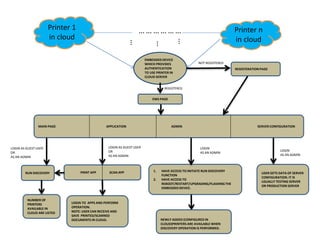
 I have explained one of the basic workflow of cloud print services I have
worked before which uses Cloud, Database, Server, Embedded Device and
Apps.
 Admin Accounts will be maintained and managed in regular intervals of
time.
 Permission for Guest and Admin user plays major role is servicing the
customer.
BACK
MAIN PAGE APPLICATION ADMIN SERVER CONFIGURATION
Printer 1
in cloud
Printer n
in cloud
… … … … … …
EMBEDDED DEVICE
WHICH PROVIDES
AUTHENTICATION
TO USE PRINTER IN
CLOUD SERVER
RUN DISCOVERY PRINT APP SCAN APP 1. HAVE ACCESS TO INITIATE RUN DISCOVERY
FUNCTION
2. HAVE ACCESS TO
REBOOT/RESTART/UPGRADING/FLASHING THE
EMBEDDED DEVICE.
USER GETS DATA OF SERVER
CONFIGURATION. IT IS
USUALLY TESTING SERVER
OR PRODUCTION SERVER
NOT REGISTERED
REGISTERED
LOGIN AS GUEST USER
OR
AS AN ADMIN
LOGIN AS GUEST USER
OR
AS AN ADMIN
LOGIN
AS AN ADMIN
LOGIN
AS AN ADMIN
NUMBER OF
PRINTERS
AVAILABLE IN
CLOUD ARE LISTED
LOGIN TO APPS AND PERFORM
OPERATION.
NOTE: USER CAN RECEIVE AND
SAVE PRINTED/SCANNED
DOCUMENTS IN CLOUD. NEWLY ADDED (CONFIGURED IN
CLOUD)PRINTERS ARE AVAILABLE WHEN
DISCOVERY OPERATION IS PERFORMED.
EWS PAGE
REGISTERATION PAGE
THANK YOU
17
 For any queries please contact : sangeethas1989@gmail.com
 My Linkedin Login ID is:
https://www.linkedin.com/in/sangeetha-subramani-05029833
 Date of the slide created: 20th January 2017
 Reference Links:
https://en.wikipedia.org/wiki/Cloud_computing
http://www.gartner.com/it-glossary/cloud-printing-services-cps/
http://www.cloudprintmanifesto.org/
BACK

Cloud printing 20012017

  • 1.
    Basics of CloudPrinting Sangeetha Subramani 20/1/2017 Bangalore
  • 2.
    INTRODUCTION 2  Any Developeror Tester who is interested in learning cloud printing needs to learn what cloud is and the basic printing operations in Cloud. You can find the basics of Cloud and cloud printing in this document and get an idea of how cloud perform with the help of Embedded device and cloud Server.  Here I have explained how you can print the document with the help of cloud.  The documents which are in cloud can be printed without installing Printer driver on our PC with the help of cloud. BACK
  • 3.
    TABLE OF CONTENTS 3 CLOUD  TYPES OF CLOUD  CLOUD SERVICES  SOFTWARE AS A SERVICE (SaaS)  THE BENEFITS OF SaaS  CLOUD PRINT  CLOUD PRINTING SERVICE  PRINCIPLES OF CLOUD PRINT  WHAT DO I NEED?  FLOW OF CLOUD PRINT
  • 4.
    CLOUD 4 ‘Cloud computing’ isan emerging information technology for storing, processing and use of data from remotely located computers that can be accessed over the internet. Although Cloud computing can be seen as a new technology which revolutionize the way of using the Internet. However one must be very careful to understand the limitations and security risks posed in utilizing these technologies. BACK
  • 5.
    TYPES OF CLOUD 5 Thereare three types of cloud which includes private, public and hybrid cloud. The private cloud is owned by a single organization and public clouds are shared on a larger scale. Private cloud provides better control and more flexibility. Private Cloud and Public Cloud jointly makes Hybrid cloud, and this cloud is used by most of the industries. BACK
  • 6.
    CLOUD SERVICES 6 Computing asa service over the internet  Cloud computing, often referred to as simply “the cloud,” is the delivery of on-demand computing resources—everything from applications to data centers over the internet on a pay-for-use basis.  Elastic resources—Scale up or down quickly and easily to meet demand  Metered service so you only pay for what you use  Self service—All the IT resources you need with self-service access. BACK
  • 7.
    CONTINUED… 7 Listed cloud servicesbelow:  1. Software as a service (SaaS)  2. Platform as a service (PaaS)  3. Infrastructure as a service (IaaS) Lets see SaaS in brief to explain cloud print BACK
  • 8.
    SOFTWARE AS ASERVICE (SaaS) 8  Cloud-based applications or software as a service run on distant computers “in the cloud” that are owned and operated by others and that connect to users’ computers via the internet and, usually, a web browser.  This provides unlimited computing power on demand to users, which does not require major capital investments to fulfill their needs. In addition to that with the help of an internet connection they can retrieve their data from anywhere. BACK
  • 9.
    THE BENEFITS OFSaaS 9  You can sign up and rapidly start using innovative business apps  Apps and data are accessible from any connected computer  No data is lost if your computer breaks, as data is in the cloud  The service is able to dynamically scale to usage needs BACK
  • 10.
    CLOUD PRINT 10  CloudPrinting is a combination of software and hardware to monitor print devices and to enable easy management of print devices in small and medium business enterprises.  Cloud Print is a service which is created to allow any Cloud-Print-aware application (web, desktop, mobile) on any device in the network cloud to print to any printer.  Cloud Print integrates with the mobile/laptop/desktop allowing users to print from their mobile/laptop/desktop devices. Cloud Print is listed as a printer option in the Print Preview page of Web browsers like Google Chrome, Firefox, IE and Opera. BACK
  • 11.
    CLOUD PRINTING SERVICES(CPS) 11  Cloud printing services (CPS) are hosted cloud computing offerings that enable users to print documents and other materials on any device associated with the cloud. Users create content with any software tool they want and transfer the file to a cloud printing service provider via whatever device they choose, which then routes the file to a cloud-attached printer at a location selected by the user.  CPS may be open (hosted by a company that enables other enterprises to use its hardware, software and network to produce printed materials) or closed (a proprietary network that is available to only the enterprise’s customers). BACK
  • 12.
    CONTINUED…. 12  Cloud printingenables end users, whether professional buyers or consumers, to have documents printed without being encumbered by actual printing equipment and still have it delivered where and when they want it.  Technology providers may enable CPS as part of a managed print services (MPS) offering. BACK
  • 13.
    PRINCIPLES OF CLOUDPRINT 13 Professional cloud print providers strive to:  Allow any virtual information to be accessible as tangible objects.  Allow clients to connect their service in the simplest way possible.  Allow production facilities to connect in the simplest way possible.  Produce on demand only, to avoid excess stock.  Produce in best-of-breed facilities only, to ensure the highest quality.  Produce locally, to minimize the ecological footprint. BACK
  • 14.
    WHAT DO INEED? 14 To use Cloud Print you need below primary things:  Internet protocol of Printers Configured in Cloud  Embedded Device for security purpose which allow user to access printer in cloud.  User Account.  A Cloud Print-enabled printer  A device capable of printing to Cloud Print (e.g. an Android phone, iOS device, laptop, or tablet). BACK
  • 15.
    FLOW OF CLOUDPRINT 15  I have explained one of the basic workflow of cloud print services I have worked before which uses Cloud, Database, Server, Embedded Device and Apps.  Admin Accounts will be maintained and managed in regular intervals of time.  Permission for Guest and Admin user plays major role is servicing the customer. BACK
  • 16.
    MAIN PAGE APPLICATIONADMIN SERVER CONFIGURATION Printer 1 in cloud Printer n in cloud … … … … … … EMBEDDED DEVICE WHICH PROVIDES AUTHENTICATION TO USE PRINTER IN CLOUD SERVER RUN DISCOVERY PRINT APP SCAN APP 1. HAVE ACCESS TO INITIATE RUN DISCOVERY FUNCTION 2. HAVE ACCESS TO REBOOT/RESTART/UPGRADING/FLASHING THE EMBEDDED DEVICE. USER GETS DATA OF SERVER CONFIGURATION. IT IS USUALLY TESTING SERVER OR PRODUCTION SERVER NOT REGISTERED REGISTERED LOGIN AS GUEST USER OR AS AN ADMIN LOGIN AS GUEST USER OR AS AN ADMIN LOGIN AS AN ADMIN LOGIN AS AN ADMIN NUMBER OF PRINTERS AVAILABLE IN CLOUD ARE LISTED LOGIN TO APPS AND PERFORM OPERATION. NOTE: USER CAN RECEIVE AND SAVE PRINTED/SCANNED DOCUMENTS IN CLOUD. NEWLY ADDED (CONFIGURED IN CLOUD)PRINTERS ARE AVAILABLE WHEN DISCOVERY OPERATION IS PERFORMED. EWS PAGE REGISTERATION PAGE
  • 17.
    THANK YOU 17  Forany queries please contact : sangeethas1989@gmail.com  My Linkedin Login ID is: https://www.linkedin.com/in/sangeetha-subramani-05029833  Date of the slide created: 20th January 2017  Reference Links: https://en.wikipedia.org/wiki/Cloud_computing http://www.gartner.com/it-glossary/cloud-printing-services-cps/ http://www.cloudprintmanifesto.org/ BACK