Cloud Bursting with A10 Lightning ADS
Leverage AWS for dynamically add capacity
for applications deployed in DC
Akshay Mathur
@akshaymathu
Rupamjyoti Sarma Baruah
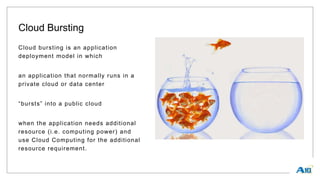
Cloud Bursting
Cloud bursting is an application
deployment model in which
an application that normally runs in a
private cloud or data center
“bursts” into a public cloud
when the application needs additional
resource (i.e. computing power) and
use Cloud Computing for the additional
resource requirement.
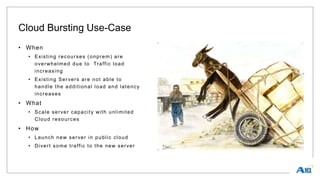
Cloud Bursting Use-Case
• When
• Existing recourses (onprem) are
overwhelmed due to Traffic load
increasing
• Existing Servers are not able to
handle the additional load and latency
increases
• What
• Scale server capacity with unlimited
Cloud resources
• How
• Launch new server in public cloud
• Divert some traffic to the new server
CONFIDENTIA
L
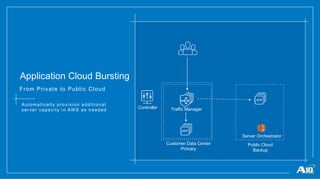
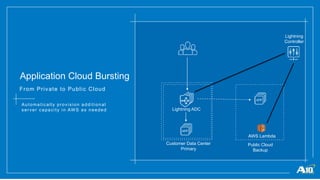
Application Cloud Bursting
From Private to Public Cloud
Automatically provision additional
server capacity in AWS as needed
Customer Data Center
Primary
Public Cloud
Backup
Server Orchestrator
Controller Traffic Manager
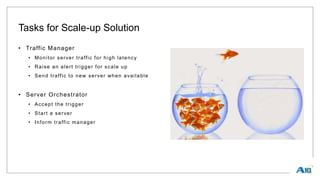
Tasks for Scale-up Solution
• Traffic Manager
• Monitor server traffic for high latency
• Raise an alert trigger for scale up
• Send traffic to new server when available
• Server Orchestrator
• Accept the trigger
• Start a server
• Inform traffic manager
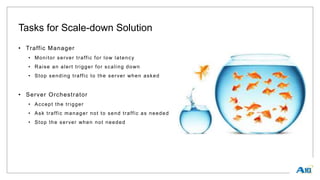
Tasks for Scale-down Solution
• Traffic Manager
• Monitor server traffic for low latency
• Raise an alert trigger for scaling down
• Stop sending traffic to the server when asked
• Server Orchestrator
• Accept the trigger
• Ask traffic manager not to send traffic as needed
• Stop the server when not needed
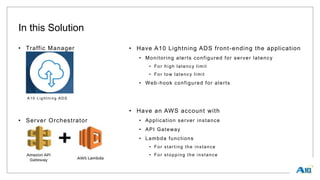
In this Solution
• Traffic Manager
A10 Lig ht ning ADS
• Server Orchestrator
• Have A10 Lightning ADS front-ending the application
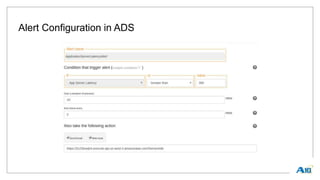
• Monitoring alerts configured for server latency
• For high latency limit
• For low latency limit
• Web-hook configured for alerts
• Have an AWS account with
• Application server instance
• API Gateway
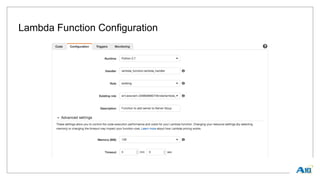
• Lambda functions
• For starting the instance
• For stopping the instance
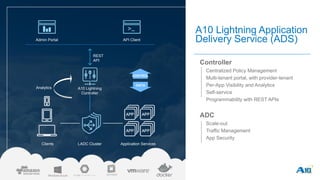
A10 Lightning Application
Delivery Service (ADS)
Controller
• Centralized Policy Management
• Multi-tenant portal, with provider-tenant
• Per-App Visibility and Analytics
• Self-service
• Programmability with REST APIs
ADC
• Scale-out
• Traffic Management
• App Security
DATA
CONTROL
Analytics
Admin Portal API Client
A10 Lightning
Controller
REST
API
LADC Cluster Application ServicesClients
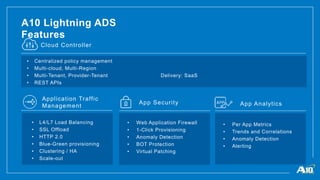
A10 Lightning ADS
Features
Cloud Controller
• Centralized policy management
• Multi-cloud, Multi-Region
• Multi-Tenant, Provider-Tenant
• REST APIs
Delivery: SaaS
Application Traffic
Management
App Security
• L4/L7 Load Balancing
• SSL Offload
• HTTP 2.0
• Blue-Green provisioning
• Clustering / HA
• Scale-out
• Web Application Firewall
• 1-Click Provisioning
• Anomaly Detection
• BOT Protection
• Virtual Patching
App Analytics
• Per App Metrics
• Trends and Correlations
• Anomaly Detection
• Alerting
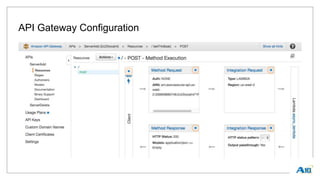
Amazon API Gateway
• Amazon API Gateway supports the following two major functionalities:
• Create, manage and host a RESTful API to expose AWS Lambda functions, HTTP endpoints as
well as other services from the AWS family including, but not limited to, Amazon DynamoDB,
Amazon S3 Amazon Kinesis. You can use this feature through the API Gateway REST API
requests and responses, the API Gateway console, AWS Command -Line Interface (CLI), or an
API Gateway SDK of supported platforms/languages. This feature is sometimes referred to as
the API Gateway control service.
• 3rd-party app developer to call a deployed API to access the integrated back -end features, using
standard HTTP protocols or a platform- or language-specific SDK generated by API Gateway for
the API. This feature is sometimes known as the API Gateway execution service.
AWS Lambda
• AWS Lambda is a compute service that lets you run code without provisioning or
managing servers.
• AWS Lambda executes your code only when needed and scales automatically, from a
few requests per day to thousands per second. You pay only for the compute time you
consume - there is no charge when your code is not running. With AWS Lambda, you
can run code for virtually any type of application or backend service - all with zero
administration.
• AWS Lambda runs your code on a high-availability compute infrastructure and performs
all of the administration of the compute resources, including server and operating
system maintenance, capacity provisioning and automatic scaling, code monitoring and
logging.
CONFIDENTIA
L
Application Cloud Bursting
From Private to Public Cloud
Automatically provision additional
server capacity in AWS as needed
Customer Data Center
Primary
Public Cloud
Backup
AWS Lambda
Lightning
Controller
Lightning ADC
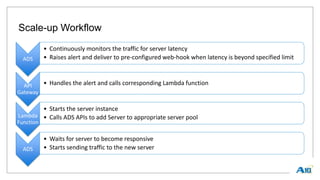
Scale-up Workflow
ADS
• Continuously monitors the traffic for server latency
• Raises alert and deliver to pre-configured web-hook when latency is beyond specified limit
API
Gateway
• Handles the alert and calls corresponding Lambda function
Lambda
Function
• Starts the server instance
• Calls ADS APIs to add Server to appropriate server pool
ADS
• Waits for server to become responsive
• Starts sending traffic to the new server
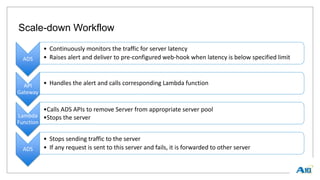
Scale-down Workflow
ADS
• Continuously monitors the traffic for server latency
• Raises alert and deliver to pre-configured web-hook when latency is below specified limit
API
Gateway
• Handles the alert and calls corresponding Lambda function
Lambda
Function
•Calls ADS APIs to remove Server from appropriate server pool
•Stops the server
ADS
• Stops sending traffic to the server
• If any request is sent to this server and fails, it is forwarded to other server
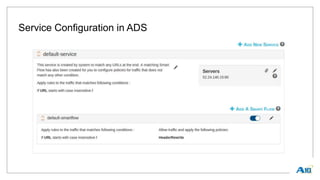
Service Configuration in ADS
Alert Configuration in ADS
API Gateway Configuration
Lambda Function Configuration
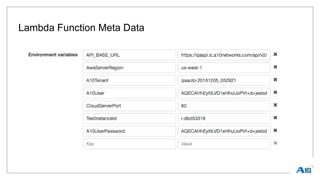
Lambda Function Meta Data
Lambda Function Code
def lambda_handler(event, context):
Ec2Client.start_instances(InstanceIds=[ServerInstanceID])
_add_instance_to_server_grp(**event)
def _add_instance_to_server_grp(**kwargs):
ServerGrpImportApi =
"applications/{0}/hosts/{1}/services/{2}/servergroups/
_import".format(
kwargs['applicationId'],
kwargs['hostId'],
kwargs['serviceId'])
server_grp_data = [{"weight": 1, "port": CloudServerPort,
"ipAddress": _get_public_ip_addr(SrvInstId)}]
urllib2.urlopen(ServerGrpImportApi , server_grp_data)
Thank you
Akshay: amathur@a10networks.com
Rupam: rsarmabaruah@a10networks.com

Cloud Bursting with A10 Lightning ADS

  • 1.
    Cloud Bursting withA10 Lightning ADS Leverage AWS for dynamically add capacity for applications deployed in DC Akshay Mathur @akshaymathu Rupamjyoti Sarma Baruah
  • 2.
    Cloud Bursting Cloud burstingis an application deployment model in which an application that normally runs in a private cloud or data center “bursts” into a public cloud when the application needs additional resource (i.e. computing power) and use Cloud Computing for the additional resource requirement.
  • 3.
    Cloud Bursting Use-Case •When • Existing recourses (onprem) are overwhelmed due to Traffic load increasing • Existing Servers are not able to handle the additional load and latency increases • What • Scale server capacity with unlimited Cloud resources • How • Launch new server in public cloud • Divert some traffic to the new server
  • 4.
    CONFIDENTIA L Application Cloud Bursting FromPrivate to Public Cloud Automatically provision additional server capacity in AWS as needed Customer Data Center Primary Public Cloud Backup Server Orchestrator Controller Traffic Manager
  • 5.
    Tasks for Scale-upSolution • Traffic Manager • Monitor server traffic for high latency • Raise an alert trigger for scale up • Send traffic to new server when available • Server Orchestrator • Accept the trigger • Start a server • Inform traffic manager
  • 6.
    Tasks for Scale-downSolution • Traffic Manager • Monitor server traffic for low latency • Raise an alert trigger for scaling down • Stop sending traffic to the server when asked • Server Orchestrator • Accept the trigger • Ask traffic manager not to send traffic as needed • Stop the server when not needed
  • 7.
    In this Solution •Traffic Manager A10 Lig ht ning ADS • Server Orchestrator • Have A10 Lightning ADS front-ending the application • Monitoring alerts configured for server latency • For high latency limit • For low latency limit • Web-hook configured for alerts • Have an AWS account with • Application server instance • API Gateway • Lambda functions • For starting the instance • For stopping the instance
  • 8.
    A10 Lightning Application DeliveryService (ADS) Controller • Centralized Policy Management • Multi-tenant portal, with provider-tenant • Per-App Visibility and Analytics • Self-service • Programmability with REST APIs ADC • Scale-out • Traffic Management • App Security DATA CONTROL Analytics Admin Portal API Client A10 Lightning Controller REST API LADC Cluster Application ServicesClients
  • 9.
    A10 Lightning ADS Features CloudController • Centralized policy management • Multi-cloud, Multi-Region • Multi-Tenant, Provider-Tenant • REST APIs Delivery: SaaS Application Traffic Management App Security • L4/L7 Load Balancing • SSL Offload • HTTP 2.0 • Blue-Green provisioning • Clustering / HA • Scale-out • Web Application Firewall • 1-Click Provisioning • Anomaly Detection • BOT Protection • Virtual Patching App Analytics • Per App Metrics • Trends and Correlations • Anomaly Detection • Alerting
  • 10.
    Amazon API Gateway •Amazon API Gateway supports the following two major functionalities: • Create, manage and host a RESTful API to expose AWS Lambda functions, HTTP endpoints as well as other services from the AWS family including, but not limited to, Amazon DynamoDB, Amazon S3 Amazon Kinesis. You can use this feature through the API Gateway REST API requests and responses, the API Gateway console, AWS Command -Line Interface (CLI), or an API Gateway SDK of supported platforms/languages. This feature is sometimes referred to as the API Gateway control service. • 3rd-party app developer to call a deployed API to access the integrated back -end features, using standard HTTP protocols or a platform- or language-specific SDK generated by API Gateway for the API. This feature is sometimes known as the API Gateway execution service.
  • 11.
    AWS Lambda • AWSLambda is a compute service that lets you run code without provisioning or managing servers. • AWS Lambda executes your code only when needed and scales automatically, from a few requests per day to thousands per second. You pay only for the compute time you consume - there is no charge when your code is not running. With AWS Lambda, you can run code for virtually any type of application or backend service - all with zero administration. • AWS Lambda runs your code on a high-availability compute infrastructure and performs all of the administration of the compute resources, including server and operating system maintenance, capacity provisioning and automatic scaling, code monitoring and logging.
  • 12.
    CONFIDENTIA L Application Cloud Bursting FromPrivate to Public Cloud Automatically provision additional server capacity in AWS as needed Customer Data Center Primary Public Cloud Backup AWS Lambda Lightning Controller Lightning ADC
  • 13.
    Scale-up Workflow ADS • Continuouslymonitors the traffic for server latency • Raises alert and deliver to pre-configured web-hook when latency is beyond specified limit API Gateway • Handles the alert and calls corresponding Lambda function Lambda Function • Starts the server instance • Calls ADS APIs to add Server to appropriate server pool ADS • Waits for server to become responsive • Starts sending traffic to the new server
  • 14.
    Scale-down Workflow ADS • Continuouslymonitors the traffic for server latency • Raises alert and deliver to pre-configured web-hook when latency is below specified limit API Gateway • Handles the alert and calls corresponding Lambda function Lambda Function •Calls ADS APIs to remove Server from appropriate server pool •Stops the server ADS • Stops sending traffic to the server • If any request is sent to this server and fails, it is forwarded to other server
  • 15.
  • 16.
  • 17.
  • 18.
  • 19.
  • 20.
    Lambda Function Code deflambda_handler(event, context): Ec2Client.start_instances(InstanceIds=[ServerInstanceID]) _add_instance_to_server_grp(**event) def _add_instance_to_server_grp(**kwargs): ServerGrpImportApi = "applications/{0}/hosts/{1}/services/{2}/servergroups/ _import".format( kwargs['applicationId'], kwargs['hostId'], kwargs['serviceId']) server_grp_data = [{"weight": 1, "port": CloudServerPort, "ipAddress": _get_public_ip_addr(SrvInstId)}] urllib2.urlopen(ServerGrpImportApi , server_grp_data)
  • 21.