1
1. ABSTRACT
Classification is a central topic in machine learning that has to do with teaching machines
how to group together data by particular criteria. Classification is an important tool in today‘s
world, where big data is used to make all kinds of decisions in government, economics,
medicine, and more. Researchers have access to huge amounts of data, and classification is one
tool that helps them to make sense of the data and find patterns. The classification methods and
tools are varied according to the size of the dataset. The main objective of this project is to
classify the text and image data. Here, I have used two methods, Machine learning on text data
set(to detect phishing web sites) and Deep learning to image data sets (to label cifar-10 images) .
2
2. INTRODUCTION
Classification is a central topic in machine learning that has to do with teaching
machines how to group together data by particular criteria. Supervised learning is the process
where computers group data together based on pre-determined characteristics. There is
an unsupervised version of classification, called clustering where computers find shared
characteristics by which to group data when categories are not specified. A common example
of classification comes with detecting spam emails. To write a program to filter out spam
emails, a computer programmer can train a machine learning algorithm with a set of spam-
like emails labeled as spam and regular emails labeled as not-spam. The idea is to make an
algorithm that can learn characteristics of spam emails from this training set so that it can
filter out spam emails when it encounters new emails.
Classification is an important tool in today‘s world, where big data is used to make all
kinds of decisions in government, economics, medicine, and more. Researchers have access
to huge amounts of data, and classification is one tool that helps them to make sense of the
data and find patterns. While classification in machine learning requires the use of
(sometimes) complex algorithms, classification is something that human do naturally every
day. Classification is simply grouping things together according to similar features and
attributes. When you go to a grocery store, you can fairly accurately group the foods by food
group (grains, fruit, vegetables, meat, etc.) In machine learning, classification is all about
teaching computers to do the same.
3
3. SYSTEM SPECIFICATION
HARDWARE REQUIREMENTS
 Intel Pentium 2.10 GHz / 500 GB / 2GB
SOFTWARE REQUIREMENTS
 Windows 8.1 / Rstudio 3.4.3 / Rtools / Keras / Tensorflow / Anaconda3 5.1.0 / FloydHub
Keras – Interface between R and Python to implement deep learning models
Tensorflow - Backend for Keras in R to implement deep learning models(CPU & GPU
Compatibility)
Anaconda3 5.1.0 – To provide Conda environment between R and Python
FloydHub – Online Cloud Infrastructure service to run Deep Learning Models.
4
4. LITERATURE REVIEW
1. International Journal of Advance Foundation and Research in Computer (IJAFRC), Volume 3,
Issue 4, April – 2016. ISSN : 2348 – 4853, Impact Factor – 1.317, “Link Guard Algorithm
approch on Phishing Detection and Control”.
ABSTRACT
Phishing is a new type of network attack where the attacker creates a replica of an
existing Web page to fool users (e.g., by using specially designed e-mails or instant messages)
into submitting personal, financial, or password data to what they think is their service provides‘
Web site. In this research paper, we proposed a new end-host based anti-phishing algorithm,
which we call Link Guard, by utilizing the generic characteristics of the hyperlinks in phishing
attacks. These characteristics are derived by analyzing the phishing data archive provided by the
Anti-Phishing Working Group (APWG). Because it is based on the generic characteristics of
phishing attacks, Link Guard can detect not only known but also unknown phishing attacks. We
have implemented Link Guard in Windows XP. Our experiments verified that Link Guard is
effective to detect and prevent both known and unknown phishing attacks with minimal false
negatives. Link Guard successfully detects 195 out of the 203 phishing attacks. Our experiments
also showed that Link Guard is light weighted and can detect and prevent phishing attacks in real
time. Index Terms: Hyperlink, Link Guard algorithm. Network security, Phishing attacks.
2. International Journal of Engineering and Techniques - Volume 2, Issue 5, Sep – October 2016.
“Automated Phishing Website Detection Using URL Features and Machine Learning
Technique”
ABSTRACT
Malicious URL, a.k.a. malicious website, is a common and serious threat to
cybersecurity. Malicious URLs host unsolicited content (spam, phishing, drive-by exploits, etc.)
and lure unsuspecting users to become victims of scams, and cause losses of billions of dollars
every year. It is imperative to detect and act on such threats in a timely manner. Traditionally,
this detection is done mostly through the usage of blacklists. However, blacklists cannot be
exhaustive, and lack the ability to detect newly generated malicious URLs. To improve the
generality of malicious URL detectors, machine learning techniques have been explored with
increasing attention in recent years. This article aims to provide a comprehensive survey and a
5
structural understanding of Malicious URL Detection techniques using machine learning. We
present the formal formulation of Malicious URL Detection as a machine learning task, and
categorize and review the contributions of literature studies that addresses different dimensions
of this problem (feature representation, algorithm design, etc.). Further, this article provides a
timely and comprehensive survey for a range of different audiences, not only for machine
learning researchers and engineers in academia, but also for professionals and practitioners in
cybersecurity industry, to help them understand the state of the art and facilitate their
ownresearchandpracticalapplications.Wealsodiscusspractical issues in system design, open
research challenges, and point out some important directions for future research. Index Terms—
Malicious URL Detection, Machine Learning, Online Learning, Internet security, Cybersecurit
PROPOSED WORK
Phishing is an unlawful activity of making gullible people to reveal their insightful
information into fake websites. The Aim of these phishing websites is to acquire confidential
information such as usernames, passwords, banking credentials and some other personal
information. Phishing website looks similar to legitimate website. Therefore people cannot make
difference among them. Today, users are heavily relying on the internet for online purchasing,
ticket booking, bill payments, etc. As technology advances, the phishing approaches being used
are also getting progressed and hence it stimulates anti-phishing methods to be upgraded.
There are many algorithms used to identify the Phishing Websites which use the
maximum of 30 parameters. Here, I‘ve tried to prove that the minimal effective parameters are
sufficient for the detection of phishing websites. By using those minimal effective parameters,
we would be able to identify the phishing websites.
6
5. SOFTWARE DESCRIPTION
5.1 MACHINE LEARNING
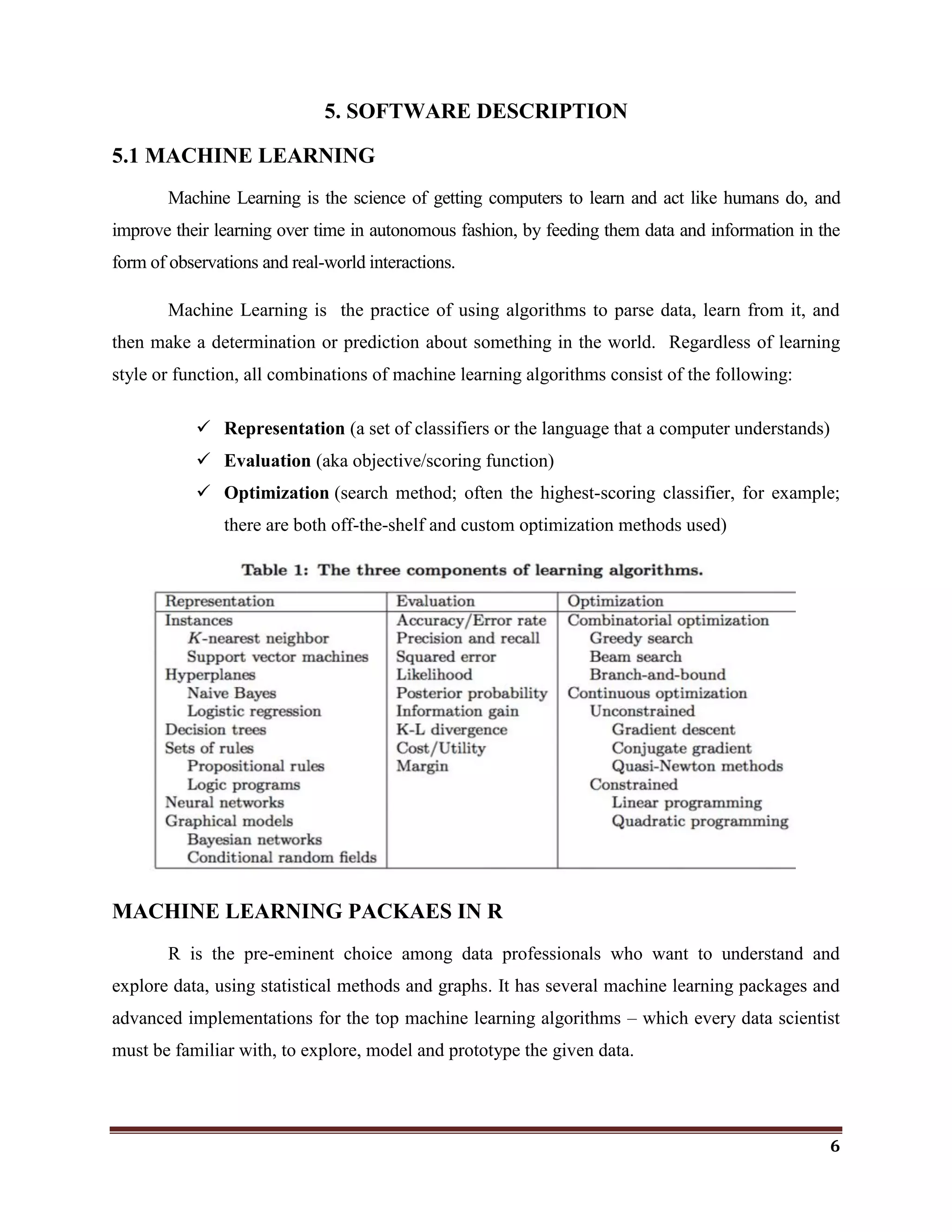
Machine Learning is the science of getting computers to learn and act like humans do, and
improve their learning over time in autonomous fashion, by feeding them data and information in the
form of observations and real-world interactions.
Machine Learning is the practice of using algorithms to parse data, learn from it, and
then make a determination or prediction about something in the world. Regardless of learning
style or function, all combinations of machine learning algorithms consist of the following:
 Representation (a set of classifiers or the language that a computer understands)
 Evaluation (aka objective/scoring function)
 Optimization (search method; often the highest-scoring classifier, for example;
there are both off-the-shelf and custom optimization methods used)
MACHINE LEARNING PACKAES IN R
R is the pre-eminent choice among data professionals who want to understand and
explore data, using statistical methods and graphs. It has several machine learning packages and
advanced implementations for the top machine learning algorithms – which every data scientist
must be familiar with, to explore, model and prototype the given data.
7
“MICE” Package – Takes care of your Missing Values
If missing values are something which haunts you then MICE package is the real friend
of yours. When we face an issue of missing values we generally go ahead with basic imputations
such as replacing with 0, replacing with mean, replacing with mode etc. but each of these
methods are not versatile and could result into a possible data discrepancy.
MICE package helps you to impute missing values by using multiple techniques,
depending on the kind of data you are working with.
“rpart” package: Lets partition your data
(rpart) package in R language, is used to build classification or regression models using a
two stage procedure and the resultant models is represented in the form of binary trees. The basic
way to plot any regression or classification tree using the rpart package is to call
the plot() function. The results might not be pretty by just using the basic plot() function, so there
is an alternative i.e. the prp() function which is powerful and flexible. prp() function
in rpart.plot package is often referred to as the authentic Swiss army knife for plotting regression
trees.
rpart() function helps establish a relationship between a dependant and independent
variables so that a business can understand the variance in the dependant variables based on the
independent variables.
“PARTY”: partition your data
PARTY package in R is used for recursive partitioning and this package reflects the
continuous development of ensemble methods.
PARTY is yet another package to build decision trees based on Conditional Inference
algorithm. ctree() is the main function of PARTY package which is used extensively, which
reduces the training time and bias.
8
Similar to other predictive analytics functions in R, PARTY also has similar syntax i.e.,
ctree(formula,data) which will build your decision tree, taking the default values of various
arguments into consideration which can be tweaked based on requirements.
“CARET”: Classification And REgression Training
Classification and REgression Training (CARET) package is developed with the intent to
combine model training and prediction. Data scientists can run several different algorithms for a
given business problem using the CARET package. Data scientists might not be aware as to
which is the best algorithm for a given problem. CARET package helps investigate the optimal
parameters for an algorithm with controlled experiments. The grid search method of the caret R
package searches parameters by combining various methods to estimate the performance of a
given model.
To build any predictive model, CARET uses train() function; The syntax of train
function looks like
train(formula, data, method)
Every package or function in R has some default values associated with it, before
applying any algorithm you must know about the various options available. Passing default
values will throw you some result but you can‘t be sure that the output is the most optimized or
accurate one.
There are many other machine learning packages available in the CRAN repository
like igraph, glmnet, gbm, tree, CORElearn, mboost, etc. which are used in different industries to
build performance efficient models. We have observed the scenarios where changing just one
parameter can modify the output completely. So, don‘t rely on default values of parameters –
Understand your data and requirements before applying any algorithm.
9
5.2 DEEP LEARNING
Instead of organizing data to run through predefined equations, deep learning sets up
basic parameters about the data and trains the computer to learn on its own by recognizing
patterns using many layers of processing.
 Deep learning requires large amounts of labeled data.
 Deep learning requires substantial computing power. (High-performance GPUs combined
with clusters or cloud computing is preferable)
 Most deep learning methods use neural network architectures, which is why deep
learning models are often referred to as deep neural networks.
In deep learning, a computer model learns to perform classification tasks directly from
images, text, or sound. Deep learning models can achieve state-of-the-art accuracy, sometimes
exceeding human-level performance. Models are trained by using a large set of labeled data and
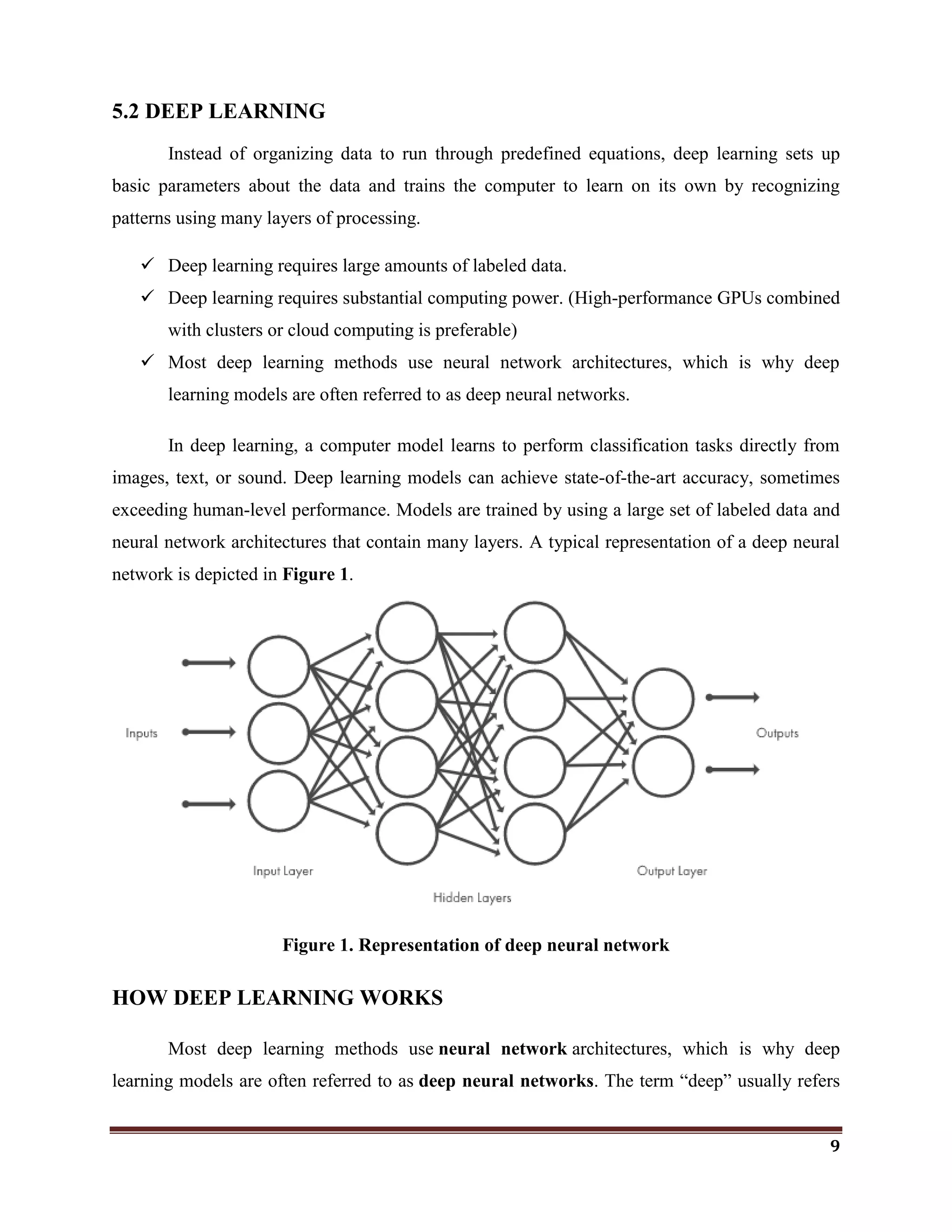
neural network architectures that contain many layers. A typical representation of a deep neural
network is depicted in Figure 1.
Figure 1. Representation of deep neural network
HOW DEEP LEARNING WORKS
Most deep learning methods use neural network architectures, which is why deep
learning models are often referred to as deep neural networks. The term ―deep‖ usually refers
10
to the number of hidden layers in the neural network. Traditional neural networks only contain 2-
3 hidden layers, while deep networks can have as many as 150.
Deep learning models are trained by using large sets of labeled data and neural network
architectures that learn features directly from the data without the need for manual feature
extraction.
One of the most popular types of deep neural networks is known as convolutional neural
networks (CNN or ConvNet). A CNN convolves learned features with input data, and uses 2D
Convolutional layers, making this architecture well suited to processing 2D data, such as images.
CNNs eliminate the need for manual feature extraction, so you do not need to identify
features used to classify images. The CNN works by extracting features directly from images.
The relevant features are not pre-trained; they are learned while the network trains on a
collection of images. This automated feature extraction makes deep learning models highly
accurate for computer vision tasks such as object classification.
11
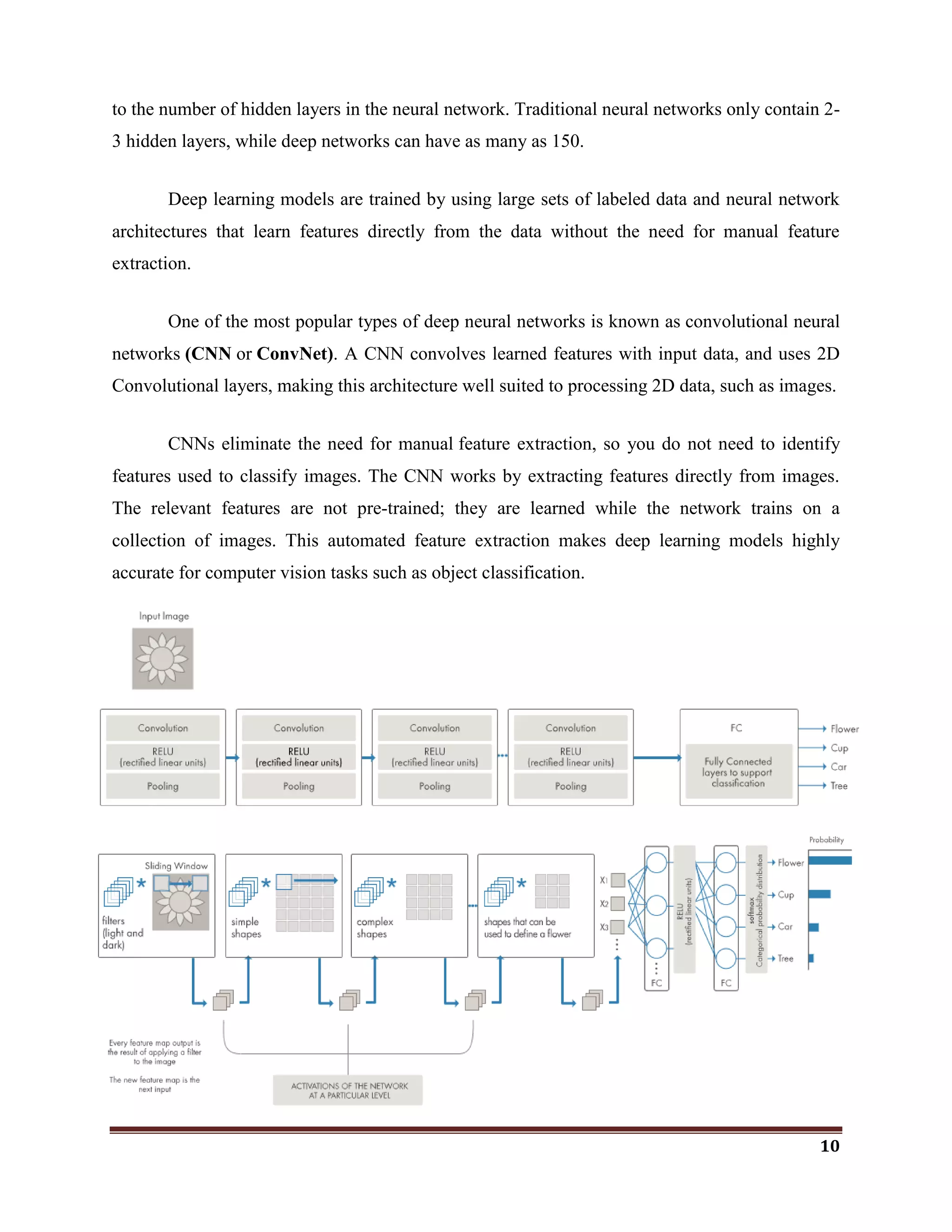
Figure 2. Example of a network with many convolutional layers. Filters are applied to each
training image at different resolutions, and the output of each convolved image serves as the
input to the next layer.
PACKAGES FOR DEEP LEARNING IN R
The R programming language has gained considerable popularity among statisticians and
data miners for its ease-of-use, as well as its sophisticated visualizations and analyses. With the
advent of the deep learning era, the support for deep learning in R has grown ever since, with an
increasing number of packages becoming available. This section presents an overview on deep
learning in R as provided by the following packages: MXNetR, darch, deepnet, H2O and deepr.
Package Available architectures of neural networks
MXNetR Feed-forward neural network, convolutional neural network (CNN)
Darch Restricted Boltzmann machine, deep belief network
Deepnet Feed-forward neural network, restricted Boltzmann machine, deep belief network,
stacked autoencoders
H2O Feed-forward neural network, deep autoencoders
Deepr Simplify some functions from H2O and deepnet packages
Package “MXNetR”
The MXNetR package is an interface of the MXNet library written in C++. It contains
feed-forward neural networks and convolutional neural networks (CNN) (MXNetR 2016a). It
also allows one to construct customized models. This package is distributed in two versions:
CPU only or GPU version. The former CPU version can be easily installed directly from inside
R, whereas the latter GPU version depends on 3rd party libraries like cuDNN and requires
building the library from its source code (MXNetR 2016b).
Package “darch”
The darch package (darch 2015) implements the training of deep architectures, such as
deep belief networks, which consist of layer-wise pre-trained restricted Boltzmann machines.
12
The package also entails backpropagation for fine-tuning and, in the latest version, makes pre-
training optional.
Training of a Deep Belief Network is performed via darch() function.
Package “deepnet”
deepnet (deepnet 2015) is a relatively small, yet quite powerful package with variety of
architectures to pick from. It can train a feed-forward network using the function nn.train() or
initialize weights for the deep belief network with dbn.dnn.train(). This function internally
uses rbm.train() to train a restricted Boltzmann machine (which can also be used individually).
Furthermore, deepnet can also handle stacked autoencoders via sae.dnn.train().
Package “H2O”
H2O is an open-source software platform with the ability to exploit distributed computer
systems (H2O 2015). Its core is coded in Java and requires the latest version of JVM and JDK,
which can be found at https://www.java.com/en/download/. The package provides interfaces for
many languages and was originally designed to serve as a cloud-based platform (Candel et al.
2015). Accordingly, one starts H2O by calling h2o.init().
Package “deepr”
The package deepr (deepr 2015) doesn‘t implement any deep learning algorithms itself
but forwards its tasks to H20. The package was originally designed at a time when the H2O
package was not yet available on CRAN. As this is no longer the case, we will exclude it from
our comparison. We also note that its function train_rbm() uses the deepnet implementation
of rbm to train a model with some additional output.
DEEP LEARNING Vs MACHINE LEARNING
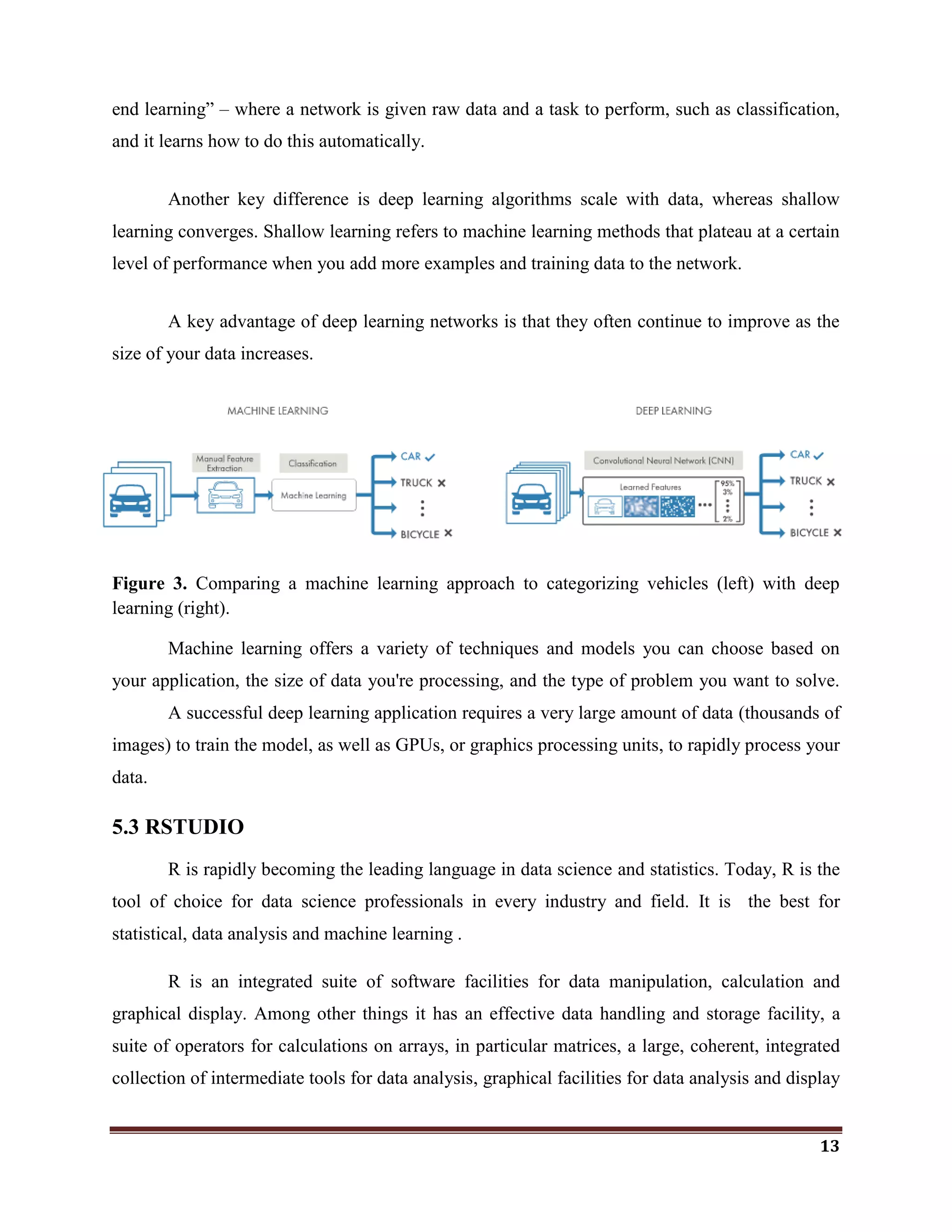
Deep learning is a specialized form of machine learning. A machine learning workflow
starts with relevant features being manually extracted from images. The features are then used to
create a model that categorizes the objects in the image. With a deep learning workflow, relevant
features are automatically extracted from images. In addition, deep learning performs ―end-to-
13
end learning‖ – where a network is given raw data and a task to perform, such as classification,
and it learns how to do this automatically.
Another key difference is deep learning algorithms scale with data, whereas shallow
learning converges. Shallow learning refers to machine learning methods that plateau at a certain
level of performance when you add more examples and training data to the network.
A key advantage of deep learning networks is that they often continue to improve as the
size of your data increases.
Figure 3. Comparing a machine learning approach to categorizing vehicles (left) with deep
learning (right).
Machine learning offers a variety of techniques and models you can choose based on
your application, the size of data you're processing, and the type of problem you want to solve.
A successful deep learning application requires a very large amount of data (thousands of
images) to train the model, as well as GPUs, or graphics processing units, to rapidly process your
data.
5.3 RSTUDIO
R is rapidly becoming the leading language in data science and statistics. Today, R is the
tool of choice for data science professionals in every industry and field. It is the best for
statistical, data analysis and machine learning .
R is an integrated suite of software facilities for data manipulation, calculation and
graphical display. Among other things it has an effective data handling and storage facility, a
suite of operators for calculations on arrays, in particular matrices, a large, coherent, integrated
collection of intermediate tools for data analysis, graphical facilities for data analysis and display
14
either directly at the computer or on hardcopy, and a well developed, simple and effective
programming language (called ‗S‘) which includes conditionals, loops, user defined recursive
functions and input and output facilities. R is very much a vehicle for newly developing methods
of interactive data analysis. It has developed rapidly, and has been extended by a large collection
of packages. However, most programs written in R are essentially ephemeral, written for a single
piece of data analysis.
5.4 KERAS
 Keras provides a high-level neural networks API developed with a focus on enabling fast
experimentation. Keras has the following key features:
 Allows the same code to run on CPU or on GPU,.
 User-friendly API which makes it easy to quickly prototype deep learning models.
 Supports arbitrary network architectures: multi-input or multi-output models, layer
sharing, model sharing, etc.
 Is capable of running on top of multiple back-ends including Tensorflow, CNTK or
Theano.
5.5 TENSORFLOW
 TensorFlow is an open source software library for numerical computation using data flow
graphs. Nodes in the graph represent mathematical operations, while the graph edges
represent the multidimensional data arrays (tensors) communicated between them.
 The flexible architecture allows you to deploy computation to one or more CPUs or
GPUs in a desktop, server, or mobile device with a single API.
 The TensorFlow API is composed of a set of Python modules that enable constructing
and executing TensorFlow graphs. The tensorflow package provides access to the
complete TensorFlow API from within R.
15
INSTALLATION OF KERAS WITH TENSORFLOW AT THE BACKEND.
The steps to install Keras in RStudio is very simple. If we follow the below steps, first
Neural Network Model in R would be ready.
Install.packages(“devtools”)
devtools::install_github(“rstudio/keras”)
The above step will load the keras library from the GitHub repository. Now it is time to
load keras into R and install tensorflow.
library(keras)
By default, RStudio loads the CPU version of tensorflow. Use the below command to
download the CPU version of tensorflow.
Install_tensorflow()
To install the tensorflow version with GPU support for a single user/desktop system, use
the below command.
Install_tensorflow(gpu=TRUE)
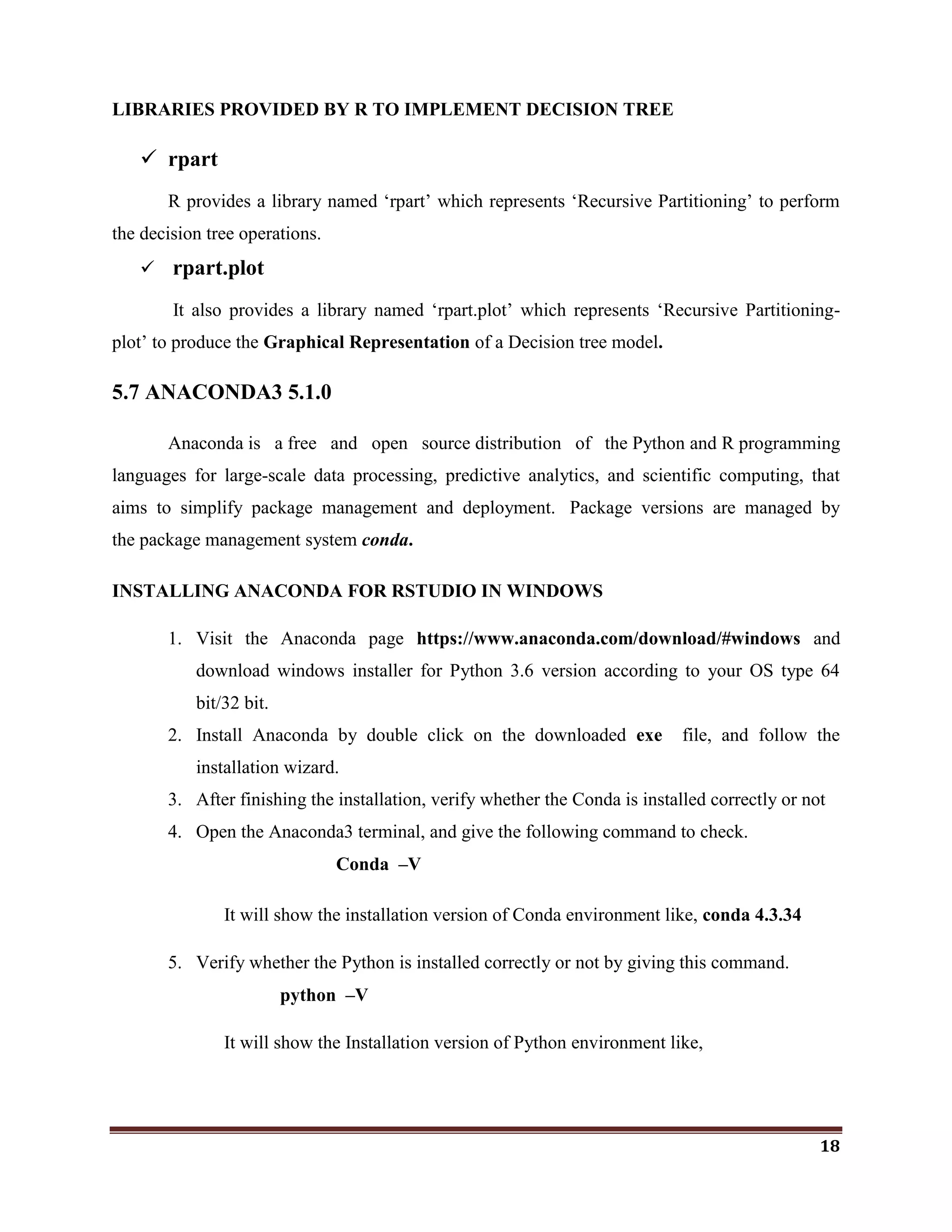
5.6 DECISION TREE
Tree based learning algorithms are considered to be one of the best and mostly used
supervised learning methods. Tree based methods empower predictive models with high
accuracy, stability and ease of interpretation. Unlike linear models, they map non-linear
relationships quite well. They are adaptable at solving any kind of problem at hand
(classification or regression).
16
Decision tree is a graph to represent choices and their results in form of a tree. The nodes
in the graph represent an event or choice and the edges of the graph represent the decision rules
or conditions. It is mostly used in Machine Learning and Data Mining applications using R.
 Decision tree is the most powerful and popular algorithm for classification and
prediction.
 By applying this algorithm, the most effective attribute(s) can be found out to detect the
phishing website.
RECURSIVE PARTITIONING ALGORITHMS HAVE TWO BASIC STEPS
1. Given a subset of training data, find the best feature for predicting the labels on
that subsets.
2. Find a split on that feature that best seperates the labels, and split into two new
subsets.
3. Repeat steps one and two recursively until you meet a new stopping criterion.
ADVANTAGES OF DECISION TREES
1. Easy to Understand:
Decision tree output is very easy to understand even for people from non-
analytical background. It does not require any statistical knowledge to read and interpret
them. Its graphical representation is very intuitive and users can easily relate their
hypothesis.
2. Useful in Data exploration:
Decision tree is one of the fastest way to identify most significant variables and
relation between two or more variables. With the help of decision trees, we can create
new variables / features that has better power to predict target variable. For example, we
are working on a problem where we have information available in hundreds of variables,
there decision tree will help to identify most significant variable.
17
3. Less data cleaning required:
It requires less data cleaning compared to some other modeling techniques. It is
not influenced by outliers and missing values to a fair degree.
4. Data type is not a constraint:
It can handle both numerical and categorical variables.
5. Non Parametric Method:
Decision tree is considered to be a non-parametric method. This means that
decision trees have no assumptions about the space distribution and the classifier
structure.
DISADVANTAGES
1. Over fitting:
Over fitting is one of the most practical difficulty for decision tree models. This
problem gets solved by setting constraints on model parameters and pruning (discussed in
detailed below).
2. Not fit for continuous variables:
While working with continuous numerical variables, decision tree looses
information when it categorizes variables in different categories.
HOW DOES A TREE DECIDE WHERE TO SPLIT?
The decision of making strategic splits heavily affects a tree‘s accuracy. The decision
criteria is different for classification and regression trees.
Decision trees use multiple algorithms to decide to split a node in two or more sub-nodes.
The creation of sub-nodes increases the homogeneity of resultant sub-nodes. In other words, we
can say that purity of the node increases with respect to the target variable. Decision tree splits
the nodes on all available variables and then selects the split which results in most homogeneous
sub-nodes. The algorithm selection is also based on type of target variables.
18
LIBRARIES PROVIDED BY R TO IMPLEMENT DECISION TREE
 rpart
R provides a library named ‗rpart‘ which represents ‗Recursive Partitioning‘ to perform
the decision tree operations.
 rpart.plot
It also provides a library named ‗rpart.plot‘ which represents ‗Recursive Partitioning-
plot‘ to produce the Graphical Representation of a Decision tree model.
5.7 ANACONDA3 5.1.0
Anaconda is a free and open source distribution of the Python and R programming
languages for large-scale data processing, predictive analytics, and scientific computing, that
aims to simplify package management and deployment. Package versions are managed by
the package management system conda.
INSTALLING ANACONDA FOR RSTUDIO IN WINDOWS
1. Visit the Anaconda page https://www.anaconda.com/download/#windows and
download windows installer for Python 3.6 version according to your OS type 64
bit/32 bit.
2. Install Anaconda by double click on the downloaded exe file, and follow the
installation wizard.
3. After finishing the installation, verify whether the Conda is installed correctly or not
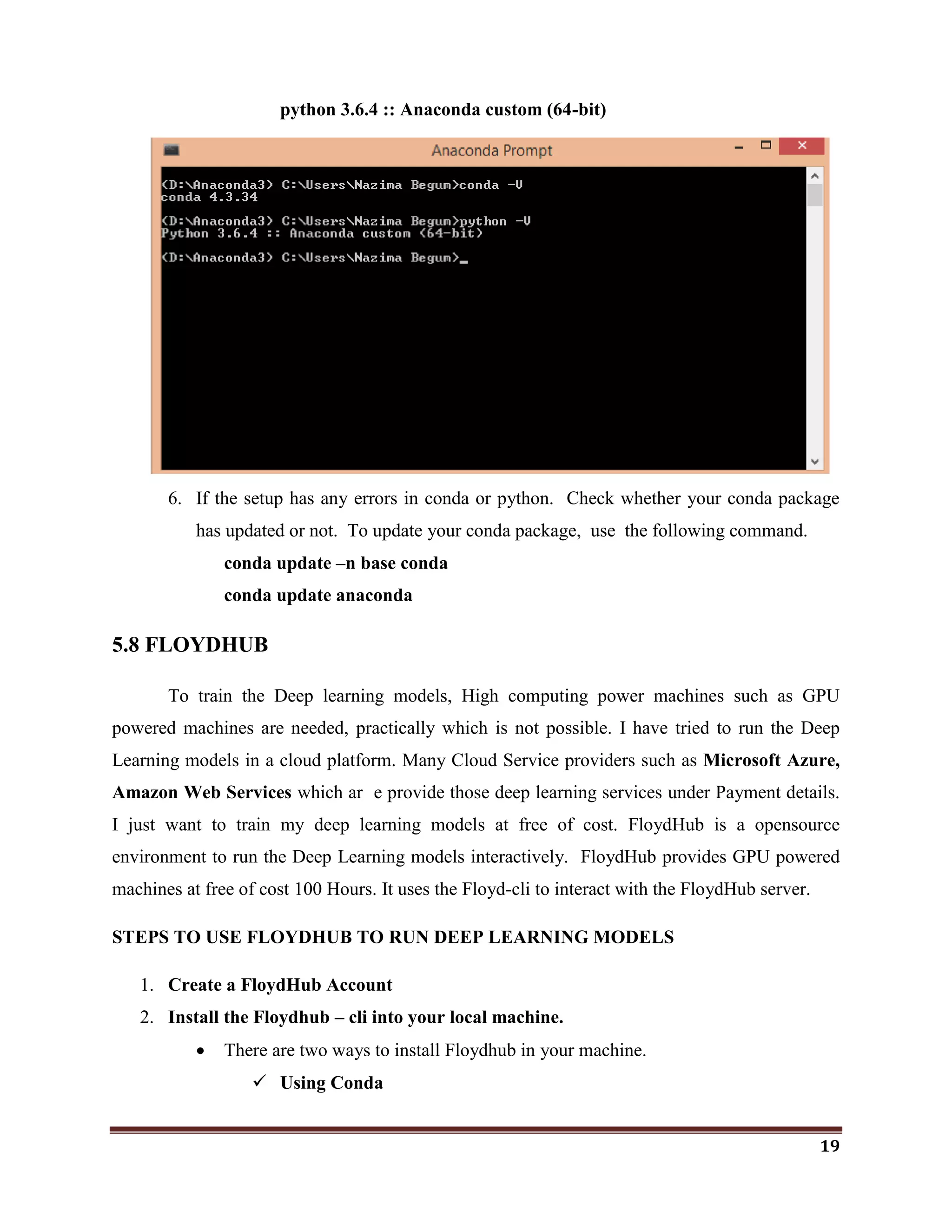
4. Open the Anaconda3 terminal, and give the following command to check.
Conda –V
It will show the installation version of Conda environment like, conda 4.3.34
5. Verify whether the Python is installed correctly or not by giving this command.
python –V
It will show the Installation version of Python environment like,
19
python 3.6.4 :: Anaconda custom (64-bit)
6. If the setup has any errors in conda or python. Check whether your conda package
has updated or not. To update your conda package, use the following command.
conda update –n base conda
conda update anaconda
5.8 FLOYDHUB
To train the Deep learning models, High computing power machines such as GPU
powered machines are needed, practically which is not possible. I have tried to run the Deep
Learning models in a cloud platform. Many Cloud Service providers such as Microsoft Azure,
Amazon Web Services which ar e provide those deep learning services under Payment details.
I just want to train my deep learning models at free of cost. FloydHub is a opensource
environment to run the Deep Learning models interactively. FloydHub provides GPU powered
machines at free of cost 100 Hours. It uses the Floyd-cli to interact with the FloydHub server.
STEPS TO USE FLOYDHUB TO RUN DEEP LEARNING MODELS
1. Create a FloydHub Account
2. Install the Floydhub – cli into your local machine.
 There are two ways to install Floydhub in your machine.
 Using Conda
20
$ conda install -y -c conda-forge -c floydhub floyd-cli
 Using pip
$ pip install -U floyd-cli
3. Login to Floydhub using Floyd-cli
$ floyd login –u <user-name>
It requires a password. Please enter your password. If you have a valid
Floydhub account it displays Login Successfully. For example,
$ floyd login -u najimabegum
Please enter your password:
Login Successful as najimabegum
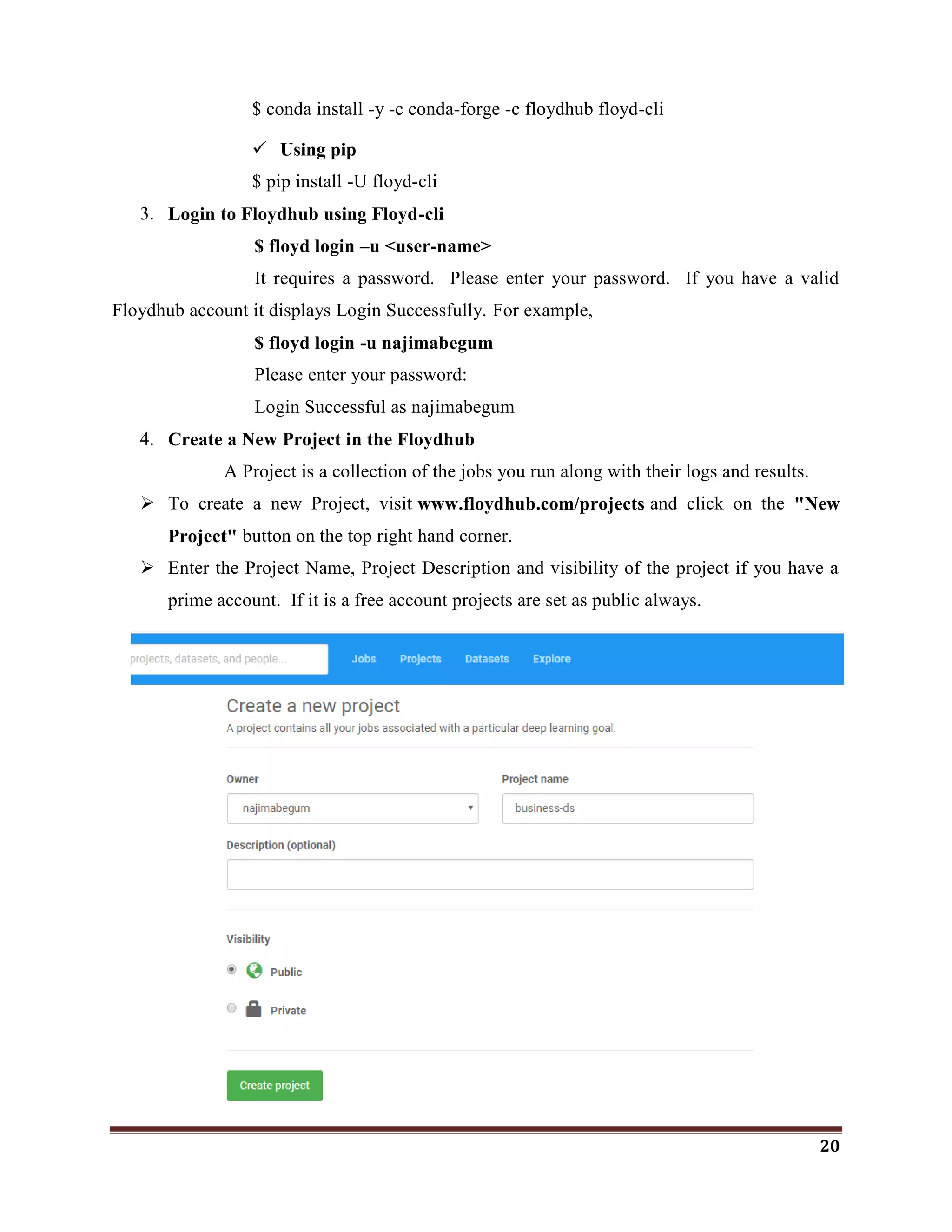
4. Create a New Project in the Floydhub
A Project is a collection of the jobs you run along with their logs and results.
 To create a new Project, visit www.floydhub.com/projects and click on the "New
Project" button on the top right hand corner.
 Enter the Project Name, Project Description and visibility of the project if you have a
prime account. If it is a free account projects are set as public always.
21
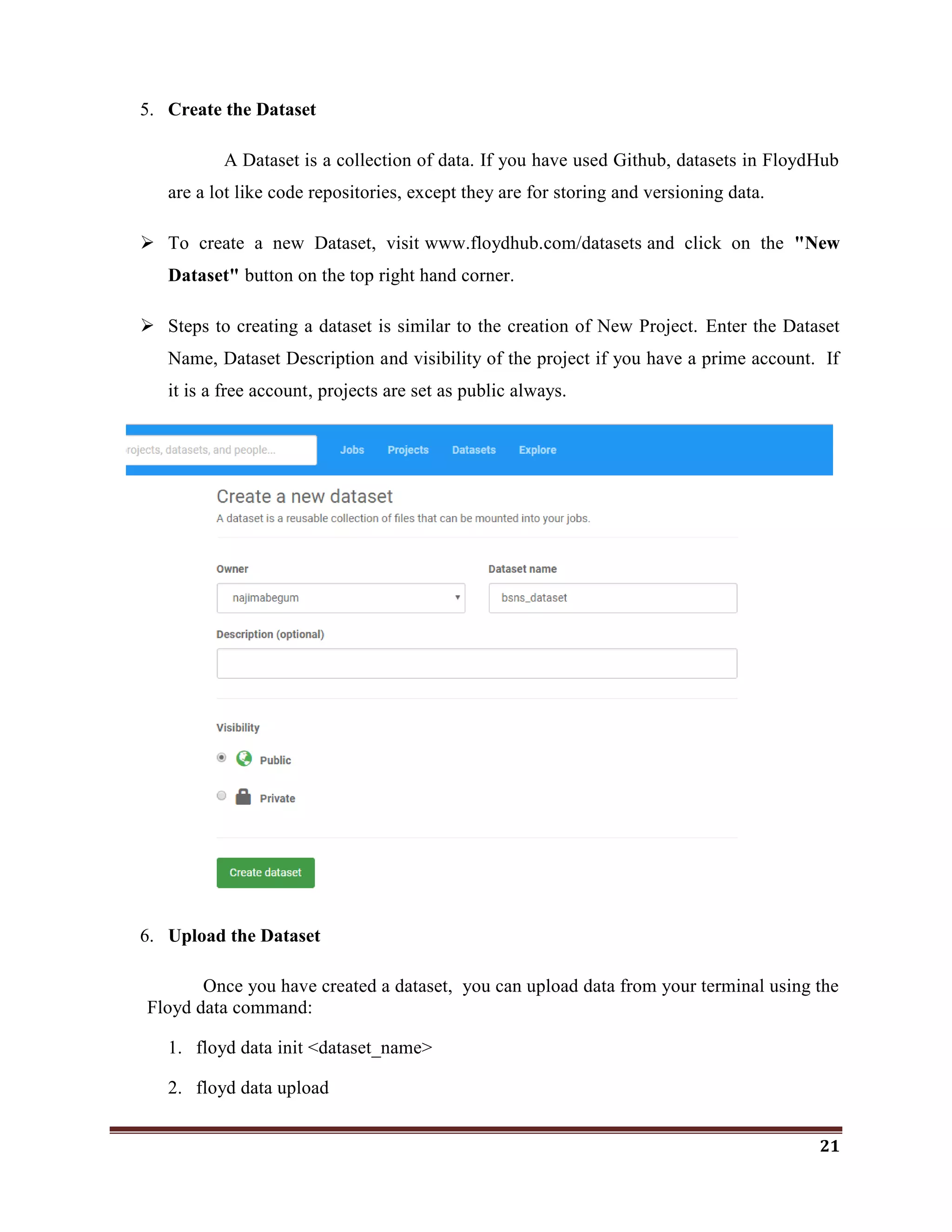
5. Create the Dataset
A Dataset is a collection of data. If you have used Github, datasets in FloydHub
are a lot like code repositories, except they are for storing and versioning data.
 To create a new Dataset, visit www.floydhub.com/datasets and click on the "New
Dataset" button on the top right hand corner.
 Steps to creating a dataset is similar to the creation of New Project. Enter the Dataset
Name, Dataset Description and visibility of the project if you have a prime account. If
it is a free account, projects are set as public always.
6. Upload the Dataset
Once you have created a dataset, you can upload data from your terminal using the
Floyd data command:
1. floyd data init <dataset_name>
2. floyd data upload
22
 Dataset uploads are resumable. If your Internet connection cuts out during an
upload, you'll be able to resume it later if you choose to.
 If your upload has stopped before it completing, resume it using the
--resume or -r flag:
7. Run a job
Running jobs is the core action in the FloydHub workflow. A job pulls together
your code and dataset(s), sends them to a deep-learning server configured with the right
environment, and actually kicks off the necessary code to get the data science done.
The floyd run command is used to run the job.
PARTS OF THE floyd run COMMAND
[OPTIONS]
 Instance Type : --cpu or --gpu or --cpu2 or --gpu2
 Dataset(s) : --data
 Mode : --mode
 Environment : --env
 Message : --message or -m
 Tensorboard : --tensorboard
INSTANCE TYPE
To specify the instance type means to choose what kind of FloydHub instance your job
will run on. Think of this as a hardware choice rather than a software one. (The software
environment is declared with the Environment (--env) OPTION of floyd run command.)
Floyd run Flag Instance type Description
--gpu GPU Tesla K80 GPU Machine
--gpu2 GPU Tesla V100 GPU Machine
--cpu CPU 2 core low performance CPU Machine
--cpu2 CPU 8 core high performance CPU Machine
23
DATASET(S)
You can specify up to five datasources (datasets or outputs from previous jobs) to
mount to the server that will be running your job. For each datasource, specify the --data flag
as detailed below:
--data <name_of_datasource>:<mount_point_on_server>
MODE
FloydHub jobs can currently be run in one of three modes:
1. –mode job (DEFAULT)
2. –mode jupyter
3. –mode serve
ENVIRONMENT
Specifying the environment means choosing what major deep-learning software
packages you want available on the server that runs your code. FloydHub offers servers with
many different deep-learning software packages pre-installed such as, keras, Tensorflow,
caffe, MxNet, PyTorch, Theano, Chainer
Use the --env flag to specify which environment you would like your job to run in. For
Example,
$ floyd run --env tensorflow-1.3 "python train.py"
$ floyd run --env pytorch-0.2 "python train.py"
MESSAGE
Using --message or -m, you can specify a message that describes your job. The job
message will be displayed at various places on floydhub.com and is useful when reviewing
past jobs that you'd like to iterate on.
8. Run a job using CPU vs GPU
When you run a job using the floyd run command, it is executed on a CPU instance
on FloydHub's servers, by default.
24
$ floyd run "python mnist_cnn.py"
You can also force your job to execute on on a CPU using the --cpu flag
$ floyd run --cpu "python mnist_cnn.py"
If you want to run your job on a GPU, simply add the --gpu flag. Just make sure
your code is optimized to use the available GPU.
$ floyd run --gpu "python mnist_cnn.py"
CHECKING GPU STATUS
You can check the GPU stats by running a dummy job that executes the nvidia-
smi command.
$ floyd run --gpu "nvidia-smi"
$ Floyd logs –t <Job-Name>
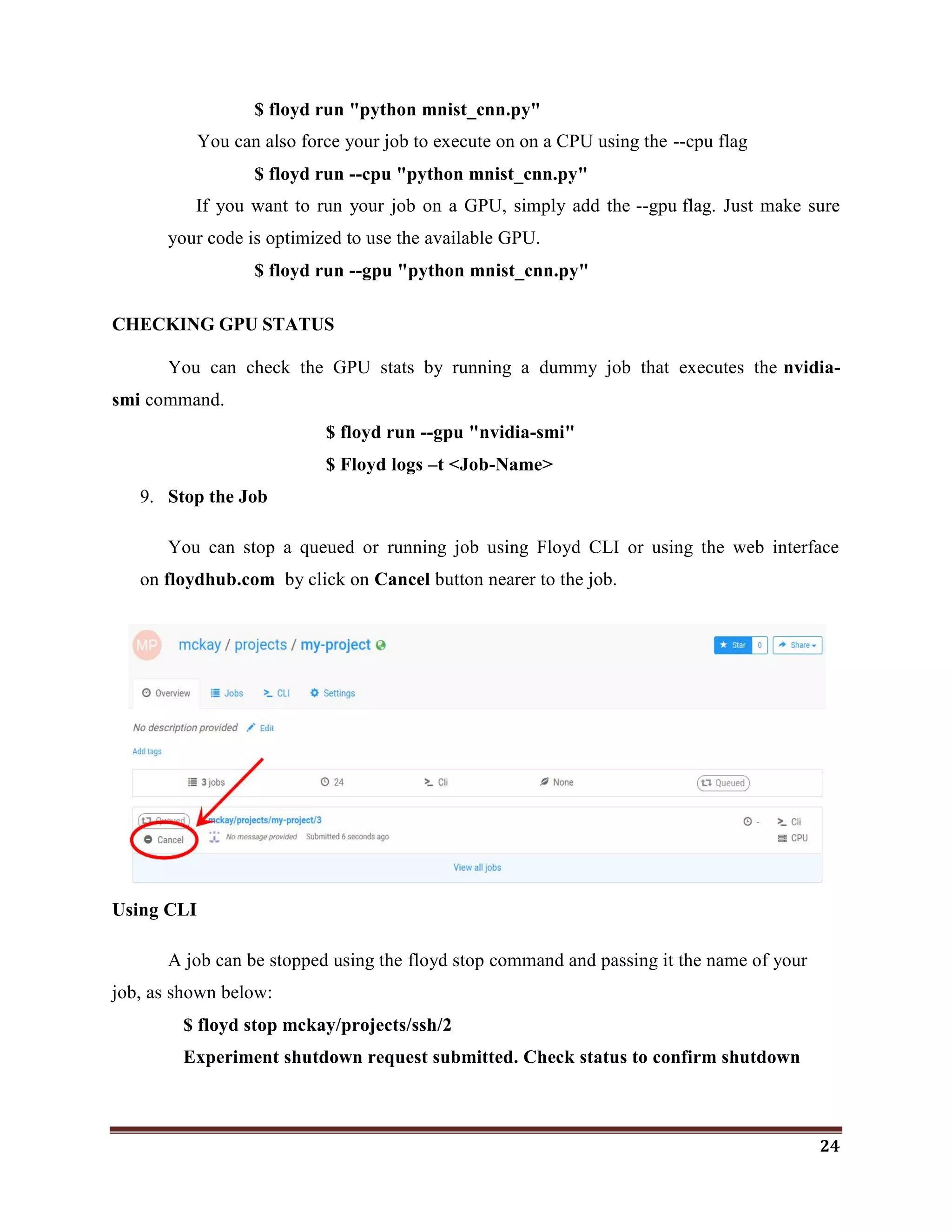
9. Stop the Job
You can stop a queued or running job using Floyd CLI or using the web interface
on floydhub.com by click on Cancel button nearer to the job.
Using CLI
A job can be stopped using the floyd stop command and passing it the name of your
job, as shown below:
$ floyd stop mckay/projects/ssh/2
Experiment shutdown request submitted. Check status to confirm shutdown
25
10. Save Output
Saving information generated during a job is easy. On a FloydHub deep learning
server your code has access to a directory called /output. The /output directory is a
special directory that is used to store information you want to save for future use after a
job finishes. Anything saved in the /output directory at the time a job finishes will be
preserved and can be accessed and reused later.
You can view the saved output of a job using the floyd output command:
$ floyd output mckay/projects/quick-start/1
Opening output directory in your browser...
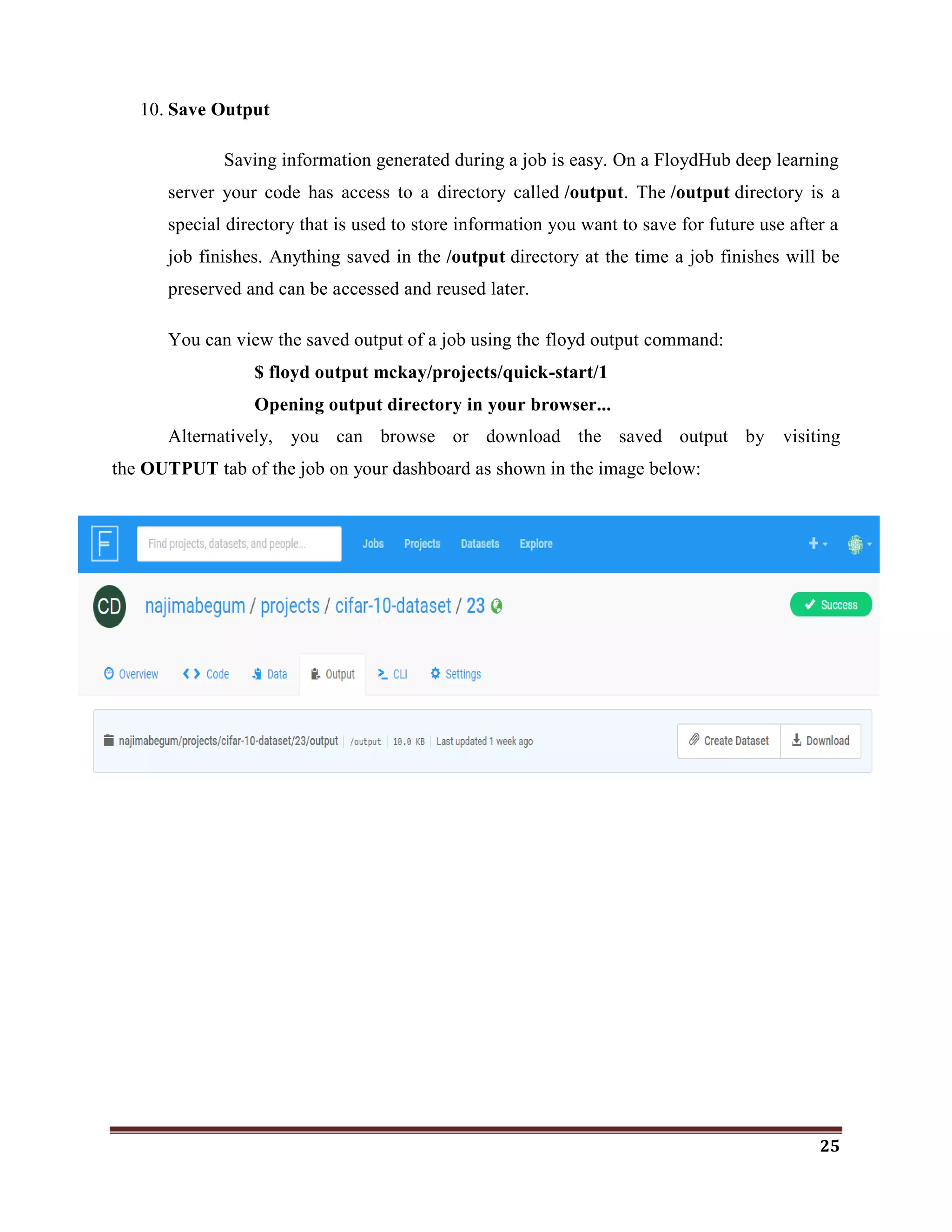
Alternatively, you can browse or download the saved output by visiting
the OUTPUT tab of the job on your dashboard as shown in the image below:
26
6. PROJECT DESCRIPTION
6.1 CLASSIFICATION ON PHISHING WEBSITES USING DECISION
TREE
Machine learning is a field within computer science, it differs from traditional
computational approaches. Machine learning algorithms allow computers to train on data inputs
and use statistical analysis in order to output values that fall within a specific range. Because of
this, machine learning facilitates computers in building models from sample data in order to
automate decision-making processes based on data inputs. Machine Learning is possible through
many algorithms.
Here, I have focused on the comparative study of Random Forest and Link Guard
Algorithms to identify minimal effective parameters for the Detection of Phishing websites
using R. Both algorithms have followed different ways and parameters to detect the phishing
websites. They have used many parameters to detect the phishing websites exactly. Here, I‘ve
proved that the minimal effective parameters are sufficient for the detection of phishing websites.
By using those minimal parameters, we would be able to identify the phishing websites faster.
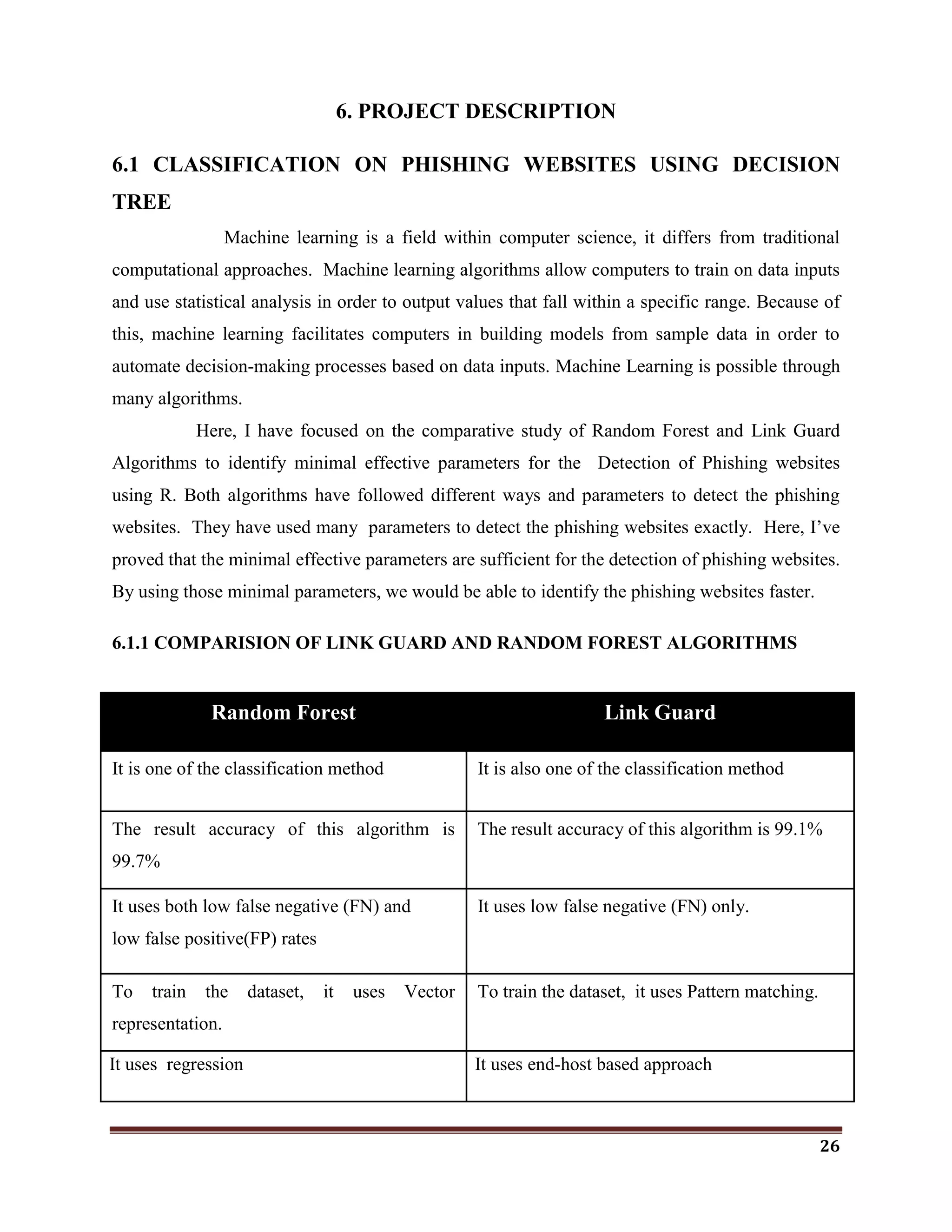
6.1.1 COMPARISION OF LINK GUARD AND RANDOM FOREST ALGORITHMS
Random Forest Link Guard
It is one of the classification method It is also one of the classification method
The result accuracy of this algorithm is
99.7%
The result accuracy of this algorithm is 99.1%
It uses both low false negative (FN) and
low false positive(FP) rates
It uses low false negative (FN) only.
To train the dataset, it uses Vector
representation.
To train the dataset, it uses Pattern matching.
It uses regression It uses end-host based approach
27
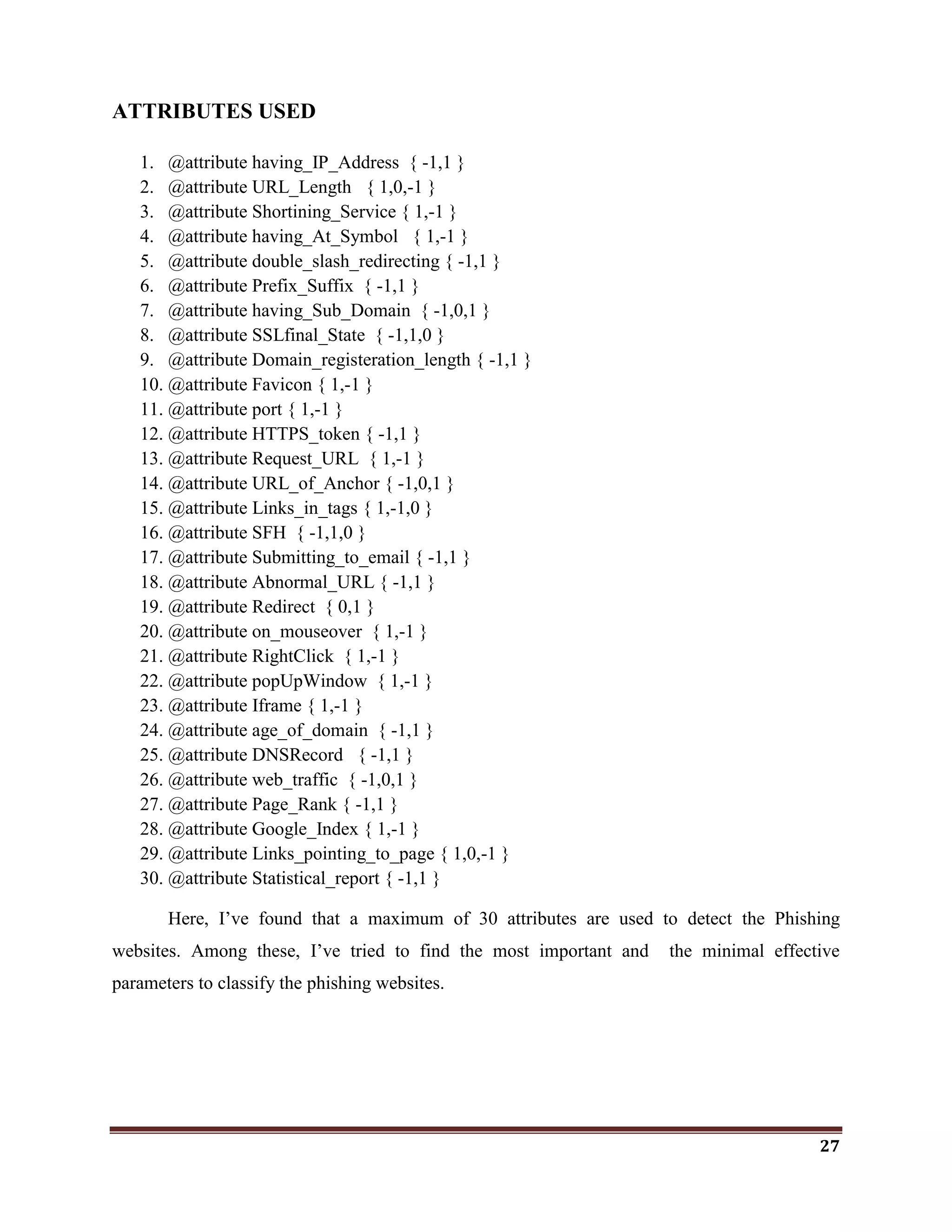
ATTRIBUTES USED
1. @attribute having_IP_Address { -1,1 }
2. @attribute URL_Length { 1,0,-1 }
3. @attribute Shortining_Service { 1,-1 }
4. @attribute having_At_Symbol { 1,-1 }
5. @attribute double_slash_redirecting { -1,1 }
6. @attribute Prefix_Suffix { -1,1 }
7. @attribute having_Sub_Domain { -1,0,1 }
8. @attribute SSLfinal_State { -1,1,0 }
9. @attribute Domain_registeration_length { -1,1 }
10. @attribute Favicon { 1,-1 }
11. @attribute port { 1,-1 }
12. @attribute HTTPS_token { -1,1 }
13. @attribute Request_URL { 1,-1 }
14. @attribute URL_of_Anchor { -1,0,1 }
15. @attribute Links_in_tags { 1,-1,0 }
16. @attribute SFH { -1,1,0 }
17. @attribute Submitting_to_email { -1,1 }
18. @attribute Abnormal_URL { -1,1 }
19. @attribute Redirect { 0,1 }
20. @attribute on_mouseover { 1,-1 }
21. @attribute RightClick { 1,-1 }
22. @attribute popUpWindow { 1,-1 }
23. @attribute Iframe { 1,-1 }
24. @attribute age_of_domain { -1,1 }
25. @attribute DNSRecord { -1,1 }
26. @attribute web_traffic { -1,0,1 }
27. @attribute Page_Rank { -1,1 }
28. @attribute Google_Index { 1,-1 }
29. @attribute Links_pointing_to_page { 1,0,-1 }
30. @attribute Statistical_report { -1,1 }
Here, I‘ve found that a maximum of 30 attributes are used to detect the Phishing
websites. Among these, I‘ve tried to find the most important and the minimal effective
parameters to classify the phishing websites.
28
DATASET
I used a dataset of phishing website publicly available on the machine learning repository
provided by UCI. You don‘t have to download the dataset yourself as it is included directly in
this repository (dataset.csv le) and was downloaded on your machine when you cloned this
repository.
 https://archive.ics.uci.edu/ml/datasets.html
 https://www.phishtank.com/
6.1.2 FIND THE MINIMAL EFFECTIVE ATTRIBUTES
CODE
#import package
library(rpart)
library(rpart.plot)
#Load data
psite <- read.csv("G:MLDecision TreeDatasetsPhishingweb.csv")
#Fit Model
mod <- rpart(Result~., data = psite[1:1200,])
summary(mod)
rpart.plot(mod, type= 4, extra= 101)
p <- predict(mod, psite[,1:9])
table(p,psite$Result)
29
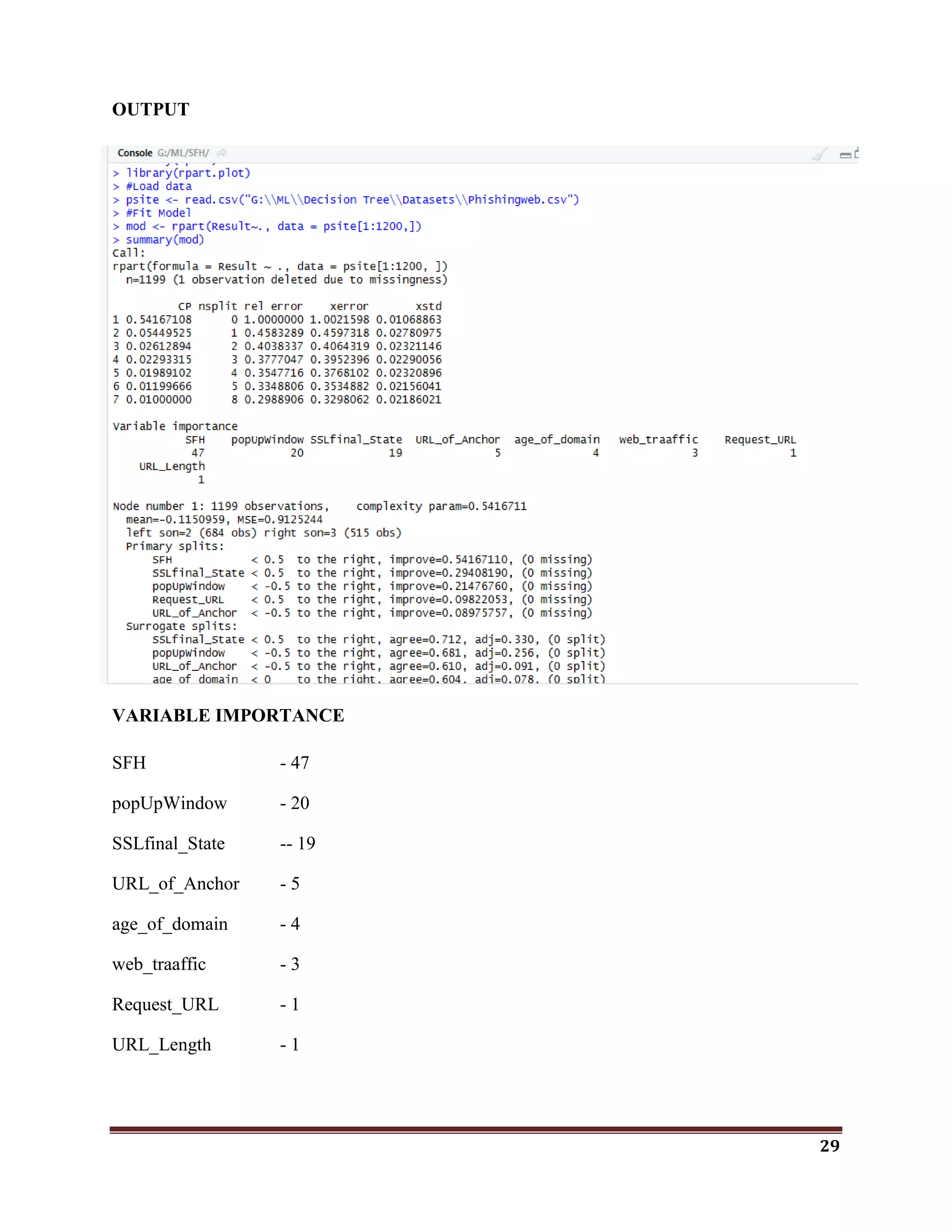
OUTPUT
VARIABLE IMPORTANCE
SFH - 47
popUpWindow - 20
SSLfinal_State -- 19
URL_of_Anchor - 5
age_of_domain - 4
web_traaffic - 3
Request_URL - 1
URL_Length - 1
30
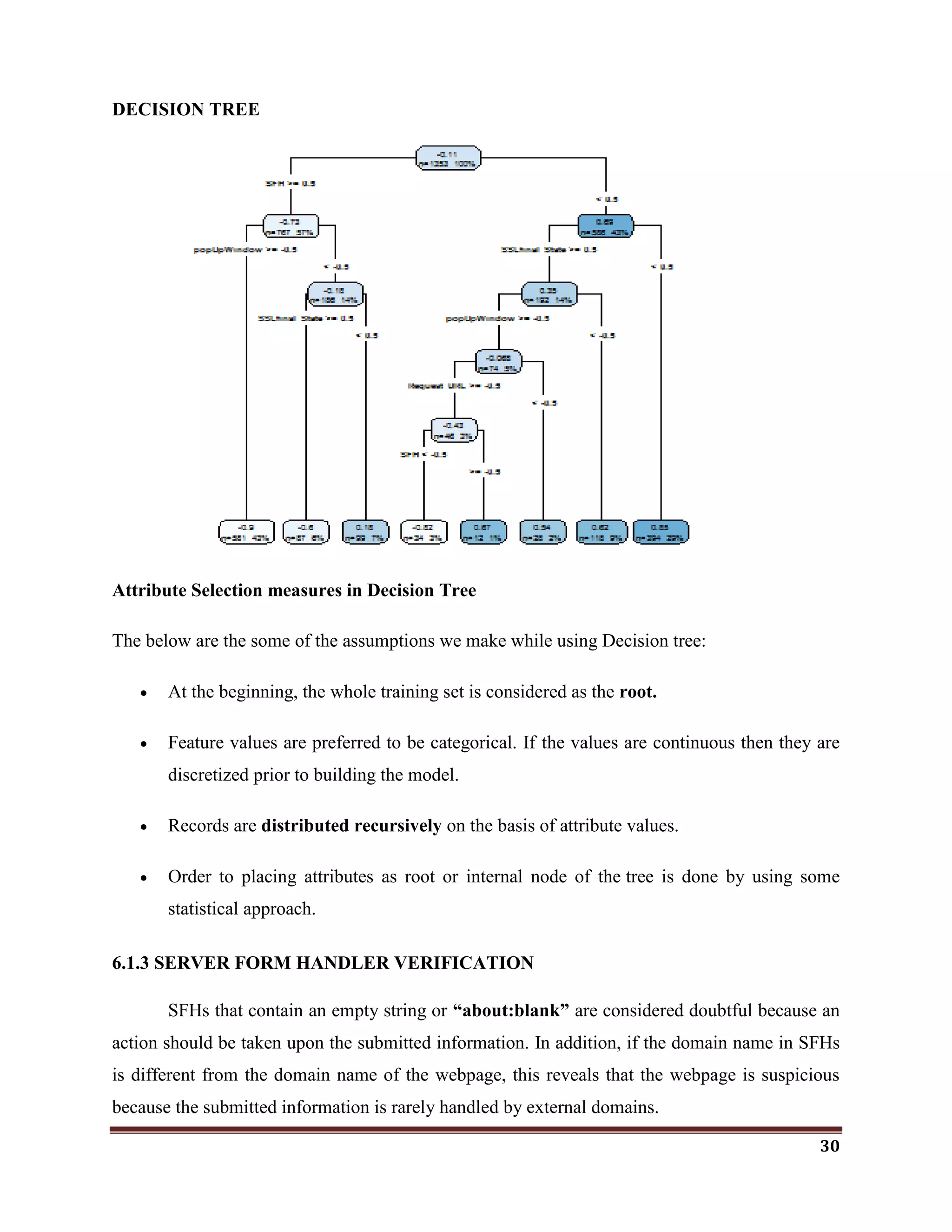
DECISION TREE
Attribute Selection measures in Decision Tree
The below are the some of the assumptions we make while using Decision tree:
 At the beginning, the whole training set is considered as the root.
 Feature values are preferred to be categorical. If the values are continuous then they are
discretized prior to building the model.
 Records are distributed recursively on the basis of attribute values.
 Order to placing attributes as root or internal node of the tree is done by using some
statistical approach.
6.1.3 SERVER FORM HANDLER VERIFICATION
SFHs that contain an empty string or “about:blank” are considered doubtful because an
action should be taken upon the submitted information. In addition, if the domain name in SFHs
is different from the domain name of the webpage, this reveals that the webpage is suspicious
because the submitted information is rarely handled by external domains.
31
Rule:IF
SFH is "about: blank" Or Is Empty → Phishing
SFH Refers To A Different Domain → Suspicious
Otherwise → Legitimate
 In the Decision tree, Server Form Handler(SFH) is set to be root. It indicates that SFH
plays a vital role in detecting phishing websites.
 The importance of SFH variable is 47.
 So, I tried to prove that, the SFH is a Minimal effective parameter to identify the
phishing websites.
 For that, the SFH is extracted from the Link. If SFH occurs the FP(False Positive) value
is set to be 1. else set to be -1. If possibilities of SFH in the Link is founded FP value is
set to be 0.
CODE TO CHECK WHETHER THE SFH IS SUFFICIENT TO DETECT PHISHING
WEBSITES OR NOT
library(party)
library(rpart.plot)
#Load data
sites <- read.csv("G:MLSFHds.csv")
#Fit Model
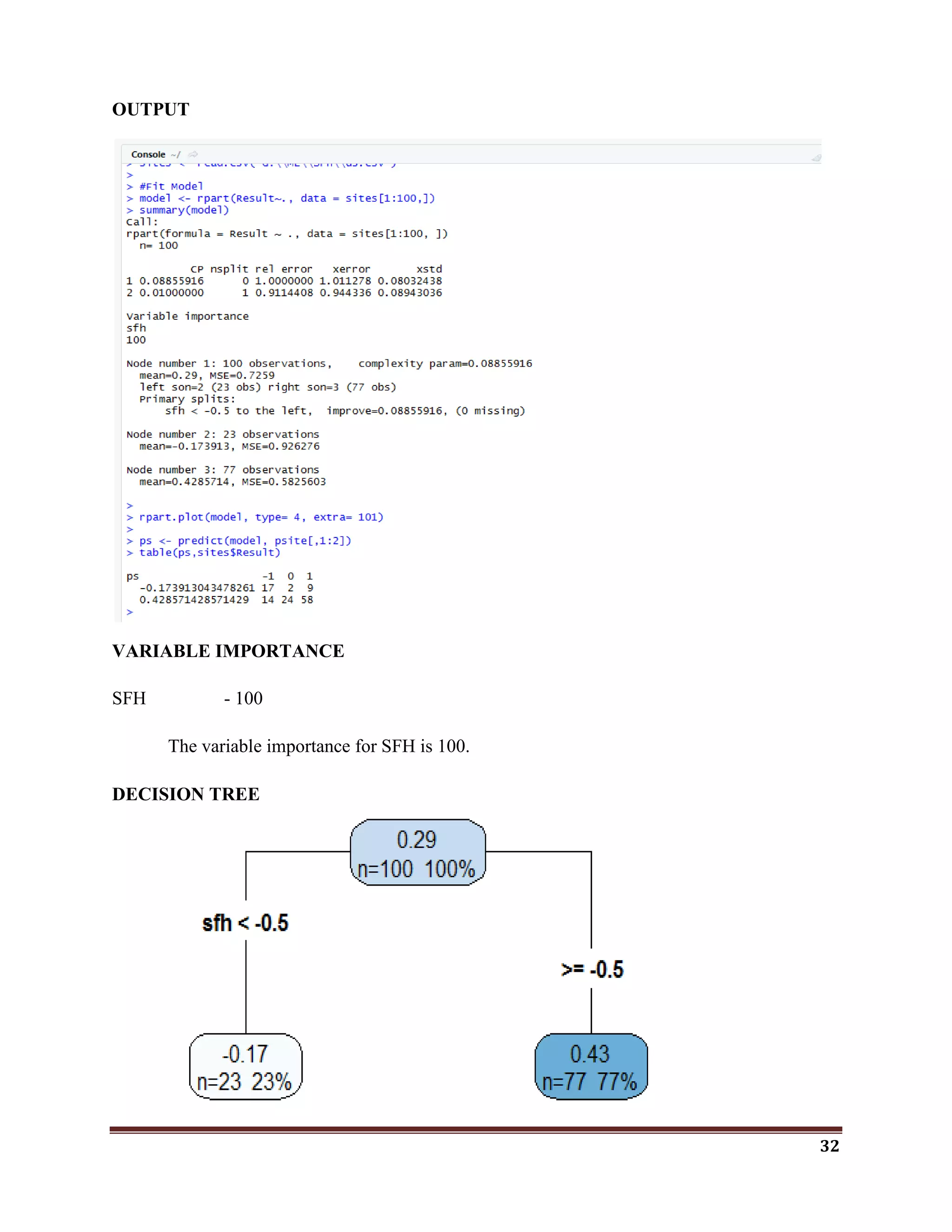
model <- rpart(Result~., data = sites[1:100,])
summary(model)
rpart.plot(model, type= 4, extra= 101)
ps <- predict(model, psite[,1:2])
table(ps,sites$Result)
32
OUTPUT
VARIABLE IMPORTANCE
SFH - 100
The variable importance for SFH is 100.
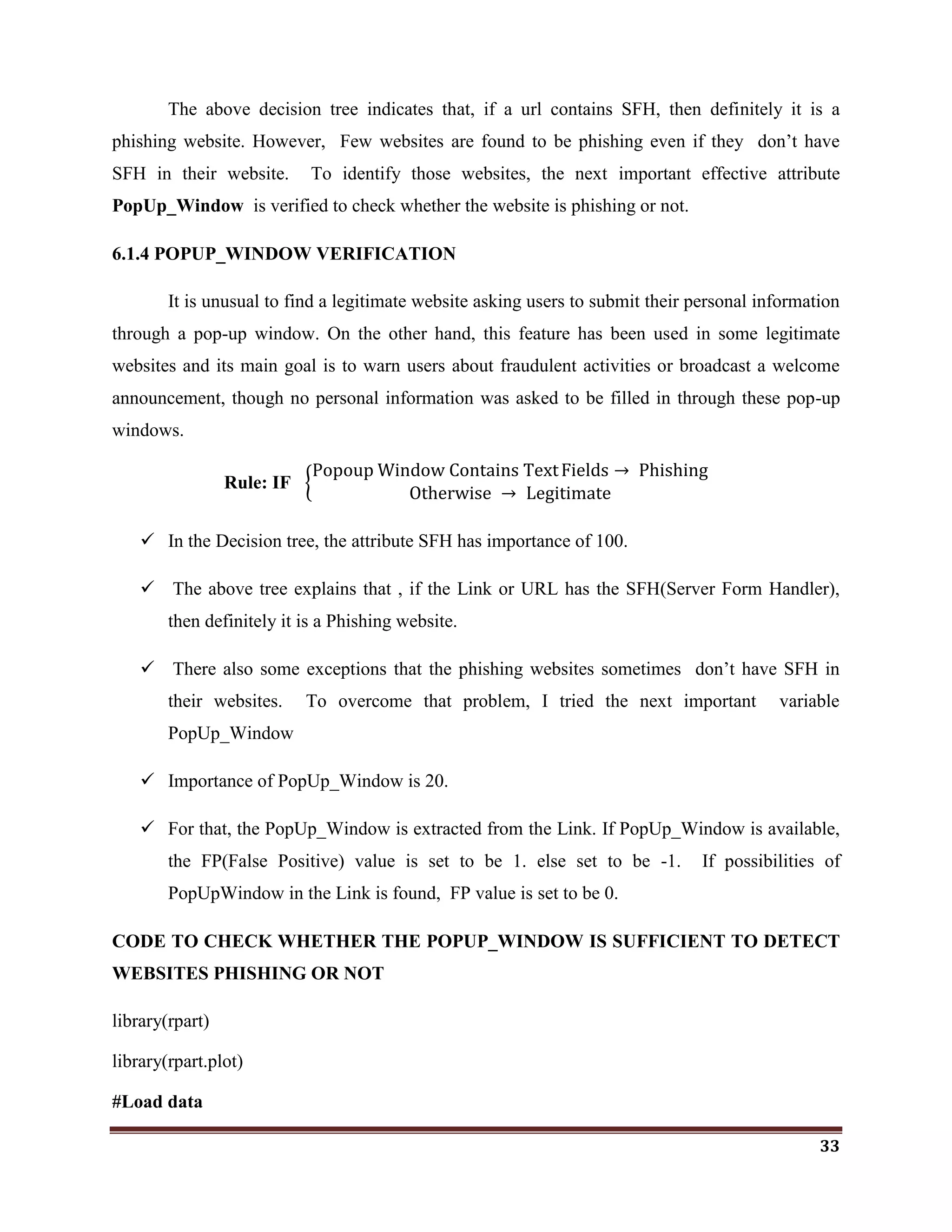
DECISION TREE
33
The above decision tree indicates that, if a url contains SFH, then definitely it is a
phishing website. However, Few websites are found to be phishing even if they don‘t have
SFH in their website. To identify those websites, the next important effective attribute
PopUp_Window is verified to check whether the website is phishing or not.
6.1.4 POPUP_WINDOW VERIFICATION
It is unusual to find a legitimate website asking users to submit their personal information
through a pop-up window. On the other hand, this feature has been used in some legitimate
websites and its main goal is to warn users about fraudulent activities or broadcast a welcome
announcement, though no personal information was asked to be filled in through these pop-up
windows.
Rule: IF
Popoup Window Contains TextFields → Phishing
Otherwise → Legitimate
 In the Decision tree, the attribute SFH has importance of 100.
 The above tree explains that , if the Link or URL has the SFH(Server Form Handler),
then definitely it is a Phishing website.
 There also some exceptions that the phishing websites sometimes don‘t have SFH in
their websites. To overcome that problem, I tried the next important variable
PopUp_Window
 Importance of PopUp_Window is 20.
 For that, the PopUp_Window is extracted from the Link. If PopUp_Window is available,
the FP(False Positive) value is set to be 1. else set to be -1. If possibilities of
PopUpWindow in the Link is found, FP value is set to be 0.
CODE TO CHECK WHETHER THE POPUP_WINDOW IS SUFFICIENT TO DETECT
WEBSITES PHISHING OR NOT
library(rpart)
library(rpart.plot)
#Load data
34
sites <- read.csv("G:MLSFHpone.csv")
#Fit Model
model <- rpart(result~., data = sites[1:100,])
summary(model)
rpart.plot(model, type= 4, extra= 101)
ps <- predict(model, sites[,1:2])
table(ps,sites$result)
OUTPUT
VARIABLE IMPORTANCE
Popup - 100
35
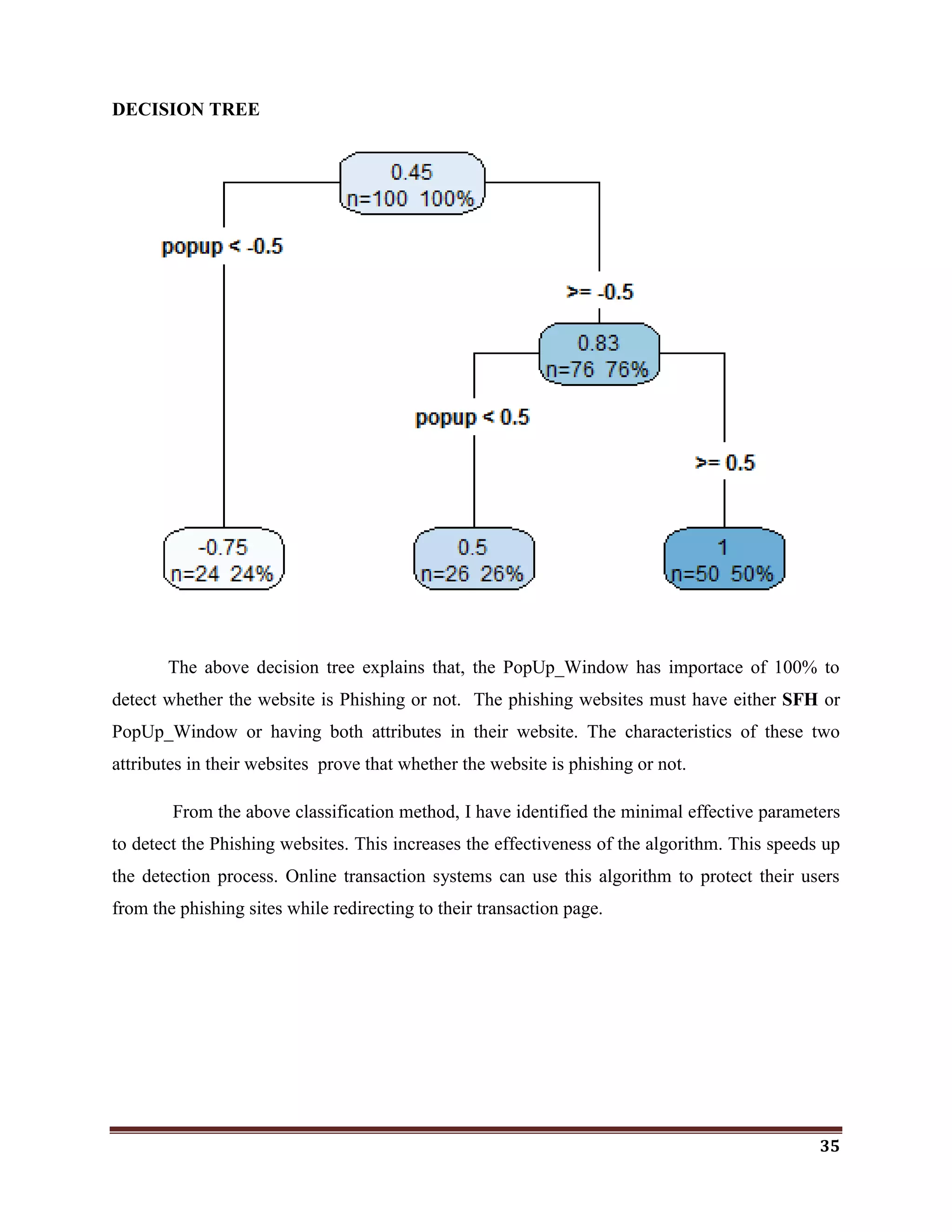
DECISION TREE
The above decision tree explains that, the PopUp_Window has importace of 100% to
detect whether the website is Phishing or not. The phishing websites must have either SFH or
PopUp_Window or having both attributes in their website. The characteristics of these two
attributes in their websites prove that whether the website is phishing or not.
From the above classification method, I have identified the minimal effective parameters
to detect the Phishing websites. This increases the effectiveness of the algorithm. This speeds up
the detection process. Online transaction systems can use this algorithm to protect their users
from the phishing sites while redirecting to their transaction page.
36
6.2 CLASSIFICATION ON CIFAR-10 DATASET USING CNN
Deep learning is just a subset of machine learning. It technically is machine learning and
functions in a similar way (hence why the terms are sometimes loosely interchanged), but its
capabilities are different.
Basic machine learning models do become progressively better at whatever their function
is, but they still some guidance. If an ML algorithm returns an inaccurate prediction, then an
engineer needs to step in and make adjustments. But with a deep learning model, the algorithms
are capable of determining on their own if the prediction are accurate or not.
6.2.1 CLASSIFICATION ON IMAGES
In the previous model, I have used text dataset. The size of that dataset is less. Image
datasets are normally larger. For those larger datasets, the training process is easy in Deep
Learning. Here, I have taken Cifar-10 dataset to classify the images. The Convolution Neural
Network (CNN) is the popular and efficient method to classify image datasets in Deep learning.
CNNs use a variation of multilayer perceptrons designed to require minimal
preprocessing. They are also known as shift invariant or space invariant artificial neural
networks (SIANN), based on their shared-weights architecture and translation invariance
characteristics.
A CNN consists of an input and an output layer, as well as multiple hidden layers. The
hidden layers of a CNN typically consist of convolutional layers, pooling layers, fully connected
layers and normalization layers.
LAYERS USED TO BUILD ConvNets
A ConvNet is a sequence of layers, and every layer of a ConvNet transforms one volume
of activations to another through a differentiable function. I used three main types of layers to
build ConvNet architectures: Convolutional Layer, Pooling Layer, and dropout layer.
37
 INPUT [32x32x3] will hold the raw pixel values of the image, in this case an image of width
32, height 32, and with three color channels R,G,B.
 CONV layer will compute the output of neurons that are connected to local regions in the
input, each computing a dot product between their weights and a small region they are
connected to in the input volume. This may result in volume such as [32x32x12] if we
decided to use 12 filters.
 RELU layer will apply an elementwise activation function, such as
the max(0,x)max(0,x) thresholding at zero. This leaves the size of the volume unchanged
([32x32x12]).
 POOL layer will perform a downsampling operation along the spatial dimensions (width,
height), resulting in volume such as [16x16x12].
ConvNets transform the original image layer by layer from the original pixel values to the
final class scores. Note that some layers contain parameters and other don‘t. In particular, the
CONV/FC layers perform transformations that are a function of not only the activations in the
input volume, but also of the parameters (the weights and biases of the neurons). On the other
hand, the RELU/POOL layers will implement a fixed function. The parameters in the CONV/FC
layers will be trained with gradient descent so that the class scores that the ConvNet computes
are consistent with the labels in the training set for each image.
6.2.2 CIFAR-10 DATASET
The CIFAR-10 dataset consists of 60000 32x32 colour images in 10 classes, with 6000
images per class.
There are 50000 training images and 10000 test images. The dataset is divided into five
training batches and one test batch, each with 10000 images. The test batch contains exactly
1000 randomly-selected images from each class. The training batches contain the remaining
images in random order, but some training batches may contain more images from one class than
another.
The Classes are airplane, automobile, bird, cat, deer, dog, frog, horse, ship, and truck.
The Cifar-10 dataset is collected from https://www.cs.toronto.edu/~kriz/cifar.html
38
6.2.3 DEEP LEARNING ARCHITECTURES
 RNN – Recurrent Neural Networks
Speech Recognition, Handwriting recognition
 LSTM / GRU
Natural Language text Compression, Gesture recognition, Image captioning
 CNN- Convolutional Neural Networks
Image recognition, Video analysis, Natural Language processing
 DBN – Deep Belief Networks
Image recognition, Information retrieval, natural language understanding, failure
prediction
 DSN – Deep Stacking Networks
Image recognition, Continuous Speech recognition
Here I have chosed CNN for Cifar-10 Image recognition.
6.2.4 SCALING DATA
#Training data
train_x<-cifar$train$x/255
#convert a vector class to binary class matrix
#converting the target variable to once hot encoded vectors using keras
inbuilt function to_categorical()
train_y<-to_categorical(cifar$train$y,num_classes = 10)
#Test data
test_x<-cifar$test$x/255
test_y<-to_categorical(cifar$test$y,num_classes=10)
39
6.2.5 CNN ARCHITECTURE FOR CLASSIFYING CIFAR-10
#a linear stack of layers
model<-keras_model_sequential()
#configuring the Model
model %>%
#defining a 2-D convolution layer
layer_conv_2d(filter=32,kernel_size=c(3,3),padding="same", input_shape=c(32,32,3) ) %>%
layer_activation("relu") %>%
#another 2-D convolution layer
layer_conv_2d(filter=32 ,kernel_size=c(3,3)) %>% layer_activation("relu") %>%
#dropout layer to avoid overfitting
layer_dropout(0.25) %>%
layer_conv_2d(filter=32 , kernel_size=c(3,3),padding="same") %>% layer_activation("relu")
%>% layer_conv_2d(filter=32,kernel_size=c(3,3) ) %>% layer_activation("relu") %>%
layer_max_pooling_2d(pool_size=c(2,2)) %>%
layer_dropout(0.25) %>%
#flatten the input
layer_flatten() %>%
layer_dense(512) %>%
layer_activation("relu") %>%
layer_dropout(0.5) %>%
#output layer-10 classes-10 units
layer_dense(10) %>%
#applying softmax nonlinear activation function to the output layer #to calculate cross-
entropy
layer_activation("softmax")
40
ACTIVATION FUNCTIONS
They basically decide whether a neuron should be activated or not. Whether the
information that the neuron is receiving is relevant for the given information or should it be
ignored.
It is used to determine the output of neural network like yes or no. It maps the resulting
values in between 0 to 1 or -1 to 1 etc. (depending upon the function).
The Activation Functions can be basically divided into 2 types-
 Linear Activation Function
 Non-linear Activation Functions
Linear Activation Function
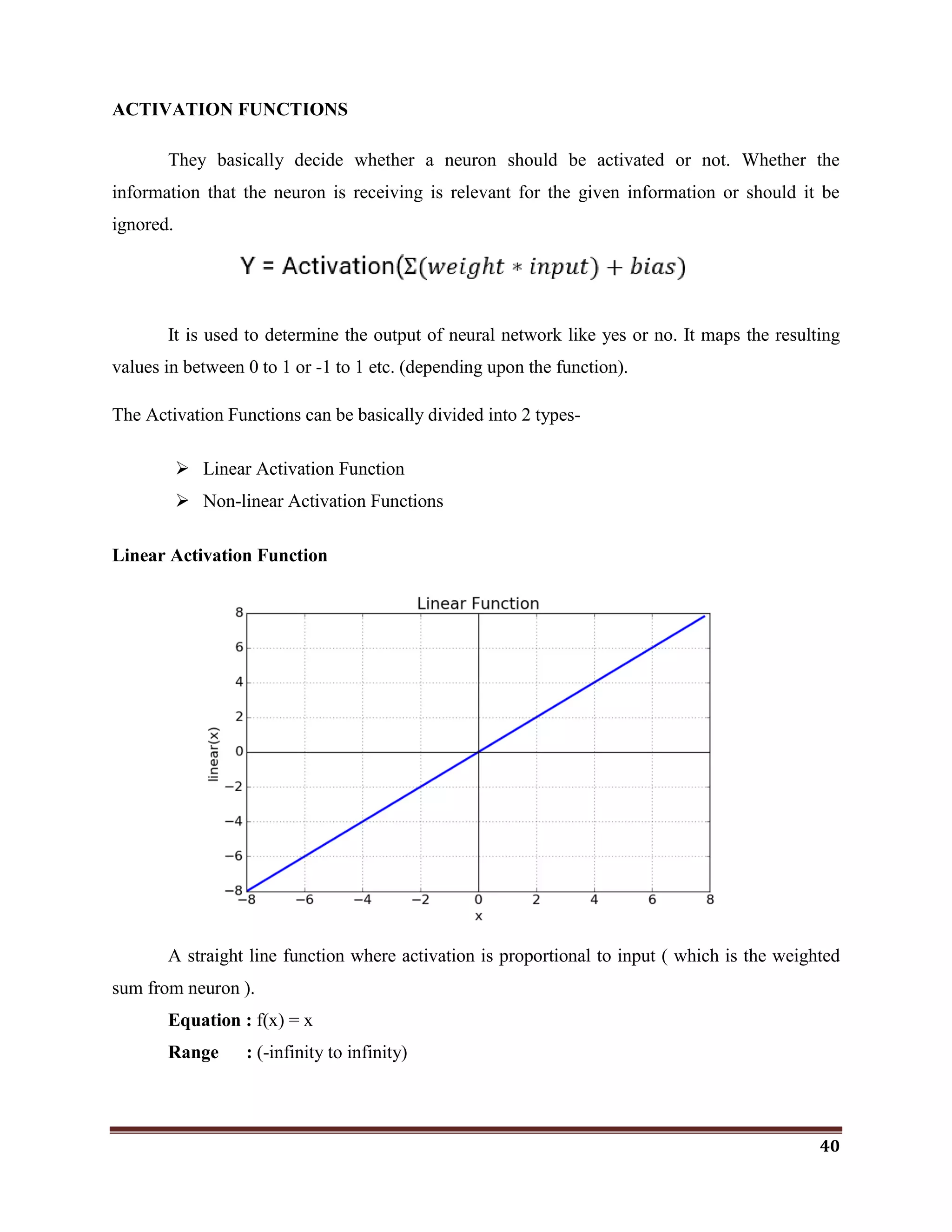
A straight line function where activation is proportional to input ( which is the weighted
sum from neuron ).
Equation : f(x) = x
Range : (-infinity to infinity)
41
Non-linear Activation Function
The Nonlinear Activation Functions are the most used activation functions. It makes it
easy for the model to generalize or adapt with variety of data and to differentiate between the
output.
Non Linear functions are,
The Nonlinear Activation Functions are mainly divided on the basis of their range or
curves
Derivative or Differentia
Change in y-axis w.r.t. change in x-axis.It is also known as slope.
Monotonic
A function varying in such a way that it either never decreases or never increases.
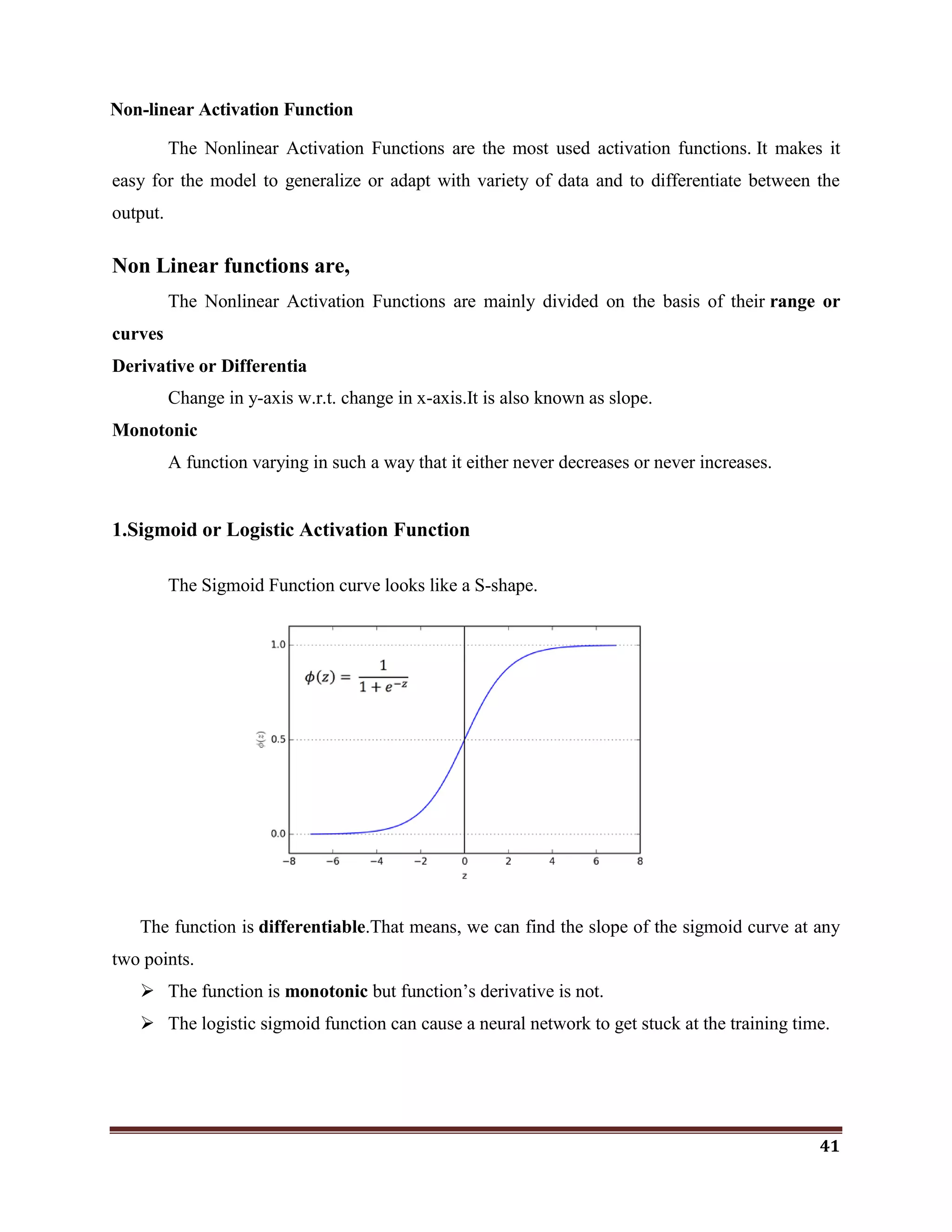
1.Sigmoid or Logistic Activation Function
The Sigmoid Function curve looks like a S-shape.
The function is differentiable.That means, we can find the slope of the sigmoid curve at any
two points.
 The function is monotonic but function‘s derivative is not.
 The logistic sigmoid function can cause a neural network to get stuck at the training time.
42
 The softmax function is a more generalized logistic activation function which is used for
multiclass classification.
2.ReLU(Rectified Linear Unit) Activation Function
The ReLU is half rectified (from bottom).It is f(s) is zero when z is less than zero and f(z)
is equal to z when z is above or equal to zero.
Range: [ 0 to infinity)
The function and its derivative both are monotonic.
But the issue is that all the negative values become zero immediately which decreases the
ability of the model to fit or train from the data properly. That means any negative input given to
the ReLU activation function turns the value into zero immediately in the graph, which in turns
affects the resulting graph by not mapping the negative values appropriately.
Here, I have used ReLU and Softmax Activation functions in CNN Architechture.
softmax gives the probability of output classes.
If the resulting vector for a classification program is [0 .1 .1 .75 0 0 0 0 0 .05], then this
represents a 10% probability that the image is a 1, a 10% probability that the image is a 2, a 75%
probability that the image is a 3, and a 5% probability that the image is a 9
43
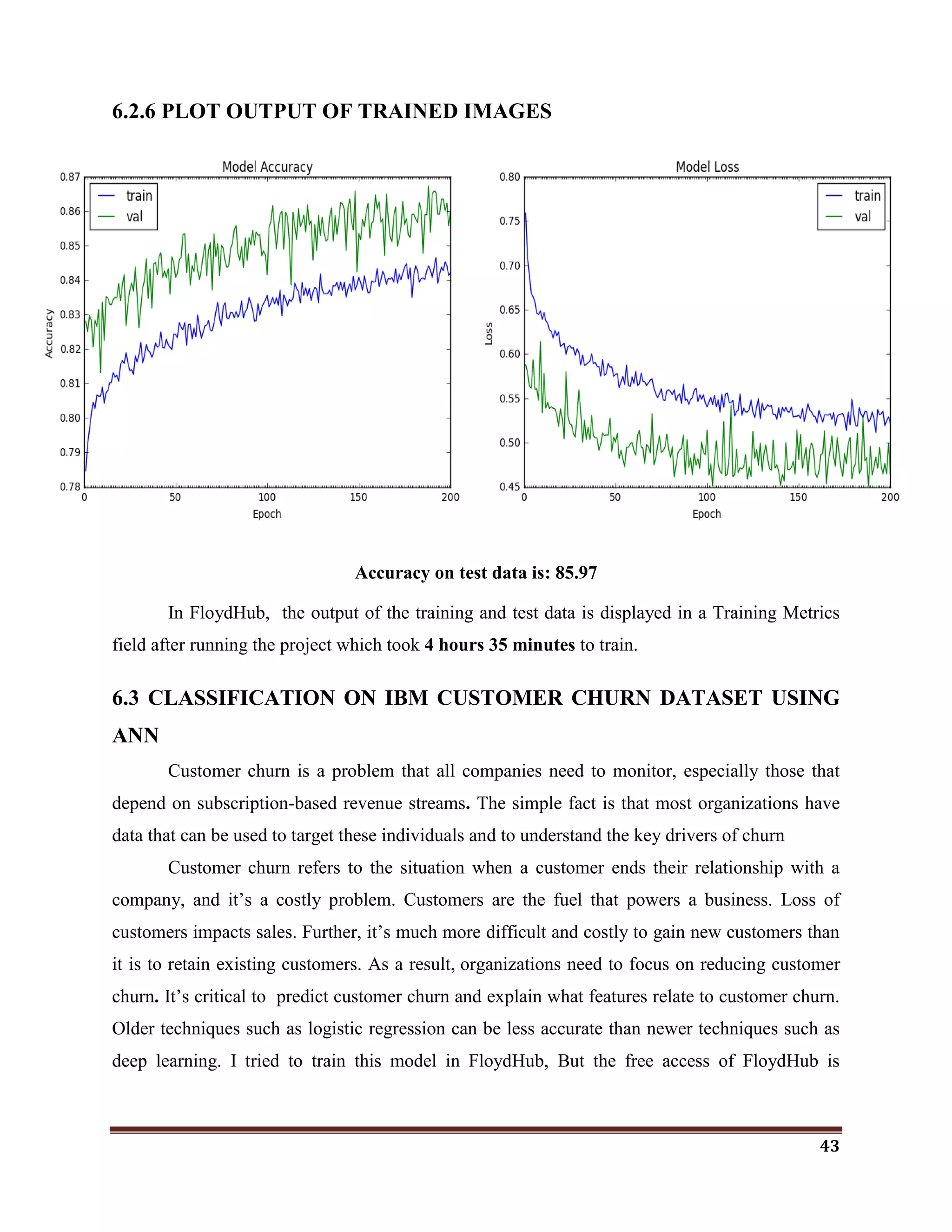
6.2.6 PLOT OUTPUT OF TRAINED IMAGES
Accuracy on test data is: 85.97
In FloydHub, the output of the training and test data is displayed in a Training Metrics
field after running the project which took 4 hours 35 minutes to train.
6.3 CLASSIFICATION ON IBM CUSTOMER CHURN DATASET USING
ANN
Customer churn is a problem that all companies need to monitor, especially those that
depend on subscription-based revenue streams. The simple fact is that most organizations have
data that can be used to target these individuals and to understand the key drivers of churn
Customer churn refers to the situation when a customer ends their relationship with a
company, and it‘s a costly problem. Customers are the fuel that powers a business. Loss of
customers impacts sales. Further, it‘s much more difficult and costly to gain new customers than
it is to retain existing customers. As a result, organizations need to focus on reducing customer
churn. It‘s critical to predict customer churn and explain what features relate to customer churn.
Older techniques such as logistic regression can be less accurate than newer techniques such as
deep learning. I tried to train this model in FloydHub, But the free access of FloydHub is
44
expired. Therefore, I have used Keras with Tensorflow(CPU) Backend to train the deep
learning model using Artificial Neural Network architecture.
6.3.1 DATASET COLLECTION
Dataset collected for this work is IBM Customer Churn Dataset from the following
link.
 https://community.watsonanalytics.com/wp-content/uploads/2015/03/WA_Fn-
UseC_-Telco-Customer-Churn.csv
The dataset includes information about:
 Customers who left within the last month:
The column is called Churn
 Services that each customer has signed up for:
Phone, multiple lines, internet, online security, online backup, device protection,
tech support, and streaming TV and movies
 Customer account information:
How long they‘ve been a customer, contract, payment method, paperless billing,
monthly charges, and total charges
 Demographic info about customers:
Gender, age range, and if they have partners and dependents
6.3.2 PRUNING DATA
churn_data_tbl <- churn_data_raw %>%
select(-customerID) %>%
drop_na() %>%
select(Churn, everything())
churn_data_tbl
It removes the unnecessary rows and columns which are NA and it removes the missing
values.
45
6.3.3 ARTIFICIAL NEURAL NETWORK ARCHITECTURE
# Building Artificial Neural Network
model_keras <- keras_model_sequential()
model_keras %>%
# First hidden layer
layer_dense(
units = 16,
kernel_initializer = "uniform",
activation = "relu",
input_shape = ncol(x_train_tbl)) %>%
# Dropout to prevent overfitting
layer_dropout(rate = 0.1) %>%
# Second hidden layer
layer_dense(
units = 16,
kernel_initializer = "uniform",
activation = "relu") %>%
# Dropout to prevent overfitting
layer_dropout(rate = 0.1) %>%
# Output layer
layer_dense(
units = 1,
kernel_initializer = "uniform",
activation = "sigmoid") %>%
# Compile ANN
compile(
optimizer = 'adam',
loss = 'binary_crossentropy',
metrics = c('accuracy')
)
model_keras
46
ANN ARCHITECTURE
1. Initialize a sequential model:
The first step is to initialize a sequential model with keras_model_sequential()
which is the beginning of the Keras model. The sequential model is composed of a linear
stack of layers.
2. Apply layers to the sequential model:
Layers consist of the input layer, hidden layers and an output layer. The input
layer is the data and provided it‘s formatted correctly there‘s nothing more to discuss.
The hidden layers and output layers controls the ANN inner workings.
 Hidden Layers:
Hidden layers form the neural network nodes that enable non-linear activation
using weights. The hidden layers are created using layer_dense(). Here I have added two
hidden layers. I have appled units=16, which is the number of nodes. I have selected
kernel_initializer=”uniform” and activation=”relu” for both layers. The first layer
needs to have the input_shape=35, which is the number of columns in the training set.
 Dropout Layers:
Dropout layers are used to control overfitting. This eliminates weights below a
cutoff threshold to prevent low weights from overfitting the layers. Here, I have used the
layer_dropout() function add two drop out layers with rate = 0.10 to remove weights
below 10%.
3. Output Layer:
The output layer specifies the shape of the output and the method of assimilating
the learned information. The output layer is applied using the layer_dense(). For binary
values, the shape should be units=1. For multi-classification, the units should
correspond to the number of classes.
4. Compile the model:
The last step is to compile the model with compile(). Here, I have used
optimizer=”adam” which is one of the most popular optimization algorithms. I have
selected loss = “binary_crossentropy” since this is a binary classification problem.
47
6.3.4 # FIT THE KERAS MODEL TO THE TRAINING DATA
fit_keras <- fit(
object = model_keras,
x = as.matrix(x_train_tbl),
y = y_train_vec,
batch_size = 32,
steps_per_epoch = as.integer(1072/32),
epochs = 5,
validation_split = 0.30,
validation_data = as.matrix(x_test_tbl),
shuffle=TRUE,
#class_weight=None,
#sample_weight=None,
initial_epoch=0, validation_steps=as.integer(32))
I have used the fit() function to run the ANN on the training data. The object is the
model, and x and y are the training data in matrix and numeric vector forms, respectively. The
batch_size=32 sets the number samples per gradient update within each epoch. I have set
epochs=5 to control the number of training cycles. I have set validation_split=0.30 to include
30% of the data for model validation, which prevents overfitting.
# PLOT THE TRAINING/VALIDATION HISTORY OF OUR KERAS MODEL
plot(fit_keras) +
theme_tq() +
scale_color_tq() +
scale_fill_tq() +
labs(title = "Deep Learning Training Results")
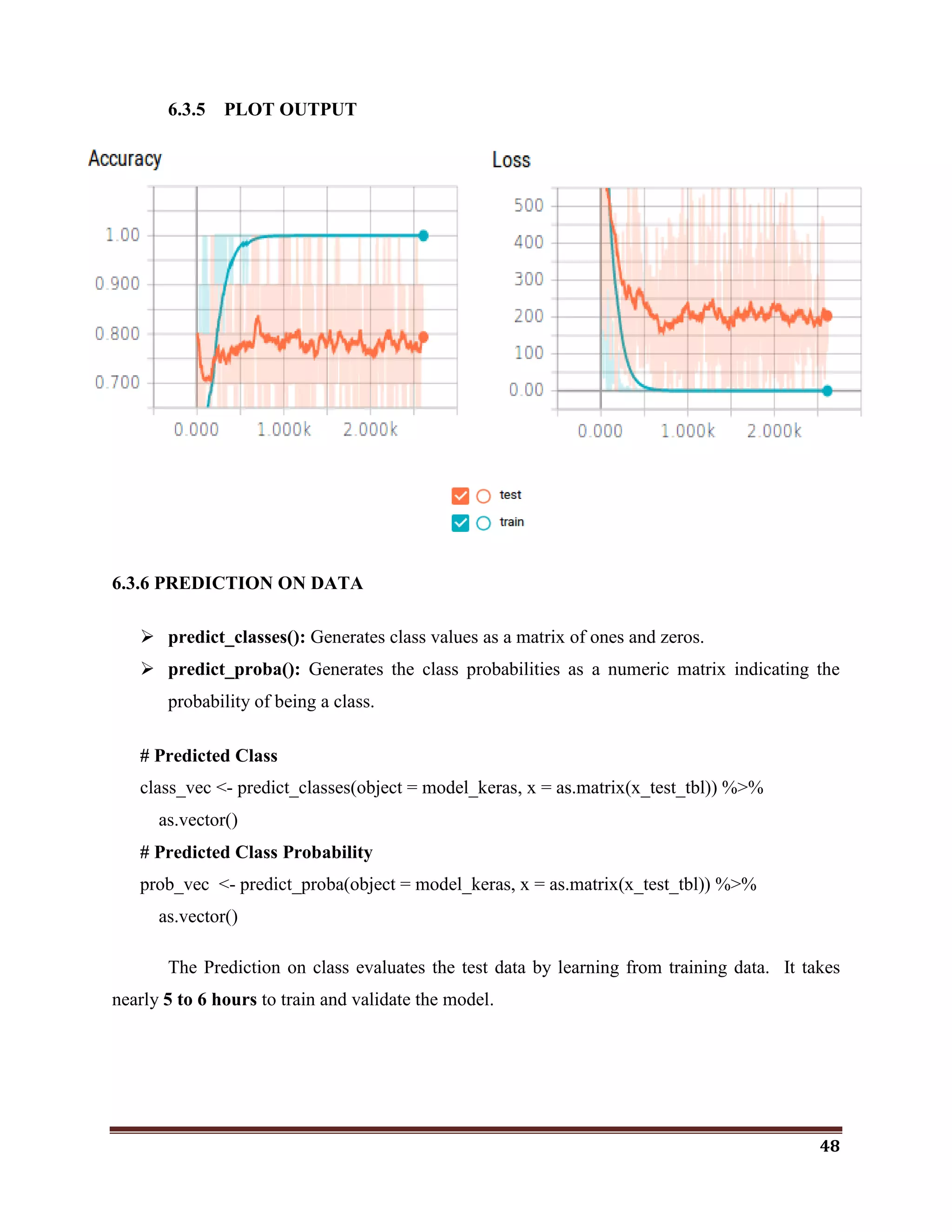
Plotting the Keras model generates the graphical plot output of the training metrics.
48
6.3.5 PLOT OUTPUT
6.3.6 PREDICTION ON DATA
 predict_classes(): Generates class values as a matrix of ones and zeros.
 predict_proba(): Generates the class probabilities as a numeric matrix indicating the
probability of being a class.
# Predicted Class
class_vec <- predict_classes(object = model_keras, x = as.matrix(x_test_tbl)) %>%
as.vector()
# Predicted Class Probability
prob_vec <- predict_proba(object = model_keras, x = as.matrix(x_test_tbl)) %>%
as.vector()
The Prediction on class evaluates the test data by learning from training data. It takes
nearly 5 to 6 hours to train and validate the model.
49
7. PROBLEMS FACED
System specification is not enough to execute the deep learning models. To overcome
this problem, I have tried Microsoft Azure and AWS(Amazon Web Services) to train deep
learning models. But both Azure and AWS requires a Payment details. But, I want to train the
models at free of cost. Finally, I preferred FloydHub which provides 100 Hours free access to
TeslaK80 GPU and CPU machines to train the deep learning models.
Initilly, it was difficult to install Keras and Tensorflow in Rstudio. It requires the conda
environment to use deep learning models in Rstudio. To overcome this problem, I have installed
Anaconda3 5.1.0 to create the conda environment which provides the Tensorflow backend for
Keras library in Rstudio. By creating conda environment on Anaconda3 5.1.0, the process of
Keras and Tensorflow installation was completed successfully.
50
8. CONCLUSION
I wished to use R language for classification using small and large text and image
datasets. Here, I have tried to classify text data set using decision tree algorithm, cifar-10 data
set using Convolutional Neural Network which is a deep-learning model with GPU.and IBM
Customer Churn Dataset using Artificial Neural Network. Further, I have tried to realize the role
of cloud tools in classifying the data especially FloydHub which provides machine with GPU
free for 100 hours. This trial helped me to apply classification further on data sets in different
domains to reveal the hidden facts and patterns using deep learning.

Classification with R

  • 1.
    1 1. ABSTRACT Classification isa central topic in machine learning that has to do with teaching machines how to group together data by particular criteria. Classification is an important tool in today‘s world, where big data is used to make all kinds of decisions in government, economics, medicine, and more. Researchers have access to huge amounts of data, and classification is one tool that helps them to make sense of the data and find patterns. The classification methods and tools are varied according to the size of the dataset. The main objective of this project is to classify the text and image data. Here, I have used two methods, Machine learning on text data set(to detect phishing web sites) and Deep learning to image data sets (to label cifar-10 images) .
  • 2.
    2 2. INTRODUCTION Classification isa central topic in machine learning that has to do with teaching machines how to group together data by particular criteria. Supervised learning is the process where computers group data together based on pre-determined characteristics. There is an unsupervised version of classification, called clustering where computers find shared characteristics by which to group data when categories are not specified. A common example of classification comes with detecting spam emails. To write a program to filter out spam emails, a computer programmer can train a machine learning algorithm with a set of spam- like emails labeled as spam and regular emails labeled as not-spam. The idea is to make an algorithm that can learn characteristics of spam emails from this training set so that it can filter out spam emails when it encounters new emails. Classification is an important tool in today‘s world, where big data is used to make all kinds of decisions in government, economics, medicine, and more. Researchers have access to huge amounts of data, and classification is one tool that helps them to make sense of the data and find patterns. While classification in machine learning requires the use of (sometimes) complex algorithms, classification is something that human do naturally every day. Classification is simply grouping things together according to similar features and attributes. When you go to a grocery store, you can fairly accurately group the foods by food group (grains, fruit, vegetables, meat, etc.) In machine learning, classification is all about teaching computers to do the same.
  • 3.
    3 3. SYSTEM SPECIFICATION HARDWAREREQUIREMENTS  Intel Pentium 2.10 GHz / 500 GB / 2GB SOFTWARE REQUIREMENTS  Windows 8.1 / Rstudio 3.4.3 / Rtools / Keras / Tensorflow / Anaconda3 5.1.0 / FloydHub Keras – Interface between R and Python to implement deep learning models Tensorflow - Backend for Keras in R to implement deep learning models(CPU & GPU Compatibility) Anaconda3 5.1.0 – To provide Conda environment between R and Python FloydHub – Online Cloud Infrastructure service to run Deep Learning Models.
  • 4.
    4 4. LITERATURE REVIEW 1.International Journal of Advance Foundation and Research in Computer (IJAFRC), Volume 3, Issue 4, April – 2016. ISSN : 2348 – 4853, Impact Factor – 1.317, “Link Guard Algorithm approch on Phishing Detection and Control”. ABSTRACT Phishing is a new type of network attack where the attacker creates a replica of an existing Web page to fool users (e.g., by using specially designed e-mails or instant messages) into submitting personal, financial, or password data to what they think is their service provides‘ Web site. In this research paper, we proposed a new end-host based anti-phishing algorithm, which we call Link Guard, by utilizing the generic characteristics of the hyperlinks in phishing attacks. These characteristics are derived by analyzing the phishing data archive provided by the Anti-Phishing Working Group (APWG). Because it is based on the generic characteristics of phishing attacks, Link Guard can detect not only known but also unknown phishing attacks. We have implemented Link Guard in Windows XP. Our experiments verified that Link Guard is effective to detect and prevent both known and unknown phishing attacks with minimal false negatives. Link Guard successfully detects 195 out of the 203 phishing attacks. Our experiments also showed that Link Guard is light weighted and can detect and prevent phishing attacks in real time. Index Terms: Hyperlink, Link Guard algorithm. Network security, Phishing attacks. 2. International Journal of Engineering and Techniques - Volume 2, Issue 5, Sep – October 2016. “Automated Phishing Website Detection Using URL Features and Machine Learning Technique” ABSTRACT Malicious URL, a.k.a. malicious website, is a common and serious threat to cybersecurity. Malicious URLs host unsolicited content (spam, phishing, drive-by exploits, etc.) and lure unsuspecting users to become victims of scams, and cause losses of billions of dollars every year. It is imperative to detect and act on such threats in a timely manner. Traditionally, this detection is done mostly through the usage of blacklists. However, blacklists cannot be exhaustive, and lack the ability to detect newly generated malicious URLs. To improve the generality of malicious URL detectors, machine learning techniques have been explored with increasing attention in recent years. This article aims to provide a comprehensive survey and a
  • 5.
    5 structural understanding ofMalicious URL Detection techniques using machine learning. We present the formal formulation of Malicious URL Detection as a machine learning task, and categorize and review the contributions of literature studies that addresses different dimensions of this problem (feature representation, algorithm design, etc.). Further, this article provides a timely and comprehensive survey for a range of different audiences, not only for machine learning researchers and engineers in academia, but also for professionals and practitioners in cybersecurity industry, to help them understand the state of the art and facilitate their ownresearchandpracticalapplications.Wealsodiscusspractical issues in system design, open research challenges, and point out some important directions for future research. Index Terms— Malicious URL Detection, Machine Learning, Online Learning, Internet security, Cybersecurit PROPOSED WORK Phishing is an unlawful activity of making gullible people to reveal their insightful information into fake websites. The Aim of these phishing websites is to acquire confidential information such as usernames, passwords, banking credentials and some other personal information. Phishing website looks similar to legitimate website. Therefore people cannot make difference among them. Today, users are heavily relying on the internet for online purchasing, ticket booking, bill payments, etc. As technology advances, the phishing approaches being used are also getting progressed and hence it stimulates anti-phishing methods to be upgraded. There are many algorithms used to identify the Phishing Websites which use the maximum of 30 parameters. Here, I‘ve tried to prove that the minimal effective parameters are sufficient for the detection of phishing websites. By using those minimal effective parameters, we would be able to identify the phishing websites.
  • 6.
    6 5. SOFTWARE DESCRIPTION 5.1MACHINE LEARNING Machine Learning is the science of getting computers to learn and act like humans do, and improve their learning over time in autonomous fashion, by feeding them data and information in the form of observations and real-world interactions. Machine Learning is the practice of using algorithms to parse data, learn from it, and then make a determination or prediction about something in the world. Regardless of learning style or function, all combinations of machine learning algorithms consist of the following:  Representation (a set of classifiers or the language that a computer understands)  Evaluation (aka objective/scoring function)  Optimization (search method; often the highest-scoring classifier, for example; there are both off-the-shelf and custom optimization methods used) MACHINE LEARNING PACKAES IN R R is the pre-eminent choice among data professionals who want to understand and explore data, using statistical methods and graphs. It has several machine learning packages and advanced implementations for the top machine learning algorithms – which every data scientist must be familiar with, to explore, model and prototype the given data.
  • 7.
    7 “MICE” Package –Takes care of your Missing Values If missing values are something which haunts you then MICE package is the real friend of yours. When we face an issue of missing values we generally go ahead with basic imputations such as replacing with 0, replacing with mean, replacing with mode etc. but each of these methods are not versatile and could result into a possible data discrepancy. MICE package helps you to impute missing values by using multiple techniques, depending on the kind of data you are working with. “rpart” package: Lets partition your data (rpart) package in R language, is used to build classification or regression models using a two stage procedure and the resultant models is represented in the form of binary trees. The basic way to plot any regression or classification tree using the rpart package is to call the plot() function. The results might not be pretty by just using the basic plot() function, so there is an alternative i.e. the prp() function which is powerful and flexible. prp() function in rpart.plot package is often referred to as the authentic Swiss army knife for plotting regression trees. rpart() function helps establish a relationship between a dependant and independent variables so that a business can understand the variance in the dependant variables based on the independent variables. “PARTY”: partition your data PARTY package in R is used for recursive partitioning and this package reflects the continuous development of ensemble methods. PARTY is yet another package to build decision trees based on Conditional Inference algorithm. ctree() is the main function of PARTY package which is used extensively, which reduces the training time and bias.
  • 8.
    8 Similar to otherpredictive analytics functions in R, PARTY also has similar syntax i.e., ctree(formula,data) which will build your decision tree, taking the default values of various arguments into consideration which can be tweaked based on requirements. “CARET”: Classification And REgression Training Classification and REgression Training (CARET) package is developed with the intent to combine model training and prediction. Data scientists can run several different algorithms for a given business problem using the CARET package. Data scientists might not be aware as to which is the best algorithm for a given problem. CARET package helps investigate the optimal parameters for an algorithm with controlled experiments. The grid search method of the caret R package searches parameters by combining various methods to estimate the performance of a given model. To build any predictive model, CARET uses train() function; The syntax of train function looks like train(formula, data, method) Every package or function in R has some default values associated with it, before applying any algorithm you must know about the various options available. Passing default values will throw you some result but you can‘t be sure that the output is the most optimized or accurate one. There are many other machine learning packages available in the CRAN repository like igraph, glmnet, gbm, tree, CORElearn, mboost, etc. which are used in different industries to build performance efficient models. We have observed the scenarios where changing just one parameter can modify the output completely. So, don‘t rely on default values of parameters – Understand your data and requirements before applying any algorithm.
  • 9.
    9 5.2 DEEP LEARNING Insteadof organizing data to run through predefined equations, deep learning sets up basic parameters about the data and trains the computer to learn on its own by recognizing patterns using many layers of processing.  Deep learning requires large amounts of labeled data.  Deep learning requires substantial computing power. (High-performance GPUs combined with clusters or cloud computing is preferable)  Most deep learning methods use neural network architectures, which is why deep learning models are often referred to as deep neural networks. In deep learning, a computer model learns to perform classification tasks directly from images, text, or sound. Deep learning models can achieve state-of-the-art accuracy, sometimes exceeding human-level performance. Models are trained by using a large set of labeled data and neural network architectures that contain many layers. A typical representation of a deep neural network is depicted in Figure 1. Figure 1. Representation of deep neural network HOW DEEP LEARNING WORKS Most deep learning methods use neural network architectures, which is why deep learning models are often referred to as deep neural networks. The term ―deep‖ usually refers
  • 10.
    10 to the numberof hidden layers in the neural network. Traditional neural networks only contain 2- 3 hidden layers, while deep networks can have as many as 150. Deep learning models are trained by using large sets of labeled data and neural network architectures that learn features directly from the data without the need for manual feature extraction. One of the most popular types of deep neural networks is known as convolutional neural networks (CNN or ConvNet). A CNN convolves learned features with input data, and uses 2D Convolutional layers, making this architecture well suited to processing 2D data, such as images. CNNs eliminate the need for manual feature extraction, so you do not need to identify features used to classify images. The CNN works by extracting features directly from images. The relevant features are not pre-trained; they are learned while the network trains on a collection of images. This automated feature extraction makes deep learning models highly accurate for computer vision tasks such as object classification.
  • 11.
    11 Figure 2. Exampleof a network with many convolutional layers. Filters are applied to each training image at different resolutions, and the output of each convolved image serves as the input to the next layer. PACKAGES FOR DEEP LEARNING IN R The R programming language has gained considerable popularity among statisticians and data miners for its ease-of-use, as well as its sophisticated visualizations and analyses. With the advent of the deep learning era, the support for deep learning in R has grown ever since, with an increasing number of packages becoming available. This section presents an overview on deep learning in R as provided by the following packages: MXNetR, darch, deepnet, H2O and deepr. Package Available architectures of neural networks MXNetR Feed-forward neural network, convolutional neural network (CNN) Darch Restricted Boltzmann machine, deep belief network Deepnet Feed-forward neural network, restricted Boltzmann machine, deep belief network, stacked autoencoders H2O Feed-forward neural network, deep autoencoders Deepr Simplify some functions from H2O and deepnet packages Package “MXNetR” The MXNetR package is an interface of the MXNet library written in C++. It contains feed-forward neural networks and convolutional neural networks (CNN) (MXNetR 2016a). It also allows one to construct customized models. This package is distributed in two versions: CPU only or GPU version. The former CPU version can be easily installed directly from inside R, whereas the latter GPU version depends on 3rd party libraries like cuDNN and requires building the library from its source code (MXNetR 2016b). Package “darch” The darch package (darch 2015) implements the training of deep architectures, such as deep belief networks, which consist of layer-wise pre-trained restricted Boltzmann machines.
  • 12.
    12 The package alsoentails backpropagation for fine-tuning and, in the latest version, makes pre- training optional. Training of a Deep Belief Network is performed via darch() function. Package “deepnet” deepnet (deepnet 2015) is a relatively small, yet quite powerful package with variety of architectures to pick from. It can train a feed-forward network using the function nn.train() or initialize weights for the deep belief network with dbn.dnn.train(). This function internally uses rbm.train() to train a restricted Boltzmann machine (which can also be used individually). Furthermore, deepnet can also handle stacked autoencoders via sae.dnn.train(). Package “H2O” H2O is an open-source software platform with the ability to exploit distributed computer systems (H2O 2015). Its core is coded in Java and requires the latest version of JVM and JDK, which can be found at https://www.java.com/en/download/. The package provides interfaces for many languages and was originally designed to serve as a cloud-based platform (Candel et al. 2015). Accordingly, one starts H2O by calling h2o.init(). Package “deepr” The package deepr (deepr 2015) doesn‘t implement any deep learning algorithms itself but forwards its tasks to H20. The package was originally designed at a time when the H2O package was not yet available on CRAN. As this is no longer the case, we will exclude it from our comparison. We also note that its function train_rbm() uses the deepnet implementation of rbm to train a model with some additional output. DEEP LEARNING Vs MACHINE LEARNING Deep learning is a specialized form of machine learning. A machine learning workflow starts with relevant features being manually extracted from images. The features are then used to create a model that categorizes the objects in the image. With a deep learning workflow, relevant features are automatically extracted from images. In addition, deep learning performs ―end-to-
  • 13.
    13 end learning‖ –where a network is given raw data and a task to perform, such as classification, and it learns how to do this automatically. Another key difference is deep learning algorithms scale with data, whereas shallow learning converges. Shallow learning refers to machine learning methods that plateau at a certain level of performance when you add more examples and training data to the network. A key advantage of deep learning networks is that they often continue to improve as the size of your data increases. Figure 3. Comparing a machine learning approach to categorizing vehicles (left) with deep learning (right). Machine learning offers a variety of techniques and models you can choose based on your application, the size of data you're processing, and the type of problem you want to solve. A successful deep learning application requires a very large amount of data (thousands of images) to train the model, as well as GPUs, or graphics processing units, to rapidly process your data. 5.3 RSTUDIO R is rapidly becoming the leading language in data science and statistics. Today, R is the tool of choice for data science professionals in every industry and field. It is the best for statistical, data analysis and machine learning . R is an integrated suite of software facilities for data manipulation, calculation and graphical display. Among other things it has an effective data handling and storage facility, a suite of operators for calculations on arrays, in particular matrices, a large, coherent, integrated collection of intermediate tools for data analysis, graphical facilities for data analysis and display
  • 14.
    14 either directly atthe computer or on hardcopy, and a well developed, simple and effective programming language (called ‗S‘) which includes conditionals, loops, user defined recursive functions and input and output facilities. R is very much a vehicle for newly developing methods of interactive data analysis. It has developed rapidly, and has been extended by a large collection of packages. However, most programs written in R are essentially ephemeral, written for a single piece of data analysis. 5.4 KERAS  Keras provides a high-level neural networks API developed with a focus on enabling fast experimentation. Keras has the following key features:  Allows the same code to run on CPU or on GPU,.  User-friendly API which makes it easy to quickly prototype deep learning models.  Supports arbitrary network architectures: multi-input or multi-output models, layer sharing, model sharing, etc.  Is capable of running on top of multiple back-ends including Tensorflow, CNTK or Theano. 5.5 TENSORFLOW  TensorFlow is an open source software library for numerical computation using data flow graphs. Nodes in the graph represent mathematical operations, while the graph edges represent the multidimensional data arrays (tensors) communicated between them.  The flexible architecture allows you to deploy computation to one or more CPUs or GPUs in a desktop, server, or mobile device with a single API.  The TensorFlow API is composed of a set of Python modules that enable constructing and executing TensorFlow graphs. The tensorflow package provides access to the complete TensorFlow API from within R.
  • 15.
    15 INSTALLATION OF KERASWITH TENSORFLOW AT THE BACKEND. The steps to install Keras in RStudio is very simple. If we follow the below steps, first Neural Network Model in R would be ready. Install.packages(“devtools”) devtools::install_github(“rstudio/keras”) The above step will load the keras library from the GitHub repository. Now it is time to load keras into R and install tensorflow. library(keras) By default, RStudio loads the CPU version of tensorflow. Use the below command to download the CPU version of tensorflow. Install_tensorflow() To install the tensorflow version with GPU support for a single user/desktop system, use the below command. Install_tensorflow(gpu=TRUE) 5.6 DECISION TREE Tree based learning algorithms are considered to be one of the best and mostly used supervised learning methods. Tree based methods empower predictive models with high accuracy, stability and ease of interpretation. Unlike linear models, they map non-linear relationships quite well. They are adaptable at solving any kind of problem at hand (classification or regression).
  • 16.
    16 Decision tree isa graph to represent choices and their results in form of a tree. The nodes in the graph represent an event or choice and the edges of the graph represent the decision rules or conditions. It is mostly used in Machine Learning and Data Mining applications using R.  Decision tree is the most powerful and popular algorithm for classification and prediction.  By applying this algorithm, the most effective attribute(s) can be found out to detect the phishing website. RECURSIVE PARTITIONING ALGORITHMS HAVE TWO BASIC STEPS 1. Given a subset of training data, find the best feature for predicting the labels on that subsets. 2. Find a split on that feature that best seperates the labels, and split into two new subsets. 3. Repeat steps one and two recursively until you meet a new stopping criterion. ADVANTAGES OF DECISION TREES 1. Easy to Understand: Decision tree output is very easy to understand even for people from non- analytical background. It does not require any statistical knowledge to read and interpret them. Its graphical representation is very intuitive and users can easily relate their hypothesis. 2. Useful in Data exploration: Decision tree is one of the fastest way to identify most significant variables and relation between two or more variables. With the help of decision trees, we can create new variables / features that has better power to predict target variable. For example, we are working on a problem where we have information available in hundreds of variables, there decision tree will help to identify most significant variable.
  • 17.
    17 3. Less datacleaning required: It requires less data cleaning compared to some other modeling techniques. It is not influenced by outliers and missing values to a fair degree. 4. Data type is not a constraint: It can handle both numerical and categorical variables. 5. Non Parametric Method: Decision tree is considered to be a non-parametric method. This means that decision trees have no assumptions about the space distribution and the classifier structure. DISADVANTAGES 1. Over fitting: Over fitting is one of the most practical difficulty for decision tree models. This problem gets solved by setting constraints on model parameters and pruning (discussed in detailed below). 2. Not fit for continuous variables: While working with continuous numerical variables, decision tree looses information when it categorizes variables in different categories. HOW DOES A TREE DECIDE WHERE TO SPLIT? The decision of making strategic splits heavily affects a tree‘s accuracy. The decision criteria is different for classification and regression trees. Decision trees use multiple algorithms to decide to split a node in two or more sub-nodes. The creation of sub-nodes increases the homogeneity of resultant sub-nodes. In other words, we can say that purity of the node increases with respect to the target variable. Decision tree splits the nodes on all available variables and then selects the split which results in most homogeneous sub-nodes. The algorithm selection is also based on type of target variables.
  • 18.
    18 LIBRARIES PROVIDED BYR TO IMPLEMENT DECISION TREE  rpart R provides a library named ‗rpart‘ which represents ‗Recursive Partitioning‘ to perform the decision tree operations.  rpart.plot It also provides a library named ‗rpart.plot‘ which represents ‗Recursive Partitioning- plot‘ to produce the Graphical Representation of a Decision tree model. 5.7 ANACONDA3 5.1.0 Anaconda is a free and open source distribution of the Python and R programming languages for large-scale data processing, predictive analytics, and scientific computing, that aims to simplify package management and deployment. Package versions are managed by the package management system conda. INSTALLING ANACONDA FOR RSTUDIO IN WINDOWS 1. Visit the Anaconda page https://www.anaconda.com/download/#windows and download windows installer for Python 3.6 version according to your OS type 64 bit/32 bit. 2. Install Anaconda by double click on the downloaded exe file, and follow the installation wizard. 3. After finishing the installation, verify whether the Conda is installed correctly or not 4. Open the Anaconda3 terminal, and give the following command to check. Conda –V It will show the installation version of Conda environment like, conda 4.3.34 5. Verify whether the Python is installed correctly or not by giving this command. python –V It will show the Installation version of Python environment like,
  • 19.
    19 python 3.6.4 ::Anaconda custom (64-bit) 6. If the setup has any errors in conda or python. Check whether your conda package has updated or not. To update your conda package, use the following command. conda update –n base conda conda update anaconda 5.8 FLOYDHUB To train the Deep learning models, High computing power machines such as GPU powered machines are needed, practically which is not possible. I have tried to run the Deep Learning models in a cloud platform. Many Cloud Service providers such as Microsoft Azure, Amazon Web Services which ar e provide those deep learning services under Payment details. I just want to train my deep learning models at free of cost. FloydHub is a opensource environment to run the Deep Learning models interactively. FloydHub provides GPU powered machines at free of cost 100 Hours. It uses the Floyd-cli to interact with the FloydHub server. STEPS TO USE FLOYDHUB TO RUN DEEP LEARNING MODELS 1. Create a FloydHub Account 2. Install the Floydhub – cli into your local machine.  There are two ways to install Floydhub in your machine.  Using Conda
  • 20.
    20 $ conda install-y -c conda-forge -c floydhub floyd-cli  Using pip $ pip install -U floyd-cli 3. Login to Floydhub using Floyd-cli $ floyd login –u <user-name> It requires a password. Please enter your password. If you have a valid Floydhub account it displays Login Successfully. For example, $ floyd login -u najimabegum Please enter your password: Login Successful as najimabegum 4. Create a New Project in the Floydhub A Project is a collection of the jobs you run along with their logs and results.  To create a new Project, visit www.floydhub.com/projects and click on the "New Project" button on the top right hand corner.  Enter the Project Name, Project Description and visibility of the project if you have a prime account. If it is a free account projects are set as public always.
  • 21.
    21 5. Create theDataset A Dataset is a collection of data. If you have used Github, datasets in FloydHub are a lot like code repositories, except they are for storing and versioning data.  To create a new Dataset, visit www.floydhub.com/datasets and click on the "New Dataset" button on the top right hand corner.  Steps to creating a dataset is similar to the creation of New Project. Enter the Dataset Name, Dataset Description and visibility of the project if you have a prime account. If it is a free account, projects are set as public always. 6. Upload the Dataset Once you have created a dataset, you can upload data from your terminal using the Floyd data command: 1. floyd data init <dataset_name> 2. floyd data upload
  • 22.
    22  Dataset uploadsare resumable. If your Internet connection cuts out during an upload, you'll be able to resume it later if you choose to.  If your upload has stopped before it completing, resume it using the --resume or -r flag: 7. Run a job Running jobs is the core action in the FloydHub workflow. A job pulls together your code and dataset(s), sends them to a deep-learning server configured with the right environment, and actually kicks off the necessary code to get the data science done. The floyd run command is used to run the job. PARTS OF THE floyd run COMMAND [OPTIONS]  Instance Type : --cpu or --gpu or --cpu2 or --gpu2  Dataset(s) : --data  Mode : --mode  Environment : --env  Message : --message or -m  Tensorboard : --tensorboard INSTANCE TYPE To specify the instance type means to choose what kind of FloydHub instance your job will run on. Think of this as a hardware choice rather than a software one. (The software environment is declared with the Environment (--env) OPTION of floyd run command.) Floyd run Flag Instance type Description --gpu GPU Tesla K80 GPU Machine --gpu2 GPU Tesla V100 GPU Machine --cpu CPU 2 core low performance CPU Machine --cpu2 CPU 8 core high performance CPU Machine
  • 23.
    23 DATASET(S) You can specifyup to five datasources (datasets or outputs from previous jobs) to mount to the server that will be running your job. For each datasource, specify the --data flag as detailed below: --data <name_of_datasource>:<mount_point_on_server> MODE FloydHub jobs can currently be run in one of three modes: 1. –mode job (DEFAULT) 2. –mode jupyter 3. –mode serve ENVIRONMENT Specifying the environment means choosing what major deep-learning software packages you want available on the server that runs your code. FloydHub offers servers with many different deep-learning software packages pre-installed such as, keras, Tensorflow, caffe, MxNet, PyTorch, Theano, Chainer Use the --env flag to specify which environment you would like your job to run in. For Example, $ floyd run --env tensorflow-1.3 "python train.py" $ floyd run --env pytorch-0.2 "python train.py" MESSAGE Using --message or -m, you can specify a message that describes your job. The job message will be displayed at various places on floydhub.com and is useful when reviewing past jobs that you'd like to iterate on. 8. Run a job using CPU vs GPU When you run a job using the floyd run command, it is executed on a CPU instance on FloydHub's servers, by default.
  • 24.
    24 $ floyd run"python mnist_cnn.py" You can also force your job to execute on on a CPU using the --cpu flag $ floyd run --cpu "python mnist_cnn.py" If you want to run your job on a GPU, simply add the --gpu flag. Just make sure your code is optimized to use the available GPU. $ floyd run --gpu "python mnist_cnn.py" CHECKING GPU STATUS You can check the GPU stats by running a dummy job that executes the nvidia- smi command. $ floyd run --gpu "nvidia-smi" $ Floyd logs –t <Job-Name> 9. Stop the Job You can stop a queued or running job using Floyd CLI or using the web interface on floydhub.com by click on Cancel button nearer to the job. Using CLI A job can be stopped using the floyd stop command and passing it the name of your job, as shown below: $ floyd stop mckay/projects/ssh/2 Experiment shutdown request submitted. Check status to confirm shutdown
  • 25.
    25 10. Save Output Savinginformation generated during a job is easy. On a FloydHub deep learning server your code has access to a directory called /output. The /output directory is a special directory that is used to store information you want to save for future use after a job finishes. Anything saved in the /output directory at the time a job finishes will be preserved and can be accessed and reused later. You can view the saved output of a job using the floyd output command: $ floyd output mckay/projects/quick-start/1 Opening output directory in your browser... Alternatively, you can browse or download the saved output by visiting the OUTPUT tab of the job on your dashboard as shown in the image below:
  • 26.
    26 6. PROJECT DESCRIPTION 6.1CLASSIFICATION ON PHISHING WEBSITES USING DECISION TREE Machine learning is a field within computer science, it differs from traditional computational approaches. Machine learning algorithms allow computers to train on data inputs and use statistical analysis in order to output values that fall within a specific range. Because of this, machine learning facilitates computers in building models from sample data in order to automate decision-making processes based on data inputs. Machine Learning is possible through many algorithms. Here, I have focused on the comparative study of Random Forest and Link Guard Algorithms to identify minimal effective parameters for the Detection of Phishing websites using R. Both algorithms have followed different ways and parameters to detect the phishing websites. They have used many parameters to detect the phishing websites exactly. Here, I‘ve proved that the minimal effective parameters are sufficient for the detection of phishing websites. By using those minimal parameters, we would be able to identify the phishing websites faster. 6.1.1 COMPARISION OF LINK GUARD AND RANDOM FOREST ALGORITHMS Random Forest Link Guard It is one of the classification method It is also one of the classification method The result accuracy of this algorithm is 99.7% The result accuracy of this algorithm is 99.1% It uses both low false negative (FN) and low false positive(FP) rates It uses low false negative (FN) only. To train the dataset, it uses Vector representation. To train the dataset, it uses Pattern matching. It uses regression It uses end-host based approach
  • 27.
    27 ATTRIBUTES USED 1. @attributehaving_IP_Address { -1,1 } 2. @attribute URL_Length { 1,0,-1 } 3. @attribute Shortining_Service { 1,-1 } 4. @attribute having_At_Symbol { 1,-1 } 5. @attribute double_slash_redirecting { -1,1 } 6. @attribute Prefix_Suffix { -1,1 } 7. @attribute having_Sub_Domain { -1,0,1 } 8. @attribute SSLfinal_State { -1,1,0 } 9. @attribute Domain_registeration_length { -1,1 } 10. @attribute Favicon { 1,-1 } 11. @attribute port { 1,-1 } 12. @attribute HTTPS_token { -1,1 } 13. @attribute Request_URL { 1,-1 } 14. @attribute URL_of_Anchor { -1,0,1 } 15. @attribute Links_in_tags { 1,-1,0 } 16. @attribute SFH { -1,1,0 } 17. @attribute Submitting_to_email { -1,1 } 18. @attribute Abnormal_URL { -1,1 } 19. @attribute Redirect { 0,1 } 20. @attribute on_mouseover { 1,-1 } 21. @attribute RightClick { 1,-1 } 22. @attribute popUpWindow { 1,-1 } 23. @attribute Iframe { 1,-1 } 24. @attribute age_of_domain { -1,1 } 25. @attribute DNSRecord { -1,1 } 26. @attribute web_traffic { -1,0,1 } 27. @attribute Page_Rank { -1,1 } 28. @attribute Google_Index { 1,-1 } 29. @attribute Links_pointing_to_page { 1,0,-1 } 30. @attribute Statistical_report { -1,1 } Here, I‘ve found that a maximum of 30 attributes are used to detect the Phishing websites. Among these, I‘ve tried to find the most important and the minimal effective parameters to classify the phishing websites.
  • 28.
    28 DATASET I used adataset of phishing website publicly available on the machine learning repository provided by UCI. You don‘t have to download the dataset yourself as it is included directly in this repository (dataset.csv le) and was downloaded on your machine when you cloned this repository.  https://archive.ics.uci.edu/ml/datasets.html  https://www.phishtank.com/ 6.1.2 FIND THE MINIMAL EFFECTIVE ATTRIBUTES CODE #import package library(rpart) library(rpart.plot) #Load data psite <- read.csv("G:MLDecision TreeDatasetsPhishingweb.csv") #Fit Model mod <- rpart(Result~., data = psite[1:1200,]) summary(mod) rpart.plot(mod, type= 4, extra= 101) p <- predict(mod, psite[,1:9]) table(p,psite$Result)
  • 29.
    29 OUTPUT VARIABLE IMPORTANCE SFH -47 popUpWindow - 20 SSLfinal_State -- 19 URL_of_Anchor - 5 age_of_domain - 4 web_traaffic - 3 Request_URL - 1 URL_Length - 1
  • 30.
    30 DECISION TREE Attribute Selectionmeasures in Decision Tree The below are the some of the assumptions we make while using Decision tree:  At the beginning, the whole training set is considered as the root.  Feature values are preferred to be categorical. If the values are continuous then they are discretized prior to building the model.  Records are distributed recursively on the basis of attribute values.  Order to placing attributes as root or internal node of the tree is done by using some statistical approach. 6.1.3 SERVER FORM HANDLER VERIFICATION SFHs that contain an empty string or “about:blank” are considered doubtful because an action should be taken upon the submitted information. In addition, if the domain name in SFHs is different from the domain name of the webpage, this reveals that the webpage is suspicious because the submitted information is rarely handled by external domains.
  • 31.
    31 Rule:IF SFH is "about:blank" Or Is Empty → Phishing SFH Refers To A Different Domain → Suspicious Otherwise → Legitimate  In the Decision tree, Server Form Handler(SFH) is set to be root. It indicates that SFH plays a vital role in detecting phishing websites.  The importance of SFH variable is 47.  So, I tried to prove that, the SFH is a Minimal effective parameter to identify the phishing websites.  For that, the SFH is extracted from the Link. If SFH occurs the FP(False Positive) value is set to be 1. else set to be -1. If possibilities of SFH in the Link is founded FP value is set to be 0. CODE TO CHECK WHETHER THE SFH IS SUFFICIENT TO DETECT PHISHING WEBSITES OR NOT library(party) library(rpart.plot) #Load data sites <- read.csv("G:MLSFHds.csv") #Fit Model model <- rpart(Result~., data = sites[1:100,]) summary(model) rpart.plot(model, type= 4, extra= 101) ps <- predict(model, psite[,1:2]) table(ps,sites$Result)
  • 32.
    32 OUTPUT VARIABLE IMPORTANCE SFH -100 The variable importance for SFH is 100. DECISION TREE
  • 33.
    33 The above decisiontree indicates that, if a url contains SFH, then definitely it is a phishing website. However, Few websites are found to be phishing even if they don‘t have SFH in their website. To identify those websites, the next important effective attribute PopUp_Window is verified to check whether the website is phishing or not. 6.1.4 POPUP_WINDOW VERIFICATION It is unusual to find a legitimate website asking users to submit their personal information through a pop-up window. On the other hand, this feature has been used in some legitimate websites and its main goal is to warn users about fraudulent activities or broadcast a welcome announcement, though no personal information was asked to be filled in through these pop-up windows. Rule: IF Popoup Window Contains TextFields → Phishing Otherwise → Legitimate  In the Decision tree, the attribute SFH has importance of 100.  The above tree explains that , if the Link or URL has the SFH(Server Form Handler), then definitely it is a Phishing website.  There also some exceptions that the phishing websites sometimes don‘t have SFH in their websites. To overcome that problem, I tried the next important variable PopUp_Window  Importance of PopUp_Window is 20.  For that, the PopUp_Window is extracted from the Link. If PopUp_Window is available, the FP(False Positive) value is set to be 1. else set to be -1. If possibilities of PopUpWindow in the Link is found, FP value is set to be 0. CODE TO CHECK WHETHER THE POPUP_WINDOW IS SUFFICIENT TO DETECT WEBSITES PHISHING OR NOT library(rpart) library(rpart.plot) #Load data
  • 34.
    34 sites <- read.csv("G:MLSFHpone.csv") #FitModel model <- rpart(result~., data = sites[1:100,]) summary(model) rpart.plot(model, type= 4, extra= 101) ps <- predict(model, sites[,1:2]) table(ps,sites$result) OUTPUT VARIABLE IMPORTANCE Popup - 100
  • 35.
    35 DECISION TREE The abovedecision tree explains that, the PopUp_Window has importace of 100% to detect whether the website is Phishing or not. The phishing websites must have either SFH or PopUp_Window or having both attributes in their website. The characteristics of these two attributes in their websites prove that whether the website is phishing or not. From the above classification method, I have identified the minimal effective parameters to detect the Phishing websites. This increases the effectiveness of the algorithm. This speeds up the detection process. Online transaction systems can use this algorithm to protect their users from the phishing sites while redirecting to their transaction page.
  • 36.
    36 6.2 CLASSIFICATION ONCIFAR-10 DATASET USING CNN Deep learning is just a subset of machine learning. It technically is machine learning and functions in a similar way (hence why the terms are sometimes loosely interchanged), but its capabilities are different. Basic machine learning models do become progressively better at whatever their function is, but they still some guidance. If an ML algorithm returns an inaccurate prediction, then an engineer needs to step in and make adjustments. But with a deep learning model, the algorithms are capable of determining on their own if the prediction are accurate or not. 6.2.1 CLASSIFICATION ON IMAGES In the previous model, I have used text dataset. The size of that dataset is less. Image datasets are normally larger. For those larger datasets, the training process is easy in Deep Learning. Here, I have taken Cifar-10 dataset to classify the images. The Convolution Neural Network (CNN) is the popular and efficient method to classify image datasets in Deep learning. CNNs use a variation of multilayer perceptrons designed to require minimal preprocessing. They are also known as shift invariant or space invariant artificial neural networks (SIANN), based on their shared-weights architecture and translation invariance characteristics. A CNN consists of an input and an output layer, as well as multiple hidden layers. The hidden layers of a CNN typically consist of convolutional layers, pooling layers, fully connected layers and normalization layers. LAYERS USED TO BUILD ConvNets A ConvNet is a sequence of layers, and every layer of a ConvNet transforms one volume of activations to another through a differentiable function. I used three main types of layers to build ConvNet architectures: Convolutional Layer, Pooling Layer, and dropout layer.
  • 37.
    37  INPUT [32x32x3]will hold the raw pixel values of the image, in this case an image of width 32, height 32, and with three color channels R,G,B.  CONV layer will compute the output of neurons that are connected to local regions in the input, each computing a dot product between their weights and a small region they are connected to in the input volume. This may result in volume such as [32x32x12] if we decided to use 12 filters.  RELU layer will apply an elementwise activation function, such as the max(0,x)max(0,x) thresholding at zero. This leaves the size of the volume unchanged ([32x32x12]).  POOL layer will perform a downsampling operation along the spatial dimensions (width, height), resulting in volume such as [16x16x12]. ConvNets transform the original image layer by layer from the original pixel values to the final class scores. Note that some layers contain parameters and other don‘t. In particular, the CONV/FC layers perform transformations that are a function of not only the activations in the input volume, but also of the parameters (the weights and biases of the neurons). On the other hand, the RELU/POOL layers will implement a fixed function. The parameters in the CONV/FC layers will be trained with gradient descent so that the class scores that the ConvNet computes are consistent with the labels in the training set for each image. 6.2.2 CIFAR-10 DATASET The CIFAR-10 dataset consists of 60000 32x32 colour images in 10 classes, with 6000 images per class. There are 50000 training images and 10000 test images. The dataset is divided into five training batches and one test batch, each with 10000 images. The test batch contains exactly 1000 randomly-selected images from each class. The training batches contain the remaining images in random order, but some training batches may contain more images from one class than another. The Classes are airplane, automobile, bird, cat, deer, dog, frog, horse, ship, and truck. The Cifar-10 dataset is collected from https://www.cs.toronto.edu/~kriz/cifar.html
  • 38.
    38 6.2.3 DEEP LEARNINGARCHITECTURES  RNN – Recurrent Neural Networks Speech Recognition, Handwriting recognition  LSTM / GRU Natural Language text Compression, Gesture recognition, Image captioning  CNN- Convolutional Neural Networks Image recognition, Video analysis, Natural Language processing  DBN – Deep Belief Networks Image recognition, Information retrieval, natural language understanding, failure prediction  DSN – Deep Stacking Networks Image recognition, Continuous Speech recognition Here I have chosed CNN for Cifar-10 Image recognition. 6.2.4 SCALING DATA #Training data train_x<-cifar$train$x/255 #convert a vector class to binary class matrix #converting the target variable to once hot encoded vectors using keras inbuilt function to_categorical() train_y<-to_categorical(cifar$train$y,num_classes = 10) #Test data test_x<-cifar$test$x/255 test_y<-to_categorical(cifar$test$y,num_classes=10)
  • 39.
    39 6.2.5 CNN ARCHITECTUREFOR CLASSIFYING CIFAR-10 #a linear stack of layers model<-keras_model_sequential() #configuring the Model model %>% #defining a 2-D convolution layer layer_conv_2d(filter=32,kernel_size=c(3,3),padding="same", input_shape=c(32,32,3) ) %>% layer_activation("relu") %>% #another 2-D convolution layer layer_conv_2d(filter=32 ,kernel_size=c(3,3)) %>% layer_activation("relu") %>% #dropout layer to avoid overfitting layer_dropout(0.25) %>% layer_conv_2d(filter=32 , kernel_size=c(3,3),padding="same") %>% layer_activation("relu") %>% layer_conv_2d(filter=32,kernel_size=c(3,3) ) %>% layer_activation("relu") %>% layer_max_pooling_2d(pool_size=c(2,2)) %>% layer_dropout(0.25) %>% #flatten the input layer_flatten() %>% layer_dense(512) %>% layer_activation("relu") %>% layer_dropout(0.5) %>% #output layer-10 classes-10 units layer_dense(10) %>% #applying softmax nonlinear activation function to the output layer #to calculate cross- entropy layer_activation("softmax")
  • 40.
    40 ACTIVATION FUNCTIONS They basicallydecide whether a neuron should be activated or not. Whether the information that the neuron is receiving is relevant for the given information or should it be ignored. It is used to determine the output of neural network like yes or no. It maps the resulting values in between 0 to 1 or -1 to 1 etc. (depending upon the function). The Activation Functions can be basically divided into 2 types-  Linear Activation Function  Non-linear Activation Functions Linear Activation Function A straight line function where activation is proportional to input ( which is the weighted sum from neuron ). Equation : f(x) = x Range : (-infinity to infinity)
  • 41.
    41 Non-linear Activation Function TheNonlinear Activation Functions are the most used activation functions. It makes it easy for the model to generalize or adapt with variety of data and to differentiate between the output. Non Linear functions are, The Nonlinear Activation Functions are mainly divided on the basis of their range or curves Derivative or Differentia Change in y-axis w.r.t. change in x-axis.It is also known as slope. Monotonic A function varying in such a way that it either never decreases or never increases. 1.Sigmoid or Logistic Activation Function The Sigmoid Function curve looks like a S-shape. The function is differentiable.That means, we can find the slope of the sigmoid curve at any two points.  The function is monotonic but function‘s derivative is not.  The logistic sigmoid function can cause a neural network to get stuck at the training time.
  • 42.
    42  The softmaxfunction is a more generalized logistic activation function which is used for multiclass classification. 2.ReLU(Rectified Linear Unit) Activation Function The ReLU is half rectified (from bottom).It is f(s) is zero when z is less than zero and f(z) is equal to z when z is above or equal to zero. Range: [ 0 to infinity) The function and its derivative both are monotonic. But the issue is that all the negative values become zero immediately which decreases the ability of the model to fit or train from the data properly. That means any negative input given to the ReLU activation function turns the value into zero immediately in the graph, which in turns affects the resulting graph by not mapping the negative values appropriately. Here, I have used ReLU and Softmax Activation functions in CNN Architechture. softmax gives the probability of output classes. If the resulting vector for a classification program is [0 .1 .1 .75 0 0 0 0 0 .05], then this represents a 10% probability that the image is a 1, a 10% probability that the image is a 2, a 75% probability that the image is a 3, and a 5% probability that the image is a 9
  • 43.
    43 6.2.6 PLOT OUTPUTOF TRAINED IMAGES Accuracy on test data is: 85.97 In FloydHub, the output of the training and test data is displayed in a Training Metrics field after running the project which took 4 hours 35 minutes to train. 6.3 CLASSIFICATION ON IBM CUSTOMER CHURN DATASET USING ANN Customer churn is a problem that all companies need to monitor, especially those that depend on subscription-based revenue streams. The simple fact is that most organizations have data that can be used to target these individuals and to understand the key drivers of churn Customer churn refers to the situation when a customer ends their relationship with a company, and it‘s a costly problem. Customers are the fuel that powers a business. Loss of customers impacts sales. Further, it‘s much more difficult and costly to gain new customers than it is to retain existing customers. As a result, organizations need to focus on reducing customer churn. It‘s critical to predict customer churn and explain what features relate to customer churn. Older techniques such as logistic regression can be less accurate than newer techniques such as deep learning. I tried to train this model in FloydHub, But the free access of FloydHub is
  • 44.
    44 expired. Therefore, Ihave used Keras with Tensorflow(CPU) Backend to train the deep learning model using Artificial Neural Network architecture. 6.3.1 DATASET COLLECTION Dataset collected for this work is IBM Customer Churn Dataset from the following link.  https://community.watsonanalytics.com/wp-content/uploads/2015/03/WA_Fn- UseC_-Telco-Customer-Churn.csv The dataset includes information about:  Customers who left within the last month: The column is called Churn  Services that each customer has signed up for: Phone, multiple lines, internet, online security, online backup, device protection, tech support, and streaming TV and movies  Customer account information: How long they‘ve been a customer, contract, payment method, paperless billing, monthly charges, and total charges  Demographic info about customers: Gender, age range, and if they have partners and dependents 6.3.2 PRUNING DATA churn_data_tbl <- churn_data_raw %>% select(-customerID) %>% drop_na() %>% select(Churn, everything()) churn_data_tbl It removes the unnecessary rows and columns which are NA and it removes the missing values.
  • 45.
    45 6.3.3 ARTIFICIAL NEURALNETWORK ARCHITECTURE # Building Artificial Neural Network model_keras <- keras_model_sequential() model_keras %>% # First hidden layer layer_dense( units = 16, kernel_initializer = "uniform", activation = "relu", input_shape = ncol(x_train_tbl)) %>% # Dropout to prevent overfitting layer_dropout(rate = 0.1) %>% # Second hidden layer layer_dense( units = 16, kernel_initializer = "uniform", activation = "relu") %>% # Dropout to prevent overfitting layer_dropout(rate = 0.1) %>% # Output layer layer_dense( units = 1, kernel_initializer = "uniform", activation = "sigmoid") %>% # Compile ANN compile( optimizer = 'adam', loss = 'binary_crossentropy', metrics = c('accuracy') ) model_keras
  • 46.
    46 ANN ARCHITECTURE 1. Initializea sequential model: The first step is to initialize a sequential model with keras_model_sequential() which is the beginning of the Keras model. The sequential model is composed of a linear stack of layers. 2. Apply layers to the sequential model: Layers consist of the input layer, hidden layers and an output layer. The input layer is the data and provided it‘s formatted correctly there‘s nothing more to discuss. The hidden layers and output layers controls the ANN inner workings.  Hidden Layers: Hidden layers form the neural network nodes that enable non-linear activation using weights. The hidden layers are created using layer_dense(). Here I have added two hidden layers. I have appled units=16, which is the number of nodes. I have selected kernel_initializer=”uniform” and activation=”relu” for both layers. The first layer needs to have the input_shape=35, which is the number of columns in the training set.  Dropout Layers: Dropout layers are used to control overfitting. This eliminates weights below a cutoff threshold to prevent low weights from overfitting the layers. Here, I have used the layer_dropout() function add two drop out layers with rate = 0.10 to remove weights below 10%. 3. Output Layer: The output layer specifies the shape of the output and the method of assimilating the learned information. The output layer is applied using the layer_dense(). For binary values, the shape should be units=1. For multi-classification, the units should correspond to the number of classes. 4. Compile the model: The last step is to compile the model with compile(). Here, I have used optimizer=”adam” which is one of the most popular optimization algorithms. I have selected loss = “binary_crossentropy” since this is a binary classification problem.
  • 47.
    47 6.3.4 # FITTHE KERAS MODEL TO THE TRAINING DATA fit_keras <- fit( object = model_keras, x = as.matrix(x_train_tbl), y = y_train_vec, batch_size = 32, steps_per_epoch = as.integer(1072/32), epochs = 5, validation_split = 0.30, validation_data = as.matrix(x_test_tbl), shuffle=TRUE, #class_weight=None, #sample_weight=None, initial_epoch=0, validation_steps=as.integer(32)) I have used the fit() function to run the ANN on the training data. The object is the model, and x and y are the training data in matrix and numeric vector forms, respectively. The batch_size=32 sets the number samples per gradient update within each epoch. I have set epochs=5 to control the number of training cycles. I have set validation_split=0.30 to include 30% of the data for model validation, which prevents overfitting. # PLOT THE TRAINING/VALIDATION HISTORY OF OUR KERAS MODEL plot(fit_keras) + theme_tq() + scale_color_tq() + scale_fill_tq() + labs(title = "Deep Learning Training Results") Plotting the Keras model generates the graphical plot output of the training metrics.
  • 48.
    48 6.3.5 PLOT OUTPUT 6.3.6PREDICTION ON DATA  predict_classes(): Generates class values as a matrix of ones and zeros.  predict_proba(): Generates the class probabilities as a numeric matrix indicating the probability of being a class. # Predicted Class class_vec <- predict_classes(object = model_keras, x = as.matrix(x_test_tbl)) %>% as.vector() # Predicted Class Probability prob_vec <- predict_proba(object = model_keras, x = as.matrix(x_test_tbl)) %>% as.vector() The Prediction on class evaluates the test data by learning from training data. It takes nearly 5 to 6 hours to train and validate the model.
  • 49.
    49 7. PROBLEMS FACED Systemspecification is not enough to execute the deep learning models. To overcome this problem, I have tried Microsoft Azure and AWS(Amazon Web Services) to train deep learning models. But both Azure and AWS requires a Payment details. But, I want to train the models at free of cost. Finally, I preferred FloydHub which provides 100 Hours free access to TeslaK80 GPU and CPU machines to train the deep learning models. Initilly, it was difficult to install Keras and Tensorflow in Rstudio. It requires the conda environment to use deep learning models in Rstudio. To overcome this problem, I have installed Anaconda3 5.1.0 to create the conda environment which provides the Tensorflow backend for Keras library in Rstudio. By creating conda environment on Anaconda3 5.1.0, the process of Keras and Tensorflow installation was completed successfully.
  • 50.
    50 8. CONCLUSION I wishedto use R language for classification using small and large text and image datasets. Here, I have tried to classify text data set using decision tree algorithm, cifar-10 data set using Convolutional Neural Network which is a deep-learning model with GPU.and IBM Customer Churn Dataset using Artificial Neural Network. Further, I have tried to realize the role of cloud tools in classifying the data especially FloydHub which provides machine with GPU free for 100 hours. This trial helped me to apply classification further on data sets in different domains to reveal the hidden facts and patterns using deep learning.