Class Diagram
CAP315
UML Class Diagram
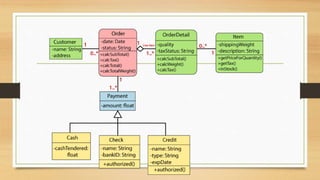
• The class diagram depicts a static view of an application.
• It represents the types of objects residing in the system and the relationships
between them.
• A class consists of its objects, and also it may inherit from other classes.
• A class diagram is used to visualize, describe, document various different
aspects of the system, and also construct executable software code.
Continue..
• It shows the attributes, classes, functions, and relationships to give an
overview of the software system.
• It constitutes class names, attributes, and functions in a separate
compartment that helps in software development.
• Since it is a collection of classes, interfaces, associations, collaborations, and
constraints, it is termed as a structural diagram.
Purpose of Class Diagrams
• The main purpose of class diagrams is to build a static view of an
application.
• It is the only diagram that is widely used for construction, and it can be
mapped with object-oriented languages.
• It is one of the most popular UML diagrams
• It analyses and designs a static view of an application.
• It describes the major responsibilities of a system.
• It is a base for component and deployment diagrams.
• It incorporates forward and reverse engineering.
Benefits of Class Diagrams
• It can represent the object model for complex systems.
• It reduces the maintenance time by providing an overview of how an
application is structured before coding.
• It provides a general schematic of an application for better understanding.
• It represents a detailed chart by highlighting the desired code, which is to be
programmed.
• It is helpful for the stakeholders and the developers
Vital components of a Class Diagram
• Upper Section
• Middle Section
• Lower Section
Upper Section
• The upper section encompasses the name of the class. A class is a
representation of similar objects that shares the same relationships,
attributes, operations, and semantics.
• Capitalize the initial letter of the class name.
• Place the class name in the center of the upper section.
• A class name must be written in bold format.
• The name of the abstract class should be written in italics format
Middle Section
• The middle section constitutes the attributes, which describe the quality of
the class.
• The attributes are written along with its visibility factors, which are public
(+), private (-), protected (#), and package (~).
• The accessibility of an attribute class is illustrated by the visibility factors.
• A meaningful name should be assigned to the attribute, which will explain its
usage inside the class.
Lower Section
• The lower section contain methods or operations. The methods are
represented in the form of a list, where each method is written in a single
line.
Relationships
• Dependency
• Generalization
• Association
• Multiplicity
• Aggregation
• Composition
Dependency
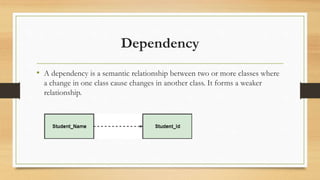
• A dependency is a semantic relationship between two or more classes where
a change in one class cause changes in another class. It forms a weaker
relationship.
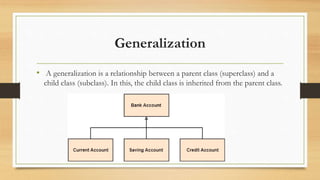
Generalization
• A generalization is a relationship between a parent class (superclass) and a
child class (subclass). In this, the child class is inherited from the parent class.
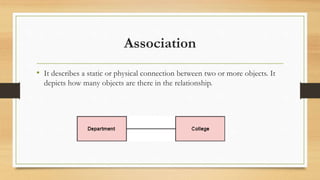
Association
• It describes a static or physical connection between two or more objects. It
depicts how many objects are there in the relationship.
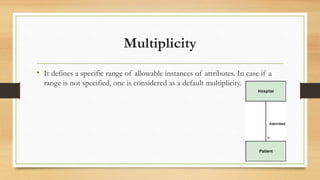
Multiplicity
• It defines a specific range of allowable instances of attributes. In case if a
range is not specified, one is considered as a default multiplicity.
Aggregation
• An aggregation is a subset of association, which represents has a
relationship.
• It is more specific then association.
• It defines a part-whole or part-of relationship.
• In this kind of relationship, the child class can exist independently of its
parent class.
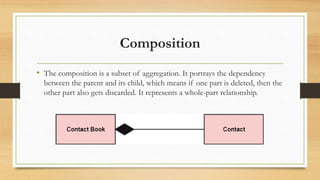
Composition
• The composition is a subset of aggregation. It portrays the dependency
between the parent and its child, which means if one part is deleted, then the
other part also gets discarded. It represents a whole-part relationship.
Abstract Classes
• In the abstract class, no objects can be a direct entity of the abstract class.
• The abstract class can neither be declared nor be instantiated.
• It is used to find the functionalities across the classes.
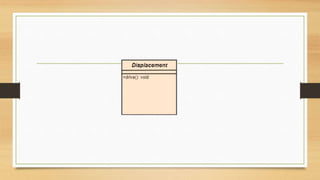
• The notation of the abstract class is similar to that of class; the only
difference is that the name of the class is written in italics.
• Since it does not involve any implementation for a given function, it is best
to use the abstract class with multiple objects.
How to draw a Class Diagram?
• The class diagram is used most widely to construct software applications. It
not only represents a static view of the system but also all the major aspects
of an application. A collection of class diagrams as a whole represents a
system.
• To describe a complete aspect of the system, it is suggested to give a meaningful name to
the class diagram.
• The objects and their relationships should be acknowledged in advance.
• The attributes and methods (responsibilities) of each class must be known.
• A minimum number of desired properties should be specified as more number of the
unwanted property will lead to a complex diagram.
• Notes can be used as and when required by the developer to describe the aspects of a
diagram.
• The diagrams should be redrawn and reworked as many times to make it correct before
producing its final version.
Usage of Class diagrams
• The class diagram is used to represent a static view of the system.
• It plays an essential role in the establishment of the component and
deployment diagrams.
• It helps to construct an executable code to perform forward and backward
engineering for any system, or we can say it is mainly used for construction.
It represents the mapping with object-oriented languages that are C++, Java,
etc.
• To describe the static view of a system.
• To show the collaboration among every instance in the static view.
• To describe the functionalities performed by the system.
• To construct the software application using object-oriented languages.

classdiagram.pptx

  • 1.
  • 2.
    UML Class Diagram •The class diagram depicts a static view of an application. • It represents the types of objects residing in the system and the relationships between them. • A class consists of its objects, and also it may inherit from other classes. • A class diagram is used to visualize, describe, document various different aspects of the system, and also construct executable software code.
  • 3.
    Continue.. • It showsthe attributes, classes, functions, and relationships to give an overview of the software system. • It constitutes class names, attributes, and functions in a separate compartment that helps in software development. • Since it is a collection of classes, interfaces, associations, collaborations, and constraints, it is termed as a structural diagram.
  • 4.
    Purpose of ClassDiagrams • The main purpose of class diagrams is to build a static view of an application. • It is the only diagram that is widely used for construction, and it can be mapped with object-oriented languages. • It is one of the most popular UML diagrams
  • 5.
    • It analysesand designs a static view of an application. • It describes the major responsibilities of a system. • It is a base for component and deployment diagrams. • It incorporates forward and reverse engineering.
  • 6.
    Benefits of ClassDiagrams • It can represent the object model for complex systems. • It reduces the maintenance time by providing an overview of how an application is structured before coding. • It provides a general schematic of an application for better understanding. • It represents a detailed chart by highlighting the desired code, which is to be programmed. • It is helpful for the stakeholders and the developers
  • 7.
    Vital components ofa Class Diagram • Upper Section • Middle Section • Lower Section
  • 8.
    Upper Section • Theupper section encompasses the name of the class. A class is a representation of similar objects that shares the same relationships, attributes, operations, and semantics. • Capitalize the initial letter of the class name. • Place the class name in the center of the upper section. • A class name must be written in bold format. • The name of the abstract class should be written in italics format
  • 9.
    Middle Section • Themiddle section constitutes the attributes, which describe the quality of the class. • The attributes are written along with its visibility factors, which are public (+), private (-), protected (#), and package (~). • The accessibility of an attribute class is illustrated by the visibility factors. • A meaningful name should be assigned to the attribute, which will explain its usage inside the class.
  • 10.
    Lower Section • Thelower section contain methods or operations. The methods are represented in the form of a list, where each method is written in a single line.
  • 11.
    Relationships • Dependency • Generalization •Association • Multiplicity • Aggregation • Composition
  • 12.
    Dependency • A dependencyis a semantic relationship between two or more classes where a change in one class cause changes in another class. It forms a weaker relationship.
  • 13.
    Generalization • A generalizationis a relationship between a parent class (superclass) and a child class (subclass). In this, the child class is inherited from the parent class.
  • 14.
    Association • It describesa static or physical connection between two or more objects. It depicts how many objects are there in the relationship.
  • 15.
    Multiplicity • It definesa specific range of allowable instances of attributes. In case if a range is not specified, one is considered as a default multiplicity.
  • 16.
    Aggregation • An aggregationis a subset of association, which represents has a relationship. • It is more specific then association. • It defines a part-whole or part-of relationship. • In this kind of relationship, the child class can exist independently of its parent class.
  • 17.
    Composition • The compositionis a subset of aggregation. It portrays the dependency between the parent and its child, which means if one part is deleted, then the other part also gets discarded. It represents a whole-part relationship.
  • 18.
    Abstract Classes • Inthe abstract class, no objects can be a direct entity of the abstract class. • The abstract class can neither be declared nor be instantiated. • It is used to find the functionalities across the classes. • The notation of the abstract class is similar to that of class; the only difference is that the name of the class is written in italics. • Since it does not involve any implementation for a given function, it is best to use the abstract class with multiple objects.
  • 20.
    How to drawa Class Diagram? • The class diagram is used most widely to construct software applications. It not only represents a static view of the system but also all the major aspects of an application. A collection of class diagrams as a whole represents a system.
  • 21.
    • To describea complete aspect of the system, it is suggested to give a meaningful name to the class diagram. • The objects and their relationships should be acknowledged in advance. • The attributes and methods (responsibilities) of each class must be known. • A minimum number of desired properties should be specified as more number of the unwanted property will lead to a complex diagram. • Notes can be used as and when required by the developer to describe the aspects of a diagram. • The diagrams should be redrawn and reworked as many times to make it correct before producing its final version.
  • 23.
    Usage of Classdiagrams • The class diagram is used to represent a static view of the system. • It plays an essential role in the establishment of the component and deployment diagrams. • It helps to construct an executable code to perform forward and backward engineering for any system, or we can say it is mainly used for construction. It represents the mapping with object-oriented languages that are C++, Java, etc.
  • 24.
    • To describethe static view of a system. • To show the collaboration among every instance in the static view. • To describe the functionalities performed by the system. • To construct the software application using object-oriented languages.