Citrix Net Scaler V9.0 Lb Highload Mar2009

Editor's Notes

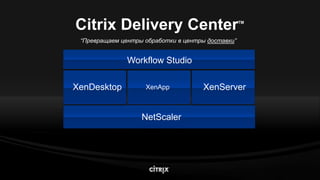
  • #8 This view of Citrix Delivery Center is still perfectly valid. It will not be featured as much in the Synergy keynotes this year since so much of the focus is on the line-of-sight delivery concepts, but we can still use it in the breakouts. What this view shows is a zoom in on the “Delivery Controllers” that sit in the datacenter at the delivery tier. All four of the delivery controllers have platinum editions that extend their “delivery reach” (three extend out to the end user, while one extends back into the datacenter to deliver application workloads).Note that we’re making one subtle change to this chart by extending NetScaler along the bottom. This does a few things: Makes it easier to tell the end-to-end virtualization story (servers-apps-desktops) Shows NetScaler (application networking) as a layer above transport networking Makes it easier to show that NetScaler delivers web apps to external users (who don’t go through a corporate “desktop”)
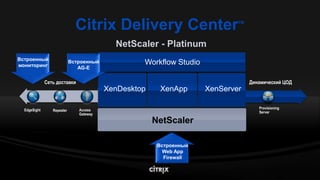
  • #9 {slide builds from core CDC products and then details the additional supporting products that complement the Product Lines in the CDC}{This chart serves to illustrate the key Platinum components – and the elements that complete the end-end solution for Platinum}
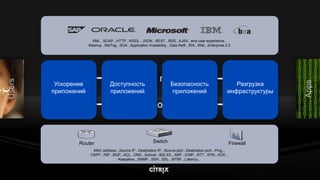
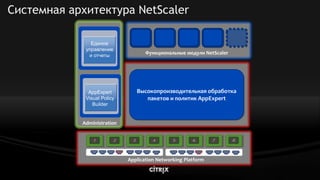
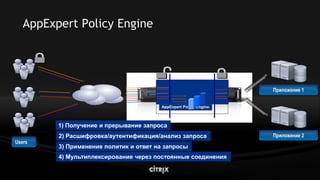
  • #11 NetScaler is able to provide a broad spectrum of application delivery benefits and simplify web app delivery, because it is architected for high performance, extensibility and ease of management. We control the architecture from the ground up by tightly coupling networking hardware with advanced CPUs and specialized processors. Layered on top of this powerful hardware platform is a high performance packet processing and evaluation engine that makes all decisions for that packet in one single pass. This allows us to deliver an industry leading 15 Gbps of throughput on a single core and to add services to that packet like content switching, caching and compression without degrading performance. NetScaler’s architecture is also highly extensible. Using the AppExpert Policy Framework administrators can create highly customized policies. Functional modules like AppFW, GSLB and Access Gateway SSL VPN can be easily added via software license keys. The extensibility of our architecture has allowed us to rapidly add new functional modules to meet increasingly challenging application delivery requirements. All of NetScaler’s performance and features are easily managed by a strong suite of management tools. All functions on NetScaler can be managed and monitored through the unified graphical or command line interface and rich reporting tools. The AppExpert Visual Policy Builder allows administrators to easily create rich policies without having to write complex code.
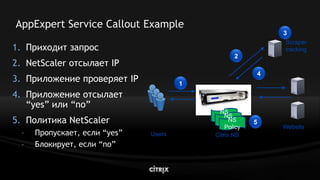
  • #13 Currently, the most commonly cited use case is for basing NetScaler policy decisions on “source IP address reputation” that is tracked in another application or service. For example, one beta customer has an external application that identifies and tracks IP addresses that are scraping its site’s content. This customer used a service callout to have NetScaler query this application in real-time and then used NetScaler to either pass or drop the request. The same approach could be used to have NetScaler filter spam or other inbound content by using a callout to pass payload information to another application that inspects this content.Other use cases customers have mentioned include:-Passing content to an external transformation engine -Integration with UDDI or other directory services-Geo-targeting or other token-based switching decisions, where the logic for the content switch is available in an external application.
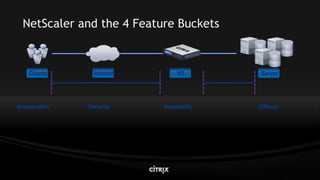
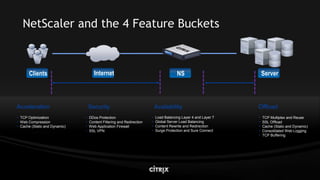
  • #15 The NetScaler has four primary buckets in which Features can fall. In the following sections we will take each one individually:Server OffloadClient Side AccelerationSecurityAvailability
  • #16 The NetScaler has four primary buckets in which Features can fall. In the following sections we will take each one individually:Server OffloadClient Side AccelerationSecurityAvailability
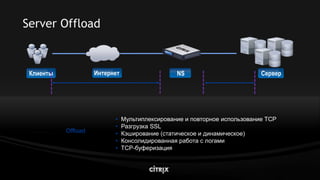
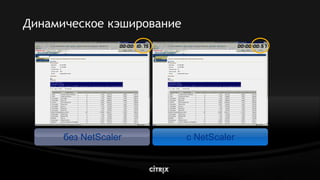
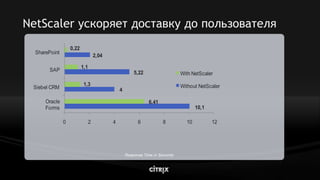
  • #18 The NetScaler has Features designed to improve Server Side performance and to assist in improving Server Efficiency. These Features are:TCP Multiplex and Reuse. As previously mentioned, reducing the CPU overhead associated with TCP connection management from web servers can allow sites to scale much more effectivelySSL Offload. The NetScaler has a build in ASIC designed to handle SSL transactions and bulk encryption. SSL encryption generates significant CPU load on web servers.Cache. We can cache Static content, such as images or whole pages, as well as content that is typically not cacheable, like dynamic content. Dynamic content might be a database report. Provided there is a valid URL a policy can match on this content can be cached based on user defined parameters. Using Dynamic caching can greatly reduce the amount of CPU cycles spent on a DB server running and formatting such large reports.Web Compression. Modern day web browsers support standards based web compression in the form of GZIP or Deflate. The Accept-Encoding headers specify to the NetScaler which type of compression the browser (client) can handle. This can be done on the web servers for a significant cost in the CPU.Consolidated Web Logging. The NS can allocate a memory buffer to dynamically store and pass of to a dedicated client real time web logs. There is no longer a need to run a web logging agent on each server and then to further consolidate those logs after the fact.TCP Buffering. This feature allows the server to send communication at wirespeed to the NetScaler, where the NetScaler can “buffer” this content and meter out this content to a slower link. This allows a server to be free to handle new requests while the slow client is still receiving content. Typically this slow client would lock this session until all content is received.
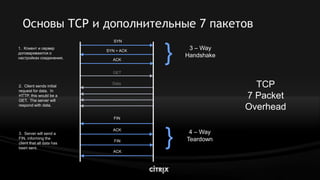
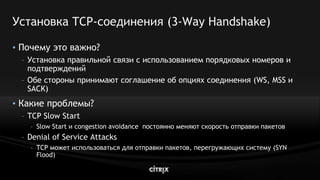
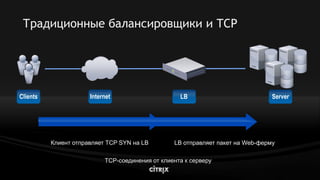
  • #19 In a traditional TCP communication, in which the server interacts directly with the client, you can see that there is a cost for connection set-up and tear-down. In addition, this implies that the two systems have already had some communication and have arrived at their maximum window size. In most initial connections, systems perform a TCP Slow Start (RFC 2001), in which they ACK the first packet, then the next two, then the next three and so on until they reach an agreed upon maximum window size. For sites that receive a large number of connection from new hosts, this slow start congestion avoidance can reduce performance as well. HTTP is a short lived connection and will have difficulty reaching full speed from TCP Slow Start.
  • #20 TCP has an Option Field where various TCP options can be used to enhance communication between a client and server: 1. Window Scaling: This will change the Window Size (the Window Size defines the number of bytes to be received before requiring acknowledgement) to up 1 GB 2. Maximum Segment Size: Defines the maximum size of data (in bytes) that can be sent per segment. Ideally fragmentation should be avoided 3. Selective Acknowledgements: Allows the client to Acknowledge, selectively, data that was sent, as opposed to requesting a resend of all packets
  • #21 Traditional Load Balancers forward TCP connections straight through to back-end services. Some load balancers use a concept called Delayed Binding, where they will pause a TCP connection and spoof the 3-Way Handshake to a client. This is used as a security mechanism against SYN Floods, before quickly establishing the server side 3-Way handshake, thereby forwarding the TCP connection on to the server. This passes on the TCP connection overhead directly to the Server to manage, increasing server CPU cycles.
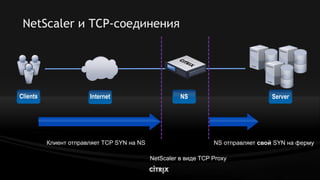
  • #22 The NetScaler acts as a TCP Proxy allowing two distinct and independent TCP connections, one to the client and one to the server.
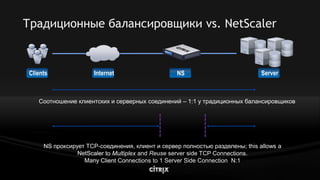
  • #23 Traditional Load Balancers Because of 1:1 TCP Connection Mapping, TCP overhead related to connection setup and teardown is passed directly to the Web Server Most of the CPU loading on a web server is directly related to the TCP OverheadNetScaler Advantage The NetScaler acts as a TCP Proxy, doing so allows the NetScaler to manage the server side TCP connection and the client side TCP connection as two distinct and independent connections With this separation, the NetScaler can now leverage the TCP Proxy architecture to multiplex and reuse the server side TCP connection independently from a client side connection. This NS reuse of already established and idle server side TCP connections reduces the TCP Overhead on web servers. If you can consider a very conservative estimate of 2:1 Offload, this will potentially allow a situation where the site traffic can double before the need to provision additional resources or half of the existing resources can be pulled out reducing Space, Power and Cooling concerns inside a data center.
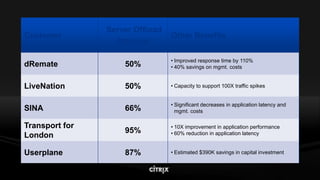
  • #24 There is a published case study for every customer listed on this slide available at www.citrix.com. The case studies provide more detail on the offload and other benefits the customer achieved.
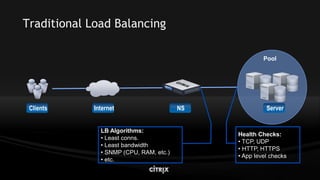
  • #26 Traditional Load Balancers
  • #27 Traditional Load Balancers
  • #28 Traditional Load Balancers
  • #29 Traditional Load Balancers
  • #30 Traditional Load Balancers
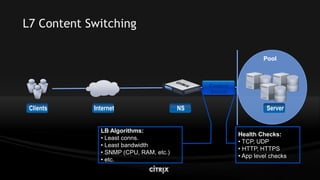
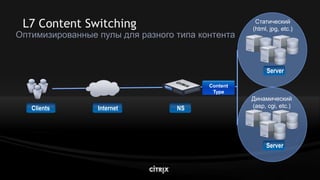
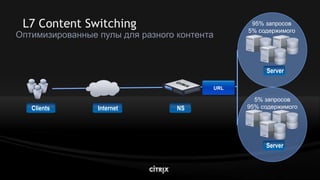
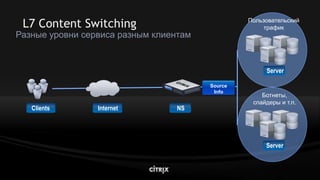
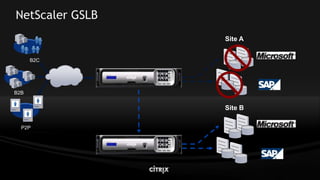
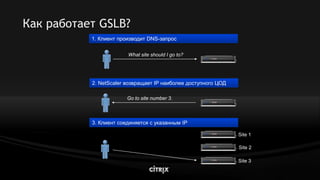
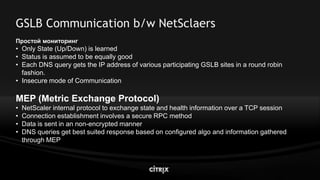
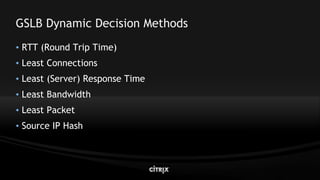
  • #31 To illustrate, NetScaler maximizes application availability with intelligent L4 server load balancing and advaced L7 content switching features to ensure that users are directed to the right content every time. NetScalers global server load balancing features provides seamless failover and redirection of users to a back-up site in the event of a disaster and can be used to intelligently spread user requests across multiple sites during normal business operations.
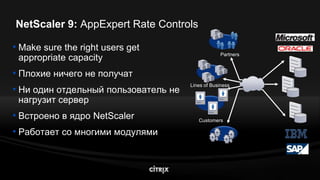
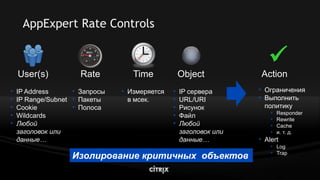
  • #38 NetScaler 9 enhances the ability ensure application availability by enabling NetScaler policies to be triggered based upon data rates either coming from a given source or going to a given resource. AppExpert Rate Controls give administrators the ability take actions beyond what basic network rate-shaping or QoS provide, and to govern resources at a far more granular level. By integrating AppExpert Rate Controls into NetScaler’s fully application-aware policy engine, administrators aren’t limited to just throttling traffic based upon IP address and port, but have the full depth and breadth of NetScaler traffic management, acceleration and security functionality at their disposal.There’s a number of ways folks have told us they’re going to use AppExpert rate controls. Of course straight-up rate limiting (e.g., DNS rate-limiting, limiting traffic originating from a single subnet) is one example. Ensuring a given resource (e.g., anything from a VServer to a specific URL) is another. Two specific examples are:One customer allows some of its partners to scrape its website so the partners can republish content on their own sites. However, the customer wants to ensure that overly aggressive scraping by the partners doesn’t overwhelm the website and degrade the site’s performance. AppExpert rate controls can be used to limit how much scraping each partner can do. This same approach could be used to ensure that websites that publish APIs -- so that partners can do mashups, for example -- aren’t overwhelmed by any particular partner’s use of the API.Another example is a customer that was having problems with a couple of users FTPing a few too many large files at the same time. By using AppExpert rate controls to build an expression around bandwidth consumed per sourceIP, they can drop any additional FTP requests coming from a sourceIP (aka a user) that already has too much FTP activity. A more generalized use could also do something along the lines of limiting the amount of concurrent file downloading for a given SharePoint site, to ensure that downloads don’t drown out other SharePoint (or other application) activity.
  • #39 There’s a number of ways folks have told us they’re going to use AppExpert rate controls. Of course straight-up rate limiting (e.g., DNS rate-limiting, limiting traffic originating from a single subnet) is one example. Ensuring a given resource (e.g., anything from a VServer to a specific URL) is another. Two specific examples are:One customer allows some of its partners to scrape its website so the partners can republish content on their own sites. However, the customer wants to ensure that overly aggressive scraping by the partners doesn’t overwhelm the website and degrade the site’s performance. AppExpert rate controls can be used to limit how much scraping each partner can do. This same approach could be used to ensure that websites that publish APIs -- so that partners can do mashups, for example -- aren’t overwhelmed by any particular partner’s use of the API.Another example is a customer that was having problems with a couple of users FTPing a few too many large files at the same time. By using AppExpert rate controls to build an expression around bandwidth consumed per sourceIP, they can drop any additional FTP requests coming from a sourceIP (aka a user) that already has too much FTP activity. A more generalized use could also do something along the lines of limiting the amount of concurrent file downloading for a given SharePoint site, to ensure that downloads don’t drown out other SharePoint (or other application) activity.
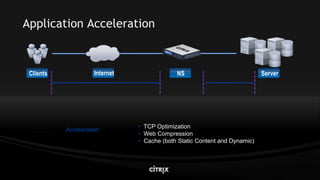
  • #41 The NetScaler has Features designed to improve client experience on a web site. These Features are:TCP Optimization. Low level TCP optimizations designed to speed content to the client, such as WSS, SACK, MSS and FastRamp.Web Compression. Modern day web browsers support standards based web compression in the form of GZIP or Deflate. The Accept-Encoding headers specify to the NetScaler which type of compression the browser (client) can handle. This single feature offers the biggest bang for improving web site response for your clients. Even clients on a quick link (such as DSL and Cable) stand to see improvements since Compression reduces the amount of packets sent. Also a benefit seen in high-loss networks such as wireless.Cache. We can cache Static content, such as images or whole pages, as well as content that is typically not cacheable, like dynamic content. Dynamic content might be a database report. Provided there is a valid URL a policy can match on this content can be cached based on user defined parameters. This benefits clients by reducing the “time” spent processing objects such as a large report. The clients will not have to wait while the report is run and then formatted.SSL Offload. The NetScaler has a build in ASIC designed to handle SSL transactions and bulk encryption. End to end encrypted traffic will typically not be available for mid stream enhancements like caching or compressing data, only by loading valid SSL Certificates on the NetScaler can acceleration benefits be achieved on encrypted traffic.