Learning Objectives
• Logging into the Keiser Library System
• Searching the database for images
• Using images from the Internet ( free and
unlicensed)
• Citing images (database, personal and
Internet)
Student ID #
Last 4 of SS #
Enter your
username and
password to Login.
Search for items to
checkout.
Search the Databases.
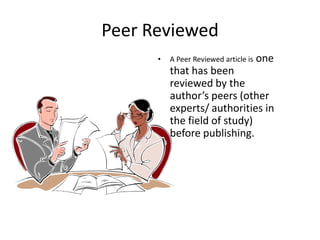
Peer Reviewed
• A Peer Reviewed article is one
that has been
reviewed by the
author’s peers (other
experts/ authorities in
the field of study)
before publishing.
Search for Images
Deborah Williams
CINAHL & MEDLINE
BOTH PROVIDE
MEDICAL JOURNAL
ARTICLES
Search for images
Deborah Williams
Click the “Images” dropdown box at the
top to search for images related to your
topic.
Search for images
Deborah Williams
I’m searching for images
of blood cells in a
Leukemia patient
Type in the key word and
limit your images to
color, B&W, illustrations,
etc
Deborah Williams
The key words
Leukemia blood cells
limited by color
images give me 6
results. I chose #3.
Double-click
on the image
to open
Deborah Williams
This is the
image from
the database
with an
explanation
Deborah Williams
You must cite the images you
use in your presentation no
matter where you got them
from. Click the link below to
get the instructions to the
APA citation info for this
image.
Deborah Williams
This is an example of
how to cite in APA
format for the article
and
Image.
You can also use a citation
builder like
citationmachine.net or
easybib.com to create your
citations.
Want to use an image from the
Internet?
• You must be sure it is free and open stock.
• Follow the image link to the original source to
find out if it is free.
• If the image has a watermark on it, chances
are it’s not free.
• If using your original photos, you should
include citation info. (i.e. name, date,
description of image) Look for “properties” in
the image file.
Find image information
Right-click on the image file and
select “properties” to get the
image info of your photo.
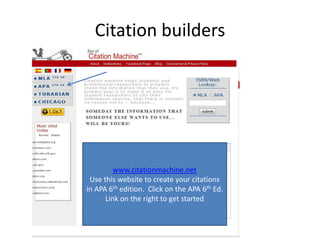
Citation builders
Deborah Williams
www.citationmachine.net
Use this website to create your citations
in APA 6th edition. Click on the APA 6th Ed.
Link on the right to get started
Click web images to build a citation for images.
Fill in the blanks with the available information
then click “Make Citation”.
The citation in APA 6th edition format appears above along with
the in-text citation format. Copy and paste the citation into your
document. THAT’S IT! EASY 
Copy and paste your images and references as you research to
save what you found in one place.
Source: Mayfield,
2012
Use the Tools
• Use the cite tool to get the right information
• Use the save and print tools to save to USB or
to print.
• Use the citation builders
• Open a Word document to capture the
citations for your results. Copy and paste
them to start your Reference Page
Deborah Williams
We learned…….
• Logging into the Keiser Library System
• Searching the database for images
• Using images from the Internet ( free and
unlicensed)
• Citing images (database, personal and
Internet)
Let’s take the Post-Test
After the post-test, go to a computer and log in
to the library website to find scholarly
information about your topic and images.

Citing images

  • 2.
    Learning Objectives • Logginginto the Keiser Library System • Searching the database for images • Using images from the Internet ( free and unlicensed) • Citing images (database, personal and Internet)
  • 3.
    Student ID # Last4 of SS # Enter your username and password to Login.
  • 4.
    Search for itemsto checkout. Search the Databases.
  • 5.
    Peer Reviewed • APeer Reviewed article is one that has been reviewed by the author’s peers (other experts/ authorities in the field of study) before publishing.
  • 6.
    Search for Images DeborahWilliams CINAHL & MEDLINE BOTH PROVIDE MEDICAL JOURNAL ARTICLES
  • 7.
    Search for images DeborahWilliams Click the “Images” dropdown box at the top to search for images related to your topic.
  • 8.
    Search for images DeborahWilliams I’m searching for images of blood cells in a Leukemia patient Type in the key word and limit your images to color, B&W, illustrations, etc
  • 9.
    Deborah Williams The keywords Leukemia blood cells limited by color images give me 6 results. I chose #3. Double-click on the image to open
  • 10.
    Deborah Williams This isthe image from the database with an explanation
  • 11.
    Deborah Williams You mustcite the images you use in your presentation no matter where you got them from. Click the link below to get the instructions to the APA citation info for this image.
  • 12.
    Deborah Williams This isan example of how to cite in APA format for the article and Image. You can also use a citation builder like citationmachine.net or easybib.com to create your citations.
  • 13.
    Want to usean image from the Internet? • You must be sure it is free and open stock. • Follow the image link to the original source to find out if it is free. • If the image has a watermark on it, chances are it’s not free. • If using your original photos, you should include citation info. (i.e. name, date, description of image) Look for “properties” in the image file.
  • 14.
    Find image information Right-clickon the image file and select “properties” to get the image info of your photo.
  • 15.
    Citation builders Deborah Williams www.citationmachine.net Usethis website to create your citations in APA 6th edition. Click on the APA 6th Ed. Link on the right to get started
  • 16.
    Click web imagesto build a citation for images.
  • 17.
    Fill in theblanks with the available information then click “Make Citation”.
  • 18.
    The citation inAPA 6th edition format appears above along with the in-text citation format. Copy and paste the citation into your document. THAT’S IT! EASY 
  • 19.
    Copy and pasteyour images and references as you research to save what you found in one place. Source: Mayfield, 2012
  • 20.
    Use the Tools •Use the cite tool to get the right information • Use the save and print tools to save to USB or to print. • Use the citation builders • Open a Word document to capture the citations for your results. Copy and paste them to start your Reference Page Deborah Williams
  • 21.
    We learned……. • Logginginto the Keiser Library System • Searching the database for images • Using images from the Internet ( free and unlicensed) • Citing images (database, personal and Internet)
  • 22.
    Let’s take thePost-Test After the post-test, go to a computer and log in to the library website to find scholarly information about your topic and images.