CineMarkup
Video Annotation editor and player
Team: Pacific Machines ( Altanai , Carrie, Cheng, and Peter - students of Seattle University )
Problem
Making time synced notes from an online lecture or video meeting is a challenge as it requires screen recording
or heavy system installation for custom software.
Reprocessing a video to preserve a sequence of notes is problematic because:
- it takes up space
- it infringes intellectual property rights
- and the textual DOM context is lost in the video file
[1]
Group 10
Team: Pacific Machines ( Altanai , Carrie, Cheng, and Peter )
Requirements
[1]
Group 10
Team: Pacific Machines ( Altanai , Carrie, Cheng, and Peter )
Self annotating a video for frame specific notes and
replaying the notes in time sequenced and position
correlated fashion.
Personalized time and position synced video
annotation
Save multiple custom notes for each
individual viewer
Each user can save notes separately and return to
them for reference later.
Lightweight and browser based interface
Browser supported elements and resources to
build interactive user interface for editor and
player.
Notes to be saved as Json objects in a custom file
format for replaying interactively.
Custom file format and library
Solution
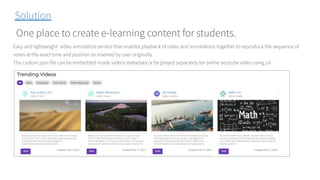
One place to create e-learning content for students.
Easy and lightweight video annotation service that enables playback of video and annotations together to reproduce the sequence of
notes at the exact time and position as inserted by user originally.
The custom json file can be embedded inside videos metadata or be played separately for online youtube video using url .
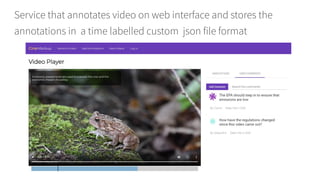
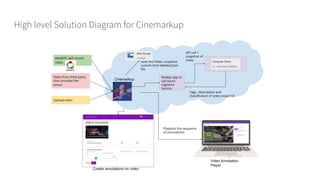
Service that annotates video on web interface and stores the
annotations in a time labelled custom json file format
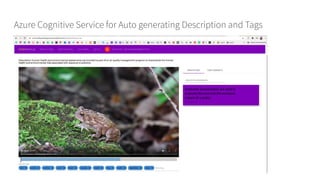
Azure Cognitive Service for Auto generating Description and Tags
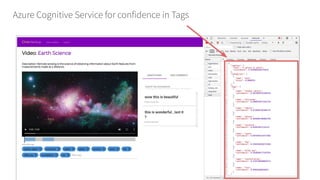
Azure Cognitive Service for confidence in Tags
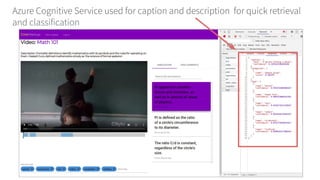
Azure Cognitive Service used for caption and description for quick retrieval
and classification
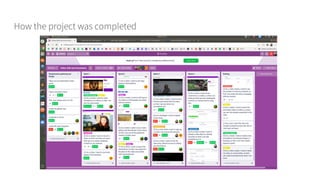
How the project was completed
High level Solution Diagram for Cinemarkup
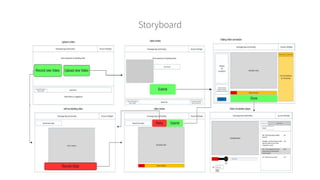
Storyboard
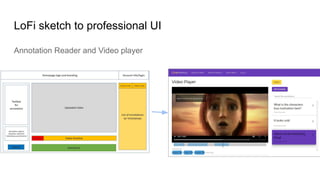
LoFi sketch to professional UI
Annotation Reader and Video player
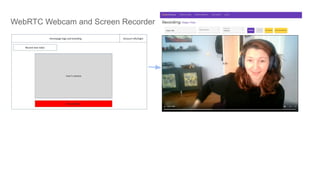
WebRTC Webcam and Screen Recorder
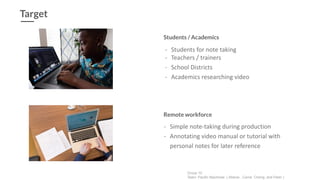
- Simple note-taking during production
- Annotating video manual or tutorial with
personal notes for later reference
Remote workforce
Target
- Students for note taking
- Teachers / trainers
- School Districts
- Academics researching video
Students / Academics
Group 10
Team: Pacific Machines ( Altanai , Carrie, Cheng, and Peter )

Cinemarkup

  • 1.
    CineMarkup Video Annotation editorand player Team: Pacific Machines ( Altanai , Carrie, Cheng, and Peter - students of Seattle University )
  • 2.
    Problem Making time syncednotes from an online lecture or video meeting is a challenge as it requires screen recording or heavy system installation for custom software. Reprocessing a video to preserve a sequence of notes is problematic because: - it takes up space - it infringes intellectual property rights - and the textual DOM context is lost in the video file [1] Group 10 Team: Pacific Machines ( Altanai , Carrie, Cheng, and Peter )
  • 3.
    Requirements [1] Group 10 Team: PacificMachines ( Altanai , Carrie, Cheng, and Peter ) Self annotating a video for frame specific notes and replaying the notes in time sequenced and position correlated fashion. Personalized time and position synced video annotation Save multiple custom notes for each individual viewer Each user can save notes separately and return to them for reference later. Lightweight and browser based interface Browser supported elements and resources to build interactive user interface for editor and player. Notes to be saved as Json objects in a custom file format for replaying interactively. Custom file format and library
  • 4.
    Solution One place tocreate e-learning content for students. Easy and lightweight video annotation service that enables playback of video and annotations together to reproduce the sequence of notes at the exact time and position as inserted by user originally. The custom json file can be embedded inside videos metadata or be played separately for online youtube video using url .
  • 5.
    Service that annotatesvideo on web interface and stores the annotations in a time labelled custom json file format
  • 6.
    Azure Cognitive Servicefor Auto generating Description and Tags
  • 7.
    Azure Cognitive Servicefor confidence in Tags
  • 8.
    Azure Cognitive Serviceused for caption and description for quick retrieval and classification
  • 9.
    How the projectwas completed
  • 10.
    High level SolutionDiagram for Cinemarkup
  • 11.
  • 12.
    LoFi sketch toprofessional UI Annotation Reader and Video player
  • 13.
    WebRTC Webcam andScreen Recorder
  • 14.
    - Simple note-takingduring production - Annotating video manual or tutorial with personal notes for later reference Remote workforce Target - Students for note taking - Teachers / trainers - School Districts - Academics researching video Students / Academics Group 10 Team: Pacific Machines ( Altanai , Carrie, Cheng, and Peter )