ENDNOTE
INTRODUCTION
2
MEHWISH HUSSAIN - ASST. PROF. ( DUHS)
 A software to deal with research references
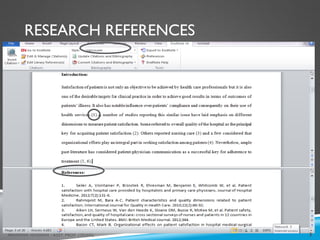
RESEARCH REFERENCES
3
MEHWISH HUSSAIN - ASST. PROF. ( DUHS)
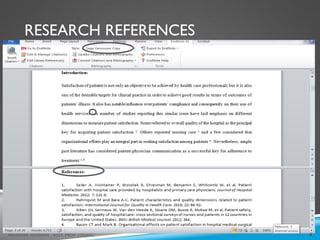
RESEARCH REFERENCES
4
MEHWISH HUSSAIN - ASST. PROF. ( DUHS)
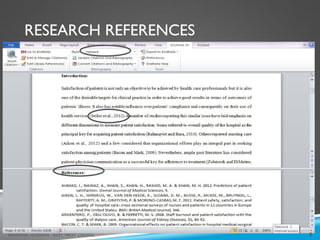
RESEARCH REFERENCES
5
MEHWISH HUSSAIN - ASST. PROF. ( DUHS)
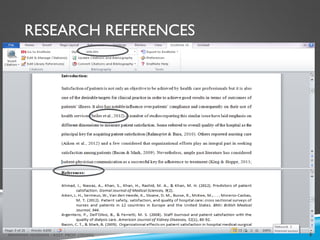
RESEARCH REFERENCES
6
MEHWISH HUSSAIN - ASST. PROF. ( DUHS)
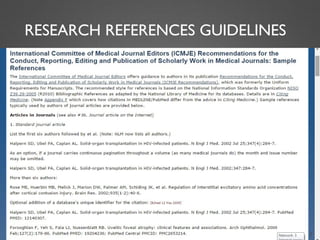
RESEARCH REFERENCES GUIDELINES
MEHWISH HUSSAIN - ASST. PROF. ( DUHS) 7
INTRODUCTION
8
MEHWISH HUSSAIN - ASST. PROF. ( DUHS)
 A software to deal with research references
If you want to “deal” with research references with
authentication and with few clicks
Use bibliography mangers
 EndNote remains the favored, time-saving solution
for organizing references and creating instant research
references/bibliography.
OBJECTIVES
9
MEHWISH HUSSAIN - ASST. PROF. ( DUHS)
 How to start work with EndNote XIV
 How to prepare reference library in EndNote XIV
 How to import references from online database
 How to encode references manually
 How to switch different reference styles
 How to insert reference in MS Office Word
 How to delete unwanted references from MS Word
 Other mostly used options in EndNote
Getting
started
To start here, all you have to do is follow the instructions given in the presentations.
We will work point and click together.
You may encounter few hitches due to
technical concerns, however, once you comprehend the issues you will enjoy
working with EndNote.
10
MEHWISH HUSSAIN - ASST. PROF. ( DUHS)
M E HWISH HUSSAIN - ASST. PROF. ( DUHS)
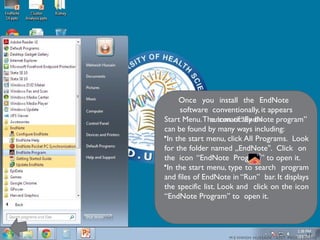
Once you install the EndNote
software conventionally, it appears
automatically on
Start Menu.The icon of “EndNote program”
can be found by many ways including:
•In the start menu, click All Programs. Look
for the folder named „EndNote . Click on
‟
the icon “EndNote Program” to open it.
•In the start menu, type to search program
and files of EndNote in “Run” bar. It displays
the specific list. Look and click on the icon
“EndNote Program” to open it.
11
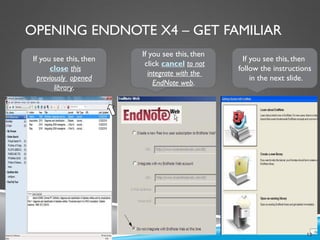
OPENING ENDNOTE X4 – GET FAMILIAR
MEHWISH HUSSAIN - ASST. PROF. ( DUHS)
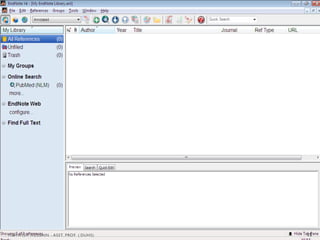
If you see this, then
close this
previously opened
library.
If you see this, then
click cancel to not
integrate with the
EndNote web.
If you see this, then
follow the instructions
in the next slide.
12
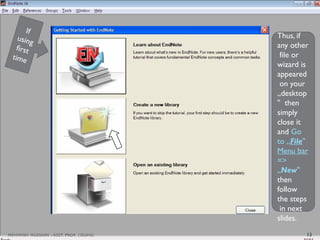
Thus, if
any other
file or
wizard is
appeared
on your
„desktop
then
‟
simply
close it
and Go
to „File‟
Menu bar
=>
„New‟
then
follow
the steps
in next
slides.
13
MEHWISH HUSSAIN - ASST. PROF. ( DUHS)
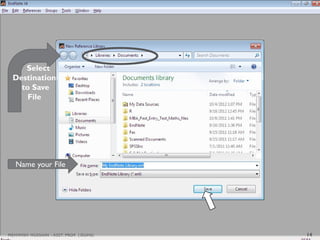
Name your File
Select
Destination
to Save
File
14
MEHWISH HUSSAIN - ASST. PROF. ( DUHS)
15
MEHWISH HUSSAIN - ASST. PROF. ( DUHS)
FILE AND FOLDER AFTER SAVING THE
LIBRARY
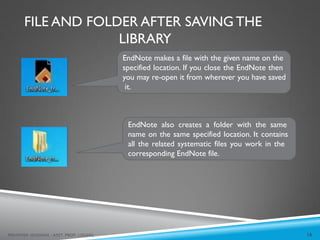
EndNote makes a file with the given name on the
specified location. If you close the EndNote then
you may re-open it from wherever you have saved
it.
EndNote also creates a folder with the same
name on the same specified location. It contains
all the related systematic files you work in the
corresponding EndNote file.
16
MEHWISH HUSSAIN - ASST. PROF. ( DUHS)
Be more familiar
17
MEHWISH HUSSAIN - ASST. PROF. ( DUHS)
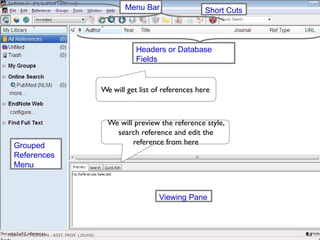
Headers or Database
Fields
Viewing Pane
Grouped
References
Menu
Menu Bar Short Cuts
We will get list of references here
We will preview the reference style,
search reference and edit the
reference from here
18
MEHWISH HUSSAIN - ASST. PROF. ( DUHS)
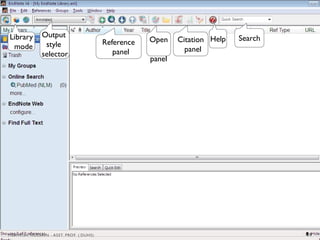
Library
mode
Output
style
selector
Reference
panel
Open
panel
Citation
panel
Help Search
19
MEHWISH HUSSAIN - ASST. PROF. ( DUHS)
Prepare reference
library
20
MEHWISH HUSSAIN - ASST. PROF. ( DUHS)
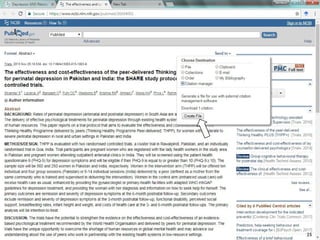
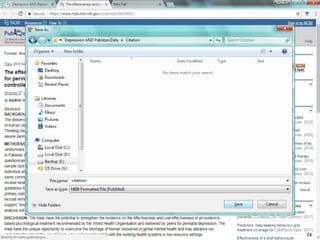
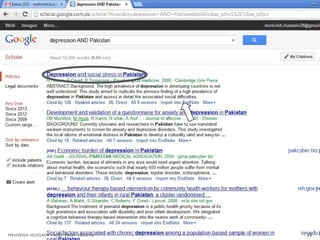
• Import from online database in EndNote
• Encode manually
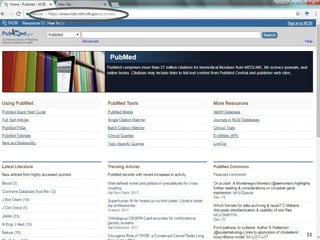
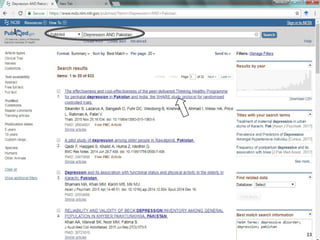
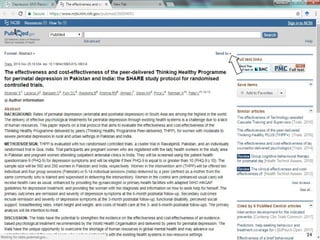
Import References
from PubMed
Website
21
MEHWISH HUSSAIN - ASST. PROF. ( DUHS)
MEHWISH HUSSAIN - ASST. PROF. ( DUHS) 22
MEHWISH HUSSAIN - ASST. PROF. ( DUHS) 23
MEHWISH HUSSAIN - ASST. PROF. ( DUHS) 24
MEHWISH HUSSAIN - ASST. PROF. ( DUHS) 25
MEHWISH HUSSAIN - ASST. PROF. ( DUHS) 26
MEHWISH HUSSAIN - ASST. PROF. ( DUHS)
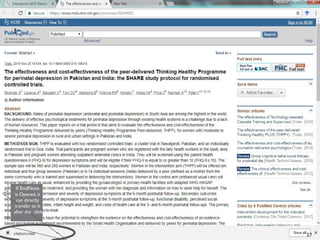
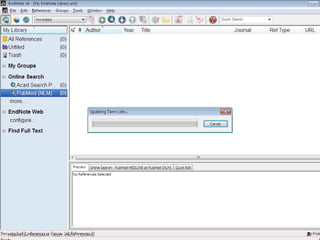
If EndNote
is Opened, it
can directly
transfer to it
after the click
27
MEHWISH HUSSAIN - ASST. PROF. ( DUHS)
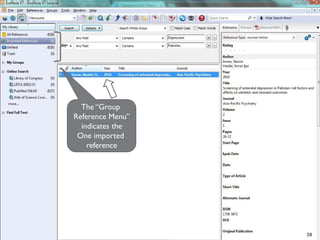
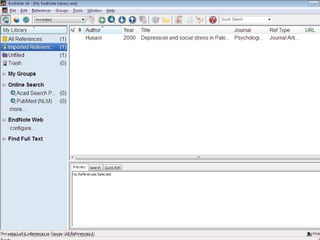
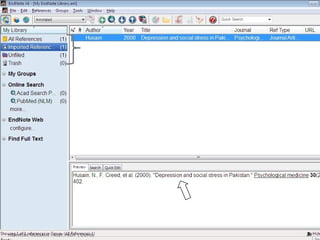
The “Group
Reference Menu”
indicates the
One imported
reference
28
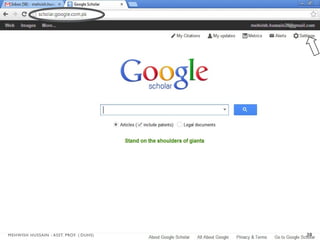
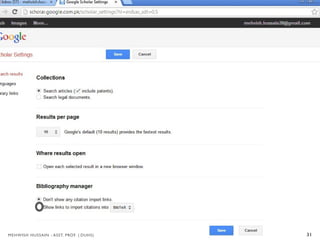
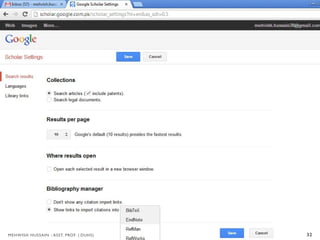
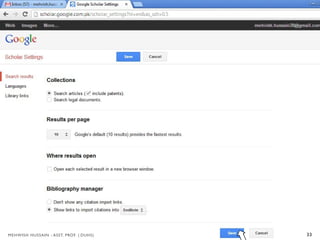
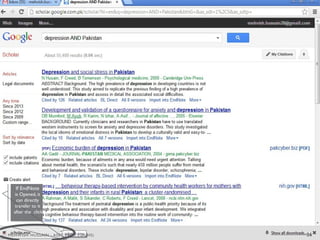
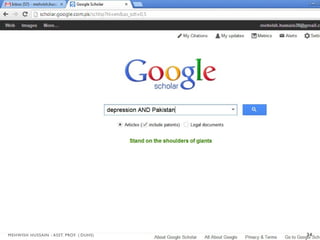
Import References
from Google
Scholar
29
MEHWISH HUSSAIN - ASST. PROF. ( DUHS)
30
MEHWISH HUSSAIN - ASST. PROF. ( DUHS)
31
MEHWISH HUSSAIN - ASST. PROF. ( DUHS)
32
MEHWISH HUSSAIN - ASST. PROF. ( DUHS)
33
MEHWISH HUSSAIN - ASST. PROF. ( DUHS)
34
MEHWISH HUSSAIN - ASST. PROF. ( DUHS)
35
MEHWISH HUSSAIN - ASST. PROF. ( DUHS)
If EndNote
is Opened, it
can directly
transfer to it
after the click
36
MEHWISH HUSSAIN - ASST. PROF. ( DUHS)
37
MEHWISH HUSSAIN - ASST. PROF. ( DUHS)
38
MEHWISH HUSSAIN - ASST. PROF. ( DUHS)
39
MEHWISH HUSSAIN - ASST. PROF. ( DUHS)
Encode reference
in library
manually
40
MEHWISH HUSSAIN - ASST. PROF. ( DUHS)
MEHWISH HUSSAIN - ASST. PROF. ( DUHS) 41
MEHWISH HUSSAIN - ASST. PROF. ( DUHS)
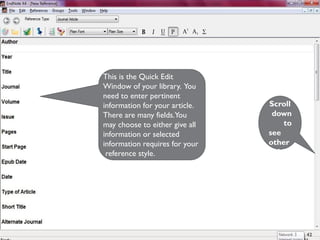
Scroll
down
to
see
other
fields
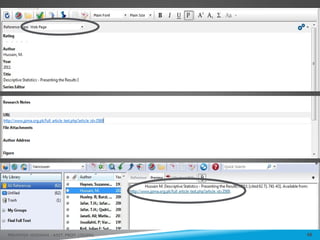
This is the Quick Edit
Window of your library. You
need to enter pertinent
information for your article.
There are many fields.You
may choose to either give all
information or selected
information requires for your
reference style.
42
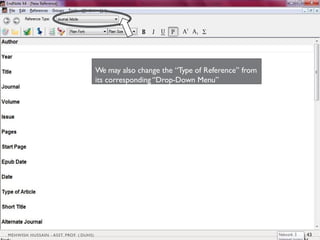
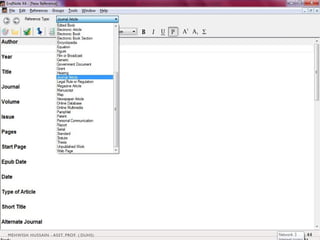
We may also change the “Type of Reference” from
its corresponding “Drop-Down Menu”
43
MEHWISH HUSSAIN - ASST. PROF. ( DUHS)
44
MEHWISH HUSSAIN - ASST. PROF. ( DUHS)
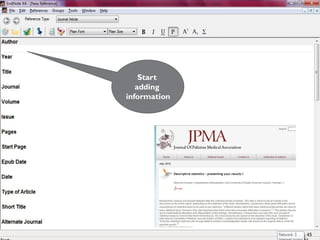
Start
adding
information
45
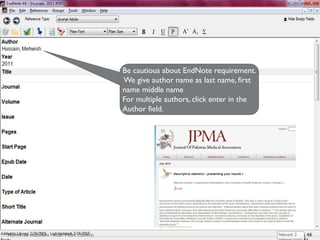
Be cautious about EndNote requirement.
We give author name as last name, first
name middle name
For multiple authors, click enter in the
Author field.
46
MEHWISH HUSSAIN - ASST. PROF. ( DUHS)
47
MEHWISH HUSSAIN - ASST. PROF. ( DUHS)
48
MEHWISH HUSSAIN - ASST. PROF. ( DUHS)
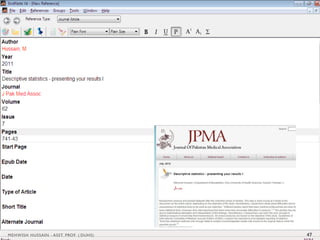
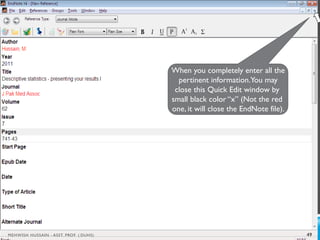
When you completely enter all the
pertinent information.You may
close this Quick Edit window by
small black color “x” (Not the red
one, it will close the EndNote file).
49
MEHWISH HUSSAIN - ASST. PROF. ( DUHS)
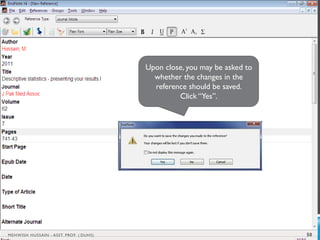
Upon close, you may be asked to
whether the changes in the
reference should be saved.
Click “Yes”.
50
MEHWISH HUSSAIN - ASST. PROF. ( DUHS)
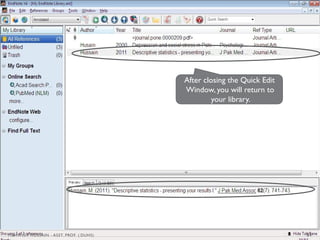
After closing the Quick Edit
Window, you will return to
your library.
51
MEHWISH HUSSAIN - ASST. PROF. ( DUHS)
Switch different
reference styles
52
MEHWISH HUSSAIN - ASST. PROF. ( DUHS)
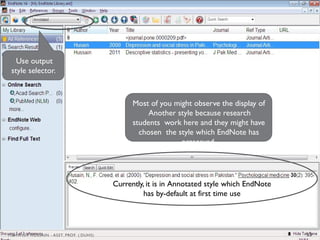
Currently, it is in Annotated style which EndNote
has by-default at first time use
Use output
style selector.
Most of you might observe the display of
Another style because research
students work here and they might have
chosen the style which EndNote has
preserved.
53
MEHWISH HUSSAIN - ASST. PROF. ( DUHS)
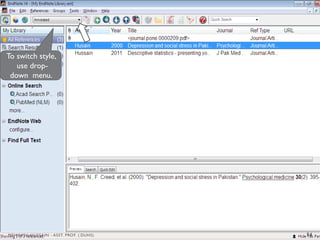
To switch style,
use drop-
down menu.
54
MEHWISH HUSSAIN - ASST. PROF. ( DUHS)
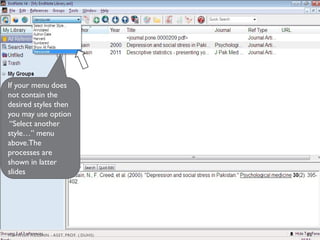
If your menu does
not contain the
desired styles then
you may use option
“Select another
style…” menu
above.The
processes are
shown in latter
slides
55
MEHWISH HUSSAIN - ASST. PROF. ( DUHS)
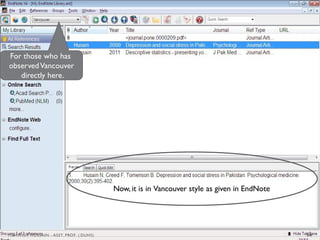
Now, it is in Vancouver style as given in EndNote
For those who has
observedVancouver
directly here.
56
MEHWISH HUSSAIN - ASST. PROF. ( DUHS)
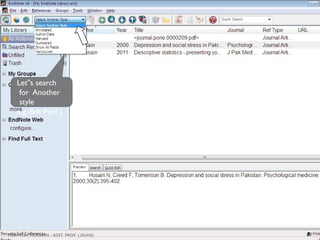
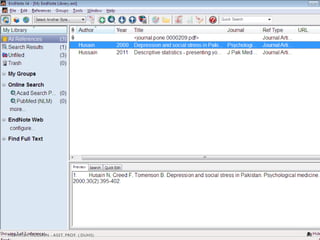
Let s search
‟
for Another
style
e.g. Brit Med J
57
MEHWISH HUSSAIN - ASST. PROF. ( DUHS)
58
MEHWISH HUSSAIN - ASST. PROF. ( DUHS)
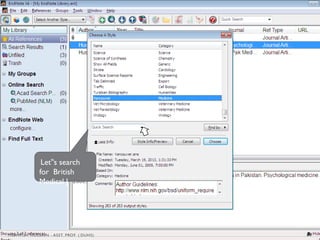
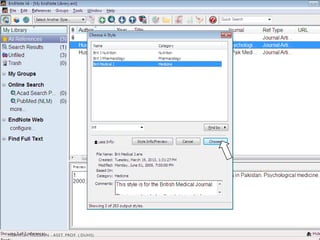
Let s search
‟
for British
Medical J
59
MEHWISH HUSSAIN - ASST. PROF. ( DUHS)
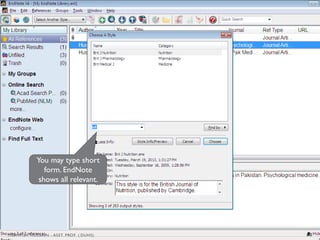
You may type short
form. EndNote
shows all relevant.
60
MEHWISH HUSSAIN - ASST. PROF. ( DUHS)
61
MEHWISH HUSSAIN - ASST. PROF. ( DUHS)
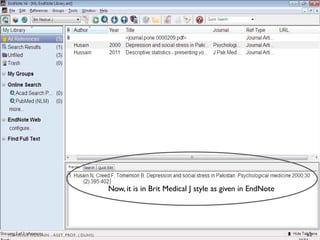
Now, it is in Brit Medical J style as given in EndNote
62
MEHWISH HUSSAIN - ASST. PROF. ( DUHS)
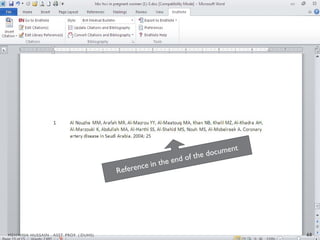
Insert references
in MS Word
63
MEHWISH HUSSAIN - ASST. PROF. ( DUHS)
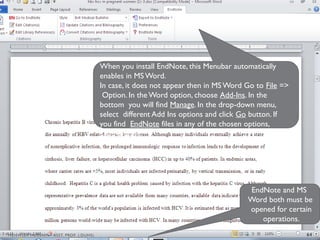
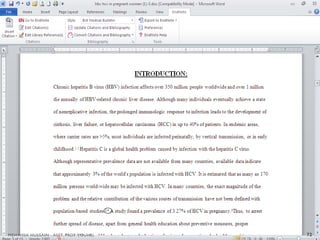
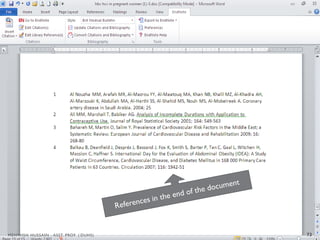
When you install EndNote, this Menubar automatically
enables in MS Word.
In case, it does not appear then in MS Word Go to File =>
Option. In the Word option, choose Add-Ins. In the
bottom you will find Manage. In the drop-down menu,
select different Add Ins options and click Go button. If
you find EndNote files in any of the chosen options,
Enable those.
EndNote and MS
Word both must be
opened for certain
operations.
64
MEHWISH HUSSAIN - ASST. PROF. ( DUHS)
MEHWISH HUSSAIN - ASST. PROF. ( DUHS 65
MEHWISH HUSSAIN - ASST. PROF. ( DUHS) 66
MEHWISH HUSSAIN - ASST. PROF. ( DUHS 67
68
MEHWISH HUSSAIN - ASST. PROF. ( DUHS)
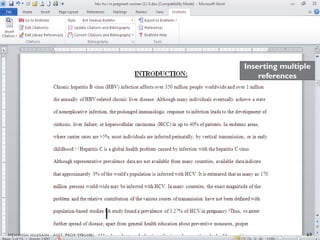
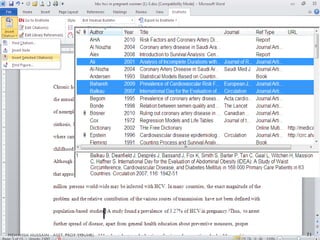
Inserting multiple
references
69
MEHWISH HUSSAIN - ASST. PROF. ( DUHS)
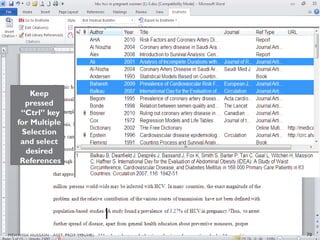
Keep
pressed
“Ctrl” key
for Multiple
Selection
and select
desired
References
70
MEHWISH HUSSAIN - ASST. PROF. ( DUHS)
71
MEHWISH HUSSAIN - ASST. PROF. ( DUHS)
72
MEHWISH HUSSAIN - ASST. PROF. ( DUHS)
73
MEHWISH HUSSAIN - ASST. PROF. ( DUHS)
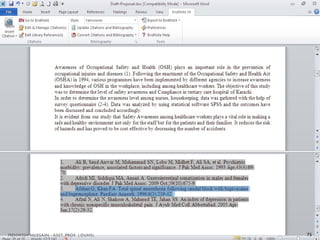
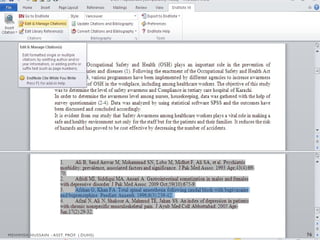
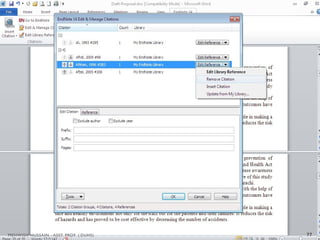
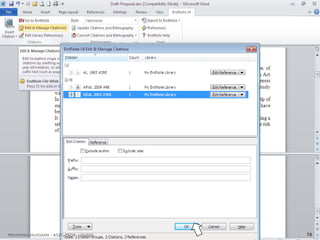
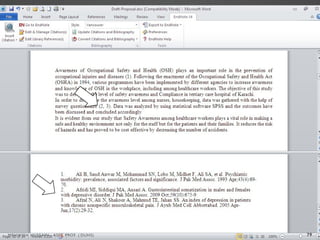
Deleting Unwanted
References From
MS Word
74
MEHWISH HUSSAIN - ASST. PROF. ( DUHS)
75
MEHWISH HUSSAIN - ASST. PROF. ( DUHS)
76
MEHWISH HUSSAIN - ASST. PROF. ( DUHS)
77
MEHWISH HUSSAIN - ASST. PROF. ( DUHS)
78
MEHWISH HUSSAIN - ASST. PROF. ( DUHS)
79
MEHWISH HUSSAIN - ASST. PROF. ( DUHS)
80
MEHWISH HUSSAIN - ASST. PROF. ( DUHS)

chp 4.pptx RESEARCH METHODOLOGY PHARMACY PRACTICE