Chapter 3
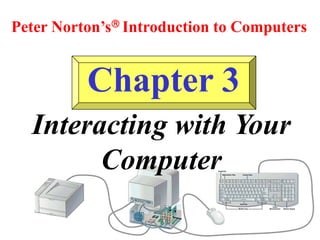
Peter Norton’s Introduction to Computers
Interacting with Your
Computer
Learning Objectives:
• List at least three common input and output devices.
• Name the processes a video monitor uses to displays images.
• Name the components of a mouse and list the common
techniques used to maintain a mouse.
• Name three types of printers and list the advantages and
disadvantages of each.
• Explain how input and output devices communicate with the
other parts of the computer.
Input Devices:
• Keyboard
• Mouse
• Trackball
• Trackpad
• Pen
• Touch Screen
• Bar Code Reader
• Image Scanner
• Microphone
• Video
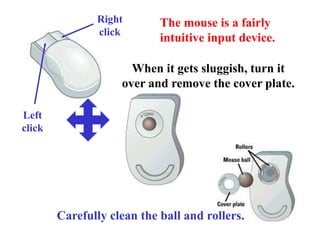
Right
click
The mouse is a fairly
intuitive input device.
When it gets sluggish, turn it
over and remove the cover plate.
Carefully clean the ball and rollers.
Left
click
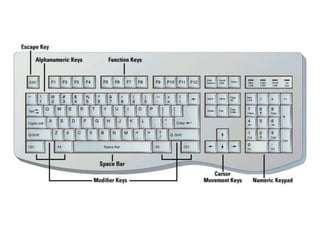
Parts of a Keyboard:
• Alphanumeric Keys
• Modifier Keys
• Numeric Keypad
• Function Keys
• Cursor-movement Keys
• Escape Key
• Special-purpose Keys
Factors Affecting
Monitors:
• Size
• Resolution
• Refresh rate
• Dot pitch
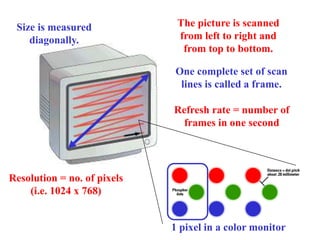
Size is measured
diagonally.
Resolution = no. of pixels
(i.e. 1024 x 768)
Refresh rate = number of
frames in one second
The picture is scanned
from left to right and
from top to bottom.
One complete set of scan
lines is called a frame.
1 pixel in a color monitor
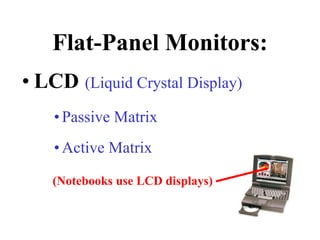
Flat-Panel Monitors:
• LCD (Liquid Crystal Display)
•Passive Matrix
•Active Matrix
(Notebooks use LCD displays)
Types of Printers:
• Ink Jet
• Laser
• Dot-Matrix
• Thermal-Wax
• Dye-Sub
• Fiery
• IRIS
• Plotter
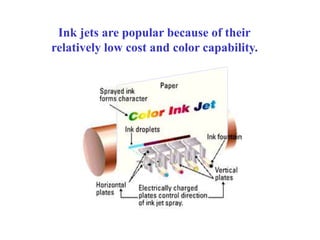
Ink jets are popular because of their
relatively low cost and color capability.
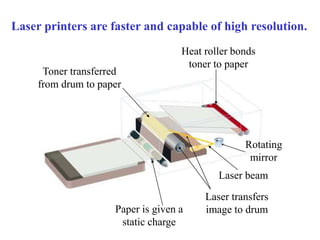
Paper is given a
static charge
Laser beam
Heat roller bonds
toner to paper
Toner transferred
from drum to paper
Rotating
mirror
Laser transfers
image to drum
Laser printers are faster and capable of high resolution.
Printer Criteria:
• Image Quality
• Speed
• Initial Cost
• Cost of Operation
Types of Interfaces:
• Serial
• Parallel
• Centronics
• SCSI
Bit 0
Start bit
Bit 1
Bit 2
Bit 3
Bit 4
Bit 5
Bit 6
Bit 7
Stop Bit
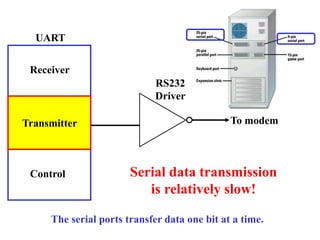
UART
RS232
Driver
To modem
Transmitter
Receiver
Control Serial data transmission
is relatively slow!
The serial ports transfer data one bit at a time.
PIA
Transmitter
Receiver
Control
To printer
The parallel port transfers data one byte at a time.
Drivers
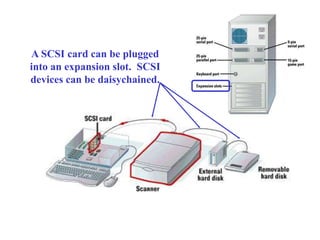
A SCSI card can be plugged
into an expansion slot. SCSI
devices can be daisychained.
Learning Objectives:
Chapter 3 Review
• List at least three common input and output devices.
• Name the processes a video monitor uses to displays images.
• Name the components of a mouse and list the common
techniques used to maintain a mouse.
• Name three types of printers and list the advantages and
disadvantages of each.
• Explain how input and output devices communicate with the
other parts of the computer.

Chapter3.ppt

  • 1.
    Chapter 3 Peter Norton’sIntroduction to Computers Interacting with Your Computer
  • 2.
    Learning Objectives: • Listat least three common input and output devices. • Name the processes a video monitor uses to displays images. • Name the components of a mouse and list the common techniques used to maintain a mouse. • Name three types of printers and list the advantages and disadvantages of each. • Explain how input and output devices communicate with the other parts of the computer.
  • 3.
    Input Devices: • Keyboard •Mouse • Trackball • Trackpad • Pen • Touch Screen • Bar Code Reader • Image Scanner • Microphone • Video
  • 4.
    Right click The mouse isa fairly intuitive input device. When it gets sluggish, turn it over and remove the cover plate. Carefully clean the ball and rollers. Left click
  • 5.
    Parts of aKeyboard: • Alphanumeric Keys • Modifier Keys • Numeric Keypad • Function Keys • Cursor-movement Keys • Escape Key • Special-purpose Keys
  • 7.
    Factors Affecting Monitors: • Size •Resolution • Refresh rate • Dot pitch
  • 8.
    Size is measured diagonally. Resolution= no. of pixels (i.e. 1024 x 768) Refresh rate = number of frames in one second The picture is scanned from left to right and from top to bottom. One complete set of scan lines is called a frame. 1 pixel in a color monitor
  • 9.
    Flat-Panel Monitors: • LCD(Liquid Crystal Display) •Passive Matrix •Active Matrix (Notebooks use LCD displays)
  • 10.
    Types of Printers: •Ink Jet • Laser • Dot-Matrix • Thermal-Wax • Dye-Sub • Fiery • IRIS • Plotter
  • 11.
    Ink jets arepopular because of their relatively low cost and color capability.
  • 12.
    Paper is givena static charge Laser beam Heat roller bonds toner to paper Toner transferred from drum to paper Rotating mirror Laser transfers image to drum Laser printers are faster and capable of high resolution.
  • 13.
    Printer Criteria: • ImageQuality • Speed • Initial Cost • Cost of Operation
  • 14.
    Types of Interfaces: •Serial • Parallel • Centronics • SCSI
  • 15.
    Bit 0 Start bit Bit1 Bit 2 Bit 3 Bit 4 Bit 5 Bit 6 Bit 7 Stop Bit UART RS232 Driver To modem Transmitter Receiver Control Serial data transmission is relatively slow! The serial ports transfer data one bit at a time.
  • 16.
    PIA Transmitter Receiver Control To printer The parallelport transfers data one byte at a time. Drivers
  • 17.
    A SCSI cardcan be plugged into an expansion slot. SCSI devices can be daisychained.
  • 18.
    Learning Objectives: Chapter 3Review • List at least three common input and output devices. • Name the processes a video monitor uses to displays images. • Name the components of a mouse and list the common techniques used to maintain a mouse. • Name three types of printers and list the advantages and disadvantages of each. • Explain how input and output devices communicate with the other parts of the computer.