CS221N, Data Structures
Introduction
1
Welcome to Data Structures!
 Start off Chapter 1
 What are data structures and algorithms?
 What good will it do me to know about them?
 Why can't I just use arrays and for loops to handle my data?
 When does it make sense to apply what I learn here?
 This chapter attempts to
 answer these questions.
 We'll also introduce some terms you'll need to know
 generally set the stage for the more detailed chapters to follow.
2
We Ready? Let’s Roll.
 In the course description, I mentioned that this class will
cover both data structures and algorithms.
 Let’s delve a little deeper into exactly what we mean…
 And show some examples of each.
3
Definition of a Data Structure
 A data structure is an arrangement of data in a computer’s
memory (or disk).
 Questions to ponder:
 What are some examples of data structures you already know
about from your Java course?
 How can the arrangement of data in memory affect
performance?
4
Definition of an Algorithm
 An algorithm provides a set of instructions for manipulating
data in that structures.
 Questions to ponder:
 What’s an example of an algorithm?
 How can the design of an algorithm affect performance? How
can it affect memory?
5
Data Structure or Algorithm?
 Linked List
 Sort
 Search
 Stack
6
Real World Data Storage
 Real-world data: data that describes physical entities external
to the computer. Can we think of some examples?
 a personnel records.
 a book records.
 What’s an example of non-computer data storage?
 Addresses and phone #s:
 Book names, titles, ISBNs:
7
Real World Data Storage
 Say we wanted to convert one of these systems to a computer
program, what must we consider?
 Memory consumption:
 Scalability:
 Algorithms (which ones do we care about?):
8
Important: Data Structures can be HUGE!!!
 What are some example scenarios where we need large data
structures?
 a personnel record describes an actual human being.
 an inventory record describes an existing car part or grocery
item
 financial transaction record describes, say, an actual check
written to pay the electric bill.
 Now the issue of scalability comes into play. Suppose I
design a reusable component for (i.e.) sorting an array of
records by last name. I’m going to distribute this on the
internet. I have to prepare for many more situations now:
9
Programmer Tools
 Do not store real-world data, but perform some function
internal to the machine.
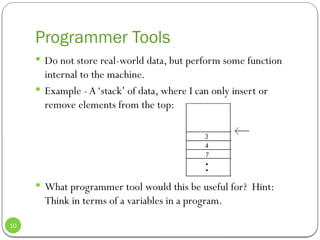
 Example - A‘stack’ of data, where I can only insert or
remove elements from the top:
 What programmer tool would this be useful for? Hint:
Think in terms of a variables in a program.
10
Real World Modeling
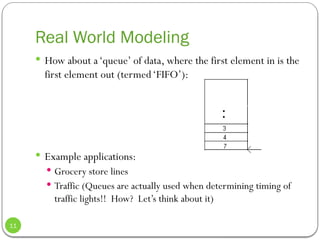
 How about a‘queue’ of data, where the first element in is the
first element out (termed‘FIFO’):
 Example applications:
 Grocery store lines
 Traffic (Queues are actually used when determining timing of
traffic lights!! How? Let’s think about it)
11
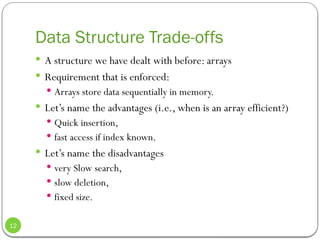
Data Structure Trade-offs
 A structure we have dealt with before: arrays
 Requirement that is enforced:
 Arrays store data sequentially in memory.
 Let’s name the advantages (i.e., when is an array efficient?)
 Quick insertion,
 fast access if index known.
 Let’s name the disadvantages
 very Slow search,
 slow deletion,
 fixed size.
12
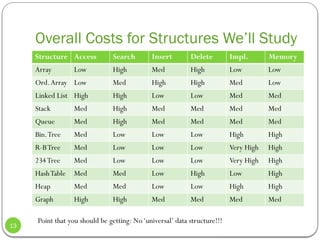
Overall Costs for Structures We’ll Study
Structure Access Search Insert Delete Impl. Memory
Array Low High Med High Low Low
Ord.Array Low Med High High Med Low
Linked List High High Low Low Med Med
Stack Med High Med Med Med Med
Queue Med High Med Med Med Med
Bin.Tree Med Low Low Low High High
R-BTree Med Low Low Low Very High High
234Tree Med Low Low Low Very High High
HashTable Med Med Low High Low High
Heap Med Med Low Low High High
Graph High High Med Med Med Med
Point that you should be getting: No‘universal’ data structure!!!
13
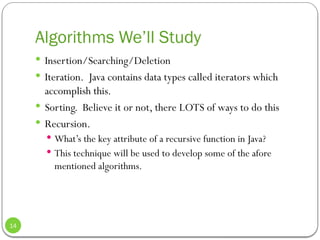
Algorithms We’ll Study
 Insertion/Searching/Deletion
 Iteration. Java contains data types called iterators which
accomplish this.
 Sorting. Believe it or not, there LOTS of ways to do this
 Recursion.
 What’s the key attribute of a recursive function in Java?
 This technique will be used to develop some of the afore
mentioned algorithms.
14
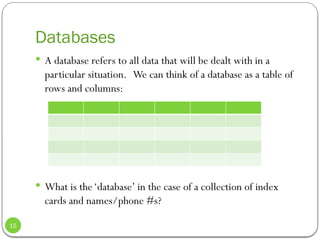
Databases
 A database refers to all data that will be dealt with in a
particular situation. We can think of a database as a table of
rows and columns:
 What is the‘database’ in the case of a collection of index
cards and names/phone #s?
15
Database Records
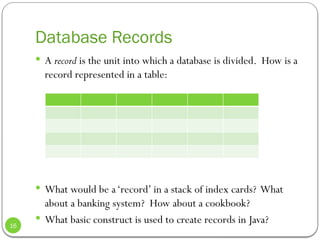
 A record is the unit into which a database is divided. How is a
record represented in a table:
 What would be a‘record’ in a stack of index cards? What
about a banking system? How about a cookbook?
 What basic construct is used to create records in Java?
16
Database Fields
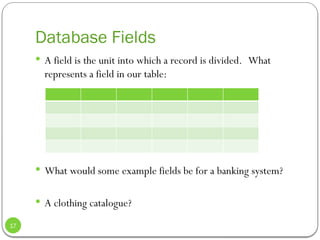
 A field is the unit into which a record is divided. What
represents a field in our table:
 What would some example fields be for a banking system?
 A clothing catalogue?
17
Database Keys
 Given a database (a collection of records), a common
operation is obviously searching. In particular we often want
to find a single particular record. But what exactly does this
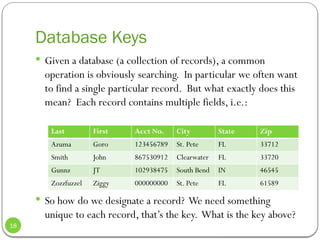
mean? Each record contains multiple fields, i.e.:
 So how do we designate a record? We need something
unique to each record, that’s the key. What is the key above?
Last First Acct No. City State Zip
Azuma Goro 123456789 St. Pete FL 33712
Smith John 867530912 Clearwater FL 33720
Gunnz JT 102938475 South Bend IN 46545
Zozzfuzzel Ziggy 000000000 St. Pete FL 61589
18
Database Keys
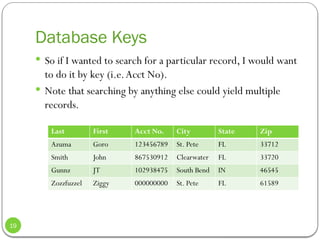
 So if I wanted to search for a particular record, I would want
to do it by key (i.e.Acct No).
 Note that searching by anything else could yield multiple
records.
Last First Acct No. City State Zip
Azuma Goro 123456789 St. Pete FL 33712
Smith John 867530912 Clearwater FL 33720
Gunnz JT 102938475 South Bend IN 46545
Zozzfuzzel Ziggy 000000000 St. Pete FL 61589
19
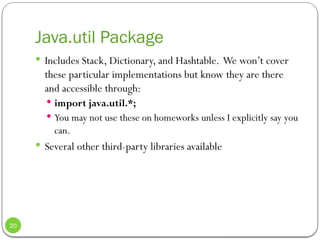
Java.util Package
 Includes Stack, Dictionary, and Hashtable. We won’t cover
these particular implementations but know they are there
and accessible through:
 import java.util.*;
 You may not use these on homeworks unless I explicitly say you
can.
 Several other third-party libraries available
20
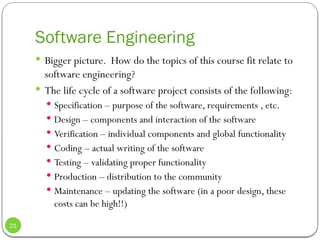
Software Engineering
 Bigger picture. How do the topics of this course fit relate to
software engineering?
 The life cycle of a software project consists of the following:
 Specification – purpose of the software, requirements , etc.
 Design – components and interaction of the software
 Verification – individual components and global functionality
 Coding – actual writing of the software
 Testing – validating proper functionality
 Production – distribution to the community
 Maintenance – updating the software (in a poor design, these
costs can be high!!)
21

Chapter one data structure and algorithm s

  • 1.
  • 2.
    Welcome to DataStructures!  Start off Chapter 1  What are data structures and algorithms?  What good will it do me to know about them?  Why can't I just use arrays and for loops to handle my data?  When does it make sense to apply what I learn here?  This chapter attempts to  answer these questions.  We'll also introduce some terms you'll need to know  generally set the stage for the more detailed chapters to follow. 2
  • 3.
    We Ready? Let’sRoll.  In the course description, I mentioned that this class will cover both data structures and algorithms.  Let’s delve a little deeper into exactly what we mean…  And show some examples of each. 3
  • 4.
    Definition of aData Structure  A data structure is an arrangement of data in a computer’s memory (or disk).  Questions to ponder:  What are some examples of data structures you already know about from your Java course?  How can the arrangement of data in memory affect performance? 4
  • 5.
    Definition of anAlgorithm  An algorithm provides a set of instructions for manipulating data in that structures.  Questions to ponder:  What’s an example of an algorithm?  How can the design of an algorithm affect performance? How can it affect memory? 5
  • 6.
    Data Structure orAlgorithm?  Linked List  Sort  Search  Stack 6
  • 7.
    Real World DataStorage  Real-world data: data that describes physical entities external to the computer. Can we think of some examples?  a personnel records.  a book records.  What’s an example of non-computer data storage?  Addresses and phone #s:  Book names, titles, ISBNs: 7
  • 8.
    Real World DataStorage  Say we wanted to convert one of these systems to a computer program, what must we consider?  Memory consumption:  Scalability:  Algorithms (which ones do we care about?): 8
  • 9.
    Important: Data Structurescan be HUGE!!!  What are some example scenarios where we need large data structures?  a personnel record describes an actual human being.  an inventory record describes an existing car part or grocery item  financial transaction record describes, say, an actual check written to pay the electric bill.  Now the issue of scalability comes into play. Suppose I design a reusable component for (i.e.) sorting an array of records by last name. I’m going to distribute this on the internet. I have to prepare for many more situations now: 9
  • 10.
    Programmer Tools  Donot store real-world data, but perform some function internal to the machine.  Example - A‘stack’ of data, where I can only insert or remove elements from the top:  What programmer tool would this be useful for? Hint: Think in terms of a variables in a program. 10
  • 11.
    Real World Modeling How about a‘queue’ of data, where the first element in is the first element out (termed‘FIFO’):  Example applications:  Grocery store lines  Traffic (Queues are actually used when determining timing of traffic lights!! How? Let’s think about it) 11
  • 12.
    Data Structure Trade-offs A structure we have dealt with before: arrays  Requirement that is enforced:  Arrays store data sequentially in memory.  Let’s name the advantages (i.e., when is an array efficient?)  Quick insertion,  fast access if index known.  Let’s name the disadvantages  very Slow search,  slow deletion,  fixed size. 12
  • 13.
    Overall Costs forStructures We’ll Study Structure Access Search Insert Delete Impl. Memory Array Low High Med High Low Low Ord.Array Low Med High High Med Low Linked List High High Low Low Med Med Stack Med High Med Med Med Med Queue Med High Med Med Med Med Bin.Tree Med Low Low Low High High R-BTree Med Low Low Low Very High High 234Tree Med Low Low Low Very High High HashTable Med Med Low High Low High Heap Med Med Low Low High High Graph High High Med Med Med Med Point that you should be getting: No‘universal’ data structure!!! 13
  • 14.
    Algorithms We’ll Study Insertion/Searching/Deletion  Iteration. Java contains data types called iterators which accomplish this.  Sorting. Believe it or not, there LOTS of ways to do this  Recursion.  What’s the key attribute of a recursive function in Java?  This technique will be used to develop some of the afore mentioned algorithms. 14
  • 15.
    Databases  A databaserefers to all data that will be dealt with in a particular situation. We can think of a database as a table of rows and columns:  What is the‘database’ in the case of a collection of index cards and names/phone #s? 15
  • 16.
    Database Records  Arecord is the unit into which a database is divided. How is a record represented in a table:  What would be a‘record’ in a stack of index cards? What about a banking system? How about a cookbook?  What basic construct is used to create records in Java? 16
  • 17.
    Database Fields  Afield is the unit into which a record is divided. What represents a field in our table:  What would some example fields be for a banking system?  A clothing catalogue? 17
  • 18.
    Database Keys  Givena database (a collection of records), a common operation is obviously searching. In particular we often want to find a single particular record. But what exactly does this mean? Each record contains multiple fields, i.e.:  So how do we designate a record? We need something unique to each record, that’s the key. What is the key above? Last First Acct No. City State Zip Azuma Goro 123456789 St. Pete FL 33712 Smith John 867530912 Clearwater FL 33720 Gunnz JT 102938475 South Bend IN 46545 Zozzfuzzel Ziggy 000000000 St. Pete FL 61589 18
  • 19.
    Database Keys  Soif I wanted to search for a particular record, I would want to do it by key (i.e.Acct No).  Note that searching by anything else could yield multiple records. Last First Acct No. City State Zip Azuma Goro 123456789 St. Pete FL 33712 Smith John 867530912 Clearwater FL 33720 Gunnz JT 102938475 South Bend IN 46545 Zozzfuzzel Ziggy 000000000 St. Pete FL 61589 19
  • 20.
    Java.util Package  IncludesStack, Dictionary, and Hashtable. We won’t cover these particular implementations but know they are there and accessible through:  import java.util.*;  You may not use these on homeworks unless I explicitly say you can.  Several other third-party libraries available 20
  • 21.
    Software Engineering  Biggerpicture. How do the topics of this course fit relate to software engineering?  The life cycle of a software project consists of the following:  Specification – purpose of the software, requirements , etc.  Design – components and interaction of the software  Verification – individual components and global functionality  Coding – actual writing of the software  Testing – validating proper functionality  Production – distribution to the community  Maintenance – updating the software (in a poor design, these costs can be high!!) 21