EXPLAINING THE JAVA COMPILER
& INTERPRETER
Chapter 2.3:
Java
 There are hundreds of high level computer
languages. Java, C++, C, Basic, Fortran,
Cobol, Lisp, Perl, Prolog, Eiffel, Python
 The capabilities of the languages vary
widely, but they all need a way to do
 declarative statements
 conditional statements
 iterative or repetitive statements
 A compiler is a program that converts
commands in high level languages to
machine language instructions
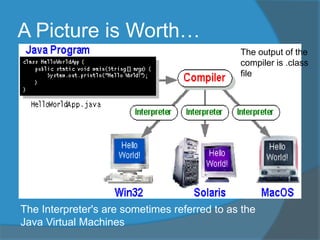
A Picture is Worth…
The Interpreter's are sometimes referred to as the
Java Virtual Machines
The output of the
compiler is .class
file
A Simple Java Program
public class Hello
{ public static void main(String[] args)
{ System.out.println("Hello World!");
}
}
This would be in a text file named Hello.java
DEMO of writing and running a program via notepad
and the command line
More Definitions
 code or source code: The sequence of
instructions in a particular program.
 The code in this program instructs the computer
to print a message of Hello, world! on the
screen.
 output: The messages printed to the
computer user by a program.
 console: The text box or window onto
which output is printed.
Compiling and Running
 Compiler: a program that converts a program
in one language to another language
 compile from C++ to machine code
 compile Java to bytecode
 Bytecode: a language for an imaginary cpu
 Interpreter: A converts one instruction or line
of code from one language to another and
then executes that instruction
 When java programs are run the bytecode produced
by the compiler is fed to an interpreter that converts
it to machine code for a particular CPU
 on my machine it converts it to instructions for a
Pentium cpu
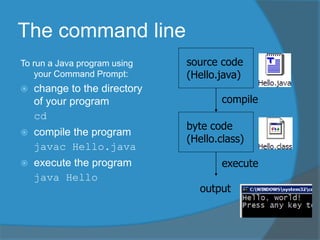
The command line
To run a Java program using
your Command Prompt:
 change to the directory
of your program
cd
 compile the program
javac Hello.java
 execute the program
java Hello
source code
(Hello.java)
compile
byte code
(Hello.class)
execute
output
Another Java program
public class Hello2 {
public static void main(String[] args) {
System.out.println("Hello, world!");
System.out.println();
System.out.println("This program
produces");
System.out.println("four lines of
output");
}
}
 The code in this program instructs the computer to print
four messages on the screen.

Chapter 2.3

  • 1.
    EXPLAINING THE JAVACOMPILER & INTERPRETER Chapter 2.3:
  • 2.
    Java  There arehundreds of high level computer languages. Java, C++, C, Basic, Fortran, Cobol, Lisp, Perl, Prolog, Eiffel, Python  The capabilities of the languages vary widely, but they all need a way to do  declarative statements  conditional statements  iterative or repetitive statements  A compiler is a program that converts commands in high level languages to machine language instructions
  • 3.
    A Picture isWorth… The Interpreter's are sometimes referred to as the Java Virtual Machines The output of the compiler is .class file
  • 4.
    A Simple JavaProgram public class Hello { public static void main(String[] args) { System.out.println("Hello World!"); } } This would be in a text file named Hello.java DEMO of writing and running a program via notepad and the command line
  • 5.
    More Definitions  codeor source code: The sequence of instructions in a particular program.  The code in this program instructs the computer to print a message of Hello, world! on the screen.  output: The messages printed to the computer user by a program.  console: The text box or window onto which output is printed.
  • 6.
    Compiling and Running Compiler: a program that converts a program in one language to another language  compile from C++ to machine code  compile Java to bytecode  Bytecode: a language for an imaginary cpu  Interpreter: A converts one instruction or line of code from one language to another and then executes that instruction  When java programs are run the bytecode produced by the compiler is fed to an interpreter that converts it to machine code for a particular CPU  on my machine it converts it to instructions for a Pentium cpu
  • 7.
    The command line Torun a Java program using your Command Prompt:  change to the directory of your program cd  compile the program javac Hello.java  execute the program java Hello source code (Hello.java) compile byte code (Hello.class) execute output
  • 8.
    Another Java program publicclass Hello2 { public static void main(String[] args) { System.out.println("Hello, world!"); System.out.println(); System.out.println("This program produces"); System.out.println("four lines of output"); } }  The code in this program instructs the computer to print four messages on the screen.