M O B I L E C O M P U T I N G T E C H N O L O G I E S
CHAPTER 2
2.1 INTRODUCTION TO MOBILE
COMPUTING
2.1.1 Mobile computing aspect:
a) Mobile communication
Communication issues include ad hoc networks and infrastructure
networks as well as communication properties, protocols, data
formats and concrete technologies.
b) Mobile hardware
Hardware includes mobile devices or device components.
c) Mobile software
Mobile software deals with the characteristics and requirements
of mobile applications.
2.1 INTRODUCTION TO MOBILE
COMPUTING
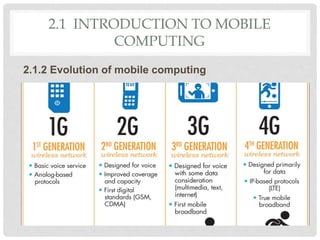
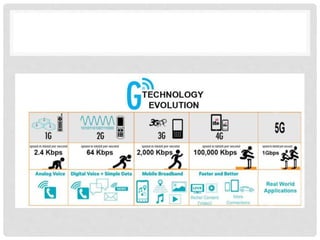
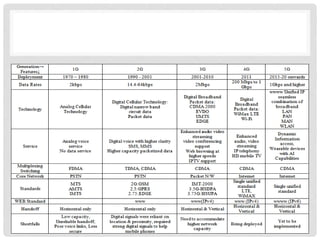
2.1.2 Evolution of mobile computing
2.1 INTRODUCTION TO MOBILE
COMPUTING
2.1.3 Mobile computing components:
a) Infrastructure
b) Communications
c) Devices
d) Platform
e) Application
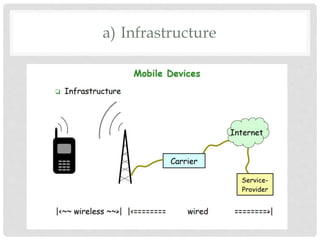
a) Infrastructure
b) Communications
• Presenting comprehensive coverage of this fast moving
field, Wireless Communications and Mobile Computing
provides the R&D communities working in academia and
the telecommunications and networking industries with a
forum for sharing research and ideas.
• Menyampaikan liputan komprehensif bidang bergerak
pantas ini, Wireless Communications dan Mobile
Computing menyediakan komuniti R & D yang bekerja di
akademik dan industri telekomunikasi dan rangkaian
dengan forum untuk berkongsi penyelidikan dan idea
c) Devices
• Is any device that is created using mobile componentsd,
such as mobile hardware and software. Mobile computing
devices are protable devices capable of operating,
executing and providing services and application like a
typical computing device.
Type of mobile computing device
• Portable computer
• Laptop
• Smartphones and tables
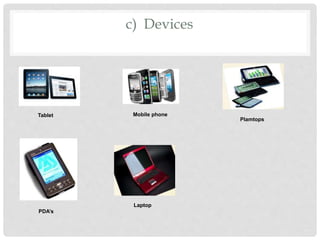
c) Devices
Tablet Mobile phone
Plamtops
PDA’s
Laptop
d) Platform
A platform is a group of technologies that are used as a base
upon which other applications, processes or technologies are
developed.
Type of mobile computing platform
• Hardware Platform
• Operating System
• Client/Server
• Mobile Platform
e) Application
A type of application software designed to run on a mobile
device, such as a smartphone or tablet computer.
Apps are generally small, individual software units with
limited function.
2.1 INTRODUCTION TO MOBILE
COMPUTING
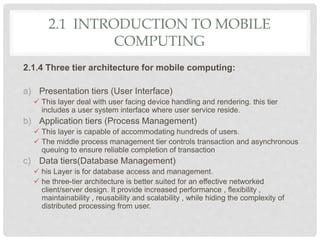
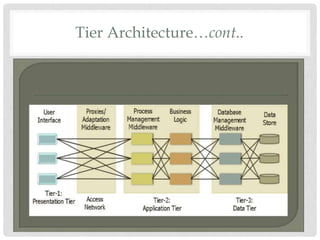
2.1.4 Three tier architecture for mobile computing:
a) Presentation tiers (User Interface)
 This layer deal with user facing device handling and rendering. this tier
includes a user system interface where user service reside.
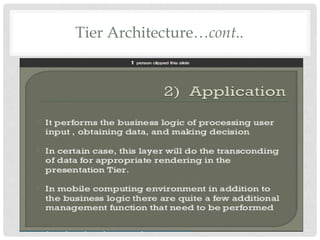
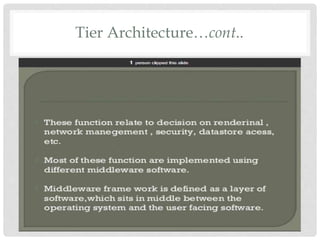
b) Application tiers (Process Management)
 This layer is capable of accommodating hundreds of users.
 The middle process management tier controls transaction and asynchronous
queuing to ensure reliable completion of transaction
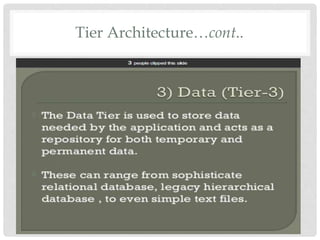
c) Data tiers(Database Management)
 his Layer is for database access and management.
 he three-tier architecture is better suited for an effective networked
client/server design. It provide increased performance , flexibility ,
maintainability , reusability and scalability , while hiding the complexity of
distributed processing from user.
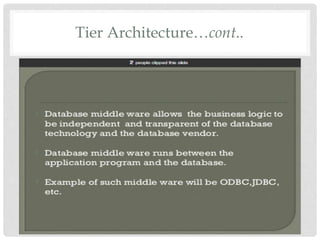
Tier Architecture…cont..
2.2 UNDERSTANDS WIRELESS SYSTEM
ARCHITECTURE
2.2.1 Wireless system architecture:
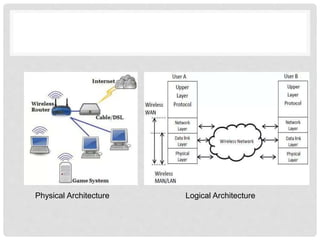
a) Logical architecture of wireless network
The logical architecture of wireless network is not visible.
Refers to the structure of standards and protocols that enable
connections to be established between physical devices, or
nodes, and which control the routing and flow of data between
these nodes.
Defines the network’s protocols rules by which two entities
communicate.
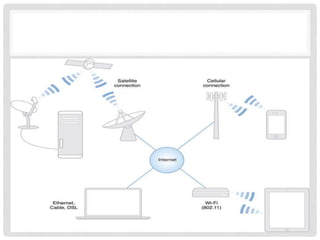
b) Physical architecture of a wireless network
The physical architecture of a wireless network is easy to
understand because it’s usually visible.
Mainly, it consists of hardware:
Physical Architecture Logical Architecture
2.2 UNDERSTANDS WIRELESS SYSTEM
ARCHITECTURE…cont…
2.2.2 Wireless network system components
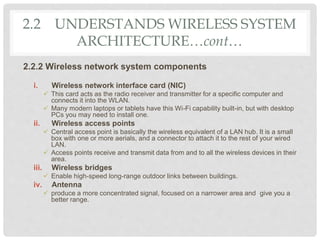
i. Wireless network interface card (NIC)
 This card acts as the radio receiver and transmitter for a specific computer and
connects it into the WLAN.
 Many modern laptops or tablets have this Wi-Fi capability built-in, but with desktop
PCs you may need to install one.
ii. Wireless access points
 Central access point is basically the wireless equivalent of a LAN hub. It is a small
box with one or more aerials, and a connector to attach it to the rest of your wired
LAN.
 Access points receive and transmit data from and to all the wireless devices in their
area.
iii. Wireless bridges
 Enable high-speed long-range outdoor links between buildings.
iv. Antenna
 produce a more concentrated signal, focused on a narrower area and give you a
better range.
2.2 UNDERSTANDS WIRELESS SYSTEM
ARCHITECTURE…cont…
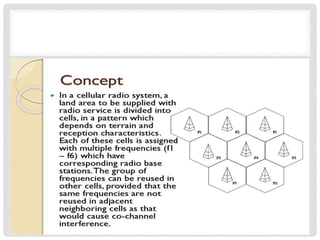
2.2.3 Cellular network basic concept
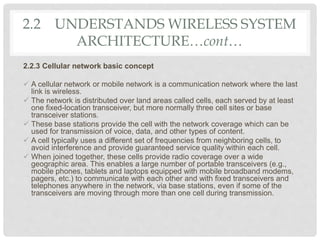
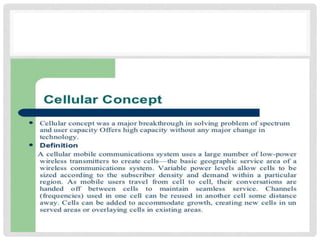
 A cellular network or mobile network is a communication network where the last
link is wireless.
 The network is distributed over land areas called cells, each served by at least
one fixed-location transceiver, but more normally three cell sites or base
transceiver stations.
 These base stations provide the cell with the network coverage which can be
used for transmission of voice, data, and other types of content.
 A cell typically uses a different set of frequencies from neighboring cells, to
avoid interference and provide guaranteed service quality within each cell.
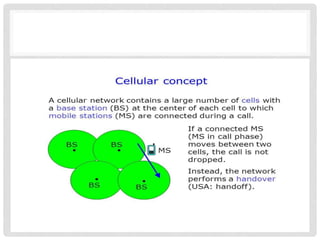
 When joined together, these cells provide radio coverage over a wide
geographic area. This enables a large number of portable transceivers (e.g.,
mobile phones, tablets and laptops equipped with mobile broadband modems,
pagers, etc.) to communicate with each other and with fixed transceivers and
telephones anywhere in the network, via base stations, even if some of the
transceivers are moving through more than one cell during transmission.
2.2 UNDERSTANDS WIRELESS SYSTEM
ARCHITECTURE…cont…
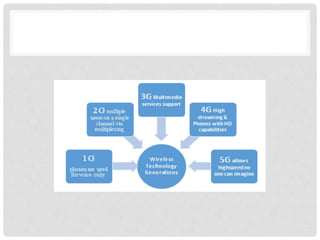
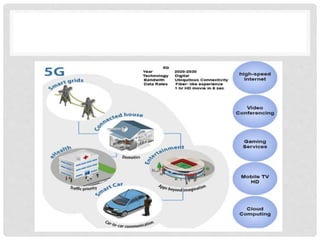
2.2.4 Evolution of wireless generation
a) 1G
b) 2G
c) 3G
d) 4G
e) 5G
2.2 UNDERSTANDS WIRELESS SYSTEM
ARCHITECTURE…cont…
2.2.5 Information signal
Communications systems—such as a wireless network—
symbolize data using codes that electrical, radio, and light signals
efficiently represent.
The signals carry the information through the system from one
point to another.
The signals are either digital or analog, depending on their
location within the system.
• Digital Signal
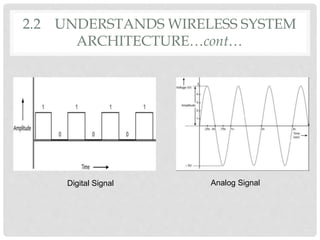
Digital signals are composed of pulses of precise, positive
voltages and zero voltages.
A pulse of positive voltage represents a 1. A pulse of zero voltage
represents a 0.
Every pulse in the digital signal is called a binary digit, or bit.
A bit can have only one of two possible values: 1 or 0. Eight bits
together form a byte.
using of discrete signals to represent information/data.
Number, letters or icons are all examples of digital signal.
Advantage:
more reliable than analog transmission
noise affects digital transmission less severely
2.2 UNDERSTANDS WIRELESS SYSTEM
ARCHITECTURE…cont…
• Analog Signal
Electronic signal that varies directly with time changes for an
infinite range of time.
Your speech, a siren, and live music are all examples of analog
waves.
using of continuous signals to represent information/data.
Wireless networks generally use analog signals at 2.4 GHz,
which is in a band of frequencies referred to as radio waves.
An analog signal is characterized by four fundamental properties:
amplitude, frequency, wavelength, and phase.
2.2 UNDERSTANDS WIRELESS SYSTEM
ARCHITECTURE…cont…
Digital Signal Analog Signal
2.2 UNDERSTANDS WIRELESS SYSTEM
ARCHITECTURE…cont…
2.3 MOBILE COMPUTING OS
2.3.1 Mobile computing OS
• mobile OS, is an operating system that is specifically designed to
run on mobile devices such as mobile phones, smartphones, PDAs,
tablet computers.
a) iOS technology
 iOS (formerly iPhone OS) is a mobile operating system created and
developed by Apple Inc. exclusively for its hardware.
 It is the operating system that presently many of the company's mobile
devices, including the iPhone, iPad, and iPod Touch.
b) Android technology
 mobile operating system developed by Google(2008), based on a modified
version of the Linux kernel and other open source software
 designed primarily for touchscreen mobile devices such as smartphones and
tablets.
 Variants of Android are also used on game consoles, digital cameras, PCs
and other electronics.

CHAPTER 2 - MOBILE COMPUTING TECHNOLOGIES.pptx

  • 1.
    M O BI L E C O M P U T I N G T E C H N O L O G I E S CHAPTER 2
  • 2.
    2.1 INTRODUCTION TOMOBILE COMPUTING 2.1.1 Mobile computing aspect: a) Mobile communication Communication issues include ad hoc networks and infrastructure networks as well as communication properties, protocols, data formats and concrete technologies. b) Mobile hardware Hardware includes mobile devices or device components. c) Mobile software Mobile software deals with the characteristics and requirements of mobile applications.
  • 3.
    2.1 INTRODUCTION TOMOBILE COMPUTING 2.1.2 Evolution of mobile computing
  • 5.
    2.1 INTRODUCTION TOMOBILE COMPUTING 2.1.3 Mobile computing components: a) Infrastructure b) Communications c) Devices d) Platform e) Application
  • 6.
  • 7.
    b) Communications • Presentingcomprehensive coverage of this fast moving field, Wireless Communications and Mobile Computing provides the R&D communities working in academia and the telecommunications and networking industries with a forum for sharing research and ideas. • Menyampaikan liputan komprehensif bidang bergerak pantas ini, Wireless Communications dan Mobile Computing menyediakan komuniti R & D yang bekerja di akademik dan industri telekomunikasi dan rangkaian dengan forum untuk berkongsi penyelidikan dan idea
  • 8.
    c) Devices • Isany device that is created using mobile componentsd, such as mobile hardware and software. Mobile computing devices are protable devices capable of operating, executing and providing services and application like a typical computing device. Type of mobile computing device • Portable computer • Laptop • Smartphones and tables
  • 9.
    c) Devices Tablet Mobilephone Plamtops PDA’s Laptop
  • 10.
    d) Platform A platformis a group of technologies that are used as a base upon which other applications, processes or technologies are developed. Type of mobile computing platform • Hardware Platform • Operating System • Client/Server • Mobile Platform
  • 11.
    e) Application A typeof application software designed to run on a mobile device, such as a smartphone or tablet computer. Apps are generally small, individual software units with limited function.
  • 12.
    2.1 INTRODUCTION TOMOBILE COMPUTING 2.1.4 Three tier architecture for mobile computing: a) Presentation tiers (User Interface)  This layer deal with user facing device handling and rendering. this tier includes a user system interface where user service reside. b) Application tiers (Process Management)  This layer is capable of accommodating hundreds of users.  The middle process management tier controls transaction and asynchronous queuing to ensure reliable completion of transaction c) Data tiers(Database Management)  his Layer is for database access and management.  he three-tier architecture is better suited for an effective networked client/server design. It provide increased performance , flexibility , maintainability , reusability and scalability , while hiding the complexity of distributed processing from user.
  • 13.
  • 14.
  • 15.
  • 16.
  • 17.
  • 18.
  • 19.
    2.2 UNDERSTANDS WIRELESSSYSTEM ARCHITECTURE 2.2.1 Wireless system architecture: a) Logical architecture of wireless network The logical architecture of wireless network is not visible. Refers to the structure of standards and protocols that enable connections to be established between physical devices, or nodes, and which control the routing and flow of data between these nodes. Defines the network’s protocols rules by which two entities communicate.
  • 20.
    b) Physical architectureof a wireless network The physical architecture of a wireless network is easy to understand because it’s usually visible. Mainly, it consists of hardware:
  • 21.
  • 22.
    2.2 UNDERSTANDS WIRELESSSYSTEM ARCHITECTURE…cont… 2.2.2 Wireless network system components i. Wireless network interface card (NIC)  This card acts as the radio receiver and transmitter for a specific computer and connects it into the WLAN.  Many modern laptops or tablets have this Wi-Fi capability built-in, but with desktop PCs you may need to install one. ii. Wireless access points  Central access point is basically the wireless equivalent of a LAN hub. It is a small box with one or more aerials, and a connector to attach it to the rest of your wired LAN.  Access points receive and transmit data from and to all the wireless devices in their area. iii. Wireless bridges  Enable high-speed long-range outdoor links between buildings. iv. Antenna  produce a more concentrated signal, focused on a narrower area and give you a better range.
  • 23.
    2.2 UNDERSTANDS WIRELESSSYSTEM ARCHITECTURE…cont… 2.2.3 Cellular network basic concept  A cellular network or mobile network is a communication network where the last link is wireless.  The network is distributed over land areas called cells, each served by at least one fixed-location transceiver, but more normally three cell sites or base transceiver stations.  These base stations provide the cell with the network coverage which can be used for transmission of voice, data, and other types of content.  A cell typically uses a different set of frequencies from neighboring cells, to avoid interference and provide guaranteed service quality within each cell.  When joined together, these cells provide radio coverage over a wide geographic area. This enables a large number of portable transceivers (e.g., mobile phones, tablets and laptops equipped with mobile broadband modems, pagers, etc.) to communicate with each other and with fixed transceivers and telephones anywhere in the network, via base stations, even if some of the transceivers are moving through more than one cell during transmission.
  • 29.
    2.2 UNDERSTANDS WIRELESSSYSTEM ARCHITECTURE…cont… 2.2.4 Evolution of wireless generation a) 1G b) 2G c) 3G d) 4G e) 5G
  • 33.
    2.2 UNDERSTANDS WIRELESSSYSTEM ARCHITECTURE…cont… 2.2.5 Information signal Communications systems—such as a wireless network— symbolize data using codes that electrical, radio, and light signals efficiently represent. The signals carry the information through the system from one point to another. The signals are either digital or analog, depending on their location within the system.
  • 34.
    • Digital Signal Digitalsignals are composed of pulses of precise, positive voltages and zero voltages. A pulse of positive voltage represents a 1. A pulse of zero voltage represents a 0. Every pulse in the digital signal is called a binary digit, or bit. A bit can have only one of two possible values: 1 or 0. Eight bits together form a byte. using of discrete signals to represent information/data. Number, letters or icons are all examples of digital signal. Advantage: more reliable than analog transmission noise affects digital transmission less severely 2.2 UNDERSTANDS WIRELESS SYSTEM ARCHITECTURE…cont…
  • 35.
    • Analog Signal Electronicsignal that varies directly with time changes for an infinite range of time. Your speech, a siren, and live music are all examples of analog waves. using of continuous signals to represent information/data. Wireless networks generally use analog signals at 2.4 GHz, which is in a band of frequencies referred to as radio waves. An analog signal is characterized by four fundamental properties: amplitude, frequency, wavelength, and phase. 2.2 UNDERSTANDS WIRELESS SYSTEM ARCHITECTURE…cont…
  • 36.
    Digital Signal AnalogSignal 2.2 UNDERSTANDS WIRELESS SYSTEM ARCHITECTURE…cont…
  • 37.
    2.3 MOBILE COMPUTINGOS 2.3.1 Mobile computing OS • mobile OS, is an operating system that is specifically designed to run on mobile devices such as mobile phones, smartphones, PDAs, tablet computers. a) iOS technology  iOS (formerly iPhone OS) is a mobile operating system created and developed by Apple Inc. exclusively for its hardware.  It is the operating system that presently many of the company's mobile devices, including the iPhone, iPad, and iPod Touch. b) Android technology  mobile operating system developed by Google(2008), based on a modified version of the Linux kernel and other open source software  designed primarily for touchscreen mobile devices such as smartphones and tablets.  Variants of Android are also used on game consoles, digital cameras, PCs and other electronics.