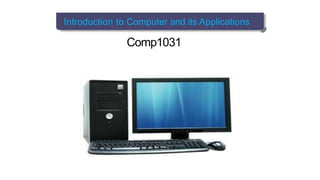
Introduction to Computer and its Applications
Comp1031
Chapter One: Introduction to Computer Chapter Two: Computer System Chapter Three: Number Systems
What is a Computer?
A computer is a machine that is controlled by internally
stored programs and that can perform operations without
human intervention.
It is a collection of hardware and software components.
hardware:
) Consist of one or more processing units, memory units, and input and
output devices.
) It is the equipment you see and the parts you can touch.
Software:
) is the set of instructions, called a program, which tells the computer
what to do, when and how to do it.
Generally, Computer is a programmable electronic machine
capable of accepting data, processing, storing and then
displays the output to the user.
Lecture Introduction to Computer Applications
1/88
Chapter One: Introduction to Computer Chapter Two: Computer System Chapter Three: Number Systems
Characteristics of computers
Computers have the following characteristics:-
Automatic: once a program is in the computer’s memory, it continues
without the need for human intervention until completion. Or once
started on a job, they carry on until the job is finished.
Speed: a computer is a very fast device. Units of time are
microseconds (10 -6 second), nanoseconds (10 -9 second) or even
picoseconds (10 -12 second). A powerful computer is capable of
performing several billion (109) simple arithmetic operations per
second.
Accuracy: The computer’s accuracy is consistently high. Almost
without exception, the errors in computing are due to human rather
than to technological weakness, that is to incorrect programming, or
to inaccurate data or to poorly designed systems.
Storage capacity: computers help to save space and economy by
storing very large amount of data.
Lecture Introduction to Computer Applications
2/88
Chapter One: Introduction to Computer Chapter Two: Computer System Chapter Three: Number Systems
Characteristics of computers
Diligence: unlike human beings, a computer is free from boredom,
tiredness, lack of concentration, etc, and hence can work for hours
without creating any error and without grumbling.
Versatility: it is one of the most wonderful things about the
computer. A computer is capable of performing almost any task
provided that the task can be reduced to a series of logical steps.
Power of remembering: a computer can store and recall huge
amount of information because of its secondary storage capability.
No IQ: a computer not a magical device. It can only perform tasks
that a human being can. It possesses no intelligence of its own. Its
IQ is zero. It has to be told what to do and in whatsequence.
No feeling: computers are devoid of emotion. They have no
feelings and no instincts because they are machines. Computers can
not make judgment on their own. Their judgment is based on the
instructions given to them in the form of programs.
Lecture Introduction to Computer Applications
3/88
Chapter One: Introduction to Computer Chapter Two: Computer System Chapter Three: Number Systems
Characteristics of computers
Reliability: now a day’s computers are used in sensitive areas that
need very high reliability. For example hospitals are using computers
in patient diagnosis, monitoring patient operations. They are also
monitoring activities in industries that may cause failure or success of
the company.etc.
Resource sharing: by connecting computers each other resource
sharing is achievable in the computer system. E.g. printer.
Flexibility: a computer is a versatile machine. All other machines like
television or a typewriter do the one thing they are designed for. Unlike
such machines, a computer can be used to play music, watch films,
type letters, send faxes, diagnose illness, design buildings and
bridges, etc.
Lecture Introduction to Computer Applications
4/88
Chapter One: Introduction to Computer Chapter Two: Computer System Chapter Three: Number Systems
Application of computers
Some application areas of computers are listed below:-
Science: scientists have been using computers to develop theories,
to analysis, and test the date. E.g. detail study of how earth quakes
affect buildings or population affect weather pattern, satellite based
application.
Education: computers have also revolutionized the whole process
of education. Currently, the class room, libraries, and museums are
effectively utilizing computers to make the education much more
interesting.
Medicine and health care: now doctors are using computers right
from diagnosing the illness to monitoring a patient’s status during
complex surgery.
Lecture Introduction to Computer Applications
5/88
Chapter One: Introduction to Computer Chapter Two: Computer System Chapter Three: Number Systems
Application of computers
Engineering (architectures): the architects and engineering are
extremely using computers in designing and drawings. By using
the techniques like virtual reality architects can explore houses
that have been designed.
Entertainment: computers are used to control the images and
sounds. The special effects, which mesmerize the audience,
would not have been possible without the computer. In addition,
computerized animation and color full graphics have modernized
the film industry.
Communication: E-mail or electronic mail is one of the
communication media in which computer is used. The advantage
of this service is that while transferring the message it save
time, avoids wastage of paper, and so on.
Lecture Introduction to Computer Applications 6/88
Chapter One: Introduction to Computer Chapter Two: Computer System Chapter Three: Number Systems
Application of computers
Business application: There are various concerns from which
computers are used such as in business forecasting, to prepare
pay bills and personal record, in banking operation and data
storage, in the various types of life insurance business, and as
an aid to management.
Publishing: computers have created a field known as DTP
(Desk Top Publishing). In DTP, with the help of computer and
laser printer one can perform the publishing job all by oneself.
Banking: in the field of banking and insurance computers
are extensively used. People can use the ATM (Automatic
Teller Machine) services 24 hours of the day in order to
deposit and withdraw cash.
Industries: - it is used for designing products, assisting
labors, controlling the work of the machineries in factory
e.t.c.
Lecture Introduction to Computer Applications
7/88
Chapter One: Introduction to Computer Chapter Two: Computer System Chapter Three: Number Systems
Limitation of computers
There are activities that computers can’t perform:
Computers can’t decide how to be programmed. It is always persons
or humans that are responsible for programming the computers.
Computers can only perform what it is programmed to do, nothing
more and nothing less.
Computers don’t provide their own inputs unless people provide it
with the inputs.
Interpretation of data and implementation of decisions is always left
for humans.
Lecture Introduction to Computer Applications
8/88
Chapter One: Introduction to Computer Chapter Two: Computer System Chapter Three: Number Systems
Generation of computers
There is a rapid change in Generation of computer.
All modern computers can be categorized in to five generation
based on the following five dimensions:
) Basic electronic component used by the computer
) Secondary storage device used
) Operating system
) Access time of the computer
) Computer language used.
The most common improvements which are made from
one generation to next.
) Enhanced power in terms of speed processing data, storage
) More Convenient to use
) Better reliability
) Reduced physical size &loss Expensive
Lecture Introduction to Computer Applications
9/88
Chapter One: Introduction to Computer Chapter Two: Computer System Chapter Three: Number Systems
First generation
This generation of computer is characterized by:- It
uses vacuum tubes as main component
It is very big ,expensive & slow
It required extensive air condition It
generates large heat
It uses magnetic drums for memory It is
very expensive to operate.
It uses machine language to perform operation.
It uses punched cards and paper tape for input purpose.
Output was displayed on printouts.
Lecture Introduction to Computer Applications
10/88
Chapter One: Introduction to Computer Chapter Two: Computer System Chapter Three: Number Systems
Second generation
It uses transistor instead of vacuum tubes
Bc of the transistors, the computer becomes smaller in size,
fast in speed &more reliable than 1 st generation.
It uses punched cards for input and printouts for
output It controls by Assembly programming
language Magnetic tape is introduced for store data
Lecture Introduction to Computer Applications
11/88
Chapter One: Introduction to Computer Chapter Two: Computer System Chapter Three: Number Systems
Third generation
Integrated circuits(IC) called chips are replaced to transistor.
IC is a collection transistor. Transistors were placed on silicon
chips called Semiconductors. Because of IC, Computers
became:-
) Smaller in size &power requirement
) Very fast &more reliable
) Magnetic disk is replaced to magnetic tape storage device.
) It uses keyboard instead of punched cards.
) It uses monitors instead of printout.
) It uses operating system which allows the computer to run many
applications at one time with a central program that monitored the
memory.
Lecture Introduction to Computer Applications
12/88
Chapter One: Introduction to Computer Chapter Two: Computer System Chapter Three: Number Systems
Fourth generation :
This generation of computer is Characterized by:
It uses Microprocessor replaces Integrated Circuit. Thousands of
Integrated Circuits are built onto a single silicon Chip.
Cheaper in price
More powerful
Efficient &reliable
It uses Graphical user interface and mouse.
Five Generation:
It is characterized by:
It uses an artificial intelligence &interact with the natural language
The main is to narrow the gap between human being and
computer.
Lecture Introduction to Computer Applications
13/88
Chapter One: Introduction to Computer Chapter Two: Computer System Chapter Three: Number Systems
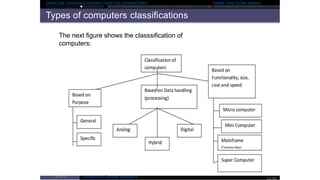
Types of computers classifications
The next figure shows the classsification of
computers:
Lecture Introduction to Computer Applications
14/88
Chapter One: Introduction to Computer Chapter Two: Computer System Chapter Three: Number Systems
Computers classification according to purpose
General purpose
Design to perform a range of tasks these computers have the
ability to perform a range of tasks .
These computers have the ability to store numerous programs.
These machines can be used for various applications, ranging
from scientific as well as business applications. Even though
such computers are versatile, they generally lack in speed and
efficiency. Computers that you use home and schools are
general purpose computers.
Specific purpose
Design to handle a specific problem or to perform a single specific
task built into the machine. They lacked versatility .However, being
designed for specific tasks; they can be providing the result very
quickly and effectively. These computers are used for airline
reservation, satellite tracking, and air traffic control.
Lecture Introduction to Computer Applications
15/88
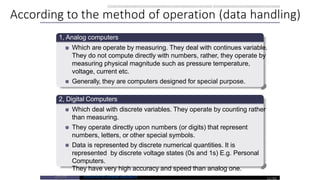
According to the method of operation (data handling)
1, Analog computers
Which are operate by measuring. They deal with continues variable.
They do not compute directly with numbers, rather, they operate by
measuring physical magnitude such as pressure temperature,
voltage, current etc.
Generally, they are computers designed for special purpose.
2, Digital Computers
Which deal with discrete variables. They operate by counting rather
than measuring.
They operate directly upon numbers (or digits) that represent
numbers, letters, or other special symbols.
Data is represented by discrete numerical quantities. It is
represented by discrete voltage states (0s and 1s) E.g. Personal
Computers.
They have very high accuracy and speed than analog one.
Lecture Introduction to Computer Applications
16/88
Chapter One: Introduction to Computer Chapter Two: Computer System Chapter Three: Number Systems
3, Hybrid Computers
The best features of analog and digital computers can be combined
into a single device to form a hybrid computer.
It processes the information by collecting input data with analog
method, converts it into digital quantities, processes the digital
values and converts the output from digital to analog form.
Lecture Introduction to Computer Applications
17/88
Chapter One: Introduction to Computer Chapter Two: Computer System Chapter Three: Number Systems
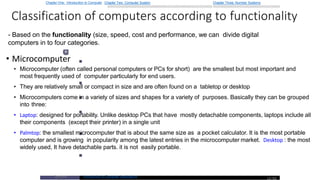
Classification of computers according to functionality
- Based on the functionality (size, speed, cost and performance, we can divide digital
computers in to four categories.
1
• Microcomputer
• Microcomputer (often called personal computers or PCs for short) are the smallest but most important and
most frequently used of computer particularly for end users.
• They are relatively small or compact in size and are often found on a tabletop or desktop
• Microcomputers come in a variety of sizes and shapes for a variety of purposes. Basically they can be grouped
into three:
• Laptop: designed for portability. Unlike desktop PCs that have mostly detachable components, laptops include all
their components (except their printer) in a single unit
• Palmtop: the smallest microcomputer that is about the same size as a pocket calculator. It is the most portable
computer and is growing in popularity among the latest entries in the microcomputer market. Desktop : the most
widely used, It have detachable parts. it is not easily portable.
Lecture Introduction to Computer Applications
18/88
Chapter One: Introduction to Computer Chapter Two: Computer System Chapter Three: Number Systems
Microcomputers are used for:
Word processing (automated, electronic typing and editing) to
prepare letters, reports, memos and other documents.
Computerized worksheet analysis and modeling. This
computerizes business performance and assists decision-
making activities.
Graphics in the generation of charts and other graphic images.
This visually enhances both the analysis and presentation of
information in reports and group presentations.
Engineering activities. Computer-aided design and analysis can
be performed by the use of powerful microcomputers.
Personal and home use. Entertainment, home management,
personal finances, education, and other activities can easily
supported by the use of personal computers.
Lecture Introduction to Computer Applications
19/88
Chapter One: Introduction to Computer Chapter Two: Computer System Chapter Three: Number Systems
Cont..
2 Minicomputers
Minicomputers are midrange computers that are larger and more
powerful than most microcomputers but are smaller and less powerful
than mainframe computer systems.
The minicomputers size prevents it from being easily portable although
it can be moved more easily than a mainframe computer.
Minicomputers cost less to buy and maintain than mainframe
computers. Most minicomputers canfunction in ordinary operating
environments, as they do not need special air conditioning or electrical
wiring.
Minicomputers are being used for a large number of business and
scientific applications. They are popularly used in scientific laboratories,
research centers, universities and colleges, engineering firms,
industrial process monitoring and control etc.
Lecture Introduction to Computer Applications
20/88
Chapter One: Introduction to Computer Chapter Two: Computer System Chapter Three: Number Systems
Cont..
3 Mainframe
Mainframe computers are large, powerful computers that are
physically larger than micros and minis and usually have
processors with faster instruction processing speeds. For
example, they may be able to process from 10 to 200 million
instructions per second (MIPS).
A mainframe computer is generally found in a special computer
room where environmental factors such as temperature, humidity,
dust and air conditions are closely monitored.
Lecture Introduction to Computer Applications
21/88
Chapter One: Introduction to Computer Chapter Two: Computer System Chapter Three: Number Systems
Cont..
4 Supercomputer
designed for high-speed processing.
A supercomputer is generally characterized as being the fastest, most
powerful, and most expensive computer.
As many as sixty miles of wiring are closely packed inside
supercomputers, and tremendous amounts of heat are generated.
Because of this, supercomputers demand special cooling requirement
and the room itself should be air-conditioned.
Some supercomputers require extra floor support to hold the extreme
weight of the complete system that includes storage units.
In addition, highly trained data processing professionals are required to
operate supercomputers.
These computers can take inputs from over 10,000 individual
computers and users at the same time.
Super computers are largely used by research organizations, military
defense systems, national weather for casting agencies, large
corporations, aircraft manufacturer, etc.
Lecture Introduction to Computer Applications
22/88
Quiz 10%
1. What are some of criteria's to categorize a
computer by generation?
2. List type of computer base on data handling.
3. Define a computer.
4. List at least three applications of a computer

chapter 1.pptx

  • 1.
    Introduction to Computerand its Applications Comp1031
  • 2.
    Chapter One: Introductionto Computer Chapter Two: Computer System Chapter Three: Number Systems What is a Computer? A computer is a machine that is controlled by internally stored programs and that can perform operations without human intervention. It is a collection of hardware and software components. hardware: ) Consist of one or more processing units, memory units, and input and output devices. ) It is the equipment you see and the parts you can touch. Software: ) is the set of instructions, called a program, which tells the computer what to do, when and how to do it. Generally, Computer is a programmable electronic machine capable of accepting data, processing, storing and then displays the output to the user. Lecture Introduction to Computer Applications 1/88
  • 3.
    Chapter One: Introductionto Computer Chapter Two: Computer System Chapter Three: Number Systems Characteristics of computers Computers have the following characteristics:- Automatic: once a program is in the computer’s memory, it continues without the need for human intervention until completion. Or once started on a job, they carry on until the job is finished. Speed: a computer is a very fast device. Units of time are microseconds (10 -6 second), nanoseconds (10 -9 second) or even picoseconds (10 -12 second). A powerful computer is capable of performing several billion (109) simple arithmetic operations per second. Accuracy: The computer’s accuracy is consistently high. Almost without exception, the errors in computing are due to human rather than to technological weakness, that is to incorrect programming, or to inaccurate data or to poorly designed systems. Storage capacity: computers help to save space and economy by storing very large amount of data. Lecture Introduction to Computer Applications 2/88
  • 4.
    Chapter One: Introductionto Computer Chapter Two: Computer System Chapter Three: Number Systems Characteristics of computers Diligence: unlike human beings, a computer is free from boredom, tiredness, lack of concentration, etc, and hence can work for hours without creating any error and without grumbling. Versatility: it is one of the most wonderful things about the computer. A computer is capable of performing almost any task provided that the task can be reduced to a series of logical steps. Power of remembering: a computer can store and recall huge amount of information because of its secondary storage capability. No IQ: a computer not a magical device. It can only perform tasks that a human being can. It possesses no intelligence of its own. Its IQ is zero. It has to be told what to do and in whatsequence. No feeling: computers are devoid of emotion. They have no feelings and no instincts because they are machines. Computers can not make judgment on their own. Their judgment is based on the instructions given to them in the form of programs. Lecture Introduction to Computer Applications 3/88
  • 5.
    Chapter One: Introductionto Computer Chapter Two: Computer System Chapter Three: Number Systems Characteristics of computers Reliability: now a day’s computers are used in sensitive areas that need very high reliability. For example hospitals are using computers in patient diagnosis, monitoring patient operations. They are also monitoring activities in industries that may cause failure or success of the company.etc. Resource sharing: by connecting computers each other resource sharing is achievable in the computer system. E.g. printer. Flexibility: a computer is a versatile machine. All other machines like television or a typewriter do the one thing they are designed for. Unlike such machines, a computer can be used to play music, watch films, type letters, send faxes, diagnose illness, design buildings and bridges, etc. Lecture Introduction to Computer Applications 4/88
  • 6.
    Chapter One: Introductionto Computer Chapter Two: Computer System Chapter Three: Number Systems Application of computers Some application areas of computers are listed below:- Science: scientists have been using computers to develop theories, to analysis, and test the date. E.g. detail study of how earth quakes affect buildings or population affect weather pattern, satellite based application. Education: computers have also revolutionized the whole process of education. Currently, the class room, libraries, and museums are effectively utilizing computers to make the education much more interesting. Medicine and health care: now doctors are using computers right from diagnosing the illness to monitoring a patient’s status during complex surgery. Lecture Introduction to Computer Applications 5/88
  • 7.
    Chapter One: Introductionto Computer Chapter Two: Computer System Chapter Three: Number Systems Application of computers Engineering (architectures): the architects and engineering are extremely using computers in designing and drawings. By using the techniques like virtual reality architects can explore houses that have been designed. Entertainment: computers are used to control the images and sounds. The special effects, which mesmerize the audience, would not have been possible without the computer. In addition, computerized animation and color full graphics have modernized the film industry. Communication: E-mail or electronic mail is one of the communication media in which computer is used. The advantage of this service is that while transferring the message it save time, avoids wastage of paper, and so on. Lecture Introduction to Computer Applications 6/88
  • 8.
    Chapter One: Introductionto Computer Chapter Two: Computer System Chapter Three: Number Systems Application of computers Business application: There are various concerns from which computers are used such as in business forecasting, to prepare pay bills and personal record, in banking operation and data storage, in the various types of life insurance business, and as an aid to management. Publishing: computers have created a field known as DTP (Desk Top Publishing). In DTP, with the help of computer and laser printer one can perform the publishing job all by oneself. Banking: in the field of banking and insurance computers are extensively used. People can use the ATM (Automatic Teller Machine) services 24 hours of the day in order to deposit and withdraw cash. Industries: - it is used for designing products, assisting labors, controlling the work of the machineries in factory e.t.c. Lecture Introduction to Computer Applications 7/88
  • 9.
    Chapter One: Introductionto Computer Chapter Two: Computer System Chapter Three: Number Systems Limitation of computers There are activities that computers can’t perform: Computers can’t decide how to be programmed. It is always persons or humans that are responsible for programming the computers. Computers can only perform what it is programmed to do, nothing more and nothing less. Computers don’t provide their own inputs unless people provide it with the inputs. Interpretation of data and implementation of decisions is always left for humans. Lecture Introduction to Computer Applications 8/88
  • 10.
    Chapter One: Introductionto Computer Chapter Two: Computer System Chapter Three: Number Systems Generation of computers There is a rapid change in Generation of computer. All modern computers can be categorized in to five generation based on the following five dimensions: ) Basic electronic component used by the computer ) Secondary storage device used ) Operating system ) Access time of the computer ) Computer language used. The most common improvements which are made from one generation to next. ) Enhanced power in terms of speed processing data, storage ) More Convenient to use ) Better reliability ) Reduced physical size &loss Expensive Lecture Introduction to Computer Applications 9/88
  • 11.
    Chapter One: Introductionto Computer Chapter Two: Computer System Chapter Three: Number Systems First generation This generation of computer is characterized by:- It uses vacuum tubes as main component It is very big ,expensive & slow It required extensive air condition It generates large heat It uses magnetic drums for memory It is very expensive to operate. It uses machine language to perform operation. It uses punched cards and paper tape for input purpose. Output was displayed on printouts. Lecture Introduction to Computer Applications 10/88
  • 12.
    Chapter One: Introductionto Computer Chapter Two: Computer System Chapter Three: Number Systems Second generation It uses transistor instead of vacuum tubes Bc of the transistors, the computer becomes smaller in size, fast in speed &more reliable than 1 st generation. It uses punched cards for input and printouts for output It controls by Assembly programming language Magnetic tape is introduced for store data Lecture Introduction to Computer Applications 11/88
  • 13.
    Chapter One: Introductionto Computer Chapter Two: Computer System Chapter Three: Number Systems Third generation Integrated circuits(IC) called chips are replaced to transistor. IC is a collection transistor. Transistors were placed on silicon chips called Semiconductors. Because of IC, Computers became:- ) Smaller in size &power requirement ) Very fast &more reliable ) Magnetic disk is replaced to magnetic tape storage device. ) It uses keyboard instead of punched cards. ) It uses monitors instead of printout. ) It uses operating system which allows the computer to run many applications at one time with a central program that monitored the memory. Lecture Introduction to Computer Applications 12/88
  • 14.
    Chapter One: Introductionto Computer Chapter Two: Computer System Chapter Three: Number Systems Fourth generation : This generation of computer is Characterized by: It uses Microprocessor replaces Integrated Circuit. Thousands of Integrated Circuits are built onto a single silicon Chip. Cheaper in price More powerful Efficient &reliable It uses Graphical user interface and mouse. Five Generation: It is characterized by: It uses an artificial intelligence &interact with the natural language The main is to narrow the gap between human being and computer. Lecture Introduction to Computer Applications 13/88
  • 15.
    Chapter One: Introductionto Computer Chapter Two: Computer System Chapter Three: Number Systems Types of computers classifications The next figure shows the classsification of computers: Lecture Introduction to Computer Applications 14/88
  • 16.
    Chapter One: Introductionto Computer Chapter Two: Computer System Chapter Three: Number Systems Computers classification according to purpose General purpose Design to perform a range of tasks these computers have the ability to perform a range of tasks . These computers have the ability to store numerous programs. These machines can be used for various applications, ranging from scientific as well as business applications. Even though such computers are versatile, they generally lack in speed and efficiency. Computers that you use home and schools are general purpose computers. Specific purpose Design to handle a specific problem or to perform a single specific task built into the machine. They lacked versatility .However, being designed for specific tasks; they can be providing the result very quickly and effectively. These computers are used for airline reservation, satellite tracking, and air traffic control. Lecture Introduction to Computer Applications 15/88
  • 17.
    According to themethod of operation (data handling) 1, Analog computers Which are operate by measuring. They deal with continues variable. They do not compute directly with numbers, rather, they operate by measuring physical magnitude such as pressure temperature, voltage, current etc. Generally, they are computers designed for special purpose. 2, Digital Computers Which deal with discrete variables. They operate by counting rather than measuring. They operate directly upon numbers (or digits) that represent numbers, letters, or other special symbols. Data is represented by discrete numerical quantities. It is represented by discrete voltage states (0s and 1s) E.g. Personal Computers. They have very high accuracy and speed than analog one. Lecture Introduction to Computer Applications 16/88
  • 18.
    Chapter One: Introductionto Computer Chapter Two: Computer System Chapter Three: Number Systems 3, Hybrid Computers The best features of analog and digital computers can be combined into a single device to form a hybrid computer. It processes the information by collecting input data with analog method, converts it into digital quantities, processes the digital values and converts the output from digital to analog form. Lecture Introduction to Computer Applications 17/88
  • 19.
    Chapter One: Introductionto Computer Chapter Two: Computer System Chapter Three: Number Systems Classification of computers according to functionality - Based on the functionality (size, speed, cost and performance, we can divide digital computers in to four categories. 1 • Microcomputer • Microcomputer (often called personal computers or PCs for short) are the smallest but most important and most frequently used of computer particularly for end users. • They are relatively small or compact in size and are often found on a tabletop or desktop • Microcomputers come in a variety of sizes and shapes for a variety of purposes. Basically they can be grouped into three: • Laptop: designed for portability. Unlike desktop PCs that have mostly detachable components, laptops include all their components (except their printer) in a single unit • Palmtop: the smallest microcomputer that is about the same size as a pocket calculator. It is the most portable computer and is growing in popularity among the latest entries in the microcomputer market. Desktop : the most widely used, It have detachable parts. it is not easily portable. Lecture Introduction to Computer Applications 18/88
  • 20.
    Chapter One: Introductionto Computer Chapter Two: Computer System Chapter Three: Number Systems Microcomputers are used for: Word processing (automated, electronic typing and editing) to prepare letters, reports, memos and other documents. Computerized worksheet analysis and modeling. This computerizes business performance and assists decision- making activities. Graphics in the generation of charts and other graphic images. This visually enhances both the analysis and presentation of information in reports and group presentations. Engineering activities. Computer-aided design and analysis can be performed by the use of powerful microcomputers. Personal and home use. Entertainment, home management, personal finances, education, and other activities can easily supported by the use of personal computers. Lecture Introduction to Computer Applications 19/88
  • 21.
    Chapter One: Introductionto Computer Chapter Two: Computer System Chapter Three: Number Systems Cont.. 2 Minicomputers Minicomputers are midrange computers that are larger and more powerful than most microcomputers but are smaller and less powerful than mainframe computer systems. The minicomputers size prevents it from being easily portable although it can be moved more easily than a mainframe computer. Minicomputers cost less to buy and maintain than mainframe computers. Most minicomputers canfunction in ordinary operating environments, as they do not need special air conditioning or electrical wiring. Minicomputers are being used for a large number of business and scientific applications. They are popularly used in scientific laboratories, research centers, universities and colleges, engineering firms, industrial process monitoring and control etc. Lecture Introduction to Computer Applications 20/88
  • 22.
    Chapter One: Introductionto Computer Chapter Two: Computer System Chapter Three: Number Systems Cont.. 3 Mainframe Mainframe computers are large, powerful computers that are physically larger than micros and minis and usually have processors with faster instruction processing speeds. For example, they may be able to process from 10 to 200 million instructions per second (MIPS). A mainframe computer is generally found in a special computer room where environmental factors such as temperature, humidity, dust and air conditions are closely monitored. Lecture Introduction to Computer Applications 21/88
  • 23.
    Chapter One: Introductionto Computer Chapter Two: Computer System Chapter Three: Number Systems Cont.. 4 Supercomputer designed for high-speed processing. A supercomputer is generally characterized as being the fastest, most powerful, and most expensive computer. As many as sixty miles of wiring are closely packed inside supercomputers, and tremendous amounts of heat are generated. Because of this, supercomputers demand special cooling requirement and the room itself should be air-conditioned. Some supercomputers require extra floor support to hold the extreme weight of the complete system that includes storage units. In addition, highly trained data processing professionals are required to operate supercomputers. These computers can take inputs from over 10,000 individual computers and users at the same time. Super computers are largely used by research organizations, military defense systems, national weather for casting agencies, large corporations, aircraft manufacturer, etc. Lecture Introduction to Computer Applications 22/88
  • 25.
    Quiz 10% 1. Whatare some of criteria's to categorize a computer by generation? 2. List type of computer base on data handling. 3. Define a computer. 4. List at least three applications of a computer