Introduction to Mobile Application Development by Amdework Asefa
1
1
1
By Amdework Asefa
Mobile Application
Development
Introduction to Mobile Application Development by Amdework Asefa
Contents
● Short Introduction about Mobile App Dev’t
● Mobile App development tools and services (android vs iOS)
● Android Versions
● Challenges of Android app development
● App fundamentals: Android App File Structure, UI Architecture &
Components
2
Introduction to Mobile Application Development by Amdework Asefa
Mobile Application Development
● Mobile device: more than simple call and website access.
● According to Statista there are 17.72 billion mobile Devices worldwide
in 2024.
● Recent study shows >50% of Googling happens via smart-phones.
● Mobile is needed in every business which has given the kicking start
to mobile app dev’t.
● Mobile app dev’t: is the process of creating software apps that run on
a mobile devices (Phones, tablets, watches, TVs, and Cars)..
3
Introduction to Mobile Application Development by Amdework Asefa
What is Android?
● Android is an open-source, Linux-based mobile operating system
developed by Google.
● Is a User Interface for touch screens
● Highly customizable for devices / by vendors
4
Introduction to Mobile Application Development by Amdework Asefa
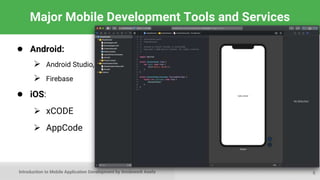
Major Mobile Development Tools and Services
● Android:
 Android Studio,
 Firebase
● iOS:
 xCODE
 AppCode
5
Introduction to Mobile Application Development by Amdework Asefa
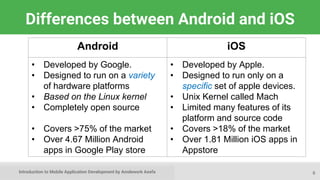
Differences between Android and iOS
6
Android iOS
• Developed by Google.
• Designed to run on a variety
of hardware platforms
• Based on the Linux kernel
• Completely open source
• Covers >75% of the market
• Over 4.67 Million Android
apps in Google Play store
• Developed by Apple.
• Designed to run only on a
specific set of apple devices.
• Unix Kernel called Mach
• Limited many features of its
platform and source code
• Covers >18% of the market
• Over 1.81 Million iOS apps in
Appstore
Introduction to Mobile Application Development by Amdework Asefa
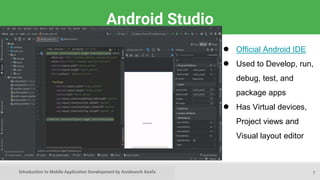
Android Studio
7
● Official Android IDE
● Used to Develop, run,
debug, test, and
package apps
● Has Virtual devices,
Project views and
Visual layout editor
Introduction to Mobile Application Development by Amdework Asefa
Google Play store
After you complete development
You can
Publish your apps through Google Play store:
● Official app store for Android
● Digital distribution service operated by Google
8
Introduction to Mobile Application Development by Amdework Asefa
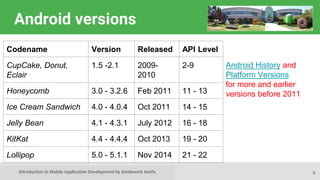
Android versions
9
Codename Version Released API Level
CupCake, Donut,
Eclair
1.5 -2.1 2009-
2010
2-9
Honeycomb 3.0 - 3.2.6 Feb 2011 11 - 13
Ice Cream Sandwich 4.0 - 4.0.4 Oct 2011 14 - 15
Jelly Bean 4.1 - 4.3.1 July 2012 16 - 18
KitKat 4.4 - 4.4.4 Oct 2013 19 - 20
Lollipop 5.0 - 5.1.1 Nov 2014 21 - 22
Android History and
Platform Versions
for more and earlier
versions before 2011
Introduction to Mobile Application Development by Amdework Asefa
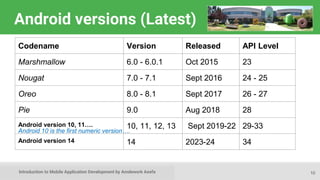
Android versions (Latest)
10
Codename Version Released API Level
Marshmallow 6.0 - 6.0.1 Oct 2015 23
Nougat 7.0 - 7.1 Sept 2016 24 - 25
Oreo 8.0 - 8.1 Sept 2017 26 - 27
Pie 9.0 Aug 2018 28
Android version 10, 11…. 10, 11, 12, 13 Sept 2019-22 29-33
Android version 14 14 2023-24 34
Android 10 is the first numeric version….
Introduction to Mobile Application Development by Amdework Asefa
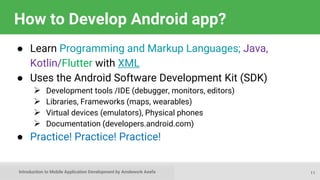
How to Develop Android app?
● Learn Programming and Markup Languages; Java,
Kotlin/Flutter with XML
● Uses the Android Software Development Kit (SDK)
 Development tools /IDE (debugger, monitors, editors)
 Libraries, Frameworks (maps, wearables)
 Virtual devices (emulators), Physical phones
 Documentation (developers.android.com)
● Practice! Practice! Practice!
11
Introduction to Mobile Application Development by Amdework Asefa
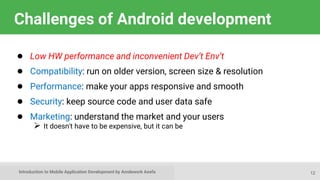
Challenges of Android development
● Low HW performance and inconvenient Dev’t Env’t
● Compatibility: run on older version, screen size & resolution
● Performance: make your apps responsive and smooth
● Security: keep source code and user data safe
● Marketing: understand the market and your users
 It doesn't have to be expensive, but it can be
12
Introduction to Mobile Application Development by Amdework Asefa
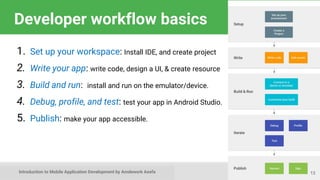
Developer workflow basics
1. Set up your workspace: Install IDE, and create project
2. Write your app: write code, design a UI, & create resource
3. Build and run: install and run on the emulator/device.
4. Debug, profile, and test: test your app in Android Studio.
5. Publish: make your app accessible.
13
Introduction to Mobile Application Development by Amdework Asefa
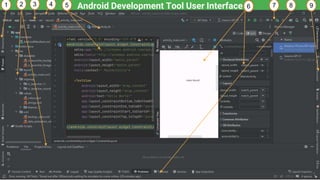
Android Development Tool User Interface
14
1 2 3 5
4 6 7 8 9
Introduction to Mobile Application Development by Amdework Asefa
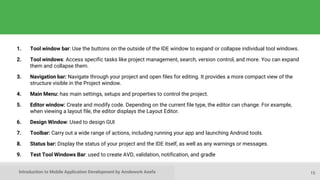
1. Tool window bar: Use the buttons on the outside of the IDE window to expand or collapse individual tool windows.
2. Tool windows: Access specific tasks like project management, search, version control, and more. You can expand
them and collapse them.
3. Navigation bar: Navigate through your project and open files for editing. It provides a more compact view of the
structure visible in the Project window.
4. Main Menu: has main settings, setups and properties to control the project.
5. Editor window: Create and modify code. Depending on the current file type, the editor can change. For example,
when viewing a layout file, the editor displays the Layout Editor.
6. Design Window: Used to design GUI
7. Toolbar: Carry out a wide range of actions, including running your app and launching Android tools.
8. Status bar: Display the status of your project and the IDE itself, as well as any warnings or messages.
9. Test Tool Windows Bar: used to create AVD, validation, notification, and gradle
15
Introduction to Mobile Application Development by Amdework Asefa
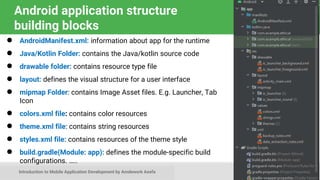
Android application structure
building blocks
● AndroidManifest.xml: information about app for the runtime
● Java/Kotlin Folder: contains the Java/kotlin source code
● drawable folder: contains resource type file
● layout: defines the visual structure for a user interface
● mipmap Folder: contains Image Asset files. E.g. Launcher, Tab
Icon
● colors.xml file: contains color resources
● theme.xml file: contains string resources
● styles.xml file: contains resources of the theme style
● build.gradle(Module: app): defines the module-specific build
configurations. …..
16
Introduction to Mobile Application Development by Amdework Asefa
Intent
• Intent: Is a special class to move from screen to screen.
• It describe what an application wants done. Used in Explicit intent
• IntentFilter: is an expression in an app's manifest file that specifies
the type of intents that the component would like to receive. Used in
implicit intent.
• The two most important parts of the intent data structure are the
action and the data to act upon.
17
Introduction to Mobile Application Development by Amdework Asefa
Activity Lifecycle
● In Android, an activity is referred to as one screen in an
application.
● It is very similar to a single window of any desktop app.
● An Android app consists of 1 or more screens/ activities.
● Each activity goes through various stages or a lifecycle
and is managed by activity stacks.
● So when a new activity starts, the previous one always
remains below it.
18
Introduction to Mobile Application Development by Amdework Asefa
Activity Lifecycle ..
• There are four stages of an activity.
1. Active/Running Activity: if it is on the top of stake (Foreground)
2. A lost focus and a non-full-sized or transparent activity: Either
another activity has a higher position or the activity itself is not
focusable in the current window
3. Hidden activity: If an activity is completely hidden by another
activity, it is stopped or hidden. It still retains all the information, and
will often be killed by the system when memory is needed elsewhere.
4. Dead/Idle Activity: completely killed or not started yet activity
19
Introduction to Mobile Application Development by Amdework Asefa
UI Components
● User Interfaces (UI) in Android can be built within two
ways, by defining XML-Code or by writing Java-Code.
● Defining the GUI structure in XML is highly preferable,
● Jetpack Compose (Kotlin) is more preferable.
● Based on the Model-Viewer-Control principle that the UI
should always be separated from the program-logic.
● Adapting a program from one screen to another is a lot easier.
20
Introduction to Mobile Application Development by Amdework Asefa
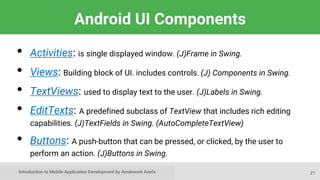
Android UI Components
• Activities: is single displayed window. (J)Frame in Swing.
• Views: Building block of UI. includes controls. (J) Components in Swing.
• TextViews: used to display text to the user. (J)Labels in Swing.
• EditTexts: A predefined subclass of TextView that includes rich editing
capabilities. (J)TextFields in Swing. (AutoCompleteTextView)
• Buttons: A push-button that can be pressed, or clicked, by the user to
perform an action. (J)Buttons in Swing.
21
Introduction to Mobile Application Development by Amdework Asefa
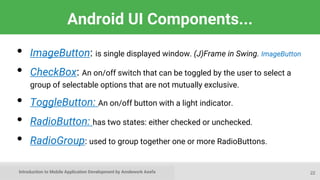
Android UI Components...
• ImageButton: is single displayed window. (J)Frame in Swing. ImageButton
• CheckBox: An on/off switch that can be toggled by the user to select a
group of selectable options that are not mutually exclusive.
• ToggleButton: An on/off button with a light indicator.
• RadioButton: has two states: either checked or unchecked.
• RadioGroup: used to group together one or more RadioButtons.
22
Introduction to Mobile Application Development by Amdework Asefa
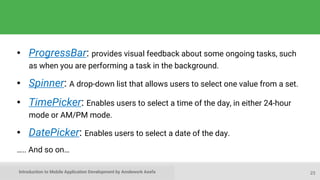
• ProgressBar: provides visual feedback about some ongoing tasks, such
as when you are performing a task in the background.
• Spinner: A drop-down list that allows users to select one value from a set.
• TimePicker: Enables users to select a time of the day, in either 24-hour
mode or AM/PM mode.
• DatePicker: Enables users to select a date of the day.
….. And so on…
23
Introduction to Mobile Application Development by Amdework Asefa
Learn more
● Android History
● Introduction to Android
● Platform Architecture
● UI Overview
● Platform Versions
● Supporting Different Platform Versions
● Android Studio User’s Guide
24
Introduction to Mobile Application Development by Amdework Asefa
What's Next?
25
● Chapter Two: Notification, Menus and Dialogs
Introduction to Mobile Application Development by Amdework Asefa
THE END
26
Question?

Chapter 1- Mobile Application Development Introduction-java.pptx

  • 1.
    Introduction to MobileApplication Development by Amdework Asefa Introduction to Mobile Application Development by Amdework Asefa 1 1 1 By Amdework Asefa Mobile Application Development
  • 2.
    Introduction to MobileApplication Development by Amdework Asefa Contents ● Short Introduction about Mobile App Dev’t ● Mobile App development tools and services (android vs iOS) ● Android Versions ● Challenges of Android app development ● App fundamentals: Android App File Structure, UI Architecture & Components 2
  • 3.
    Introduction to MobileApplication Development by Amdework Asefa Mobile Application Development ● Mobile device: more than simple call and website access. ● According to Statista there are 17.72 billion mobile Devices worldwide in 2024. ● Recent study shows >50% of Googling happens via smart-phones. ● Mobile is needed in every business which has given the kicking start to mobile app dev’t. ● Mobile app dev’t: is the process of creating software apps that run on a mobile devices (Phones, tablets, watches, TVs, and Cars).. 3
  • 4.
    Introduction to MobileApplication Development by Amdework Asefa What is Android? ● Android is an open-source, Linux-based mobile operating system developed by Google. ● Is a User Interface for touch screens ● Highly customizable for devices / by vendors 4
  • 5.
    Introduction to MobileApplication Development by Amdework Asefa Major Mobile Development Tools and Services ● Android:  Android Studio,  Firebase ● iOS:  xCODE  AppCode 5
  • 6.
    Introduction to MobileApplication Development by Amdework Asefa Differences between Android and iOS 6 Android iOS • Developed by Google. • Designed to run on a variety of hardware platforms • Based on the Linux kernel • Completely open source • Covers >75% of the market • Over 4.67 Million Android apps in Google Play store • Developed by Apple. • Designed to run only on a specific set of apple devices. • Unix Kernel called Mach • Limited many features of its platform and source code • Covers >18% of the market • Over 1.81 Million iOS apps in Appstore
  • 7.
    Introduction to MobileApplication Development by Amdework Asefa Android Studio 7 ● Official Android IDE ● Used to Develop, run, debug, test, and package apps ● Has Virtual devices, Project views and Visual layout editor
  • 8.
    Introduction to MobileApplication Development by Amdework Asefa Google Play store After you complete development You can Publish your apps through Google Play store: ● Official app store for Android ● Digital distribution service operated by Google 8
  • 9.
    Introduction to MobileApplication Development by Amdework Asefa Android versions 9 Codename Version Released API Level CupCake, Donut, Eclair 1.5 -2.1 2009- 2010 2-9 Honeycomb 3.0 - 3.2.6 Feb 2011 11 - 13 Ice Cream Sandwich 4.0 - 4.0.4 Oct 2011 14 - 15 Jelly Bean 4.1 - 4.3.1 July 2012 16 - 18 KitKat 4.4 - 4.4.4 Oct 2013 19 - 20 Lollipop 5.0 - 5.1.1 Nov 2014 21 - 22 Android History and Platform Versions for more and earlier versions before 2011
  • 10.
    Introduction to MobileApplication Development by Amdework Asefa Android versions (Latest) 10 Codename Version Released API Level Marshmallow 6.0 - 6.0.1 Oct 2015 23 Nougat 7.0 - 7.1 Sept 2016 24 - 25 Oreo 8.0 - 8.1 Sept 2017 26 - 27 Pie 9.0 Aug 2018 28 Android version 10, 11…. 10, 11, 12, 13 Sept 2019-22 29-33 Android version 14 14 2023-24 34 Android 10 is the first numeric version….
  • 11.
    Introduction to MobileApplication Development by Amdework Asefa How to Develop Android app? ● Learn Programming and Markup Languages; Java, Kotlin/Flutter with XML ● Uses the Android Software Development Kit (SDK)  Development tools /IDE (debugger, monitors, editors)  Libraries, Frameworks (maps, wearables)  Virtual devices (emulators), Physical phones  Documentation (developers.android.com) ● Practice! Practice! Practice! 11
  • 12.
    Introduction to MobileApplication Development by Amdework Asefa Challenges of Android development ● Low HW performance and inconvenient Dev’t Env’t ● Compatibility: run on older version, screen size & resolution ● Performance: make your apps responsive and smooth ● Security: keep source code and user data safe ● Marketing: understand the market and your users  It doesn't have to be expensive, but it can be 12
  • 13.
    Introduction to MobileApplication Development by Amdework Asefa Developer workflow basics 1. Set up your workspace: Install IDE, and create project 2. Write your app: write code, design a UI, & create resource 3. Build and run: install and run on the emulator/device. 4. Debug, profile, and test: test your app in Android Studio. 5. Publish: make your app accessible. 13
  • 14.
    Introduction to MobileApplication Development by Amdework Asefa Android Development Tool User Interface 14 1 2 3 5 4 6 7 8 9
  • 15.
    Introduction to MobileApplication Development by Amdework Asefa 1. Tool window bar: Use the buttons on the outside of the IDE window to expand or collapse individual tool windows. 2. Tool windows: Access specific tasks like project management, search, version control, and more. You can expand them and collapse them. 3. Navigation bar: Navigate through your project and open files for editing. It provides a more compact view of the structure visible in the Project window. 4. Main Menu: has main settings, setups and properties to control the project. 5. Editor window: Create and modify code. Depending on the current file type, the editor can change. For example, when viewing a layout file, the editor displays the Layout Editor. 6. Design Window: Used to design GUI 7. Toolbar: Carry out a wide range of actions, including running your app and launching Android tools. 8. Status bar: Display the status of your project and the IDE itself, as well as any warnings or messages. 9. Test Tool Windows Bar: used to create AVD, validation, notification, and gradle 15
  • 16.
    Introduction to MobileApplication Development by Amdework Asefa Android application structure building blocks ● AndroidManifest.xml: information about app for the runtime ● Java/Kotlin Folder: contains the Java/kotlin source code ● drawable folder: contains resource type file ● layout: defines the visual structure for a user interface ● mipmap Folder: contains Image Asset files. E.g. Launcher, Tab Icon ● colors.xml file: contains color resources ● theme.xml file: contains string resources ● styles.xml file: contains resources of the theme style ● build.gradle(Module: app): defines the module-specific build configurations. ….. 16
  • 17.
    Introduction to MobileApplication Development by Amdework Asefa Intent • Intent: Is a special class to move from screen to screen. • It describe what an application wants done. Used in Explicit intent • IntentFilter: is an expression in an app's manifest file that specifies the type of intents that the component would like to receive. Used in implicit intent. • The two most important parts of the intent data structure are the action and the data to act upon. 17
  • 18.
    Introduction to MobileApplication Development by Amdework Asefa Activity Lifecycle ● In Android, an activity is referred to as one screen in an application. ● It is very similar to a single window of any desktop app. ● An Android app consists of 1 or more screens/ activities. ● Each activity goes through various stages or a lifecycle and is managed by activity stacks. ● So when a new activity starts, the previous one always remains below it. 18
  • 19.
    Introduction to MobileApplication Development by Amdework Asefa Activity Lifecycle .. • There are four stages of an activity. 1. Active/Running Activity: if it is on the top of stake (Foreground) 2. A lost focus and a non-full-sized or transparent activity: Either another activity has a higher position or the activity itself is not focusable in the current window 3. Hidden activity: If an activity is completely hidden by another activity, it is stopped or hidden. It still retains all the information, and will often be killed by the system when memory is needed elsewhere. 4. Dead/Idle Activity: completely killed or not started yet activity 19
  • 20.
    Introduction to MobileApplication Development by Amdework Asefa UI Components ● User Interfaces (UI) in Android can be built within two ways, by defining XML-Code or by writing Java-Code. ● Defining the GUI structure in XML is highly preferable, ● Jetpack Compose (Kotlin) is more preferable. ● Based on the Model-Viewer-Control principle that the UI should always be separated from the program-logic. ● Adapting a program from one screen to another is a lot easier. 20
  • 21.
    Introduction to MobileApplication Development by Amdework Asefa Android UI Components • Activities: is single displayed window. (J)Frame in Swing. • Views: Building block of UI. includes controls. (J) Components in Swing. • TextViews: used to display text to the user. (J)Labels in Swing. • EditTexts: A predefined subclass of TextView that includes rich editing capabilities. (J)TextFields in Swing. (AutoCompleteTextView) • Buttons: A push-button that can be pressed, or clicked, by the user to perform an action. (J)Buttons in Swing. 21
  • 22.
    Introduction to MobileApplication Development by Amdework Asefa Android UI Components... • ImageButton: is single displayed window. (J)Frame in Swing. ImageButton • CheckBox: An on/off switch that can be toggled by the user to select a group of selectable options that are not mutually exclusive. • ToggleButton: An on/off button with a light indicator. • RadioButton: has two states: either checked or unchecked. • RadioGroup: used to group together one or more RadioButtons. 22
  • 23.
    Introduction to MobileApplication Development by Amdework Asefa • ProgressBar: provides visual feedback about some ongoing tasks, such as when you are performing a task in the background. • Spinner: A drop-down list that allows users to select one value from a set. • TimePicker: Enables users to select a time of the day, in either 24-hour mode or AM/PM mode. • DatePicker: Enables users to select a date of the day. ….. And so on… 23
  • 24.
    Introduction to MobileApplication Development by Amdework Asefa Learn more ● Android History ● Introduction to Android ● Platform Architecture ● UI Overview ● Platform Versions ● Supporting Different Platform Versions ● Android Studio User’s Guide 24
  • 25.
    Introduction to MobileApplication Development by Amdework Asefa What's Next? 25 ● Chapter Two: Notification, Menus and Dialogs
  • 26.
    Introduction to MobileApplication Development by Amdework Asefa THE END 26 Question?

Editor's Notes

  • #10 There were earlier versions before Feb 2011.
  • #11 There were earlier versions before Feb 2011.