(c) Smruti R. Sarangi, 2023 1
Chapter 1:
Introduction
to Operating
Systems
Smruti R Sarangi
IIT Delhi
(c) Smruti R. Sarangi, 2023 2
What is an Operating Systems (OS)?
It is a special program
Can control other programs
Exercises control over hardware
(c) Smruti R. Sarangi, 2023 3
Background Required for the Course
C/C++ programming proficiency
Computer Architecture
Data Structures
4
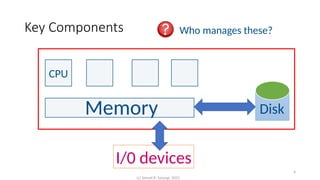
Key Components
Hard
Memory
CPU
Disk
I/0 devices
Who manages these?
(c) Smruti R. Sarangi, 2023
(c) Smruti R. Sarangi, 2023 5
Operating System
P1
Programs
P2 P3
Hardware
Memory
CPUs
Place of the 0S
I/O & Storage
Between
application
software and
hardware
(c) Smruti R. Sarangi, 2023 6
Why do we need a special program, the 0S?
• Many programs share common hardware (HW)
• The access to common hardware needs to be regulated
• Hardware: CPU, memory, I/0 and storage
• Schedule the CPU
• Interface with devices
• Manage storage
• Manage memory
• Security
• Make it easy to build distributed systems
• Makes it easy to work with HW
Power, temperature
and security concerns
7
Basic Idea: Arbitration and Regulating Accesses
• A process is an instance of a running program
• At any point of time multiple processes are active
• The processes have different requirements
• The 0S arbitrates between the processes
• Accessing HW is very complex
• Elaborate protocols
• Same code needs to run on multiple machines
• Provide a common interface: device derivers in the 0S
Arbitration
Access
(c) Smruti R. Sarangi, 2023
(c) Smruti R. Sarangi, 2023 8
Space of operating Systems
HPC and server
Desktop/laptop
Mobile
Even wearables
(c) Smruti R. Sarangi, 2023 9
History of Linux : Milestones
1991
1992
2000 – 2010
2012 – 2020
Linus Torvalds started extending the MINIX 0S
Released under the GPL license. Available on the web.
Takes over the server and HPC market
Android (Linux-based) becomes the most popular mobile
Operating System
(c) Smruti R. Sarangi, 2023 10
Why teach a real world 0S?
• Conveys a realistic picture
• Provides real-world skills
We will learn generic concepts in the context of Linux
(c) Smruti R. Sarangi, 2023 11
Open Source Design
Freely available source code
https://elixir.bootlin.com/linux/v6.2.12/source/kernel
Version 6.2.12
www.kernel.org
(c) Smruti R. Sarangi, 2023 12
Bane and Boon of the GPL License
• Freedom to use, modify and distribute
• All derivative works are also under GPL
• Fosters collaboration
• Prohibits tivoization: cannot restrict
hardware to a given piece of GPL-protected
software that is protected with a key
• Quite restrictive in nature
• Need to disclose all modifications
• Cannot build appliances (HW+SW)
combos that involve kernel modifications
(c) Smruti R. Sarangi, 2023 13
Some Kernel Source Code Statistics
• Roughly 25 million lines of source code
• Per version, 250k lines of code change
x y z
Major version
number
Minor version
number
Patch number
Current version: 6.2.12
rc  release candidate
(test release)
-rc<num>
(c) Smruti R. Sarangi, 2023 14
Details of the Linux Code Base
Most of the code
is drivers
(c) Smruti R. Sarangi, 2023 15
Major Subsystems in Linux (Directory-wise)
All the code
arch: All the assembly code
that is architecture
dependent
drivers: All the kernel
routines that run the
devices. Translate generic
OS calls to HW-specific
instructions.
HW-dependent code
Process manager
kernel: process scheduler,
synchronization, time
management, event
management, debugging
virt: Support for running a
guest OS as a regular
program.
Memory
and I/O
mm: physical and virtual
memory manager
fs: file systems
block: generic layer for
all block-based storage
devices like hard disks
io_uring: data structures
for I/O support
init: boot code
(c) Smruti R. Sarangi, 2023 16
The arch Folder
• The Linux codebase has two parts: machine dependent and machine
independent
• Most of the code is machine independent. Otherwise, it will become
impossible to manage such a large codebase.
• We need a layer to abstract out details of the underlying machine.
• This is the job of the arch folder (machine dependent part) that:
• The kernel uses generic data types such as u32 or u64. They are defined
within files of the arch folder (for each architecture)
• Map high-level primitives to assembly-level code snippets (arch. specific)
• Provide other low-level services: booting the system, managing the memory
system, power management, etc.
(c) Smruti R. Sarangi, 2023 17
Factoid
Android, Chrome OS, Tizen (Samsung),
Web OS (LG) are all based on Linux.
(c) Smruti R. Sarangi, 2023 18
(c) Smruti R. Sarangi, 2023 19
Fundamentals: cores,
registers, interrupts,
virtual memory, I/O
Processes,
synchronization,
scheduling
Communication:
interrupts, system calls
+ I/O system and
device drivers
Memory system,
virtualization,
security
OS
(c) Smruti R. Sarangi, 2023 20
srsarangi@cse.iitd.ac.in

Chapter 1 introduction to Operating systems

  • 1.
    (c) Smruti R.Sarangi, 2023 1 Chapter 1: Introduction to Operating Systems Smruti R Sarangi IIT Delhi
  • 2.
    (c) Smruti R.Sarangi, 2023 2 What is an Operating Systems (OS)? It is a special program Can control other programs Exercises control over hardware
  • 3.
    (c) Smruti R.Sarangi, 2023 3 Background Required for the Course C/C++ programming proficiency Computer Architecture Data Structures
  • 4.
    4 Key Components Hard Memory CPU Disk I/0 devices Whomanages these? (c) Smruti R. Sarangi, 2023
  • 5.
    (c) Smruti R.Sarangi, 2023 5 Operating System P1 Programs P2 P3 Hardware Memory CPUs Place of the 0S I/O & Storage Between application software and hardware
  • 6.
    (c) Smruti R.Sarangi, 2023 6 Why do we need a special program, the 0S? • Many programs share common hardware (HW) • The access to common hardware needs to be regulated • Hardware: CPU, memory, I/0 and storage • Schedule the CPU • Interface with devices • Manage storage • Manage memory • Security • Make it easy to build distributed systems • Makes it easy to work with HW Power, temperature and security concerns
  • 7.
    7 Basic Idea: Arbitrationand Regulating Accesses • A process is an instance of a running program • At any point of time multiple processes are active • The processes have different requirements • The 0S arbitrates between the processes • Accessing HW is very complex • Elaborate protocols • Same code needs to run on multiple machines • Provide a common interface: device derivers in the 0S Arbitration Access (c) Smruti R. Sarangi, 2023
  • 8.
    (c) Smruti R.Sarangi, 2023 8 Space of operating Systems HPC and server Desktop/laptop Mobile Even wearables
  • 9.
    (c) Smruti R.Sarangi, 2023 9 History of Linux : Milestones 1991 1992 2000 – 2010 2012 – 2020 Linus Torvalds started extending the MINIX 0S Released under the GPL license. Available on the web. Takes over the server and HPC market Android (Linux-based) becomes the most popular mobile Operating System
  • 10.
    (c) Smruti R.Sarangi, 2023 10 Why teach a real world 0S? • Conveys a realistic picture • Provides real-world skills We will learn generic concepts in the context of Linux
  • 11.
    (c) Smruti R.Sarangi, 2023 11 Open Source Design Freely available source code https://elixir.bootlin.com/linux/v6.2.12/source/kernel Version 6.2.12 www.kernel.org
  • 12.
    (c) Smruti R.Sarangi, 2023 12 Bane and Boon of the GPL License • Freedom to use, modify and distribute • All derivative works are also under GPL • Fosters collaboration • Prohibits tivoization: cannot restrict hardware to a given piece of GPL-protected software that is protected with a key • Quite restrictive in nature • Need to disclose all modifications • Cannot build appliances (HW+SW) combos that involve kernel modifications
  • 13.
    (c) Smruti R.Sarangi, 2023 13 Some Kernel Source Code Statistics • Roughly 25 million lines of source code • Per version, 250k lines of code change x y z Major version number Minor version number Patch number Current version: 6.2.12 rc  release candidate (test release) -rc<num>
  • 14.
    (c) Smruti R.Sarangi, 2023 14 Details of the Linux Code Base Most of the code is drivers
  • 15.
    (c) Smruti R.Sarangi, 2023 15 Major Subsystems in Linux (Directory-wise) All the code arch: All the assembly code that is architecture dependent drivers: All the kernel routines that run the devices. Translate generic OS calls to HW-specific instructions. HW-dependent code Process manager kernel: process scheduler, synchronization, time management, event management, debugging virt: Support for running a guest OS as a regular program. Memory and I/O mm: physical and virtual memory manager fs: file systems block: generic layer for all block-based storage devices like hard disks io_uring: data structures for I/O support init: boot code
  • 16.
    (c) Smruti R.Sarangi, 2023 16 The arch Folder • The Linux codebase has two parts: machine dependent and machine independent • Most of the code is machine independent. Otherwise, it will become impossible to manage such a large codebase. • We need a layer to abstract out details of the underlying machine. • This is the job of the arch folder (machine dependent part) that: • The kernel uses generic data types such as u32 or u64. They are defined within files of the arch folder (for each architecture) • Map high-level primitives to assembly-level code snippets (arch. specific) • Provide other low-level services: booting the system, managing the memory system, power management, etc.
  • 17.
    (c) Smruti R.Sarangi, 2023 17 Factoid Android, Chrome OS, Tizen (Samsung), Web OS (LG) are all based on Linux.
  • 18.
    (c) Smruti R.Sarangi, 2023 18
  • 19.
    (c) Smruti R.Sarangi, 2023 19 Fundamentals: cores, registers, interrupts, virtual memory, I/O Processes, synchronization, scheduling Communication: interrupts, system calls + I/O system and device drivers Memory system, virtualization, security OS
  • 20.
    (c) Smruti R.Sarangi, 2023 20 srsarangi@cse.iitd.ac.in