Chapter 02 Input Output Memory Devices
Input Devices
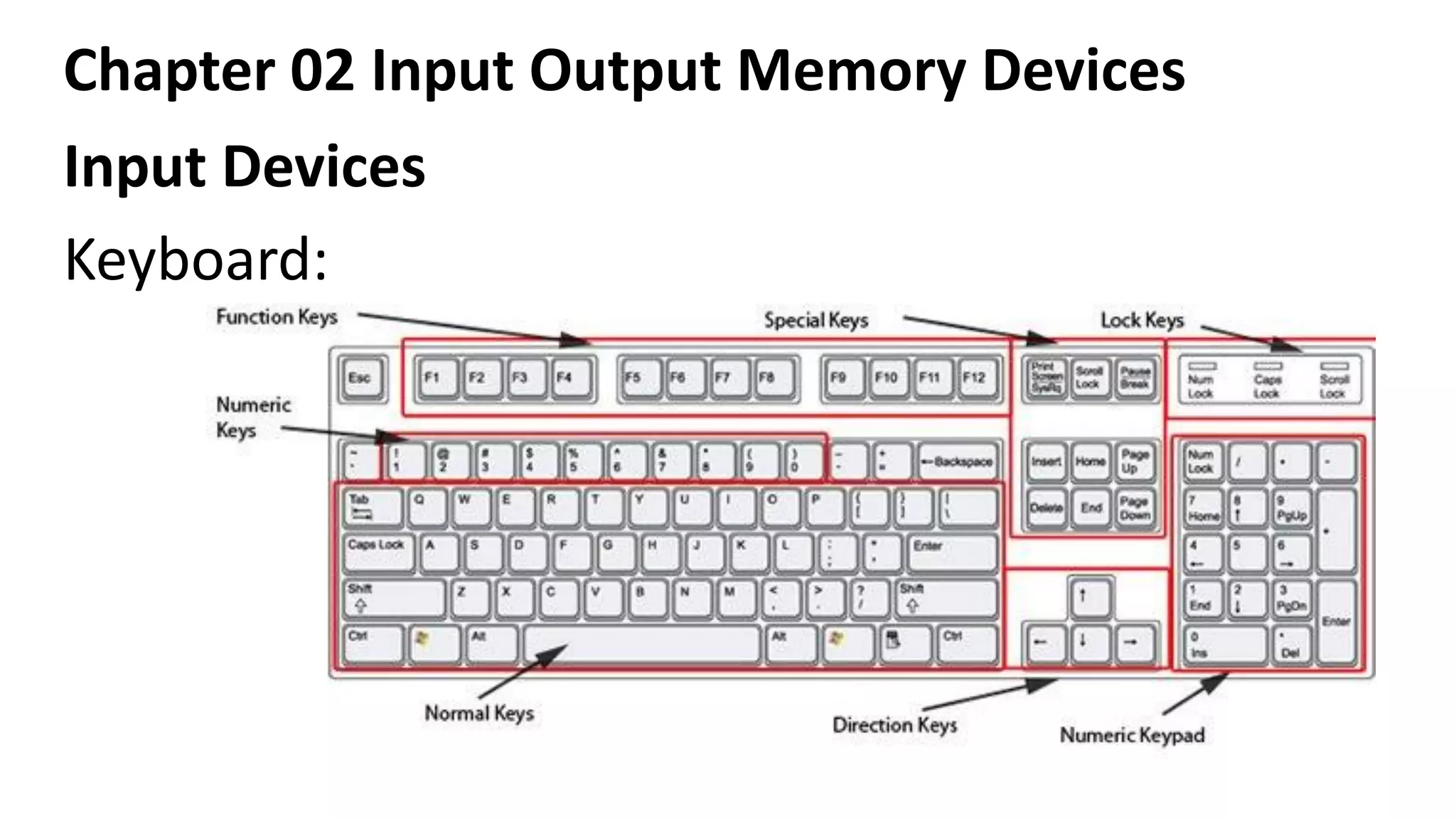
Keyboard:
Chapter 02 Input Output Memory Devices
Input Devices
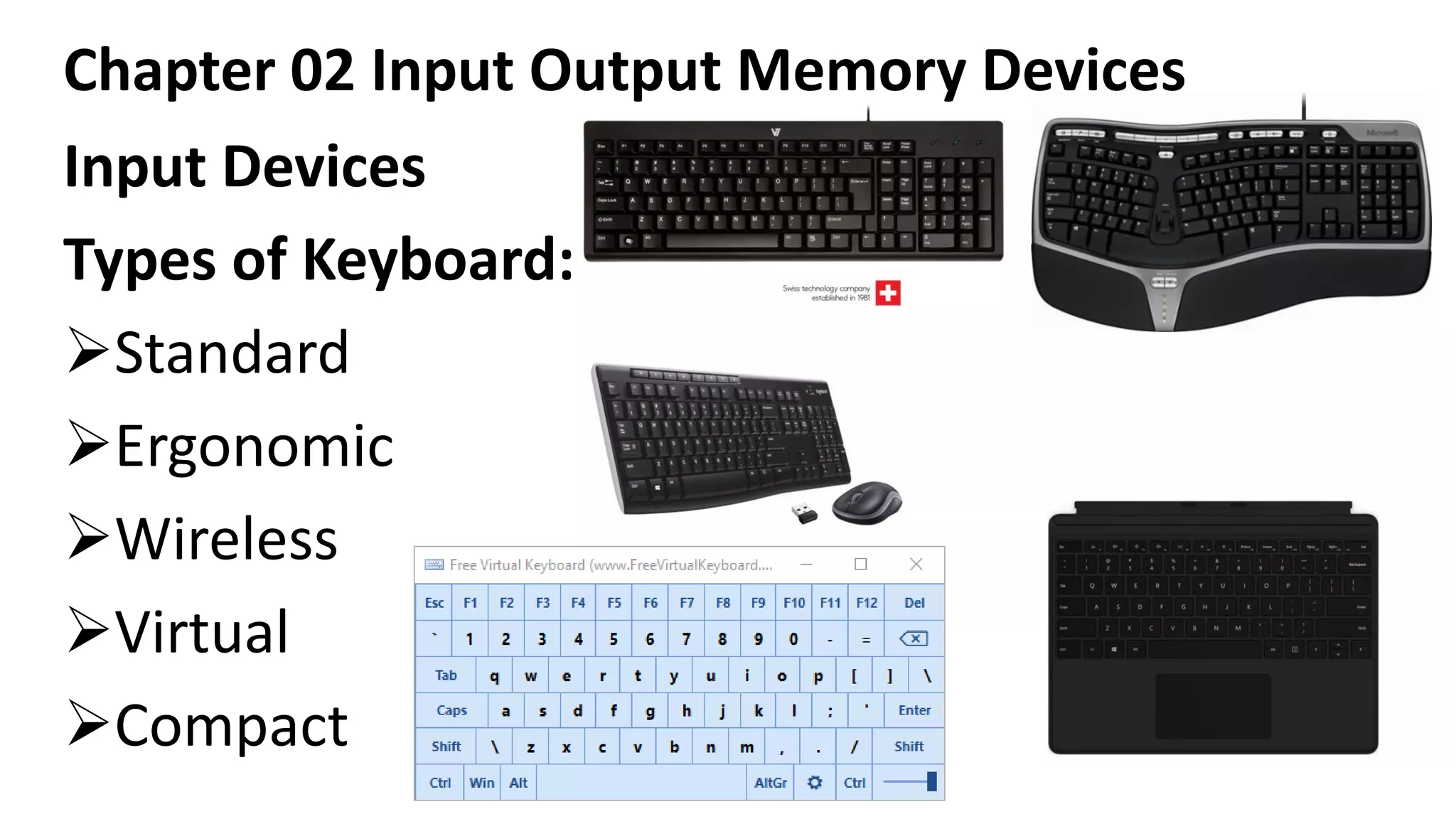
Types of Keyboard:
➢Standard
➢Ergonomic
➢Wireless
➢Virtual
➢Compact
Chapter 02 Input Output Memory Devices
Input Devices
Mouse: (Mechanically Operated User Serial Engine)
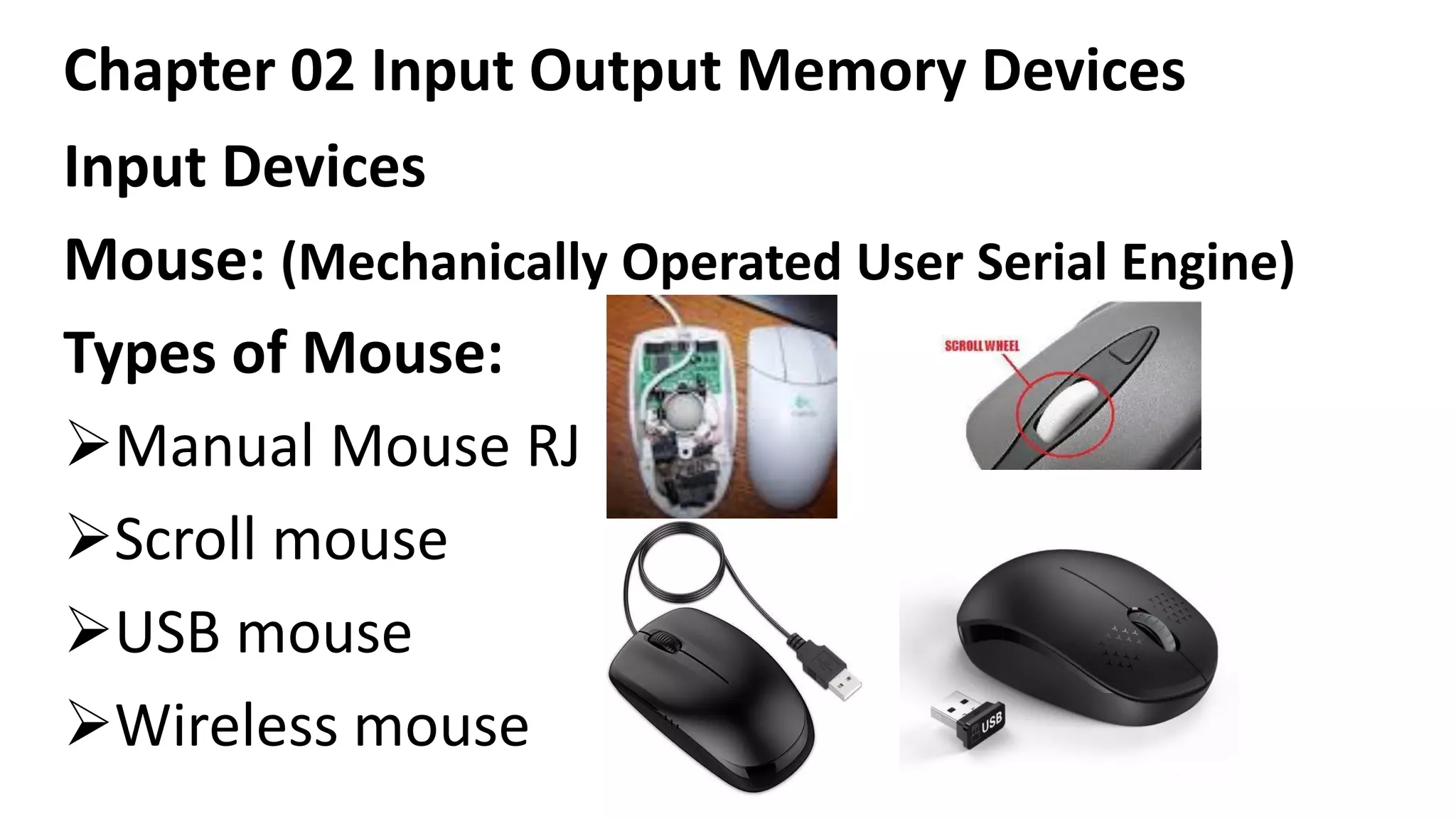
Types of Mouse:
➢Manual Mouse RJ
➢Scroll mouse
➢USB mouse
➢Wireless mouse
Chapter 02 Input Output Memory Devices
Input Devices
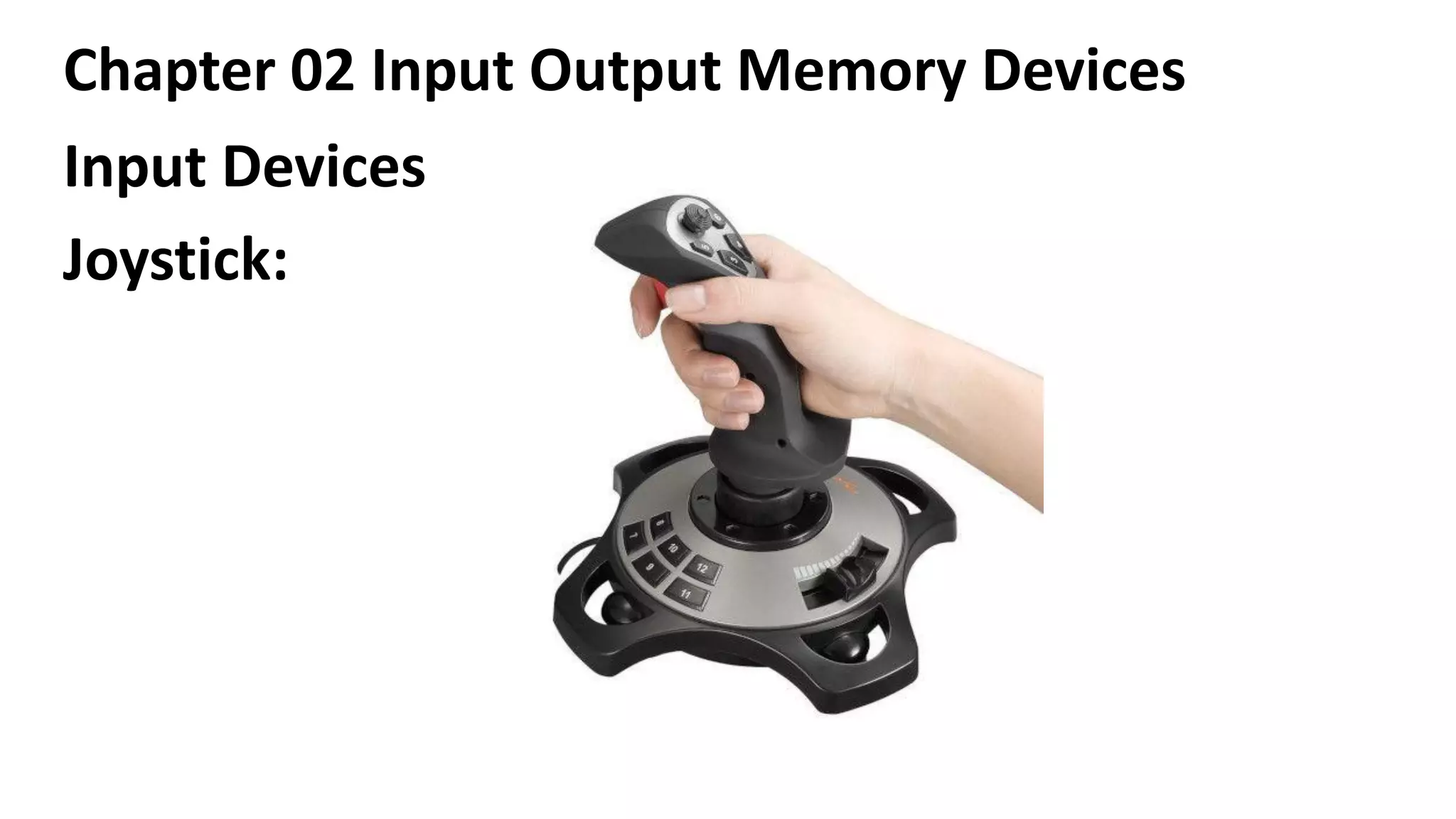
Joystick:
Chapter 02 Input Output Memory Devices
Input Devices
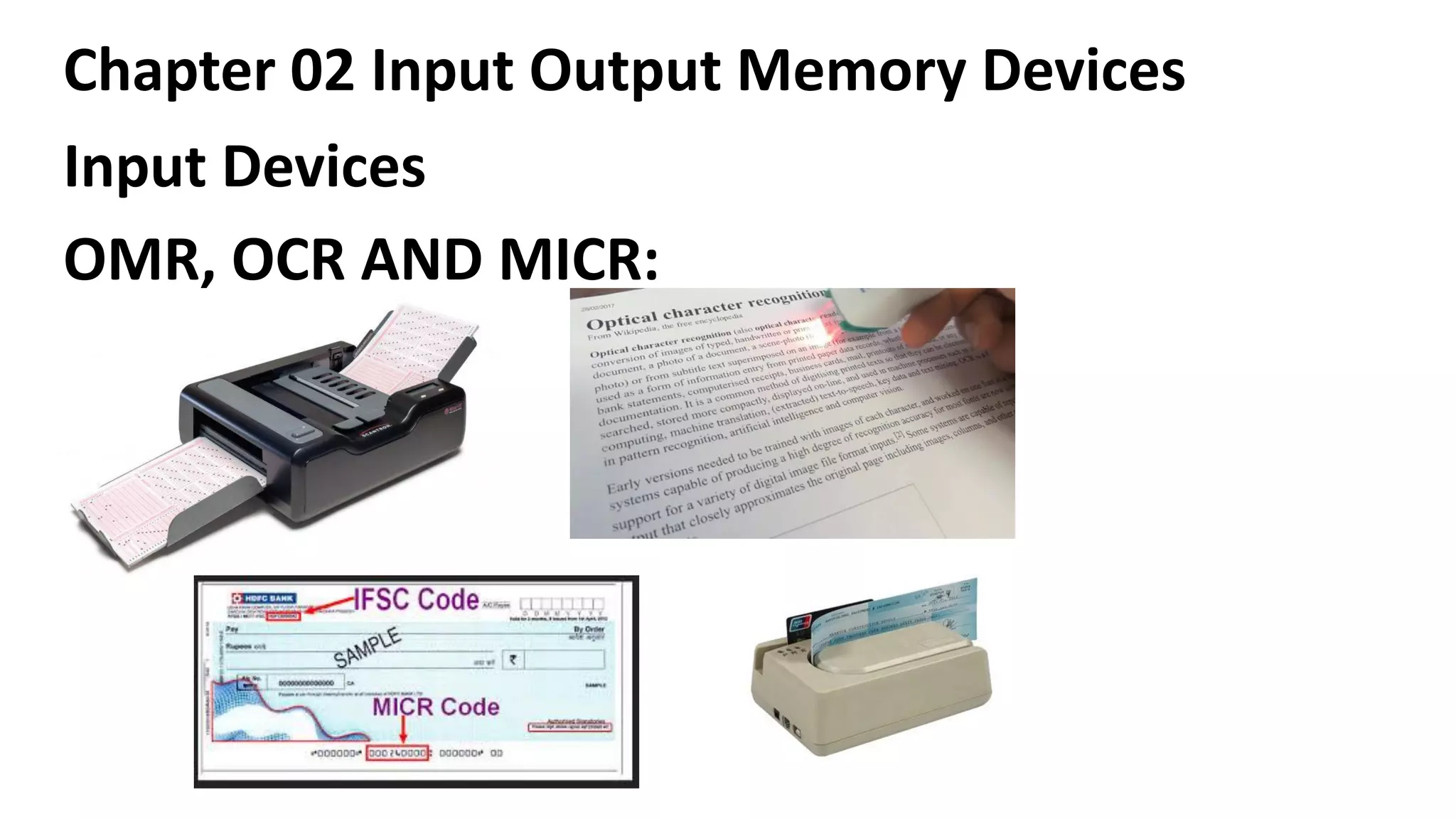
OMR, OCR AND MICR:
Chapter 02 Input Output Memory Devices
Introduction to output devices:
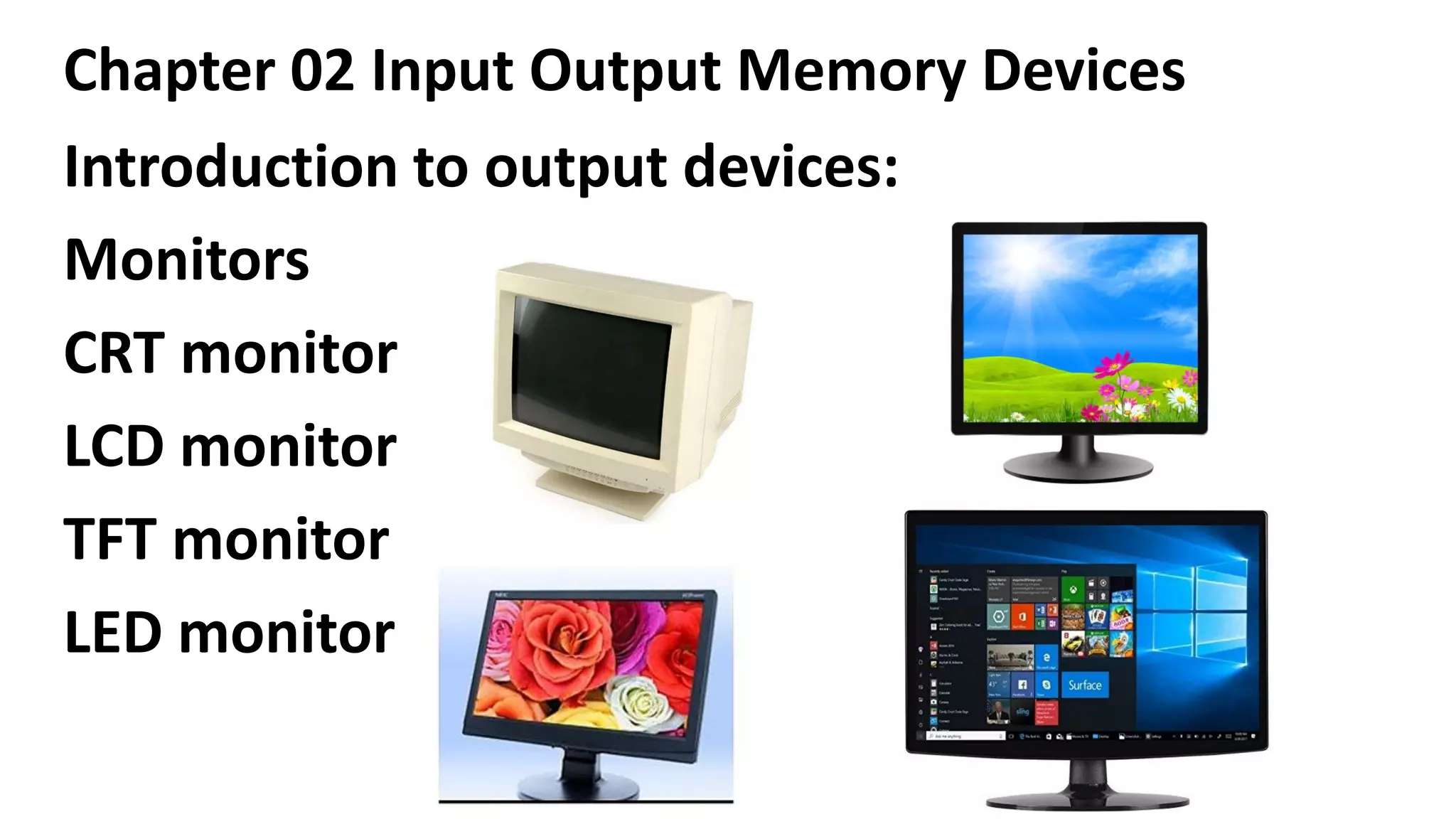
Monitors
CRT monitor
LCD monitor
TFT monitor
LED monitor
Chapter 02 Input Output Memory Devices
Introduction to output devices:
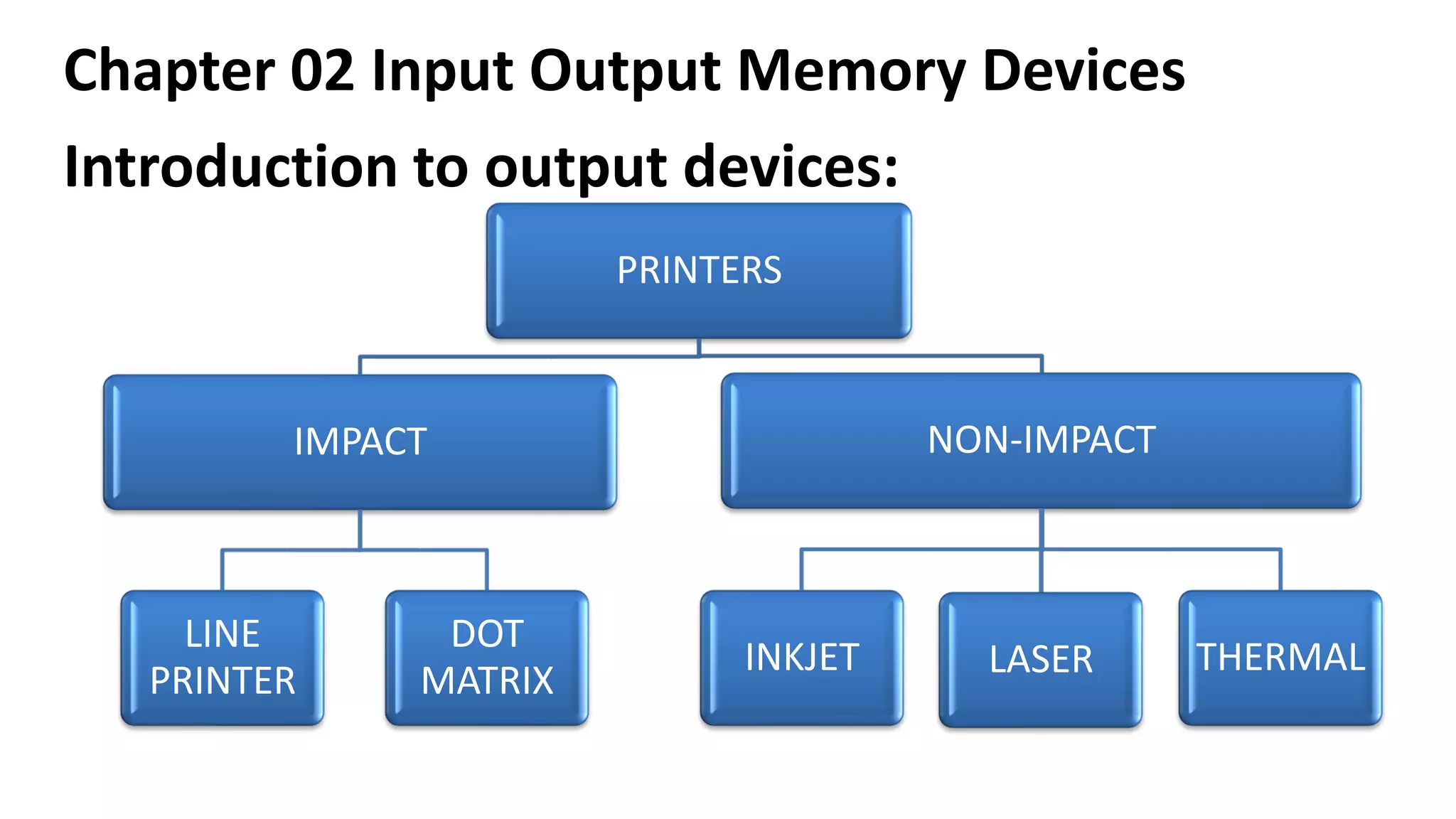
PRINTERS
IMPACT
LINE
PRINTER
DOT
MATRIX
NON-IMPACT
INKJET LASER THERMAL
Chapter 02 Input Output Memory Devices
Introduction to output devices:
Characteristics of impact printers
✓There is a physical contact between paper and print
assembly, hence they are useful for bulk printing.
✓Impact printers are ideal for printing multiple copies
(carbon copies) because they can easily print through
many layers of paper.
✓Due to its striking activity, impact printers are very
noisy.
Chapter 02 Input Output Memory Devices
Introduction to output devices:
Characteristics of impact printers
✓Since they are mechanical in nature, they tend
to be slow.
✓Impact do not support transparencies.
✓Measured with characters per seconds (CPS).
Chapter 02 Input Output Memory Devices
Introduction to output devices:
Characteristics of Non-impact printers
➢They are quiet than impact printers because
there is no striking mechanism involved.
➢They posses the ability to change type faces
automatically.
➢These printers produce high quality graphics.
➢These printers support the transparencies.
Chapter 02 Input Output Memory Devices
Introduction to output devices:
Characteristics of Non-impact printers
➢These printers cannot print multi part forms
because no impact is being made on the paper.
➢Measured in dots per inches (dpi)
➢The speed is calculated by the number of pages per
minute (ppm)
➢The size of the printing various A4,A3,A2,A0 and
Jumbo size.
Chapter 02 Input Output Memory Devices
Introduction to output devices:
Line printer:
-Capable of printing an entire line at a time.
-It can print 150 lines to 3000 lines per minute.
-The limitations of line printer are they can print only
one font, they cannot print graphics.
-The print quality is low and they are noisy to operate.
-It is used to print on multi part stationeries to
prepare copies of a document.
Chapter 02 Input Output Memory Devices
Introduction to output devices:
Dot Matrix Printer:
-It prints one line of 8 or 14 points at a time, with
print head moving across a line.
-The printing speed is around 300 characters per
second.
-It uses multi part stationeries to prepare copies
of a document.
Chapter 02 Input Output Memory Devices
Introduction to output devices:
Thermal Printer:
-Printers that produce images by pushing electrically
heated pins against special heat-sensitive paper.
-Thermal printer paper tends to darken over time due
to sunlight and heat. So the printed matters on the
paper fade after a week or two.
-It produces poor quality print.
Chapter 02 Input Output Memory Devices
Introduction to output devices:
Laser Printer:
-laser printers use a laser beam and dry powdered
ink to produce a fine dot matrix pattern.
-It can produce very good quality of graphic
images.
-The available resolution range from 300dpi at the
low end to around 1200 dpi at the high end.
Chapter 02 Input Output Memory Devices
Introduction to output devices:
Inkjet Printer:
-it uses color cartridges which combine magenta,
yellow and cyan inks. A black cartridge is also used for
crisp monochrome output.
-Inkjet printers work by spraying ionizing ink at a
sheet of paper.
-magnetized plates in the ink’s path direct the ink
onto the paper in the described shape.
Chapter 02 Input Output Memory Devices
Introduction to output devices:
Plotter Printer:
-plotters use pens to draw lines. As a result, they can
produce continuous lines, whereas printers can only
simulates lines by printing a closely spaced series of
dots.
-Plotters are more expensive than printers.
-They are used in engineering applications where
precision is mandatory.
Chapter 02 Input Output Memory Devices
Introduction to output devices:
Speakers:
-The sound signals from analog/digital are converted into audible
frequency in the speakers and produce voice output.
-Using speakers along with speech synthesizer software, the
computer can provide voice output.
-voice output has become very common in many places like airline,
banks, automatic telephonic enquiry system etc.
-Users can also hear music/songs using the voice output system.
-Today the speakers are with the subwoofer and 2/3/4 speakers.
Chapter 02 Input Output Memory Devices
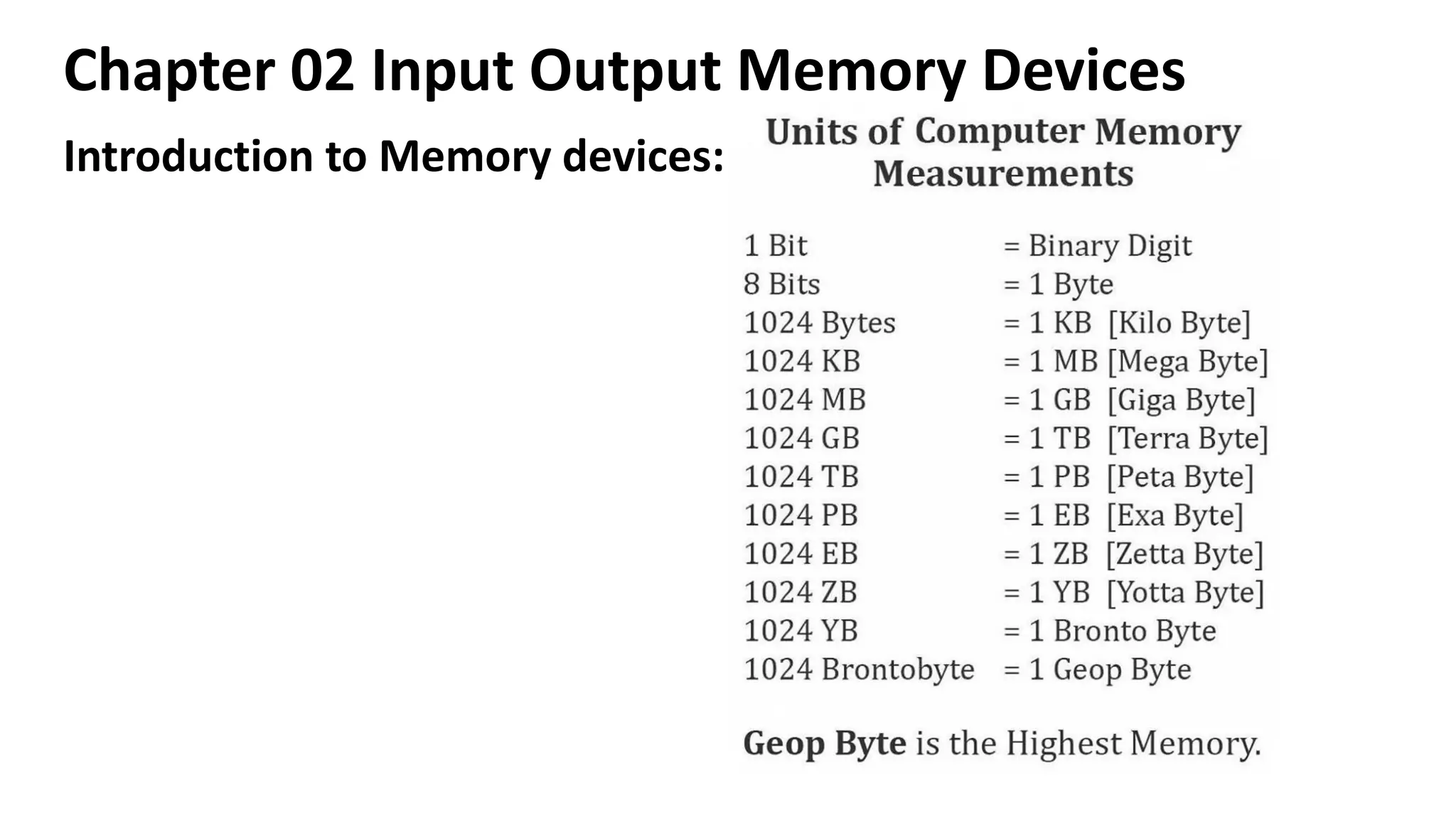
Introduction to Memory devices:
Chapter 02 Input Output Memory Devices
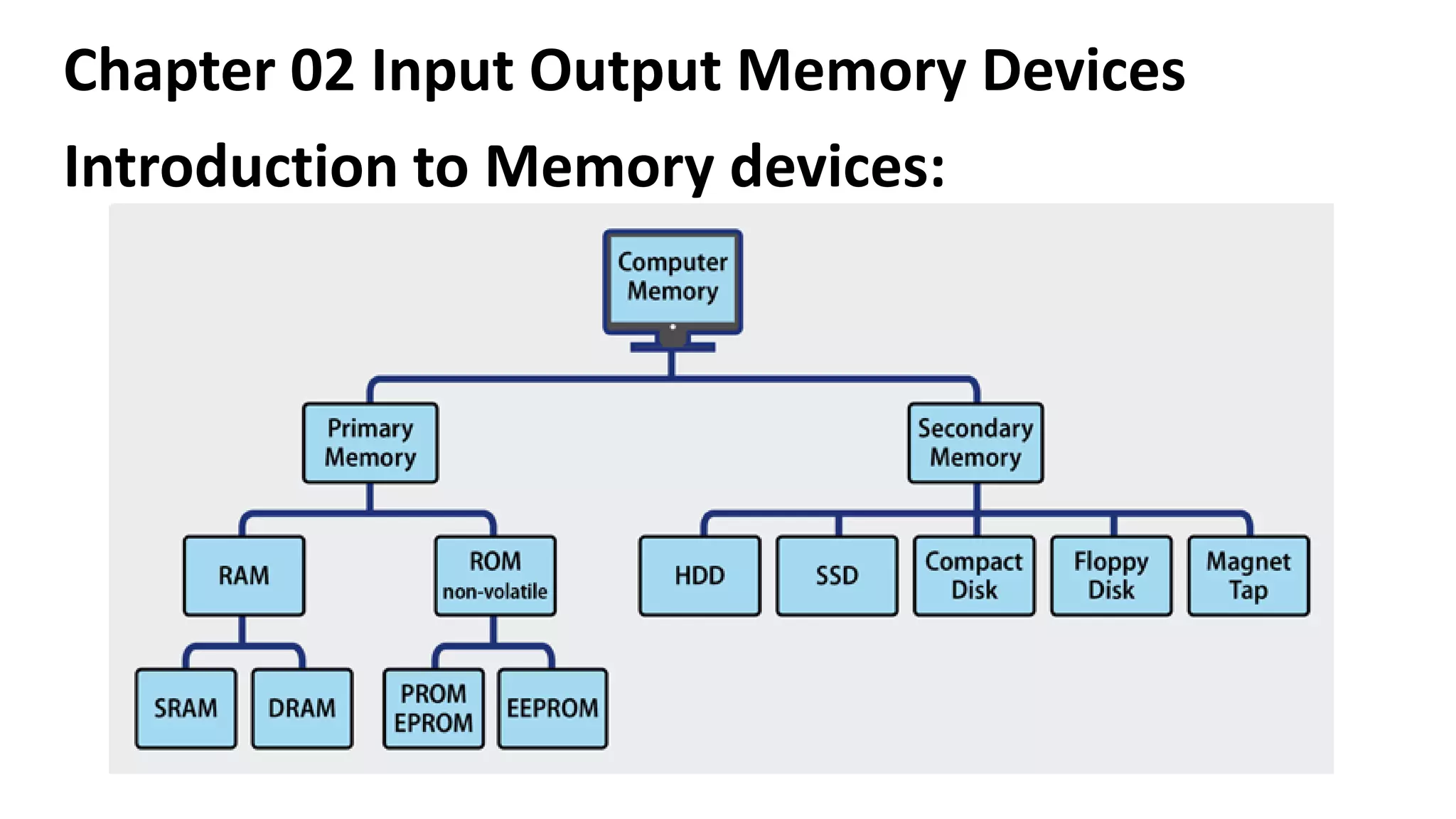
Introduction to Memory devices:
Chapter 02 Input Output Memory Devices
Introduction to Memory devices:
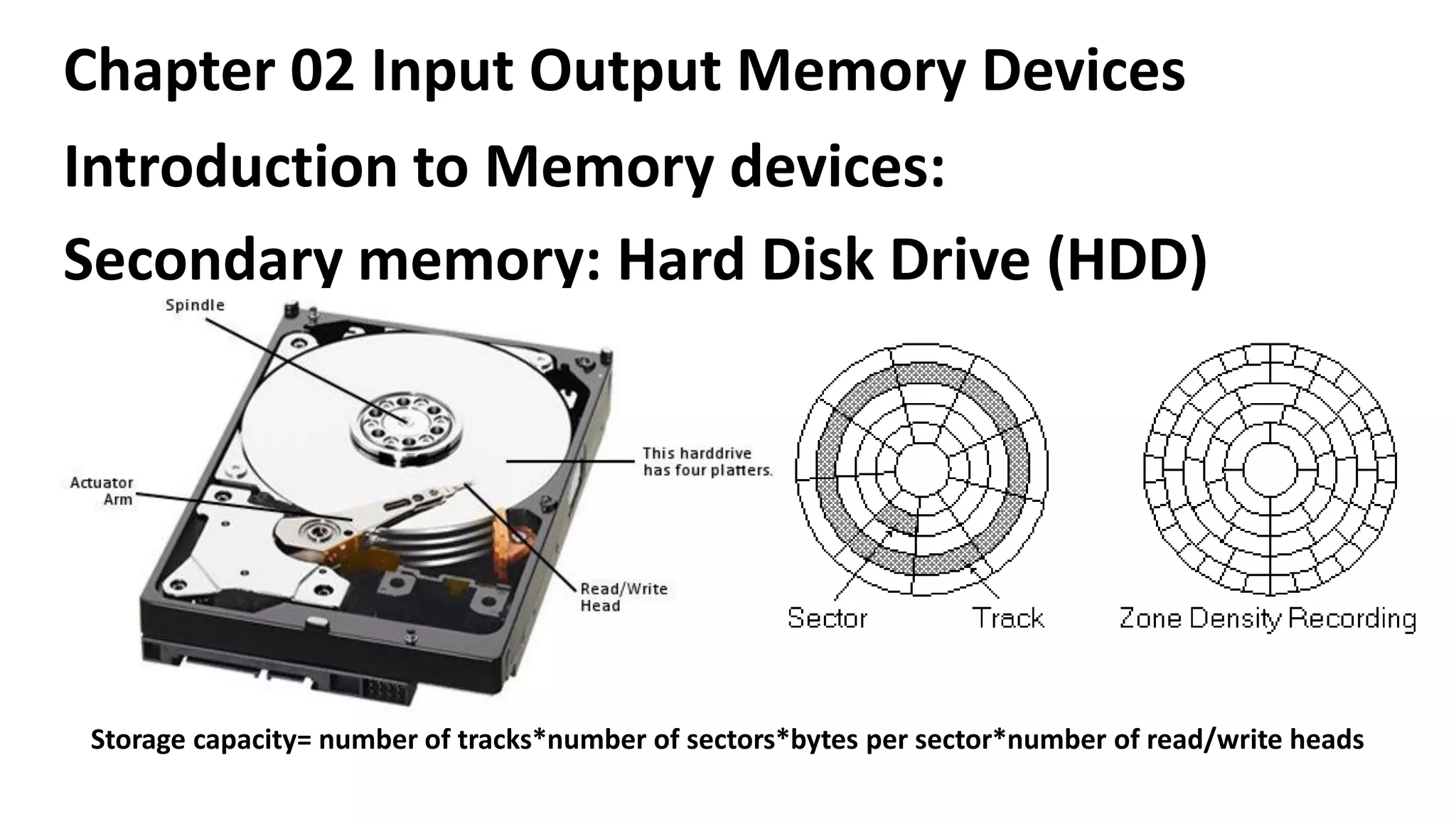
Secondary memory: Hard Disk Drive (HDD)
Storage capacity= number of tracks*number of sectors*bytes per sector*number of read/write heads
Chapter 02 Input Output Memory Devices
Introduction to Memory devices:
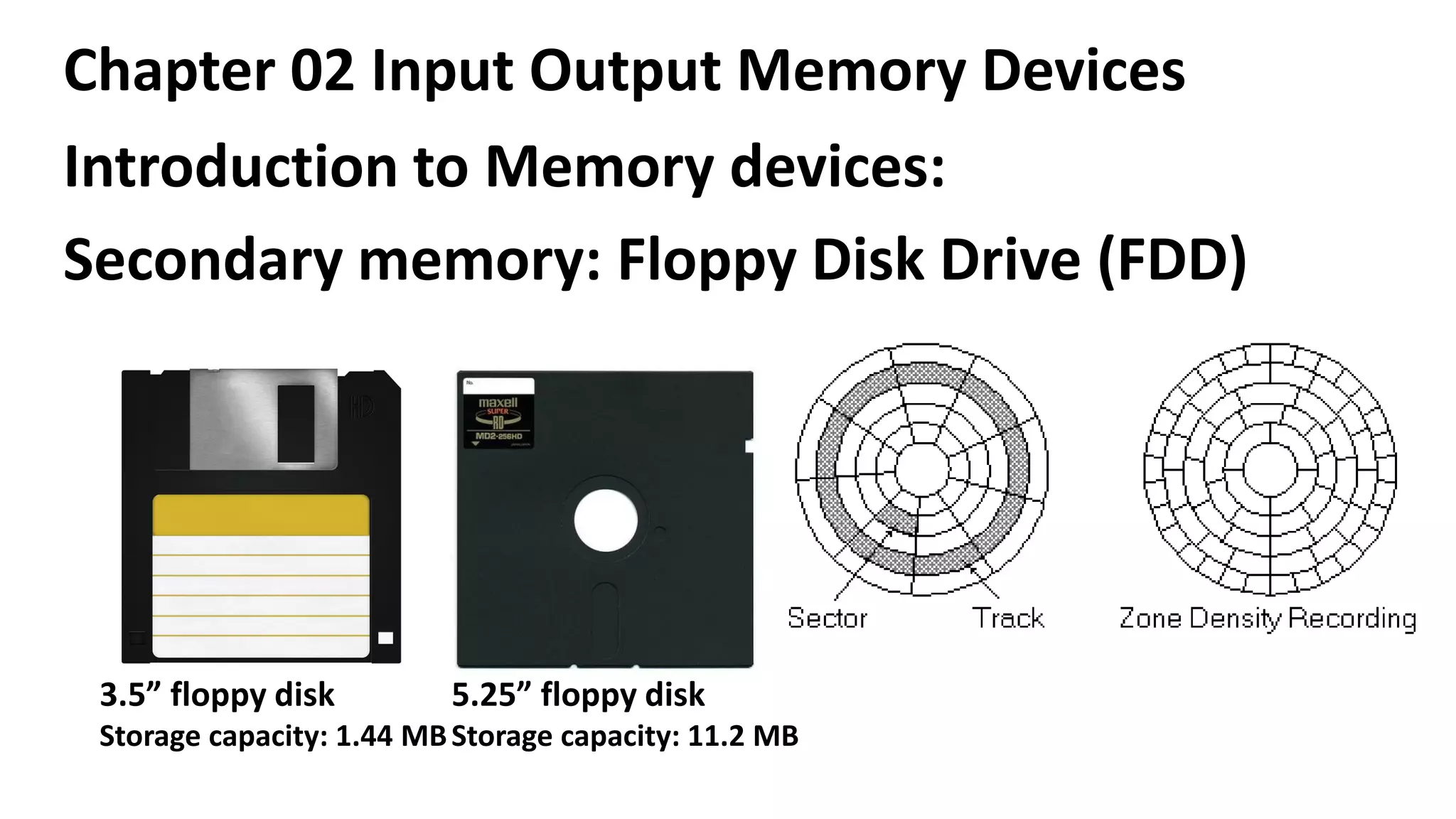
Secondary memory: Floppy Disk Drive (FDD)
3.5” floppy disk
Storage capacity: 1.44 MB
5.25” floppy disk
Storage capacity: 11.2 MB
Chapter 02 Input Output Memory Devices
Introduction to Memory devices:
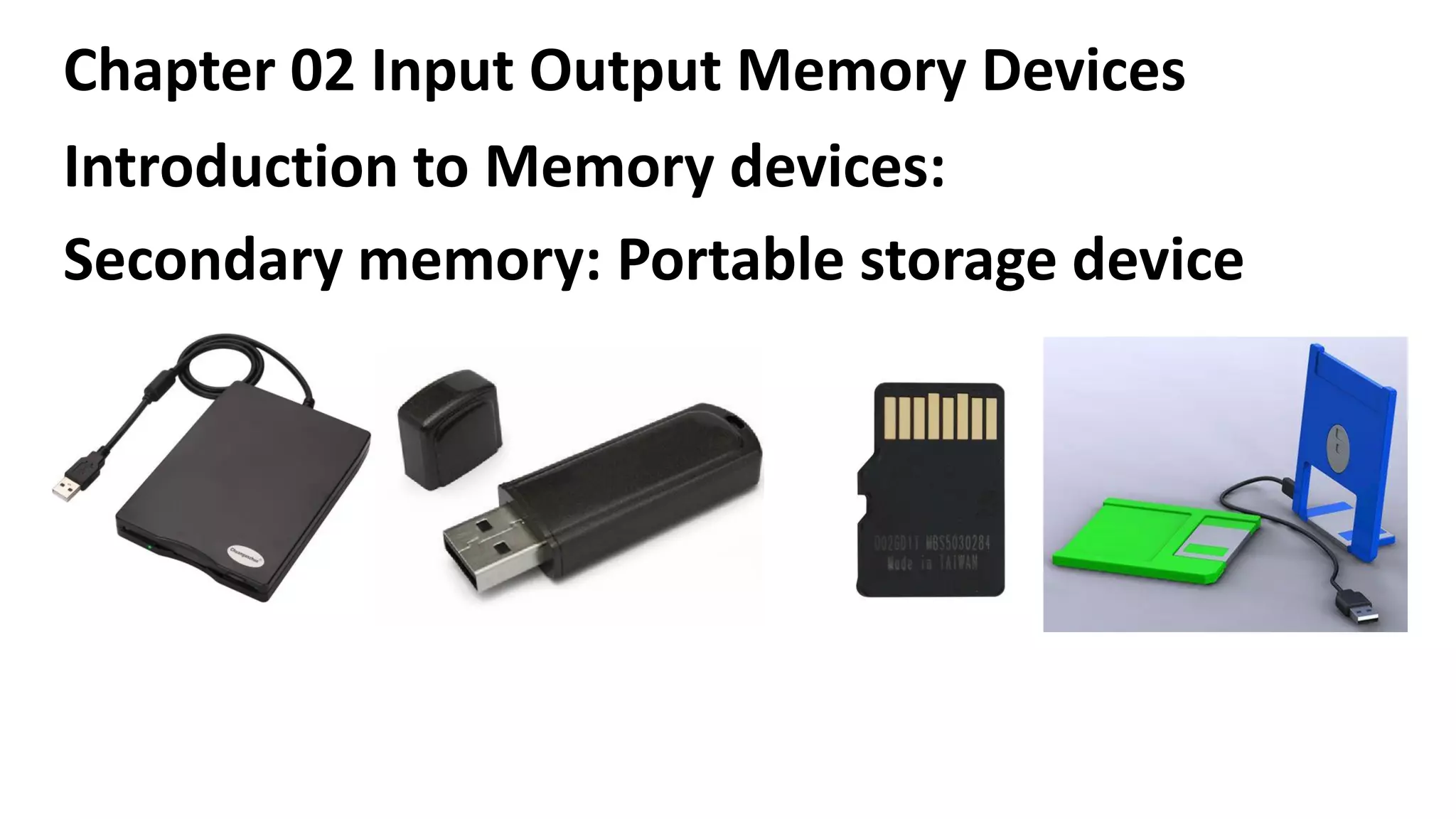
Secondary memory: Portable storage device
(PSD)
Chapter 02 Input Output Memory Devices
Introduction to Memory devices:
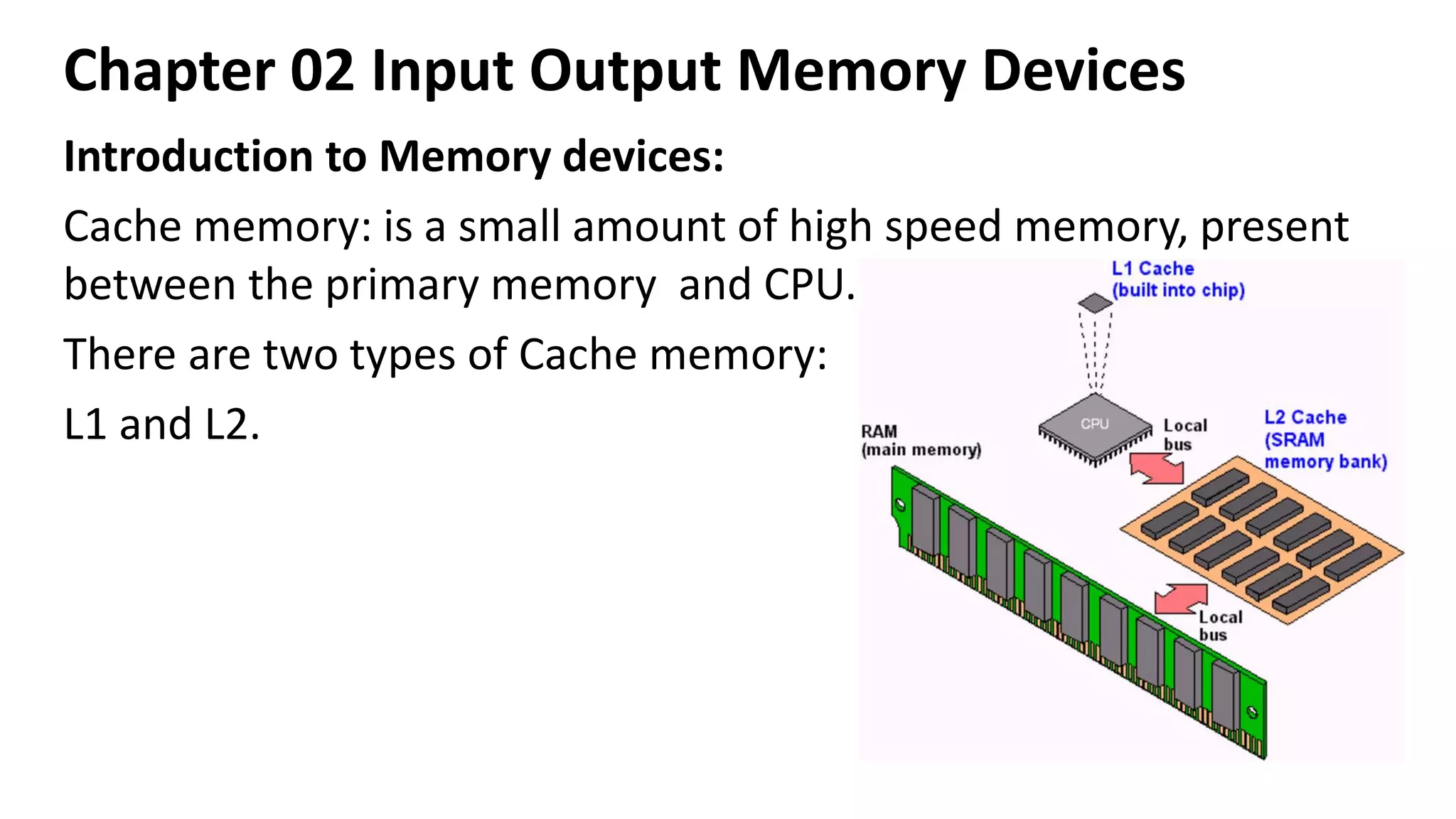
Cache memory: is a small amount of high speed memory, present
between the primary memory and CPU.
There are two types of Cache memory:
L1 and L2.

Chapter 02 Input Output Memory Devices (3).pdf

  • 1.
    Chapter 02 InputOutput Memory Devices Input Devices Keyboard:
  • 2.
    Chapter 02 InputOutput Memory Devices Input Devices Types of Keyboard: ➢Standard ➢Ergonomic ➢Wireless ➢Virtual ➢Compact
  • 3.
    Chapter 02 InputOutput Memory Devices Input Devices Mouse: (Mechanically Operated User Serial Engine) Types of Mouse: ➢Manual Mouse RJ ➢Scroll mouse ➢USB mouse ➢Wireless mouse
  • 4.
    Chapter 02 InputOutput Memory Devices Input Devices Joystick:
  • 5.
    Chapter 02 InputOutput Memory Devices Input Devices OMR, OCR AND MICR:
  • 6.
    Chapter 02 InputOutput Memory Devices Introduction to output devices: Monitors CRT monitor LCD monitor TFT monitor LED monitor
  • 7.
    Chapter 02 InputOutput Memory Devices Introduction to output devices: PRINTERS IMPACT LINE PRINTER DOT MATRIX NON-IMPACT INKJET LASER THERMAL
  • 8.
    Chapter 02 InputOutput Memory Devices Introduction to output devices: Characteristics of impact printers ✓There is a physical contact between paper and print assembly, hence they are useful for bulk printing. ✓Impact printers are ideal for printing multiple copies (carbon copies) because they can easily print through many layers of paper. ✓Due to its striking activity, impact printers are very noisy.
  • 9.
    Chapter 02 InputOutput Memory Devices Introduction to output devices: Characteristics of impact printers ✓Since they are mechanical in nature, they tend to be slow. ✓Impact do not support transparencies. ✓Measured with characters per seconds (CPS).
  • 10.
    Chapter 02 InputOutput Memory Devices Introduction to output devices: Characteristics of Non-impact printers ➢They are quiet than impact printers because there is no striking mechanism involved. ➢They posses the ability to change type faces automatically. ➢These printers produce high quality graphics. ➢These printers support the transparencies.
  • 11.
    Chapter 02 InputOutput Memory Devices Introduction to output devices: Characteristics of Non-impact printers ➢These printers cannot print multi part forms because no impact is being made on the paper. ➢Measured in dots per inches (dpi) ➢The speed is calculated by the number of pages per minute (ppm) ➢The size of the printing various A4,A3,A2,A0 and Jumbo size.
  • 12.
    Chapter 02 InputOutput Memory Devices Introduction to output devices: Line printer: -Capable of printing an entire line at a time. -It can print 150 lines to 3000 lines per minute. -The limitations of line printer are they can print only one font, they cannot print graphics. -The print quality is low and they are noisy to operate. -It is used to print on multi part stationeries to prepare copies of a document.
  • 13.
    Chapter 02 InputOutput Memory Devices Introduction to output devices: Dot Matrix Printer: -It prints one line of 8 or 14 points at a time, with print head moving across a line. -The printing speed is around 300 characters per second. -It uses multi part stationeries to prepare copies of a document.
  • 14.
    Chapter 02 InputOutput Memory Devices Introduction to output devices: Thermal Printer: -Printers that produce images by pushing electrically heated pins against special heat-sensitive paper. -Thermal printer paper tends to darken over time due to sunlight and heat. So the printed matters on the paper fade after a week or two. -It produces poor quality print.
  • 15.
    Chapter 02 InputOutput Memory Devices Introduction to output devices: Laser Printer: -laser printers use a laser beam and dry powdered ink to produce a fine dot matrix pattern. -It can produce very good quality of graphic images. -The available resolution range from 300dpi at the low end to around 1200 dpi at the high end.
  • 16.
    Chapter 02 InputOutput Memory Devices Introduction to output devices: Inkjet Printer: -it uses color cartridges which combine magenta, yellow and cyan inks. A black cartridge is also used for crisp monochrome output. -Inkjet printers work by spraying ionizing ink at a sheet of paper. -magnetized plates in the ink’s path direct the ink onto the paper in the described shape.
  • 17.
    Chapter 02 InputOutput Memory Devices Introduction to output devices: Plotter Printer: -plotters use pens to draw lines. As a result, they can produce continuous lines, whereas printers can only simulates lines by printing a closely spaced series of dots. -Plotters are more expensive than printers. -They are used in engineering applications where precision is mandatory.
  • 18.
    Chapter 02 InputOutput Memory Devices Introduction to output devices: Speakers: -The sound signals from analog/digital are converted into audible frequency in the speakers and produce voice output. -Using speakers along with speech synthesizer software, the computer can provide voice output. -voice output has become very common in many places like airline, banks, automatic telephonic enquiry system etc. -Users can also hear music/songs using the voice output system. -Today the speakers are with the subwoofer and 2/3/4 speakers.
  • 19.
    Chapter 02 InputOutput Memory Devices Introduction to Memory devices:
  • 20.
    Chapter 02 InputOutput Memory Devices Introduction to Memory devices:
  • 21.
    Chapter 02 InputOutput Memory Devices Introduction to Memory devices: Secondary memory: Hard Disk Drive (HDD) Storage capacity= number of tracks*number of sectors*bytes per sector*number of read/write heads
  • 22.
    Chapter 02 InputOutput Memory Devices Introduction to Memory devices: Secondary memory: Floppy Disk Drive (FDD) 3.5” floppy disk Storage capacity: 1.44 MB 5.25” floppy disk Storage capacity: 11.2 MB
  • 23.
    Chapter 02 InputOutput Memory Devices Introduction to Memory devices: Secondary memory: Portable storage device (PSD)
  • 24.
    Chapter 02 InputOutput Memory Devices Introduction to Memory devices: Cache memory: is a small amount of high speed memory, present between the primary memory and CPU. There are two types of Cache memory: L1 and L2.