CHAP : 02
Sound / Audio , video and
Animation
What is sound ?
 Sound is produced by the vibration of matter
 During the vibration , created in the air surrounding it.
 The pattern of the oscillation is called a waveform
GRAPH FROM MANUAL
 This portion of the waveform is called a period
 A waveform with a clearly defined period occurring at regular intervals is called
aperiodic waveform
 The waveform repeats the same shape at regular intervals and this portion is
called a period
 Here are some sources of periodic and non periodic sounds
 Periodic sound
musical instrument
vowel sounds
bird songs
wind sound
 Non – periodic sound
constant such as t , f and s
rushing water
unpitched percussion instruments
coughs and sneezes
Basic concepts of sound
 Infra-sound from 0 to 20 Hz
 Human hearing frequency range from 20 Hz to 20 KHz
 Ultra sound from 20 kHz to 1 GHz
 Hyper sound from 1 CID to 10 THz
 Multi media systems typically make use of sound only within
the frequency range of human hearing
How computer represent sound ?
 A computer measures the amplitude of the waveform at regular time intervals to
produce a series of numbers.
 Each of these measurements is called a sample figure illustrates one period
produce a series of numbers
GRAPH FROM MANUAL
 Each vertical bar in figure represents a single sample . The height of a bar
indicates the value of that sample.
 The mechanism that converts an audio signal into digital samples is called an
analog to digital converter or ADC .
 To convert a digital signal back to analog you need a digital to analog converter or
DAC
AUDIO FORMATS
 .AIFF(Audio Interchange File Format) , .SDII in macintosh systems
 .SND for macintosh systems
 .WAV (waveform audio) for windows systems
 MIDI (musical instrument digital interface )files – used by north macintosh and windows
 .WMA (windows media audio)– windows media player
 .MP3 – MP3 audio
 .RA – Real player
 .VOC – VOC sound
 AIFF sound format for macintosh sound files
 .OGG – ogg Vorbis
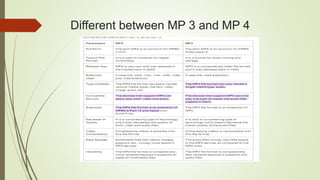
Different between MP 3 and MP 4
Short Note on JPEG , PNG , BMP
 joint photo graphics experts group
 JPEG (.JPG FILE EXTENSION)
 Jpg is used on digital camera memory card , but RAW or TIF format may be offerd too , to avoid it.
 JPG uses lossy compression (lossy meaning “with losses to quality”)
 In some cases we are willing to compromise quality for size , scarifying for the better goods.
 Many programs (photoshop , elements , photoimpact , photodeluxe) call this setting JPG quality.
 Digital cameras also offer JPG quality choices too.
 This allow amazing size reduction on the remainder but when we open the file it expand the data to
access it again , it is no longer the same data as before
 This lost data is like lost purity or integrity.
Benefits of jpg
• JPEG file format is in good use for an extended period and can be easily transferred.
• JPEG file format can be reconciled with almost any program that manages images.
• JPEG file format can be reconciled to almost all hardware tools, e.g. printers etc. So
printing digital pictures in JPEG format is quick, and simple.
• JPEG file format is suitable for a broad range of clear-sighted picture colours, with many
colour and contrast combos.
Short note on PNG
 PNG stands for portable network graphics
 The PNG format was designed as an elegant alternative to GIF (Graphic
interchange format)
 It was also designed as an open patent free format usable by everybody , as
against the proprietary GIF format.
 PNG handles transparency more efficiently than GIF
 Like GIF , the PNG formats supports 8-bit but also extends it to 24-bits , thus
giving you more color ranges to work with like in a JPEG file.
 PNG files do not support animation
 PNG files are also lossless files retaining color information when they are
compressed
Benefits of PNG
• Portability: Transmission is free of the program and equipment platform.
• Completeness: it’s conceivable to speak to truecolour, indexed-colour, and
grayscale images.
• Efficiency: any dynamic picture introduction, compression and sifting looks for
productive translating and presentation.
• Compression: pictures can be compressed effectively and consistently.
• Easiness: the execution of the standard is easy.
• Interchangeability: any PNG decoder that takes after the guidelines can peruse
all PNG information streams.
Short note on BMP
 BMP short for “bitmap”. It can be pronounced as “B-M-P” or simply a “bitmap image”.
 File extension is .BMP
 The BMP format is a commonly used raster graphics format for saving images files .
 It was introduced on the windows platform , but is now recognized by many programs
on both Macs and PCs.
 The bmp format store color data for each pixel in the image without any compression
 For example a 10x10 pixel BMP image will include color data for 100 pixels
 This method of storing image information allows for crisp , high quality graphics but also
produces large file sizes
Benefits of BMP
 The bitmap is quite useful as it provides a way to keep track of the memory using only a
little memory for the bitmap table. The size of the bitmap is purely dependent on the size
of the memory as well as the size of the memory unit.
Short note on .GIF
 GIF stands for Graphics Interchange Format. It is a bitmap image having a file
extension .gif. It is widely used for still images and animations on the World Wide
Web.
 It was introduced by CompuServe in 1987. The main motto of its development is to
develop a platform independent image format.
 GIF images uses 8 bit format which supports 256 colors. These colors cannot be
mixed to make new colors. It is very popular on internet due to its small size and
portability feature. It is considered best for line art with limited colors, images with
large flat areas of color and for images that need to be animated.
 GIF has only two versions:
• The first version was introduced in 1987 as GIF87a.
• The second version was an extended version and came in existence in 1989. It
was called GIF89a and it is used until today as the standard format.
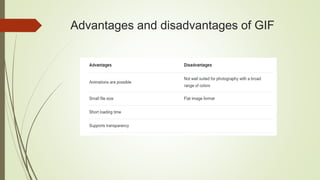
Advantages and disadvantages of GIF
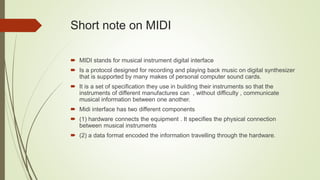
Short note on MIDI
 MIDI stands for musical instrument digital interface
 Is a protocol designed for recording and playing back music on digital synthesizer
that is supported by many makes of personal computer sound cards.
 It is a set of specification they use in building their instruments so that the
instruments of different manufactures can , without difficulty , communicate
musical information between one another.
 Midi interface has two different components
 (1) hardware connects the equipment . It specifies the physical connection
between musical instruments
 (2) a data format encoded the information travelling through the hardware.
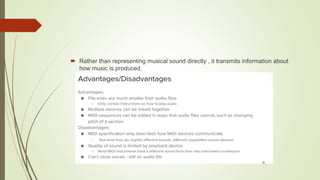
 Rather than representing musical sound directly , it transmits information about
how music is produced.
Concept of Animations
 Animation makes static presentations come alive
 It is visual change over time and can add great power to our multimedia projects,
carefully planned etc….
 Animation is created from drawn pictures and video is created using real time
visuals.
 definition of animation : A simulation of movement created by displaying a
series of pictures or frames. Cartoons on television are one example of
animation.
 There are many software applications that enable you to create animations
that you can display on a computer monitor
Different types of animation techniques

CHAP2.pptx

  • 1.
    CHAP : 02 Sound/ Audio , video and Animation
  • 2.
    What is sound?  Sound is produced by the vibration of matter  During the vibration , created in the air surrounding it.  The pattern of the oscillation is called a waveform GRAPH FROM MANUAL  This portion of the waveform is called a period  A waveform with a clearly defined period occurring at regular intervals is called aperiodic waveform  The waveform repeats the same shape at regular intervals and this portion is called a period  Here are some sources of periodic and non periodic sounds
  • 3.
     Periodic sound musicalinstrument vowel sounds bird songs wind sound  Non – periodic sound constant such as t , f and s rushing water unpitched percussion instruments coughs and sneezes
  • 4.
    Basic concepts ofsound  Infra-sound from 0 to 20 Hz  Human hearing frequency range from 20 Hz to 20 KHz  Ultra sound from 20 kHz to 1 GHz  Hyper sound from 1 CID to 10 THz  Multi media systems typically make use of sound only within the frequency range of human hearing
  • 5.
    How computer representsound ?  A computer measures the amplitude of the waveform at regular time intervals to produce a series of numbers.  Each of these measurements is called a sample figure illustrates one period produce a series of numbers GRAPH FROM MANUAL
  • 6.
     Each verticalbar in figure represents a single sample . The height of a bar indicates the value of that sample.  The mechanism that converts an audio signal into digital samples is called an analog to digital converter or ADC .  To convert a digital signal back to analog you need a digital to analog converter or DAC
  • 7.
    AUDIO FORMATS  .AIFF(AudioInterchange File Format) , .SDII in macintosh systems  .SND for macintosh systems  .WAV (waveform audio) for windows systems  MIDI (musical instrument digital interface )files – used by north macintosh and windows  .WMA (windows media audio)– windows media player  .MP3 – MP3 audio  .RA – Real player  .VOC – VOC sound  AIFF sound format for macintosh sound files  .OGG – ogg Vorbis
  • 8.
  • 9.
    Short Note onJPEG , PNG , BMP  joint photo graphics experts group  JPEG (.JPG FILE EXTENSION)  Jpg is used on digital camera memory card , but RAW or TIF format may be offerd too , to avoid it.  JPG uses lossy compression (lossy meaning “with losses to quality”)  In some cases we are willing to compromise quality for size , scarifying for the better goods.  Many programs (photoshop , elements , photoimpact , photodeluxe) call this setting JPG quality.  Digital cameras also offer JPG quality choices too.  This allow amazing size reduction on the remainder but when we open the file it expand the data to access it again , it is no longer the same data as before  This lost data is like lost purity or integrity.
  • 10.
    Benefits of jpg •JPEG file format is in good use for an extended period and can be easily transferred. • JPEG file format can be reconciled with almost any program that manages images. • JPEG file format can be reconciled to almost all hardware tools, e.g. printers etc. So printing digital pictures in JPEG format is quick, and simple. • JPEG file format is suitable for a broad range of clear-sighted picture colours, with many colour and contrast combos.
  • 11.
    Short note onPNG  PNG stands for portable network graphics  The PNG format was designed as an elegant alternative to GIF (Graphic interchange format)  It was also designed as an open patent free format usable by everybody , as against the proprietary GIF format.  PNG handles transparency more efficiently than GIF  Like GIF , the PNG formats supports 8-bit but also extends it to 24-bits , thus giving you more color ranges to work with like in a JPEG file.  PNG files do not support animation  PNG files are also lossless files retaining color information when they are compressed
  • 12.
    Benefits of PNG •Portability: Transmission is free of the program and equipment platform. • Completeness: it’s conceivable to speak to truecolour, indexed-colour, and grayscale images. • Efficiency: any dynamic picture introduction, compression and sifting looks for productive translating and presentation. • Compression: pictures can be compressed effectively and consistently. • Easiness: the execution of the standard is easy. • Interchangeability: any PNG decoder that takes after the guidelines can peruse all PNG information streams.
  • 13.
    Short note onBMP  BMP short for “bitmap”. It can be pronounced as “B-M-P” or simply a “bitmap image”.  File extension is .BMP  The BMP format is a commonly used raster graphics format for saving images files .  It was introduced on the windows platform , but is now recognized by many programs on both Macs and PCs.  The bmp format store color data for each pixel in the image without any compression  For example a 10x10 pixel BMP image will include color data for 100 pixels  This method of storing image information allows for crisp , high quality graphics but also produces large file sizes
  • 14.
    Benefits of BMP The bitmap is quite useful as it provides a way to keep track of the memory using only a little memory for the bitmap table. The size of the bitmap is purely dependent on the size of the memory as well as the size of the memory unit.
  • 15.
    Short note on.GIF  GIF stands for Graphics Interchange Format. It is a bitmap image having a file extension .gif. It is widely used for still images and animations on the World Wide Web.  It was introduced by CompuServe in 1987. The main motto of its development is to develop a platform independent image format.  GIF images uses 8 bit format which supports 256 colors. These colors cannot be mixed to make new colors. It is very popular on internet due to its small size and portability feature. It is considered best for line art with limited colors, images with large flat areas of color and for images that need to be animated.  GIF has only two versions: • The first version was introduced in 1987 as GIF87a. • The second version was an extended version and came in existence in 1989. It was called GIF89a and it is used until today as the standard format.
  • 16.
  • 17.
    Short note onMIDI  MIDI stands for musical instrument digital interface  Is a protocol designed for recording and playing back music on digital synthesizer that is supported by many makes of personal computer sound cards.  It is a set of specification they use in building their instruments so that the instruments of different manufactures can , without difficulty , communicate musical information between one another.  Midi interface has two different components  (1) hardware connects the equipment . It specifies the physical connection between musical instruments  (2) a data format encoded the information travelling through the hardware.
  • 18.
     Rather thanrepresenting musical sound directly , it transmits information about how music is produced.
  • 20.
    Concept of Animations Animation makes static presentations come alive  It is visual change over time and can add great power to our multimedia projects, carefully planned etc….  Animation is created from drawn pictures and video is created using real time visuals.  definition of animation : A simulation of movement created by displaying a series of pictures or frames. Cartoons on television are one example of animation.  There are many software applications that enable you to create animations that you can display on a computer monitor
  • 21.
    Different types ofanimation techniques