Students Name:
Abhinav Shingote (124)
Shravani Karhale (123)
Abhinav Kharate (116)
Devarshi Nandeshwar (125)
Computer Graphics Mini Project (Review 1)
School of Computer Engineering
Guide:
Mrs. Madhavi Nimkar
SMART CITY
Index
• Introduction
• Abstract(Aim of your project in five to six lines)
• Specify Objects involved in project.
• Software/Hardware Requirement
• Proposed System
• Implementations details (description of various functions
used in project)
• Design
• Demonstration
• References
Introduction
• The concept of "Smart Cities" has become popular in recent years
as cities use technology to improve efficiency, sustainability, and
quality of life. Technologies like IoT, AI, and data analytics help
enhance infrastructure, public services, transportation, and energy
management. These advancements aim to make urban living more
convenient and eco-friendly.
Problem statement
Define Objects
• Buildings, Roads, Vehicles, Traffic lights, Trees, Wind mills,
Solar system, Drones, Peoples etc...
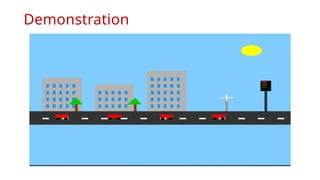
• This project aims to create a simulation of a smart city using
OpenGL. By using basic computer graphics techniques, we will
visualize a dynamic urban landscape that highlights the modern
technologies and infrastructure of a sustainable, advanced city.
Hardware/Software Requirement
1. OpenGL libraries (GLUT or FreeGLUT)
2. Code Block
3. C++ Compiler
4. Operating System: Windows/Linux/MacOS
Proposed System
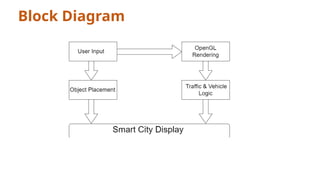
Input:
• User Input: Keyboard or mouse interactions for camera movement
or selecting objects.
Processing:
• OpenGL Object Rendering: Drawing and rendering of buildings,
roads, vehicles, and other city components.
• Traffic and Vehicle Logic: Movement of cars, buses, and other
vehicles. This part handles the logic for vehicle positioning and
traffic light changes.
Output:
• Display: The final rendered smart city scene, showing all the
elements interacting in real-time.
Block Diagram
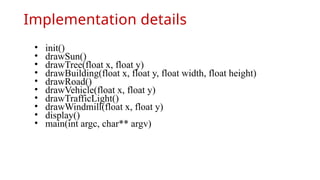
Implementation details
• init()
• drawSun()
• drawTree(float x, float y)
• drawBuilding(float x, float y, float width, float height)
• drawRoad()
• drawVehicle(float x, float y)
• drawTrafficLight()
• drawWindmill(float x, float y)
• display()
• main(int argc, char** argv)
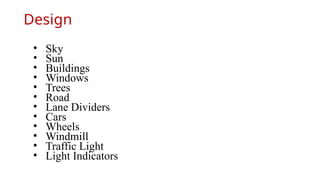
Design
• Sky
• Sun
• Buildings
• Windows
• Trees
• Road
• Lane Dividers
• Cars
• Wheels
• Windmill
• Traffic Light
• Light Indicators
Demonstration
Thank You!!
Any questions.

CG mini Project Review 1_PPT_Template.pptx.pptx

  • 1.
    Students Name: Abhinav Shingote(124) Shravani Karhale (123) Abhinav Kharate (116) Devarshi Nandeshwar (125) Computer Graphics Mini Project (Review 1) School of Computer Engineering Guide: Mrs. Madhavi Nimkar SMART CITY
  • 2.
    Index • Introduction • Abstract(Aimof your project in five to six lines) • Specify Objects involved in project. • Software/Hardware Requirement • Proposed System • Implementations details (description of various functions used in project) • Design • Demonstration • References
  • 3.
    Introduction • The conceptof "Smart Cities" has become popular in recent years as cities use technology to improve efficiency, sustainability, and quality of life. Technologies like IoT, AI, and data analytics help enhance infrastructure, public services, transportation, and energy management. These advancements aim to make urban living more convenient and eco-friendly.
  • 4.
    Problem statement Define Objects •Buildings, Roads, Vehicles, Traffic lights, Trees, Wind mills, Solar system, Drones, Peoples etc... • This project aims to create a simulation of a smart city using OpenGL. By using basic computer graphics techniques, we will visualize a dynamic urban landscape that highlights the modern technologies and infrastructure of a sustainable, advanced city.
  • 5.
    Hardware/Software Requirement 1. OpenGLlibraries (GLUT or FreeGLUT) 2. Code Block 3. C++ Compiler 4. Operating System: Windows/Linux/MacOS
  • 6.
    Proposed System Input: • UserInput: Keyboard or mouse interactions for camera movement or selecting objects. Processing: • OpenGL Object Rendering: Drawing and rendering of buildings, roads, vehicles, and other city components. • Traffic and Vehicle Logic: Movement of cars, buses, and other vehicles. This part handles the logic for vehicle positioning and traffic light changes. Output: • Display: The final rendered smart city scene, showing all the elements interacting in real-time.
  • 7.
  • 8.
    Implementation details • init() •drawSun() • drawTree(float x, float y) • drawBuilding(float x, float y, float width, float height) • drawRoad() • drawVehicle(float x, float y) • drawTrafficLight() • drawWindmill(float x, float y) • display() • main(int argc, char** argv)
  • 9.
    Design • Sky • Sun •Buildings • Windows • Trees • Road • Lane Dividers • Cars • Wheels • Windmill • Traffic Light • Light Indicators
  • 10.
  • 11.