CELLY
Suzanne Balch, Lilly Cline,
Carrie Hawkins, and Angela Williamson
EDU 337
Mitchell Doxsee
01/21/2015
COLLABORATIVE GROUP
1
WIKI CHOSEN BY THE
GROUP
Wikispaces.com was chosen by the group for collaboration:
 Wikispaces.com was familiar to one of the group members.
 The wiki provided a page history.
 The technology does not to overshadow or draw focus away
from the intent of the group’s focus
 The wiki enhances communication.
 Wikispaces.com offers wiki tutorials.
 Language Translation options.
 Wikispaces.com is hosted by someone else.
COLLABORATIVE GROUP
1
SUMMARY LEADING TO
TOPIC CHOICE
Suzanne Balch, Lilly Cline, and Angela Williamson were
the founders of the topic chosen by the group.
Suzanne Balch and Angela had the shared an interest
in using technology in education.
With their interests in mind, “T” Cline introduced Celly
and combined the elements that produced the chosen
topic of the group.
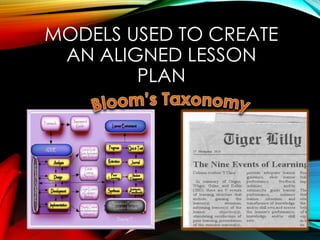
MODELS USED TO CREATE
AN ALIGNED LESSON
PLAN
CLIENT, STAKEHOLDER,
AND INTERESTED PARTY
CONCERN
 Becoming compliant with government standards to
incorporate technology in education.
 Resolving learner problems.
LEARNER PROBLEMS
 Learners are bringing mobile devices to class.
 Learners are not focusing on tasks.
 Learners are not participating because they are
distracted.
TARGET AUDIENCE
 First-year post-secondary learners entering college.
 Learners that may have attended college previously
but, have not completed their program of study.
 Learners that may have attended college previously
but, Celly was not required at that time for all students.
 Both Male and Female students.
 Includes non-traditional students.
 Diverse learners with different levels of technology
knowledge and skill sets.
 Learners may experience fear or anxiety when learning
new technology.
LEARNER OBJECTIVES
AND GOALS
 Demonstrate the ability to communicate efficiently
and effectively within the Celly SMS Texting
application.
 Demonstrate the ability to navigate the Celly
website.
 Identify navigation icon tools of the Celly
application.
 Demonstrate the ability to take a quiz within the Celly
application.
REQUIREMENTS
AND
WHEN CELLY WILL
BE INTRODUCED TO
ALL LEARNERS
 The Celly application is a required tool used by the
two-year college.
 All learners must take a prerequisite course of study
before entering their selected fields of study.
 All learners must successfully complete and pass the
prerequisite course before entering their selected
fields of study.
 Celly will be introduced as in individual lesson plan
within the prerequisite course.
 All learners must successfully pass the Celly lesson
within the prerequisite course.
CHARACTERISTICS OF
COLLABORATIVE GROUP
ACTIVITIES
In summary of Hall (2013) collaborative group activities
are characterized by the following categories:
 Communication
 Structure
 Group Composition
 Grounding
GROUNDING
After all students have been introduced to Celly,
set up their Celly accounts,
been familiarized with their account tools,
sent their first SMS message to the instructor or TA,
and completed their first Quiz,
All students will read the instructor’s and TA’s (if
applicable) biography (introduction)
Then each student will:
Create their own biography (F.O.R.D. – Introduction)
and share it with the instructor, TA (if applicable), and
peers.
CELLY
Contributors:
Suzanne Balch, Lilly Cline,
Carrie Hawkins, and Angela Williamson
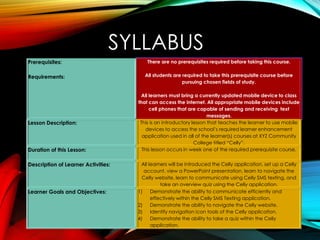
SYLLABUS
Prerequisites:
Requirements:
There are no prerequisites required before taking this course.
All students are required to take this prerequisite course before
pursuing chosen fields of study.
All learners must bring a currently updated mobile device to class
that can access the Internet. All appropriate mobile devices include
cell phones that are capable of sending and receiving text
messages.
Lesson Description: This is an introductory lesson that teaches the learner to use mobile
devices to access the school’s required learner enhancement
application used in all of the learner(s) courses at XYZ Community
College titled “Celly”.
Duration of this Lesson: This lesson occurs in week one of the required prerequisite course.
Description of Learner Activities: All learners will be introduced the Celly application, set up a Celly
account, view a PowerPoint presentation, learn to navigate the
Celly website, learn to communicate using Celly SMS texting, and
take an overview quiz using the Celly application.
Learner Goals and Objectives: 1) Demonstrate the ability to communicate efficiently and
effectively within the Celly SMS Texting application.
2) Demonstrate the ability to navigate the Celly website.
3) Identify navigation icon tools of the Celly application.
4) Demonstrate the ability to take a quiz within the Celly
application.
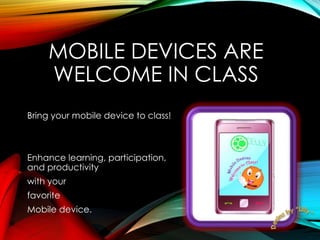
MOBILE DEVICES ARE
WELCOME IN CLASS
Bring your mobile device to class!
Enhance learning, participation,
and productivity
with your
favorite
Mobile device.
CELLY IS REQUIRED
All students are required to
have access to Celly and use Celly
for participation in all classes.
WHAT IS CELLY?
 Celly is a safe platform for ad-hoc social networks.
 Celly “Cells” work like a chat room for safe online
communication.
 Prevents chat storms from occurring in the class room.
 Celly uses mobile devices to enhance mobile learning.
CELLY IS PRIVATE
Your phone number is kept secure and private at
ALL TIMES.
Only your username and instructor approved
text messages are visible to other
class members of your Celly Cells classroom.
THE SCHOOL CELLY
CELLS ARE MONITORED
All of your instructors will receive your Celly Cells
messages before the messages are accepted and
posted to all Cell members. With this in mind,
 Follow the school’s posted “Code of Conduct” rules.
 Follow proper “Netiquette” rules.
 Keep texts relevant to school work that is assigned.
Instructors will report misconduct to the school.
Consequences will be administered accordingly.
WHAT DEVICES CAN I
USE TO ACCESS CELLY?
Celly is accessible by way of :
 iPhone – IPad - iPod
 Any Cell Phone with Texting Ability
 Android
 World Wide Web
 SMS (short message service) Text - Text Messaging
 Email
WHAT DOES IT COST TO
USE CELLY?
 Celly is free to schools.
 Celly is only free when accessed through the Celly
Website or the Celly apps.
 If you wish to use your cell phone as your primary access
to your Cells then you will need to purchase a premium
package for $15.00 per month.
 Carrier fees may apply if you do not have an unlimited
text messaging plan with your carrier.
 Academic funding in your school financial account
does not pay for your Celly expenses. Celly is an out-of-
pocket expense.
CELLY IN EDUCATION
WILL BE USED FOR:
 Broadcasting school and classroom alerts.
 Broadcasting school events.
 Instructor conducted classroom topics.
 Conducting classroom collaborative group work and
multiple- school groups.
 Individual student participation.
 Taking class room notes.
CELLY IN EDUCATION
WILL BE USED FOR:
 Polls.
 Quizzes.
 Instructor feedback and guidance.
 Peer to peer feedback.
 Viewing Instructor coordinated videos.
 Accessing assistance for school work during class
and outside of school hours.
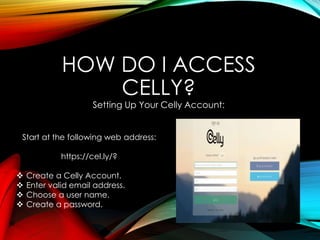
HOW DO I ACCESS
CELLY?
Setting Up Your Celly Account:
Start at the following web address:
https://cel.ly/?
 Create a Celly Account.
 Enter valid email address.
 Choose a user name.
 Create a password.
CHOOSE AN AVATAR
An “Avatar” is a personification picture or animation that you create
that other users can use to recognize you within the Celly classroom.
To create an Avatar:
 Log into your Celly account.
 Hover your moue over the “Gear” icon in the top right hand corner of
your screen.
 A “drop down” Menu will appear.
 Left mouse click on “Edit Profile”.
 In your profile page on Celly left mouse click on the “Set Avatar”
button.
 You can upload an image, take a photo with your mobile device, link
to an image from another web page, or choose a previously created
Avatar from the Celly Avatar Gallery.
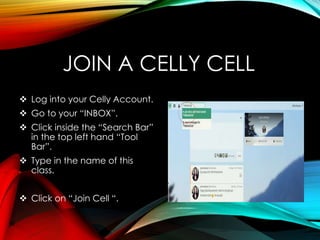
JOIN A CELLY CELL
 Log into your Celly Account.
 Go to your “INBOX”.
 Click inside the “Search Bar”
in the top left hand “Tool
Bar”.
 Type in the name of this
class.
 Click on “Join Cell “.
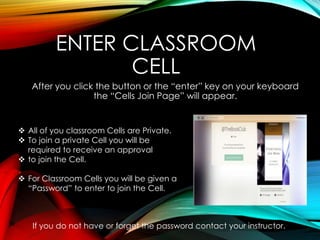
ENTER CLASSROOM
CELL
After you click the button or the “enter” key on your keyboard
the “Cells Join Page” will appear.
 All of you classroom Cells are Private.
 To join a private Cell you will be
required to receive an approval
 to join the Cell.
 For Classroom Cells you will be given a
“Password” to enter to join the Cell.
If you do not have or forget the password contact your instructor.
PENDING JOIN CELL
NOTIFICATION
Your Celly Account will show you a
“Pending Notification” message.
Because you will be entering the password
Given to you to join the classroom Cell
You will not receive the “Pending Notification” message.
You will b e able to immediately open the
Classroom Cell to participate in the classroom’s Cell
When you enter the case-sensitive password
Given to you to access the classroom’s Cell.
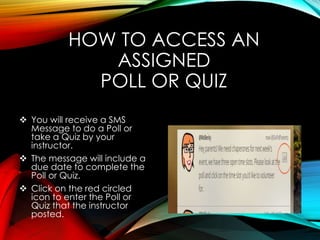
HOW TO ACCESS AN
ASSIGNED
POLL OR QUIZ
 You will receive a SMS
Message to do a Poll or
take a Quiz by your
instructor.
 The message will include a
due date to complete the
Poll or Quiz.
 Click on the red circled
icon to enter the Poll or
Quiz that the instructor
posted.
INSIDE THE
POLL OR QUIZ
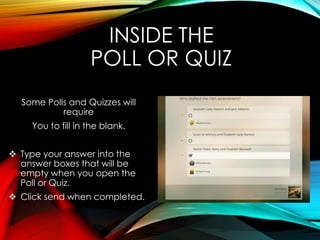
Some Polls and Quizzes will
require
You to fill in the blank.
 Type your answer into the
answer boxes that will be
empty when you open the
Poll or Quiz.
 Click send when completed.
INSIDE THE
POLL OR QUIZ
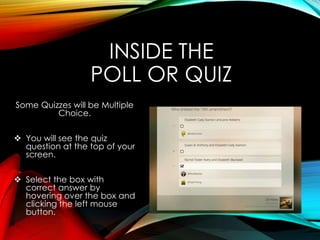
Some Quizzes will be Multiple
Choice.
 You will see the quiz
question at the top of your
screen.
 Select the box with
correct answer by
hovering over the box and
clicking the left mouse
button.
TAKE YOUR FIRST QUIZ
Your first Celly Quiz is over the materials that you just
covered in this PowerPoint presentation.
You have 20 minutes to complete the quiz.
Answers to Quiz Questions are not Case-Sensitive.
Questions are fill-in-the-blank and True/False.
AFTER CLASS
REQUIRED READING
All students must read the “ Celly Terms of Service”
located at the following web address:
https://cel.ly/tos
“Rules of Conduct” and “Netiquette” rules
In the student handbook.
CONCLUSION
The next lesson in this series will include an assessment
based on the required reading materials.
Required Reading:
Reference Information Packet Hand – Out
Remember to bring your mobile devices to
The next scheduled class.
REFERENCES
Balch, S. (2015). Week Three Assignment Contemplating Characteristics. Retrieved from
https://edu337class.wikispaces.com/file/detail/Week+Three+Assignment
+Contemplating+Characteristics.pptx.
Bower, M. (2011). Synchronous collaboration competencies in web-conferencing
environments – their impact on the learning process. Distance Education, 32(1),
63-83. Retrieved from EBSCOhost database.
Brown, A., & Green, T. (2011). The essentials of instructional designer: Connecting
fundamental principles with process and practice. Boston, MA: Pearson.
Culatta, R. (2011). ADDIE model. Retrieved from
http://www.instructionaldesign.org/models/addie.html.
Choy, S. (2002). NATIONAL CENTER FOR EDUCATION STATISTICS. ED PUBS: Jessup, MD.
REFERENCES
Cline, Lilly (2015). Character of our Lesson and Analogy of Topical Questions. Retrieved from
http://classroom.ashford.edu/re/DotNextLaunch.asp?courseid=10934655&user
id=13936008&sessionid=f98ec113d6&tabid=h45W6seB9yvh906j5U0XPgTR6r9LV7
F7nywwFwS6UrIlFLwoVvx1wpgcPGv7DkxAjnb/7HGtM9GPEWVsamOduFRYcSE
cgTqtA4f9f0bEMQ0=&sessionFirstAuthStore=true&macid=j7azvGovjYZsW3Vwr
EXHQX64rLl31j+80Qdgs0cUEEnnNQ8Z2qOipqkEAoqcmDFdbUnLNEKtXzEEHbxh
w/3XaXjRaXlFeFVPeP6CxfrLL2ZDLq1hAKlNaDY0BQ5u7k7RYSx03SHdoraIg19I
G9QpKsY3lX/qYl7zh0gsuVTbfwp/lHcmKRL+N1SdNEaDFh0DO2To/dknDw6TB
FpAW3TCFUP7QHkhgUJ0DV+FYdYesxOZvJLPxTWi7SuBivj0np7kH3GZRs6fg1ohD
foTJq4NP8ivamWObyur670Yw5vNwr0=.
Gagne, R., Wager, W. W., Golas, K. C., & Keller, J. M. (2005). Principles of instructional design
(5th ed.). United States: Cengage.
Hall, B. M. (2013). Designing collaborative activities to promote understanding and problem
solving. [Manuscript submitted for publication].International Journal of e-
Collaboration. Retrieved from
http://www.academia.edu/3235866/Designing.Collaborative.Activities.to
Promote_Understanding_and_Problem_Solving.
REFERENCES
Hawkins, C. (2015). Celly Training. Retrieved from
https://edu337class.wikispaces.com/file/detail/Week+2+Assignment
+Celly+Training2.pptx.
Hawkins, C. (2015). Week 3 Assignment: Group Expectations. Retrieved from
https:edu337class.wikispaces.com/Celly%20Training/Celly%Project/file
detail/Week+3.pptx.
Oosterhof, A., Conrad, R., & Ely, D. (2008). Assessing learners online. Pearson Education, Inc.
Scalise, K., & Gifford, B. (2006). Computer-based assessment in e-learning: A framework for
constructing “intermediate constraint” questions and tasks for technology
platforms. Journal of Technology, Learning, and Assessment, 4(6).
Retrieved from
http://sjournals.bc.edu/ois/index.php/itla/article/view/163/495.
Taylor, K., Marienau, C., & Fiddler, M. (2000). Developing adult learners. San Francisco,
CA: Jossey-Bass.
REFERENCES
Teller, D. (2015). Celly. Retrieved from https://cel.ly/.
U.S. Department of Education, Office of Educational Technology. (2010). Transforming
American education: Learning Powered by technology. Retrieved from
http://www.ed.gov/sites/default/files/netp2010.pdf.
Williamson, A. (2015). Week Three Assignment: Contemplating Characteristics.
Retrieved from https://edu337class.wikispaces.com/file/detail/Week+
Three+Assignment+Contemplating+Characteristics_Angela.pptx.

Celly Lesson Plan

  • 1.
    CELLY Suzanne Balch, LillyCline, Carrie Hawkins, and Angela Williamson EDU 337 Mitchell Doxsee 01/21/2015
  • 2.
    COLLABORATIVE GROUP 1 WIKI CHOSENBY THE GROUP Wikispaces.com was chosen by the group for collaboration:  Wikispaces.com was familiar to one of the group members.  The wiki provided a page history.  The technology does not to overshadow or draw focus away from the intent of the group’s focus  The wiki enhances communication.  Wikispaces.com offers wiki tutorials.  Language Translation options.  Wikispaces.com is hosted by someone else.
  • 3.
    COLLABORATIVE GROUP 1 SUMMARY LEADINGTO TOPIC CHOICE Suzanne Balch, Lilly Cline, and Angela Williamson were the founders of the topic chosen by the group. Suzanne Balch and Angela had the shared an interest in using technology in education. With their interests in mind, “T” Cline introduced Celly and combined the elements that produced the chosen topic of the group.
  • 4.
    MODELS USED TOCREATE AN ALIGNED LESSON PLAN
  • 5.
    CLIENT, STAKEHOLDER, AND INTERESTEDPARTY CONCERN  Becoming compliant with government standards to incorporate technology in education.  Resolving learner problems.
  • 6.
    LEARNER PROBLEMS  Learnersare bringing mobile devices to class.  Learners are not focusing on tasks.  Learners are not participating because they are distracted.
  • 7.
    TARGET AUDIENCE  First-yearpost-secondary learners entering college.  Learners that may have attended college previously but, have not completed their program of study.  Learners that may have attended college previously but, Celly was not required at that time for all students.  Both Male and Female students.  Includes non-traditional students.  Diverse learners with different levels of technology knowledge and skill sets.  Learners may experience fear or anxiety when learning new technology.
  • 8.
    LEARNER OBJECTIVES AND GOALS Demonstrate the ability to communicate efficiently and effectively within the Celly SMS Texting application.  Demonstrate the ability to navigate the Celly website.  Identify navigation icon tools of the Celly application.  Demonstrate the ability to take a quiz within the Celly application.
  • 9.
    REQUIREMENTS AND WHEN CELLY WILL BEINTRODUCED TO ALL LEARNERS  The Celly application is a required tool used by the two-year college.  All learners must take a prerequisite course of study before entering their selected fields of study.  All learners must successfully complete and pass the prerequisite course before entering their selected fields of study.  Celly will be introduced as in individual lesson plan within the prerequisite course.  All learners must successfully pass the Celly lesson within the prerequisite course.
  • 10.
    CHARACTERISTICS OF COLLABORATIVE GROUP ACTIVITIES Insummary of Hall (2013) collaborative group activities are characterized by the following categories:  Communication  Structure  Group Composition  Grounding
  • 11.
    GROUNDING After all studentshave been introduced to Celly, set up their Celly accounts, been familiarized with their account tools, sent their first SMS message to the instructor or TA, and completed their first Quiz, All students will read the instructor’s and TA’s (if applicable) biography (introduction) Then each student will: Create their own biography (F.O.R.D. – Introduction) and share it with the instructor, TA (if applicable), and peers.
  • 12.
    CELLY Contributors: Suzanne Balch, LillyCline, Carrie Hawkins, and Angela Williamson
  • 13.
    SYLLABUS Prerequisites: Requirements: There are noprerequisites required before taking this course. All students are required to take this prerequisite course before pursuing chosen fields of study. All learners must bring a currently updated mobile device to class that can access the Internet. All appropriate mobile devices include cell phones that are capable of sending and receiving text messages. Lesson Description: This is an introductory lesson that teaches the learner to use mobile devices to access the school’s required learner enhancement application used in all of the learner(s) courses at XYZ Community College titled “Celly”. Duration of this Lesson: This lesson occurs in week one of the required prerequisite course. Description of Learner Activities: All learners will be introduced the Celly application, set up a Celly account, view a PowerPoint presentation, learn to navigate the Celly website, learn to communicate using Celly SMS texting, and take an overview quiz using the Celly application. Learner Goals and Objectives: 1) Demonstrate the ability to communicate efficiently and effectively within the Celly SMS Texting application. 2) Demonstrate the ability to navigate the Celly website. 3) Identify navigation icon tools of the Celly application. 4) Demonstrate the ability to take a quiz within the Celly application.
  • 14.
    MOBILE DEVICES ARE WELCOMEIN CLASS Bring your mobile device to class! Enhance learning, participation, and productivity with your favorite Mobile device.
  • 15.
    CELLY IS REQUIRED Allstudents are required to have access to Celly and use Celly for participation in all classes.
  • 16.
    WHAT IS CELLY? Celly is a safe platform for ad-hoc social networks.  Celly “Cells” work like a chat room for safe online communication.  Prevents chat storms from occurring in the class room.  Celly uses mobile devices to enhance mobile learning.
  • 17.
    CELLY IS PRIVATE Yourphone number is kept secure and private at ALL TIMES. Only your username and instructor approved text messages are visible to other class members of your Celly Cells classroom.
  • 18.
    THE SCHOOL CELLY CELLSARE MONITORED All of your instructors will receive your Celly Cells messages before the messages are accepted and posted to all Cell members. With this in mind,  Follow the school’s posted “Code of Conduct” rules.  Follow proper “Netiquette” rules.  Keep texts relevant to school work that is assigned. Instructors will report misconduct to the school. Consequences will be administered accordingly.
  • 19.
    WHAT DEVICES CANI USE TO ACCESS CELLY? Celly is accessible by way of :  iPhone – IPad - iPod  Any Cell Phone with Texting Ability  Android  World Wide Web  SMS (short message service) Text - Text Messaging  Email
  • 20.
    WHAT DOES ITCOST TO USE CELLY?  Celly is free to schools.  Celly is only free when accessed through the Celly Website or the Celly apps.  If you wish to use your cell phone as your primary access to your Cells then you will need to purchase a premium package for $15.00 per month.  Carrier fees may apply if you do not have an unlimited text messaging plan with your carrier.  Academic funding in your school financial account does not pay for your Celly expenses. Celly is an out-of- pocket expense.
  • 21.
    CELLY IN EDUCATION WILLBE USED FOR:  Broadcasting school and classroom alerts.  Broadcasting school events.  Instructor conducted classroom topics.  Conducting classroom collaborative group work and multiple- school groups.  Individual student participation.  Taking class room notes.
  • 22.
    CELLY IN EDUCATION WILLBE USED FOR:  Polls.  Quizzes.  Instructor feedback and guidance.  Peer to peer feedback.  Viewing Instructor coordinated videos.  Accessing assistance for school work during class and outside of school hours.
  • 23.
    HOW DO IACCESS CELLY? Setting Up Your Celly Account: Start at the following web address: https://cel.ly/?  Create a Celly Account.  Enter valid email address.  Choose a user name.  Create a password.
  • 24.
    CHOOSE AN AVATAR An“Avatar” is a personification picture or animation that you create that other users can use to recognize you within the Celly classroom. To create an Avatar:  Log into your Celly account.  Hover your moue over the “Gear” icon in the top right hand corner of your screen.  A “drop down” Menu will appear.  Left mouse click on “Edit Profile”.  In your profile page on Celly left mouse click on the “Set Avatar” button.  You can upload an image, take a photo with your mobile device, link to an image from another web page, or choose a previously created Avatar from the Celly Avatar Gallery.
  • 25.
    JOIN A CELLYCELL  Log into your Celly Account.  Go to your “INBOX”.  Click inside the “Search Bar” in the top left hand “Tool Bar”.  Type in the name of this class.  Click on “Join Cell “.
  • 26.
    ENTER CLASSROOM CELL After youclick the button or the “enter” key on your keyboard the “Cells Join Page” will appear.  All of you classroom Cells are Private.  To join a private Cell you will be required to receive an approval  to join the Cell.  For Classroom Cells you will be given a “Password” to enter to join the Cell. If you do not have or forget the password contact your instructor.
  • 27.
    PENDING JOIN CELL NOTIFICATION YourCelly Account will show you a “Pending Notification” message. Because you will be entering the password Given to you to join the classroom Cell You will not receive the “Pending Notification” message. You will b e able to immediately open the Classroom Cell to participate in the classroom’s Cell When you enter the case-sensitive password Given to you to access the classroom’s Cell.
  • 28.
    HOW TO ACCESSAN ASSIGNED POLL OR QUIZ  You will receive a SMS Message to do a Poll or take a Quiz by your instructor.  The message will include a due date to complete the Poll or Quiz.  Click on the red circled icon to enter the Poll or Quiz that the instructor posted.
  • 29.
    INSIDE THE POLL ORQUIZ Some Polls and Quizzes will require You to fill in the blank.  Type your answer into the answer boxes that will be empty when you open the Poll or Quiz.  Click send when completed.
  • 30.
    INSIDE THE POLL ORQUIZ Some Quizzes will be Multiple Choice.  You will see the quiz question at the top of your screen.  Select the box with correct answer by hovering over the box and clicking the left mouse button.
  • 31.
    TAKE YOUR FIRSTQUIZ Your first Celly Quiz is over the materials that you just covered in this PowerPoint presentation. You have 20 minutes to complete the quiz. Answers to Quiz Questions are not Case-Sensitive. Questions are fill-in-the-blank and True/False.
  • 32.
    AFTER CLASS REQUIRED READING Allstudents must read the “ Celly Terms of Service” located at the following web address: https://cel.ly/tos “Rules of Conduct” and “Netiquette” rules In the student handbook.
  • 33.
    CONCLUSION The next lessonin this series will include an assessment based on the required reading materials. Required Reading: Reference Information Packet Hand – Out Remember to bring your mobile devices to The next scheduled class.
  • 34.
    REFERENCES Balch, S. (2015).Week Three Assignment Contemplating Characteristics. Retrieved from https://edu337class.wikispaces.com/file/detail/Week+Three+Assignment +Contemplating+Characteristics.pptx. Bower, M. (2011). Synchronous collaboration competencies in web-conferencing environments – their impact on the learning process. Distance Education, 32(1), 63-83. Retrieved from EBSCOhost database. Brown, A., & Green, T. (2011). The essentials of instructional designer: Connecting fundamental principles with process and practice. Boston, MA: Pearson. Culatta, R. (2011). ADDIE model. Retrieved from http://www.instructionaldesign.org/models/addie.html. Choy, S. (2002). NATIONAL CENTER FOR EDUCATION STATISTICS. ED PUBS: Jessup, MD.
  • 35.
    REFERENCES Cline, Lilly (2015).Character of our Lesson and Analogy of Topical Questions. Retrieved from http://classroom.ashford.edu/re/DotNextLaunch.asp?courseid=10934655&user id=13936008&sessionid=f98ec113d6&tabid=h45W6seB9yvh906j5U0XPgTR6r9LV7 F7nywwFwS6UrIlFLwoVvx1wpgcPGv7DkxAjnb/7HGtM9GPEWVsamOduFRYcSE cgTqtA4f9f0bEMQ0=&sessionFirstAuthStore=true&macid=j7azvGovjYZsW3Vwr EXHQX64rLl31j+80Qdgs0cUEEnnNQ8Z2qOipqkEAoqcmDFdbUnLNEKtXzEEHbxh w/3XaXjRaXlFeFVPeP6CxfrLL2ZDLq1hAKlNaDY0BQ5u7k7RYSx03SHdoraIg19I G9QpKsY3lX/qYl7zh0gsuVTbfwp/lHcmKRL+N1SdNEaDFh0DO2To/dknDw6TB FpAW3TCFUP7QHkhgUJ0DV+FYdYesxOZvJLPxTWi7SuBivj0np7kH3GZRs6fg1ohD foTJq4NP8ivamWObyur670Yw5vNwr0=. Gagne, R., Wager, W. W., Golas, K. C., & Keller, J. M. (2005). Principles of instructional design (5th ed.). United States: Cengage. Hall, B. M. (2013). Designing collaborative activities to promote understanding and problem solving. [Manuscript submitted for publication].International Journal of e- Collaboration. Retrieved from http://www.academia.edu/3235866/Designing.Collaborative.Activities.to Promote_Understanding_and_Problem_Solving.
  • 36.
    REFERENCES Hawkins, C. (2015).Celly Training. Retrieved from https://edu337class.wikispaces.com/file/detail/Week+2+Assignment +Celly+Training2.pptx. Hawkins, C. (2015). Week 3 Assignment: Group Expectations. Retrieved from https:edu337class.wikispaces.com/Celly%20Training/Celly%Project/file detail/Week+3.pptx. Oosterhof, A., Conrad, R., & Ely, D. (2008). Assessing learners online. Pearson Education, Inc. Scalise, K., & Gifford, B. (2006). Computer-based assessment in e-learning: A framework for constructing “intermediate constraint” questions and tasks for technology platforms. Journal of Technology, Learning, and Assessment, 4(6). Retrieved from http://sjournals.bc.edu/ois/index.php/itla/article/view/163/495. Taylor, K., Marienau, C., & Fiddler, M. (2000). Developing adult learners. San Francisco, CA: Jossey-Bass.
  • 37.
    REFERENCES Teller, D. (2015).Celly. Retrieved from https://cel.ly/. U.S. Department of Education, Office of Educational Technology. (2010). Transforming American education: Learning Powered by technology. Retrieved from http://www.ed.gov/sites/default/files/netp2010.pdf. Williamson, A. (2015). Week Three Assignment: Contemplating Characteristics. Retrieved from https://edu337class.wikispaces.com/file/detail/Week+ Three+Assignment+Contemplating+Characteristics_Angela.pptx.

Editor's Notes

  • #2 Before class is to start announce that all students are required to bring a mobile device to class for this lesson that can access the internet or send and receive text messages. Before class begins, hand out an introductory poll worksheet to each student. This activity should take no more than 15 minutes of class time. Collect the introductory polls when students complete them or when 15 minutes has expired, which ever comes first. Review student answers before the lesson begins. The data will be used to ascertain if all students have access to a device for the lesson and school work hereafter, ascertain knowledge and skills, identify possible anxiety of use of mobile devices or fear of learning new technology and/or applications among students, and to create groups for the collaborative group activity. The data will be collected for further tracking and information for school use and solving learner problems. 1 point will be given to all students upon completion of the introductory poll (the point may be used as an extra credit point marked in the grade book.) If all students have a mobile device to access Celly proceed with this lesson plan. If not all students have a device with them, have devices available that have been acquired from the school for student use to use on day 1 of class or if a student forgets to bring his or her device to class. Instruct students to bring their mobile device to class for the duration of this lesson and every day of every class they attend forward. The introductory poll should contain the following questions: Do you have a mobile device? Did you bring a mobile device to class? If yes, name the mobile device you brought to class today. If no, what mobile device(s) do you have access to use during class and after school? How often do you use mobile devices to access school work? Describe your confidence in using mobile devices. Briefly describe your experience using mobile devices for class work. Describe your confidence in learning to use new mobile device applications. Do you have an existing Celly account? If yes, please provide your username. Note: All Celly images are property of Celly and this group has been given express permission to use the Celly images for this lesson plan project. The exception to the graphics in this slide presentation is the graphic image on slide 2 that was created by “T” Cline. Included on slide 2 is “T” Cline’s permissions to use graphic image for educational purposes.
  • #3  In summary of Bower (2011) operational competency is the ability of the learner(s) to use the tools in an application, interactional competency gauges the success of the learner(s) ability to use the tools to successfully communicate during a learning event, managerial competency refers to the affordances of the tools used in combination to successfully engage in the learning event, and the design competencies are the ability to design the elements so that the virtual collaboration aspect did not hinder the delivery of the information but rather improves the learner’s potential outcome through the use of the application and/or tools available. When working in groups it is always best, in my opinion, to have a page history. A group member that may not be able to attend a group meeting at a given time may look back through the history so that he and/or she can be updated of every event and all of the discussion information that was given and discussed within the group. A secondary application, or need, for a page history is the example of our group activity for this course. The learner can read all of the content that occurred during his and/or her absence to gain understanding and be able to participate with up to date information that is relevant to what is occurring in the group at present. As an instructor he or she can monitor group and individual learner participation as well as add his or her own commentary to guide the learners within the group. Not all users are going to have the same knowledge and skills base. It is essential when choosing a wiki for group collaboration that the wiki offers tutorials to use the wiki effectively and efficiently for those that need more information to promote participation in the group. Not everyone in a collaborative group may speak the same language. Wikispaces.com offers language translation tools for group members who may need the tools to comprehend and participate in the collaborative group work. This class also has a short time frame in which to accomplish a lot. The best choice based on time is a simple wiki structure. Wikispaces.com offers corporate branding but, it is not necessary for our collaborative group project. Changing the way a wiki looks is aesthetically pleasing in some cases. In the current situation this is not necessary either. When deciding on the way a wiki looks one must take into consideration how appearance (e.g. color) may appear differently on different devices and in different browsers.
  • #4  Taylor, Marienau, & Fiddler (2000) state, “Adults can be paradoxical learners,” and I concur with wholeheartedness. In summation of Taylor, Marienau, & Fiddler (2000) adults come from diverse backgrounds including culture, education, work environments, maturity, and readiness. Age, willingness to learn, and behavioral thought processes are also prevalent in the, who, what, where, when, and how an adult learner approaches learning. Learning styles of individuals are also paramount in deciding how the student is “engaged,” in his/her own learning event. Every single event in the life of an individual from birth to his/her current status has created a unique individual. With this in mind, I suggested a lesson topic in which learners are already engaged in America on a daily basis. One of my personal interests is politics. I keep up on most major issues that will affect me as an individual. With this in mind, it was helpful in knowing the inside scoop on the issues of increasing the usage of technology in education. It was not difficult for me to use Suzanne’s interests and blend it with my knowledge. With this in mind, Celly was an appropriate suggestion to fulfill her interest in technology in education. U.S. Department of Education, Office of Educational Technology (2010) states, The model of learning described in this plan calls for engaging and empowering personalized learning experiences for learners of all ages. The model stipulates that we focus what and how we teach to match what people need to know and how the learn. It calls for using state-of-the-art technology and Universal design for Learning (UDL) concepts to enable, motivate, and inspire all students to achieve, regardless of background, languages, or disabilities (p. 5).
  • #5  I used the nine events of learning to construct important elements of the collaborative group 1’s final project presentation. The graphic images were created by Lilly Cline. In summary of Gagne, Wager, Golas, and Keller (2005) there are nine events of learning which include gaining attention, informing the learner of the objective, stimulating recall of prerequisite learning, presenting the stimulus material, providing learner guidance, eliciting the performance, providing feedback about performance correctness, assessing the performance, and enhancing retention and transfer. Brown and Green (2011) states, “ADDIE is particularly useful as a framework for comparing and contrasting more formally and completely developed instructional design/development models,” (p. 10). Culatta (2011) makes a very good point about ADDIE that I had brought up in other course discussion forums. ADDIE is very general and can cause interpretational errors among users of the model. In summary of Culatta (2011) ADDIE, because of the generalization of the model others have used ADDIE to create their own frameworks that suite their specific needs. ADDIE is a very important model as it applies to what I have learned during this course. In summary of Brown and Green (2011) ADDIE is not a model itself but, rather it is an assessment guide to describe elements of instructional design models. ADDIE is best used as a check list to ensure that nothing is overlooked in designing a learner model. The learner model should not only contain activities and assessments but, each part of the design process must produce a product that is in alignment with the learner objectives and goals but, also include aligned assessments that are valid. In summary of Culatta (2011) the analysis phase of the ADDIE model include the determination of who the learners are, what their characteristics are, determine the learning constraints, what is the method of delivery, pedagogical considerations, and the timeline for the project to be completed. The development and implementation phases work hand-in-hand. Both of these ADDIE model phases are produced simultaneously. Creating the assessment strategies are also put together during the development phase. If a project roll-out is to be used as a preliminary testing ground for the learning event then this is an opportune time to sample live learner objectives and goals that used ADDIE as a check list to create the learning project. This live trial run of the training is an opportune time to ensure the formative and summative assessments are in alignment with the learner goals and objectives and are both reliable and valid. One way to measure the assessment is to produce a learner survey. The learner survey gives feedback from the learner’s perspective which is invaluable data to include in determining the success of the design project. Although there are other systems of thought in learning Bloom’s Taxonomy is possibly the most well-known. To define Bloom’s 1956 Taxonomy, Brown and Green (2011) states, “the cognitive domain is formally referred to as Bloom’s Taxonomy of the Cognitive Domain. This taxonomy describes six levels: knowledge, comprehension, application, analysis, synthesis, and evaluation (Bloom, Englehart, Frost, Hill & Krathwohl, 1956),” (p. 33). In summary of Brown and Green (2011) Bloom’s six categories; knowledge, comprehension, application, analysis, synthesis, and evaluation are often used to develop assessment plans. In summary of Bloom (1956) Bloom’s taxonomy is also sub-divided into two primary categories. The first primary category is knowledge. Bloom’s taxonomy category of knowledge corresponds closely to what our contemporary cognitive psychologists relates to as declarative knowledge. The second primary category is known as what Bloom (1956) refers to as the “intellectual skills.” This secondary category is presented as the subcategories of learner application, analysis, comprehension, evaluation, and synthesis. An assessment example that is most commonly associated to “declarative knowledge” is a test assessment which tests the stored memory of factual information. For example, a multiple choice test, true/false, or short essay which follows a learning event that contains information related to dates. With this in mind, I created a simple quiz assessment and used Bloom’s taxonomy as a model to write appropriate learner goals and objectives for our collaborative group’s final project presentation. The simple quiz assessment is in alignment with the learner goals and objectives, the expected outcomes of the lesson, the lesson plan, and produces measureable learner progress data. This data can be used by the instructor to give progress feedback, encouragement, and can be used by instructional designers who may encounter the data for use in solving other learner problems.
  • #6  If our group were to be sitting in a conference room addressing concerns of a school in a real life scenario we might encounter other issues that may need our problem solving skills to address. As an instructional designer, the client, stakeholders, and other interested parties may have problems that they wish to have addressed that include more than immediate learner problems. The United States government has set a plan in motion for implementing technology in education. In our scenario, the client, stakeholders, and other interested parties would want us to address their compliance concerns for technology in education.
  • #7 Our group collaboration isolated these learner problems as our targets to solve in our group collaboration.
  • #8  In summary of Choy (2002) a non-traditional student refers to a category of students recognized by the National Center of Education Statistics (NCES) that implies the learner is a part-time status student and age is commonly as associated element in defining the non-traditional student group. Our group decision was to focus our final project lesson plan for on- ground (on-site) learners attending a physical 2-year college. Though our lesson plan was designed specifically with them in mind the lesson plans PowerPoint presentation can be adapted to online learning environments as well. Understanding a target audience for an on-ground (on-site) 2-year college was an easy task for the group to identify. Other elements would be taken into consideration if the target audience were adult online learners.
  • #9  Dialogue is the conversation between two or more individuals. Taylor, Marienau, & Fiddler (2000) state, “If their intention is to reach mutual understanding, which does not necessarily mean agreement, they examine the basis for the differences in order to surface and explore potentially distorting assumptions. Dialogue therefore becomes an essential feature of their making meaning and constructing knowledge,” (p. 34). Students, regardless of academic level, must be able to communicate efficiently and effectively within an academic environment. With this in mind, the learner objectives of this lesson plan, should include demonstrating the ability to use the new technology in education to communicate efficiently and effectively. In a “social” empowered learning environment the “social” learner creates meaning through intrapersonal, interpersonal, his/her knowledge of cognition and adopting appropriate cognitive skills that suit the lesson objectives.
  • #10  Note: All learners may not start their college education at the same time of the year. Students are allowed to enter college at the beginning of each term. This will impact the number of students taking the prerequisite course at any given time period. Students may withdraw from the prerequisite class within a 21 day period but, may not continue to individualized fields of study until the prerequisite course requirements are met. If you have an assigned Teachers Assistant (TA) make their contact information and explain what students should contact the TA for at the beginning of the class. Recommendation: TA’s should be part of the grounding at the introduction of the course and Celly lesson plan.
  • #11  Williamson (2015) states, “Within collaborative conversations there will likely be on and off task conversation. On task conversation is any commentary that is directly related to the tasks at hand. Off task conversation, can include helpful community building and social discussions outside of the task itself, but still relevant and helpful to the productivity of the collaboration. Because of the importance of these two types of conversations, both should be present as each lends itself to strengthening the collaborative exercises. I would encourage this type of communication rather than quell it,” (p. 2). Cline (2015) states, “There are three ways that I would define feedback for group interactions. Feedback is the process in which part of the output of a system is returned to its input in order to regulate its further output, critical assessment or suggestions to improve performance, and response(s) to an inquiry. In summary of Hall (2013) she identifies all three types of feedback with support,” (p. 1). Cline (2015) also states, “Overall, I believe that all relative (goal oriented) feedback from the individuals of the group should be encouraged and discussed to better the performance of the group as a whole not just improve the performance of an individual within a group. In a timed session, this can be difficult to achieve dependent on the group size. Hall (2013) mentions encouragement in feedback as well as focusing performance,” (p. 1). Hawkins (2015) states, “Scripts may limit the flow of the session and stifle communication/feedback Instructor interference should be limited providing guidelines rather than detailed instruction Some level of structure needed but should not impede creativity Session is not role dependent therefore any roles should evolve organically Session should be synchronous vs. asynchronous,” (p. 3). Balch (2015) states, “I would limit group size to no more than five participants per group. As the group composition gets bigger, there is an increased chance for fewer participants to actively engage in the collaboration. Too few participants can also be a challenge but is likely to be less detrimental than a ‘crowd’ of learners attempting to be heard within the collaboration. If we are creating a collaborative nature within the session, I am not sure that we can allow the course to be accessed autonomously but rather should be scheduled for each group of learners so that groups can be controlled. The larger a collaborative group the more sessions the group should have to interact and all the more emphasis should be placed on communication within the group,” (p. 4). “Learning circles” are a collaborative learning process. Collaboration is the act of working jointly. The purpose of “learning circles” are; Taylor, Marienau, & Fiddler (2000) state, “To exchange information and beliefs; attend to how people learn; consider bringing about change; and discuss, learn about, and consider action on an issue of concern,” (p. 81). In summary of Taylor, Marienau, & Fiddler (2000) this collaborative style of learning is participation through which people, groups, and organizations work together to achieve desired results. The intent of “learning circles” is that a joint group sets out to accomplish a shared vision, achieve positive, and build an interdependent system to address issues and opportunities. The group is not as intensely lead by an authoritive nature as it is a joining of a group with common goals. Each volunteer member of the group brings his/her unique knowledge, experiences, and skill sets while sharing resources and responsibilities to jointly plan, implement and evaluate a central concept. Each member is equally empowered to participate. Unique in its relaxed learning style so is the “setting” by which these group meetings can take place. In summary of Taylor, Marienau, & Fiddler (2000) these agreed upon meeting times, often two hour intervals once a week for a set duration of time, can virtually be held anywhere. These places may include but, are not limited to a group member’s home, library, local pizza hut, or a conference room. Interestingly this concept could easily be incorporated into an online learning environment using, private chat rooms, Skype, or other conference technologies. In summation of Taylor, Marienau, & Fiddler (2000) the “delivery methods” are nearly limitless but, must be agreed upon to keep the focus of the group on the learner goal. If a needed resource is not available group members could incorporate an assigned project to create the material needed to enhance learning and knowledge. This methodology ensures member orientation toward factual evidences that are necessary to support the learning process. In summary of (Kolb 1984, as cited in Taylor, Marienau, & Fiddler, 2000) “experiential learning” is any formal system of reasoning that arrives at the truth by the exchange of logical arguments. The ultimate goal of collaborative group activities is to arrive at the truth.
  • #12  In summary of Hall (2013) grounding supports relationships between peers and group members. Grounding, in my opinion, is situational when explaining what is best for a collaborative group. For example, the environment in which the group operates is the key in determining grounding strategies. For example the group may operate entirely on-ground (on-site), entirely online, a combination of both, and formal or informal. Time frame or schedule of due dates and close dates may also impact the grounding of the entire group as well.
  • #13  Note: All Celly images are property of Celly and this group has been given express permission by Derek Teller of Celly to use the Celly logo, images, and materials for this lesson plan collaborative group project. The exception to the graphics in this slide presentation is the graphic image on slide 2 that was created by “T” Cline. Included on slide 2 is “T” Cline’s permissions to use graphic image for educational purposes. The syllabus was suggested by Angela Williamson. The simulated activity “First Quiz” was suggested by Suzanne Balch, the assessment rubric was suggested by “T”heresa Cline, and the PowerPoint presentation method was suggested by Carrie Hawkins. The PowerPoint presentation was created by “T”heresa Cline and Suzanne Balch was the editor of the PowerPoint presentation.
  • #14  Angela suggested a syllabus to introduce to the class the learner goals and objectives. A syllabus may also include a list of prerequisites that are required before the learner(s) take a course, course description, expected learner outcomes, a description of the activities the learners will experience, the schedule that the learner activities will occur, etc. The learner objectives and goals would be found in this lesson plans syllabus. Our lesson plan syllabus is designed around this single lesson plan. With this in mind, the actual course syllabus that the learner would find this lesson plan in would be more detailed. The syllabus for this lesson plan was created by “T”.
  • #15 Permission to use image to create tech friendly flyers, announcements, and posters for classroom door and wall…
  • #16  All students will have received this information from entrance counselors, academic counselors, student catalogs, student handbooks, and/or the school website. This slide’s function is a reminder to all students of that information.
  • #17  Ad-hoc means for a specific purpose. On the Celly platform “groups” are referred to as “Cells”. The definition of a chat storm is when and individual talks very quickly but it is primarily used as a tactic to distract and confuse an individual to persuade that individual to do and/or agree to whatever the person wants just to quiet them. This is a tactic commonly used in telemarketing that has become an annoyance in education.
  • #18  I concur with the statement, “Security is a greater concern with online learning because of reduced face-to-face interaction, and also because many online learning activities involve collaborative work and the use of external resources” (Oosterhof et al, 2008).
  • #19  Refer students to the “Code of Conduct” rules and “Netiquette” rules in the school handbook and/or on the school’s website. Hand each student a set of reference sheets that include the “Code of Conduct” and “Netiquette” rules at the end of the first lesson period.
  • #20  Note: Google Talk and Skype are not compatible with Celly. Celly works with all major U.S. cell phone providers including MetroPCS.
  • #21  Recommend that students access Celly through the Celly website or Celly apps to maintain a free of cost access. Recommend to students that will primarily be accessing Celly with their phone to upgrade their carrier package to unlimited text messaging to avoid excessive prices. Note: Every new Cell that is created is given 1,000 free SMS text messages. Classrooms and groups will use these quickly.
  • #22 All students will be using Celly for the duration of your academic journey with __________________ (fill in the blank with name of college).
  • #23  Before proceeding to the next slide have all students get out their mobile devices and turn them on if they have not already done so.
  • #24  First, students that are using IPhone, IPad, iPod, and android will need to download the Celly application found at https://cel.ly/app? The “Celly” application is free for all devices and provides all of the functions that SMS services provide with the exception of iPod which can only view video and audio files. Note: Some students may have an existing Celly account. You may want to kindly ask them to be patient while other students go through the steps with you (the instructor) to set up their Celly accounts.
  • #25  Note: You can only set an Avatar from a web based mobile device. You can not set an Avatar from SMS messaging. Recommend that all students do this in their free time rather than taking up class time to do this activity.
  • #26  Insert class number and name of the class into this slide that the students will access for the first time. When typing in a name to join a Celly Cell you are required to type in the exact name given for your classroom.
  • #28  Notify students that they must join the classroom Cell prior to the first day of class to prevent any delays in participating in class. The date to join the classroom’s Cell should be posted on the student’s class schedule and in the syllabus. Class schedules can be obtained by contacting the school’s administration office. If a student is having issues in joining a classroom’s Cell instruct them to contact the school’s technical department first then they may contact the Celly technical support team if the school can not first resolve the issue for the student. Instruct student’s on how to contact the school’s technical support. Celly’s technical support web address can be found at the following link: support@cel.ly After, you have received feedback from your instructor, a grade for your final assignment, and your final grade for your course you will no longer have access to the current Classroom Cell that you have completed.
  • #29  Inform all students that Quizzes will not be duplicated in their current Classroom Cells. This is a precautionary measure to prevent students from cheating on quizzes.
  • #30  The first line within the Poll or Quiz will be the topic of the Poll and/or the Quiz question that you will need to answer. When taking quizzes the instructor may choose to let you know immediately if you have answered the quiz question correctly. All Poll and Quiz data goes directly to the instructor. Once you have completed the Quiz close the Poll after the “Send” button has been pressed only once if the Quiz does not automatically close. Only your instructor and you will know the results of your Quiz.
  • #31  Note: inform all students that once they have submitted their answers to the Poll or Quiz they will not have the opportunity to take the Poll or Quiz a second time. Inform the students using mobile devices to access Celly through the Celly web site to not use the browser’s “back” button because they risk being locked out of the Poll or Quiz. If this occurs immediately contact your instructor, explain that you have pressed the browser’s “back” button, have been locked out of the Poll or Quiz, and ask the instructor for instructions.
  • #32  In summary of Scalise and Gifford (2006) the type 1 assessment method is completion also known as a fill-in-the-blank strategy that is less complex but, requires the learners to recall information that has been addressed in the learner materials. The type 1 strategy was used to create the 7 of following 10 quiz questions to be answered by the learner. In summary of Scalise and Gifford (2006) the type 4 is multiple choice assessment method also known as a conventional or standard multiple choice method. Multiple choice is constrained but, has a fully selectable set of choices for the learner to choose from. 3 statements our of the 10 question quiz were designed after the type four assessment method. This is an acquisition of knowledge, and simulated skill assessment. The quiz maximum value is 5 points. Questions should include: What is an Avatar? Answer: personification picture or animation Is Celly required for all students? Answer: yes Is Celly free for schools? Answer: yes Might you incur fees from SMS messaging carrier when using Celly? Answer: yes What kind of technology is used to access Celly? Answer: mobile devices You may use your browser’s back button when taking a quiz. Choose true or false. Answer: false What is Celly used for in education? Answer: to enhance mobile learning I need to follow school “Code of Conduct” rules when using Celly in classroom Cells. Choose True or False. Answer: True I don’t need to follow proper “Netiquette” rules when using Celly in classroom Cells. Choose True or False. Answer: False When should I first log into my Celly classroom Cell? answer: before the first day of class Assessment Grading Instructions: 5 points – Distinguished - Answers all 10 questions correctly. 4 points – Proficient - Answers 8 out of the 10 questions correctly. 3 points – Basic – Answers 5 out of the 10 questions correctly. 2 points – Below expectations – Answers 4 or less of the 10 questions correctly. 0 points – Non-Performance – 0 out of the 10 questions are answered correctly or the quiz is non-existent (not completed or turned in for grading; recommended exception: 1 point should be awarded for completing the assessment but, zero questions are answered correctly). In summary of Oosterhof, Conrad, and Ely (2008) scoring rubrics can be easier to understand by breaking down the primary word components. A rubric is an established set of criteria for scoring and/or rating the learner’s performance on tests, portfolio’s, writing exercises, or other performance type tasks. Scoring criteria are rules for assigning a score or rating a student’s performance and scoring rubrics can come with a pre-packaged scoring guide. The scoring guide itself may contain specific instructions or “raters”, rating scales, and samples of student work that example’s various levels of expected learner performance in context with the assessment content. In layman’s terms, a scoring rubric allows for simultaneous grading of multiple attributes in a given assessment and can be can be scored holistically or analytically. Important advantages of scoring rubrics for learners is that the assessment can tap complex thinking by requiring students to construct arguments, give explanations, integrate information, interpret information, organize and evaluate the merit of ideas, and carry out other types of reasoning (Cashin, 1987; Gronlund & Linn, 1990; McMillan, 2001; Thorndike, 1997; Worthen, et. al., 1993). In summary of Gagne, Wager, Golas, K. C., and Keller (2005) summative assessments are high stakes assessments that come at the end of a learning unit. In summary of Oosterhof, Conrad, and Ely (2008) ability-referenced is determining a learner’s assessment grade by comparing his and/or her ability that has been acquired during a learning event with clearly stated criteria (the basis for comparison or a reference point against which other things can be evaluated) for learning outcomes and clearly stated standards for expected levels of performance. With this type of assessment there has to be some point of reference as to the learners maximum capability because the learner is assessed (graded) against the self rather than the learner group as a whole. The short assessment quiz that I created evaluates the learner’s knowledge against self and not against the rest of the students peers.
  • #33  Hand out reference packets with the school’s “Code of Conduct” and “Netiquette” rules included for quick access to reading materials that will be covered in the next class. This should also be announced by the instructor just before dismissing the students from class. Recommended reading: “Help Connecting to Celly SMS” located at the following web address: https://cel.ly/hc?
  • #34  The lesson conclusion page might look like the one presented to prepare learners for what is expected to occur in the next class session.