CCNA
CCNA
Virtual Routing & Forwarding
Things we’ll cover
Things we’ll cover
●
Intro to VRF
●
VRF Configuration
R1
VRF
VRF
●
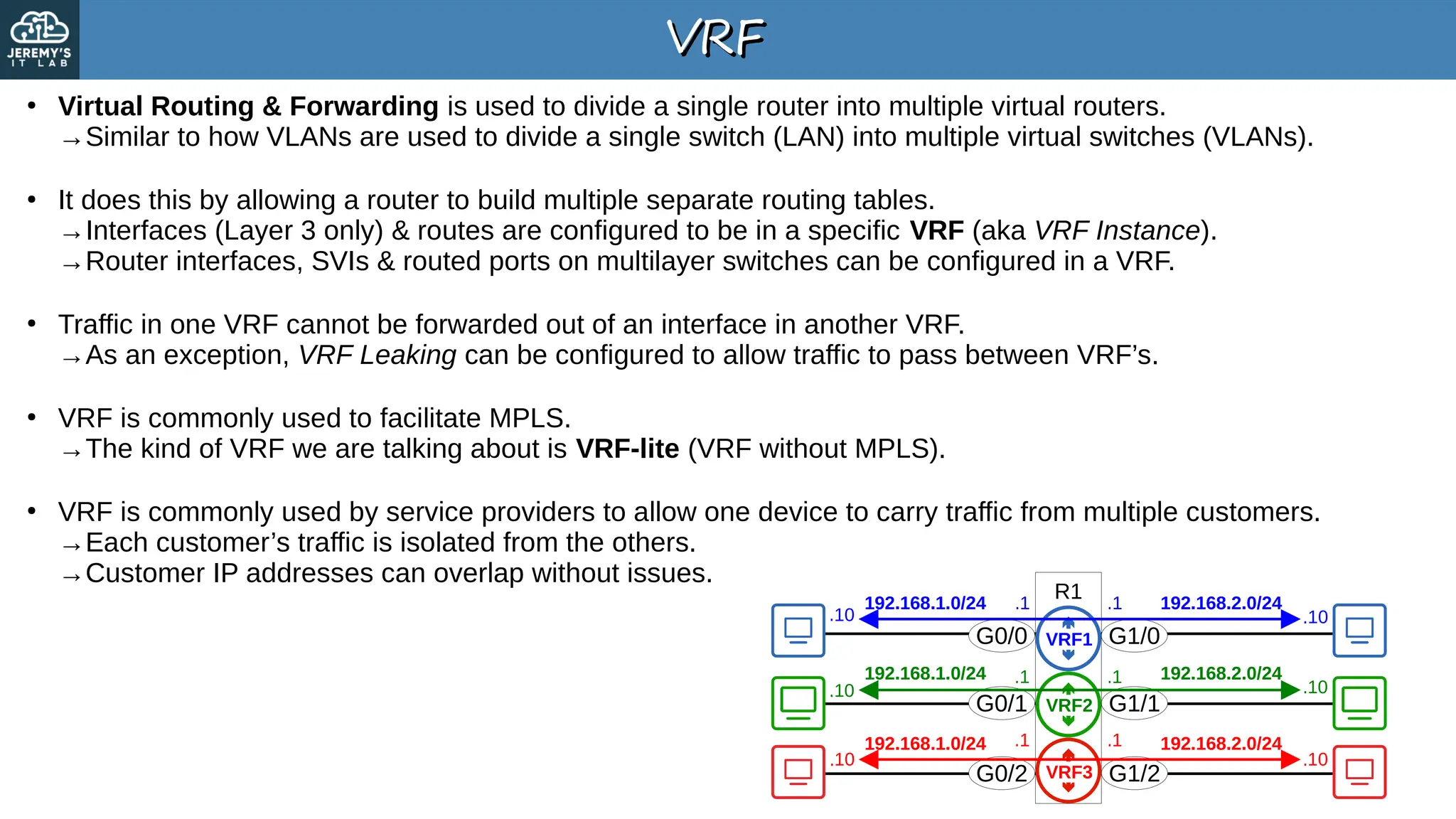
Virtual Routing & Forwarding is used to divide a single router into multiple virtual routers.
→Similar to how VLANs are used to divide a single switch (LAN) into multiple virtual switches (VLANs).
●
It does this by allowing a router to build multiple separate routing tables.
→Interfaces (Layer 3 only) & routes are configured to be in a specific VRF (aka VRF Instance).
→Router interfaces, SVIs & routed ports on multilayer switches can be configured in a VRF.
●
Traffic in one VRF cannot be forwarded out of an interface in another VRF.
→As an exception, VRF Leaking can be configured to allow traffic to pass between VRF’s.
●
VRF is commonly used to facilitate MPLS.
→The kind of VRF we are talking about is VRF-lite (VRF without MPLS).
●
VRF is commonly used by service providers to allow one device to carry traffic from multiple customers.
→Each customer’s traffic is isolated from the others.
→Customer IP addresses can overlap without issues.
G0/0
G0/1
G0/2
G1/0
G1/1
G1/2
192.168.1.0/24
192.168.1.0/24
192.168.1.0/24
.10
.10
.10 .10
.10
.10
.1
.1
.1 192.168.2.0/24
192.168.2.0/24
192.168.2.0/24
.1
.1
.1
VRF1
VRF2
VRF3
VRF Configuration
VRF Configuration
SPR1
C1R1
C1R2
C2R1
C2R2
G0/0
G0/1
G0/2
G0/3
192.168.1.0/30 192.168.1.0/30
192.168.11.0/30 192.168.12.0/30
.1
.1
.1 .1
.2
.2
.2
.2
G0/0
G0/0
G0/0
G0/0
SPR1(config)# interface g0/0
SPR1(config-if)# ip address 192.168.1.1 255.255.255.252
SPR1(config-if)# no shutdown
SPR1(config-if)# interface g0/1
SPR1(config-if)# ip address 192.168.11.1 255.255.255.252
SPR1(config-if)# no shutdown
SPR1(config-if)# interface g0/2
SPR1(config-if)# ip address 192.168.1.1 255.255.255.252
% 192.168.1.0 overlaps with GigabitEthernet0/0
SPR1(config-if)# ip address 192.168.1.2 255.255.255.252
% 192.168.1.0 overlaps with GigabitEthernet0/0
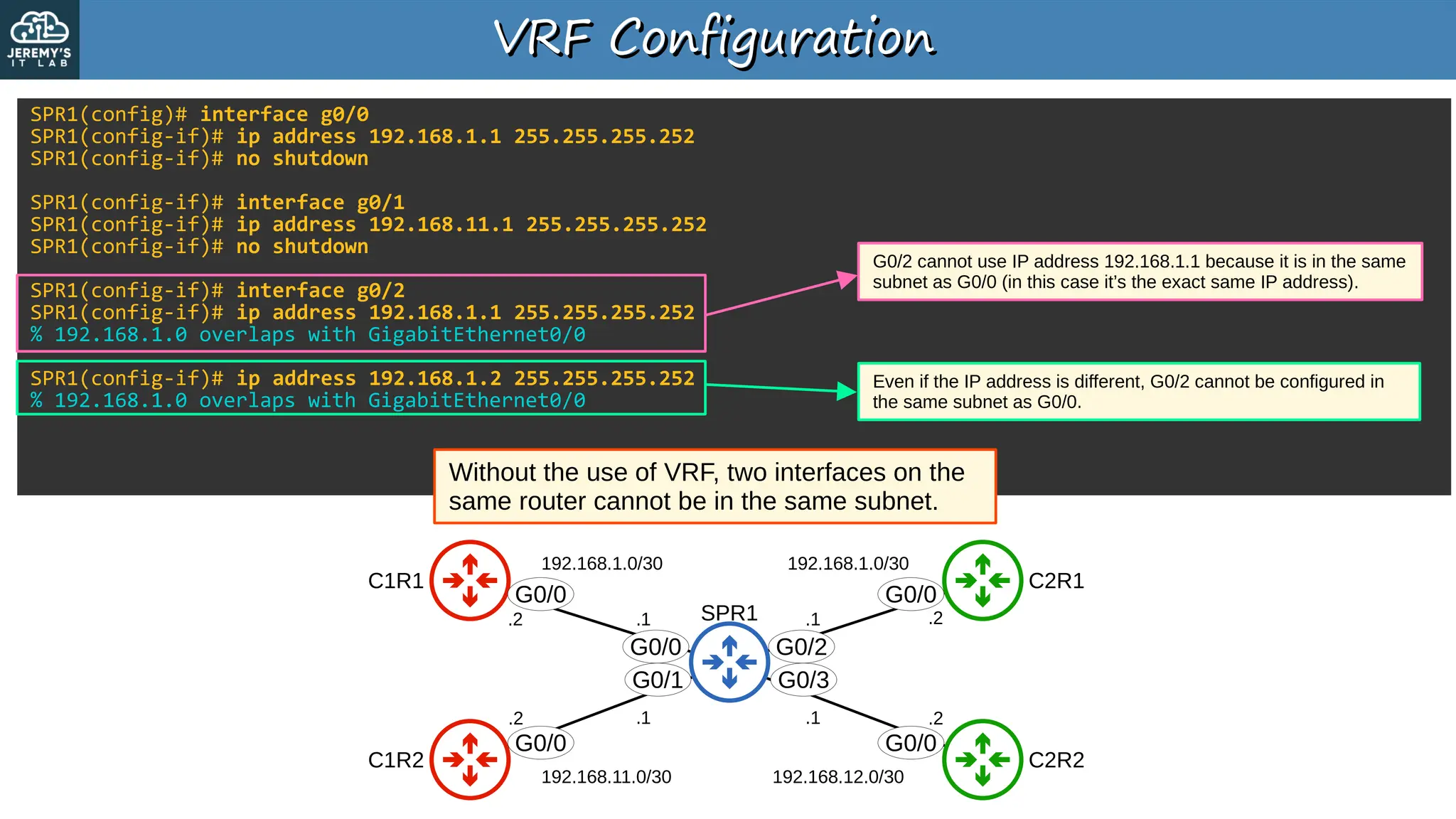
Without the use of VRF, two interfaces on the
same router cannot be in the same subnet.
G0/2 cannot use IP address 192.168.1.1 because it is in the same
subnet as G0/0 (in this case it’s the exact same IP address).
Even if the IP address is different, G0/2 cannot be configured in
the same subnet as G0/0.
G0/2
G0/3
VRF Configuration
VRF Configuration
SPR1
C1R1
C1R2
C2R1
C2R2
G0/0
G0/1
G0/2
G0/3
192.168.1.0/30 192.168.1.0/30
192.168.11.0/30 192.168.12.0/30
.1
.1
.1 .1
.2
.2
.2
.2
G0/0
G0/0
G0/0
G0/0
SPR1(config)# ip vrf CUSTOMER1
SPR1(config-vrf)# ip vrf CUSTOMER2
SPR1(config-vrf)# do show ip vrf
Name Default RD Interfaces
CUSTOMER1 <not set>
CUSTOMER2 <not set>
SPR1(config-vrf)# interface g0/0
SPR1(config-if)# ip vrf forwarding CUSTOMER1
% Interface GigabitEthernet0/0 IPv4 disabled and address(es) removed due to enabling VRF CUSTOMER1
SPR1(config-if)# ip address 192.168.1.1 255.255.255.252
SPR1(config-if)# interface g0/1
SPR1(config-if)# ip vrf forwarding CUSTOMER1
% Interface GigabitEthernet0/1 IPv4 disabled and address(es) removed due to enabling VRF CUSTOMER1
SPR1(config-if)# ip address 192.168.11.1 255.255.255.252
SPR1(config-if)# interface g0/2
SPR1(config-if)# ip vrf forwarding CUSTOMER2
SPR1(config-if)# ip address 192.168.1.1 255.255.255.252
SPR1(config-if)# no shutdown
SPR1(config-if)# interface g0/3
SPR1(config-if)# ip vrf forwarding CUSTOMER2
SPR1(config-if)# ip address 192.168.12.1 255.255.255.252
SPR1(config-if)# no shutdown
SPR1(config-if)# do show ip vrf
Name Default RD Interfaces
CUSTOMER1 <not set> Gi0/0
Gi0/1
CUSTOMER2 <not set> Gi0/2
Gi0/3
G0/0
G0/1
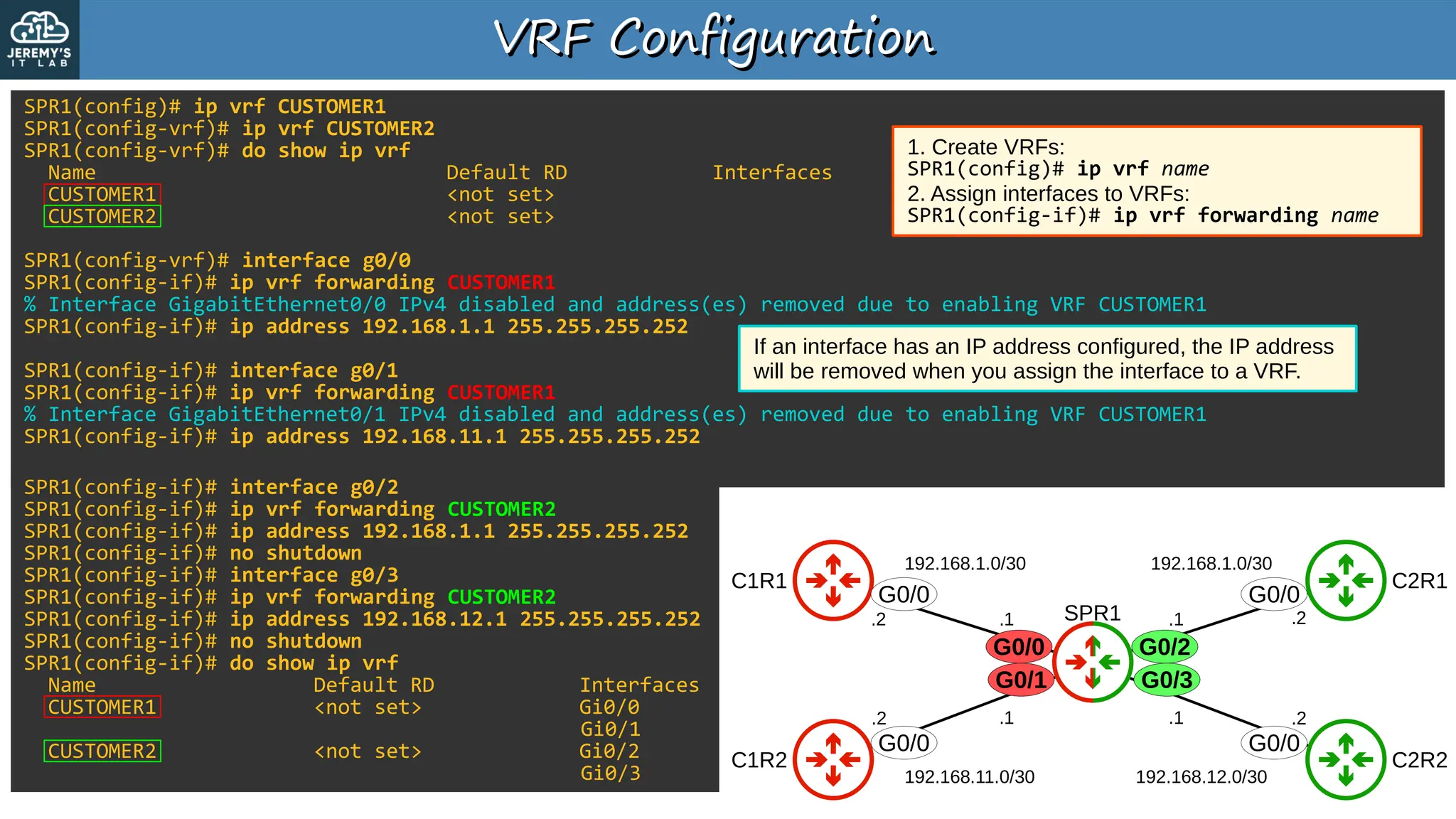
1. Create VRFs:
SPR1(config)# ip vrf name
2. Assign interfaces to VRFs:
SPR1(config-if)# ip vrf forwarding name
If an interface has an IP address configured, the IP address
will be removed when you assign the interface to a VRF.
G0/2
G0/3
VRF Configuration
VRF Configuration
SPR1
C1R1
C1R2
C2R1
C2R2
G0/0
G0/1
G0/2
G0/3
192.168.1.0/30 192.168.1.0/30
192.168.11.0/30 192.168.12.0/30
.1
.1
.1 .1
.2
.2
.2
.2
G0/0
G0/0
G0/0
G0/0
SPR1# show ip route
Codes: L - local, C - connected, S - static, R - RIP, M - mobile, B - BGP
D - EIGRP, EX - EIGRP external, O - OSPF, IA - OSPF inter area
N1 - OSPF NSSA external type 1, N2 - OSPF NSSA external type 2
E1 - OSPF external type 1, E2 - OSPF external type 2
i - IS-IS, su - IS-IS summary, L1 - IS-IS level-1, L2 - IS-IS level-2
ia - IS-IS inter area, * - candidate default, U - per-user static route
o - ODR, P - periodic downloaded static route, H - NHRP, l - LISP
a - application route
+ - replicated route, % - next hop override, p - overrides from PfR
Gateway of last resort is not set
G0/0
G0/1
SPR1# show ip route vrf CUSTOMER1
Routing Table: CUSTOMER1
!output omitted
192.168.1.0/24 is variably subnetted, 2 subnets, 2 masks
C 192.168.1.0/30 is directly connected, GigabitEthernet0/0
L 192.168.1.1/32 is directly connected, GigabitEthernet0/0
192.168.11.0/24 is variably subnetted, 2 subnets, 2 masks
C 192.168.11.0/30 is directly connected, GigabitEthernet0/1
L 192.168.11.1/32 is directly connected, GigabitEthernet0/1
SPR1# show ip route vrf CUSTOMER2
Routing Table: CUSTOMER2
!output omitted
192.168.1.0/24 is variably subnetted, 2 subnets, 2 masks
C 192.168.1.0/30 is directly connected, GigabitEthernet0/2
L 192.168.1.1/32 is directly connected, GigabitEthernet0/2
192.168.12.0/24 is variably subnetted, 2 subnets, 2 masks
C 192.168.12.0/30 is directly connected, GigabitEthernet0/3
L 192.168.12.1/32 is directly connected, GigabitEthernet0/3
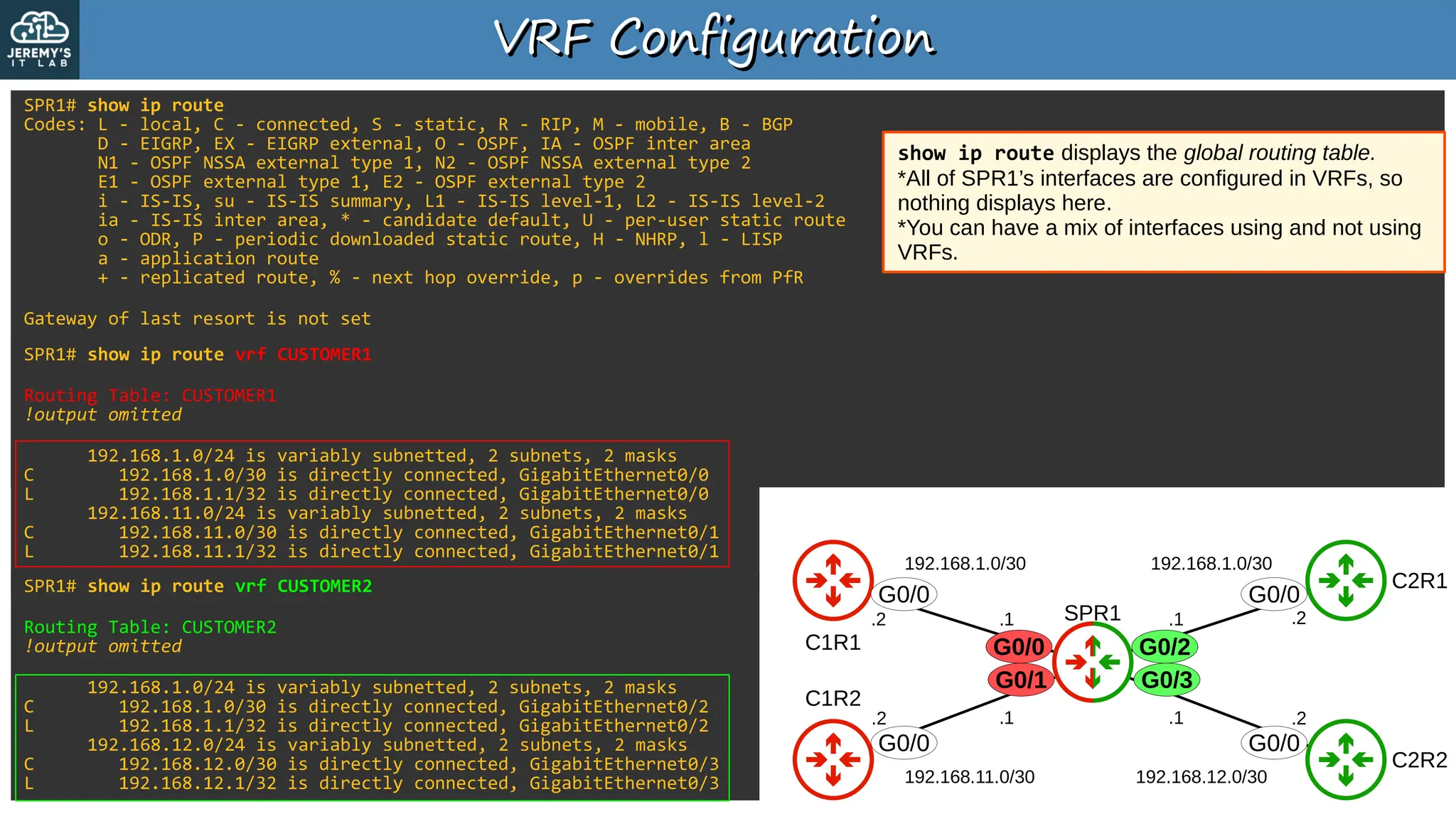
show ip route displays the global routing table.
*All of SPR1’s interfaces are configured in VRFs, so
nothing displays here.
*You can have a mix of interfaces using and not using
VRFs.
G0/2
G0/3
VRF Configuration
VRF Configuration
SPR1
C1R1
C1R2
C2R1
C2R2
G0/0
G0/1
G0/2
G0/3
192.168.1.0/30 192.168.1.0/30
192.168.11.0/30 192.168.12.0/30
.1
.1
.1 .1
.2
.2
.2
.2
G0/0
G0/0
G0/0
G0/0
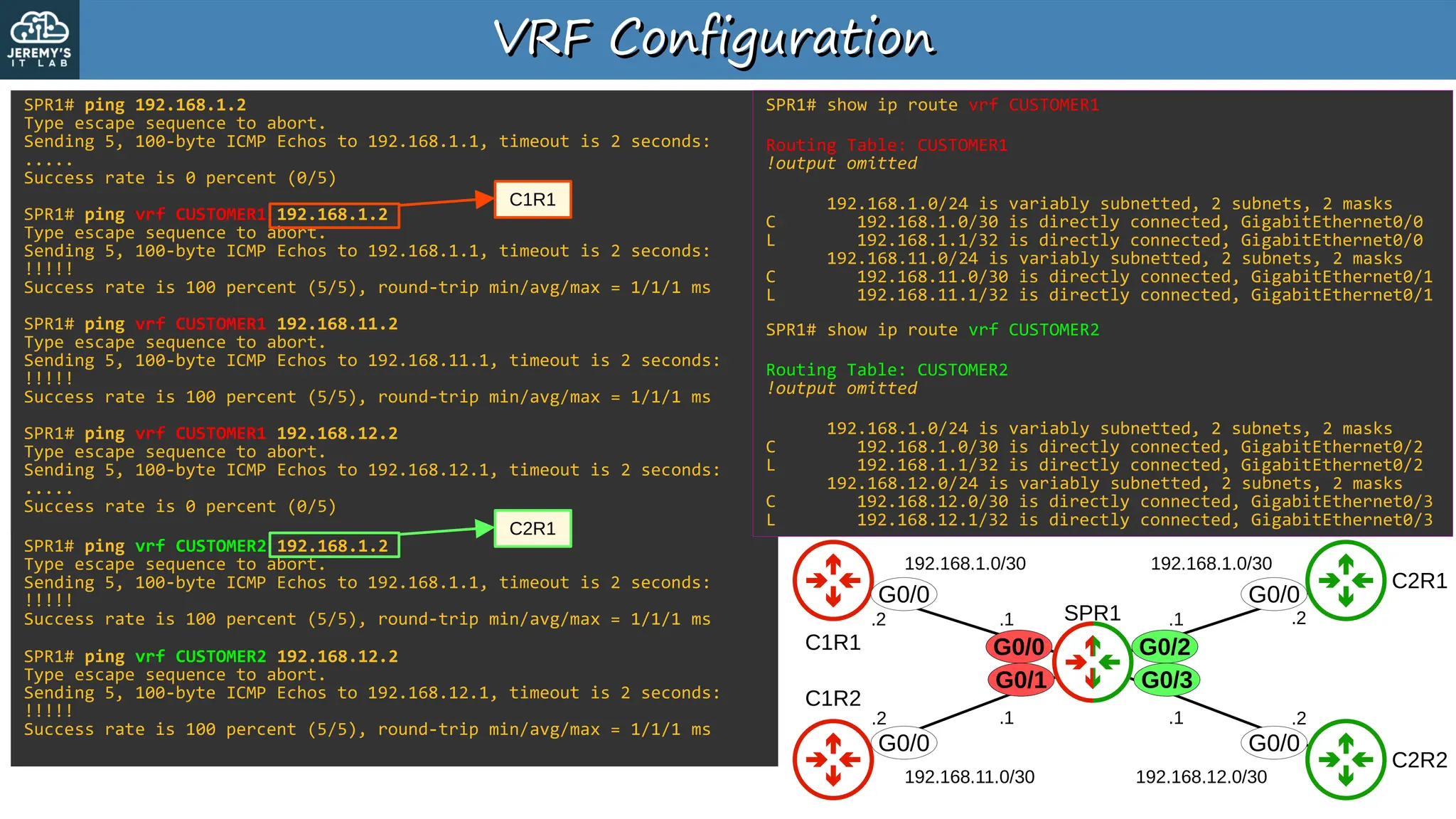
SPR1# ping 192.168.1.2
Type escape sequence to abort.
Sending 5, 100-byte ICMP Echos to 192.168.1.1, timeout is 2 seconds:
.....
Success rate is 0 percent (0/5)
SPR1# ping vrf CUSTOMER1 192.168.1.2
Type escape sequence to abort.
Sending 5, 100-byte ICMP Echos to 192.168.1.1, timeout is 2 seconds:
!!!!!
Success rate is 100 percent (5/5), round-trip min/avg/max = 1/1/1 ms
SPR1# ping vrf CUSTOMER1 192.168.11.2
Type escape sequence to abort.
Sending 5, 100-byte ICMP Echos to 192.168.11.1, timeout is 2 seconds:
!!!!!
Success rate is 100 percent (5/5), round-trip min/avg/max = 1/1/1 ms
SPR1# ping vrf CUSTOMER1 192.168.12.2
Type escape sequence to abort.
Sending 5, 100-byte ICMP Echos to 192.168.12.1, timeout is 2 seconds:
.....
Success rate is 0 percent (0/5)
G0/0
G0/1
SPR1# ping vrf CUSTOMER2 192.168.1.2
Type escape sequence to abort.
Sending 5, 100-byte ICMP Echos to 192.168.1.1, timeout is 2 seconds:
!!!!!
Success rate is 100 percent (5/5), round-trip min/avg/max = 1/1/1 ms
SPR1# ping vrf CUSTOMER2 192.168.12.2
Type escape sequence to abort.
Sending 5, 100-byte ICMP Echos to 192.168.12.1, timeout is 2 seconds:
!!!!!
Success rate is 100 percent (5/5), round-trip min/avg/max = 1/1/1 ms
C1R1
C2R1
SPR1# show ip route vrf CUSTOMER1
Routing Table: CUSTOMER1
!output omitted
192.168.1.0/24 is variably subnetted, 2 subnets, 2 masks
C 192.168.1.0/30 is directly connected, GigabitEthernet0/0
L 192.168.1.1/32 is directly connected, GigabitEthernet0/0
192.168.11.0/24 is variably subnetted, 2 subnets, 2 masks
C 192.168.11.0/30 is directly connected, GigabitEthernet0/1
L 192.168.11.1/32 is directly connected, GigabitEthernet0/1
SPR1# show ip route vrf CUSTOMER2
Routing Table: CUSTOMER2
!output omitted
192.168.1.0/24 is variably subnetted, 2 subnets, 2 masks
C 192.168.1.0/30 is directly connected, GigabitEthernet0/2
L 192.168.1.1/32 is directly connected, GigabitEthernet0/2
192.168.12.0/24 is variably subnetted, 2 subnets, 2 masks
C 192.168.12.0/30 is directly connected, GigabitEthernet0/3
L 192.168.12.1/32 is directly connected, GigabitEthernet0/3
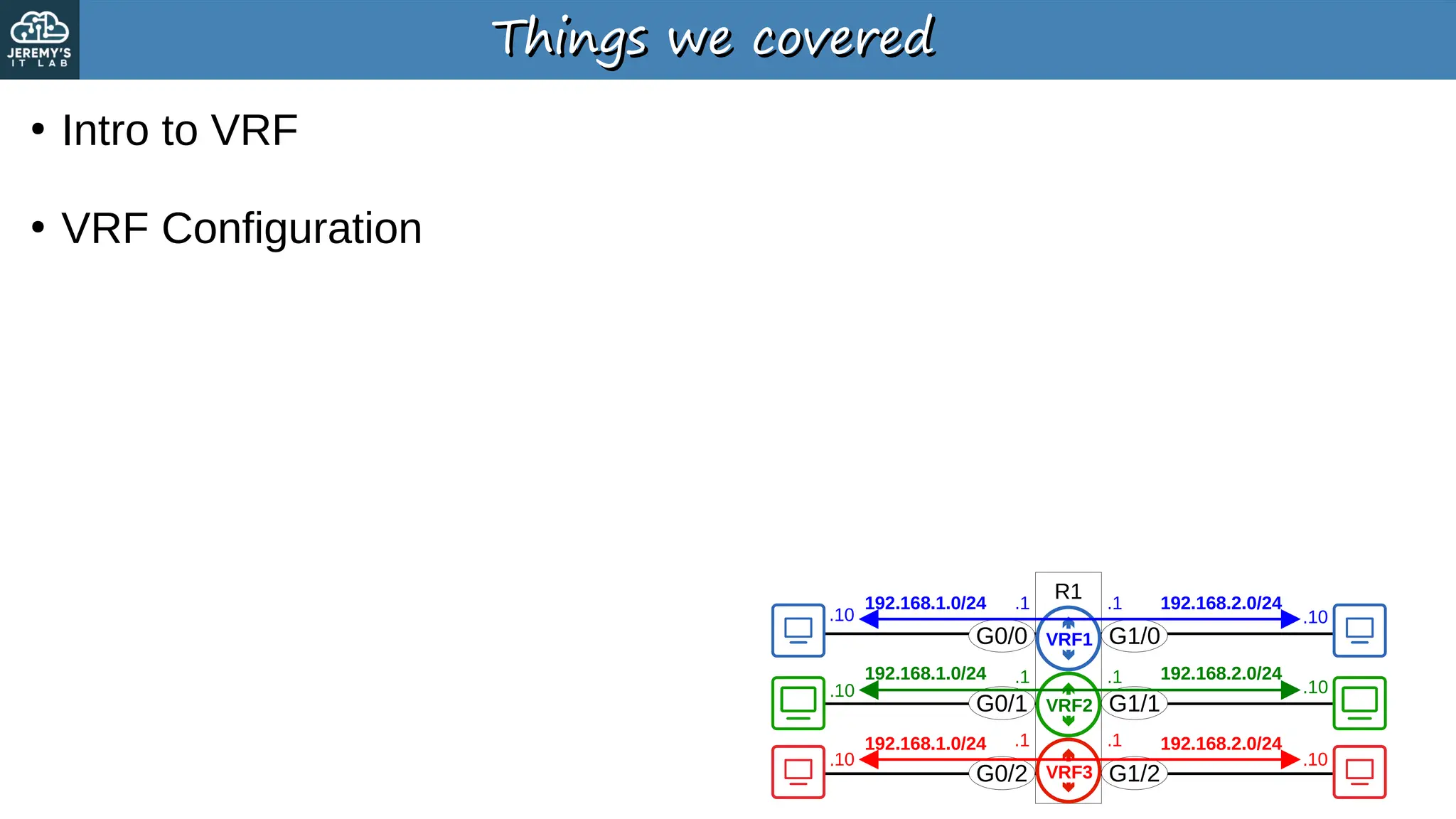
Things we covered
Things we covered
●
Intro to VRF
●
VRF Configuration
R1
G0/0
G0/1
G0/2
G1/0
G1/1
G1/2
192.168.1.0/24
192.168.1.0/24
192.168.1.0/24
.10
.10
.10 .10
.10
.10
.1
.1
.1 192.168.2.0/24
192.168.2.0/24
192.168.2.0/24
.1
.1
.1
VRF1
VRF2
VRF3
Quiz 1
Quiz 1
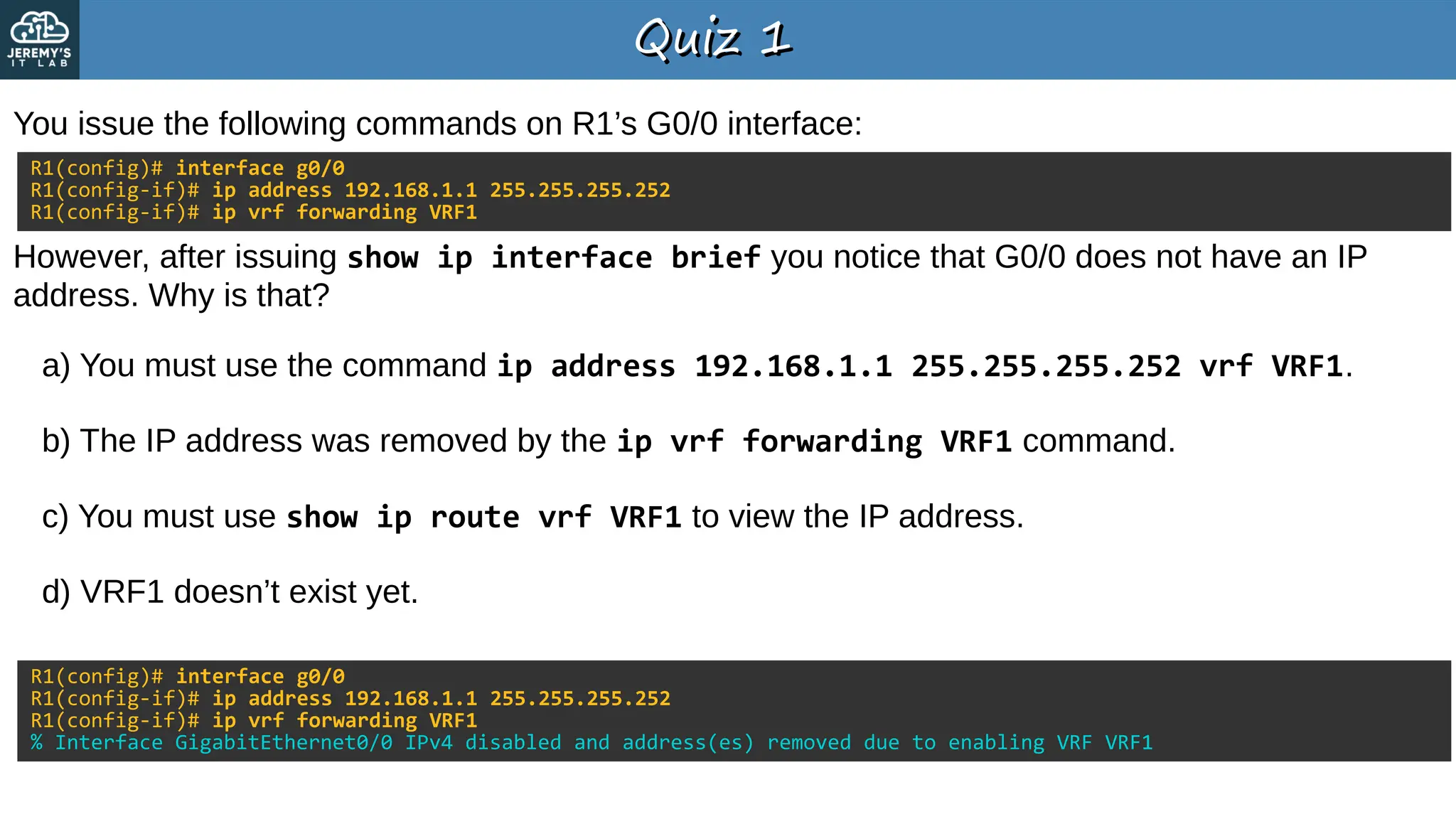
You issue the following commands on R1’s G0/0 interface:
a) You must use the command ip address 192.168.1.1 255.255.255.252 vrf VRF1.
b) The IP address was removed by the ip vrf forwarding VRF1 command.
c) You must use show ip route vrf VRF1 to view the IP address.
d) VRF1 doesn’t exist yet.
R1(config)# interface g0/0
R1(config-if)# ip address 192.168.1.1 255.255.255.252
R1(config-if)# ip vrf forwarding VRF1
However, after issuing show ip interface brief you notice that G0/0 does not have an IP
address. Why is that?
R1(config)# interface g0/0
R1(config-if)# ip address 192.168.1.1 255.255.255.252
R1(config-if)# ip vrf forwarding VRF1
% Interface GigabitEthernet0/0 IPv4 disabled and address(es) removed due to enabling VRF VRF1
Quiz 2
Quiz 2
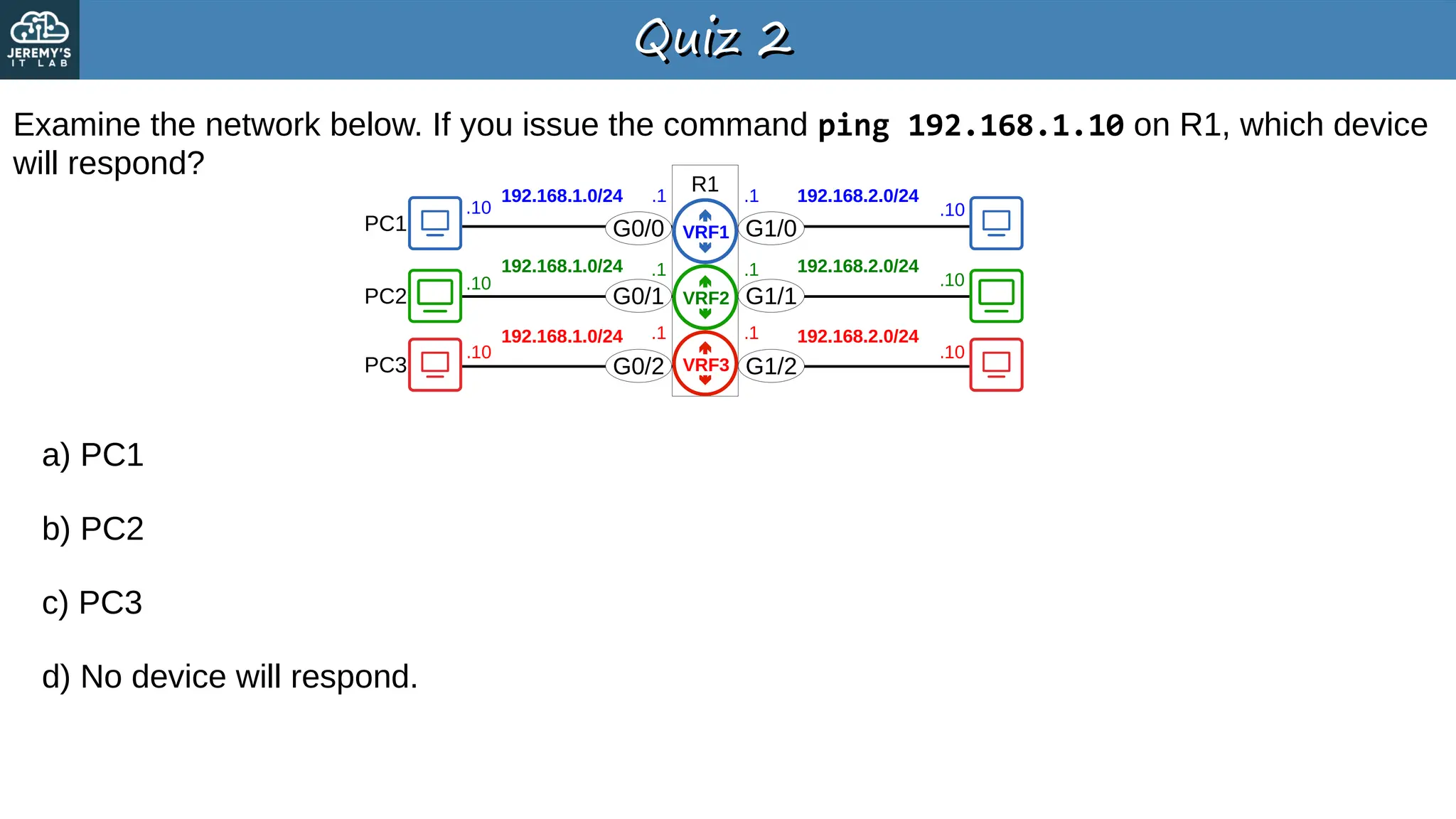
Examine the network below. If you issue the command ping 192.168.1.10 on R1, which device
will respond?
a) PC1
b) PC2
c) PC3
d) No device will respond.
R1
G0/0
G0/1
G0/2
G1/0
G1/1
G1/2
PC1
PC2
PC3
192.168.1.0/24
192.168.1.0/24
192.168.1.0/24
.10
.10
.10 .10
.10
.10
.1
.1
.1 192.168.2.0/24
192.168.2.0/24
192.168.2.0/24
.1
.1
.1
VRF1
VRF2
VRF3
Quiz 3
Quiz 3
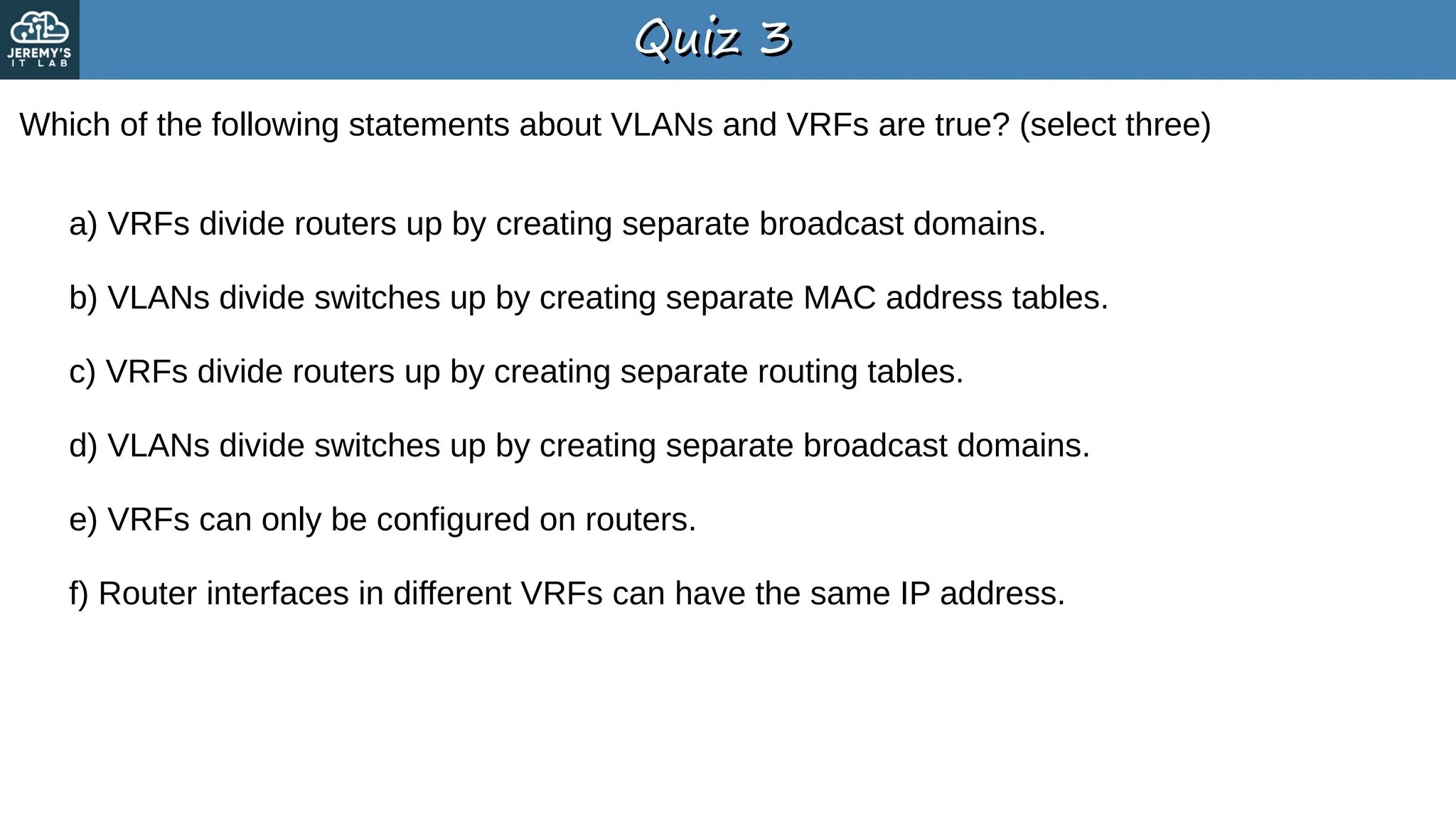
Which of the following statements about VLANs and VRFs are true? (select three)
a) VRFs divide routers up by creating separate broadcast domains.
b) VLANs divide switches up by creating separate MAC address tables.
c) VRFs divide routers up by creating separate routing tables.
d) VLANs divide switches up by creating separate broadcast domains.
e) VRFs can only be configured on routers.
f) Router interfaces in different VRFs can have the same IP address.
CCNA300-201Day+54+(part+3)+Slides+-+VRF.pdf

  • 1.
    CCNA CCNA Virtual Routing &Forwarding Virtual Routing & Forwarding
  • 2.
    Things we’ll cover Thingswe’ll cover ● Intro to VRF ● VRF Configuration
  • 3.
    R1 VRF VRF ● Virtual Routing &Forwarding is used to divide a single router into multiple virtual routers. →Similar to how VLANs are used to divide a single switch (LAN) into multiple virtual switches (VLANs). ● It does this by allowing a router to build multiple separate routing tables. →Interfaces (Layer 3 only) & routes are configured to be in a specific VRF (aka VRF Instance). →Router interfaces, SVIs & routed ports on multilayer switches can be configured in a VRF. ● Traffic in one VRF cannot be forwarded out of an interface in another VRF. →As an exception, VRF Leaking can be configured to allow traffic to pass between VRF’s. ● VRF is commonly used to facilitate MPLS. →The kind of VRF we are talking about is VRF-lite (VRF without MPLS). ● VRF is commonly used by service providers to allow one device to carry traffic from multiple customers. →Each customer’s traffic is isolated from the others. →Customer IP addresses can overlap without issues. G0/0 G0/1 G0/2 G1/0 G1/1 G1/2 192.168.1.0/24 192.168.1.0/24 192.168.1.0/24 .10 .10 .10 .10 .10 .10 .1 .1 .1 192.168.2.0/24 192.168.2.0/24 192.168.2.0/24 .1 .1 .1 VRF1 VRF2 VRF3
  • 4.
    VRF Configuration VRF Configuration SPR1 C1R1 C1R2 C2R1 C2R2 G0/0 G0/1 G0/2 G0/3 192.168.1.0/30192.168.1.0/30 192.168.11.0/30 192.168.12.0/30 .1 .1 .1 .1 .2 .2 .2 .2 G0/0 G0/0 G0/0 G0/0 SPR1(config)# interface g0/0 SPR1(config-if)# ip address 192.168.1.1 255.255.255.252 SPR1(config-if)# no shutdown SPR1(config-if)# interface g0/1 SPR1(config-if)# ip address 192.168.11.1 255.255.255.252 SPR1(config-if)# no shutdown SPR1(config-if)# interface g0/2 SPR1(config-if)# ip address 192.168.1.1 255.255.255.252 % 192.168.1.0 overlaps with GigabitEthernet0/0 SPR1(config-if)# ip address 192.168.1.2 255.255.255.252 % 192.168.1.0 overlaps with GigabitEthernet0/0 Without the use of VRF, two interfaces on the same router cannot be in the same subnet. G0/2 cannot use IP address 192.168.1.1 because it is in the same subnet as G0/0 (in this case it’s the exact same IP address). Even if the IP address is different, G0/2 cannot be configured in the same subnet as G0/0.
  • 5.
    G0/2 G0/3 VRF Configuration VRF Configuration SPR1 C1R1 C1R2 C2R1 C2R2 G0/0 G0/1 G0/2 G0/3 192.168.1.0/30192.168.1.0/30 192.168.11.0/30 192.168.12.0/30 .1 .1 .1 .1 .2 .2 .2 .2 G0/0 G0/0 G0/0 G0/0 SPR1(config)# ip vrf CUSTOMER1 SPR1(config-vrf)# ip vrf CUSTOMER2 SPR1(config-vrf)# do show ip vrf Name Default RD Interfaces CUSTOMER1 <not set> CUSTOMER2 <not set> SPR1(config-vrf)# interface g0/0 SPR1(config-if)# ip vrf forwarding CUSTOMER1 % Interface GigabitEthernet0/0 IPv4 disabled and address(es) removed due to enabling VRF CUSTOMER1 SPR1(config-if)# ip address 192.168.1.1 255.255.255.252 SPR1(config-if)# interface g0/1 SPR1(config-if)# ip vrf forwarding CUSTOMER1 % Interface GigabitEthernet0/1 IPv4 disabled and address(es) removed due to enabling VRF CUSTOMER1 SPR1(config-if)# ip address 192.168.11.1 255.255.255.252 SPR1(config-if)# interface g0/2 SPR1(config-if)# ip vrf forwarding CUSTOMER2 SPR1(config-if)# ip address 192.168.1.1 255.255.255.252 SPR1(config-if)# no shutdown SPR1(config-if)# interface g0/3 SPR1(config-if)# ip vrf forwarding CUSTOMER2 SPR1(config-if)# ip address 192.168.12.1 255.255.255.252 SPR1(config-if)# no shutdown SPR1(config-if)# do show ip vrf Name Default RD Interfaces CUSTOMER1 <not set> Gi0/0 Gi0/1 CUSTOMER2 <not set> Gi0/2 Gi0/3 G0/0 G0/1 1. Create VRFs: SPR1(config)# ip vrf name 2. Assign interfaces to VRFs: SPR1(config-if)# ip vrf forwarding name If an interface has an IP address configured, the IP address will be removed when you assign the interface to a VRF.
  • 6.
    G0/2 G0/3 VRF Configuration VRF Configuration SPR1 C1R1 C1R2 C2R1 C2R2 G0/0 G0/1 G0/2 G0/3 192.168.1.0/30192.168.1.0/30 192.168.11.0/30 192.168.12.0/30 .1 .1 .1 .1 .2 .2 .2 .2 G0/0 G0/0 G0/0 G0/0 SPR1# show ip route Codes: L - local, C - connected, S - static, R - RIP, M - mobile, B - BGP D - EIGRP, EX - EIGRP external, O - OSPF, IA - OSPF inter area N1 - OSPF NSSA external type 1, N2 - OSPF NSSA external type 2 E1 - OSPF external type 1, E2 - OSPF external type 2 i - IS-IS, su - IS-IS summary, L1 - IS-IS level-1, L2 - IS-IS level-2 ia - IS-IS inter area, * - candidate default, U - per-user static route o - ODR, P - periodic downloaded static route, H - NHRP, l - LISP a - application route + - replicated route, % - next hop override, p - overrides from PfR Gateway of last resort is not set G0/0 G0/1 SPR1# show ip route vrf CUSTOMER1 Routing Table: CUSTOMER1 !output omitted 192.168.1.0/24 is variably subnetted, 2 subnets, 2 masks C 192.168.1.0/30 is directly connected, GigabitEthernet0/0 L 192.168.1.1/32 is directly connected, GigabitEthernet0/0 192.168.11.0/24 is variably subnetted, 2 subnets, 2 masks C 192.168.11.0/30 is directly connected, GigabitEthernet0/1 L 192.168.11.1/32 is directly connected, GigabitEthernet0/1 SPR1# show ip route vrf CUSTOMER2 Routing Table: CUSTOMER2 !output omitted 192.168.1.0/24 is variably subnetted, 2 subnets, 2 masks C 192.168.1.0/30 is directly connected, GigabitEthernet0/2 L 192.168.1.1/32 is directly connected, GigabitEthernet0/2 192.168.12.0/24 is variably subnetted, 2 subnets, 2 masks C 192.168.12.0/30 is directly connected, GigabitEthernet0/3 L 192.168.12.1/32 is directly connected, GigabitEthernet0/3 show ip route displays the global routing table. *All of SPR1’s interfaces are configured in VRFs, so nothing displays here. *You can have a mix of interfaces using and not using VRFs.
  • 7.
    G0/2 G0/3 VRF Configuration VRF Configuration SPR1 C1R1 C1R2 C2R1 C2R2 G0/0 G0/1 G0/2 G0/3 192.168.1.0/30192.168.1.0/30 192.168.11.0/30 192.168.12.0/30 .1 .1 .1 .1 .2 .2 .2 .2 G0/0 G0/0 G0/0 G0/0 SPR1# ping 192.168.1.2 Type escape sequence to abort. Sending 5, 100-byte ICMP Echos to 192.168.1.1, timeout is 2 seconds: ..... Success rate is 0 percent (0/5) SPR1# ping vrf CUSTOMER1 192.168.1.2 Type escape sequence to abort. Sending 5, 100-byte ICMP Echos to 192.168.1.1, timeout is 2 seconds: !!!!! Success rate is 100 percent (5/5), round-trip min/avg/max = 1/1/1 ms SPR1# ping vrf CUSTOMER1 192.168.11.2 Type escape sequence to abort. Sending 5, 100-byte ICMP Echos to 192.168.11.1, timeout is 2 seconds: !!!!! Success rate is 100 percent (5/5), round-trip min/avg/max = 1/1/1 ms SPR1# ping vrf CUSTOMER1 192.168.12.2 Type escape sequence to abort. Sending 5, 100-byte ICMP Echos to 192.168.12.1, timeout is 2 seconds: ..... Success rate is 0 percent (0/5) G0/0 G0/1 SPR1# ping vrf CUSTOMER2 192.168.1.2 Type escape sequence to abort. Sending 5, 100-byte ICMP Echos to 192.168.1.1, timeout is 2 seconds: !!!!! Success rate is 100 percent (5/5), round-trip min/avg/max = 1/1/1 ms SPR1# ping vrf CUSTOMER2 192.168.12.2 Type escape sequence to abort. Sending 5, 100-byte ICMP Echos to 192.168.12.1, timeout is 2 seconds: !!!!! Success rate is 100 percent (5/5), round-trip min/avg/max = 1/1/1 ms C1R1 C2R1 SPR1# show ip route vrf CUSTOMER1 Routing Table: CUSTOMER1 !output omitted 192.168.1.0/24 is variably subnetted, 2 subnets, 2 masks C 192.168.1.0/30 is directly connected, GigabitEthernet0/0 L 192.168.1.1/32 is directly connected, GigabitEthernet0/0 192.168.11.0/24 is variably subnetted, 2 subnets, 2 masks C 192.168.11.0/30 is directly connected, GigabitEthernet0/1 L 192.168.11.1/32 is directly connected, GigabitEthernet0/1 SPR1# show ip route vrf CUSTOMER2 Routing Table: CUSTOMER2 !output omitted 192.168.1.0/24 is variably subnetted, 2 subnets, 2 masks C 192.168.1.0/30 is directly connected, GigabitEthernet0/2 L 192.168.1.1/32 is directly connected, GigabitEthernet0/2 192.168.12.0/24 is variably subnetted, 2 subnets, 2 masks C 192.168.12.0/30 is directly connected, GigabitEthernet0/3 L 192.168.12.1/32 is directly connected, GigabitEthernet0/3
  • 8.
    Things we covered Thingswe covered ● Intro to VRF ● VRF Configuration R1 G0/0 G0/1 G0/2 G1/0 G1/1 G1/2 192.168.1.0/24 192.168.1.0/24 192.168.1.0/24 .10 .10 .10 .10 .10 .10 .1 .1 .1 192.168.2.0/24 192.168.2.0/24 192.168.2.0/24 .1 .1 .1 VRF1 VRF2 VRF3
  • 9.
    Quiz 1 Quiz 1 Youissue the following commands on R1’s G0/0 interface: a) You must use the command ip address 192.168.1.1 255.255.255.252 vrf VRF1. b) The IP address was removed by the ip vrf forwarding VRF1 command. c) You must use show ip route vrf VRF1 to view the IP address. d) VRF1 doesn’t exist yet. R1(config)# interface g0/0 R1(config-if)# ip address 192.168.1.1 255.255.255.252 R1(config-if)# ip vrf forwarding VRF1 However, after issuing show ip interface brief you notice that G0/0 does not have an IP address. Why is that? R1(config)# interface g0/0 R1(config-if)# ip address 192.168.1.1 255.255.255.252 R1(config-if)# ip vrf forwarding VRF1 % Interface GigabitEthernet0/0 IPv4 disabled and address(es) removed due to enabling VRF VRF1
  • 10.
    Quiz 2 Quiz 2 Examinethe network below. If you issue the command ping 192.168.1.10 on R1, which device will respond? a) PC1 b) PC2 c) PC3 d) No device will respond. R1 G0/0 G0/1 G0/2 G1/0 G1/1 G1/2 PC1 PC2 PC3 192.168.1.0/24 192.168.1.0/24 192.168.1.0/24 .10 .10 .10 .10 .10 .10 .1 .1 .1 192.168.2.0/24 192.168.2.0/24 192.168.2.0/24 .1 .1 .1 VRF1 VRF2 VRF3
  • 11.
    Quiz 3 Quiz 3 Whichof the following statements about VLANs and VRFs are true? (select three) a) VRFs divide routers up by creating separate broadcast domains. b) VLANs divide switches up by creating separate MAC address tables. c) VRFs divide routers up by creating separate routing tables. d) VLANs divide switches up by creating separate broadcast domains. e) VRFs can only be configured on routers. f) Router interfaces in different VRFs can have the same IP address.