Module 5
Cloud Delivery Model Considerations
Cloud Delivery Model Considerations: The cloud provider perspective
Building IaaS environments, equipping PaaS environments, and optimizing
SaaS environments, The cloud consumer perspective: working with IaaS
environments, working with PaaS environments, working with SaaS services.
1
26-11-
2023
Cloud Delivery Models: The Cloud
Provider Perspective
• This module explores the architecture and administration of IaaS,
PaaS, and SaaS cloud delivery models from the point of view of the
cloud provider.
• The integration and management of these cloud-based environments as
part of greater environments and how they can relate to different
technologies and cloud mechanism combinations are examined.
2
26-11-
2023
Building IaaS Environments
• The virtual server and cloud storage device mechanisms represent the
two most fundamental IT resources that are delivered as part of a
standard rapid provisioning architecture within IaaS environments.
• Operating system
• Primary memory capacity
• Processing capacity
• Virtualized storage capacity
3
26-11-
2023
Building IaaS Environments
• Memory and virtualized storage capacity are usually allocated with
increments of 1 GB to simplify the provisioning of underlying
physical IT resources.
• IaaS offerings are pre-emptively assembled by cloud providers via
virtual server images that capture the pre-defined configurations.
• Bare-metal provisioning architecture - Some cloud providers may
offer cloud consumers direct administrative access to physical IT
resources.
• Snapshots can be taken of a virtual server to record its current state,
memory, and configuration of a virtualized IaaS environment for
backup and replication purposes, in support of horizontal and vertical
scaling requirements.
4
26-11-
2023
Building IaaS Environments
• The snapshot can be used to duplicate a virtual server.
• Most cloud providers also support importing and exporting options for
custom-built virtual server images in both proprietary and standard
formats.
5
26-11-
2023
Data Centers
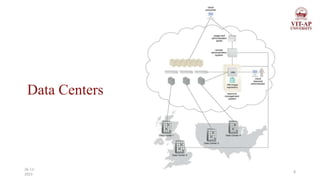
• Cloud providers can offer IaaS-based IT resources from multiple
geographically diverse data centres, which provides the following
primary benefits:
• Multiple data centers can be linked together for increased resiliency.
• Each data center is placed in a different location to lower the chances
of a single failure, forcing all data centers to go offline simultaneously.
• Connected through high-speed communications networks with low
latency.
6
26-11-
2023
Data Centers
• Data centers can perform load balancing, IT resource backup and
replication, and increase storage capacity while improving availability
and reliability.
• Having multiple data centers spread over a greater area further reduces
network latency.
• Data centers that are deployed in different countries make access to IT
resources more convenient for cloud consumers that are constricted by
legal and regulatory requirements.
7
26-11-
2023
Data Centers
8
26-11-
2023
Data Centers
• When an IaaS environment is used to provide cloud consumers with
virtualized network environments. Each cloud consumer is segregated
into a tenant environment that isolates IT resources from the rest of the
cloud through the Internet.
• VLANs and network access control software collaboratively realize
the corresponding logical network perimeters.
9
26-11-
2023
Scalability and Reliability
• Within IaaS environments, cloud providers can automatically
provision virtual servers via the dynamic vertical scaling type of the
dynamic scalability architecture.
• This can be performed through the VIM, if the host physical servers
have sufficient capacity.
• The VIM can scale virtual servers out using resource replication as
part of a resource pool architecture, if a given physical server has
insufficient capacity to support vertical scaling.
10
26-11-
2023
Scalability and Reliability
• The load balancer mechanism, as part of a workload distribution
architecture, can be used to distribute the workload among IT
resources in a pool to complete the horizontal scaling process.
• Manual scalability requires the cloud consumer to interact with a
usage and administration program to explicitly request IT resource
scaling.
• Automatic scalability requires the automated scaling listener to
monitor the workload and reactively scale the resource capacity.
11
26-11-
2023
Scalability and Reliability
• This mechanism typically acts as a monitoring agent that tracks IT
resource usage in order to notify the resource management system
when capacity has been exceeded.
• Replicated IT resources can be arranged in high-availability
configuration that forms a failover system for implementation via
standard VIM features.
• Alternatively, a high- availability/high-performance resource cluster
can be created at the physical or virtual server level, or both
simultaneously.
12
26-11-
2023
Scalability and Reliability
• The multipath resource access architecture is commonly employed to
enhance reliability via the use of redundant access paths.
• Some cloud providers further offer the provisioning of dedicated IT
resources via the resource reservation architecture.
13
26-11-
2023
Monitoring
• Cloud usage monitors in an IaaS environment can be implemented
using the VIM or specialized monitoring tools that directly comprise
and/or interface with the virtualization platform.
• Several common capabilities of the IaaS platform involve monitoring:
• Virtual Server Lifecycles–Recording and tracking uptime periods and
the allocation of IT resources, for pay-per-use monitors and time-
based billing purposes.
• Data Storage–Tracking and assigning the allocation of storage
capacity to cloud storage devices on virtual servers, for pay-per-use
monitors that record storage usage for billing purposes.
14
26-11-
2023
Monitoring
• Network Traffic–For pay-per-use monitors that measure inbound and
outbound network usage and SLA monitors that track QoS metrics,
such as response times and network losses.
• Failure Conditions–For SLA monitors that track IT resources and QoS
metrics to provide warning in times of failure.
• Event Triggers – For audit monitors that appraise and evaluate the
regulatory compliance of select IT resources.
15
26-11-
2023
Security
• Cloud security mechanisms that are relevant for securing IaaS environments
include:
• Encryption, hashing, digital signature, and PKI (Public Key Infrastructure)
mechanisms for overall protection of data transmission.
• IAM (Identity and Access Management) and SSO (Single sign-on)
mechanisms for accessing services and interfaces in security systems that
rely on user identification, authentication, and authorization capabilities.
• Cloud-based security groups for isolating virtual environments through
hypervisors and network segments via network management software.
16
26-11-
2023
Security
• Hardened virtual server images for internal and externally available
virtual server environments.
• Various cloud usage monitors to track provisioned virtual IT resources
to detect abnormal usage patterns.
17
26-11-
2023
Equipping PaaS Environments
• PaaS environments is typically is application development and deployment
platforms in order to accommodate different programming models,
languages, and frameworks.
• A separate ready-made environment is usually created for each
programming stack that contains the necessary software to run applications.
• Each platform is accompanied by a matching SDK and IDE, which can be
custom-built or enabled by IDE plugins supplied by the cloud provider.
• IDE toolkits can simulate the cloud runtime locally within the PaaS
environment and usually include executable application servers.
18
26-11-
2023
Equipping PaaS Environments
• The security restrictions that are inherent to the runtime are also
simulated in the development environment, including checks for
unauthorized attempts to access system IT resources.
• Cloud consumers can create and control customized virtual server
images with ready-made environments.
• This mechanism also provides features specific to the PaaS platform,
such as managing deployed applications and configuring multitenancy.
19
26-11-
2023
Scalability and Reliability
• The scalability requirements of PaaS environments are generally
addressed via dynamic scalability and workload distribution
architectures.
• That rely on the use of native automated scaling listeners and load
balancers.
• The resource pooling architecture is further utilized to provision IT
resources from resource pools made available to multiple cloud
consumers.
20
26-11-
2023
Scalability and Reliability
• Cloud providers can evaluate network traffic and server-side
connection usage against the instance’s workload.
• The reliability of ready-made environments and hosted cloud services
and applications can be supported with standard failover system
mechanisms
• Non-disruptive service relocation architecture, to shield cloud
consumers from failover conditions.
• The resource reservation architecture may also be in place to offer
exclusive access to PaaS-based IT resources
21
26-11-
2023
Monitoring
• Specialized cloud usage monitors in PaaS environments are used to
monitor the following:
• Ready-Made Environment Instances – The applications of these
instances are recorded by pay-per-use monitors for the calculation of
time-based usage fees.
• Data Persistence – This statistic is provided by pay-per-use monitors
that record the number of objects, individual occupied storage sizes,
and database transactions per billing period.
22
26-11-
2023
Monitoring
• Network Usage–Inbound and outbound network usage is tracked for
pay-per-use monitors and SLA monitors that track network-related
QoS metrics.
• Failure Conditions–SLA monitors that track the QoS metrics of IT
resources need to capture failure statistics.
• Event Triggers – This metric is primarily used by audit monitors that
need to respond to certain types of events.
23
26-11-
2023
Security
• The PaaS environment, by default, does not usually introduce the need
for new cloud security mechanisms beyond those that are already
provisioned for IaaS environments.
24
26-11-
2023
Optimizing SaaS Environments
• In SaaS implementations, cloud service architectures are generally
based on multitenant environments that enable concurrent cloud
consumer access.
• SaaS IT resource segregation does not typically occur at the
infrastructure level.
• SaaS implementations rely heavily on the features provided by the
native dynamic scalability and workload distribution architectures.
• Non-disruptive service relocation to ensure that failover conditions do
not impact the availability of SaaS-based cloud services.
25
26-11-
2023
Optimizing SaaS Environments
• SaaS deployment will bring with it unique architectural, functional,
and runtime requirements.
• These requirements are specific to the nature of the business logic the
SaaS-based cloud service is programmed with, as well as the distinct
usage patterns it is subjected to by its cloud service consumers.
• For example, consider the diversity in functionality and usage of the
following recognized online SaaS offerings:
• Collaborative authoring and information-sharing (Wikipedia, Blogger)
• Collaborative management(Zimbra, Google Apps)
• Audio/video communications(Skype, Google Meet)
26
26-11-
2023
Optimizing SaaS Environments
• Consider that many of the previously listed cloud services are offered
in one or more of the following implementation mediums:
• REST (Representational State Transfer) service – It is an architectural
style that can be applied to web services to create and enhance
properties like performance, scalability, and modifiability
• Mobile-enabled SaaS implementations are commonly supported by the
multi-device broker mechanism.
27
26-11-
2023
Optimizing SaaS Environments
• Service Load Balancing–for workload distribution across redundant SaaS-
based cloud service implementations
• Dynamic Failure Detection and Recovery–To establish a system that can
automatically resolve some failure conditions without disruption in service
to the SaaS implementation
• Storage Maintenance Window–to allow for planned maintenance outages
that do not impact SaaS implementation availability
• Elastic Resource Capacity/Elastic Network Capacity–to establish inherent
elasticity within the SaaS-based cloud service architecture that enables it to
automatically accommodate a range of runtime scalability requirements
28
26-11-
2023
Optimizing SaaS Environments
• Cloud Balancing–To in still broad resiliency within the SaaS
implementation, which can be especially important for cloud services
subjected to extreme concurrent usage volumes
• Specialized cloud usage monitors can be used in SaaS environments to
track the following types of metrics:
• Tenant Subscription Period–This metric is used by pay-per-use
monitors to record and track application usage for time-based billing.
• Application Usage – This metric, based on user or security groups, is
used with pay- per-use monitors to record and track application usage
for billing purposes.
29
26-11-
2023
Optimizing SaaS Environments
• Tenant Application Functional Module – This metric is used by pay-
per-use monitors for function-based billing.
• Cloud services can have different functionality tiers according to
whether the cloud consumer is free-tier or a paid subscriber.
• SaaS environments are also commonly monitored for data storage,
network traffic, failure conditions, and event triggers.
30
26-11-
2023
Security
• SaaS implementations generally rely on a foundation of security
controls inherent to their deployment environment.
• Distinct business processing logic will then add layers of additional
cloud security mechanisms or specialized security technologies.
31
26-11-
2023
The Cloud Consumer Perspective: Working
with IaaS
• Virtual servers are accessed at the operating system level using remote
terminal applications.
• Remote Desktop Client – for Windows based environments and
presents a Windows GUI desktop
• SSH Client – for Mac and other Linux based environments to allow
for secure channel connections to text-based shell accounts running on
the server OS.
32
26-11-
2023
Working with IaaS
• A cloud storage device can be attached directly to the virtual servers
and accessed through the virtual servers’ functional interface for
management by the operating system.
• Alternatively, a cloud storage device can be attached to an IT resource
that is being hosted outside of the cloud, such as an on-premise device
over a WAN or VPN.
• In these cases, the following formats for the manipulation and
transmission of cloud storage data are commonly used:
33
26-11-
2023
Working with IaaS
• Networked File System– System-based storage access, whose rendering of
files is like how folders are organized in operating systems (NFS – Network
File System, CIFS - Common Internet File System).
• Storage Area Network Devices–Block-based storage access collates and
formats geographically diverse data into cohesive files for optimal network
transmission (iSCSI - Internet Small Computer System Interface, Fibre
Channel).
• Web-Based Resources–Object-based storage access by which an interface
that is not integrated into the operating system logically represents files,
which can be accessed through a Web-based interface (Amazon S3).
34
26-11-
2023
Working with PaaS Environments
• A typical PaaS IDE can offer a wide range of tools and programming
resources, such as software libraries, class libraries, frameworks, APIs,
and various runtime capabilities that emulate the intended cloud-based
deployment environment.
• These features allow developers to create, test, and run application
code within the cloud or locally (on- premise) while using the IDE to
emulate the cloud deployment environment.
35
26-11-
2023
Working with PaaS Environments
• Compiled or completed applications are then bundled and uploaded to
the cloud and deployed via the ready-made environments. This
deployment process can also be controlled through the IDE.
• PaaS also allows for applications to use cloud storage devices as
independent data storing systems for holding development specific
data (for example in a repository that is available outside of the cloud
environment).
• Both SQL and NoSQL database structures are generally supported.
36
26-11-
2023
Working with SaaS Environments
• Because SaaS-based cloud services are almost always accompanied by
refined and generic APIs, they are usually designed to be incorporated
as part of larger distributed solutions.
• A common example of this is Google Maps, which offers a
comprehensive API that enables mapping information and images to
be incorporated into Web sites and Web-based applications.
• Many SaaS offerings are provided free of charge, although these cloud
services often come with data collecting sub-programs that harvest
usage data for the benefit of the cloud provider.
37
26-11-
2023
Working with SaaS Environments
• When using any SaaS product that is sponsored by third parties, there
is a reasonable chance that it is performing a form of background
information gathering.
• Reading the cloud provider’s agreement will usually help shed light on
any secondary activity that the cloud service is designed to perform.
• Cloud consumers using SaaS products supplied by cloud providers are
relieved of the responsibilities of implementing and administering
their underlying hosting environments.
38
26-11-
2023
Working with SaaS Environments
• Customization options are usually available to cloud consumers;
however, these options are generally limited to the runtime usage
control of the cloud service instances that are generated specifically by
and for the cloud consumer.
39
26-11-
2023

CC Module 5.pptx

  • 1.
    Module 5 Cloud DeliveryModel Considerations Cloud Delivery Model Considerations: The cloud provider perspective Building IaaS environments, equipping PaaS environments, and optimizing SaaS environments, The cloud consumer perspective: working with IaaS environments, working with PaaS environments, working with SaaS services. 1 26-11- 2023
  • 2.
    Cloud Delivery Models:The Cloud Provider Perspective • This module explores the architecture and administration of IaaS, PaaS, and SaaS cloud delivery models from the point of view of the cloud provider. • The integration and management of these cloud-based environments as part of greater environments and how they can relate to different technologies and cloud mechanism combinations are examined. 2 26-11- 2023
  • 3.
    Building IaaS Environments •The virtual server and cloud storage device mechanisms represent the two most fundamental IT resources that are delivered as part of a standard rapid provisioning architecture within IaaS environments. • Operating system • Primary memory capacity • Processing capacity • Virtualized storage capacity 3 26-11- 2023
  • 4.
    Building IaaS Environments •Memory and virtualized storage capacity are usually allocated with increments of 1 GB to simplify the provisioning of underlying physical IT resources. • IaaS offerings are pre-emptively assembled by cloud providers via virtual server images that capture the pre-defined configurations. • Bare-metal provisioning architecture - Some cloud providers may offer cloud consumers direct administrative access to physical IT resources. • Snapshots can be taken of a virtual server to record its current state, memory, and configuration of a virtualized IaaS environment for backup and replication purposes, in support of horizontal and vertical scaling requirements. 4 26-11- 2023
  • 5.
    Building IaaS Environments •The snapshot can be used to duplicate a virtual server. • Most cloud providers also support importing and exporting options for custom-built virtual server images in both proprietary and standard formats. 5 26-11- 2023
  • 6.
    Data Centers • Cloudproviders can offer IaaS-based IT resources from multiple geographically diverse data centres, which provides the following primary benefits: • Multiple data centers can be linked together for increased resiliency. • Each data center is placed in a different location to lower the chances of a single failure, forcing all data centers to go offline simultaneously. • Connected through high-speed communications networks with low latency. 6 26-11- 2023
  • 7.
    Data Centers • Datacenters can perform load balancing, IT resource backup and replication, and increase storage capacity while improving availability and reliability. • Having multiple data centers spread over a greater area further reduces network latency. • Data centers that are deployed in different countries make access to IT resources more convenient for cloud consumers that are constricted by legal and regulatory requirements. 7 26-11- 2023
  • 8.
  • 9.
    Data Centers • Whenan IaaS environment is used to provide cloud consumers with virtualized network environments. Each cloud consumer is segregated into a tenant environment that isolates IT resources from the rest of the cloud through the Internet. • VLANs and network access control software collaboratively realize the corresponding logical network perimeters. 9 26-11- 2023
  • 10.
    Scalability and Reliability •Within IaaS environments, cloud providers can automatically provision virtual servers via the dynamic vertical scaling type of the dynamic scalability architecture. • This can be performed through the VIM, if the host physical servers have sufficient capacity. • The VIM can scale virtual servers out using resource replication as part of a resource pool architecture, if a given physical server has insufficient capacity to support vertical scaling. 10 26-11- 2023
  • 11.
    Scalability and Reliability •The load balancer mechanism, as part of a workload distribution architecture, can be used to distribute the workload among IT resources in a pool to complete the horizontal scaling process. • Manual scalability requires the cloud consumer to interact with a usage and administration program to explicitly request IT resource scaling. • Automatic scalability requires the automated scaling listener to monitor the workload and reactively scale the resource capacity. 11 26-11- 2023
  • 12.
    Scalability and Reliability •This mechanism typically acts as a monitoring agent that tracks IT resource usage in order to notify the resource management system when capacity has been exceeded. • Replicated IT resources can be arranged in high-availability configuration that forms a failover system for implementation via standard VIM features. • Alternatively, a high- availability/high-performance resource cluster can be created at the physical or virtual server level, or both simultaneously. 12 26-11- 2023
  • 13.
    Scalability and Reliability •The multipath resource access architecture is commonly employed to enhance reliability via the use of redundant access paths. • Some cloud providers further offer the provisioning of dedicated IT resources via the resource reservation architecture. 13 26-11- 2023
  • 14.
    Monitoring • Cloud usagemonitors in an IaaS environment can be implemented using the VIM or specialized monitoring tools that directly comprise and/or interface with the virtualization platform. • Several common capabilities of the IaaS platform involve monitoring: • Virtual Server Lifecycles–Recording and tracking uptime periods and the allocation of IT resources, for pay-per-use monitors and time- based billing purposes. • Data Storage–Tracking and assigning the allocation of storage capacity to cloud storage devices on virtual servers, for pay-per-use monitors that record storage usage for billing purposes. 14 26-11- 2023
  • 15.
    Monitoring • Network Traffic–Forpay-per-use monitors that measure inbound and outbound network usage and SLA monitors that track QoS metrics, such as response times and network losses. • Failure Conditions–For SLA monitors that track IT resources and QoS metrics to provide warning in times of failure. • Event Triggers – For audit monitors that appraise and evaluate the regulatory compliance of select IT resources. 15 26-11- 2023
  • 16.
    Security • Cloud securitymechanisms that are relevant for securing IaaS environments include: • Encryption, hashing, digital signature, and PKI (Public Key Infrastructure) mechanisms for overall protection of data transmission. • IAM (Identity and Access Management) and SSO (Single sign-on) mechanisms for accessing services and interfaces in security systems that rely on user identification, authentication, and authorization capabilities. • Cloud-based security groups for isolating virtual environments through hypervisors and network segments via network management software. 16 26-11- 2023
  • 17.
    Security • Hardened virtualserver images for internal and externally available virtual server environments. • Various cloud usage monitors to track provisioned virtual IT resources to detect abnormal usage patterns. 17 26-11- 2023
  • 18.
    Equipping PaaS Environments •PaaS environments is typically is application development and deployment platforms in order to accommodate different programming models, languages, and frameworks. • A separate ready-made environment is usually created for each programming stack that contains the necessary software to run applications. • Each platform is accompanied by a matching SDK and IDE, which can be custom-built or enabled by IDE plugins supplied by the cloud provider. • IDE toolkits can simulate the cloud runtime locally within the PaaS environment and usually include executable application servers. 18 26-11- 2023
  • 19.
    Equipping PaaS Environments •The security restrictions that are inherent to the runtime are also simulated in the development environment, including checks for unauthorized attempts to access system IT resources. • Cloud consumers can create and control customized virtual server images with ready-made environments. • This mechanism also provides features specific to the PaaS platform, such as managing deployed applications and configuring multitenancy. 19 26-11- 2023
  • 20.
    Scalability and Reliability •The scalability requirements of PaaS environments are generally addressed via dynamic scalability and workload distribution architectures. • That rely on the use of native automated scaling listeners and load balancers. • The resource pooling architecture is further utilized to provision IT resources from resource pools made available to multiple cloud consumers. 20 26-11- 2023
  • 21.
    Scalability and Reliability •Cloud providers can evaluate network traffic and server-side connection usage against the instance’s workload. • The reliability of ready-made environments and hosted cloud services and applications can be supported with standard failover system mechanisms • Non-disruptive service relocation architecture, to shield cloud consumers from failover conditions. • The resource reservation architecture may also be in place to offer exclusive access to PaaS-based IT resources 21 26-11- 2023
  • 22.
    Monitoring • Specialized cloudusage monitors in PaaS environments are used to monitor the following: • Ready-Made Environment Instances – The applications of these instances are recorded by pay-per-use monitors for the calculation of time-based usage fees. • Data Persistence – This statistic is provided by pay-per-use monitors that record the number of objects, individual occupied storage sizes, and database transactions per billing period. 22 26-11- 2023
  • 23.
    Monitoring • Network Usage–Inboundand outbound network usage is tracked for pay-per-use monitors and SLA monitors that track network-related QoS metrics. • Failure Conditions–SLA monitors that track the QoS metrics of IT resources need to capture failure statistics. • Event Triggers – This metric is primarily used by audit monitors that need to respond to certain types of events. 23 26-11- 2023
  • 24.
    Security • The PaaSenvironment, by default, does not usually introduce the need for new cloud security mechanisms beyond those that are already provisioned for IaaS environments. 24 26-11- 2023
  • 25.
    Optimizing SaaS Environments •In SaaS implementations, cloud service architectures are generally based on multitenant environments that enable concurrent cloud consumer access. • SaaS IT resource segregation does not typically occur at the infrastructure level. • SaaS implementations rely heavily on the features provided by the native dynamic scalability and workload distribution architectures. • Non-disruptive service relocation to ensure that failover conditions do not impact the availability of SaaS-based cloud services. 25 26-11- 2023
  • 26.
    Optimizing SaaS Environments •SaaS deployment will bring with it unique architectural, functional, and runtime requirements. • These requirements are specific to the nature of the business logic the SaaS-based cloud service is programmed with, as well as the distinct usage patterns it is subjected to by its cloud service consumers. • For example, consider the diversity in functionality and usage of the following recognized online SaaS offerings: • Collaborative authoring and information-sharing (Wikipedia, Blogger) • Collaborative management(Zimbra, Google Apps) • Audio/video communications(Skype, Google Meet) 26 26-11- 2023
  • 27.
    Optimizing SaaS Environments •Consider that many of the previously listed cloud services are offered in one or more of the following implementation mediums: • REST (Representational State Transfer) service – It is an architectural style that can be applied to web services to create and enhance properties like performance, scalability, and modifiability • Mobile-enabled SaaS implementations are commonly supported by the multi-device broker mechanism. 27 26-11- 2023
  • 28.
    Optimizing SaaS Environments •Service Load Balancing–for workload distribution across redundant SaaS- based cloud service implementations • Dynamic Failure Detection and Recovery–To establish a system that can automatically resolve some failure conditions without disruption in service to the SaaS implementation • Storage Maintenance Window–to allow for planned maintenance outages that do not impact SaaS implementation availability • Elastic Resource Capacity/Elastic Network Capacity–to establish inherent elasticity within the SaaS-based cloud service architecture that enables it to automatically accommodate a range of runtime scalability requirements 28 26-11- 2023
  • 29.
    Optimizing SaaS Environments •Cloud Balancing–To in still broad resiliency within the SaaS implementation, which can be especially important for cloud services subjected to extreme concurrent usage volumes • Specialized cloud usage monitors can be used in SaaS environments to track the following types of metrics: • Tenant Subscription Period–This metric is used by pay-per-use monitors to record and track application usage for time-based billing. • Application Usage – This metric, based on user or security groups, is used with pay- per-use monitors to record and track application usage for billing purposes. 29 26-11- 2023
  • 30.
    Optimizing SaaS Environments •Tenant Application Functional Module – This metric is used by pay- per-use monitors for function-based billing. • Cloud services can have different functionality tiers according to whether the cloud consumer is free-tier or a paid subscriber. • SaaS environments are also commonly monitored for data storage, network traffic, failure conditions, and event triggers. 30 26-11- 2023
  • 31.
    Security • SaaS implementationsgenerally rely on a foundation of security controls inherent to their deployment environment. • Distinct business processing logic will then add layers of additional cloud security mechanisms or specialized security technologies. 31 26-11- 2023
  • 32.
    The Cloud ConsumerPerspective: Working with IaaS • Virtual servers are accessed at the operating system level using remote terminal applications. • Remote Desktop Client – for Windows based environments and presents a Windows GUI desktop • SSH Client – for Mac and other Linux based environments to allow for secure channel connections to text-based shell accounts running on the server OS. 32 26-11- 2023
  • 33.
    Working with IaaS •A cloud storage device can be attached directly to the virtual servers and accessed through the virtual servers’ functional interface for management by the operating system. • Alternatively, a cloud storage device can be attached to an IT resource that is being hosted outside of the cloud, such as an on-premise device over a WAN or VPN. • In these cases, the following formats for the manipulation and transmission of cloud storage data are commonly used: 33 26-11- 2023
  • 34.
    Working with IaaS •Networked File System– System-based storage access, whose rendering of files is like how folders are organized in operating systems (NFS – Network File System, CIFS - Common Internet File System). • Storage Area Network Devices–Block-based storage access collates and formats geographically diverse data into cohesive files for optimal network transmission (iSCSI - Internet Small Computer System Interface, Fibre Channel). • Web-Based Resources–Object-based storage access by which an interface that is not integrated into the operating system logically represents files, which can be accessed through a Web-based interface (Amazon S3). 34 26-11- 2023
  • 35.
    Working with PaaSEnvironments • A typical PaaS IDE can offer a wide range of tools and programming resources, such as software libraries, class libraries, frameworks, APIs, and various runtime capabilities that emulate the intended cloud-based deployment environment. • These features allow developers to create, test, and run application code within the cloud or locally (on- premise) while using the IDE to emulate the cloud deployment environment. 35 26-11- 2023
  • 36.
    Working with PaaSEnvironments • Compiled or completed applications are then bundled and uploaded to the cloud and deployed via the ready-made environments. This deployment process can also be controlled through the IDE. • PaaS also allows for applications to use cloud storage devices as independent data storing systems for holding development specific data (for example in a repository that is available outside of the cloud environment). • Both SQL and NoSQL database structures are generally supported. 36 26-11- 2023
  • 37.
    Working with SaaSEnvironments • Because SaaS-based cloud services are almost always accompanied by refined and generic APIs, they are usually designed to be incorporated as part of larger distributed solutions. • A common example of this is Google Maps, which offers a comprehensive API that enables mapping information and images to be incorporated into Web sites and Web-based applications. • Many SaaS offerings are provided free of charge, although these cloud services often come with data collecting sub-programs that harvest usage data for the benefit of the cloud provider. 37 26-11- 2023
  • 38.
    Working with SaaSEnvironments • When using any SaaS product that is sponsored by third parties, there is a reasonable chance that it is performing a form of background information gathering. • Reading the cloud provider’s agreement will usually help shed light on any secondary activity that the cloud service is designed to perform. • Cloud consumers using SaaS products supplied by cloud providers are relieved of the responsibilities of implementing and administering their underlying hosting environments. 38 26-11- 2023
  • 39.
    Working with SaaSEnvironments • Customization options are usually available to cloud consumers; however, these options are generally limited to the runtime usage control of the cloud service instances that are generated specifically by and for the cloud consumer. 39 26-11- 2023