KIT’s College of Engineering (Autonomous), Kolhapur | Code: 6267
F.Y. Btech. 2024-25 : CAED/CAEG
( Engg. Graphics)
1
INTRODUCTION TO ENGINEERING
DRAWING & CAD SOFTWARE
Date: 9th
Sep 2024
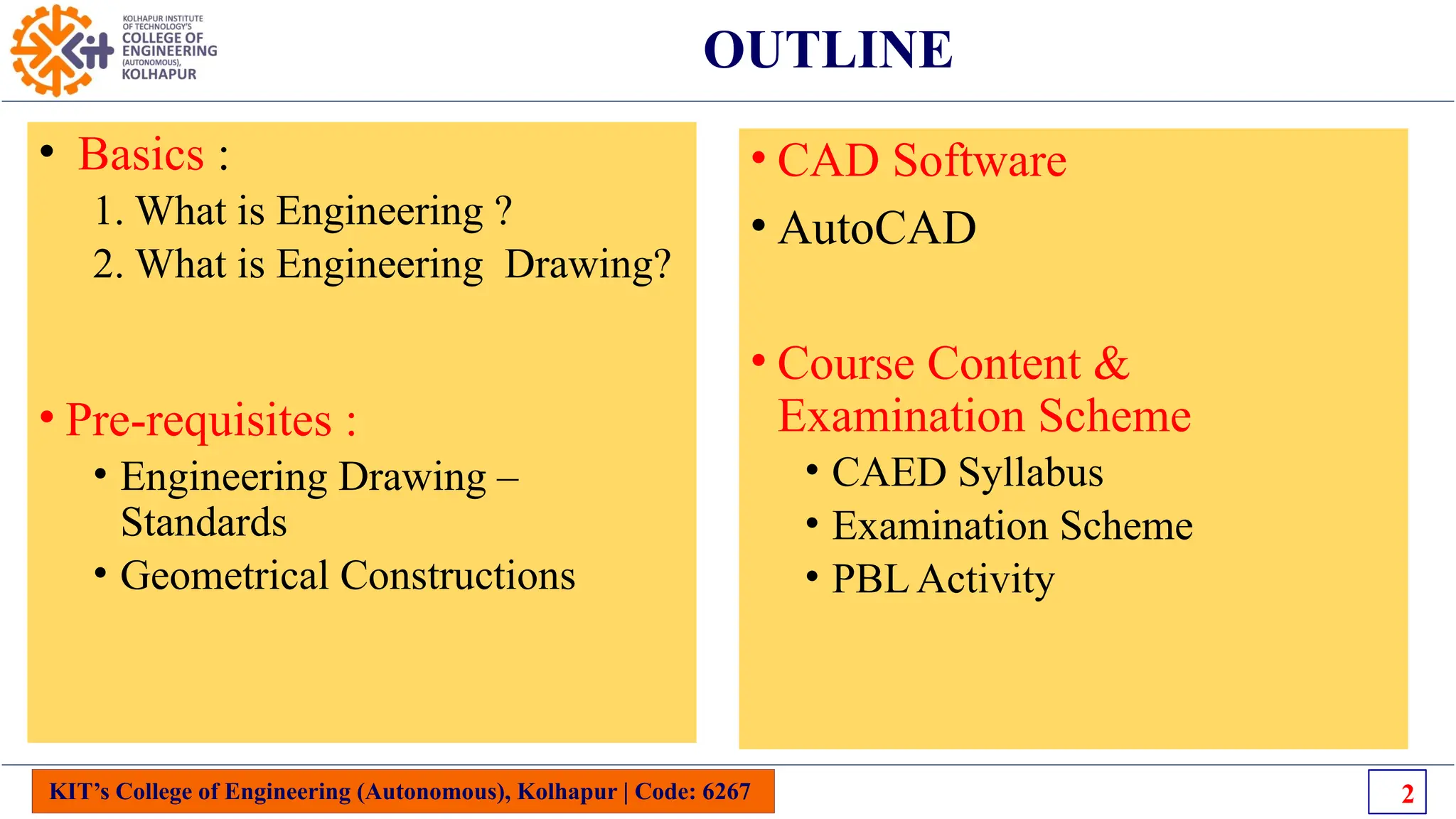
OUTLINE
• Basics :
1. What is Engineering ?
2. What is Engineering Drawing?
• Pre-requisites :
• Engineering Drawing –
Standards
• Geometrical Constructions
KIT’s College of Engineering (Autonomous), Kolhapur | Code: 6267 2
• CAD Software
• AutoCAD
• Course Content &
Examination Scheme
• CAED Syllabus
• Examination Scheme
• PBL Activity
KIT’s College of Engineering (Autonomous), Kolhapur | Code: 6267 3
Background
KIT’s College of Engineering (Autonomous), Kolhapur | Code: 6267 4
Introduction- What is Engineering?
“The discipline dealing with the art or science of applying scientific knowledge
to a practical problem”
4
KIT’s College of Engineering (Autonomous), Kolhapur | Code: 6267 5
Introduction- What is Engineering?
Definition by
Accreditation
Board for Engineering
& Technology
5
KIT’s College of Engineering (Autonomous), Kolhapur | Code: 6267 6
Introduction- Engineering History and Examples
6
KIT’s College of Engineering (Autonomous), Kolhapur | Code: 6267
Introduction- What is Engineering?
7
KIT’s College of Engineering (Autonomous), Kolhapur | Code: 6267
Introduction- What is Engineering Drawing?
8
KIT’s College of Engineering (Autonomous), Kolhapur | Code: 6267
Introduction: Engineering Drawing?
9
KIT’s College of Engineering (Autonomous), Kolhapur | Code: 6267
Introduction- What is Engineering Drawing?
10
KIT’s College of Engineering (Autonomous), Kolhapur | Code: 6267
Introduction- What is Engineering Drawing?
A A
Language Barrier
11
KIT’s College of Engineering (Autonomous), Kolhapur | Code: 6267
Introduction- Effectiveness of Graphics Language
1. Try to write a description of
this object.
2. Test your written description
by having someone attempt
to make a sketch from your
description.
The word languages are inadequate for describing the size, shape and
features completely as well as concisely.
You can easily understand that …
12
KIT’s College of Engineering (Autonomous), Kolhapur | Code: 6267
Introduction- What is Engineering Drawing?
13
KIT’s College of Engineering (Autonomous), Kolhapur | Code: 6267
Introduction- Composition of Graphic language?
Graphic language in “engineering application” use
lines to represent the surfaces, edges and contours
of objects.
A drawing can be done using freehand, instruments
or computer methods.
The language is known as “drawing” or “drafting” .
14
KIT’s College of Engineering (Autonomous), Kolhapur | Code: 6267
Introduction- Free Hand Drawing
The lines are sketched without using instruments other
than pencils and erasers.
Example
15
KIT’s College of Engineering (Autonomous), Kolhapur | Code: 6267
Introduction- Instrument drawing
Instruments are used to draw straight lines, circles, and
curves concisely and accurately. Thus, the drawings are usually made to
scale.
Example
16
KIT’s College of Engineering (Autonomous), Kolhapur | Code: 6267
Introduction- Computer drawing
The drawings are usually made by commercial software such as AutoCAD,
solid works etc.
Example
17
KIT’s College of Engineering (Autonomous), Kolhapur | Code: 6267 18
AUTOCAD- Introduction
KIT’s College of Engineering (Autonomous), Kolhapur | Code: 6267 19
AutoCAD- Graphical user Interface
Information center
View cube
Navigation bar
Model and layout
tabs Command line
Annotation tools
Ribbon/
Panel
Application button
Snap tools
Menu bar
Application bar Slide bar
KIT’s College of Engineering (Autonomous), Kolhapur | Code: 6267
Applications of Engineering Drawing
20
KIT’s College of Engineering (Autonomous), Kolhapur | Code: 6267
Applications of Engineering Drawing
Mechanical machine
Chemical reactor
Civil structure
Important for all
Branches
APPLICATIONS
Electrical circuit
21
KIT’s College of Engineering (Autonomous), Kolhapur | Code: 6267
Prerequisites & Content of Engineering Drawing
Knowledge of Geometry at SSC Level
• Simple Geometrical Constructions
1. To Construct Perpendicular Line at particular point
2. To Bisect a Line/ Arc/ Angle
3. Divide line/ Circle in to some equal number of parts
4. To draw regular polygon ( Square/Pentagon/ Hexagon)
5. Identify Different Solids ( Pyramids/ Prisms/ Tetrahedron)
22
+ C
To draw the line perpendicular to a given line at a given point
Adjacent-sides method
Repeat
To Bisect an Angle
2. Swing the arcs of any radius from the intersection
points between the previous arc and the lines.
3. Draw the line.
1. Swing an arc of any radius whose centers at the vertex.
(not to scale)
r1
Given
A
B
C
A
B
C
r2
r2
KIT’s College of Engineering (Autonomous), Kolhapur | Code: 6267
Standards of Engineering Drawing
25
KIT’s College of Engineering (Autonomous), Kolhapur | Code: 6267
Standards of Engineering Drawing
26
KIT’s College of Engineering (Autonomous), Kolhapur | Code: 6267
Standards of Engineering Drawing
27
KIT’s College of Engineering (Autonomous), Kolhapur | Code: 6267
Standards of Engineering Drawing
28
KIT’s College of Engineering (Autonomous), Kolhapur | Code: 6267
Standards of Engineering Drawing
29
KIT’s College of Engineering (Autonomous), Kolhapur | Code: 6267
Standards of Engineering Drawing
30
31
32
KIT’s College of Engineering (Autonomous), Kolhapur | Code: 6267
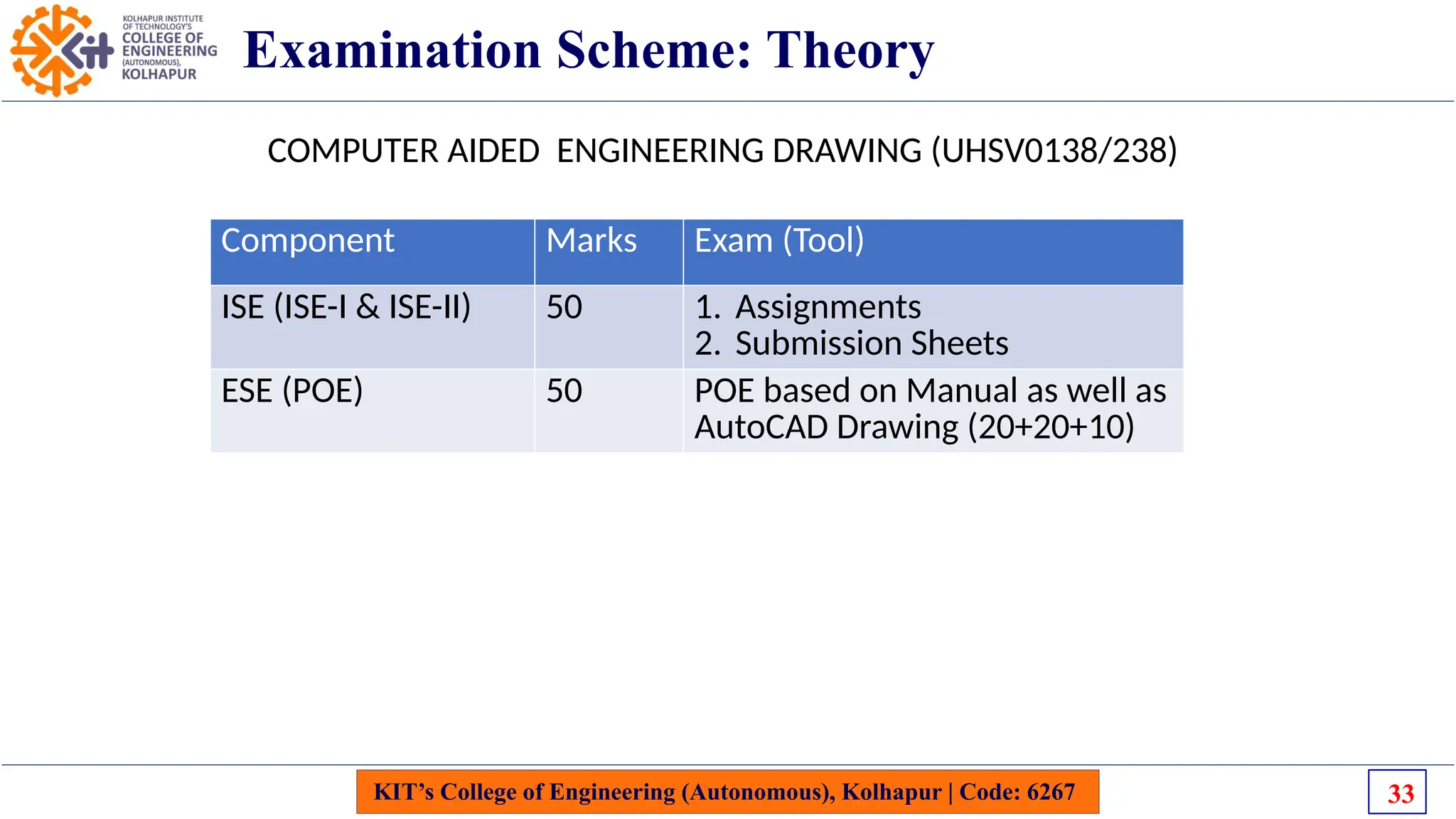
Examination Scheme: Theory
Component Marks Exam (Tool)
ISE (ISE-I & ISE-II) 50 1. Assignments
2. Submission Sheets
ESE (POE) 50 POE based on Manual as well as
AutoCAD Drawing (20+20+10)
COMPUTER AIDED ENGINEERING DRAWING (UHSV0138/238)
33
KIT’s College of Engineering (Autonomous), Kolhapur | Code: 6267
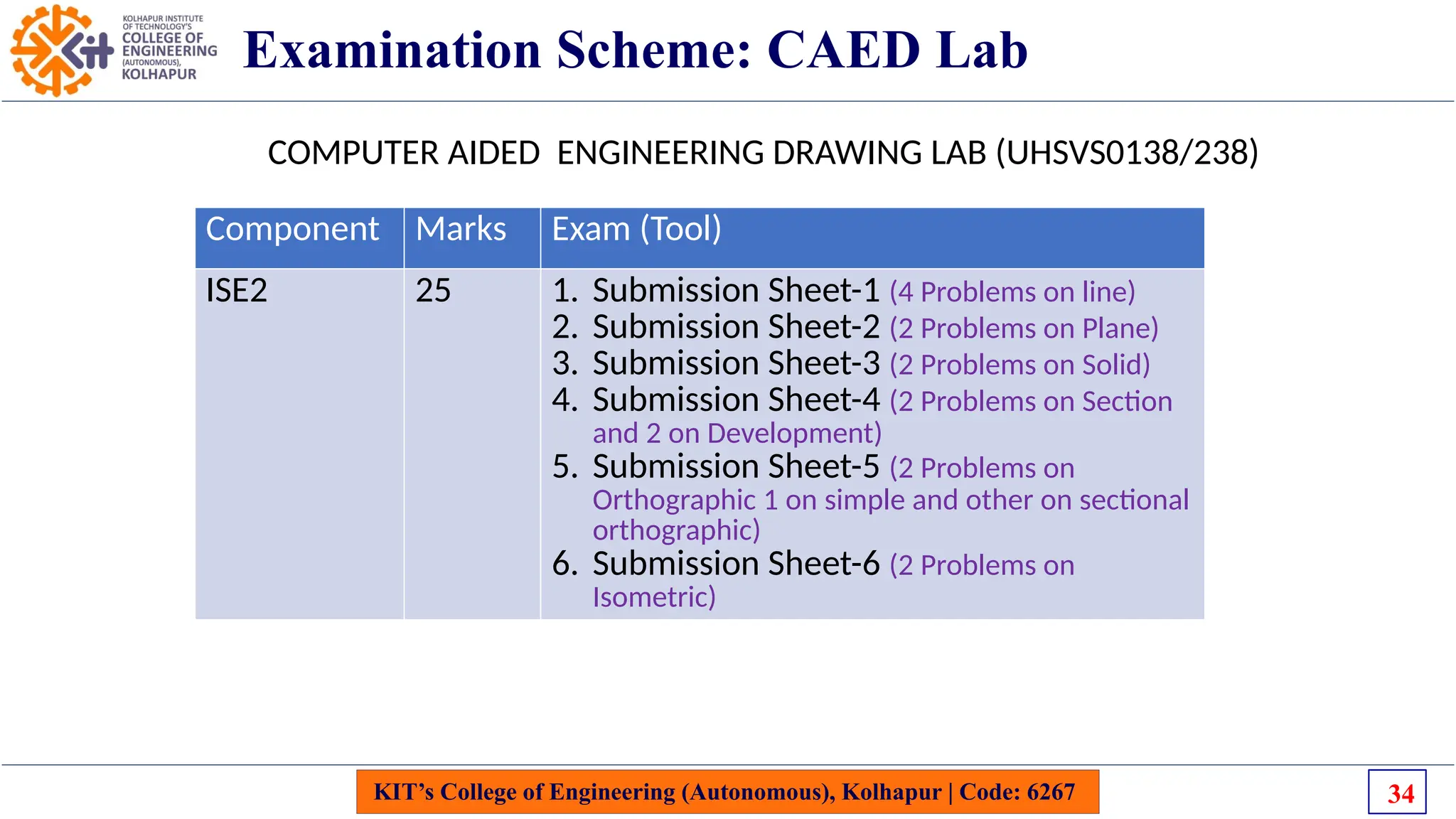
Examination Scheme: CAED Lab
Component Marks Exam (Tool)
ISE2 25 1. Submission Sheet-1 (4 Problems on line)
2. Submission Sheet-2 (2 Problems on Plane)
3. Submission Sheet-3 (2 Problems on Solid)
4. Submission Sheet-4 (2 Problems on Section
and 2 on Development)
5. Submission Sheet-5 (2 Problems on
Orthographic 1 on simple and other on sectional
orthographic)
6. Submission Sheet-6 (2 Problems on
Isometric)
COMPUTER AIDED ENGINEERING DRAWING LAB (UHSVS0138/238)
34
Reference Books: CAED
KIT’s College of Engineering (Autonomous), Kolhapur | Code: 6267 35
Reference Books: CAED
KIT’s College of Engineering (Autonomous), Kolhapur | Code: 6267
THANK YOU
36

CAED_Module 1_Introduction & Prereqisites of EG_SSS1.pptx

  • 1.
    KIT’s College ofEngineering (Autonomous), Kolhapur | Code: 6267 F.Y. Btech. 2024-25 : CAED/CAEG ( Engg. Graphics) 1 INTRODUCTION TO ENGINEERING DRAWING & CAD SOFTWARE Date: 9th Sep 2024
  • 2.
    OUTLINE • Basics : 1.What is Engineering ? 2. What is Engineering Drawing? • Pre-requisites : • Engineering Drawing – Standards • Geometrical Constructions KIT’s College of Engineering (Autonomous), Kolhapur | Code: 6267 2 • CAD Software • AutoCAD • Course Content & Examination Scheme • CAED Syllabus • Examination Scheme • PBL Activity
  • 3.
    KIT’s College ofEngineering (Autonomous), Kolhapur | Code: 6267 3 Background
  • 4.
    KIT’s College ofEngineering (Autonomous), Kolhapur | Code: 6267 4 Introduction- What is Engineering? “The discipline dealing with the art or science of applying scientific knowledge to a practical problem” 4
  • 5.
    KIT’s College ofEngineering (Autonomous), Kolhapur | Code: 6267 5 Introduction- What is Engineering? Definition by Accreditation Board for Engineering & Technology 5
  • 6.
    KIT’s College ofEngineering (Autonomous), Kolhapur | Code: 6267 6 Introduction- Engineering History and Examples 6
  • 7.
    KIT’s College ofEngineering (Autonomous), Kolhapur | Code: 6267 Introduction- What is Engineering? 7
  • 8.
    KIT’s College ofEngineering (Autonomous), Kolhapur | Code: 6267 Introduction- What is Engineering Drawing? 8
  • 9.
    KIT’s College ofEngineering (Autonomous), Kolhapur | Code: 6267 Introduction: Engineering Drawing? 9
  • 10.
    KIT’s College ofEngineering (Autonomous), Kolhapur | Code: 6267 Introduction- What is Engineering Drawing? 10
  • 11.
    KIT’s College ofEngineering (Autonomous), Kolhapur | Code: 6267 Introduction- What is Engineering Drawing? A A Language Barrier 11
  • 12.
    KIT’s College ofEngineering (Autonomous), Kolhapur | Code: 6267 Introduction- Effectiveness of Graphics Language 1. Try to write a description of this object. 2. Test your written description by having someone attempt to make a sketch from your description. The word languages are inadequate for describing the size, shape and features completely as well as concisely. You can easily understand that … 12
  • 13.
    KIT’s College ofEngineering (Autonomous), Kolhapur | Code: 6267 Introduction- What is Engineering Drawing? 13
  • 14.
    KIT’s College ofEngineering (Autonomous), Kolhapur | Code: 6267 Introduction- Composition of Graphic language? Graphic language in “engineering application” use lines to represent the surfaces, edges and contours of objects. A drawing can be done using freehand, instruments or computer methods. The language is known as “drawing” or “drafting” . 14
  • 15.
    KIT’s College ofEngineering (Autonomous), Kolhapur | Code: 6267 Introduction- Free Hand Drawing The lines are sketched without using instruments other than pencils and erasers. Example 15
  • 16.
    KIT’s College ofEngineering (Autonomous), Kolhapur | Code: 6267 Introduction- Instrument drawing Instruments are used to draw straight lines, circles, and curves concisely and accurately. Thus, the drawings are usually made to scale. Example 16
  • 17.
    KIT’s College ofEngineering (Autonomous), Kolhapur | Code: 6267 Introduction- Computer drawing The drawings are usually made by commercial software such as AutoCAD, solid works etc. Example 17
  • 18.
    KIT’s College ofEngineering (Autonomous), Kolhapur | Code: 6267 18 AUTOCAD- Introduction
  • 19.
    KIT’s College ofEngineering (Autonomous), Kolhapur | Code: 6267 19 AutoCAD- Graphical user Interface Information center View cube Navigation bar Model and layout tabs Command line Annotation tools Ribbon/ Panel Application button Snap tools Menu bar Application bar Slide bar
  • 20.
    KIT’s College ofEngineering (Autonomous), Kolhapur | Code: 6267 Applications of Engineering Drawing 20
  • 21.
    KIT’s College ofEngineering (Autonomous), Kolhapur | Code: 6267 Applications of Engineering Drawing Mechanical machine Chemical reactor Civil structure Important for all Branches APPLICATIONS Electrical circuit 21
  • 22.
    KIT’s College ofEngineering (Autonomous), Kolhapur | Code: 6267 Prerequisites & Content of Engineering Drawing Knowledge of Geometry at SSC Level • Simple Geometrical Constructions 1. To Construct Perpendicular Line at particular point 2. To Bisect a Line/ Arc/ Angle 3. Divide line/ Circle in to some equal number of parts 4. To draw regular polygon ( Square/Pentagon/ Hexagon) 5. Identify Different Solids ( Pyramids/ Prisms/ Tetrahedron) 22
  • 23.
    + C To drawthe line perpendicular to a given line at a given point Adjacent-sides method Repeat
  • 24.
    To Bisect anAngle 2. Swing the arcs of any radius from the intersection points between the previous arc and the lines. 3. Draw the line. 1. Swing an arc of any radius whose centers at the vertex. (not to scale) r1 Given A B C A B C r2 r2
  • 25.
    KIT’s College ofEngineering (Autonomous), Kolhapur | Code: 6267 Standards of Engineering Drawing 25
  • 26.
    KIT’s College ofEngineering (Autonomous), Kolhapur | Code: 6267 Standards of Engineering Drawing 26
  • 27.
    KIT’s College ofEngineering (Autonomous), Kolhapur | Code: 6267 Standards of Engineering Drawing 27
  • 28.
    KIT’s College ofEngineering (Autonomous), Kolhapur | Code: 6267 Standards of Engineering Drawing 28
  • 29.
    KIT’s College ofEngineering (Autonomous), Kolhapur | Code: 6267 Standards of Engineering Drawing 29
  • 30.
    KIT’s College ofEngineering (Autonomous), Kolhapur | Code: 6267 Standards of Engineering Drawing 30
  • 31.
  • 32.
  • 33.
    KIT’s College ofEngineering (Autonomous), Kolhapur | Code: 6267 Examination Scheme: Theory Component Marks Exam (Tool) ISE (ISE-I & ISE-II) 50 1. Assignments 2. Submission Sheets ESE (POE) 50 POE based on Manual as well as AutoCAD Drawing (20+20+10) COMPUTER AIDED ENGINEERING DRAWING (UHSV0138/238) 33
  • 34.
    KIT’s College ofEngineering (Autonomous), Kolhapur | Code: 6267 Examination Scheme: CAED Lab Component Marks Exam (Tool) ISE2 25 1. Submission Sheet-1 (4 Problems on line) 2. Submission Sheet-2 (2 Problems on Plane) 3. Submission Sheet-3 (2 Problems on Solid) 4. Submission Sheet-4 (2 Problems on Section and 2 on Development) 5. Submission Sheet-5 (2 Problems on Orthographic 1 on simple and other on sectional orthographic) 6. Submission Sheet-6 (2 Problems on Isometric) COMPUTER AIDED ENGINEERING DRAWING LAB (UHSVS0138/238) 34
  • 35.
    Reference Books: CAED KIT’sCollege of Engineering (Autonomous), Kolhapur | Code: 6267 35
  • 36.
    Reference Books: CAED KIT’sCollege of Engineering (Autonomous), Kolhapur | Code: 6267 THANK YOU 36