SATHYABAMA
INSTITUTE OF SCIENCE AND TECHNOLOGY
(DEEMED TO BE UNIVERSITY)
Accredited with Grade “A++” by NAAC
Presented by
JAYAPRAKASH. V
Assistant Professor,
Department of Mechatronics Engineering,
School of Mechanical Engineering,
Sathyabama Institute of Science and Technology,
Chennai – 600 119.
SMEB1102 ENGINEERING GRAPHICS L T P Credits Total Marks
3 0 0 3 100
COURSE OBJECTIVES
 To Understand the concept of graphic communication, develop the drawing skills
for communicating concepts, ideas and designs of engineering products and to
expose them to existing national standards related to technical drawings.
 To make the student to visualize and read the drawings.
 To make the students to understand the importance of sectioning and
development of surfaces.
 To learn about the orthographic and pictorial projections.
END SEMESTER EXAMINATION QUESTION PAPER PATTERN
Maximum Marks: 100 Exam Duration: 3 Hrs
PART A: 10 Questions of 2 marks each - No choice 20 Marks
PART B: Questions from each unit with internal choice, each carrying 16 marks 80 Marks
TEXT / REFERENCE BOOKS
• Bhatt N.D. and Panchal V.M, Engineering Drawing‖, Charotar Publishing House, 53rd Edition,
2019.
• Natrajan K.V, A Text Book of Engineering Graphics‖, Dhanalakshmi Publishers, Chennai, 2018.
• Venugopal K. and Prabhu Raja V., ―Engineering Graphics", New Age International (P) Limited,
2018.
• Engineering drawing practice for schools and colleges, SP 46-1988.
(http://web.iitd.ac.in/~achawla/public_html/201/lectures/sp46.pdf)
PUBLICATION OF BUREAU OF INDIAN STANDARDS
• 1. IS 10711 — 2001: Technical products Documentation — Size and lay out of drawing sheets.
• 2. IS 9609 (Parts 0 & 1) — 2001: Technical products Documentation — Lettering.
• 3. IS 10714 (Part 20) — 2001 & SP 46 — 2003: Lines for technical drawings.
• 4. IS 11669 — 1986 & SP 46 — 2003: Dimensioning of Technical Drawings.
• 5. IS 15021 (Parts 1 to 4) — 2001: Technical drawings — Projection Methods.
UNIT 1 PLANE CURVES 9 Hrs.
Basic Geometrical constructions, Curves used in engineering practices: Conics — Construction of ellipse,
parabola and hyperbola by eccentricity method — Construction of cycloid — Drawing of tangents and normal
to the above curves.
UNIT 2 PROJECTION OF POINTS AND LINES 9 Hrs.
Projection - Types of projection - Projection of points lying in four quadrants - Projection of lines (First angle
projection only) - Projection of lines parallel and inclined to one or both the planes.
UNIT 3 PROJECTION OF SOLIDS 9 Hrs.
Projection of simple solids like prisms, pyramids, cylinder, cone and truncated solids when the axis is inclined
to one of the principal planes and parallel to the other by rotating object method. Practicing three-dimensional
modeling of simple objects by CAD Software (Not for examination).
UNIT 4 SECTION OF SOLIDS AND DEVELOPMENT OF SURFACES 9 Hrs.
Purpose of sectioning - Sectional views - Hatching - Section plane perpendicular to one plane and parallel to
other plane - Section plane inclined to HP - True shape of the section. Need for development of surfaces -
Types of development of surfaces - Development of lateral surfaces of simple and sectioned solids - Prisms,
pyramids, cylinders and cones. Practicing three-dimensional modeling of simple objects by CAD Software
(Not for examination).
UNIT 5 ISOMETRIC PROJECTION AND FREEHAND SKETCHING 9 Hrs.
Principles of isometric projection — isometric scale - isometric projections of simple solids and truncated
solids - Prisms, pyramids, cylinders, cones.
Orthographic Projection:- Visualization concepts and Free Hand sketching: Visualization principles —
Representation of Three Dimensional objects — Layout of views- Freehand sketching of multiple views from
pictorial views of objects. Practicing three-dimensional modeling of simple objects by CAD Software (Not for
examination)
CHAPTERS
UNIT 1
PLANE CURVES 9 Hrs.
Basic Geometrical constructions, Curves used in engineering practices: Conics — Construction of ellipse,
parabola and hyperbola by eccentricity method — Construction of cycloid — Drawing of tangents and
normal to the above curves.
INTRODUCTION
 Who is an Engineer?
 An Engineer is a
 creative,
 innovative and
 productive person
 Just as people in society have language to communicate, WE Engineers use
drawing to communicate.
 Drawing is the language of Engineers.
 Engineering drawing is a universal and powerful language.
 Engineering student/Engineer can
 design an object
 visualize how it will look when made
 make a drawing of it and
 use this drawing as a means of communication to the production team to make this
product.
ENGINEERING DRAWING
 Engineering drawing is a drawing
 drawn by an engineer,
 having engineering knowledge,
 for the engineering purpose.
IMPORTANCE OF ENGINEERING DRAWING
 An Engineer must have perfect knowledge and skill in drawing.
 As the bad language is unpleasant to read and communicate, so also an incorrect
drawing is a discomfort for a trained eye.
 Even a small error committed by the draughtsman will misguide the machinist and the
ultimate product will be a failure.
 Computer has a major impact on the methods used to design and create
technical drawings.
 Design and drafting on computer are cheap and less time consuming.
Engineering Drawing
Manual Drawing
12/18/2023
CADD
DRAFTING TOOLS
12/18/2023
1. Drawing Board
2. Mini Drafter
3. Drawing Sheet (A2)
4. Pencils (HB, H, 2H, 4H, 2B, 4B etc.,)
5. Non-dust Rubber
6. Scales (Civil Engineer's Scale, Architect's Scale, Metric Scale)
7. Instrument Box
8. Set Squares (30°, 45°, 60° etc.,)
9. Drawing Board Clips, Clamps, Pins and Cello Tape
10. Protractor / Pro Circle / Circle Master / French Curve
11. Pencil Sharpener
12. Small paper knife or Stitching thread etc.,
DRAWING BOARD
12/18/2023
 Drawing board is made of soft
wooden platens.
 Almost perfect planning of the
working surface of the drawing board
is to be ensured.
MINI DRAFTER
12/18/2023
 This is a device used to draw
parallel or inclined lines very
effectively with ease.
 This is mounted on the top left
corner of the drawing board by
means of a clamping mechanism
which is an integral part of the
device.
 An L-shaped scale which is
graduated in millimeters acts as the
working edge of the mini-drafter.
 The L-Shaped scale also has a
degree scale for angle
measurement.
 The working edge can be moved to
any desired location on the drawing
board.
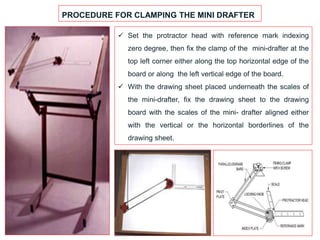
PROCEDURE FOR CLAMPING THE MINI DRAFTER
 Set the protractor head with reference mark indexing
zero degree, then fix the clamp of the mini-drafter at the
top left corner either along the top horizontal edge of the
board or along the left vertical edge of the board.
 With the drawing sheet placed underneath the scales of
the mini-drafter, fix the drawing sheet to the drawing
board with the scales of the mini- drafter aligned either
with the vertical or the horizontal borderlines of the
drawing sheet.
DRAWING SHEET
12/18/2023
 Drawing sheet is the medium on
which drawings are prepared by
means of pencils or pen.
 Drawing sheets are available in
standard sizes as shown in Table 1.2.
 A standard A0 size sheet is the one
with an area of 1 m2 and having
dimensions of 1189 x 841.
 Each higher number sheet (A1, A2,
A3, etc. in order) is half the size of
the immediately lower numbered
sheet.
 For drawing practice for first year
engineering students A2 size is the
preferred drawing sheet.
 The recommended sizes obtained
for various drawing sheets are
shown.
PENCILS / LEAD STICKS/ PENCIL SHARPENER / ERASER
 The primary tool used in technical drawings is the pencil
or lead sticks.
 Generally for technical drawings, the three grades of
pencil used is HB, H and 2H.
 For different purposes, different grades of pencils are
used.
 The HB pencil is a soft grade used for drawing thick
lines, borderlines, lettering and arrowheads.
 The H pencil is a medium grade used to draw finishing
lines, visible lines and hidden lines.
 The 2H pencil is a hard grade pencil
used for drawing construction lines, dimension lines,
center lines and section lines.
 Pencil sharpener is used to mend the pencils.
 Eraser is used to erase the unnecessary part of the
pencil drawing.
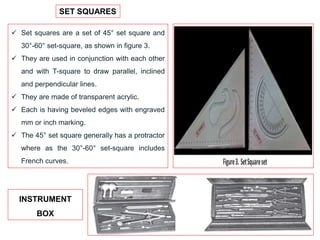
SET SQUARES
 Set squares are a set of 45° set square and
30°-60° set-square, as shown in figure 3.
 They are used in conjunction with each other
and with T-square to draw parallel, inclined
and perpendicular lines.
 They are made of transparent acrylic.
 Each is having beveled edges with engraved
mm or inch marking.
 The 45° set square generally has a protractor
where as the 30°-60° set-square includes
French curves.
INSTRUMENT
BOX
COMPASSES
 These are used to draw arcs or circles.
 Generally two sizes of compasses: one large compass
and the other a small spring bow compass are commonly
used.
DIVIDER
 Dividers are used to transfer lengths to the drawings
either from scales or from the drawing itself.
 Similar to the compasses, two sizes of dividers are
used in technical drawings: One large divider and the
other small spring bow divider.
DRAWING CLIPS AND CLAMPS CIRCLE MASTER OR PRO-CIRCLE
FRENCH CURVE
 French curve is free form template made of acrylic
 It is used to draw a smooth curve passing through
a number of points.
 The outer profile of the French curve is adjusted such the
smooth curve passes through more than three points and a
curve passing through these lines are drawn.
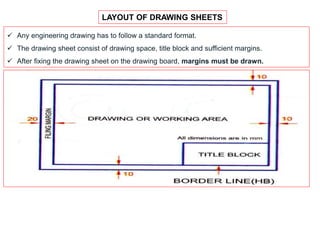
LAYOUT OF DRAWING SHEETS
 Any engineering drawing has to follow a standard format.
 The drawing sheet consist of drawing space, title block and sufficient margins.
 After fixing the drawing sheet on the drawing board, margins must be drawn.
TITLE BLOCK
 An important feature which is a must in every
drawing sheet.
 The title box is drawn at the bottom right
hand corner of every drawing sheet and
provides technical and administrative details
regarding the drawing/component.
 Though there are various dimensions for the
title box, for Engineering students it is
advisable to use a title box of size
170 mm x 65 mm.
 A typical title block is divided into two zones:
 (a) part identification zone and
 (b) additional information zone.
TITLE BLOCK
 In the part identification zone:
 information like the component identification number,
 name of the part,
 the legal owner of the drawing (i.e. the name of firm/component/etc., will
be highlighted.
 In the additional information zone:
 technical information like symbols,
 indicating the system of projection,
 scale of drawing,
 method of indicating surface texture,
 geometric tolerances, etc., will be highlighted.
TITLE BLOCK
LETTERING
 Writing of titles, sub-titles, dimensions, scales and other details on a drawing is called
Lettering.
 The Indian standard followed for lettering is BIS: 9609
Essential features of ‘Lettering’:
 Legibility
 Uniformity
 Ease
 Rapidity
 Suitability for microfilming/photocopying/any other photographic processes.
 Single stroke lettering is used in engineering drawing – width of the stem of the letters
and numerals will be uniformly thick equal to thickness of lines produced by the tip of
the pencil.
 Single stroke does not mean – entire letter written without lifting the pencil/pen.
 Letters are classified as: Single stroke letters and Gothic letters.
LETTERING
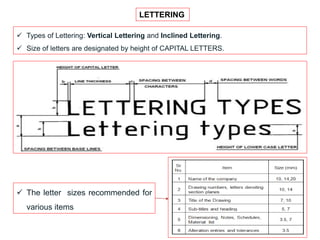
 Types of Lettering: Vertical Lettering and Inclined Lettering.
 Size of letters are designated by height of CAPITAL LETTERS.
 The letter sizes recommended for
various items
LETTERING
 Width of characters = (5/6)h
 Spacing between characters = (1/5)h
 Spacing between words = (3/5)h
Ex. 1. (Maximum Marks = 10 / Use A2 size
drawing sheet)
 Write the capital letters, A to Z, using the
following dimension:
 Height of the capital letter = 10 mm
 Width of the letter = 8 mm
 Spacing between letters = 2 mm
Ex. 2. (Maximum Marks = 10 / Use A2 size
drawing sheet)
 Write the lower case letters, a to z, using
the following dimension:
 Height of the letter = 7 mm
 Width of the letter = 5 mm
 Spacing between letters = 2 mm
Also, write the inclined letters, upper case
and lower case, to the same dimension as
mentioned above, the inclination of the
letters being 75 degrees to the horizontal.
UNIT 1
EX. NO. 1: LETTERING
LINES
 Lines are one important aspect of
technical/engineering drawing.
 Lines are always used to construct
meaningful drawings.
 Various types of lines are used to
construct drawing, each line used in
some specific sense.
 Lines are drawn following standard
conventions mentioned in BIS
(SP46:2003).
 A line may be curved, straight,
continuous, segmented. It may be
drawn as thin or thick.
 A few basic types of lines widely used
in drawings are shown in the following
Table.
DIMENSIONING
 An engineering drawing should contain the details regarding the size besides giving the
shape of the object.
 The expression of details in terms of numerical values regarding distance between
surfaces on a drawing by the use of lines, symbols and units is called dimensioning.
General Rules to be followed:
1. All the dimensions should be detailed on a drawing.
2. Dimensions should be repeated except where unavoidable.
3. Dimensions must be marked outside the drawing as far as possible.
4. Longer dimensions should be placed outside all the intermediate dimensions so that
dimension lines will not cross extension lines.
5. Only one system of dimensioning should be used in the drawing sheet.
TWO SYSTEMS OF DIMENSIONING
1. Aligned system.
2. Unidirectional system.
Aligned system Unidirectional system
TWO SYSTEMS OF DIMENSIONING
1. Aligned system.
2. Unidirectional system.
Aligned System Unidirectional System
Dimensions are aligned with the entity
being measured.
Dimensions are placed in such a way that
they can be read from the bottom edge of
the drawing sheet.
They are placed perpendicular to the
dimension line such that they may be read
from the bottom or right hand side of the
drawing sheet.
Dimensions are placed at the middle and
on top of the dimension lines.
Dimensions are inserted by breaking the
dimension lines at the middle.
UNIT 1
EX. NO. 2: GEOMETRICAL CONSTRUCTION
1. Arrow head.
2. To divide a straight line into equal parts.
3. To bisect a given angle.
4. To trisect a right angle.
5. Construction of hexagon.
6. Construction of pentagon.
Length/Width ratio
of arrow head = 3:1
5. Construction of hexagon.
6. Construction of pentagon.
with two of its
sides vertical
with two of its
sides horizontal
Special method to
construct a pentagon,
given one side
Procedure to construct pentagon:
1. Draw AB to the given length.
2. Bisect AB to get C.
3. At B, erect a perpendicular such that BD = AB.
4. Extend AB to its right.
5. With C as centre and CD as radius, draw an arc to get E.
6. AE is the diagonal of the pentagon.
7. With A as centre, AE as radius, draw an arc.
8. With B as centre, AE as radius, draw an arc.
9. With B as centre, AB as radius, cut the arc drawn in
step 7, to get F.
10. With A as centre, AB as radius, cut the arc drawn in
step 8, to get F.
11. With F and F as centre, and AB as radius, draw arcs to
get G.
12. Connect AFGFBA to get the required pentagon.
Included angle of polygon = 180 - (360 / n);
where n = no. of sides of the polygon.
UNIT 1
EX. NO. 3: CONIC SECTIONS
Applications:
 Construction of arches and bridges.
 Fabrication of light and sound reflectors.
 Used in machine tool fabrication.
 Conic sections are the curves obtained by the intersection of right
circular cone by a cutting plane at different angles.
 Circle: When the cutting plane is parallel to the base of the
cone, the section obtained is a circle.
 Ellipse: When the cone is cut by a place inclined to its axis
and the CP is not parallel to a generator, the section
obtained is an ellipse.
 Parabola: Here, the cone is cut by a plane which is
inclined to its axis and the CP is parallel to one of its end
generator.
 Hyperbola: When the cutting plane is inclined at a very
small angle with the axis or parallel to its axis, the section
obtained is a hyperbola.
 Rectangular Hyperbola: When the CP is parallel to the
axis of the cone and it is not passing through the
apex/vertex of the cone, the section obtained is a
rectangular hyperbola.
Note:
 Circle and Ellipse are closed curves.
 Parabola and Hyperbola are open and unlimited.
ECCENTRICITY OF CONIC SECTIONS(e)
 Eccentricity (e) = Distance from focus / Distance from
directrix
Note:
 Focus is also termed as fixed point.
 Directrix is also termed as fixed straight line.
UNIT 1
EX. NO. 3: CONIC SECTIONS - ELLIPSE
ECCENTRICITY OF CONIC SECTIONS(e)
 Eccentricity (e) = Distance from focus / Distance from directrix
Note:
 e = 0 for circle
 e < 1 for ellipse
 e = 1 for parabola
 e < 1 for hyperbola
 for rectangular hyperbola, e = √(2)
 e for Earth = 0.017
 e for Pluto = 0.25 (highest)
PROBLEMS IN CONIC
SECTION
 Draw an ellipse for the
following condition by
eccentricity method.
 Distance of the focus
from the directrix =
70 mm.
 Eccentricity = 3/4.
PRACTICAL APPLICATIONS OF ELLIPSE
 Arches
 Bridges
 Monuments
 Dams are constructed in the shape of semi-ellipse
 Some utensils and container bottoms
 Ship ventilators
 Industrial glands, stuffing boxes of I C Engines.
Locus Definition of Ellipse
 An ellipse is defined as a
plane curve which is the
locus of a point moving in
such a way that the sum of
its distances from two
fixed points in the plane is
always a constant.
Procedure to construct ellipse by eccentricity method
1. Draw the directrix CD.
2. Draw the axis of the ellipse, perpendicular to CD through
any point E on it.
3. Fix the focus F on the axis so that EF = 70 mm.
4. Divide EF into 7 equal parts as e = 3/4 = VF/VE.
5. Locate the Vertex V on the fourth division from E.
6. Draw a perpendicular VG at V such that VG = VF.
7. Join E and G and extend.
8. Mark arbitrary points after V, on the axis of ellipse and
name it as 1, 2, 3 …..
9. Through these points draw perpendicular line, on both
sides of the axis, so that these perpendiculars meet
extended EG line at 1’, 2’, 3’…..
10. With F as center and 1-1’ as radius, draw an arc to cut
the perpendicular drawn through 1. We get a1 and a1
’.
11. With F as center and 2-2’ as radius, draw an arc to cut
the perpendicular drawn through 2. We get a2 and a2
’.
12. Repeat the above procedure to get all the points and
draw a smooth curve, ellipse, passing through all the points.
UNIT 1
EX. NO. 3: CONIC SECTIONS - PARABOLA
PROBLEMS IN CONIC SECTION
 Draw a parabola given the distance of the focus from the directrix is equal to 60 mm, by
eccentricity method.
PRACTICAL APPLICATIONS OF PARABOLA
 Light reflectors.
 Sound reflectors.
 Arches.
 Bridges and tunnels.
 Trajectory of a thrown object or missile.
 Wall brackets subjected to heavy loads.
 Used in machine tool building.
 Bending moment diagram of a beam carrying UDL.
Locus Definition of Parabola
 Parabola is defined as a
plane curve which is the
locus of a point moving in
such a way that its distance
from a fixed point (Focus) is
always equal to its distance
from a fixed straight line
(Directrix).
Procedure to construct parabola by eccentricity method
1. Draw the directrix CD.
2. Draw the axis of the parabola, perpendicular to CD
through any point E on it.
3. Fix the focus F on the axis so that EF = 60 mm.
4. As e =1 for the parabola, locate V at the mid-point of EF,
so that VF/VE = 1
5. Mark arbitrary points after V, on the axis of parabola and
name it as 1, 2, 3 …..
6. Through these points draw perpendicular line, on both
sides of the axis.
7. With F as center and E1 as radius, draw an arc to cut the
perpendicular drawn through 1, to get 1’
8. With F as center and E2 as radius, draw an arc to cut the
perpendicular drawn through 2, to get 2’.
9. In the same way, obtain points 3’ and 4’.
10. Join these points by a smooth curve to get the required
parabola.
 22’ is called ordinate.
 2’-2’ is called double ordinate.
 Double ordinate passing through focus F is
termed as ‘latus rectum.
 Distance like V2 or V3 is called abscissa.
UNIT 1
EX. NO. 3: CONIC SECTIONS - HYPERBOLA
PROBLEMS IN CONIC SECTION
 Draw a hyperbola given the distance of the focus from the directrix is equal to 55 mm and
directrix as 1.5, by eccentricity method.
PRACTICAL APPLICATIONS OF HYPERBOLA
 Electronic transmitters.
 Electronic receivers like radar antenna.
 Rectangular hyperbola is used in the design of hydraulic
channels.
 Boyle’ law, viz. pressure x volume = constant.
Locus Definition of Hyperbola
 Parabola is defined as a
plane curve which is the
locus of a point moving in
such a way that the
difference between its
distances from two fixed
points (foci) is a constant.
Procedure to construct hyperbola by eccentricity
method
1. Draw the directrix CD.
2. Draw the axis of the hyperbola, perpendicular to CD
through any point E on it.
3. Fix the focus F on the axis so that EF = 55 mm.
4. Divide EF into 5 equal parts as e = 1.5 = 3/2 = VF/VE.
5. Locate the Vertex V on the second division from E.
6. Draw a perpendicular VG at V such that VG = VF.
7. Join E and G and extend.
8. Mark arbitrary points after V, on the axis of hyperbola and
name it as 1, 2, 3 …..
9. Through these points draw perpendicular line, on both
sides of the axis, so that these perpendiculars meet
extended EG line at 1’, 2’, 3’…..
10. With F as center and 1-1’ as radius, draw an arc to cut
the perpendicular drawn through 1. We get a1 and a1
’.
11. In the same way, obtain a2 and a2
’; a3 and a3
’.
12. Join these points by a smooth curve to get the required
hyperbola.

Unit 1-Plane Curves.pptx

  • 1.
    SATHYABAMA INSTITUTE OF SCIENCEAND TECHNOLOGY (DEEMED TO BE UNIVERSITY) Accredited with Grade “A++” by NAAC Presented by JAYAPRAKASH. V Assistant Professor, Department of Mechatronics Engineering, School of Mechanical Engineering, Sathyabama Institute of Science and Technology, Chennai – 600 119.
  • 2.
    SMEB1102 ENGINEERING GRAPHICSL T P Credits Total Marks 3 0 0 3 100 COURSE OBJECTIVES  To Understand the concept of graphic communication, develop the drawing skills for communicating concepts, ideas and designs of engineering products and to expose them to existing national standards related to technical drawings.  To make the student to visualize and read the drawings.  To make the students to understand the importance of sectioning and development of surfaces.  To learn about the orthographic and pictorial projections. END SEMESTER EXAMINATION QUESTION PAPER PATTERN Maximum Marks: 100 Exam Duration: 3 Hrs PART A: 10 Questions of 2 marks each - No choice 20 Marks PART B: Questions from each unit with internal choice, each carrying 16 marks 80 Marks
  • 3.
    TEXT / REFERENCEBOOKS • Bhatt N.D. and Panchal V.M, Engineering Drawing‖, Charotar Publishing House, 53rd Edition, 2019. • Natrajan K.V, A Text Book of Engineering Graphics‖, Dhanalakshmi Publishers, Chennai, 2018. • Venugopal K. and Prabhu Raja V., ―Engineering Graphics", New Age International (P) Limited, 2018. • Engineering drawing practice for schools and colleges, SP 46-1988. (http://web.iitd.ac.in/~achawla/public_html/201/lectures/sp46.pdf) PUBLICATION OF BUREAU OF INDIAN STANDARDS • 1. IS 10711 — 2001: Technical products Documentation — Size and lay out of drawing sheets. • 2. IS 9609 (Parts 0 & 1) — 2001: Technical products Documentation — Lettering. • 3. IS 10714 (Part 20) — 2001 & SP 46 — 2003: Lines for technical drawings. • 4. IS 11669 — 1986 & SP 46 — 2003: Dimensioning of Technical Drawings. • 5. IS 15021 (Parts 1 to 4) — 2001: Technical drawings — Projection Methods.
  • 4.
    UNIT 1 PLANECURVES 9 Hrs. Basic Geometrical constructions, Curves used in engineering practices: Conics — Construction of ellipse, parabola and hyperbola by eccentricity method — Construction of cycloid — Drawing of tangents and normal to the above curves. UNIT 2 PROJECTION OF POINTS AND LINES 9 Hrs. Projection - Types of projection - Projection of points lying in four quadrants - Projection of lines (First angle projection only) - Projection of lines parallel and inclined to one or both the planes. UNIT 3 PROJECTION OF SOLIDS 9 Hrs. Projection of simple solids like prisms, pyramids, cylinder, cone and truncated solids when the axis is inclined to one of the principal planes and parallel to the other by rotating object method. Practicing three-dimensional modeling of simple objects by CAD Software (Not for examination). UNIT 4 SECTION OF SOLIDS AND DEVELOPMENT OF SURFACES 9 Hrs. Purpose of sectioning - Sectional views - Hatching - Section plane perpendicular to one plane and parallel to other plane - Section plane inclined to HP - True shape of the section. Need for development of surfaces - Types of development of surfaces - Development of lateral surfaces of simple and sectioned solids - Prisms, pyramids, cylinders and cones. Practicing three-dimensional modeling of simple objects by CAD Software (Not for examination). UNIT 5 ISOMETRIC PROJECTION AND FREEHAND SKETCHING 9 Hrs. Principles of isometric projection — isometric scale - isometric projections of simple solids and truncated solids - Prisms, pyramids, cylinders, cones. Orthographic Projection:- Visualization concepts and Free Hand sketching: Visualization principles — Representation of Three Dimensional objects — Layout of views- Freehand sketching of multiple views from pictorial views of objects. Practicing three-dimensional modeling of simple objects by CAD Software (Not for examination) CHAPTERS
  • 5.
    UNIT 1 PLANE CURVES9 Hrs. Basic Geometrical constructions, Curves used in engineering practices: Conics — Construction of ellipse, parabola and hyperbola by eccentricity method — Construction of cycloid — Drawing of tangents and normal to the above curves. INTRODUCTION  Who is an Engineer?  An Engineer is a  creative,  innovative and  productive person  Just as people in society have language to communicate, WE Engineers use drawing to communicate.  Drawing is the language of Engineers.  Engineering drawing is a universal and powerful language.
  • 6.
     Engineering student/Engineercan  design an object  visualize how it will look when made  make a drawing of it and  use this drawing as a means of communication to the production team to make this product. ENGINEERING DRAWING  Engineering drawing is a drawing  drawn by an engineer,  having engineering knowledge,  for the engineering purpose. IMPORTANCE OF ENGINEERING DRAWING  An Engineer must have perfect knowledge and skill in drawing.  As the bad language is unpleasant to read and communicate, so also an incorrect drawing is a discomfort for a trained eye.  Even a small error committed by the draughtsman will misguide the machinist and the ultimate product will be a failure.
  • 7.
     Computer hasa major impact on the methods used to design and create technical drawings.  Design and drafting on computer are cheap and less time consuming. Engineering Drawing Manual Drawing 12/18/2023 CADD
  • 8.
    DRAFTING TOOLS 12/18/2023 1. DrawingBoard 2. Mini Drafter 3. Drawing Sheet (A2) 4. Pencils (HB, H, 2H, 4H, 2B, 4B etc.,) 5. Non-dust Rubber 6. Scales (Civil Engineer's Scale, Architect's Scale, Metric Scale) 7. Instrument Box 8. Set Squares (30°, 45°, 60° etc.,) 9. Drawing Board Clips, Clamps, Pins and Cello Tape 10. Protractor / Pro Circle / Circle Master / French Curve 11. Pencil Sharpener 12. Small paper knife or Stitching thread etc.,
  • 9.
    DRAWING BOARD 12/18/2023  Drawingboard is made of soft wooden platens.  Almost perfect planning of the working surface of the drawing board is to be ensured.
  • 10.
    MINI DRAFTER 12/18/2023  Thisis a device used to draw parallel or inclined lines very effectively with ease.  This is mounted on the top left corner of the drawing board by means of a clamping mechanism which is an integral part of the device.  An L-shaped scale which is graduated in millimeters acts as the working edge of the mini-drafter.  The L-Shaped scale also has a degree scale for angle measurement.  The working edge can be moved to any desired location on the drawing board.
  • 11.
    PROCEDURE FOR CLAMPINGTHE MINI DRAFTER  Set the protractor head with reference mark indexing zero degree, then fix the clamp of the mini-drafter at the top left corner either along the top horizontal edge of the board or along the left vertical edge of the board.  With the drawing sheet placed underneath the scales of the mini-drafter, fix the drawing sheet to the drawing board with the scales of the mini- drafter aligned either with the vertical or the horizontal borderlines of the drawing sheet.
  • 12.
    DRAWING SHEET 12/18/2023  Drawingsheet is the medium on which drawings are prepared by means of pencils or pen.  Drawing sheets are available in standard sizes as shown in Table 1.2.  A standard A0 size sheet is the one with an area of 1 m2 and having dimensions of 1189 x 841.  Each higher number sheet (A1, A2, A3, etc. in order) is half the size of the immediately lower numbered sheet.  For drawing practice for first year engineering students A2 size is the preferred drawing sheet.  The recommended sizes obtained for various drawing sheets are shown.
  • 13.
    PENCILS / LEADSTICKS/ PENCIL SHARPENER / ERASER  The primary tool used in technical drawings is the pencil or lead sticks.  Generally for technical drawings, the three grades of pencil used is HB, H and 2H.  For different purposes, different grades of pencils are used.  The HB pencil is a soft grade used for drawing thick lines, borderlines, lettering and arrowheads.  The H pencil is a medium grade used to draw finishing lines, visible lines and hidden lines.  The 2H pencil is a hard grade pencil used for drawing construction lines, dimension lines, center lines and section lines.  Pencil sharpener is used to mend the pencils.  Eraser is used to erase the unnecessary part of the pencil drawing.
  • 14.
    SET SQUARES  Setsquares are a set of 45° set square and 30°-60° set-square, as shown in figure 3.  They are used in conjunction with each other and with T-square to draw parallel, inclined and perpendicular lines.  They are made of transparent acrylic.  Each is having beveled edges with engraved mm or inch marking.  The 45° set square generally has a protractor where as the 30°-60° set-square includes French curves. INSTRUMENT BOX
  • 15.
    COMPASSES  These areused to draw arcs or circles.  Generally two sizes of compasses: one large compass and the other a small spring bow compass are commonly used. DIVIDER  Dividers are used to transfer lengths to the drawings either from scales or from the drawing itself.  Similar to the compasses, two sizes of dividers are used in technical drawings: One large divider and the other small spring bow divider. DRAWING CLIPS AND CLAMPS CIRCLE MASTER OR PRO-CIRCLE
  • 16.
    FRENCH CURVE  Frenchcurve is free form template made of acrylic  It is used to draw a smooth curve passing through a number of points.  The outer profile of the French curve is adjusted such the smooth curve passes through more than three points and a curve passing through these lines are drawn.
  • 17.
    LAYOUT OF DRAWINGSHEETS  Any engineering drawing has to follow a standard format.  The drawing sheet consist of drawing space, title block and sufficient margins.  After fixing the drawing sheet on the drawing board, margins must be drawn.
  • 18.
    TITLE BLOCK  Animportant feature which is a must in every drawing sheet.  The title box is drawn at the bottom right hand corner of every drawing sheet and provides technical and administrative details regarding the drawing/component.  Though there are various dimensions for the title box, for Engineering students it is advisable to use a title box of size 170 mm x 65 mm.  A typical title block is divided into two zones:  (a) part identification zone and  (b) additional information zone.
  • 19.
    TITLE BLOCK  Inthe part identification zone:  information like the component identification number,  name of the part,  the legal owner of the drawing (i.e. the name of firm/component/etc., will be highlighted.  In the additional information zone:  technical information like symbols,  indicating the system of projection,  scale of drawing,  method of indicating surface texture,  geometric tolerances, etc., will be highlighted.
  • 20.
  • 21.
    LETTERING  Writing oftitles, sub-titles, dimensions, scales and other details on a drawing is called Lettering.  The Indian standard followed for lettering is BIS: 9609 Essential features of ‘Lettering’:  Legibility  Uniformity  Ease  Rapidity  Suitability for microfilming/photocopying/any other photographic processes.  Single stroke lettering is used in engineering drawing – width of the stem of the letters and numerals will be uniformly thick equal to thickness of lines produced by the tip of the pencil.  Single stroke does not mean – entire letter written without lifting the pencil/pen.  Letters are classified as: Single stroke letters and Gothic letters.
  • 22.
    LETTERING  Types ofLettering: Vertical Lettering and Inclined Lettering.  Size of letters are designated by height of CAPITAL LETTERS.  The letter sizes recommended for various items
  • 23.
    LETTERING  Width ofcharacters = (5/6)h  Spacing between characters = (1/5)h  Spacing between words = (3/5)h
  • 24.
    Ex. 1. (MaximumMarks = 10 / Use A2 size drawing sheet)  Write the capital letters, A to Z, using the following dimension:  Height of the capital letter = 10 mm  Width of the letter = 8 mm  Spacing between letters = 2 mm Ex. 2. (Maximum Marks = 10 / Use A2 size drawing sheet)  Write the lower case letters, a to z, using the following dimension:  Height of the letter = 7 mm  Width of the letter = 5 mm  Spacing between letters = 2 mm Also, write the inclined letters, upper case and lower case, to the same dimension as mentioned above, the inclination of the letters being 75 degrees to the horizontal. UNIT 1 EX. NO. 1: LETTERING
  • 25.
    LINES  Lines areone important aspect of technical/engineering drawing.  Lines are always used to construct meaningful drawings.  Various types of lines are used to construct drawing, each line used in some specific sense.  Lines are drawn following standard conventions mentioned in BIS (SP46:2003).  A line may be curved, straight, continuous, segmented. It may be drawn as thin or thick.  A few basic types of lines widely used in drawings are shown in the following Table.
  • 26.
    DIMENSIONING  An engineeringdrawing should contain the details regarding the size besides giving the shape of the object.  The expression of details in terms of numerical values regarding distance between surfaces on a drawing by the use of lines, symbols and units is called dimensioning. General Rules to be followed: 1. All the dimensions should be detailed on a drawing. 2. Dimensions should be repeated except where unavoidable. 3. Dimensions must be marked outside the drawing as far as possible. 4. Longer dimensions should be placed outside all the intermediate dimensions so that dimension lines will not cross extension lines. 5. Only one system of dimensioning should be used in the drawing sheet. TWO SYSTEMS OF DIMENSIONING 1. Aligned system. 2. Unidirectional system.
  • 27.
    Aligned system Unidirectionalsystem TWO SYSTEMS OF DIMENSIONING 1. Aligned system. 2. Unidirectional system. Aligned System Unidirectional System Dimensions are aligned with the entity being measured. Dimensions are placed in such a way that they can be read from the bottom edge of the drawing sheet. They are placed perpendicular to the dimension line such that they may be read from the bottom or right hand side of the drawing sheet. Dimensions are placed at the middle and on top of the dimension lines. Dimensions are inserted by breaking the dimension lines at the middle.
  • 28.
    UNIT 1 EX. NO.2: GEOMETRICAL CONSTRUCTION 1. Arrow head. 2. To divide a straight line into equal parts. 3. To bisect a given angle. 4. To trisect a right angle. 5. Construction of hexagon. 6. Construction of pentagon. Length/Width ratio of arrow head = 3:1
  • 29.
    5. Construction ofhexagon. 6. Construction of pentagon. with two of its sides vertical with two of its sides horizontal Special method to construct a pentagon, given one side Procedure to construct pentagon: 1. Draw AB to the given length. 2. Bisect AB to get C. 3. At B, erect a perpendicular such that BD = AB. 4. Extend AB to its right. 5. With C as centre and CD as radius, draw an arc to get E. 6. AE is the diagonal of the pentagon. 7. With A as centre, AE as radius, draw an arc. 8. With B as centre, AE as radius, draw an arc. 9. With B as centre, AB as radius, cut the arc drawn in step 7, to get F. 10. With A as centre, AB as radius, cut the arc drawn in step 8, to get F. 11. With F and F as centre, and AB as radius, draw arcs to get G. 12. Connect AFGFBA to get the required pentagon. Included angle of polygon = 180 - (360 / n); where n = no. of sides of the polygon.
  • 30.
    UNIT 1 EX. NO.3: CONIC SECTIONS Applications:  Construction of arches and bridges.  Fabrication of light and sound reflectors.  Used in machine tool fabrication.  Conic sections are the curves obtained by the intersection of right circular cone by a cutting plane at different angles.
  • 31.
     Circle: Whenthe cutting plane is parallel to the base of the cone, the section obtained is a circle.  Ellipse: When the cone is cut by a place inclined to its axis and the CP is not parallel to a generator, the section obtained is an ellipse.  Parabola: Here, the cone is cut by a plane which is inclined to its axis and the CP is parallel to one of its end generator.  Hyperbola: When the cutting plane is inclined at a very small angle with the axis or parallel to its axis, the section obtained is a hyperbola.  Rectangular Hyperbola: When the CP is parallel to the axis of the cone and it is not passing through the apex/vertex of the cone, the section obtained is a rectangular hyperbola. Note:  Circle and Ellipse are closed curves.  Parabola and Hyperbola are open and unlimited. ECCENTRICITY OF CONIC SECTIONS(e)  Eccentricity (e) = Distance from focus / Distance from directrix Note:  Focus is also termed as fixed point.  Directrix is also termed as fixed straight line.
  • 32.
    UNIT 1 EX. NO.3: CONIC SECTIONS - ELLIPSE ECCENTRICITY OF CONIC SECTIONS(e)  Eccentricity (e) = Distance from focus / Distance from directrix Note:  e = 0 for circle  e < 1 for ellipse  e = 1 for parabola  e < 1 for hyperbola  for rectangular hyperbola, e = √(2)  e for Earth = 0.017  e for Pluto = 0.25 (highest) PROBLEMS IN CONIC SECTION  Draw an ellipse for the following condition by eccentricity method.  Distance of the focus from the directrix = 70 mm.  Eccentricity = 3/4. PRACTICAL APPLICATIONS OF ELLIPSE  Arches  Bridges  Monuments  Dams are constructed in the shape of semi-ellipse  Some utensils and container bottoms  Ship ventilators  Industrial glands, stuffing boxes of I C Engines. Locus Definition of Ellipse  An ellipse is defined as a plane curve which is the locus of a point moving in such a way that the sum of its distances from two fixed points in the plane is always a constant.
  • 33.
    Procedure to constructellipse by eccentricity method 1. Draw the directrix CD. 2. Draw the axis of the ellipse, perpendicular to CD through any point E on it. 3. Fix the focus F on the axis so that EF = 70 mm. 4. Divide EF into 7 equal parts as e = 3/4 = VF/VE. 5. Locate the Vertex V on the fourth division from E. 6. Draw a perpendicular VG at V such that VG = VF. 7. Join E and G and extend. 8. Mark arbitrary points after V, on the axis of ellipse and name it as 1, 2, 3 ….. 9. Through these points draw perpendicular line, on both sides of the axis, so that these perpendiculars meet extended EG line at 1’, 2’, 3’….. 10. With F as center and 1-1’ as radius, draw an arc to cut the perpendicular drawn through 1. We get a1 and a1 ’. 11. With F as center and 2-2’ as radius, draw an arc to cut the perpendicular drawn through 2. We get a2 and a2 ’. 12. Repeat the above procedure to get all the points and draw a smooth curve, ellipse, passing through all the points.
  • 34.
    UNIT 1 EX. NO.3: CONIC SECTIONS - PARABOLA PROBLEMS IN CONIC SECTION  Draw a parabola given the distance of the focus from the directrix is equal to 60 mm, by eccentricity method. PRACTICAL APPLICATIONS OF PARABOLA  Light reflectors.  Sound reflectors.  Arches.  Bridges and tunnels.  Trajectory of a thrown object or missile.  Wall brackets subjected to heavy loads.  Used in machine tool building.  Bending moment diagram of a beam carrying UDL. Locus Definition of Parabola  Parabola is defined as a plane curve which is the locus of a point moving in such a way that its distance from a fixed point (Focus) is always equal to its distance from a fixed straight line (Directrix).
  • 35.
    Procedure to constructparabola by eccentricity method 1. Draw the directrix CD. 2. Draw the axis of the parabola, perpendicular to CD through any point E on it. 3. Fix the focus F on the axis so that EF = 60 mm. 4. As e =1 for the parabola, locate V at the mid-point of EF, so that VF/VE = 1 5. Mark arbitrary points after V, on the axis of parabola and name it as 1, 2, 3 ….. 6. Through these points draw perpendicular line, on both sides of the axis. 7. With F as center and E1 as radius, draw an arc to cut the perpendicular drawn through 1, to get 1’ 8. With F as center and E2 as radius, draw an arc to cut the perpendicular drawn through 2, to get 2’. 9. In the same way, obtain points 3’ and 4’. 10. Join these points by a smooth curve to get the required parabola.  22’ is called ordinate.  2’-2’ is called double ordinate.  Double ordinate passing through focus F is termed as ‘latus rectum.  Distance like V2 or V3 is called abscissa.
  • 36.
    UNIT 1 EX. NO.3: CONIC SECTIONS - HYPERBOLA PROBLEMS IN CONIC SECTION  Draw a hyperbola given the distance of the focus from the directrix is equal to 55 mm and directrix as 1.5, by eccentricity method. PRACTICAL APPLICATIONS OF HYPERBOLA  Electronic transmitters.  Electronic receivers like radar antenna.  Rectangular hyperbola is used in the design of hydraulic channels.  Boyle’ law, viz. pressure x volume = constant. Locus Definition of Hyperbola  Parabola is defined as a plane curve which is the locus of a point moving in such a way that the difference between its distances from two fixed points (foci) is a constant.
  • 37.
    Procedure to constructhyperbola by eccentricity method 1. Draw the directrix CD. 2. Draw the axis of the hyperbola, perpendicular to CD through any point E on it. 3. Fix the focus F on the axis so that EF = 55 mm. 4. Divide EF into 5 equal parts as e = 1.5 = 3/2 = VF/VE. 5. Locate the Vertex V on the second division from E. 6. Draw a perpendicular VG at V such that VG = VF. 7. Join E and G and extend. 8. Mark arbitrary points after V, on the axis of hyperbola and name it as 1, 2, 3 ….. 9. Through these points draw perpendicular line, on both sides of the axis, so that these perpendiculars meet extended EG line at 1’, 2’, 3’….. 10. With F as center and 1-1’ as radius, draw an arc to cut the perpendicular drawn through 1. We get a1 and a1 ’. 11. In the same way, obtain a2 and a2 ’; a3 and a3 ’. 12. Join these points by a smooth curve to get the required hyperbola.