Mangalayatan University
05/31/2025 CSM – 6151 Programming with "C" 1
Faculty Name :- Prof. LALIT MOHAN GUPTA
Course Name :- Programming with ‘C’
Course Code :- CSM – 6115
Semester :- 1
Class No. :- 2
Chapter No :-1,2,3
JAN’2025 SESSION
Mangalayatan University
05/31/2025 CSM – 6151 Programming with "C" 2
Programming Paradigms
• Imperative Programming: Focuses on how to execute.
• Declarative Programming: Focuses on what to execute.
• Logical Programming: Focuses on True or False
• Examples: SQL (Declarative), Python (Imperative),
Prolog (Logical)
Mangalayatan University
05/31/2025 CSM – 6151 Programming with "C" 3
Analysis of Algorithms and Programs
• Benchmarking: Measuring the performance of programs.
• Profiling: Analyzing a program to determine which parts
of it are time or memory-intensive.
• Optimization: Improving the efficiency of algorithms and
programs.
Mangalayatan University
05/31/2025 CSM – 6151 Programming with "C" 4
Real-World Applications of Algorithms
• Sorting and Searching: Used in databases, file
management.
• Encryption Algorithms: Data security and cryptography.
• Pathfinding Algorithms: GPS navigation, AI in games.
• Machine Learning Algorithms: Data analysis, prediction
models.
Mangalayatan University
05/31/2025 CSM – 6151 Programming with "C" 5
Fundamental Stages of Problem Solving
• Definition: Problem-solving is the process of identifying
solutions to specific issues using a logical approach.
• Importance: Critical for effective programming and
software development.
Mangalayatan University
05/31/2025 CSM – 6151 Programming with "C" 6
Understanding the Problem
• Objective: Clearly define the problem.
• Steps:
• Analyze the problem statement.
• Identify input and output requirements.
• Determine constraints and limitations.
• Outcome: A precise understanding of what needs to be
solved.
Mangalayatan University
05/31/2025 CSM – 6151 Programming with "C" 7
Planning the Solution
• Objective: Develop a strategy to solve the problem.
• Steps:
• Choose an appropriate problem-solving approach (e.g.,
Divide and Conquer, Dynamic Programming).
• Outline the steps required to solve the problem (algorithm).
• Create a pseudocode or flowchart.
• Outcome: A clear plan of action for solving the problem.
Mangalayatan University
05/31/2025 CSM – 6151 Programming with "C" 8
Implementing the Solution
• Objective: Convert the planned solution into a program.
• Steps:
• Select a suitable programming language.
• Write the code based on the algorithm or pseudocode.
• Ensure the code is syntactically correct.
• Outcome: A working program that solves the problem.
Mangalayatan University
05/31/2025 CSM – 6151 Programming with "C" 9
Testing and Debugging
• Objective: Ensure the program works correctly and
efficiently.
• Steps:
• Test the program with various inputs, including edge cases.
• Identify and fix any errors or bugs.
• Optimize performance if necessary.
• Outcome: A reliable and efficient program.
Mangalayatan University
05/31/2025 CSM – 6151 Programming with "C" 10
Documentation and Maintenance
• Objective: Maintain and improve the program over time.
• Steps:
• Document the code for future reference.
• Update and modify the program as needed.
• Ensure compatibility with new requirements or
environments.
• Outcome: A sustainable and adaptable program.
Mangalayatan University
05/31/2025 CSM – 6151 Programming with "C" 11
Introduction to Programming Languages
• Definition: A programming language is a formal language
comprising a set of instructions that produce various kinds
of output.
• Purpose: Facilitates communication between the
programmer and the machine.
Mangalayatan University
05/31/2025 CSM – 6151 Programming with "C" 12
Key Features of Programming Languages
• Syntax and Semantics: Rules that define the structure
and meaning of code.
• Data Types: Defines the type of data that can be
processed (e.g., integers, floats, strings).
• Control Structures: Directs the flow of the program (e.g.,
loops, conditionals).
• Standard Library: A set of pre-written functions and
routines available to the programmer.
• Error Handling: Mechanisms to handle errors gracefully.
Mangalayatan University
05/31/2025 CSM – 6151 Programming with "C" 13
Additional Features of Programming Languages
• Modularity and Reusability: Supports modular code and
reusable functions.
• Object-Oriented Features: Supports objects and classes
for encapsulating data and functionality.
• Portability: Ability to run on different platforms with
minimal modifications.
• Performance: Efficiency in terms of execution speed and
memory usage.
• Security: Features that protect against vulnerabilities and
unauthorized access.
Mangalayatan University
05/31/2025 CSM – 6151 Programming with "C" 14
Flow Charts
Introduction to Flow Charts
• Definition: A flowchart is a diagrammatic representation
of a process or algorithm.
• Purpose: Visualize the flow of a program or system,
making it easier to understand and communicate.
Mangalayatan University
05/31/2025 CSM – 6151 Programming with "C" 15
Symbols Used in Flow Charts
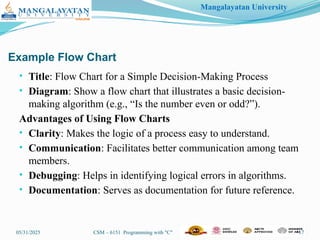
• Oval (Start/End): Indicates the beginning or end of a process.
• Rectangle (Process): Represents a process or operation.
• Diamond (Decision): Indicates a decision point with multiple
outcomes.
• Parallelogram (Input/Output): Represents input or output
operations.
• Arrows (Flow Lines): Show the direction of the flow of control.
Mangalayatan University
05/31/2025 CSM – 6151 Programming with "C" 16
Creating a Flow Chart
• Steps:
• Identify the main steps of the process.
• Determine the sequence of these steps.
• Use standard symbols to represent each step.
• Connect the steps using arrows to indicate the flow.
• Outcome: A clear and concise diagram that represents the
logic of the program or process.
Mangalayatan University
05/31/2025 CSM – 6151 Programming with "C" 17
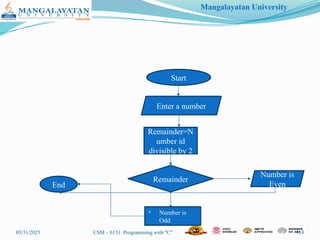
Example Flow Chart
• Title: Flow Chart for a Simple Decision-Making Process
• Diagram: Show a flow chart that illustrates a basic decision-
making algorithm (e.g., “Is the number even or odd?”).
Advantages of Using Flow Charts
• Clarity: Makes the logic of a process easy to understand.
• Communication: Facilitates better communication among team
members.
• Debugging: Helps in identifying logical errors in algorithms.
• Documentation: Serves as documentation for future reference.
Mangalayatan University
05/31/2025 CSM – 6151 Programming with "C" 18
Start
Enter a number
Remainder=N
umber id
divisible by 2
Remainder
Number is
Even
 Number is
Odd
End
Mangalayatan University
05/31/2025 CSM – 6151 Programming with "C" 19
Programs and Programming Languages
• Definition of a Program:
• A sequence of instructions written to perform a specified
task on a computer.
• What is a Programming Language?:
• A formal language comprising a set of instructions used to
produce various kinds of output.
• Purpose of Programming Languages:
• To communicate instructions to a computer.
• To create software applications, tools, and systems.
Mangalayatan University
05/31/2025 CSM – 6151 Programming with "C" 20
Types of Programming Languages
• Low-Level Languages:
• Machine Language: The fundamental language understood by
computers, composed of binary code.
• Assembly Language: A low-level language with a set of instructions
more readable by humans but closely related to machine code.
• High-Level Languages:
• Compiled Languages: C, C++, Java — translated into machine code
by a compiler.
• Interpreted Languages: Python, JavaScript — executed line-by-line
by an interpreter.
• Scripting Languages: Designed for integrating and communicating
with other programming languages.
Mangalayatan University
05/31/2025 CSM – 6151 Programming with "C" 21
Introduction to C Language
• History of C:
• Developed by Dennis Ritchie in the early 1970s at Bell Labs.
• Originally created for developing the UNIX operating system.
• Features of C:
• Procedural Language: Supports a structured approach to
programming.
• Mid-Level Language: Combines the features of both high-level
and low-level languages.
• Portability: Programs written in C are highly portable across
different hardware.
• Efficient Use of Memory: Provides dynamic memory allocation.
Mangalayatan University
05/31/2025 CSM – 6151 Programming with "C" 22
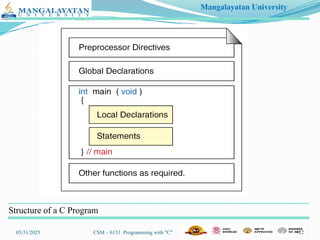
Structure of a C Program
Mangalayatan University
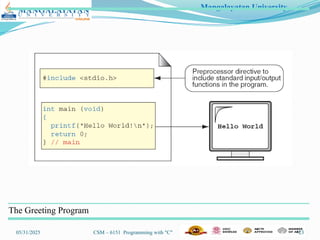
05/31/2025 CSM – 6151 Programming with "C" 23
The Greeting Program
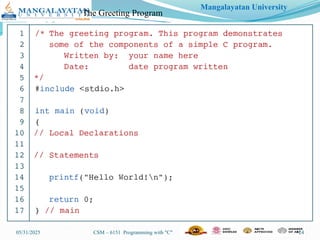
Mangalayatan University
05/31/2025 CSM – 6151 Programming with "C" 24
The Greeting Program
Mangalayatan University
05/31/2025 CSM – 6151 Programming with "C" 25
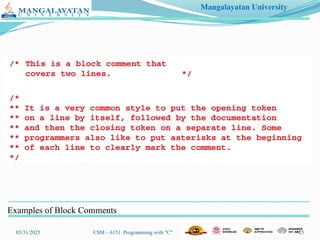
Examples of Block Comments
Mangalayatan University
05/31/2025 CSM – 6151 Programming with "C" 26
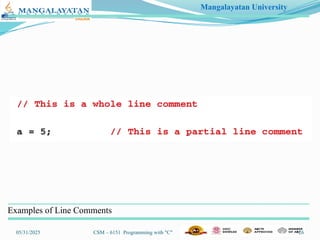
Examples of Line Comments
Mangalayatan University
05/31/2025 CSM – 6151 Programming with "C" 27
Introduction to C Language
• History of C:
• Developed by Dennis Ritchie in the early 1970s at Bell Labs.
• Originally created for developing the UNIX operating system.
• Features of C:
• Procedural Language: Supports a structured approach to
programming.
• Mid-Level Language: Combines the features of both high-level
and low-level languages.
• Portability: Programs written in C are highly portable across
different hardware.
• Efficient Use of Memory: Provides dynamic memory allocation.
Mangalayatan University
05/31/2025 CSM – 6151 Programming with "C" 28
Introduction to C Language
Compiling and Running C Programs
•
Steps to Compile and Run:
1. Write the Program: Create a .c file using a text editor or IDE.
2. Compile the Program: Use a compiler like gcc to compile
the code.
• Command: gcc program.c -o program
3. Run the Program: Execute the compiled output.
• Command: ./program (Linux/Mac) or program.exe (Windows)
Common Tools:
• IDEs: Code::Blocks, Visual Studio, Dev-C++
• Compilers: GCC (GNU Compiler Collection), Clang,
MSVC
Mangalayatan University
05/31/2025 CSM – 6151 Programming with "C" 29
Common Errors in C Programming
Syntax Error Incorrect use of language syntax.
•Example: Missing semicolon, (;).
Runtime Errors: Errors that occur during program
execution.
•Example: Division by zero.
Logical Errors: Program runs but produces incorrect
results.
•Example: Incorrect algorithm implementation.
Compilation Errors: Errors detected by the compiler.
•Example: Missing header files.

C Programming Language (Features and Components)

  • 1.
    Mangalayatan University 05/31/2025 CSM– 6151 Programming with "C" 1 Faculty Name :- Prof. LALIT MOHAN GUPTA Course Name :- Programming with ‘C’ Course Code :- CSM – 6115 Semester :- 1 Class No. :- 2 Chapter No :-1,2,3 JAN’2025 SESSION
  • 2.
    Mangalayatan University 05/31/2025 CSM– 6151 Programming with "C" 2 Programming Paradigms • Imperative Programming: Focuses on how to execute. • Declarative Programming: Focuses on what to execute. • Logical Programming: Focuses on True or False • Examples: SQL (Declarative), Python (Imperative), Prolog (Logical)
  • 3.
    Mangalayatan University 05/31/2025 CSM– 6151 Programming with "C" 3 Analysis of Algorithms and Programs • Benchmarking: Measuring the performance of programs. • Profiling: Analyzing a program to determine which parts of it are time or memory-intensive. • Optimization: Improving the efficiency of algorithms and programs.
  • 4.
    Mangalayatan University 05/31/2025 CSM– 6151 Programming with "C" 4 Real-World Applications of Algorithms • Sorting and Searching: Used in databases, file management. • Encryption Algorithms: Data security and cryptography. • Pathfinding Algorithms: GPS navigation, AI in games. • Machine Learning Algorithms: Data analysis, prediction models.
  • 5.
    Mangalayatan University 05/31/2025 CSM– 6151 Programming with "C" 5 Fundamental Stages of Problem Solving • Definition: Problem-solving is the process of identifying solutions to specific issues using a logical approach. • Importance: Critical for effective programming and software development.
  • 6.
    Mangalayatan University 05/31/2025 CSM– 6151 Programming with "C" 6 Understanding the Problem • Objective: Clearly define the problem. • Steps: • Analyze the problem statement. • Identify input and output requirements. • Determine constraints and limitations. • Outcome: A precise understanding of what needs to be solved.
  • 7.
    Mangalayatan University 05/31/2025 CSM– 6151 Programming with "C" 7 Planning the Solution • Objective: Develop a strategy to solve the problem. • Steps: • Choose an appropriate problem-solving approach (e.g., Divide and Conquer, Dynamic Programming). • Outline the steps required to solve the problem (algorithm). • Create a pseudocode or flowchart. • Outcome: A clear plan of action for solving the problem.
  • 8.
    Mangalayatan University 05/31/2025 CSM– 6151 Programming with "C" 8 Implementing the Solution • Objective: Convert the planned solution into a program. • Steps: • Select a suitable programming language. • Write the code based on the algorithm or pseudocode. • Ensure the code is syntactically correct. • Outcome: A working program that solves the problem.
  • 9.
    Mangalayatan University 05/31/2025 CSM– 6151 Programming with "C" 9 Testing and Debugging • Objective: Ensure the program works correctly and efficiently. • Steps: • Test the program with various inputs, including edge cases. • Identify and fix any errors or bugs. • Optimize performance if necessary. • Outcome: A reliable and efficient program.
  • 10.
    Mangalayatan University 05/31/2025 CSM– 6151 Programming with "C" 10 Documentation and Maintenance • Objective: Maintain and improve the program over time. • Steps: • Document the code for future reference. • Update and modify the program as needed. • Ensure compatibility with new requirements or environments. • Outcome: A sustainable and adaptable program.
  • 11.
    Mangalayatan University 05/31/2025 CSM– 6151 Programming with "C" 11 Introduction to Programming Languages • Definition: A programming language is a formal language comprising a set of instructions that produce various kinds of output. • Purpose: Facilitates communication between the programmer and the machine.
  • 12.
    Mangalayatan University 05/31/2025 CSM– 6151 Programming with "C" 12 Key Features of Programming Languages • Syntax and Semantics: Rules that define the structure and meaning of code. • Data Types: Defines the type of data that can be processed (e.g., integers, floats, strings). • Control Structures: Directs the flow of the program (e.g., loops, conditionals). • Standard Library: A set of pre-written functions and routines available to the programmer. • Error Handling: Mechanisms to handle errors gracefully.
  • 13.
    Mangalayatan University 05/31/2025 CSM– 6151 Programming with "C" 13 Additional Features of Programming Languages • Modularity and Reusability: Supports modular code and reusable functions. • Object-Oriented Features: Supports objects and classes for encapsulating data and functionality. • Portability: Ability to run on different platforms with minimal modifications. • Performance: Efficiency in terms of execution speed and memory usage. • Security: Features that protect against vulnerabilities and unauthorized access.
  • 14.
    Mangalayatan University 05/31/2025 CSM– 6151 Programming with "C" 14 Flow Charts Introduction to Flow Charts • Definition: A flowchart is a diagrammatic representation of a process or algorithm. • Purpose: Visualize the flow of a program or system, making it easier to understand and communicate.
  • 15.
    Mangalayatan University 05/31/2025 CSM– 6151 Programming with "C" 15 Symbols Used in Flow Charts • Oval (Start/End): Indicates the beginning or end of a process. • Rectangle (Process): Represents a process or operation. • Diamond (Decision): Indicates a decision point with multiple outcomes. • Parallelogram (Input/Output): Represents input or output operations. • Arrows (Flow Lines): Show the direction of the flow of control.
  • 16.
    Mangalayatan University 05/31/2025 CSM– 6151 Programming with "C" 16 Creating a Flow Chart • Steps: • Identify the main steps of the process. • Determine the sequence of these steps. • Use standard symbols to represent each step. • Connect the steps using arrows to indicate the flow. • Outcome: A clear and concise diagram that represents the logic of the program or process.
  • 17.
    Mangalayatan University 05/31/2025 CSM– 6151 Programming with "C" 17 Example Flow Chart • Title: Flow Chart for a Simple Decision-Making Process • Diagram: Show a flow chart that illustrates a basic decision- making algorithm (e.g., “Is the number even or odd?”). Advantages of Using Flow Charts • Clarity: Makes the logic of a process easy to understand. • Communication: Facilitates better communication among team members. • Debugging: Helps in identifying logical errors in algorithms. • Documentation: Serves as documentation for future reference.
  • 18.
    Mangalayatan University 05/31/2025 CSM– 6151 Programming with "C" 18 Start Enter a number Remainder=N umber id divisible by 2 Remainder Number is Even  Number is Odd End
  • 19.
    Mangalayatan University 05/31/2025 CSM– 6151 Programming with "C" 19 Programs and Programming Languages • Definition of a Program: • A sequence of instructions written to perform a specified task on a computer. • What is a Programming Language?: • A formal language comprising a set of instructions used to produce various kinds of output. • Purpose of Programming Languages: • To communicate instructions to a computer. • To create software applications, tools, and systems.
  • 20.
    Mangalayatan University 05/31/2025 CSM– 6151 Programming with "C" 20 Types of Programming Languages • Low-Level Languages: • Machine Language: The fundamental language understood by computers, composed of binary code. • Assembly Language: A low-level language with a set of instructions more readable by humans but closely related to machine code. • High-Level Languages: • Compiled Languages: C, C++, Java — translated into machine code by a compiler. • Interpreted Languages: Python, JavaScript — executed line-by-line by an interpreter. • Scripting Languages: Designed for integrating and communicating with other programming languages.
  • 21.
    Mangalayatan University 05/31/2025 CSM– 6151 Programming with "C" 21 Introduction to C Language • History of C: • Developed by Dennis Ritchie in the early 1970s at Bell Labs. • Originally created for developing the UNIX operating system. • Features of C: • Procedural Language: Supports a structured approach to programming. • Mid-Level Language: Combines the features of both high-level and low-level languages. • Portability: Programs written in C are highly portable across different hardware. • Efficient Use of Memory: Provides dynamic memory allocation.
  • 22.
    Mangalayatan University 05/31/2025 CSM– 6151 Programming with "C" 22 Structure of a C Program
  • 23.
    Mangalayatan University 05/31/2025 CSM– 6151 Programming with "C" 23 The Greeting Program
  • 24.
    Mangalayatan University 05/31/2025 CSM– 6151 Programming with "C" 24 The Greeting Program
  • 25.
    Mangalayatan University 05/31/2025 CSM– 6151 Programming with "C" 25 Examples of Block Comments
  • 26.
    Mangalayatan University 05/31/2025 CSM– 6151 Programming with "C" 26 Examples of Line Comments
  • 27.
    Mangalayatan University 05/31/2025 CSM– 6151 Programming with "C" 27 Introduction to C Language • History of C: • Developed by Dennis Ritchie in the early 1970s at Bell Labs. • Originally created for developing the UNIX operating system. • Features of C: • Procedural Language: Supports a structured approach to programming. • Mid-Level Language: Combines the features of both high-level and low-level languages. • Portability: Programs written in C are highly portable across different hardware. • Efficient Use of Memory: Provides dynamic memory allocation.
  • 28.
    Mangalayatan University 05/31/2025 CSM– 6151 Programming with "C" 28 Introduction to C Language Compiling and Running C Programs • Steps to Compile and Run: 1. Write the Program: Create a .c file using a text editor or IDE. 2. Compile the Program: Use a compiler like gcc to compile the code. • Command: gcc program.c -o program 3. Run the Program: Execute the compiled output. • Command: ./program (Linux/Mac) or program.exe (Windows) Common Tools: • IDEs: Code::Blocks, Visual Studio, Dev-C++ • Compilers: GCC (GNU Compiler Collection), Clang, MSVC
  • 29.
    Mangalayatan University 05/31/2025 CSM– 6151 Programming with "C" 29 Common Errors in C Programming Syntax Error Incorrect use of language syntax. •Example: Missing semicolon, (;). Runtime Errors: Errors that occur during program execution. •Example: Division by zero. Logical Errors: Program runs but produces incorrect results. •Example: Incorrect algorithm implementation. Compilation Errors: Errors detected by the compiler. •Example: Missing header files.