@ 2010 Tata McGraw-Hill Education
1
Education
Understanding .Net:Understanding .Net:
The C# EnvironmentThe C# Environment
@ 2010 Tata McGraw-Hill Education
2
Education
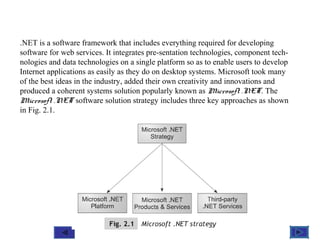
.NET is a software framework that includes everything required for developing
software for web services. It integrates pre-sentation technologies, component tech-
nologies and data technologies on a single platform so as to enable users to develop
Internet applications as easily as they do on desktop systems. Microsoft took many
of the best ideas in the industry, added their own creativity and innovations and
produced a coherent systems solution popularly known as Microsoft .NET. The
Microsoft .NET software solution strategy includes three key approaches as shown
in Fig. 2.1.
@ 2010 Tata McGraw-Hill Education
3
Education
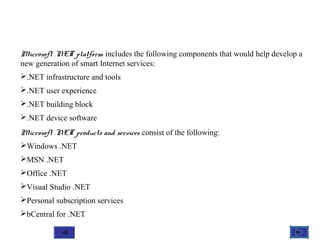
Microsoft .NET platform includes the following components that would help develop a
new generation of smart Internet services:
.NET infrastructure and tools
.NET user experience
.NET building block
.NET device software
Microsoft .NET products and services consist of the following:
Windows .NET
MSN .NET
Office .NET
Visual Studio .NET
Personal subscription services
bCentral for .NET
@ 2010 Tata McGraw-Hill Education
4
Education
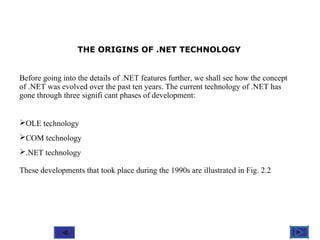
THE ORIGINS OF .NET TECHNOLOGY
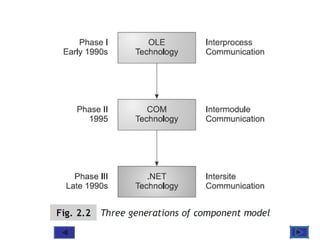
Before going into the details of .NET features further, we shall see how the concept
of .NET was evolved over the past ten years. The current technology of .NET has
gone through three signifi cant phases of development:
OLE technology
COM technology
.NET technology
These developments that took place during the 1990s are illustrated in Fig. 2.2
@ 2010 Tata McGraw-Hill Education
5
Education
@ 2010 Tata McGraw-Hill Education
6
Education
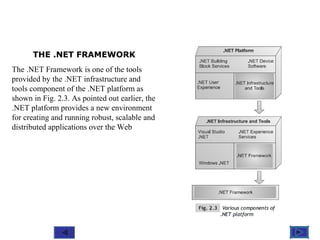
THE .NET FRAMEWORK
The .NET Framework is one of the tools
provided by the .NET infrastructure and
tools component of the .NET platform as
shown in Fig. 2.3. As pointed out earlier, the
.NET platform provides a new environment
for creating and running robust, scalable and
distributed applications over the Web
@ 2010 Tata McGraw-Hill Education
7
Education
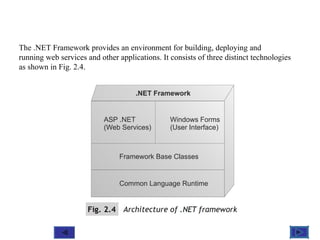
The .NET Framework provides an environment for building, deploying and
running web services and other applications. It consists of three distinct technologies
as shown in Fig. 2.4.
@ 2010 Tata McGraw-Hill Education
8
Education
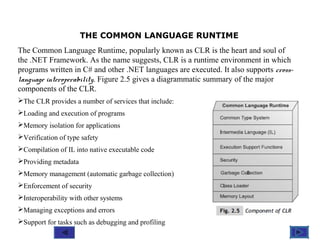
THE COMMON LANGUAGE RUNTIME
The Common Language Runtime, popularly known as CLR is the heart and soul of
the .NET Framework. As the name suggests, CLR is a runtime environment in which
programs written in C# and other .NET languages are executed. It also supports cross-
language interoperability. Figure 2.5 gives a diagrammatic summary of the major
components of the CLR.
The CLR provides a number of services that include:
Loading and execution of programs
Memory isolation for applications
Verification of type safety
Compilation of IL into native executable code
Providing metadata
Memory management (automatic garbage collection)
Enforcement of security
Interoperability with other systems
Managing exceptions and errors
Support for tasks such as debugging and profiling
@ 2010 Tata McGraw-Hill Education
9
Education
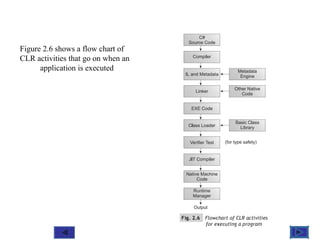
Figure 2.6 shows a flow chart of
CLR activities that go on when an
application is executed
@ 2010 Tata McGraw-Hill Education
10
Education
FRAMEWORK BASE CLASSES
.NET supplies a library of base classes that we can use to implement applications
quickly. We can use them by simply instantiating them and invoking their methods
or by inheriting them through derived classes, thus extending their functionality.
Much of the functionality in the base framework classes resides in the
vast namespace called System. We can use the base classes in the system
namespace for many different tasks including:
Input / Output Operations
String handling
Managing arrays, lists, maps, etc
Accessing files and file systems
Accessing the registry
Security
Windowing
Windows messages
Database management
Evaluation of Mathematical functions
Drawing
Managing errors and exceptions
Connecting to the Internet
And many more
@ 2010 Tata McGraw-Hill Education
11
Education
The .NET Framework provides the following tools for managing user and
application interfaces:
Windows forms
Web forms
Console Applications
Web services
These tools enable users to develop user-friendly desktop-based as well as web-based
applications using a wide variety of languages on the .NET platform.
@ 2010 Tata McGraw-Hill Education
12
Education
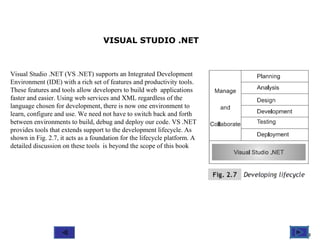
Visual Studio .NET (VS .NET) supports an Integrated Development
Environment (IDE) with a rich set of features and productivity tools.
These features and tools allow developers to build web applications
faster and easier. Using web services and XML regardless of the
language chosen for development, there is now one environment to
learn, configure and use. We need not have to switch back and forth
between environments to build, debug and deploy our code. VS .NET
provides tools that extends support to the development lifecycle. As
shown in Fig. 2.7, it acts as a foundation for the lifecycle platform. A
detailed discussion on these tools is beyond the scope of this book
VISUAL STUDIO .NET

C# intro

  • 1.
    @ 2010 TataMcGraw-Hill Education 1 Education Understanding .Net:Understanding .Net: The C# EnvironmentThe C# Environment
  • 2.
    @ 2010 TataMcGraw-Hill Education 2 Education .NET is a software framework that includes everything required for developing software for web services. It integrates pre-sentation technologies, component tech- nologies and data technologies on a single platform so as to enable users to develop Internet applications as easily as they do on desktop systems. Microsoft took many of the best ideas in the industry, added their own creativity and innovations and produced a coherent systems solution popularly known as Microsoft .NET. The Microsoft .NET software solution strategy includes three key approaches as shown in Fig. 2.1.
  • 3.
    @ 2010 TataMcGraw-Hill Education 3 Education Microsoft .NET platform includes the following components that would help develop a new generation of smart Internet services: .NET infrastructure and tools .NET user experience .NET building block .NET device software Microsoft .NET products and services consist of the following: Windows .NET MSN .NET Office .NET Visual Studio .NET Personal subscription services bCentral for .NET
  • 4.
    @ 2010 TataMcGraw-Hill Education 4 Education THE ORIGINS OF .NET TECHNOLOGY Before going into the details of .NET features further, we shall see how the concept of .NET was evolved over the past ten years. The current technology of .NET has gone through three signifi cant phases of development: OLE technology COM technology .NET technology These developments that took place during the 1990s are illustrated in Fig. 2.2
  • 5.
    @ 2010 TataMcGraw-Hill Education 5 Education
  • 6.
    @ 2010 TataMcGraw-Hill Education 6 Education THE .NET FRAMEWORK The .NET Framework is one of the tools provided by the .NET infrastructure and tools component of the .NET platform as shown in Fig. 2.3. As pointed out earlier, the .NET platform provides a new environment for creating and running robust, scalable and distributed applications over the Web
  • 7.
    @ 2010 TataMcGraw-Hill Education 7 Education The .NET Framework provides an environment for building, deploying and running web services and other applications. It consists of three distinct technologies as shown in Fig. 2.4.
  • 8.
    @ 2010 TataMcGraw-Hill Education 8 Education THE COMMON LANGUAGE RUNTIME The Common Language Runtime, popularly known as CLR is the heart and soul of the .NET Framework. As the name suggests, CLR is a runtime environment in which programs written in C# and other .NET languages are executed. It also supports cross- language interoperability. Figure 2.5 gives a diagrammatic summary of the major components of the CLR. The CLR provides a number of services that include: Loading and execution of programs Memory isolation for applications Verification of type safety Compilation of IL into native executable code Providing metadata Memory management (automatic garbage collection) Enforcement of security Interoperability with other systems Managing exceptions and errors Support for tasks such as debugging and profiling
  • 9.
    @ 2010 TataMcGraw-Hill Education 9 Education Figure 2.6 shows a flow chart of CLR activities that go on when an application is executed
  • 10.
    @ 2010 TataMcGraw-Hill Education 10 Education FRAMEWORK BASE CLASSES .NET supplies a library of base classes that we can use to implement applications quickly. We can use them by simply instantiating them and invoking their methods or by inheriting them through derived classes, thus extending their functionality. Much of the functionality in the base framework classes resides in the vast namespace called System. We can use the base classes in the system namespace for many different tasks including: Input / Output Operations String handling Managing arrays, lists, maps, etc Accessing files and file systems Accessing the registry Security Windowing Windows messages Database management Evaluation of Mathematical functions Drawing Managing errors and exceptions Connecting to the Internet And many more
  • 11.
    @ 2010 TataMcGraw-Hill Education 11 Education The .NET Framework provides the following tools for managing user and application interfaces: Windows forms Web forms Console Applications Web services These tools enable users to develop user-friendly desktop-based as well as web-based applications using a wide variety of languages on the .NET platform.
  • 12.
    @ 2010 TataMcGraw-Hill Education 12 Education Visual Studio .NET (VS .NET) supports an Integrated Development Environment (IDE) with a rich set of features and productivity tools. These features and tools allow developers to build web applications faster and easier. Using web services and XML regardless of the language chosen for development, there is now one environment to learn, configure and use. We need not have to switch back and forth between environments to build, debug and deploy our code. VS .NET provides tools that extends support to the development lifecycle. As shown in Fig. 2.7, it acts as a foundation for the lifecycle platform. A detailed discussion on these tools is beyond the scope of this book VISUAL STUDIO .NET