JavaScript Lab
January 18, 2016
Building Native Mobile Apps using
Javascript with Titanium
Fokke Zandbergen
Developer Evangelist
Appcelerator
@FokkeZB
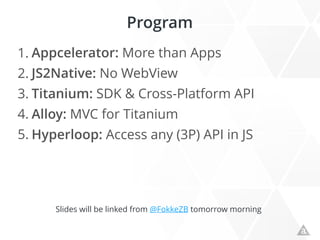
Program
1. Appcelerator: More than Apps
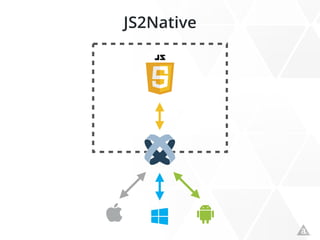
2. JS2Native: No WebView
3. Titanium: SDK & Cross-Platform API
4. Alloy: MVC for Titanium
5. Hyperloop: Access any (3P) API in JS
Slides will be linked from @FokkeZB tomorrow morning
Appcelerator: More than Apps
And Why This is Great News for All
2 Native
NO!
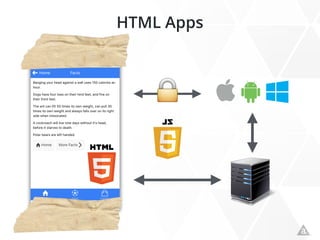
HTML Apps
!
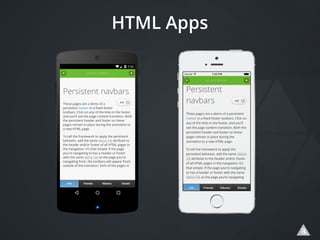
HTML Apps
JS2Native
Titanium
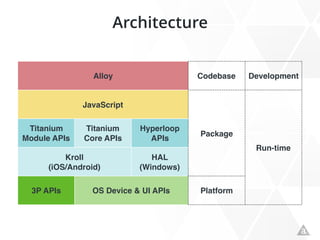
Architecture
Alloy Codebase Development
JavaScript
Package
Run-time
Titanium
Module APIs
Titanium
Core APIs
Hyperloop
APIs
Kroll
(iOS/Android)
HAL
(Windows)
3P APIs OS Device & UI APIs Platform
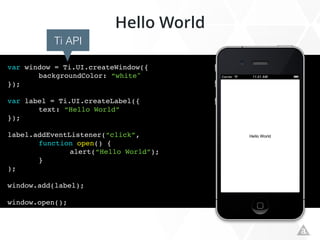
Hello World
var window = Ti.UI.createWindow({
backgroundColor: “white"
});
var label = Ti.UI.createLabel({
text: “Hello World”
});
label.addEventListener(“click”,
function open() {
alert(“Hello World”);
}
);
window.add(label);
window.open();
Ti API
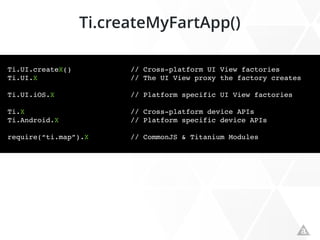
Ti.createMyFartApp()
Ti.UI.createX() // Cross-platform UI View factories
Ti.UI.X // The UI View proxy the factory creates
Ti.UI.iOS.X // Platform specific UI View factories
Ti.X // Cross-platform device APIs
Ti.Android.X // Platform specific device APIs
require(“ti.map”).X // CommonJS & Titanium Modules
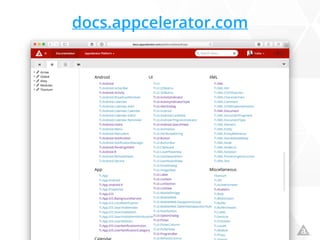
docs.appcelerator.com
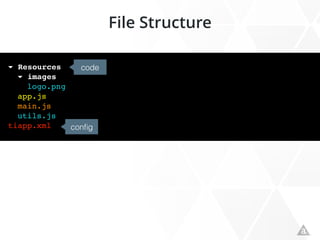
File Structure
▾ Resources
▾ images
logo.png
app.js
main.js
utils.js
tiapp.xml config
code
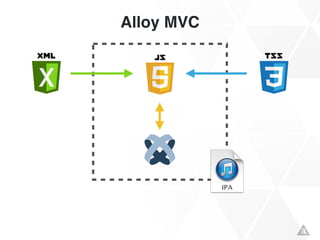
Alloy MVC
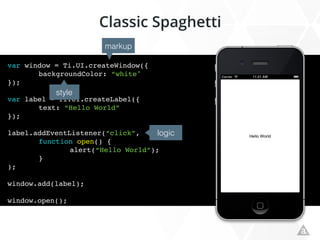
Classic Spaghetti
var window = Ti.UI.createWindow({
backgroundColor: “white"
});
var label = Ti.UI.createLabel({
text: “Hello World”
});
label.addEventListener(“click”,
function open() {
alert(“Hello World”);
}
);
window.add(label);
window.open();
style
logic
markup
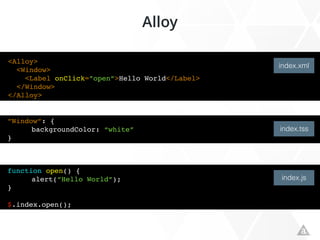
<Alloy>
<Window>
<Label onClick=”open”>Hello World</Label>
</Window>
</Alloy>
”Window”: {
backgroundColor: “white”
}
function open() {
alert(“Hello World”);
}
$.index.open();
index.xml
index.tss
index.js
Alloy
▸ app
▾ Resources
▾ alloy
▾ controllers
index.js
backbone.js
CFG.js
underscore.js
▾ images
logo.png
alloy.js
app.js
utils.js
tiapp.xml
▾ Resources
▾ images
logo.png
app.js
main.js
utils.js
tiapp.xml
▾ app
▾ assets
▾ images

logo.png
▾ controllers
index.js
▾ lib
utils.js
▾ styles
index.tss
▾ views
index.xml
▾ widgets
alloy.js
config.json
tiapp.xml
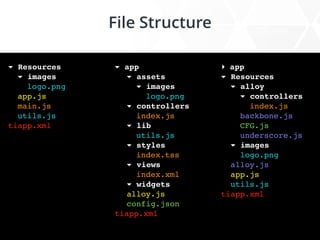
File Structure
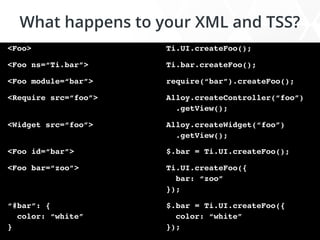
What happens to your XML and TSS?
<Foo>
<Foo ns=“Ti.bar”>
<Foo module=“bar”>
<Require src=“foo”>

<Widget src=“foo”>

<Foo id=“bar”>
<Foo bar=“zoo”>


“#bar”: {

color: “white”

}
Ti.UI.createFoo();
Ti.bar.createFoo();
require(“bar”).createFoo();
Alloy.createController(“foo”)

.getView();
Alloy.createWidget(“foo”)

.getView();
$.bar = Ti.UI.createFoo();
Ti.UI.createFoo({

bar: “zoo”

});
$.bar = Ti.UI.createFoo({

color: “white”

});
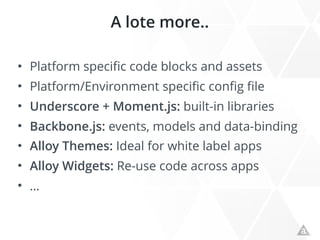
A lote more..
• Platform specific code blocks and assets
• Platform/Environment specific config file
• Underscore + Moment.js: built-in libraries
• Backbone.js: events, models and data-binding
• Alloy Themes: Ideal for white label apps
• Alloy Widgets: Re-use code across apps
• …

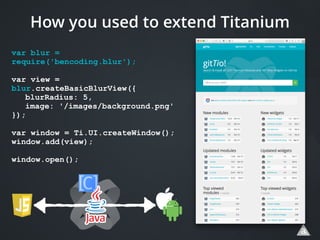
var blur =
require('bencoding.blur');
var view =
blur.createBasicBlurView({
blurRadius: 5,
image: '/images/background.png'
});
var window = Ti.UI.createWindow();
window.add(view);
window.open();
How you used to extend Titanium
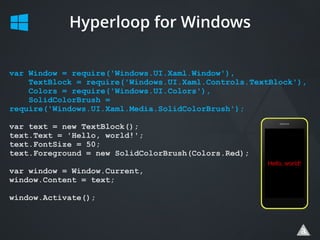
Hyperloop for Windows
var Window = require('Windows.UI.Xaml.Window'),
TextBlock = require('Windows.UI.Xaml.Controls.TextBlock'),
Colors = require('Windows.UI.Colors'),
SolidColorBrush =
require('Windows.UI.Xaml.Media.SolidColorBrush');
var text = new TextBlock();
text.Text = 'Hello, world!';
text.FontSize = 50;
text.Foreground = new SolidColorBrush(Colors.Red);
var window = Window.Current,
window.Content = text;
window.Activate();

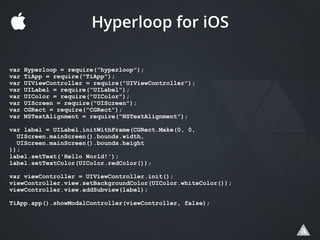
var Hyperloop = require("hyperloop");
var TiApp = require("TiApp");
var UIViewController = require("UIViewController");
var UILabel = require("UILabel");
var UIColor = require("UIColor");
var UIScreen = require("UIScreen");
var CGRect = require("CGRect");
var NSTextAlignment = require("NSTextAlignment");
var label = UILabel.initWithFrame(CGRect.Make(0, 0,
UIScreen.mainScreen().bounds.width,
UIScreen.mainScreen().bounds.height
));
label.setText('Hello World!');
label.setTextColor(UIColor.redColor());
var viewController = UIViewController.init();
viewController.view.setBackgroundColor(UIColor.whiteColor());
viewController.view.addSubview(label);
TiApp.app().showModalController(viewController, false);
Hyperloop for iOS

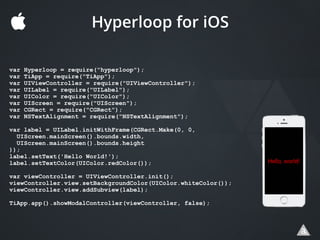
var Hyperloop = require("hyperloop");
var TiApp = require("TiApp");
var UIViewController = require("UIViewController");
var UILabel = require("UILabel");
var UIColor = require("UIColor");
var UIScreen = require("UIScreen");
var CGRect = require("CGRect");
var NSTextAlignment = require("NSTextAlignment");
var label = UILabel.initWithFrame(CGRect.Make(0, 0,
UIScreen.mainScreen().bounds.width,
UIScreen.mainScreen().bounds.height
));
label.setText('Hello World!');
label.setTextColor(UIColor.redColor());
var viewController = UIViewController.init();
viewController.view.setBackgroundColor(UIColor.whiteColor());
viewController.view.addSubview(label);
TiApp.app().showModalController(viewController, false);
Hyperloop for iOS
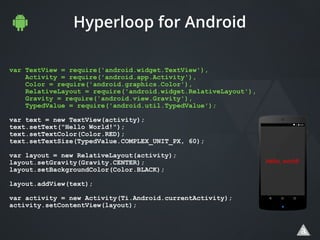
Hyperloop for Android
var TextView = require('android.widget.TextView'),
Activity = require('android.app.Activity'),
Color = require('android.graphics.Color'),
RelativeLayout = require('android.widget.RelativeLayout'),
Gravity = require('android.view.Gravity'),
TypedValue = require('android.util.TypedValue');
var text = new TextView(activity);
text.setText("Hello World!");
text.setTextColor(Color.RED);
text.setTextSize(TypedValue.COMPLEX_UNIT_PX, 60);
var layout = new RelativeLayout(activity);
layout.setGravity(Gravity.CENTER);
layout.setBackgroundColor(Color.BLACK);
layout.addView(text);
var activity = new Activity(Ti.Android.currentActivity);
activity.setContentView(layout);
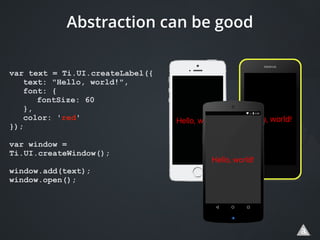
var text = Ti.UI.createLabel({
text: "Hello, world!",
font: {
fontSize: 60
},
color: 'red'
});
var window =
Ti.UI.createWindow();
window.add(text);
window.open();
Abstraction can be good
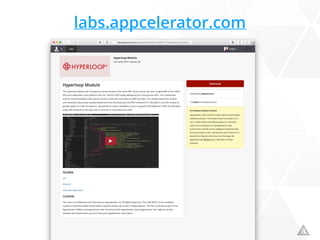
labs.appcelerator.com
www.appcelerator.com/signup
Slides will be linked from @FokkeZB tomorrow morning
Thank You !

Building Native Mobile Apps using Javascript with Titanium

  • 1.
    JavaScript Lab January 18,2016 Building Native Mobile Apps using Javascript with Titanium
  • 2.
  • 3.
    Program 1. Appcelerator: Morethan Apps 2. JS2Native: No WebView 3. Titanium: SDK & Cross-Platform API 4. Alloy: MVC for Titanium 5. Hyperloop: Access any (3P) API in JS Slides will be linked from @FokkeZB tomorrow morning
  • 4.
  • 5.
    And Why Thisis Great News for All
  • 9.
  • 10.
  • 11.
  • 12.
  • 13.
  • 14.
  • 15.
    Architecture Alloy Codebase Development JavaScript Package Run-time Titanium ModuleAPIs Titanium Core APIs Hyperloop APIs Kroll (iOS/Android) HAL (Windows) 3P APIs OS Device & UI APIs Platform
  • 16.
    Hello World var window= Ti.UI.createWindow({ backgroundColor: “white" }); var label = Ti.UI.createLabel({ text: “Hello World” }); label.addEventListener(“click”, function open() { alert(“Hello World”); } ); window.add(label); window.open(); Ti API
  • 17.
    Ti.createMyFartApp() Ti.UI.createX() // Cross-platformUI View factories Ti.UI.X // The UI View proxy the factory creates Ti.UI.iOS.X // Platform specific UI View factories Ti.X // Cross-platform device APIs Ti.Android.X // Platform specific device APIs require(“ti.map”).X // CommonJS & Titanium Modules
  • 18.
  • 19.
    File Structure ▾ Resources ▾images logo.png app.js main.js utils.js tiapp.xml config code
  • 21.
  • 22.
    Classic Spaghetti var window= Ti.UI.createWindow({ backgroundColor: “white" }); var label = Ti.UI.createLabel({ text: “Hello World” }); label.addEventListener(“click”, function open() { alert(“Hello World”); } ); window.add(label); window.open(); style logic markup
  • 23.
    <Alloy> <Window> <Label onClick=”open”>Hello World</Label> </Window> </Alloy> ”Window”:{ backgroundColor: “white” } function open() { alert(“Hello World”); } $.index.open(); index.xml index.tss index.js Alloy
  • 24.
    ▸ app ▾ Resources ▾alloy ▾ controllers index.js backbone.js CFG.js underscore.js ▾ images logo.png alloy.js app.js utils.js tiapp.xml ▾ Resources ▾ images logo.png app.js main.js utils.js tiapp.xml ▾ app ▾ assets ▾ images
 logo.png ▾ controllers index.js ▾ lib utils.js ▾ styles index.tss ▾ views index.xml ▾ widgets alloy.js config.json tiapp.xml File Structure
  • 25.
    What happens toyour XML and TSS? <Foo> <Foo ns=“Ti.bar”> <Foo module=“bar”> <Require src=“foo”>
 <Widget src=“foo”>
 <Foo id=“bar”> <Foo bar=“zoo”>
 
 “#bar”: {
 color: “white”
 } Ti.UI.createFoo(); Ti.bar.createFoo(); require(“bar”).createFoo(); Alloy.createController(“foo”)
 .getView(); Alloy.createWidget(“foo”)
 .getView(); $.bar = Ti.UI.createFoo(); Ti.UI.createFoo({
 bar: “zoo”
 }); $.bar = Ti.UI.createFoo({
 color: “white”
 });
  • 26.
    A lote more.. •Platform specific code blocks and assets • Platform/Environment specific config file • Underscore + Moment.js: built-in libraries • Backbone.js: events, models and data-binding • Alloy Themes: Ideal for white label apps • Alloy Widgets: Re-use code across apps • …
  • 29.
     var blur = require('bencoding.blur'); varview = blur.createBasicBlurView({ blurRadius: 5, image: '/images/background.png' }); var window = Ti.UI.createWindow(); window.add(view); window.open(); How you used to extend Titanium
  • 30.
    Hyperloop for Windows varWindow = require('Windows.UI.Xaml.Window'), TextBlock = require('Windows.UI.Xaml.Controls.TextBlock'), Colors = require('Windows.UI.Colors'), SolidColorBrush = require('Windows.UI.Xaml.Media.SolidColorBrush'); var text = new TextBlock(); text.Text = 'Hello, world!'; text.FontSize = 50; text.Foreground = new SolidColorBrush(Colors.Red); var window = Window.Current, window.Content = text; window.Activate();
  • 31.
     var Hyperloop =require("hyperloop"); var TiApp = require("TiApp"); var UIViewController = require("UIViewController"); var UILabel = require("UILabel"); var UIColor = require("UIColor"); var UIScreen = require("UIScreen"); var CGRect = require("CGRect"); var NSTextAlignment = require("NSTextAlignment"); var label = UILabel.initWithFrame(CGRect.Make(0, 0, UIScreen.mainScreen().bounds.width, UIScreen.mainScreen().bounds.height )); label.setText('Hello World!'); label.setTextColor(UIColor.redColor()); var viewController = UIViewController.init(); viewController.view.setBackgroundColor(UIColor.whiteColor()); viewController.view.addSubview(label); TiApp.app().showModalController(viewController, false); Hyperloop for iOS
  • 32.
     var Hyperloop =require("hyperloop"); var TiApp = require("TiApp"); var UIViewController = require("UIViewController"); var UILabel = require("UILabel"); var UIColor = require("UIColor"); var UIScreen = require("UIScreen"); var CGRect = require("CGRect"); var NSTextAlignment = require("NSTextAlignment"); var label = UILabel.initWithFrame(CGRect.Make(0, 0, UIScreen.mainScreen().bounds.width, UIScreen.mainScreen().bounds.height )); label.setText('Hello World!'); label.setTextColor(UIColor.redColor()); var viewController = UIViewController.init(); viewController.view.setBackgroundColor(UIColor.whiteColor()); viewController.view.addSubview(label); TiApp.app().showModalController(viewController, false); Hyperloop for iOS
  • 33.
    Hyperloop for Android varTextView = require('android.widget.TextView'), Activity = require('android.app.Activity'), Color = require('android.graphics.Color'), RelativeLayout = require('android.widget.RelativeLayout'), Gravity = require('android.view.Gravity'), TypedValue = require('android.util.TypedValue'); var text = new TextView(activity); text.setText("Hello World!"); text.setTextColor(Color.RED); text.setTextSize(TypedValue.COMPLEX_UNIT_PX, 60); var layout = new RelativeLayout(activity); layout.setGravity(Gravity.CENTER); layout.setBackgroundColor(Color.BLACK); layout.addView(text); var activity = new Activity(Ti.Android.currentActivity); activity.setContentView(layout);
  • 34.
    var text =Ti.UI.createLabel({ text: "Hello, world!", font: { fontSize: 60 }, color: 'red' }); var window = Ti.UI.createWindow(); window.add(text); window.open(); Abstraction can be good
  • 35.
  • 36.
  • 37.
    Slides will belinked from @FokkeZB tomorrow morning Thank You !