Buildinga
BusinessWebsite
Topics
1. Why build a website for your
business
2. How to build a website
3. Additional resources
2
ABOUT US
Hello Web is a startup software development
company.
Our Services
• Web design and development
• Mobile App development
• QA engineering
• Digital Marketing and Analytics
3
Our office
9711 Washingtonian Blvd, Suite 550 - Gaithersburg, MD
Phone: (202) 850-9001
Email: contact@helloweb.io
ABOUT US
Gil Silva
• Founder and CEO of Hello Web
• Software Engineer
• Areas of expertise: DevOps and Cloud Computing
• Currently responsible for Business Development at Hello
Web
Follow me on Twitter @GilThoughts
4
Our office
9711 Washingtonian Blvd, Suite 550 - Gaithersburg, MD
Phone: (202) 850-9001
Email: contact@helloweb.io
WhyBuilda
Websiteforyour
Business
5
THE NUMBERS
According to Forbes…
• 81% of buyers check online before deciding on a new
purchase.
• 84% of people trust online reviews as much as personal
recommendations.
• 93% of people searching never go past the first 2 pages.
6
THE BENEFITS
Some benefits of having an online presence include:
• Lower costs compared to traditional brick-and-mortar
stores
• Flexible hours, including starting as a part time business.
• Flexible management of inventory.
• Broader visibility beyond local customers.
7
HowtoBuilda
Website
8
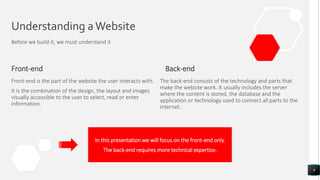
Understanding aWebsite
Before we build it, we must understand it
Front-end
Front-end is the part of the website the user interacts with.
It is the combination of the design, the layout and images
visually accessible to the user to select, read or enter
information.
Back-end
9
The back-end consists of the technology and parts that
make the website work. It usually includes the server
where the content is stored, the database and the
application or technology used to connect all parts to the
internet.
In this presentation we will focus on the front-end only.
The back-end requires more technical expertise.
10
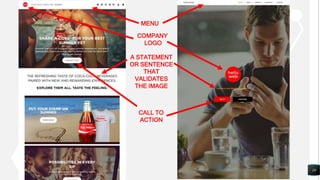
MENU
CALL TO
ACTION
A STATEMENT
OR SENTENCE
THAT
VALIDATES
THE IMAGE
COMPANY
LOGO
Understanding aWebsite
Before we build it, we must understand it
Types of websites
There are many types of websites.
From a technical point of view, most websites are
categorizes as:
• Standard websites (also called static websites)
• Dynamic websites
• E-Commerce
• Blogs
• Social networks
11
StaticWebsites
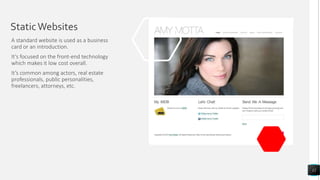
A standard website is used as a business
card or an introduction.
It’s focused on the front-end technology
which makes it low cost overall.
It’s common among actors, real estate
professionals, public personalities,
freelancers, attorneys, etc.
12
Dynamic Websites
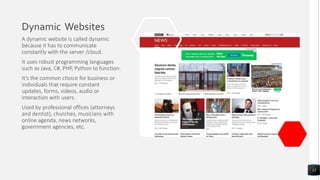
A dynamic website is called dynamic
because it has to communicate
constantly with the server /cloud.
It uses robust programming languages
such as Java, C#, PHP, Python to function.
It’s the common choice for business or
individuals that require constant
updates, forms, videos, audio or
interaction with users.
Used by professional offices (attorneys
and dentist), churches, musicians with
online agenda, news networks,
government agencies, etc.
13
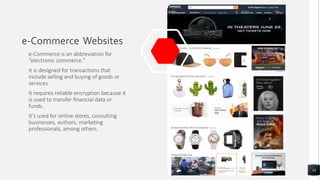
e-Commerce Websites
e-Commerce is an abbreviation for
“electronic commerce.”
It is designed for transactions that
include selling and buying of goods or
services.
It requires reliable encryption because it
is used to transfer financial data or
funds.
It’s used for online stores, consulting
businesses, authors, marketing
professionals, among others.
14
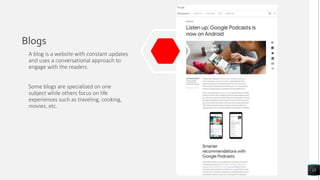
Blogs
A blog is a website with constant updates
and uses a conversational approach to
engage with the readers.
Some blogs are specialized on one
subject while others focus on life
experiences such as traveling, cooking,
movies, etc.
15
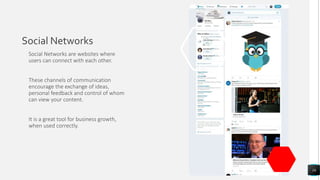
Social Networks
Social Networks are websites where
users can connect with each other.
These channels of communication
encourage the exchange of ideas,
personal feedback and control of whom
can view your content.
It is a great tool for business growth,
when used correctly.
16
HandsOn,
Let’sbuildit…
17
YOUR WEB ADDRESS
Find a domain for your website
18
Now that you know which website is the most suitable to your
business, it’s time to build it
Buy a domain for your website.
Some options are:
• Google domain – https://domains.google.com
• Domain dot com – https://domain.com
• GoDaddy – https://godaddy.com
Note: avoid searching domain names on GoDaddy
LOGO DESIGN
Design a logo
19
Now that you know which kind of website is the most suitable to your
business, it’s time to build it.
Your logo helps define your business branding
• Keep it simple
• Use solid colors compatible to different screens
• Choose a frame that is either a square or a circle
• Or use a drawing with minimalist lines
• Consider hiring a professional
WIREFRAME
Design the page layout
20
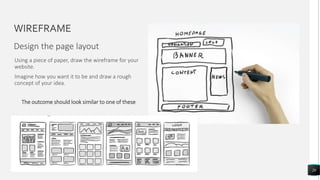
Using a piece of paper, draw the wireframe for your
website.
Imagine how you want it to be and draw a rough
concept of your idea.
The outcome should look similar to one of these
CONTENT
Write Down What Your Business is
About
21
Keep it simple.
Short sentences and clear statements.
Avoid technical jargons.
Use language accessible to a diverse audience.
You should include content for:
• Homepage: What is your business about?
• About Us: Tell a short but compelling story.
• Products/Services: What do we do? What do we
offer?
• Contact Us: Include email and social media.
Depending on business, telephone and address.
PERSONALIZED EMAIL
Create a personalized email for your
business.
It will give you an edge when
competing against more stablished
businesses.
It also prevents your emails from
being tagged as SPAM. Office 365 for Business
Google G Suite
• Starts at $5/month per user
22
• Starts at $5/month per user
HOSTING
Find a place to host your website.
After your website is created, it
must be hosted in order to be
accessible online.
Your options of hosting companies
include:
• WordPress
• Hello Web
• BlueHost
• Microsoft Cloud Azure
(professional level)
• Amazon Cloud AWS (professional
level)
• Google Could (professional level)
23
DIY or Professionally Made
The decision between doing it
yourself or hiring a web
development company is something
personal.
Your budget is a crucial part of this
decision as well as what you’re
trying to accomplish with your
website.
Let’s consider both options.
24
DIY
25
• For simpler websites
• Less secure
• Low demand of page viewership
You should consider using
WordPress (https://wordpress.com ):
• It’s free
• Offers drag and drop
Avoid the so-called free templates.
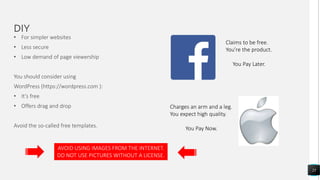
Claims to be free.
You’re the product.
You Pay Later.
Charges an arm and a leg.
You expect high quality.
You Pay Now.
AVOID USING IMAGES FROM THE INTERNET.
DO NOT USE PICTURES WITHOUT A LICENSE.
PROFESSIONALWORK
26
• Simple, complex and anything in between
• Responsive Web Design (RWD) – Works on any device
• Customer Relationship Management (CRM) included
• Provides data analytics to monitor your results
• Monitored for security to prevent cyber attacks
• High demand and scalability. Handles millions of users
simultaneously across the globe
• Uses top of the industry cloud computing for safety and speed
• Includes Search Engine Optimization (SEO)
Next Steps
27
ADDITIONAL STEPS
28
Search Engine Optimization
• Consider using SEO to maximize exposure (both for DIY or
professional development).
• SEO increases traffic to your website
• Increase awareness about your brand
Use Google Business
• Register for free
• Help with business exposure
Add Social Media channels to your website
• Choose a few social media channels of your choice and link it/them
to your website.
29
Take your business to the next level
ThankYou
Gil Silva
(202) 850-9001
contact@helloweb.io
www.helloweb.io

Building a Business Website

  • 1.
  • 2.
    Topics 1. Why builda website for your business 2. How to build a website 3. Additional resources 2
  • 3.
    ABOUT US Hello Webis a startup software development company. Our Services • Web design and development • Mobile App development • QA engineering • Digital Marketing and Analytics 3 Our office 9711 Washingtonian Blvd, Suite 550 - Gaithersburg, MD Phone: (202) 850-9001 Email: contact@helloweb.io
  • 4.
    ABOUT US Gil Silva •Founder and CEO of Hello Web • Software Engineer • Areas of expertise: DevOps and Cloud Computing • Currently responsible for Business Development at Hello Web Follow me on Twitter @GilThoughts 4 Our office 9711 Washingtonian Blvd, Suite 550 - Gaithersburg, MD Phone: (202) 850-9001 Email: contact@helloweb.io
  • 5.
  • 6.
    THE NUMBERS According toForbes… • 81% of buyers check online before deciding on a new purchase. • 84% of people trust online reviews as much as personal recommendations. • 93% of people searching never go past the first 2 pages. 6
  • 7.
    THE BENEFITS Some benefitsof having an online presence include: • Lower costs compared to traditional brick-and-mortar stores • Flexible hours, including starting as a part time business. • Flexible management of inventory. • Broader visibility beyond local customers. 7
  • 8.
  • 9.
    Understanding aWebsite Before webuild it, we must understand it Front-end Front-end is the part of the website the user interacts with. It is the combination of the design, the layout and images visually accessible to the user to select, read or enter information. Back-end 9 The back-end consists of the technology and parts that make the website work. It usually includes the server where the content is stored, the database and the application or technology used to connect all parts to the internet. In this presentation we will focus on the front-end only. The back-end requires more technical expertise.
  • 10.
    10 MENU CALL TO ACTION A STATEMENT ORSENTENCE THAT VALIDATES THE IMAGE COMPANY LOGO
  • 11.
    Understanding aWebsite Before webuild it, we must understand it Types of websites There are many types of websites. From a technical point of view, most websites are categorizes as: • Standard websites (also called static websites) • Dynamic websites • E-Commerce • Blogs • Social networks 11
  • 12.
    StaticWebsites A standard websiteis used as a business card or an introduction. It’s focused on the front-end technology which makes it low cost overall. It’s common among actors, real estate professionals, public personalities, freelancers, attorneys, etc. 12
  • 13.
    Dynamic Websites A dynamicwebsite is called dynamic because it has to communicate constantly with the server /cloud. It uses robust programming languages such as Java, C#, PHP, Python to function. It’s the common choice for business or individuals that require constant updates, forms, videos, audio or interaction with users. Used by professional offices (attorneys and dentist), churches, musicians with online agenda, news networks, government agencies, etc. 13
  • 14.
    e-Commerce Websites e-Commerce isan abbreviation for “electronic commerce.” It is designed for transactions that include selling and buying of goods or services. It requires reliable encryption because it is used to transfer financial data or funds. It’s used for online stores, consulting businesses, authors, marketing professionals, among others. 14
  • 15.
    Blogs A blog isa website with constant updates and uses a conversational approach to engage with the readers. Some blogs are specialized on one subject while others focus on life experiences such as traveling, cooking, movies, etc. 15
  • 16.
    Social Networks Social Networksare websites where users can connect with each other. These channels of communication encourage the exchange of ideas, personal feedback and control of whom can view your content. It is a great tool for business growth, when used correctly. 16
  • 17.
  • 18.
    YOUR WEB ADDRESS Finda domain for your website 18 Now that you know which website is the most suitable to your business, it’s time to build it Buy a domain for your website. Some options are: • Google domain – https://domains.google.com • Domain dot com – https://domain.com • GoDaddy – https://godaddy.com Note: avoid searching domain names on GoDaddy
  • 19.
    LOGO DESIGN Design alogo 19 Now that you know which kind of website is the most suitable to your business, it’s time to build it. Your logo helps define your business branding • Keep it simple • Use solid colors compatible to different screens • Choose a frame that is either a square or a circle • Or use a drawing with minimalist lines • Consider hiring a professional
  • 20.
    WIREFRAME Design the pagelayout 20 Using a piece of paper, draw the wireframe for your website. Imagine how you want it to be and draw a rough concept of your idea. The outcome should look similar to one of these
  • 21.
    CONTENT Write Down WhatYour Business is About 21 Keep it simple. Short sentences and clear statements. Avoid technical jargons. Use language accessible to a diverse audience. You should include content for: • Homepage: What is your business about? • About Us: Tell a short but compelling story. • Products/Services: What do we do? What do we offer? • Contact Us: Include email and social media. Depending on business, telephone and address.
  • 22.
    PERSONALIZED EMAIL Create apersonalized email for your business. It will give you an edge when competing against more stablished businesses. It also prevents your emails from being tagged as SPAM. Office 365 for Business Google G Suite • Starts at $5/month per user 22 • Starts at $5/month per user
  • 23.
    HOSTING Find a placeto host your website. After your website is created, it must be hosted in order to be accessible online. Your options of hosting companies include: • WordPress • Hello Web • BlueHost • Microsoft Cloud Azure (professional level) • Amazon Cloud AWS (professional level) • Google Could (professional level) 23
  • 24.
    DIY or ProfessionallyMade The decision between doing it yourself or hiring a web development company is something personal. Your budget is a crucial part of this decision as well as what you’re trying to accomplish with your website. Let’s consider both options. 24
  • 25.
    DIY 25 • For simplerwebsites • Less secure • Low demand of page viewership You should consider using WordPress (https://wordpress.com ): • It’s free • Offers drag and drop Avoid the so-called free templates. Claims to be free. You’re the product. You Pay Later. Charges an arm and a leg. You expect high quality. You Pay Now. AVOID USING IMAGES FROM THE INTERNET. DO NOT USE PICTURES WITHOUT A LICENSE.
  • 26.
    PROFESSIONALWORK 26 • Simple, complexand anything in between • Responsive Web Design (RWD) – Works on any device • Customer Relationship Management (CRM) included • Provides data analytics to monitor your results • Monitored for security to prevent cyber attacks • High demand and scalability. Handles millions of users simultaneously across the globe • Uses top of the industry cloud computing for safety and speed • Includes Search Engine Optimization (SEO)
  • 27.
  • 28.
    ADDITIONAL STEPS 28 Search EngineOptimization • Consider using SEO to maximize exposure (both for DIY or professional development). • SEO increases traffic to your website • Increase awareness about your brand Use Google Business • Register for free • Help with business exposure Add Social Media channels to your website • Choose a few social media channels of your choice and link it/them to your website.
  • 29.
    29 Take your businessto the next level
  • 30.