CREATING VIRAL
MOBILE APPS FOR
YOUR STARTUP
Caleb Yang
Freelance Developer
AGENDA
TECHNOLOGY
TRENDS.
CONVERSION
STORIES
MOBILE
APPLICATION & UI
FUNCTIONALITY
OF MOBILE APP.
USER INTERFACE
OF MOBILE APP.
QUESTION AND
ANSWER
Who Am I
◦ Current Deskside Engineer at Infinite Computer Solutions
◦ Worked on different User Interface Designs and Web Applications for some startups
◦ Frontend Developer with experience in JavaScript, HTML and CSS
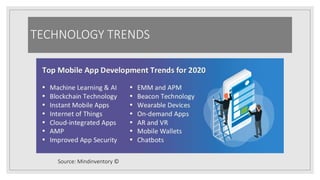
TECHNOLOGY TRENDS
Source: Mindinventory ©
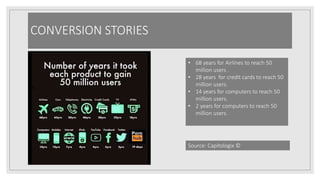
CONVERSION STORIES
• 68 years for Airlines to reach 50
million users .
• 28 years for credit cards to reach 50
million users.
• 14 years for computers to reach 50
million users.
• 2 years for computers to reach 50
million users.
Source: Capitologix ©
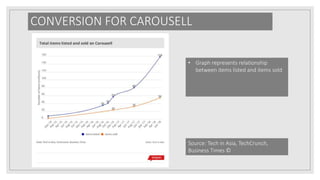
CONVERSION FOR CAROUSELL
• Graph represents relationship
between items listed and items sold
Source: Tech in Asia, TechCrunch,
Business Times ©
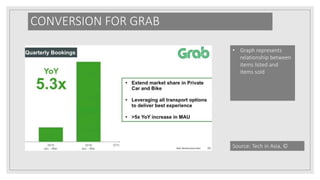
CONVERSION FOR GRAB
• Graph represents
relationship between
items listed and
items sold
Source: Tech in Asia, ©
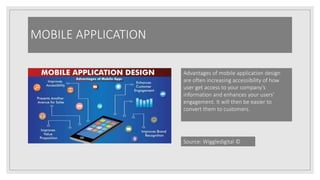
MOBILE APPLICATION
Advantages of mobile application design
are often increasing accessibility of how
user get access to your company’s
information and enhances your users’
engagement. It will then be easier to
convert them to customers.
Source: Wiggledigital ©
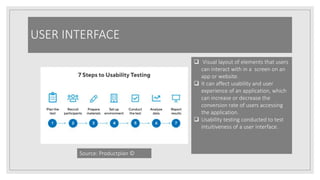
USER INTERFACE
 Visual layout of elements that users
can interact with in a screen on an
app or website.
 It can affect usability and user
experience of an application, which
can increase or decrease the
conversion rate of users accessing
the application.
 Usability testing conducted to test
intuitiveness of a user interface.
Source: Productplan ©
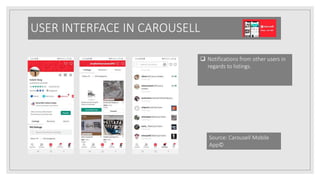
USER INTERFACE IN CAROUSELL
 Notifications from other users in
regards to listings.
Source: Carousell Mobile
App©
USER INTERFACE (continued)
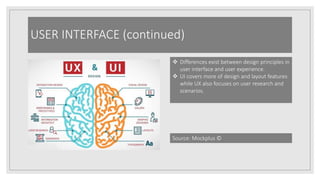
 Differences exist between design principles in
user interface and user experience.
 UI covers more of design and layout features
while UX also focuses on user research and
scenarios.
Source: Mockplus ©
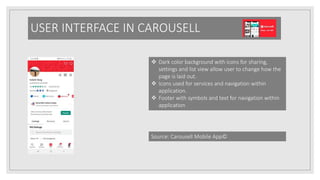
USER INTERFACE IN CAROUSELL
 Dark color background with icons for sharing,
settings and list view allow user to change how the
page is laid out.
 Icons used for services and navigation within
application.
 Footer with symbols and text for navigation within
application
Source: Carousell Mobile App©
USER INTERFACE IN CAROUSELL
 Favicons for categories
 Different listings uploaded by users
 Slider for navigation of different news
Source: Carousell Mobile App©
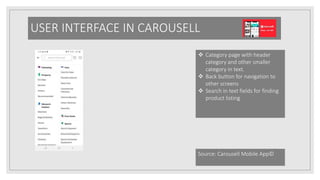
USER INTERFACE IN CAROUSELL
 Category page with header
category and other smaller
category in text.
 Back button for navigation to
other screens
 Search in text fields for finding
product listing
Source: Carousell Mobile App©
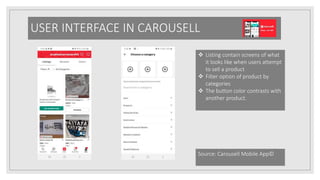
USER INTERFACE IN CAROUSELL
 Listing contain screens of what
it looks like when users attempt
to sell a product
 Filter option of product by
categories
 The button color contrasts with
another product.
Source: Carousell Mobile App©
USER INTERFACE IN CAROUSELL
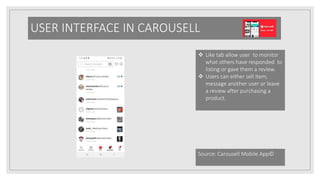
 Like tab allow user to monitor
what others have responded to
listing or gave them a review.
 Users can either sell item,
message another user or leave
a review after purchasing a
product.
Source: Carousell Mobile App©
USER INTERFACE FOR GRAB
o Features
1) Image icons for drivers as
well as geolocation tagger.
2) Text Fields for destination
and place of origin
3) Tabs that change for
different screens (Ride and
Hire)
Source: Grab Mobile App©
USER INTERFACE FOR GRAB
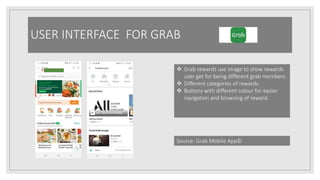
 Grab rewards use image to show rewards
user get for being different grab members.
 Different categories of rewards.
 Buttons with different colour for easier
navigation and browsing of reward.
Source: Grab Mobile App©
USER INTERFACE FOR GRAB
 Consist of Reward and other
categories.
 Reward tab for checking rewards for
taking transportation services.
 Diversification of other services give
users more choice.
Source: Grab Mobile App©
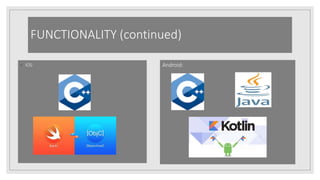
FUNCTIONALITY (continued)
◦ IOS: Android:
Grab App Functionality
 The location
functionality allows us
to integrate GPS API to
track where we want
the driver to pick us up.
 It also help us view the
route the driver takes to
send us there while on
the journey.
Source: Grab Mobile App©
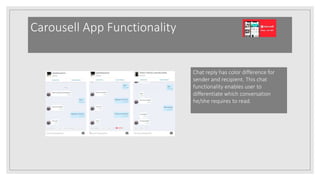
Carousell App Functionality
Chat reply has color difference for
sender and recipient. This chat
functionality enables user to
differentiate which conversation
he/she requires to read.
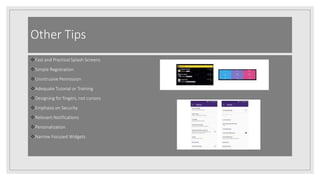
Other Tips
Fast and Practical Splash Screens
Simple Registration
Unintrusive Permission
Adequate Tutorial or Training
Designing for fingers, not cursors
Emphasis on Security
Relevant Notifications
Personalization
Narrow Focused Widgets
More Reading
◦ 1. Mobile App UX Design Principles: 15 Rules for Creating Apps that Stick:
https://www.altexsoft.com/blog/mobile/mobile-app-ux-design-principles-15-rules-for-
creating-apps-that-stick/
◦ 2. 16 Important UX Design Principles for Newcomers:
https://www.springboard.com/blog/ux-design-principles/
◦ 3. A Step-by-Step Guide To Building Your First Mobile App:
https://www.entrepreneur.com/article/231145
◦ 4. Building your first Android Application:
https://codelabs.developers.google.com/codelabs/build-your-first-android-app/#0
◦
More Reading (continued)
◦ 5. Building your first IOS Application:
https://developer.apple.com/library/archive/referencelibrary/GettingStarted/Developi
OSAppsSwift/
◦ 6. How to boost your app store downloads: https://themanifest.com/app-
development/how-boost-your-app-store-downloads
◦ 7. A Mobile usability assessment of Carousell:
https://www.researchgate.net/publication/327922598_A_mobile_usability_assessment
_of_Carousell_mobile_app
◦
More Reading (continued)
◦ 8. Grab Mobile App: A UX Assessment on Mobile Devices:
https://www.researchgate.net/publication/327424385_Grab_Mobile_App_A_UX_Ass
essment_on_Mobile_Devices
◦ 9. A UI Case Study on a top marketplace app- Carousell:
https://uxplanet.org/a-ux-case-study-on-a-top-marketplace-app-carousell-
24d5c943f774
◦
More Reading (continued)
◦ 8. Grab Mobile App: A UX Assessment on Mobile Devices:
https://www.researchgate.net/publication/327424385_Grab_Mobile_App_A_UX_Ass
essment_on_Mobile_Devices
◦ 9. A UI Case Study on a top marketplace app- Carousell:
https://uxplanet.org/a-ux-case-study-on-a-top-marketplace-app-carousell-
24d5c943f774
◦
Question and Answer

Building a viral mobile application for your startup

  • 1.
    CREATING VIRAL MOBILE APPSFOR YOUR STARTUP Caleb Yang Freelance Developer
  • 2.
    AGENDA TECHNOLOGY TRENDS. CONVERSION STORIES MOBILE APPLICATION & UI FUNCTIONALITY OFMOBILE APP. USER INTERFACE OF MOBILE APP. QUESTION AND ANSWER
  • 3.
    Who Am I ◦Current Deskside Engineer at Infinite Computer Solutions ◦ Worked on different User Interface Designs and Web Applications for some startups ◦ Frontend Developer with experience in JavaScript, HTML and CSS
  • 4.
  • 5.
    CONVERSION STORIES • 68years for Airlines to reach 50 million users . • 28 years for credit cards to reach 50 million users. • 14 years for computers to reach 50 million users. • 2 years for computers to reach 50 million users. Source: Capitologix ©
  • 6.
    CONVERSION FOR CAROUSELL •Graph represents relationship between items listed and items sold Source: Tech in Asia, TechCrunch, Business Times ©
  • 7.
    CONVERSION FOR GRAB •Graph represents relationship between items listed and items sold Source: Tech in Asia, ©
  • 8.
    MOBILE APPLICATION Advantages ofmobile application design are often increasing accessibility of how user get access to your company’s information and enhances your users’ engagement. It will then be easier to convert them to customers. Source: Wiggledigital ©
  • 9.
    USER INTERFACE  Visuallayout of elements that users can interact with in a screen on an app or website.  It can affect usability and user experience of an application, which can increase or decrease the conversion rate of users accessing the application.  Usability testing conducted to test intuitiveness of a user interface. Source: Productplan ©
  • 10.
    USER INTERFACE INCAROUSELL  Notifications from other users in regards to listings. Source: Carousell Mobile App©
  • 11.
    USER INTERFACE (continued) Differences exist between design principles in user interface and user experience.  UI covers more of design and layout features while UX also focuses on user research and scenarios. Source: Mockplus ©
  • 12.
    USER INTERFACE INCAROUSELL  Dark color background with icons for sharing, settings and list view allow user to change how the page is laid out.  Icons used for services and navigation within application.  Footer with symbols and text for navigation within application Source: Carousell Mobile App©
  • 13.
    USER INTERFACE INCAROUSELL  Favicons for categories  Different listings uploaded by users  Slider for navigation of different news Source: Carousell Mobile App©
  • 14.
    USER INTERFACE INCAROUSELL  Category page with header category and other smaller category in text.  Back button for navigation to other screens  Search in text fields for finding product listing Source: Carousell Mobile App©
  • 15.
    USER INTERFACE INCAROUSELL  Listing contain screens of what it looks like when users attempt to sell a product  Filter option of product by categories  The button color contrasts with another product. Source: Carousell Mobile App©
  • 16.
    USER INTERFACE INCAROUSELL  Like tab allow user to monitor what others have responded to listing or gave them a review.  Users can either sell item, message another user or leave a review after purchasing a product. Source: Carousell Mobile App©
  • 17.
    USER INTERFACE FORGRAB o Features 1) Image icons for drivers as well as geolocation tagger. 2) Text Fields for destination and place of origin 3) Tabs that change for different screens (Ride and Hire) Source: Grab Mobile App©
  • 18.
    USER INTERFACE FORGRAB  Grab rewards use image to show rewards user get for being different grab members.  Different categories of rewards.  Buttons with different colour for easier navigation and browsing of reward. Source: Grab Mobile App©
  • 19.
    USER INTERFACE FORGRAB  Consist of Reward and other categories.  Reward tab for checking rewards for taking transportation services.  Diversification of other services give users more choice. Source: Grab Mobile App©
  • 20.
  • 21.
    Grab App Functionality The location functionality allows us to integrate GPS API to track where we want the driver to pick us up.  It also help us view the route the driver takes to send us there while on the journey. Source: Grab Mobile App©
  • 22.
    Carousell App Functionality Chatreply has color difference for sender and recipient. This chat functionality enables user to differentiate which conversation he/she requires to read.
  • 23.
    Other Tips Fast andPractical Splash Screens Simple Registration Unintrusive Permission Adequate Tutorial or Training Designing for fingers, not cursors Emphasis on Security Relevant Notifications Personalization Narrow Focused Widgets
  • 24.
    More Reading ◦ 1.Mobile App UX Design Principles: 15 Rules for Creating Apps that Stick: https://www.altexsoft.com/blog/mobile/mobile-app-ux-design-principles-15-rules-for- creating-apps-that-stick/ ◦ 2. 16 Important UX Design Principles for Newcomers: https://www.springboard.com/blog/ux-design-principles/ ◦ 3. A Step-by-Step Guide To Building Your First Mobile App: https://www.entrepreneur.com/article/231145 ◦ 4. Building your first Android Application: https://codelabs.developers.google.com/codelabs/build-your-first-android-app/#0 ◦
  • 25.
    More Reading (continued) ◦5. Building your first IOS Application: https://developer.apple.com/library/archive/referencelibrary/GettingStarted/Developi OSAppsSwift/ ◦ 6. How to boost your app store downloads: https://themanifest.com/app- development/how-boost-your-app-store-downloads ◦ 7. A Mobile usability assessment of Carousell: https://www.researchgate.net/publication/327922598_A_mobile_usability_assessment _of_Carousell_mobile_app ◦
  • 26.
    More Reading (continued) ◦8. Grab Mobile App: A UX Assessment on Mobile Devices: https://www.researchgate.net/publication/327424385_Grab_Mobile_App_A_UX_Ass essment_on_Mobile_Devices ◦ 9. A UI Case Study on a top marketplace app- Carousell: https://uxplanet.org/a-ux-case-study-on-a-top-marketplace-app-carousell- 24d5c943f774 ◦
  • 27.
    More Reading (continued) ◦8. Grab Mobile App: A UX Assessment on Mobile Devices: https://www.researchgate.net/publication/327424385_Grab_Mobile_App_A_UX_Ass essment_on_Mobile_Devices ◦ 9. A UI Case Study on a top marketplace app- Carousell: https://uxplanet.org/a-ux-case-study-on-a-top-marketplace-app-carousell- 24d5c943f774 ◦
  • 28.