Building A Tasty Backend


                  Or...

 How spending a small amount of time to
polish your admin areas can keep you, and
             your clients, sane.
Whoami
●   Jeni Tehan
●   Delicious Creative
●   USA
●   Liverpool -> Brighton
●   Drupal 2006-2007ish
Demo Site
●   http://www.tastybackend.com
What Is This All About?
●   Drupal is very powerful
●   That's why we LOVE Drupal
●   But...
●   We're not normal
Power Can Be Powerful
●   This can overwhelm some users
●   Drupal provides a good start
●   But the defaults are only OK
●   What happens when we need more?
●   We can do better!
We Must KILL Help All Humans!
●   Our content admins are human
●   We can simplify how people add content
●   We can simplify how people manage
    content
●   We can simplify how people get around
●   We don't have to recreate the wheel to do
    this
Creating Content
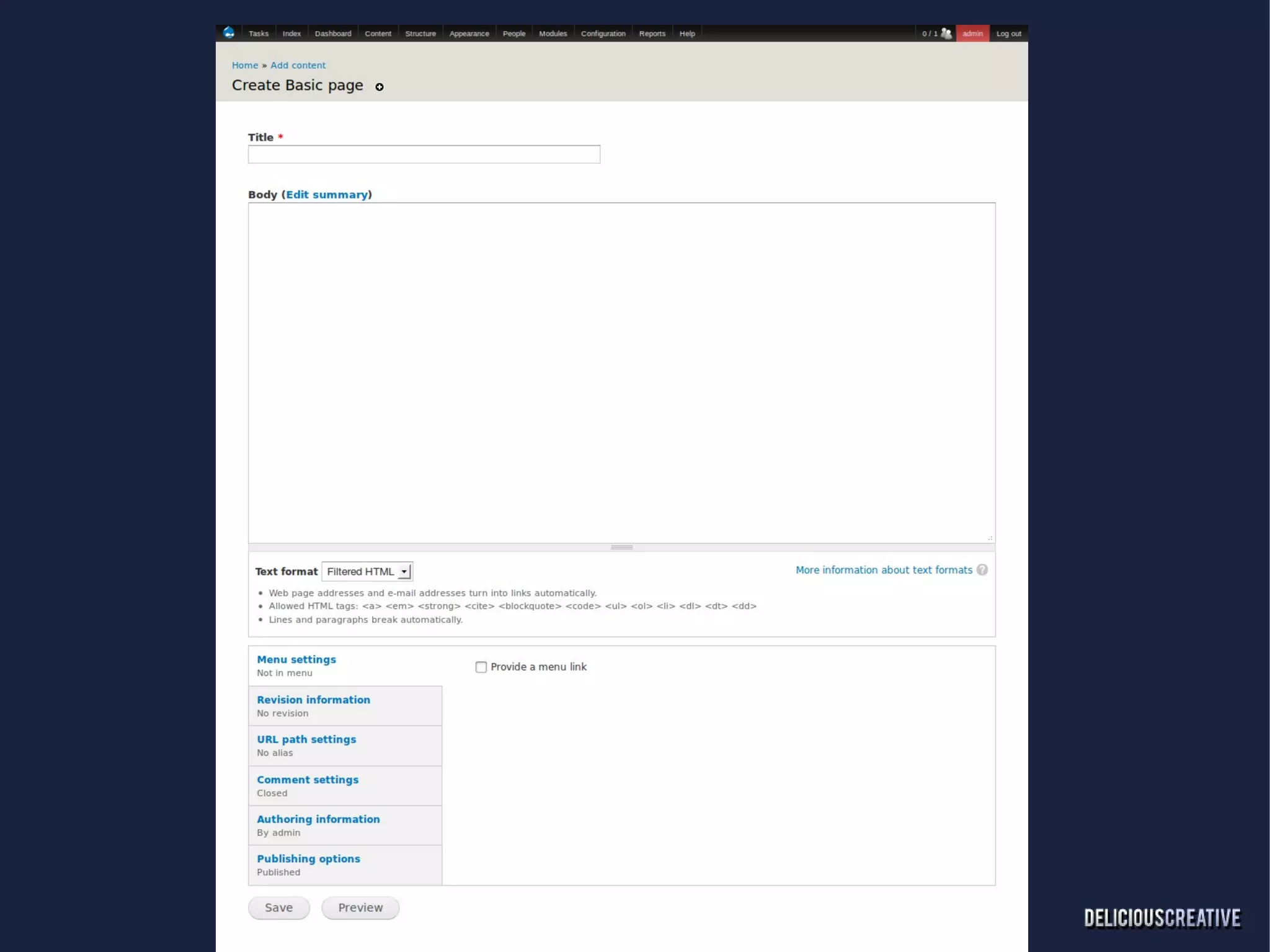
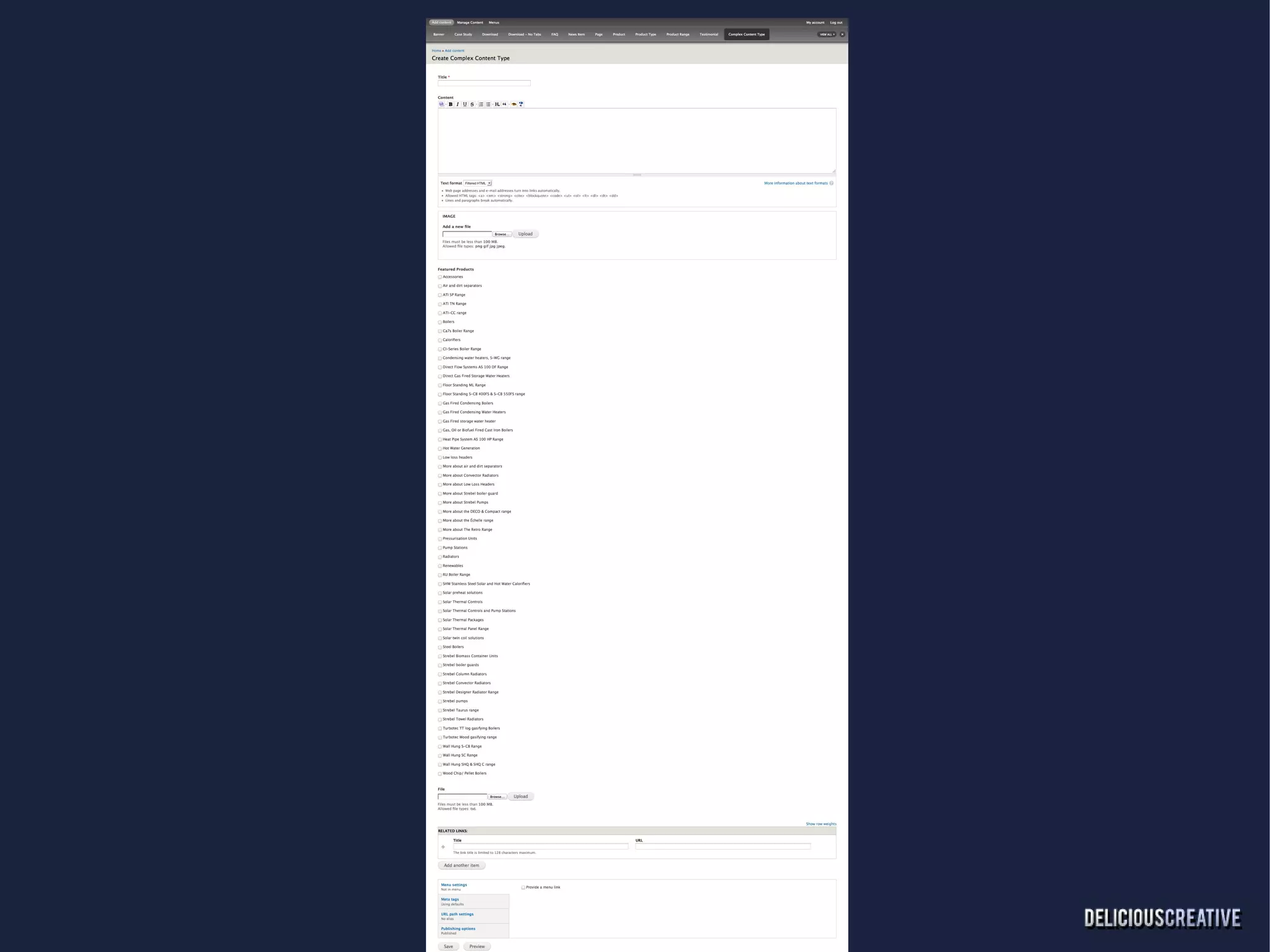
●   For New Clients This Is Everything
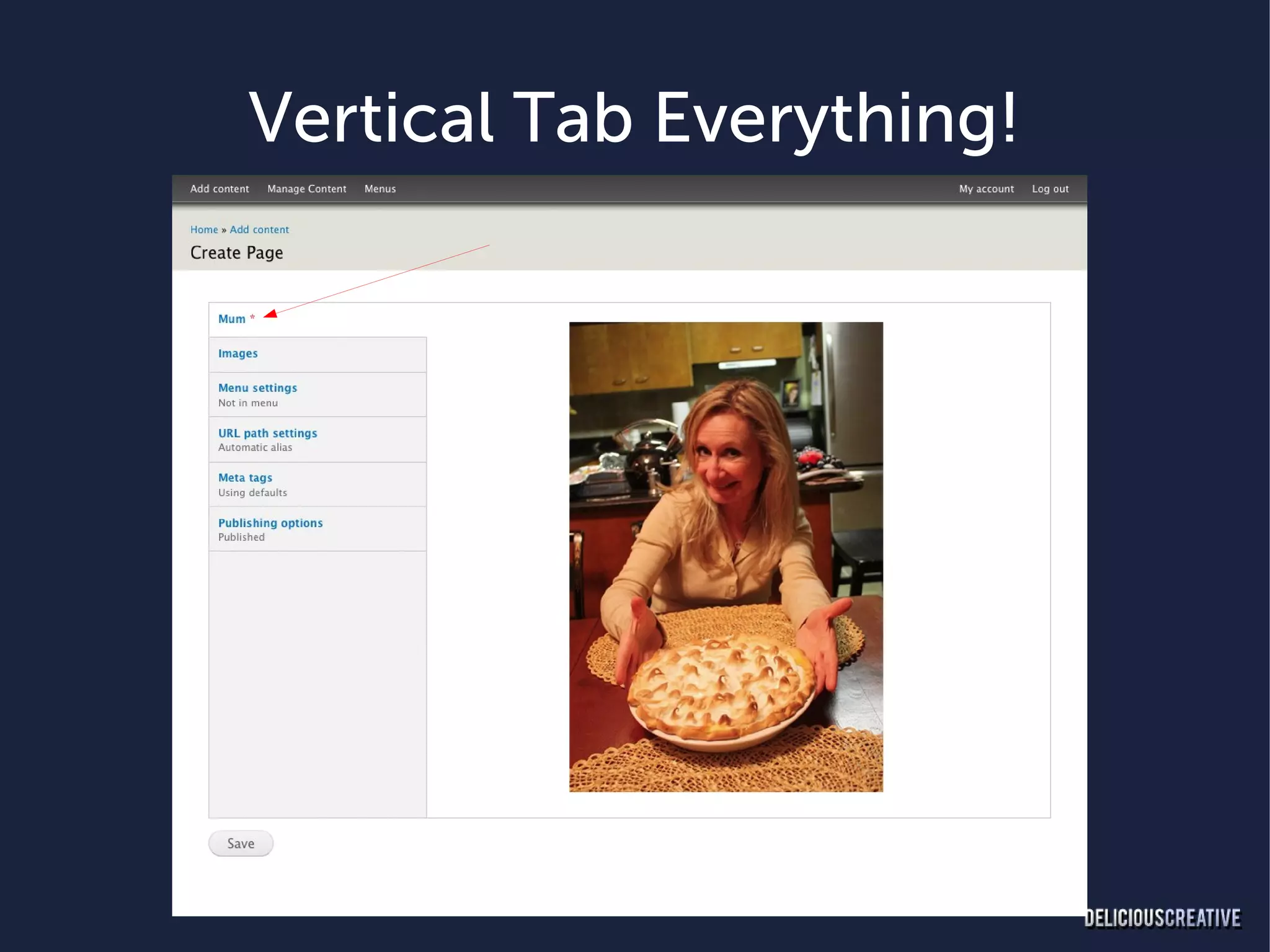
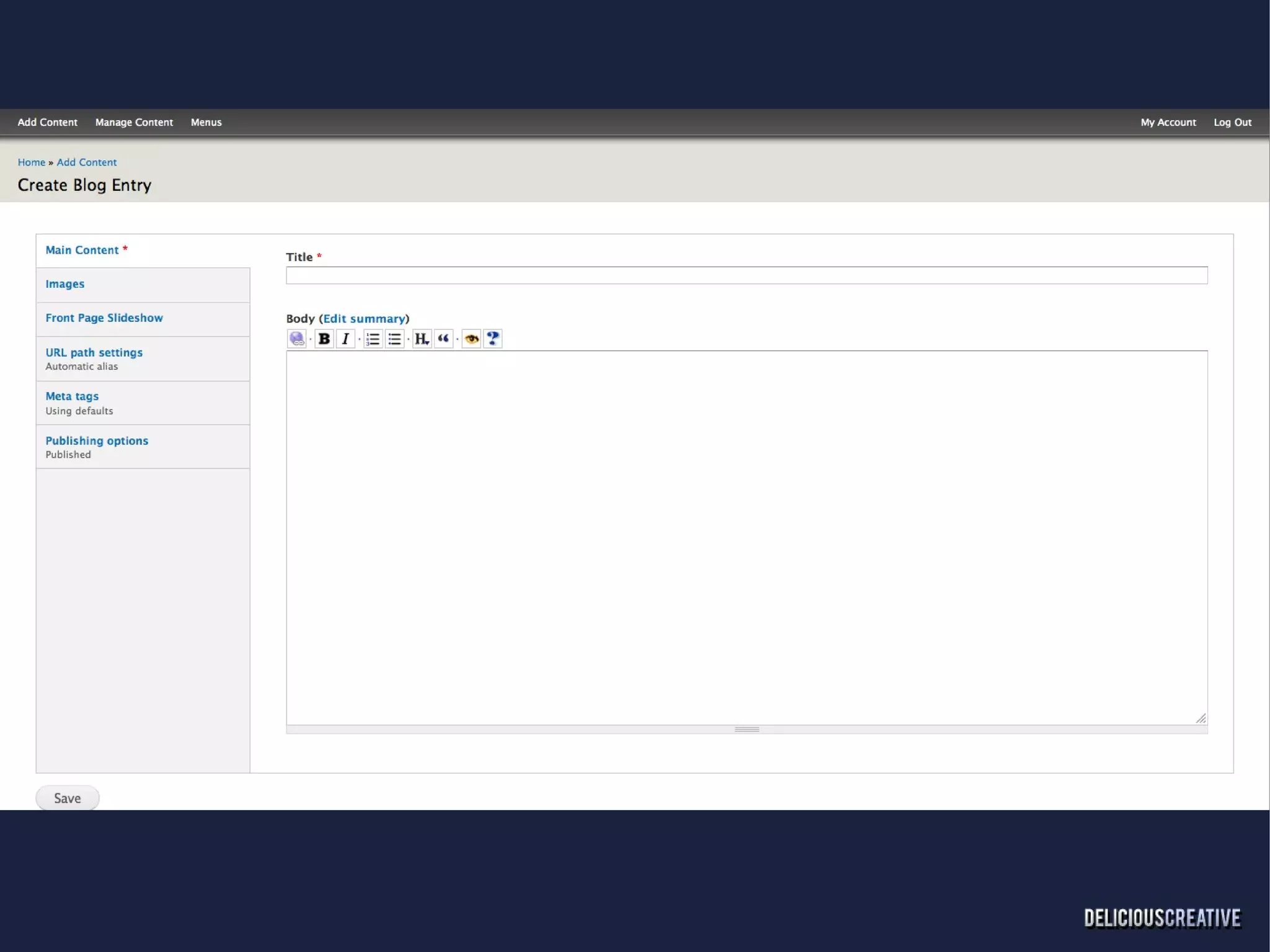
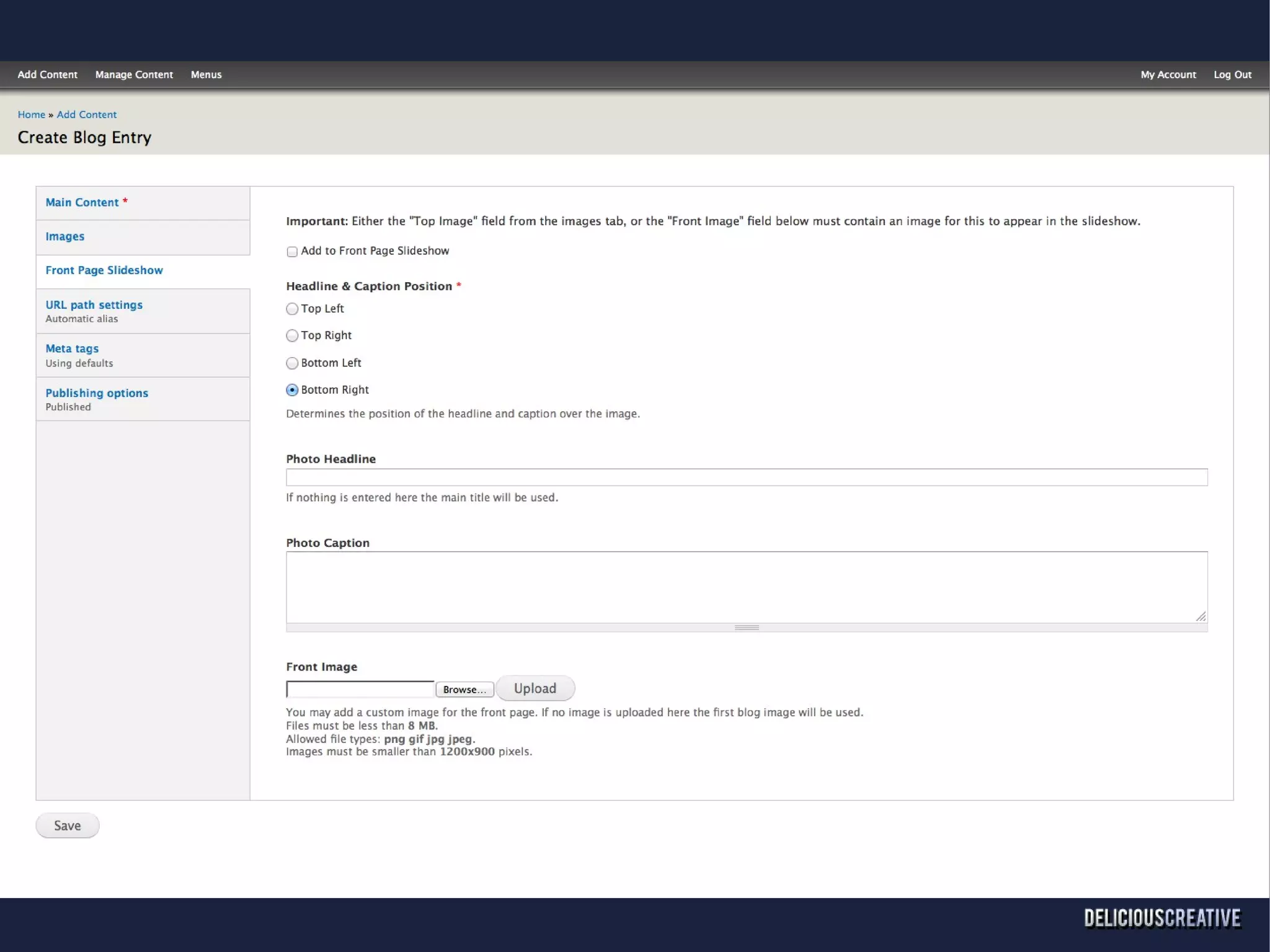
●   Vertical Tabs Helped Clean Things Up
●   Basic Forms Might Be OK
Vertical Tab Everything!
●   Yes, EVERYTHING!
Vertical Tab Everything!
●   Need Field group
    d.o/project/field_group
●   Shortens the forms
●   Simplifies things so your clients don't recoil in fear
●   Gets your forms to the point of the content
●   Only add the basic fields necessary to create the
    content, additional optional fields are hidden.
Vertical Tab Everything!
●   Hides long lists of references, taxonomy terms, etc.
●   Can add in more fields without making the form
    look huge.
●   Add additional functionality without additional
    complexity.
Further Node Add Cleansing
●   Disable the preview button
    –   Doesn't really theme well
    –   Clients expect something else when using
        an admin theme
    –   If previewing is needed save the content
        and don't publish it
Further Node Add Cleansing
●   If it's on the page, and it really doesn't need
    to be, get rid of it!
    –   No need for hook_form_alter
    –   Rules/Rules Forms Support can clean up
        unwanted elements and more.
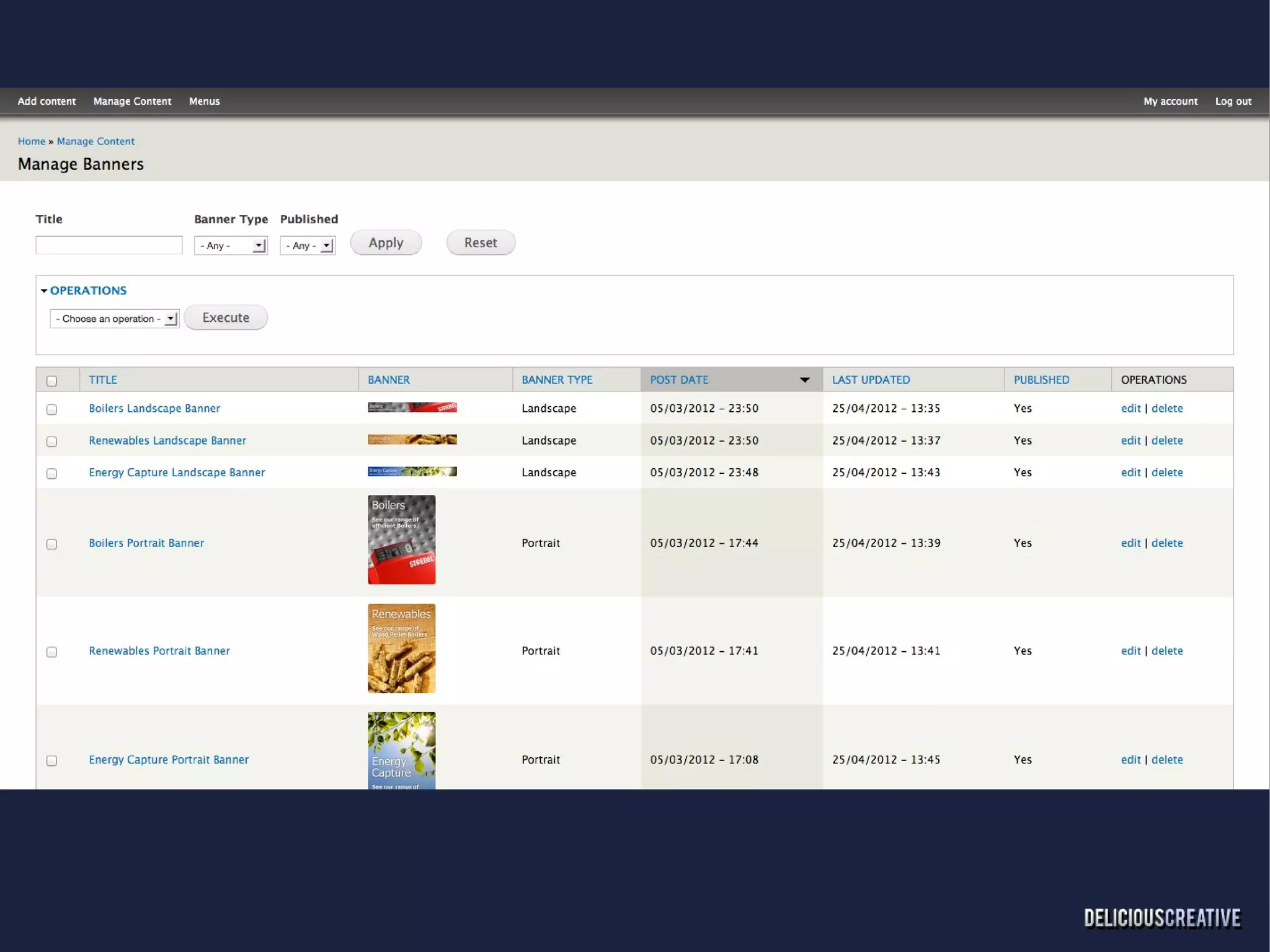
Managing Content
●   Default content page just isn't up for the
    task
    –   Too many clicks
    –   Not specific enough information
●   Views Bulk Operations to the rescue!
    d.o/project/views_bulk_operations
You Down With VBO?
●   Create admins screens that suit the content
●   Show relevant information on complex
    content types
●   Gives clients easy access to relevant
    information
●   Gives YOU access to relevant information
●   Better understanding all around
Where Do These Views Live?
●   Context Admin
    d.o/project/context_admin
●   Create Manage Content Section at
    admin/manage/content
●   Our new family home holds all our lovely
    VBO children
●   Now I'm just getting silly
Contextual Administration
●   Can be used to create admin areas that
    users wouldn't normally be able to get to
    –   Edit taxonomy terms and vocabularies
        without “Administer vocabularies and
        terms” permission
    –   Users will need the edit/delete
        permissions for the vocabulary
        ●   Makes those permissions make sense!
Administration Menus
●   Default placement of navigation menu can
    complicate your site
●   Not all pages have traditional “Sidebars”
●   Get admin menus out of your front-facing
    theme!
●   Why not use Admin Menu module?
●   What do we do?
Quickbar
●   Underloved, but works great.
●   Easy as F*DGE to understand
●   Minimises page loads
●   Everything is always on the page
●   Uses any menu you want
●   Customisable per role
Users
●   Content admins sometimes need to be “User
    admins”
●   Views Bulk Operations and Context Admin
    can also be used to manage users
●   Control Access to User Settings
    d.o/project/user_settings_access
    –   Ability for admins to add/edit users, but not
        adjust global user settings
Users
●   More useful user modules
    –   d.o/project/role_delegation
        ●   Allows you to select which roles can
            assign which roles.
             – Doesn't work with context admin just
               yet, but otherwise it's pretty sweet
Block Class Select
●   http://drupal.org/sandbox/jeni_dc/1899728
●   Add preconfigured classes to blocks
●   Easy option for Content Admins who don't
    understand CSS or shouldn't be adding their
    own classes.
Tasty Backend Feature
●   d.o/sandbox/jeni_dc/1555218
●   Standard Install
●   Some configuration necessary after install
    –   Quickbar Menu
    –   Documentation coming (I swear!)
Demo Site
●   http://www.tastybackend.com
●   Google “Tasty Backend”
●   Safe for work
●   Seriously
Thanks For Listening!
●   jeni@deliciouscreative.com
●   http://www.deliciouscreative.com
●   @DelishCreative
●   d.o. - Delicious Creative
●   IRC: jeni_dc
●   Yes, I'm a shameful self promoter

Building A Tasty Backend

  • 1.
    Building A TastyBackend Or... How spending a small amount of time to polish your admin areas can keep you, and your clients, sane.
  • 2.
    Whoami ● Jeni Tehan ● Delicious Creative ● USA ● Liverpool -> Brighton ● Drupal 2006-2007ish
  • 3.
    Demo Site ● http://www.tastybackend.com
  • 4.
    What Is ThisAll About? ● Drupal is very powerful ● That's why we LOVE Drupal ● But... ● We're not normal
  • 5.
    Power Can BePowerful ● This can overwhelm some users ● Drupal provides a good start ● But the defaults are only OK ● What happens when we need more? ● We can do better!
  • 6.
    We Must KILLHelp All Humans! ● Our content admins are human ● We can simplify how people add content ● We can simplify how people manage content ● We can simplify how people get around ● We don't have to recreate the wheel to do this
  • 7.
    Creating Content ● For New Clients This Is Everything ● Vertical Tabs Helped Clean Things Up ● Basic Forms Might Be OK
  • 10.
  • 11.
  • 13.
    Vertical Tab Everything! ● Need Field group d.o/project/field_group ● Shortens the forms ● Simplifies things so your clients don't recoil in fear ● Gets your forms to the point of the content ● Only add the basic fields necessary to create the content, additional optional fields are hidden.
  • 14.
    Vertical Tab Everything! ● Hides long lists of references, taxonomy terms, etc. ● Can add in more fields without making the form look huge. ● Add additional functionality without additional complexity.
  • 16.
    Further Node AddCleansing ● Disable the preview button – Doesn't really theme well – Clients expect something else when using an admin theme – If previewing is needed save the content and don't publish it
  • 17.
    Further Node AddCleansing ● If it's on the page, and it really doesn't need to be, get rid of it! – No need for hook_form_alter – Rules/Rules Forms Support can clean up unwanted elements and more.
  • 18.
    Managing Content ● Default content page just isn't up for the task – Too many clicks – Not specific enough information ● Views Bulk Operations to the rescue! d.o/project/views_bulk_operations
  • 19.
    You Down WithVBO? ● Create admins screens that suit the content ● Show relevant information on complex content types ● Gives clients easy access to relevant information ● Gives YOU access to relevant information ● Better understanding all around
  • 21.
    Where Do TheseViews Live? ● Context Admin d.o/project/context_admin ● Create Manage Content Section at admin/manage/content ● Our new family home holds all our lovely VBO children ● Now I'm just getting silly
  • 22.
    Contextual Administration ● Can be used to create admin areas that users wouldn't normally be able to get to – Edit taxonomy terms and vocabularies without “Administer vocabularies and terms” permission – Users will need the edit/delete permissions for the vocabulary ● Makes those permissions make sense!
  • 23.
    Administration Menus ● Default placement of navigation menu can complicate your site ● Not all pages have traditional “Sidebars” ● Get admin menus out of your front-facing theme! ● Why not use Admin Menu module? ● What do we do?
  • 24.
    Quickbar ● Underloved, but works great. ● Easy as F*DGE to understand ● Minimises page loads ● Everything is always on the page ● Uses any menu you want ● Customisable per role
  • 25.
    Users ● Content admins sometimes need to be “User admins” ● Views Bulk Operations and Context Admin can also be used to manage users ● Control Access to User Settings d.o/project/user_settings_access – Ability for admins to add/edit users, but not adjust global user settings
  • 26.
    Users ● More useful user modules – d.o/project/role_delegation ● Allows you to select which roles can assign which roles. – Doesn't work with context admin just yet, but otherwise it's pretty sweet
  • 27.
    Block Class Select ● http://drupal.org/sandbox/jeni_dc/1899728 ● Add preconfigured classes to blocks ● Easy option for Content Admins who don't understand CSS or shouldn't be adding their own classes.
  • 28.
    Tasty Backend Feature ● d.o/sandbox/jeni_dc/1555218 ● Standard Install ● Some configuration necessary after install – Quickbar Menu – Documentation coming (I swear!)
  • 29.
    Demo Site ● http://www.tastybackend.com ● Google “Tasty Backend” ● Safe for work ● Seriously
  • 30.
    Thanks For Listening! ● jeni@deliciouscreative.com ● http://www.deliciouscreative.com ● @DelishCreative ● d.o. - Delicious Creative ● IRC: jeni_dc ● Yes, I'm a shameful self promoter