Customizing the Django Admin
     When the Django Admin fails
     and what you can do to fix it


            Peter Baumgartner
               Founder, Lincoln Loop


              Michael Trythall
       User Experience Director, Lincoln Loop


     EuroDjangoCon – May 5, 2009
About Lincoln Loop
●   Django Corporate Sponsor
●   Open source contributer
●
    Services:
    ●
        Development
    ●
        Prototyping
    ●
        Consulting
    ●
        Training


    http://lincolnloop.com
Overview
●   User Interface is important
●   Default Admin UI is one-size-fits-all.
    User experience is not.
●   What can we do to improve upon it?
●   How do we implement those improvements?
(Some) Problems We Face
●   Clients want control over their web site
●   Clients don't want to pay for a minor changes
●   Clients often lack technical knowledge
●   Clients may not have specifications (just ideas)
●   Limited project and developer time
●   Etc, etc...
Problems with New, Custom Systems
               “ Easy is Hard ”
                     - Peter Lewis, NY Times

●   Time consuming – Research, Specs, Dev, Test
●   Hard to tell right from wrong
●   Good chance you might not nail it
●   Reinventing the wheel in most cases
So, What's the Solution?
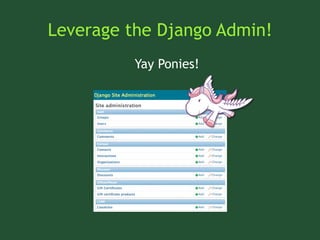
Leverage the Django Admin!
          Yay Ponies!
The Good News
●   Handful of reusable apps that alleviate some
    of the pain
●   Admin is easy to extend, customize, etc.
●   Djangonauts are thinking about these problems
●   Lots of core functionality already exists in the
    admin
Why Care About UI?
Because...
●   UI is the gateway to application logic
●   Users remember bad experiences
●   Good experiences = Happy Customers = Profit!
●   Contributing helps Django mature
●   Good UI reduces the need for documentation
    & support, but isn't a complete substitute!
Problems with the Default Admin
Not Informative or Assistive
●   No dashboard, statistics, or recent (user)
    activity
●   No actions (or models) highlighted or given
    priority
●   No assistance/help for beginner users
●   Impact from changes is not always clear
●   Disconnect from external systems
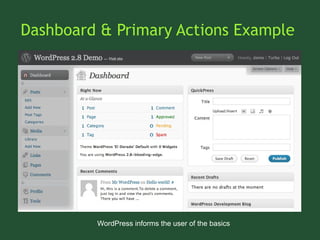
Dashboard & Primary Actions Example


         WordPress informs the user of the basics
Doesn't Fit Into Customer Mental Models
●   Relationships (e.x. hierarchy) not intuitive
●   Apps are not organized by context
●   Little (or no) navigation outside of
    breadcrumbs
●   Doesn't mimic familiar process and workflow
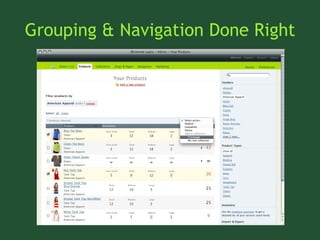
Grouping & Navigation Done Right
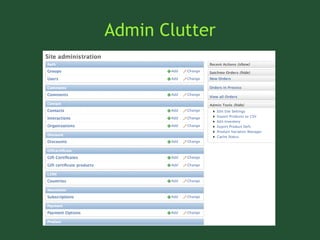
Admin Clutter
Missing Features
●   Missing common web tools like WYSIWYG, file
    management, etc
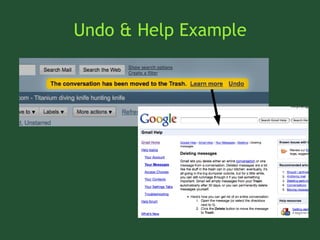
●   Difficult to recover from actions (no undo)
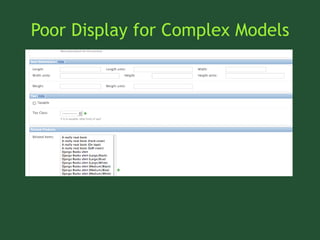
●   Better management for complicated models
●   Project-wide search
Undo & Help Example
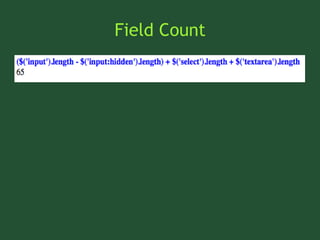
Poor Display for Complex Models
Field Count
Planning Customizations
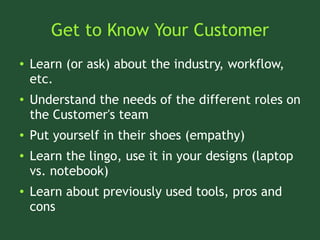
Get to Know Your Customer
●   Learn (or ask) about the industry, workflow,
    etc.
●   Understand the needs of the different roles on
    the Customer's team
●   Put yourself in their shoes (empathy)
●   Learn the lingo, use it in your designs (laptop
    vs. notebook)
●   Learn about previously used tools, pros and
    cons
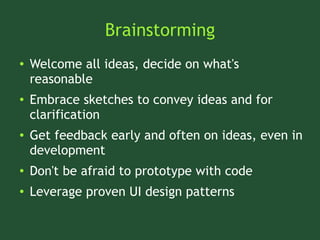
Brainstorming
●   Welcome all ideas, decide on what's
    reasonable
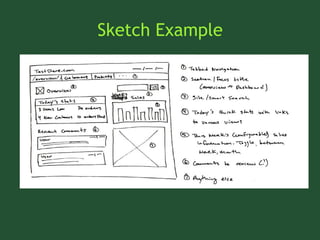
●   Embrace sketches to convey ideas and for
    clarification
●   Get feedback early and often on ideas, even in
    development
●   Don't be afraid to prototype with code
●   Leverage proven UI design patterns
Sketch Example
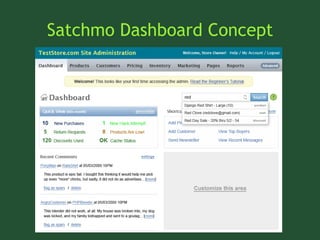
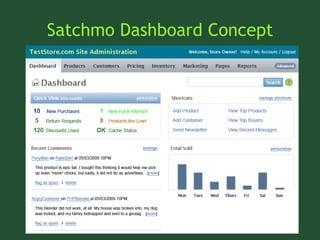
Satchmo Dashboard Concept
Implement!
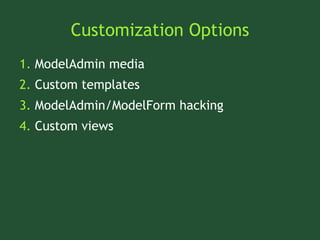
Customization Options
1. ModelAdmin media
2. Custom templates
3. ModelAdmin/ModelForm hacking
4. Custom views
Low Hanging Fruit For the Win


  http://www.flickr.com/photos/11263821@N05/2224626086
ModelAdmin Media
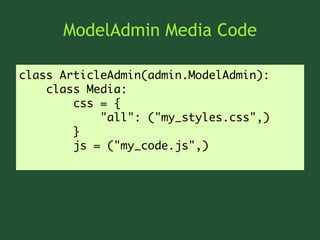
ModelAdmin Media Code

class ArticleAdmin(admin.ModelAdmin):
    class Media:
        css = {
            "all": ("my_styles.css",)
        }
        js = ("my_code.js",)
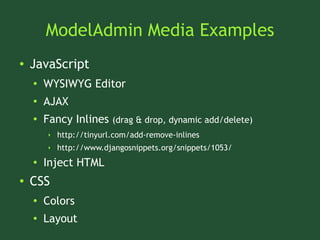
ModelAdmin Media Examples
●   JavaScript
    ●   WYSIWYG Editor
    ●
        AJAX
    ●   Fancy Inlines     (drag & drop, dynamic add/delete)
        ‣   http://tinyurl.com/add-remove-inlines
        ‣   http://www.djangosnippets.org/snippets/1053/
    ●   Inject HTML
●   CSS
    ●   Colors
    ●   Layout
ModelAdmin Media Pros & Cons
●   Pros:
    ●   Easy for one-off projects
●   Cons:
    ●   Requires Javascript
    ●   Only works for the Change Form
    ●   Difficult to bundle as reusable app
Custom Templates
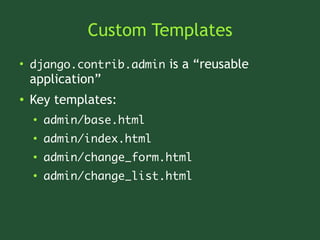
Custom Templates
●
    django.contrib.admin is a “reusable
    application”
●   Key templates:
    ●
        admin/base.html
    ●
        admin/index.html
    ●
        admin/change_form.html
    ●
        admin/change_list.html
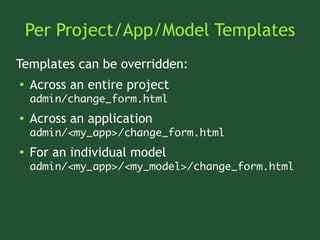
Per Project/App/Model Templates
Templates can be overridden:
●   Across an entire project
    admin/change_form.html
●   Across an application
    admin/<my_app>/change_form.html
●   For an individual model
    admin/<my_app>/<my_model>/change_form.html
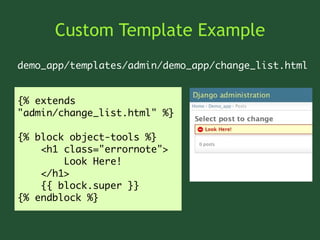
Custom Template Example
demo_app/templates/admin/demo_app/change_list.html


{% extends
"admin/change_list.html" %}

{% block object-tools %}
    <h1 class="errornote">
        Look Here!
    </h1>
    {{ block.super }}
{% endblock %}
Custom Template Tips
●   Extend, don't override
●   Use {{ block.super }} to extend blocks
●   Extend a symlink of the admin templates in
    the event of recursion
●   Extend the extrahead block in base.html for
    admin-wide media
Custom Templates in the Wild
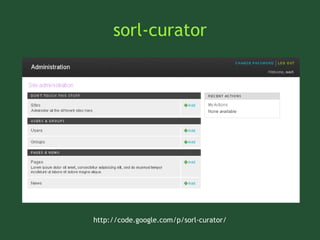
sorl-curator


http://code.google.com/p/sorl-curator/
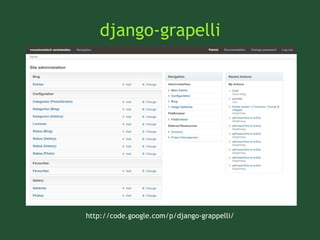
django-grapelli


http://code.google.com/p/django-grappelli/
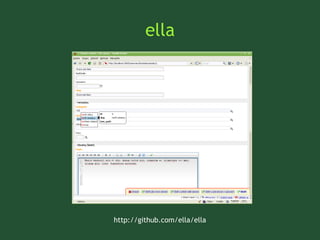
ella


http://github.com/ella/ella
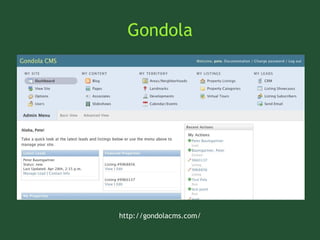
Gondola


http://gondolacms.com/
Custom Template Pros & Cons
●   Pros
    ●   Easy
    ●
        Touches every admin view
    ●   No additional work to bundle with reusable apps
●   Cons
    ●   Mostly cosmetic (not functional) changes
ModelAdmin/ModelForm Hacking
●   New in Django 1.0 (newforms-admin)
●   Old stuff (list_display, fields, ordering, etc.)
●   New stuff (exclude, inlines, form, etc.)
●   Really New stuff (list_editable, actions, etc.)
Reregistering a ModelAdmin
from django.contrib import admin
from django.contrib.auth.admin import UserAdmin
from demo_app.models import UserProfile

class UserProfileInline(admin.TabularInline):
    model = UserProfile
    fk_name = 'user'
    max_num = 1

class CustomUserAdmin(UserAdmin):
    inlines = [UserProfileInline, ]

admin.site.unregister(User)
admin.site.register(User, CustomUserAdmin)
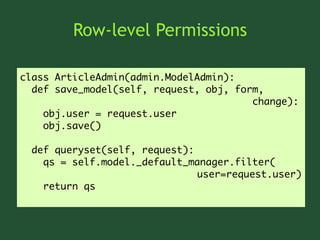
Row-level Permissions

class ArticleAdmin(admin.ModelAdmin):
  def save_model(self, request, obj, form,
                                        change):
    obj.user = request.user
    obj.save()

  def queryset(self, request):
    qs = self.model._default_manager.filter(
                               user=request.user)
    return qs
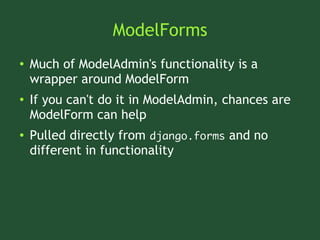
ModelForms
●   Much of ModelAdmin's functionality is a
    wrapper around ModelForm
●   If you can't do it in ModelAdmin, chances are
    ModelForm can help
●   Pulled directly from django.forms and no
    different in functionality
ModelFoms Example
class AuthorForm(forms.ModelForm):
    exclude_states = ['AS', 'GU', 'MP', 'VI',]
    def __init__(self, *args, **kwargs):
        super(AuthorForm, self).__init__(*args,
                                      **kwargs)
        w = self.fields['state'].widget
        choices = []
        for key, value in w.choices:
            if key not in self.exclude_states:
                choices.append((key, value))
        w.choices = choices

class AuthorAdmin(admin.ModelAdmin):
    form = AuthorForm
Caution: Here be Dragons


 http://www.flickr.com/photos/sharynmorrow/3019436/
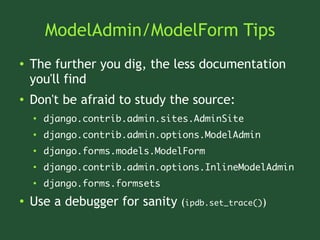
ModelAdmin/ModelForm Tips
●   The further you dig, the less documentation
    you'll find
●   Don't be afraid to study the source:
    ●
        django.contrib.admin.sites.AdminSite
    ●
        django.contrib.admin.options.ModelAdmin
    ●
        django.forms.models.ModelForm
    ●
        django.contrib.admin.options.InlineModelAdmin
    ●
        django.forms.formsets
●   Use a debugger for sanity (ipdb.set_trace())
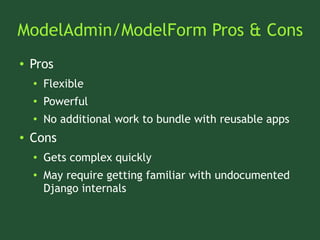
ModelAdmin/ModelForm Pros & Cons
●   Pros
    ●   Flexible
    ●
        Powerful
    ●   No additional work to bundle with reusable apps
●   Cons
    ●   Gets complex quickly
    ●   May require getting familiar with undocumented
        Django internals
Custom Views
When in Doubt, Punt


http://www.flickr.com/photos/bobtravis/485216368/
Custom Views
●   The admin just wasn't built to do some things
●   Other things simply aren't worth the trouble
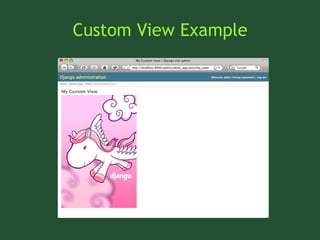
●   Build your own view and plug it into the admin
Custom View URL
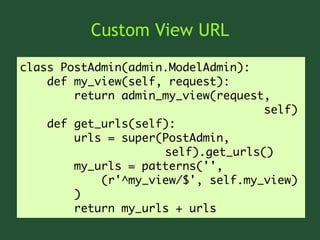
class PostAdmin(admin.ModelAdmin):
    def my_view(self, request):
        return admin_my_view(request,
                                    self)
    def get_urls(self):
        urls = super(PostAdmin,
                     self).get_urls()
        my_urls = patterns('',
            (r'^my_view/$', self.my_view)
        )
        return my_urls + urls
Custom View
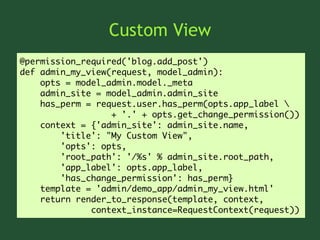
@permission_required('blog.add_post')
def admin_my_view(request, model_admin):
    opts = model_admin.model._meta
    admin_site = model_admin.admin_site
    has_perm = request.user.has_perm(opts.app_label 
                  + '.' + opts.get_change_permission())
    context = {'admin_site': admin_site.name,
        'title': "My Custom View",
        'opts': opts,
        'root_path': '/%s' % admin_site.root_path,
        'app_label': opts.app_label,
        'has_change_permission': has_perm}
    template = 'admin/demo_app/admin_my_view.html'
    return render_to_response(template, context,
              context_instance=RequestContext(request))
Custom View Template
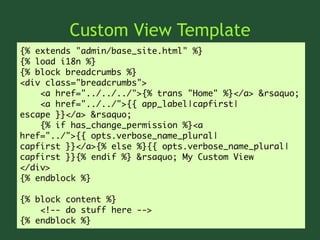
{% extends "admin/base_site.html" %}
{% load i18n %}
{% block breadcrumbs %}
<div class="breadcrumbs">
    <a href="../../../">{% trans "Home" %}</a> &rsaquo;
    <a href="../../">{{ app_label|capfirst|
escape }}</a> &rsaquo;
    {% if has_change_permission %}<a
href="../">{{ opts.verbose_name_plural|
capfirst }}</a>{% else %}{{ opts.verbose_name_plural|
capfirst }}{% endif %} &rsaquo; My Custom View
</div>
{% endblock %}

{% block content %}
    <!-- do stuff here -->
{% endblock %}
Custom View Example
Custom View Pros & Cons
●   Pros
    ●   More flexible
    ●
        More powerful
    ●   No additional work to bundle with reusable apps
●   Cons
    ●   Can be tricky to integrate into workflow
    ●   You're on your own to validate forms, build
        templates, etc.
Review
●   UI is important. Think about your end-user
●   Think about your users, not your database
●   Newforms-admin gives you hooks for lots of
    easy wins
Questions


  Peter Baumgartner
    pete@lincolnloop.com


    Michael Trythall
   michael@lincolnloop.com


http://lincolnloop.com

Customizing the Django Admin

  • 1.
    Customizing the DjangoAdmin When the Django Admin fails and what you can do to fix it Peter Baumgartner Founder, Lincoln Loop Michael Trythall User Experience Director, Lincoln Loop EuroDjangoCon – May 5, 2009
  • 2.
    About Lincoln Loop ● Django Corporate Sponsor ● Open source contributer ● Services: ● Development ● Prototyping ● Consulting ● Training http://lincolnloop.com
  • 3.
    Overview ● User Interface is important ● Default Admin UI is one-size-fits-all. User experience is not. ● What can we do to improve upon it? ● How do we implement those improvements?
  • 4.
    (Some) Problems WeFace ● Clients want control over their web site ● Clients don't want to pay for a minor changes ● Clients often lack technical knowledge ● Clients may not have specifications (just ideas) ● Limited project and developer time ● Etc, etc...
  • 5.
    Problems with New,Custom Systems “ Easy is Hard ” - Peter Lewis, NY Times ● Time consuming – Research, Specs, Dev, Test ● Hard to tell right from wrong ● Good chance you might not nail it ● Reinventing the wheel in most cases
  • 6.
    So, What's theSolution?
  • 7.
    Leverage the DjangoAdmin! Yay Ponies!
  • 8.
    The Good News ● Handful of reusable apps that alleviate some of the pain ● Admin is easy to extend, customize, etc. ● Djangonauts are thinking about these problems ● Lots of core functionality already exists in the admin
  • 9.
  • 10.
    Because... ● UI is the gateway to application logic ● Users remember bad experiences ● Good experiences = Happy Customers = Profit! ● Contributing helps Django mature ● Good UI reduces the need for documentation & support, but isn't a complete substitute!
  • 11.
    Problems with theDefault Admin
  • 12.
    Not Informative orAssistive ● No dashboard, statistics, or recent (user) activity ● No actions (or models) highlighted or given priority ● No assistance/help for beginner users ● Impact from changes is not always clear ● Disconnect from external systems
  • 13.
    Dashboard & PrimaryActions Example WordPress informs the user of the basics
  • 14.
    Doesn't Fit IntoCustomer Mental Models ● Relationships (e.x. hierarchy) not intuitive ● Apps are not organized by context ● Little (or no) navigation outside of breadcrumbs ● Doesn't mimic familiar process and workflow
  • 15.
  • 16.
  • 17.
    Missing Features ● Missing common web tools like WYSIWYG, file management, etc ● Difficult to recover from actions (no undo) ● Better management for complicated models ● Project-wide search
  • 18.
    Undo & HelpExample
  • 19.
    Poor Display forComplex Models
  • 20.
  • 21.
  • 22.
    Get to KnowYour Customer ● Learn (or ask) about the industry, workflow, etc. ● Understand the needs of the different roles on the Customer's team ● Put yourself in their shoes (empathy) ● Learn the lingo, use it in your designs (laptop vs. notebook) ● Learn about previously used tools, pros and cons
  • 23.
    Brainstorming ● Welcome all ideas, decide on what's reasonable ● Embrace sketches to convey ideas and for clarification ● Get feedback early and often on ideas, even in development ● Don't be afraid to prototype with code ● Leverage proven UI design patterns
  • 24.
  • 25.
  • 26.
  • 27.
  • 28.
    Customization Options 1. ModelAdminmedia 2. Custom templates 3. ModelAdmin/ModelForm hacking 4. Custom views
  • 29.
    Low Hanging FruitFor the Win http://www.flickr.com/photos/11263821@N05/2224626086
  • 30.
  • 31.
    ModelAdmin Media Code classArticleAdmin(admin.ModelAdmin): class Media: css = { "all": ("my_styles.css",) } js = ("my_code.js",)
  • 32.
    ModelAdmin Media Examples ● JavaScript ● WYSIWYG Editor ● AJAX ● Fancy Inlines (drag & drop, dynamic add/delete) ‣ http://tinyurl.com/add-remove-inlines ‣ http://www.djangosnippets.org/snippets/1053/ ● Inject HTML ● CSS ● Colors ● Layout
  • 33.
    ModelAdmin Media Pros& Cons ● Pros: ● Easy for one-off projects ● Cons: ● Requires Javascript ● Only works for the Change Form ● Difficult to bundle as reusable app
  • 34.
  • 35.
    Custom Templates ● django.contrib.admin is a “reusable application” ● Key templates: ● admin/base.html ● admin/index.html ● admin/change_form.html ● admin/change_list.html
  • 36.
    Per Project/App/Model Templates Templatescan be overridden: ● Across an entire project admin/change_form.html ● Across an application admin/<my_app>/change_form.html ● For an individual model admin/<my_app>/<my_model>/change_form.html
  • 37.
    Custom Template Example demo_app/templates/admin/demo_app/change_list.html {%extends "admin/change_list.html" %} {% block object-tools %} <h1 class="errornote"> Look Here! </h1> {{ block.super }} {% endblock %}
  • 38.
    Custom Template Tips ● Extend, don't override ● Use {{ block.super }} to extend blocks ● Extend a symlink of the admin templates in the event of recursion ● Extend the extrahead block in base.html for admin-wide media
  • 39.
  • 40.
  • 41.
  • 42.
  • 43.
  • 44.
    Custom Template Pros& Cons ● Pros ● Easy ● Touches every admin view ● No additional work to bundle with reusable apps ● Cons ● Mostly cosmetic (not functional) changes
  • 45.
  • 46.
    ModelAdmin/ModelForm Hacking ● New in Django 1.0 (newforms-admin) ● Old stuff (list_display, fields, ordering, etc.) ● New stuff (exclude, inlines, form, etc.) ● Really New stuff (list_editable, actions, etc.)
  • 47.
    Reregistering a ModelAdmin fromdjango.contrib import admin from django.contrib.auth.admin import UserAdmin from demo_app.models import UserProfile class UserProfileInline(admin.TabularInline): model = UserProfile fk_name = 'user' max_num = 1 class CustomUserAdmin(UserAdmin): inlines = [UserProfileInline, ] admin.site.unregister(User) admin.site.register(User, CustomUserAdmin)
  • 48.
    Row-level Permissions class ArticleAdmin(admin.ModelAdmin): def save_model(self, request, obj, form, change): obj.user = request.user obj.save() def queryset(self, request): qs = self.model._default_manager.filter( user=request.user) return qs
  • 49.
    ModelForms ● Much of ModelAdmin's functionality is a wrapper around ModelForm ● If you can't do it in ModelAdmin, chances are ModelForm can help ● Pulled directly from django.forms and no different in functionality
  • 50.
    ModelFoms Example class AuthorForm(forms.ModelForm): exclude_states = ['AS', 'GU', 'MP', 'VI',] def __init__(self, *args, **kwargs): super(AuthorForm, self).__init__(*args, **kwargs) w = self.fields['state'].widget choices = [] for key, value in w.choices: if key not in self.exclude_states: choices.append((key, value)) w.choices = choices class AuthorAdmin(admin.ModelAdmin): form = AuthorForm
  • 51.
    Caution: Here beDragons http://www.flickr.com/photos/sharynmorrow/3019436/
  • 52.
    ModelAdmin/ModelForm Tips ● The further you dig, the less documentation you'll find ● Don't be afraid to study the source: ● django.contrib.admin.sites.AdminSite ● django.contrib.admin.options.ModelAdmin ● django.forms.models.ModelForm ● django.contrib.admin.options.InlineModelAdmin ● django.forms.formsets ● Use a debugger for sanity (ipdb.set_trace())
  • 53.
    ModelAdmin/ModelForm Pros &Cons ● Pros ● Flexible ● Powerful ● No additional work to bundle with reusable apps ● Cons ● Gets complex quickly ● May require getting familiar with undocumented Django internals
  • 54.
  • 55.
    When in Doubt,Punt http://www.flickr.com/photos/bobtravis/485216368/
  • 56.
    Custom Views ● The admin just wasn't built to do some things ● Other things simply aren't worth the trouble ● Build your own view and plug it into the admin
  • 57.
    Custom View URL classPostAdmin(admin.ModelAdmin): def my_view(self, request): return admin_my_view(request, self) def get_urls(self): urls = super(PostAdmin, self).get_urls() my_urls = patterns('', (r'^my_view/$', self.my_view) ) return my_urls + urls
  • 58.
    Custom View @permission_required('blog.add_post') def admin_my_view(request,model_admin): opts = model_admin.model._meta admin_site = model_admin.admin_site has_perm = request.user.has_perm(opts.app_label + '.' + opts.get_change_permission()) context = {'admin_site': admin_site.name, 'title': "My Custom View", 'opts': opts, 'root_path': '/%s' % admin_site.root_path, 'app_label': opts.app_label, 'has_change_permission': has_perm} template = 'admin/demo_app/admin_my_view.html' return render_to_response(template, context, context_instance=RequestContext(request))
  • 59.
    Custom View Template {%extends "admin/base_site.html" %} {% load i18n %} {% block breadcrumbs %} <div class="breadcrumbs"> <a href="../../../">{% trans "Home" %}</a> &rsaquo; <a href="../../">{{ app_label|capfirst| escape }}</a> &rsaquo; {% if has_change_permission %}<a href="../">{{ opts.verbose_name_plural| capfirst }}</a>{% else %}{{ opts.verbose_name_plural| capfirst }}{% endif %} &rsaquo; My Custom View </div> {% endblock %} {% block content %} <!-- do stuff here --> {% endblock %}
  • 60.
  • 61.
    Custom View Pros& Cons ● Pros ● More flexible ● More powerful ● No additional work to bundle with reusable apps ● Cons ● Can be tricky to integrate into workflow ● You're on your own to validate forms, build templates, etc.
  • 62.
    Review ● UI is important. Think about your end-user ● Think about your users, not your database ● Newforms-admin gives you hooks for lots of easy wins
  • 63.
    Questions PeterBaumgartner pete@lincolnloop.com Michael Trythall michael@lincolnloop.com http://lincolnloop.com