BUILDING A BETTER
USER EXPERIENCE
FOR WINDOWS PHONE USERS
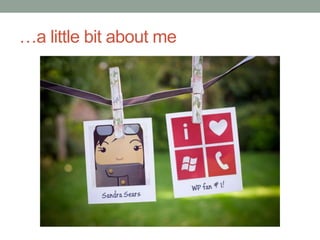
…a little bit about me
Why I think WP is awesome
           Personally                       Professionally

• As a busy mom:                   • As a UX Professional:
  • Great for planning my day to     • Thrilled about Metro Design
    day life                           Principles
  • Love all the customization       • Great developer community
    features                         • Enjoy being part of a
  • Lots of apps for my two kids       community and platform with
                                       such great potential
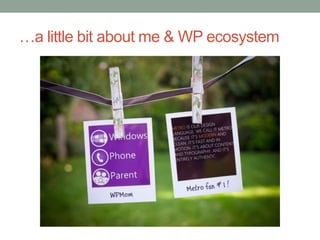
…a little bit about me & WP ecosystem
My contribution to the WP ecosystem
    I’m a WP app reviewer       I’m a Metro Design advocate

• I’m committed to find the   • I provide clear guidelines
  best WP apps for kids and     as to how we rate WP
  parents                       apps
• I keep a WP presence in     • I set up individual
  cross-platform app forums     sessions with devs to help
• I work closely with           them improve their apps’
  developers on ways to         user experience
  improve their family-       • I give talks… like today!
  friendly apps
4 THINGS TO THINK
ABOUT
When creating a Windows Phone app
4 Things to think about
• Look & Feel
• Ease of Use
• Does as it promises
• Specialize
LOOK & FEEL
Metro Design Guidelines and more
Look & Feel
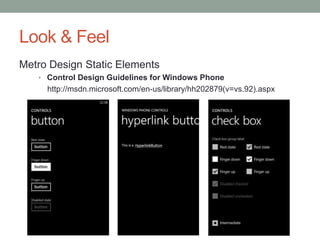
Metro Design Static Elements
   • Control Design Guidelines for Windows Phone
     http://msdn.microsoft.com/en-us/library/hh202879(v=vs.92).aspx
Look & Feel
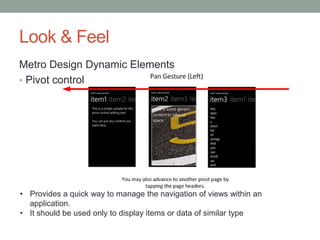
Metro Design Dynamic Elements
• Pivot control


• Provides a quick way to manage the navigation of views within an
  application.
• It should be used only to display items or data of similar type
Look & Feel
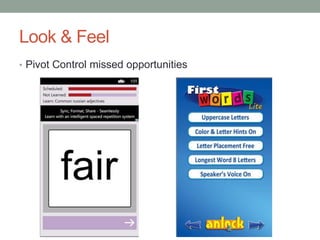
• Pivot Control missed opportunities
Look & Feel
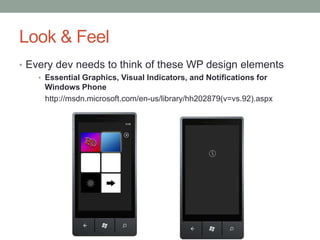
• Every dev needs to think of these WP design elements
   • Essential Graphics, Visual Indicators, and Notifications for
     Windows Phone
     http://msdn.microsoft.com/en-us/library/hh202879(v=vs.92).aspx
Look & Feel
• A few thoughts on app’s visual design
  • Do not work in isolation. Find a designer to bounce ideas off of.
  • Take a look at other applications.
  • Windows Phone’s platform is growing. Many iOS and Android app
    developers are crossing over:
    • Many of their apps have been designed with the help of visual designers
    • Corporate apps are a good example
EASE OF USE
Thinking About The User Experience
Ease of Use
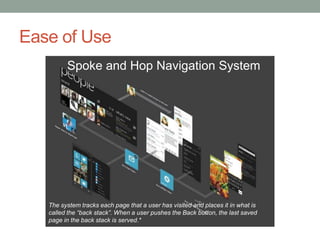
         Spoke and Hop Navigation System


   The system tracks each page that a user has visited and places it in what is
   called the “back stack”. When a user pushes the Back button, the last saved
   page in the back stack is served.*
Ease of Use
• Follow platform conventions
  • Familiarize yourself with the guidelines
     • Navigation, Orientation, and Gestures for Windows Phone
       http://msdn.microsoft.com/en-us/library/hh202911(v=vs.92).aspx
     • Interactions and Usability with Windows Phone
       http://msdn.microsoft.com/en-us/library/hh202889(v=vs.92).aspx
  • Helps the user have a consistent experience from one action to
    another (from one app to another app)
  • Do not underestimate the user’s ability to understand the platform’s
    paradigms
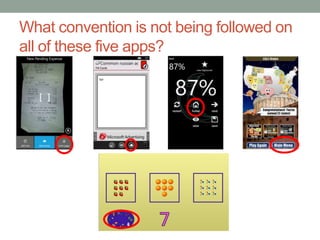
     • For example, the use of a “Home” button in a WP app is unnecessary
      since users understand that “back” will get them there.
• Remember the spoke and hop navigations system?
What convention is not being followed on
all of these five apps?
Ease of Use
Home Buttons and the Back Stack*
• Placing a Home button in your user interface deviates
  from the Windows Phone navigation model.

• It changes the expected interaction model of the platform
 and it can confuse users.

• The user can get stuck in an infinite (or near infinite) loop
 when using both your Home button and the hardware
 Back button to navigate.`

                                                    *from msdn.microsoft.com
Ease of Use
• Test your apps for usability
   • Usability testing opportunities are all around us!
   • So what is usability testing anyway? Usability testing generally
     involves setting a series of tasks for people to complete and noting
     any problems they encounter – It’s as simple as that!*


             *http://www.slideshare.net/andybudd/guerilla-usability-testing
DOES AS IT PROMISED
It’s a trust thing!
Does as promised
• It’s a trust thing!
   • When a user downloads your app, the user is trusting your app to
     do what the descriptions says.
   • Users should read descriptions carefully and not expect miracles
• About your app’s description:
  • Do not rush it!
  • Add contact info
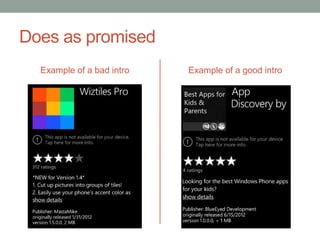
  • Make a sales pitch in the first paragraph
Does as promised
  Example of a bad intro   Example of a good intro
SPECIALIZE
Make sure your app does one thing well and
is the best of its kind
Specialize
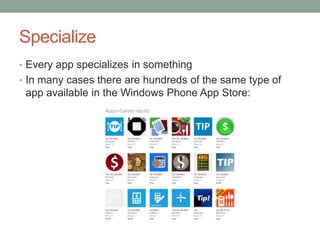
• Every app specializes in something
• In many cases there are hundreds of the same type of
 app available in the Windows Phone App Store:
Specialize
• Download as many similar apps as possible
  • Make a list of unique features
  • Think about how is your app going to be unique among the others
  • Highlight in the description how your app is different from the rest.


• Try to test it with common users of your app
   • i.e an immunization records app should be tested by a mother of
     small children
• Do some research on how other markets would use your
 app
  • i.e we say “six thirty” in American English but in European English
    we say “Half past six” or “Half six”
ANY QUESTIONS?
Windows Phone Parent Dev Services
• Visit us at: http://dev.windowsphoneparent.com
  • View our review guidelines
  • Add your family-friendly app to our catalog
  • Request an app review
  • Promote your app in Spanish-speaking markets via our Spanish
    sister site FamiliaWindowsPhone.com (currently 17 Spanish-
    speaking markets)


• Future Service:
  • Localization services
  • Beta testing
  • Usability testing
Keep in touch…
     Windows Phone Parent              Professional Networks

WindowsPhoneParent.com            MetroWise.info

@WPParent
                                  @metrowiseux
Facebook.com/WindowsPhoneParent
                                  LinkedIn.com/in/sandracsears
info@windowsphoneparent.com
                                  sandracsears@gmail.com
Download our app at:
  http://bit.ly/WPPApp

Building a better User Experience for Windows Phone Users

  • 1.
    BUILDING A BETTER USEREXPERIENCE FOR WINDOWS PHONE USERS
  • 2.
  • 3.
    Why I thinkWP is awesome Personally Professionally • As a busy mom: • As a UX Professional: • Great for planning my day to • Thrilled about Metro Design day life Principles • Love all the customization • Great developer community features • Enjoy being part of a • Lots of apps for my two kids community and platform with such great potential
  • 4.
    …a little bitabout me & WP ecosystem
  • 5.
    My contribution tothe WP ecosystem I’m a WP app reviewer I’m a Metro Design advocate • I’m committed to find the • I provide clear guidelines best WP apps for kids and as to how we rate WP parents apps • I keep a WP presence in • I set up individual cross-platform app forums sessions with devs to help • I work closely with them improve their apps’ developers on ways to user experience improve their family- • I give talks… like today! friendly apps
  • 6.
    4 THINGS TOTHINK ABOUT When creating a Windows Phone app
  • 7.
    4 Things tothink about • Look & Feel • Ease of Use • Does as it promises • Specialize
  • 8.
    LOOK & FEEL MetroDesign Guidelines and more
  • 9.
    Look & Feel MetroDesign Static Elements • Control Design Guidelines for Windows Phone http://msdn.microsoft.com/en-us/library/hh202879(v=vs.92).aspx
  • 10.
    Look & Feel MetroDesign Dynamic Elements • Pivot control • Provides a quick way to manage the navigation of views within an application. • It should be used only to display items or data of similar type
  • 11.
    Look & Feel •Pivot Control missed opportunities
  • 12.
    Look & Feel •Every dev needs to think of these WP design elements • Essential Graphics, Visual Indicators, and Notifications for Windows Phone http://msdn.microsoft.com/en-us/library/hh202879(v=vs.92).aspx
  • 13.
    Look & Feel •A few thoughts on app’s visual design • Do not work in isolation. Find a designer to bounce ideas off of. • Take a look at other applications. • Windows Phone’s platform is growing. Many iOS and Android app developers are crossing over: • Many of their apps have been designed with the help of visual designers • Corporate apps are a good example
  • 14.
    EASE OF USE ThinkingAbout The User Experience
  • 15.
    Ease of Use Spoke and Hop Navigation System The system tracks each page that a user has visited and places it in what is called the “back stack”. When a user pushes the Back button, the last saved page in the back stack is served.*
  • 16.
    Ease of Use •Follow platform conventions • Familiarize yourself with the guidelines • Navigation, Orientation, and Gestures for Windows Phone http://msdn.microsoft.com/en-us/library/hh202911(v=vs.92).aspx • Interactions and Usability with Windows Phone http://msdn.microsoft.com/en-us/library/hh202889(v=vs.92).aspx • Helps the user have a consistent experience from one action to another (from one app to another app) • Do not underestimate the user’s ability to understand the platform’s paradigms • For example, the use of a “Home” button in a WP app is unnecessary since users understand that “back” will get them there. • Remember the spoke and hop navigations system?
  • 17.
    What convention isnot being followed on all of these five apps?
  • 18.
    Ease of Use HomeButtons and the Back Stack* • Placing a Home button in your user interface deviates from the Windows Phone navigation model. • It changes the expected interaction model of the platform and it can confuse users. • The user can get stuck in an infinite (or near infinite) loop when using both your Home button and the hardware Back button to navigate.` *from msdn.microsoft.com
  • 19.
    Ease of Use •Test your apps for usability • Usability testing opportunities are all around us! • So what is usability testing anyway? Usability testing generally involves setting a series of tasks for people to complete and noting any problems they encounter – It’s as simple as that!* *http://www.slideshare.net/andybudd/guerilla-usability-testing
  • 20.
    DOES AS ITPROMISED It’s a trust thing!
  • 21.
    Does as promised •It’s a trust thing! • When a user downloads your app, the user is trusting your app to do what the descriptions says. • Users should read descriptions carefully and not expect miracles • About your app’s description: • Do not rush it! • Add contact info • Make a sales pitch in the first paragraph
  • 22.
    Does as promised Example of a bad intro Example of a good intro
  • 23.
    SPECIALIZE Make sure yourapp does one thing well and is the best of its kind
  • 24.
    Specialize • Every appspecializes in something • In many cases there are hundreds of the same type of app available in the Windows Phone App Store:
  • 25.
    Specialize • Download asmany similar apps as possible • Make a list of unique features • Think about how is your app going to be unique among the others • Highlight in the description how your app is different from the rest. • Try to test it with common users of your app • i.e an immunization records app should be tested by a mother of small children • Do some research on how other markets would use your app • i.e we say “six thirty” in American English but in European English we say “Half past six” or “Half six”
  • 26.
  • 27.
    Windows Phone ParentDev Services • Visit us at: http://dev.windowsphoneparent.com • View our review guidelines • Add your family-friendly app to our catalog • Request an app review • Promote your app in Spanish-speaking markets via our Spanish sister site FamiliaWindowsPhone.com (currently 17 Spanish- speaking markets) • Future Service: • Localization services • Beta testing • Usability testing
  • 28.
    Keep in touch… Windows Phone Parent Professional Networks WindowsPhoneParent.com MetroWise.info @WPParent @metrowiseux Facebook.com/WindowsPhoneParent LinkedIn.com/in/sandracsears info@windowsphoneparent.com sandracsears@gmail.com Download our app at: http://bit.ly/WPPApp