What is blended learning? 
Blended learning is an educational process through 
which part of the learning takes place in a virtual 
setting, allowing some student control over the 
frequency, pace and path of learning.
Tips for new 
blended students 
Login often! You will want to stay up to 
date on your lessons and activities and 
stay ahead of schedule. 
Do your best work! Be sure to think of 
the problems and click on the answer 
when you have read all the choices. 
Ask for help! If you are stuck without 
sound or have another problem, get help 
soon so you can continue your learning. 
Be patient! Some times technology 
doesn’t work smoothly, but you have to 
keep your head up and keep plugging 
along.
Tips for new blended 
instructors 
Be patient! Things will not always go 
as planned, and there may be 
mistakes along the way, but keep 
working! 
Go slow! Work at a pace that is 
comfortable for you and your 
students. 
Celebrate small successes! Every day 
might not be good, but there is good 
in every day. 
Partner up! Consult and collaborate 
with a colleague to help you through 
rough times and celebrate those small 
successes.
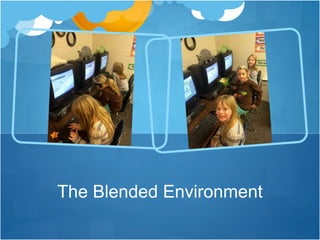
The Blended Environment
IXL 
IXL 
•Students log on daily to access 
comprehensive, standards based 
math practice. They answer 
questions and progress through 
lessons at their own pace. The 
program will pose a question, read 
it to the student, then provide 
answer choices. If the student 
selects the right answer, they get a 
green check mark. If the answer is 
incorrect, the program will provide 
the correct answer with a mini 
lesson on the topic.
MobyMax 
Students log in weekly to practice 
reading, comprehension and phonics 
along with math facts. They can 
choose their area of study, or 
sometimes are directed to a learning 
capsule based on my observation. 
They can access this course at 
home using a computer or iPad if 
they choose.
Spelling City 
•Students log on daily to practice 
weekly spelling words. They play 
games like 
•Hang Mouse 
•Word Pillar 
• Missing Letter 
to become familiar with the spelling 
list. At the end of the week, they 
take a test in this virtual setting and 
also with pencil and paper in the 
classroom.
Student Feedback
Parent Feedback 
A parent’s response to IXL : 
“Actually I was going to buy it for 
both of our sons to use but I'm so 
glad it's offered through the school. 
It's a simply wonderful site from 
what I've heard.” 
A parent’s response to 
SpellingCity: “I love that we can 
practice the spelling words at home 
and I have access to the lists on 
the go!”
Blended Learning has 
changed my teaching… 
My role in the blended environment has shifted from 
teacher to facilitator, and I am loving it. My students 
are building confidence in their skills and are working 
at a pace that suits their needs. I am available to 
offer support, provide encouragement and give 
guidance when necessary.
New ideas implemented as a 
result of BLIC course 
Online spelling tests through Spelling City 
Video tutorials for introductions to programs 
Individual reading programs with MobyMax 
Student centered learning stations

BLIC Final Project

  • 2.
    What is blendedlearning? Blended learning is an educational process through which part of the learning takes place in a virtual setting, allowing some student control over the frequency, pace and path of learning.
  • 3.
    Tips for new blended students Login often! You will want to stay up to date on your lessons and activities and stay ahead of schedule. Do your best work! Be sure to think of the problems and click on the answer when you have read all the choices. Ask for help! If you are stuck without sound or have another problem, get help soon so you can continue your learning. Be patient! Some times technology doesn’t work smoothly, but you have to keep your head up and keep plugging along.
  • 4.
    Tips for newblended instructors Be patient! Things will not always go as planned, and there may be mistakes along the way, but keep working! Go slow! Work at a pace that is comfortable for you and your students. Celebrate small successes! Every day might not be good, but there is good in every day. Partner up! Consult and collaborate with a colleague to help you through rough times and celebrate those small successes.
  • 5.
  • 6.
    IXL IXL •Studentslog on daily to access comprehensive, standards based math practice. They answer questions and progress through lessons at their own pace. The program will pose a question, read it to the student, then provide answer choices. If the student selects the right answer, they get a green check mark. If the answer is incorrect, the program will provide the correct answer with a mini lesson on the topic.
  • 7.
    MobyMax Students login weekly to practice reading, comprehension and phonics along with math facts. They can choose their area of study, or sometimes are directed to a learning capsule based on my observation. They can access this course at home using a computer or iPad if they choose.
  • 8.
    Spelling City •Studentslog on daily to practice weekly spelling words. They play games like •Hang Mouse •Word Pillar • Missing Letter to become familiar with the spelling list. At the end of the week, they take a test in this virtual setting and also with pencil and paper in the classroom.
  • 9.
  • 10.
    Parent Feedback Aparent’s response to IXL : “Actually I was going to buy it for both of our sons to use but I'm so glad it's offered through the school. It's a simply wonderful site from what I've heard.” A parent’s response to SpellingCity: “I love that we can practice the spelling words at home and I have access to the lists on the go!”
  • 11.
    Blended Learning has changed my teaching… My role in the blended environment has shifted from teacher to facilitator, and I am loving it. My students are building confidence in their skills and are working at a pace that suits their needs. I am available to offer support, provide encouragement and give guidance when necessary.
  • 12.
    New ideas implementedas a result of BLIC course Online spelling tests through Spelling City Video tutorials for introductions to programs Individual reading programs with MobyMax Student centered learning stations