Blender learning made easy...


                  Everything but the Kitchen Sink


www.blenderart.org                        Antea -by Martin Eschoyez
EDITOR - Gaurav Nawani
MANAGER/EDITOR - Sandra Gilbert
WEBSITE - Nam Pham
DESIGN - Gaurav Nawani

PROOFERS
Brian C. Treacy
Bruce Westfall
Daniel Hand
Daniel Mate
Henriël Veldtmann
Joshua Leung
Joshua Scotton
Kevin Braun
Mark Warren
Noah Summers
Patrick ODonnell
Phillip
Ronan Posnic
Scott Hill
Wade Bick
Valérie Hambert

WRITERS
Thomas Baron
Pedro BastosTeemu Vilén
Alexander Weide                   * Characters, individual body parts (i.e. feet, hands, etc).
Stephan Rodriguez
Darcy Brooker                     * Animals and reptiles.
Brian DeVincentis
Enrique Sahagun                   * Vehicles and other mechanical rigging, any other use for rigging.
Nathan Moyer
Sandra Gilbert                    * Add-ons and the python behind them.
Gaurav Nawani
                                  * How to extend blender through python.
COVER ART
Antea -by Martin Eschoyez         * New builds/patches/branches.


             www.blenderart.org                                                             Issue 33 - Everything but a Kitchen Sink
3


                         "When I announced the theme for
                         this issue "Everything but the kitchen
                         sink", I was jokingly threatened with
                         massive numbers of sink projects."


   Sandra Gilbert
        Manager/Editor


www.blenderart.org                                                Issue 33 - Everything but a Kitchen Sink
4


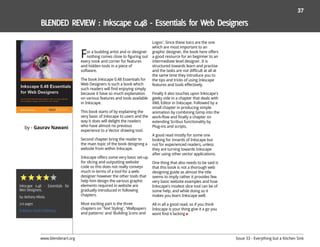
                      I
                                                                    keeping a blog of the modeling work he        their blessings for their open source
                                                                    has finished so far. I wandered over to       (non-commercial) tribute. Even more
                         love hearing about new blender             take a look, and let me tell you, it looks    fun, the original modeler is keeping an
                        projects. Everyone has their own pet        amazing. The details and texture work is      eye on Andrew's blog. No pressure
                      ideas on what would be cool to do or          beautiful. In addition to still images, he    there :P
                      accomplish using blender. Some                also has a growing number of test
                      projects are by nature short and sweet        videos to show off his progress.              The Journeyman Project Tribute looks to
                      and produce cool results or new                                                             be well organized and planned out,
                      techniques that can be shared with            Andrew has told me that one of his            making it a fun project to keep an eye
                      others. Then there are the labors of          goals is to keep the project open source      on as they progress their way through
                      love. Projects that are destined to take      and completely create the HD footage in       all their goals.
                      months of dedicated work.                     Blender. If his current tests are any
                                                                    indication, the finished result should be     Andrew is looking for additional
                      The Journeyman Project Tribute is one         quite impressive.                             volunteers to help bring this project to
                      such example. Not only is the                                                               completion. You can contact him for
                      Journeyman Project Tribute a labor of         In an effort to keep the tribute as close     further information
                      love, it is a rather ambitious one at that.   as possible to the classic original as well
                      Andrew Curry is leading an enthusiastic       as head off any legality issues, Andrew       andrewcurry2@googlemail.com

Izzy Speaks           team who have decided to remake the
                      classic game “The Journeyman Project”
                                                                    has been in touch with several
                                                                    members of Presto Studios, including          http://andyjourneyman.blogspot.com/
                      by Presto Studios. The project is             the president of the studio. Presto
                      currently split into three efforts:           Studios have given Andrew and his team

                       * A prequel novel
                       * A port to Windows of “Pegasus Prime”, a
                       remake of Journeyman by the original
                       studio.
                        * A retelling of Journeyman using Blender
                        to model and render the video footage,
                       “Journeyman HD”.
                      At the moment, there are several
                      members hard at work on the novel and
                      port teams, but so far the vast majority
                      of the HD version has been done by
                      Andrew. Another team member is busy
                      modeling and rigging three characters
                      from the game. Andrew has been


 www.blenderart.org                                                                                                   Issue 33 - Everything but a Kitchen Sink
5


                                                                        fully detailed interior.                   find a previous tutorial of mine on
                                                                                                                   how to setup blueprints here:
                                                                        This project is a common example of        Blueprints setup with Blender.
                                                                        an amateur project. The idea came
                                                                        from the 2009 Real World Racer
                                                                        contest held by Scratch Made Cars          The major steps are :
                                                                        (SMCars). The rule were simple: “do         1. Find blueprints on the Internet.
                                  No matter whether you are an          your dream racing machine”. I choose        www.SMCars.net is a very good entry
                                  amateur or a pro, this tutorial       to convert my daily ride, a Citroën C5      point, with thousands of blueprints
                                  aims to teach the work flow and       Tourer, to a Deutschen Tourenwagen          available
                                  every move you need to know           Masters (DTM) coupé. During this            2. In case you don’t find blueprints, try to
                                  to achieve a good car. It’s based     project I wanted to do a “civil” version    gather some side, front and rear views.
                                  on Blender, to allow everyone         as well to put in the background of the     Top photographs are quite hard to find,
                                  do it without requiring access        render but a lack of time prevented         but they’re not mandatory.
                                  to high-priced or pirated             me from doing so. This year, I entered      3. Collect as many reference pictures as
                            software. But it can apply to virtually
by - Thomas Baron
                                                                        another SMC contest called Topless,         you can find. Try to avoid CG pictures
                            any 3D package.                             about … topless cars. For this contest I    unless they’re official, because you don’t
                                                                        did a Hennessey Venom GT, which I           want to reproduce the mistakes from
                            I based this work on my latest project,     posted here, but I’ve had another idea.     other CG artists.
                            a coupe-convertible Citroën C5. If          A convertible, civil version of my C5. I    4. There are many good reference
                            you’re allergic to this brand, or to cars   just wanted to make things a bit more       picture sites listed at www.SMCars.net
                            in general, don’t worry as this material    difficult, by doing a CC version (coupé     but try to grab high resolution photos
                            applies to any manufactured product         – convertible). So here’s my CC5. Yes I     and be careful about picking the the
                            regardless of whether it’s big or small,    know, the name isn’t great.
                                                                                                                    right model year, the right version, etc
                            cheap or high-end.                                                                      Setup blueprints (or pictures) like I
                                                                                                                    explained in my tutorial
                            This tutorial is an on-going series of                                                  5. Draw a cage by creating a mesh
                            posts. It starts from the very beginning                                                without any faces. Basically, you create a
                            of modeling and covers every aspect:        The first step is creating a concept        plane, delete 3 vertices out of 4, place
                            hard surface modeling with a focus on       drawing of my idea. I always do it in       the last one at a particular spot, and
                            high-end quality and accuracy, best         3D, without paper. So I create what is      extrude it several times to create an
                            meshing practices to create a nice          usually called a “spline cage”, which       edge. Here’s the resulting drawing.
                            polyflow and tips to solve the most         means I have to draw the main curves
                            common issues. In addition to the           of the car using Blender. However I
                            body, this tutorial will deal with the      don’t use splines for that, I just use a
                            creation of other parts such as tires,      regular mesh without any faces. I
                            rims, wheel details, windows, grilles,      based the drawing on the C5 Tourer
                            chrome and rubber trim as well as a         (station wagon) blueprints. You can


       www.blenderart.org                                                                                                 Issue 33 - Everything but a Kitchen Sink
6


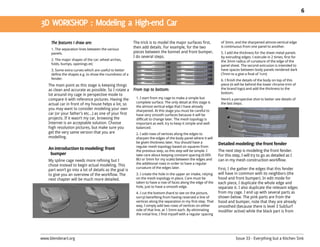
                                                         The trick is to model the major surfaces first,            of 3mm, and the sharpened almost-vertical edge
     1. The separation lines between the various
                                                         then add details. For example, for the two                 is continuous from one panel to another.
     panels.                                             pieces between the bonnet and front bumper,                5. I add the thickness for the sheet metal panels
                                                         I do several steps.                                        by extruding edges. I extrude in 2 times, first for
     2. The major shapes of the car: wheel arches,                                                                  the 3mm radius of curvature of the edge of the
     folds, bumps, openings etc                                                                                     panel sheet. The second extrusion is intended to
     3. Some extra curves which are useful to better                                                                have spaces between body panels rendered dark
     define the shapes e.g. to show the roundness of a                                                              (7mm to a give a final of 1cm)
     fender.                                                                                                        6. I finish the details of the body on top of this
    The main point as this stage is keeping things                                                                  piece (it will be behind the lower chrome trim of
    as clean and accurate as possible. So I rotate a                                                                the brand logo) and add the thickness to the
                                                                                                                    bottom.
    lot around my cage in perspective mode to
    compare it with reference pictures. Having the        1. I start from my cage to make a simple but              Here’s a perspective shot to better see details of
                                                          complete surface. The only detail at this stage is
    actual car in front of my house helps a lot, so                                                                 the last steps.
                                                          the almost vertical edge that I have already
    you may want to consider modeling your own            sharpened. At this stage you must be careful to
    car (or your father’s etc…) as one of your first      have very smooth surfaces because it will be
    projects. If it wasn’t my car, browsing the           difficult to change later. The mesh topology is
    Internet is an acceptable solution. Choose            important as well, try to keep it simple and well
    high resolution pictures, but make sure you           balanced.
    get the very same version that you are                2. I add rows of vertices along the edges to
    modelling.                                            sharpen the edges of the body panel where it will
                                                          be given thickness later. You should have a              Detailed modeling: the front fender
                                                          regular mesh topology based on squares from
    An introduction to modeling: front                    the previous step, so this step will be simple. I        The next step is modeling the front fender.
     bumper                                               take care about keeping constant spacing (0.005          For this step, I will try to go as detailed as I
    My spline cage needs more refining but I              BU or 5mm for my scale) between the edges and            can in my mesh construction workflow.
                                                          the additional rows in order to have a regular
    chose instead to begin actual modeling. This
                                                          curvature of the edges later.                            First, I the gather the edges that this fender
    part won’t go into a lot of details as the goal is
    to give you an overview of the workflow. The          3. I create the hole in the upper air intake, relying    will have in common with its neighbors (the
    next chapter will be much more detailed.              on the mesh topology in place. Care must be              hood and front bumper). In edit mode for
                                                          taken to have a row of faces along the edge of the       each piece, I duplicate the whole edge and
                                                          hole, just to have a smooth edge.                        separate it. I also duplicate the relevant edges
                                                          4. I cut the bottom (hard to see on the picture,         from my cage. I end up with several parts as
                                                          sorry) benefiting from having reserved a line of         shown below. The pink parts are from the
                                                          vertices along the separation in my first step. That     hood and bumper, note that they are already
                                                          way, I simply add two rows of vertices on either         smoothed (because there is level 3 SubSurf
                                                          side of that line, at 1.5mm each. By eliminating         modifier active) while the black part is from
                                                          the initial line, I find myself with a regular spacing


www.blenderart.org                                                                                                            Issue 33 - Everything but a Kitchen Sink
7


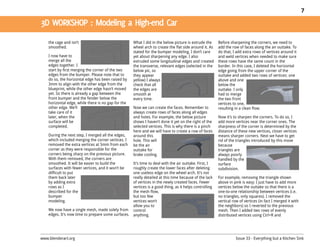
    the cage and isn’t                               What I did in the below picture is extrude the      Before sharpening the corners, we need to
    smoothed.                                        wheel arch to create the flat side around it. As    add the row of faces along the air outtake. To
                                                     stated for the bumper modeling, I don’t care        do that, I add extra rows of vertices around it
    I now have to                                    yet about sharpening any edge. I also               and weld vertices when needed to make sure
    merge all the                                    extruded some longitudinal edges and created        these rows have the same count in the
    edges together. I                                the transverse, relevant edges (selected in the     border. In this case, I deleted the horizontal
    start by first merging the corner of the two     below pic, so                                       edge going from the upper corner of the
    edges from the bumper. Please note that to       they appear                                         outtake and added two rows of vertices: one
    do so, the horizontal edge has been raised by    yellow) I always                                    above and one
    3mm to align with the other edge from the        check that all                                      below the
    blueprint, while the other edge hasn’t moved     the edges are                                       outtake. I only
    yet. So there is already a gap between the       smooth at                                           had to merge
    front bumper and the fender below the            every time.                                         the two front
    horizontal edge, while there is no gap for the                                                       vertices to one,
    other edge. We’ll                                Now we can create the faces. Remember to            resulting in a clean flow.
    take care of it                                  always create rows of faces along all edges
    later, when the                                  and holes. For example, the below picture           Now it’s to sharpen the corners. To do so, I
    surface will be                                  shows I haven’t done it yet on the right of the     add more vertices near the corner ones. The
    completed.                                       selected vertices. This is why there is a pinch     sharpness of the corner is determined by the
                                                     here and we will have to create a row of faces      distance of these new vertices, closer vertices
    During the next step, I merged all the edges,    around this                                         means sharper corners. Next we have to get
    which included merging the corner vertices. I    hole. This will                                     rid of the triangles introduced by this move
    removed the extra vertices at 5mm from each      be the air                                          because
    corner as they were responsible for the          outtake for                                         triangles are
    corners being sharp on the previous picture.     brake cooling.                                      always poorly
    With them removed, the corners are                                                                   handled by the
    smoothed. It will be easier to build the         It’s time to deal with the air outtake. First, I    surface
    surfaces with fewer vertices, and it won’t be    roughly create the lower faces after deleting       subdivision.
    difficult to put                                 one useless edge on the wheel arch. It’s not
    them back later                                  really detailed at this time because of the lack    For example, removing the triangle shown
    by adding extra                                  of vertices in the newly created faces. Fewer       above in pink is easy: I just have to add more
    rows as I                                        vertices is a good thing, as it helps controlling   vertices below the outtake so that there is a
    described for the                                the mesh flow,                                      one-to-one relationship between vertices (i.e.
    bumper                                           but too few                                         no triangles, only squares). I removed the
    modeling.                                        vertices won’t                                      vertical row of vertices (in fact I merged it with
                                                     allow you to                                        the neighbors) so I reverted to the previous
    We now have a single mesh, made solely from      control                                             mesh. Then I added two rows of evenly
    edges. It’s now time to prepare some surfaces.   anything.                                           distributed vertices using Ctrl+R and


www.blenderart.org                                                                                                 Issue 33 - Everything but a Kitchen Sink
8


    mousewheel. Now                                     part. This will                                     mode yet. So it’s
    we only have to                                     allow us to                                         not an urban
    close the faces                                     spend more                                          myth, if you’re like
    with the selected                                   time on a few                                       me and a heavy
    vertices shown in                                   different issues.                                   non-proportional
    the picture.                                                                                            loopcut user,
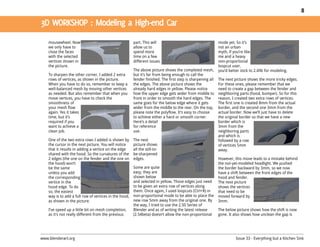
                                                        The above picture shows the completed mesh,         you’d better stick to 2.49b for modeling.
    To sharpen the other corner, I added 2 extra        but it’s far from being enough to call the
    rows of vertices, as shown in the picture.          fender finished. The first step is sharpening all   The next picture shows the more tricky edges.
    When you have to do so, remember to keep a          the edges. The above picture shows the              For these ones, please remember that we
    well-balanced mesh by moving other vertices         already hard edges in yellow. Please notice         need to create a gap between the fender and
    as needed. But also remember that when you          how the upper edge gets wider from middle to        neighboring parts (hood, bumper). So for this
    move vertices, you have to check the                front in order to smooth the hard edges. The        reason, I created two extra rows of vertices.
    smoothness of                                       same goes for the below edge where it gets          The first one is created 8mm from the actual
    your mesh flow                                      wider from the middle to the rear. On the top,      border, and the second one 3mm from the
    again. Yes it takes                                 please note the polyflow. It’s easy to choose       actual border. Now we’ll just have to delete
    time, but it’s                                      to achieve either a hard or smooth corner.          the original border so that we have a new
    required if you                                     Here’s a detail                                     border which is
    want to achieve a                                   for reference                                       3mm from the
    clean job.                                          use.                                                neighboring parts
                                                                                                            and which is
    One of the two extra rows I added is shown by       The next                                            followed by a row
    the cursor in the next picture. You will notice     picture shows                                       of vertices 5mm
    that it results in adding a vertice on the edge     all the still-to-                                   away.
    shared with the hood. So the curvatures of the      be-sharpened
    2 edges (the one on the fender and the one on       edges.                                              However, this move leads to a mistake behind
    the hood) won’t                                                                                         the not-yet-modeled headlight. We pushed
    be the same                                         Some are quite                                      the border backward by 3mm, so we now
    unless you add                                      easy, they are                                      have a shift between the front edges of the
    the corresponding                                   shown below                                         hood and fender.
    vertice in the                                      and selected in yellow. Those edges just need       The next picture
    hood edge. To do                                    to be given an extra row of vertices along          shows the vertices
    so, the easiest                                     them. Once again, I used loopcuts (Ctrl+R) in       that need to be
    way is to add a full row of vertices in the hood,   non-proportional mode to be able to place the       moved forward by
    as shown in the picture.                            new row 5mm away from the original one. By          3mm.
                                                        the way, I tried to use the 2.50 Series of
    I’ve speed up a little bit on mesh completion,      Blender and as of writing the latest release        The below picture shows how the shift is now
    as it’s not really different from the previous      (2.54beta) doesn’t allow the non-proportional       gone. It also shows how unclean the gap is


www.blenderart.org                                                                                                    Issue 33 - Everything but a Kitchen Sink
9


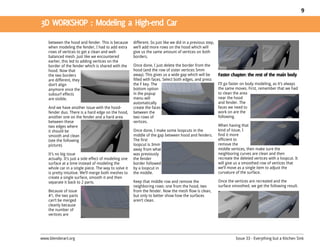
    between the hood and fender. This is because        different. So just like we did in a previous step,
    when modeling the fender, I had to add extra        we’ll add more rows on the hood which will
    rows of vertices to get a clean and well-           give us the same amount of vertices on both
    balanced mesh. Just like we encountered             borders.
    earlier, this led to adding vertices on the
    border of the fender which is shared with the       Once done, I just delete the border from the
    hood. Now that                                      hood (and the row of sister vertices 5mm
    the two borders                                     away). This gives us a wide gap which will be
    are different, they                                 filled with faces. Select both edges, and press
    don’t align                                         the F key. The                                       I’ll go faster on body modeling, as it’s always
    anymore once the                                    bottom option                                        the same moves. First, remember that we had
    subsurf effects                                     in the popup                                         to clean the area
    are visible.                                        menu will                                            near the hood
                                                        automatically                                        and fender. The
    And we have another issue with the hood-            create the faces                                     faces we need to
    fender duo. There is a hard edge on the hood,       between the                                          work on are the
    another one on the fender and a hard area           two rows of                                          following.
    between these                                       vertices.
    two edges where                                                                                          When having that
    it should be                                        Once done, I make some loopcuts in the               kind of issue, I
    smooth and clean                                    middle of the gap between hood and fenders.          find it more
    (see the following                                  The first                                            efficient to
    picture).                                           loopcut is 3mm                                       remove the
                                                        away from what                                       middle vertices, then make sure the
    It’s no big issue                                   was previously                                       neighboring curves are clean and then
    actually. It’s just a side effect of modeling one   the fender                                           recreate the deleted vertices with a loopcut. It
    surface at a time instead of modeling the           border followed                                      will give us a smoothed row of vertices that
    whole car in a single piece. The way to solve it    by a loopcut in                                      we’ll move as a single item to adjust the
    is pretty intuitive. We’ll merge both meshes to     the middle.                                          curvature of the surface.
    create a single surface, smooth it and then
    separate it back to 2 parts.                        Keep that middle row and remove the                  Once the vertices are recreated and the
                                                        neighboring rows: one from the hood, two             surface smoothed, we get the following result.
    Because of issue                                    from the fender. Now the mesh flow is clean,
    #1, the two parts                                   but only to better show how the surfaces
    can’t be merged                                     aren’t clean.
    cleanly because
    the number of
    vertices are


www.blenderart.org                                                                                                     Issue 33 - Everything but a Kitchen Sink
10


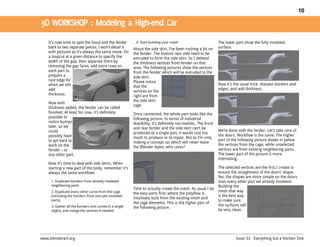
    It’s now time to split the hood and the fender       4. Start building your mesh                            The lower part show the fully modeled
    back to two separate pieces. I won’t detail it      About the side skirt, I’ve been rushing a bit on        surface.
    with pictures as it’s always the same move. Do      the fender. The bottom rear side need to be
    a loopcut at a given distance to specify the        extruded to form the side skirt. So I deleted
    width of the gap, then separate them by             the thickness vertices from fender on that
    removing the gap faces, add extra rows on           area. The following pictures show the vertices
    each part to                                        from the fender which will be extruded to the
    prepare a                                           side skirt.
    nice edge for                                       Please notice
    when we will                                                                                                Now it’s the usual trick: sharpen borders and
                                                        that the
    add                                                                                                         edges, and add thickness.
                                                        vertices on the
    thickness.                                          right are from
                                                        the side skirt
    Now with
                                                        cage.
    thickness added, the fender can be called
    finished. At least for now, it’s definitely         Once connected, the whole part looks like the
    possible to                                         following picture. In terms of industrial
    notice bumps                                        feasibility, it’s definitely not realistic. The front
    later, so we                                        and rear fender and the side skirt can’t be
    could                                                                                                       We’re done with the fender. Let’s take care of
                                                        produced as a single part, it would cost too
    possibly have                                                                                               the doors. Workflow is the same. The higher
                                                        much to produce or to repair. But as I’m only
    to get back to                                                                                              part of the following picture shows in yellow
                                                        making a concept car which will never leave
    work on the                                                                                                 the vertices from the cage, while unselected
                                                        the Blender bytes, who cares?
    fender – or                                                                                                 vertices are from existing neighboring parts.
    any other part.                                                                                             The lower part of the picture is more
                                                                                                                interesting.
    Now it’s time to deal with side skirts. When
    starting a new part of the body, remember it’s                                                              The selected vertices are the first I create to
    always the same workflow:                                                                                   ensure the straightness of the doors’ shape.
                                                                                                                Yes, the shapes are more simple on the doors
     1. Duplicate borders from already modeled                                                                  than every other part we already modeled.
     neighboring parts                                                                                          Building the
                                                        Time to actually create the mesh. As usual I do
     2. Duplicate every other curve from the cage                                                               mesh that way
                                                        the easy parts first, where the polyflow is
     (including the borders from non-yet-modeled                                                                is the best way
                                                        intuitively built from the existing mesh and
     parts)                                                                                                     to make sure
                                                        the cage elements. This is the higher part of
     3. Gather all the borders and curves in a single                                                           the surfaces will
                                                        the following picture.
     object, and merge the vertices if needed                                                                   be very clean.


www.blenderart.org                                                                                                        Issue 33 - Everything but a Kitchen Sink
11


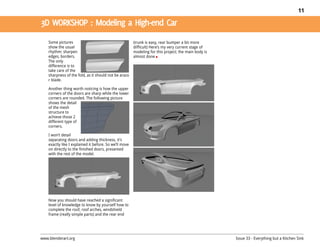
    Some pictures                                       (trunk is easy, rear bumper a bit more
    show the usual                                      difficult) Here’s my very current stage of
    rhythm: sharpen                                     modeling for this project; the main body is
    edges, borders.                                     almost done
    The only
    difference is to
    take care of the
    sharpness of the fold, as it should not be arazo
    r blade.

    Another thing worth noticing is how the upper
    corners of the doors are sharp while the lower
    corners are rounded. The following picture
    shows the detail
    of the mesh
    structure to
    achieve those 2
    different type of
    corners.

    I won’t detail
    separating doors and adding thickness, it’s
    exactly like I explained it before. So we’ll move
    on directly to the finished doors, presented
    with the rest of the model.


    Now you should have reached a significant
    level of knowledge to know by yourself how to
    complete the roof, roof arches, windshield
    frame (really simple parts) and the rear end


www.blenderart.org                                                                                    Issue 33 - Everything but a Kitchen Sink
12


                                                                        take them yourself with your digital        picture. It's the notion of projection of
                                                                        camera, or you can grab tons of them        the real world on the picture.
                                                                        from the Internet. Some people can
                                                                        use them to create a model by eye,          insight3d works using this projection,
                                                                        but it requires some serious attention      by reverse computing the projection.
                                                                        due to the nature of perspective.           Give it the pictures, a set of specific
                                                                        Perspective makes closer things             points on your model and it will be
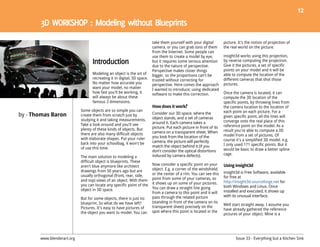
                                  Modeling an object is the art of      bigger, so the proportions can't be         able to compute the location of the
                                  recreating it in digital, 3D space.   trusted without correcting for              different cameras that shot those
                                  No matter how accurate you            perspective. Here comes the approach        pictures.
                                  want your model, no matter            I wanted to introduce; using dedicated
                                  how fast you'll be working, it        software to make this correction.           Once the camera is located, it can
                                  will always be about these                                                        compute the 3D location of the
                                  famous 3 dimensions.                                                              specific points, by throwing lines from
                                                                        How does it work                            the camera location to the location of
                            Some objects are so simple you can                                                      each point on each picture. For a
by - Thomas Baron           create them from scratch just by            Consider our 3D space, where the
                                                                                                                    given specific point, all the lines will
                            studying it and taking measurements.        object stands, and a set of cameras
                                                                        around it. Each camera takes a              converge onto the real place of this
                            Take a look around and you'll see                                                       reference point on the model. As a
                            plenty of these kinds of objects. But       picture. Put each picture in front of its
                                                                        camera on a transparent sheet. When         result you're able to compute a 3D
                            there are also many difficult objects                                                   model from a set of pictures. Of
                            with elaborate shapes. Put your ruler       you look from the location of the
                                                                        camera, the picture will perfectly          course it's a simplified 3D model. e.g.
                            back into your schoolbag, it won't be                                                   I only used 171 specific points. But it
                            of use this time.                           match the object behind it (if you
                                                                        don't consider the optical distortions      would be basic to draw a better spline
                                                                        induced by camera defects).                 cage.
                            The main solution to modeling a
                            difficult object is blueprints. These
                            aren't blue anymore like architect          Now consider a specific point on your       Using insight3d
                            drawings from 50 years ago but are          object. E.g. a corner of the windshield,
                                                                        or the center of a rim. You can see this    insight3d is Free Software, available
                            usually orthogonal (front, rear, side,                                                  for free at
                            and top) views of an object. With them      point from some of your cameras, so
                                                                        it shows up on some of your pictures.       http://insight3d.sourceforge.net for
                            you can locate any specific point of the                                                both Windows and Linux. Once
                            object in 3D space.                         You can draw a straight line going
                                                                        from a camera to this point and it will     installed and executed, it shows up
                                                                        pass through the related picture            with its unusual interface.
                            But for some objects, there is just no
                            blueprint. So what do we have left?         (standing in front of the camera on its
                                                                                                                    Well start straight away. I assume you
                            Pictures. It's easy to have pictures of     transparent sheet) precisely on the
                                                                                                                    have already gathered the reference
                            the object you want to model. You can       spot where this point is located in the
                                                                                                                    pictures of your object. Mine is a


       www.blenderart.org                                                                                                  Issue 33 - Everything but a Kitchen Sink
13


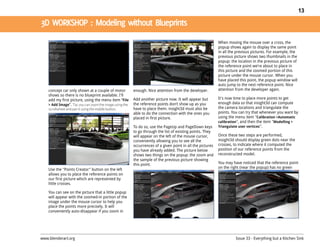
                                                                                                             When moving the mouse over a cross, the
                                                                                                             popup shows again to display the same point
                                                                                                             in all the previous pictures. For example, the
                                                                                                             previous picture shows two thumbnails in the
                                                                                                             popup: the location in the previous picture of
                                                                                                             the reference point we're about to place in
                                                                                                             this picture and the zoomed portion of this
                                                                                                             picture under the mouse cursor. When you
                                                                                                             have placed this point, the popup window will
                                                                                                             auto jump to the next reference point. Nice
    concept car only shown at a couple of motor           enough. Nice attention from the developer.         attention from the developer again.
    shows so there is no blueprint available. I'll
    add my first picture, using the menu item “File       Add another picture now. It will appear but        It's now time to place more points to get
    > Add Image”. Tip: you can zoom the image using the   the reference points don’t show up as you          enough data so that insight3d can compute
    scrollwheel and pan it using the middle button.       have to place them. insight3d must also be         the camera locations and triangulate the
                                                          able to do the connection with the ones you        points. You can try that whenever you want by
                                                          placed in first picture.                           using the menu item "Calibration >Automatic
                                                                                                             calibration", and then the item "Modelling >
                                                          To do so, use the PageUp and PageDown keys         Triangulate user vertices".
                                                          to go through the list of existing points. They
                                                          will appear on the left of the mouse cursor,       Once these two steps are performed,
                                                          conveniently allowing you to see all the           insight3d should display green dots near the
                                                          occurrences of a given point in all the pictures   crosses, to indicate where it computed the
                                                          you have already added. The picture below          position of our reference points from the
                                                          shows two things on the popup: the zoom and        reconstructed model.
                                                          the sample of the previous picture showing
                                                          this point.                                        You may have noticed that the reference point
                                                                                                             on the right (near the popup) has no green
    Use the "Points Creator" button on the left
    allows you to place the reference points on
    our first picture which are represented by
    little crosses.

    You can see on the picture that a little popup
    will appear with the zoomed-in portion of the
    image under the mouse cursor to help you
    place the points more precisely. It will
    conveniently auto-disappear if you zoom in


www.blenderart.org                                                                                                     Issue 33 - Everything but a Kitchen Sink
14


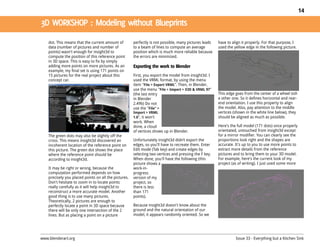
    dot. This means that the current amount of         perfectly is not possible, many pictures leads   have to align it properly. For that purpose, I
    data (number of pictures and number of             to a beam of lines to compute an average         used the yellow edge in the following picture.
    points) wasn't enough for insight3d to             position which is much more reliable because
    compute the position of this reference point       the errors are minimized.
    in 3D space. This is easy to fix by simply
    adding more points on more pictures. As an
    example, my final set is using 171 points on
    15 pictures for the real project about this        First, you export the model from insight3d. I
    concept car.                                       used the VRML format, by using the menu
                                                       item "File > Export VRML". Then, in Blender,
                                                       use the menu "File > Import > X3D & VRML 97"
                                                       (the last entry                                  This edge goes from the center of a wheel toth
                                                       in Blender                                       e other one. So it defines horizontal and rear-
                                                       2.49b) Do not                                    end orientation. I use this property to align
                                                       use the "File" >                                 the model. Also, pay attention to the middle
                                                       Import > VRML                                    vertices (shown in the white line below), they
                                                       1.0", it won't                                   should be aligned as much as possible.
                                                       work. When
                                                       done, a cloud                                    Here's the full model (171 dots) once properly
                                                       of vertices shows up in Blender.                 orientated, untouched from insight3d except
    The green dots may also be slightly off the                                                         for a mirror modifier. You can clearly see the
    cross. This means insight3d discovered an          Unfortunately insight3d didn’t export the        proportions look right and the shapes are
    incoherent location of the reference point on      edges, so you'll have to recreate them. Enter    accurate. It's up to you to use more points to
    this picture. The green dot shows the place        Edit mode (Tab key) and create edges by          extract more details from the reference
    where the reference point should be                selecting two vertices and pressing the F key.   pictures and to bring them to your 3D model.
    according to insight3d.                            When done, you'll have the following (this       For example, here's the current look of my
                                                       picture shows a                                  project (as of writing). I just used some more
    It may be right or wrong, because the              work-in-
    computation performed depends on how               progress
    precisely you placed points on all the pictures.   version of my
    Don't hesitate to zoom in to locate points         project, so
    really carefully as it will help insight3d to      there is less
    reconstruct a more accurate model. Another         than 171
    good thing is to use many pictures.                points).
    Theoretically, 2 pictures are enough to
    perfectly locate a point in 3D space because       Because insight3d doesn't know about the
    there will be only one intersection of the 2       ground and the natural orientation of our
    lines. But as placing a point on a picture         model, it appears randomly oriented. So we


www.blenderart.org                                                                                                Issue 33 - Everything but a Kitchen Sink
15


    points, and added details into Blender.            is the "Polygon creator" button on the left        One critic about insight3d, about feedback &
                                                       side. When activated, you can select a number      support. During my project, I encountered
                                                       of reference points, and a polygon is shown        several bugs. An annoying one is that the
                                                       using the points you selected. You can confirm     project file doesn't support the use of spaces
                                                       this polygon and move on to creating the next      in a folder names (at least in the Windows
                                                       one by pressing the Enter key. At any time,        version I used). I tried to reach the developer
                                                       you can cycle backwards through all the            about that, but I got no reply from him. It
                                                       created polygons using the BackSpace key.          looks like he doesn't reply to incoming emails
                                                       Use the menu item "Edit > Erase current            about his software and a comment on a
                                                       polygon" to delete the polygon shown in pink.      BlenderNation article about insight3d
                                                                                                          confirmed my fear. Let's hope this article can
                                                               .                                          cause him to change his mind!
    Some extra features within insight3d
                                                       insight3d also supports camera export, but         http://sourceforge.net/projects/insight3dng/
                                                       unfortunately I didn't achieve a useful result.
                                                       The exported data for cameras (location,
                                                                                                          Picture credits
    insight3d features the ability to discover         rotation) doesn't match the imported model.
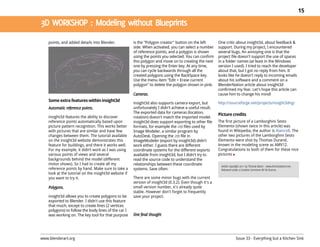
    reference points automatically based upon          insight3d does support exporting to other file     The first picture of a Lamborghini Sesto
    picture pattern recognition. This works better     formats, for example the .rzi files used by        Elemento (shown twice in this article) was
    with pictures that are similar and have few        Image Modeler, a similar program by                found in Wikipedia, the author is Alainrx8. The
    changes between them. The tutorial available       AutoDesk. Opening the .rzi file in                 other two pictures of the Lamborghini Sesto
    on the insight3d website demonstrates this         ImageModeler (export by insight3d) didn't          Elemento were shot by Thomas Durand,
    feature for buildings, and there it works well.    work either. I guess there are different           known in the modeling scene as AMV12.
    For my example, it didn’t work as I was using      coordinate systems for the different exports       Congratulations to both of them for these nice
    various points of views and several                available from insight3d, but I didn't try to      pictures
    backgrounds behind the model (different            read the source code to understand the
    motor shows). So I had to create all my            relationships between these coordinate
    reference points by hand. Make sure to take a      systems. Save often.
    look at the tutorial on the insight3d website if
    you want to try it.                                There are some minor bugs with the current
                                                       version of insight3d (0.3.2). Even though it's a
                                                       small version number, it's already quite
                                                       stable. However don't forget to frequently
    insight3d allows you to create polygons to be      save your project.
    exported to Blender. I didn't use this feature
    that much, except to create lines (2 vertices
    polygons) to follow the body lines of the car I
    was working on. The key tool for that purpose


www.blenderart.org                                                                                                  Issue 33 - Everything but a Kitchen Sink
16


                                                                    of the character’s mesh. What              Each of the five panels in the facial UI
                                                                    happens is the controls in the facial UI   shown in Figure 1 has a controller the
                                                                    manipulate the character rig structure     animator can freely manipulate within
                                                                    which in turn deforms the mesh.            the boundaries of the corresponding
                                                                                                               panel. The default location of each
                                                                    The number of panels in the facial UI      controller is in the center of the
                                                                    usually corresponds to the number of       corresponding panel.
                                Character facial animation is       facial regions of the character that
                                difficult because the face of a     need to be animated. Usually the
                                character assumes many              controls are grouped based on the          Idea of dynamic facial UIs
                                complex expressions. To             anatomical areas of the face. There        The facial UI method presented in this
                                achieve convincing visual           are a number of references to help the     article is dynamic because it extends
                                results for animation, digital      character rigger do this better, such as   the usability of the common facial UIs
                                artists need to prepare their       Paul Ekman’s book, “Facial Action          used in character facial animation. It
                                characters with sophisticated       Coding System.” Figure 1 shows an          is a method developed with Blender’s
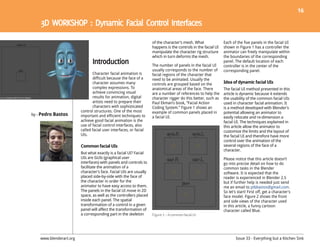
                         control structures. One of the most        example of common panels placed in         potential allowing an animator to
by - Pedro Bastos        important and efficient techniques to      a facial UI.                               easily relocate and re-dimension a
                         achieve good facial animation is the                                                  facial UI. The techniques explained in
                         use of facial control interfaces, also                                                this article allow the animator to
                         called facial user interfaces, or facial                                              customize the limits and the layout of
                         UIs.                                                                                  the facial UI and therefore have more
                                                                                                               control over the animation of the
                         Common facial UIs                                                                     several regions of the face of a
                                                                                                               character.
                         But what exactly is a facial UI? Facial
                         UIs are GUIs (graphical user                                                          Please notice that this article doesn’t
                         interfaces) with panels and controls to                                               go into precise detail on how to do
                         facilitate the animation of a                                                         common tasks in the Blender
                         character’s face. Facial UIs are usually                                              software. It is expected that the
                         placed side-by-side with the face of                                                  reader is experienced in Blender 2.5
                         the character in order for the                                                        but if further help is needed just send
                         animator to have easy access to them.                                                 me an email to ptbbastos@gmail.com.
                         The panels in the facial UI move in 2D                                                So let’s start! First off, get a character’s
                         space, as well as the controllers placed                                              face model. Figure 2 shows the front
                         inside each panel. The spatial                                                        and side views of the character used
                         transformation of a control in a given                                                in this article, a funny cartoon
                         panel will affect the transformation of                                               character called Blue.
                         a corresponding part in the skeleton       Figure 1 – A common facial UI


    www.blenderart.org                                                                                                 Issue 33 - Everything but a Kitchen Sink
17


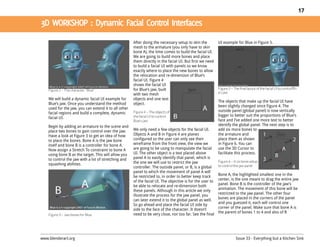
                                                       After doing the necessary setup to skin the          UI example for Blue in Figure 5.
                                                       mesh to the armature (you only have to skin
                                                       bone A), the time comes to build the facial UI.
                                                       We are going to build more bones and place
                                                       them directly in the facial UI. But first we need
                                                       to build a facial UI with panels so we know
                                                       exactly where to place the new bones to allow
                                                       the relocation and re-dimension of Blue’s
                                                       facial UI. Figure 4
                                                       shows the facial UI
    Figure 2 – The character, “Blue”                   for Blue’s jaw, built                                Figure 5 – The final layout of the facial UI to controlBlu
                                                       with two mesh                                        e’s jaw
    We will build a dynamic facial UI example for      objects and one text
                                                                                                            The objects that make up the facial UI have
    Blue’s jaw. Once you understand the method         object.
                                                                                                            been slightly changed since Figure 4. The
    used for the jaw, you can extend it to all other
                                                       Figure 4 – The objects of                            outside panel (global panel) is now vertically
    facial regions and build a complete, dynamic
                                                       the facial UI to control                             bigger to better suit the proportions of Blue’s
    facial UI.
                                                       Blue’s jaw                                           face and I’ve added one more text to better
    Begin by adding an armature to the scene and                                                            identify the global panel. The next step is to
    place two bones to gain control over the jaw.      We only need a few objects for the facial UI.        add six more bones to
    Have a look at Figure 3 to get an idea of how      Objects A and B in Figure 4 are planes               the armature and
    to place the bones. Bone A is the jaw bone         configured so the user can only see their            place them as shown
    itself and bone B is a controller for bone A.      wireframe from the front view, the view we           in Figure 6. You can
    Now assign a Stretch To constraint to bone A       are going to be using to manipulate the facial       use the 3D Cursor to
    using bone B as the target. This will allow you    UI. The other object is a text placed above          facilitate this process.
    to control the jaw with a lot of stretching and    panel A to easily identify that panel, which is
                                                       the one we will use to restrict the jaw              Figure 6 – A six bone setup
    squashing abilities.                                                                                    to control the jaw panel
                                                       controller. The outside panel, or B, is a global
                                                       panel to which the movement of panel A will
                                                       be restricted to, in order to better keep track      Bone A, the highlighted smallest one in the
                                                       of the facial UI. The objective is for the user to   center, is the one meant to drag the entire jaw
                                                       be able to relocate and re-dimension both            panel. Bone B is the controller of the jaw’s
                                                       these panels. Although in this article we only       animation. The movement of this bone will be
                                                       illustrate the process for the jaw panel, you        restricted to the jaw panel. The other four
                                                       can later extend it to the global panel as well.     bones are placed in the corners of the panel
                                                       So go ahead and place the facial UI side by          and you guessed it, each will control one
                                                       side to the face of the character. It doesn’t        corner of the panel. Make sure that bone A is
                                                       need to be very close, nor too far. See the final    the parent of bones 1 to 4 and also of B
    Figure 3 – Jaw bones for Blue


www.blenderart.org                                                                                                       Issue 33 - Everything but a Kitchen Sink
18


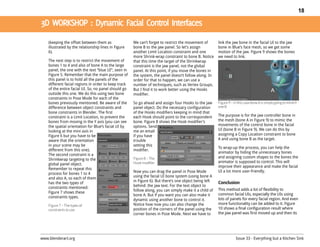
    (keeping the offset between them as               We can’t forget to restrict the movement of       link the jaw bone in the facial UI to the jaw
    illustrated by the relationship lines in Figure   bone B to the jaw panel. So let’s assign          bone in Blue’s face mesh, so we get some
    6).                                               another Limit Location constraint and one         motion of the jaw. Figure 9 shows the bones
                                                      more Shrink-wrap constraint to bone B. Notice     we need to link.
    The next step is to restrict the movement of      that this time the target of the Shrinkwrap
    bones 1 to 4 and also of bone A to the large      constraint is the jaw panel, not the global
    panel, the one with the text “blue UI”, seen in   panel. At this point, if you move the bones in
    Figure 5. Remember that the main purpose of       the system, the panel doesn’t follow along. In
    this panel is to hold all the panels of the       order for that to happen, we can use a
    different facial regions in order to keep track   number of techniques, such as Vertex Groups.
    of the entire facial UI. So, no panel should go   But I find it to work better using the Hooks
    outside this one. We do this using two bone       modifier.
    constraints in Pose Mode for each of the
    bones previously mentioned. Be aware of the       So go ahead and assign four Hooks to the jaw      Figure 9 – In this case bone A is simply going to mimicb
    difference between object constraints and         panel object. Do the necessary configuration      one B
    bone constraints in Blender. The first            of the Hooks modifiers keeping in mind that
    constraint is a Limit Location, to prevent the    each Hook should point to the correspondent       The purpose is for the jaw controller bone in
    bones from moving in the Y axis (you can see      bone. Figure 8 shows the Hook modifier’s          the mesh (bone A in Figure 9) to mimic the
    the spatial orientation for Blue’s facial UI by   options. Send                                     movements of the control bone in the facial
    looking at the mini axis in                       me an email                                       UI (bone B in Figure 9). We can do this by
    Figure 6 but you have to be                       if you have                                       assigning a Copy Location constraint to bone
    aware that the orientation                        trouble                                           A and using bone B as the target.
    in your scene may be                              setting this
                                                                                                        To wrap-up the process, you can help the
    different from this one).                         modifier.
                                                                                                        animator by hiding the unnecessary bones
    The second constraint is a
                                                      Figure 8 – The                                    and assigning custom shapes to the bones the
    Shrinkwrap targeting to the
                                                      Hook modifier                                     animator is supposed to control. This will
    global panel object.
                                                                                                        improve their appearance and make the facial
    Remember to repeat this
                                                      Now you can drag the panel in Pose Mode           UI a lot more user-friendly.
    process for bones 1 to 4
    and also A, so each of them                       using the facial UI bone system (using bone A
    has the two types of                              in Figure 6). But there’s one object being left   Conclusion
    constraints mentioned.                            behind: the jaw text. For the text object to
                                                      follow along, you can simply make it a child of   This method adds a lot of flexibility to
    Figure 7 shows these                                                                                common facial UIs, especially the UIs using
    constraints types.                                bone A. But if you want you can also make it
                                                      dynamic using another bone to control it.         lots of panels for every facial region. And even
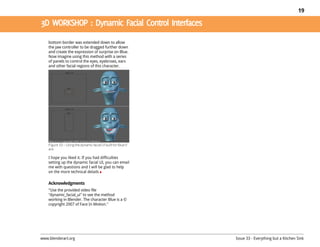
    Figure 7 – The types of                           Notice how now you can also change the            more functionality can be added to it. Figure
    constraints to use                                position of the corners of the panel using the    10 shows a final configuration result where
                                                      corner bones in Pose Mode. Next we have to        the jaw panel was first moved up and then its


www.blenderart.org                                                                                                  Issue 33 - Everything but a Kitchen Sink
19


    bottom border was extended down to allow
    the jaw controller to be dragged further down
    and create the expression of surprise on Blue.
    Now imagine using this method with a series
    of panels to control the eyes, eyebrows, ears
    and other facial regions of this character.


    Figure 10 – Using the dynamic facial UI built for Blue’sf
    ace

    I hope you liked it. If you had difficulties
    setting up the dynamic facial UI, you can email
    me with questions and I will be glad to help
    on the more technical details

    Acknowledgments
    "Use the provided video file
    "dynamic_facial_ui" to see the method
    working in Blender. The character Blue is a ©
    copyright 2007 of Face In Motion."


www.blenderart.org                                              Issue 33 - Everything but a Kitchen Sink
20


                                                                                                                 really just 2D pictures, they are
                                                                                                                 projected onto hidden low poly 3D
                                                                                                                 geometry. The resulting character
                                                                                                                 masking and shadows add to the
                                                                                                                 illusion very effectively. With hidden
                                                                                                                 3D geometry masking the pre-
                                                                                                                 rendered background, a realtime
                                Alpha Polaris is a point-and-                                                    character can walk around an object
                                click horror adventure game                                                      as if it was really in 3D space. Typical
                                developed by Turmoil Games                                                       for adventure games, we also
                                and set to be released in June        think this is one of the things we have
                                                                      been very good at. Throughout the          rendered separate front masks for
                                2011. We have been working on                                                    scenes.
                                the project for roughly two           project, Lassi has been very effective
                                years now, using Blender for          in training people to use Blender. With
                                visuals and Wintermute as a           a limited initial skill set and a team
                        game engine. The core of the game is          with no game industry background,
by - Teemu Vilén        the titular Alpha Polaris, a distant oil      we've also approached the project
                        research station in the icy wastes of         very iteratively, improving the graphics
                        Greenland. Our team of six people set         and re-doing things when needed.
                        out to produce a consistent, high-
                                                                      Our key art assets in Blender are the
                        quality gaming experience with a
                                                                      scenes. With indoor locations, one
                        special focus on the place itself. Our
                                                                      Blender scene corresponds to one
                        setting wasn't going to be a "slog
                                                                      game screen. Outdoors, there might
                        through different levels" world, but an
                                                                      be several screens rendered from one
                        isolated setting full of little details. In
                                                                      Blender scene. For example, our
                        this article, I'll discuss some of the
                                                                      station from the outside is a full 3D
                        visual challenges we have tackled.
                                                                      environment. One of the more
                        Making adventure games is a very art          important observations we made
                        heavy business. To pull one off with          regarding the pre-rendered scenes is
                        1280x800 wide-screen graphics, pre-           that including dynamic elements will
                        rendered backgrounds and real-time            make them more interesting. We don't
                        characters, we needed a lot of art            use parallax scrolling, so we employ
                                                                      different sprite animations like           One would initially think that working
                        resources. This meant we all had to                                                      with such a well defined setting is
                        learn how to do modeling and                  snowing overlay, glow from aurora
                                                                      borealis, subtle flickering on computer    relatively simple when it comes to
                        texturing in Blender. In the beginning,                                                  rendering. However, our scenes
                        only our art director Lassi had               screens and so on. Illusion of depth is
                                                                      also vital. Since the backgrounds are      contain a high number of interactive
                        significant modeling experience. I


   www.blenderart.org                                                                                                   Issue 33 - Everything but a Kitchen Sink
21


                                                        batch tools so post processing the sprite           Character animations were pretty
                                                        animations was also possible.                       straightforward to do. We made one action
                                                                                                            strip per animation in Blender and combined
                                                        The same scenes were also used for cut scene        the animations in Fragmotion. Our characters
                                                        videos. The challenge was to build the              are semi-realistic so the animations had to be
                                                        suspense while adding visually dynamic              close to a real person’s movement. Animating
                                                        content to the game. Instead of elaborate           the walk cycles was the hardest part. We
                                                        storyboards, the team prepared test animatics       videoed our team walking on a treadmill for
                                                        for the cut scenes phase of the project which       reference at a local gym which helped a bit.
    and changing details, and are revisited in          meant we already had a lot of the scenes
    different parts of the game. On top of that, we     done. This sped up the process considerably.
    have three totally different lighting conditions:   The cut scenes in the game are not very long,
    morning, evening and night. Combined with           but combined they total at over 12 minutes,
    relatively long rendering times, it has been an     so they were a big part of the project for a
    arduous process. For example, if an artist          small team.
    forgot to render a night version for objects on
                                                        With characters, the most significant problem
    the kitchen table, the error would be painfully
                                                        was getting them to Wintermute. It uses the
    obvious.
                                                        age-old DirectX format for models, and the
    All rendering was done with Blender’s own           Blender .X-exporter didn't seem to work
    renderer. We went through several other             correctly. As usual, this meant some semi-          I'm happy to say that there's not much to do
    possibilities, but at the time none of them         blind pipeline testing and frustration. If we got   anymore. At the moment I'm writing this, we
    were integrated well enough into Blender to         to the point we could see the characters in         are implementing the localization kits - the
    use in a heavy project without problems. For        Wintermute, they always had some lighting           game is to be published in several languages
    example we needed to render lots of sprite          and animation related glitches in them. After       by a major publisher. Our long, iterative
    animations for the scenes with render layers        about two weeks of testing, we ended up             process seems to be coming to conclusion.
    and alpha. The scene renders were all post          using Gandaldf's excellent .B3D exporter, and       We will definitely continue to work with
    processed in Photoshop. Luckily it has good         then converting them to .X in FragMotion.           Blender in the future, as it's proven to have
                                                                                                            outstanding features and flexibility for indie
                                                        The characters in the game are realtime with        game development, not to mention the
                                                        3000-4000 triangles. Wintermute only                community support
                                                        supports diffuse maps, so we had to bake and
                                                        paint some lighting effects on the character        Writer: Teemu Vilén, Project manager of Alpha Polaris
                                                        textures. They are 2048x2048 resolution and         and CEO of Turmoil Games LTD
                                                        were mostly painted in Photoshop, but
                                                        Blender’s texture paint was also used as it is
                                                        excellent for clearing texture seams with the
                                                        clone stamp brush.


www.blenderart.org                                                                                                     Issue 33 - Everything but a Kitchen Sink
22


                                                                         or other MMOs. So it’s possible to           now I will not share any blender files,
                                                                         build an RPG game alone with all that        scripts, textures assets, so don't ask
                                                                         stuff too. All Blender users know the        for it. All files are done by myself so I
                                                                         game Yo Frankie!, and it was the first       have a lot of things to do in the next
                                                                         big step in my opinion.                      couple of months.

                                                                         Thanks to the hours they spent to            If my concept works in a browser with
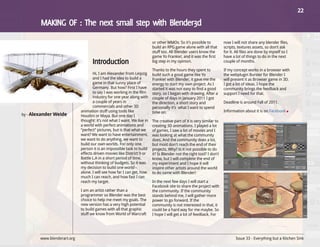
                                    Hi, I am Alexander from Leipzig      build such a good game like Yo               the webplugin Burster for Blender I
                                    and I had the idea to build a        Frankie! with Blender, it gave me the        will present it as Browser game in 3D.
                                    game in that sunny place of          energy to start my own project. As I         I got a lot of ideas. I hope the
                                    Germany. But how? First I have       started it was not easy to find a good       community brings the feedback and
                                    to say I was working in the film     story, so I began with drawing. After a      support I need for that.
                                    industry for one year along with     couple of days in January 2011 I got
                                    a couple of years in                 the direction, a short story and             Deadline is around Fall of 2011.
                                    commercials and other 3D             personally it’s what I want to spend
                             animation stuff using tools like            time on.                                     Information about it is on Facebook
by - Alexander Weide         Houdini or Maya. But one day I
                             thought: it’s not what I want. We live in   The creative part of it is very similar to
                             a world with perfect animations and         creating 3D animations. I played a lot
                             “perfect” pictures, but is that what we     of games, I saw a lot of movies and I
                             want? We want to have entertainment,        was looking at what the community
                             we want to do anything, we want to          does. And the community does a lot,
                             build our own worlds. For only one          but most don't reach the end of their
                             person it is an impossible task to build    projects. Why? Is it not possible to do
                             effects driven movies like District 9 or    it? Is Blender not the right tool? I don't
                             Battle L.A in a short period of time,       know, but I will complete the end of
                             without thinking of budgets. So it was      my experiment and I hope it will
                             my decision to build one world -            inspire other artists around the world
                             alone. I will see how far I can get, how    to do same with Blender!
                             much I can reach, and how fast I can
                             reach my target.                            In the next few days I will start a
                                                                         Facebook site to share the project with
                             I am an artist rather than a                the community. If the community
                             programmer so Blender was the best          stands behind me, I will gather more
                             choice to help me meet my goals. The        power to go forward. If the
                             new version has a very high potential       community is not interested in that, it
                             to build games with all that graphic        could be a hard way for me maybe. So
                             stuff we know from World of Warcraft        I hope I will get a lot of feedback. For


        www.blenderart.org                                                                                                   Issue 33 - Everything but a Kitchen Sink
23


                                                                          In 2005, after learning some                to take it back ...
                                                                          rigging/skinning stuff, I began to work
                                                                          on shapes (called rvk's at that time) for   The short will be (hopefully)
                                                                          facial animation of my characters.          humorous, which is why I decided to
                                                                          Today this is still the area that           model some toony and quite ugly
                                                                          provides me the most pleasure. I love       characters, especially the young girl
                                                                          the way it gives life to characters and     who is supposed to be pretty (she's a
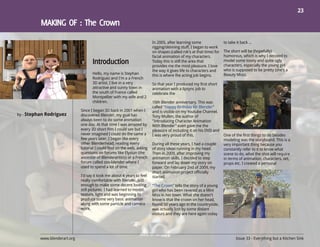
                                      Hello, my name is Stephan           this is where the acting job begins.        Beauty Miss).
                                      Rodriguez and I'm a a French
                                      3D artist. I live in a very         So that year I produced my first short
                                      attractive and sunny town in        animation with a lipsync job to
                                      the south of France called          celebrate the
                                      Montpellier with my wife and 2
                                      children.                           10th Blender anniversary. This was
                                                                          called "Happy Birthday Mr Blender"
                               Since I began 3D back in 2001 when I       and is visible on my Youtube Channel.
by - Stephan Rodriguez         discovered Blender, my goal has            Tony Mullen, the author of
                               always been to do some animation           "Introducing Character Animation
                               one day. At that time I was amazed by      With Blender" even gave me the
                               every 3D short film I could see but I      pleasure of including it on his DVD and
                               never imagined I could do the same a       I was very proud of this.                   One of the first things to do besides
                               few years later. I began like every                                                    modeling was the storyboard. This is a
                               other Blenderhead, reading every           During all these years, I had a couple      very important thing because you
                               tutorial I could find on the web, asking   of story ideas running in my head.          constantly refer to it to know what
                               questions on forums like Elysiun (the      Then in 2009, after improving my            scene to do, what the shot will require
                               ancestor of Blenderartists) or a French    animation skills, I decided to step         in terms of animation, characters, set,
                               forum called zoo-blender where I           forward and lay down my story on            props etc. I created a personal
                               used to spend a lot of time.               paper. On February 2nd of 2009, my
                                                                          short animation project officially
                               I'd say it took me about 4 years to feel   started.
                               really comfortable with Blender, just
                               enough to make some decent looking         "The Crown" tells the story of a young
                               still pictures. I had learned to model,    girl who has been revered as a Mini
                               texture, light and was beginning to        Miss in her town. What she doesn't
                               produce some very basic animation          know is that the crown on her head,
                               along with some particle and camera        found 50 years ago in the countryside,
                               work.                                      was actually lost by some distant
                                                                          visitors and they are here again today


          www.blenderart.org                                                                                                  Issue 33 - Everything but a Kitchen Sink
24


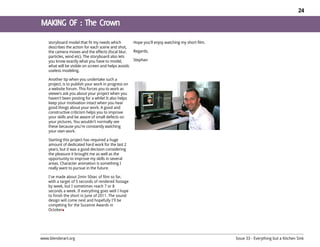
    storyboard model that fit my needs which          Hope you'll enjoy watching my short film.
    describes the action for each scene and shot,
    the camera moves and the effects (focal blur,     Regards,
    particles, wind etc). The storyboard also lets
    you know exactly what you have to model,          Stephan
    what will be visible on screen and helps avoids
    useless modeling.

    Another tip when you undertake such a
    project, is to publish your work in progress on
    a website forum. This forces you to work as
    viewers ask you about your project when you
    haven't been posting for a while! It also helps
    keep your motivation intact when you hear
    good things about your work. A good and
    constructive criticism helps you to improve
    your skills and be aware of small defects on
    your pictures. You wouldn't normally see
    these because you're constantly watching
    your own work.

    Starting this project has required a huge
    amount of dedicated hard work for the last 2
    years, but it was a good decision considering
    the pleasure it brought me as well as the
    opportunity to improve my skills in several
    areas. Character animation is something I
    really want to pursue in the future.

    I've made about 2min 50sec of film so far,
    with a target of 5 seconds of rendered footage
    by week, but I sometimes reach 7 or 8
    seconds a week. If everything goes well I hope
    to finish the short in June of 2011. The sound
    design will come next and hopefully I'll be
    competing for the Suzanne Awards in
    October


www.blenderart.org                                                                                Issue 33 - Everything but a Kitchen Sink
25


                                                                     reasoned: I can use Flash, I have game   personal achievement, but there was
                                                                     industry experience, I have written      still a nagging doubt in the back of my
                                                                     music and can do the art so why not?     mind, and when I looked more
                                                                                                              seriously at what I had accomplished
                                                                     The pre-production planning went into    compared to what still needed to be
                                                                     overdrive. This time I had Gantt         done, there came the realization that I
                                                                     charts, asset lists, puzzle designs, a   had bitten off way more than I could
                                Gordy – A couple of years ago I      design document and a more               chew. It would take at least half a
                                started sketching out some           thoroughly revised story. As soon as     dozen artists another three years of
                                ideas for an illustrated story       enough of the first level planning had   full time work to finish this project.
                                book about a Steam-punk              been completed, I was away! Full
                                styled robot called Gordy.           steam-punk ahead!                        I have since revised my goals and
                                Working as much as I could in                                                 scaled things back to a much more
                                my spare time I estimated that       Six months later I had created almost    manageable level, and have decided
                                the project would take up to         four detailed scenes, rigged and         to go back to the idea of creating a
                          two years or more to complete. It          animated the main character,             book. In the six months or more I
by - Darcy Brooker        seemed a little overwhelming but I         rendered dozens of character             spent working on the game I have
                          decided to persevere anyway.               animations, and got the whole lot        created artwork and assets that can
                                                                     working in Flash. It was a mammoth       be used in the book, learned a truck
                          I had soon developed a basic outline                                                load, and am very much looking
                          of the story and jotted down a few                                                  forward to this next creative
                          good creative visual ideas. The next                                                adventure.
                          few months were spent modeling and
                          experimenting with new techniques                                                   The style of the artwork in the book
                          for the look and feel of it and creating                                            will be a combination of Steam-punk,
                          some preliminary art. Then one fateful                                              Raygun Gothic, Indian and Riven-esk.
                          day I discovered the Flash game                                                     Whether or not the book has any text
                          Samorost, a simple point and click                                                  is still something I'm not too sure
                          adventure game using layers of
                          animated cutout props and
                          characters. The wheels in my head
                          were sent spinning. Immediately I
                          thought to myself, I could do that!
                          Why make a book when I could make
                          an animated book!?!

                          This was going to be an even bigger
                          challenge than the book but I


     www.blenderart.org                                                                                              Issue 33 - Everything but a Kitchen Sink
26


    about. I really just want to make a book full of
    eye candy about a person’s experiences while
    on holiday. A simple narrative that could be
    conveyed in a series of pictures. I'm sure it will
    all work out :)

    The book will be released independently
    through Createspace and will also be available
    through Amazon. I will be announcing its
    completion through all the popular Blender
    websites as soon as that magic day arrives
    and I will be posting artwork and updates on
    the book at my DeviantArt page at...

    http://darkladder.deviantart.com/

    and at my personal webpage at...
    http://www.darcybrooker.com/


www.blenderart.org                                       Issue 33 - Everything but a Kitchen Sink
27


                                                                         marketplace and deployed to                fastest route between two places and
                                                                         www.ncmproject.org.                        also give the user an approximation of
                                                                                                                    how long it will take to walk the
                                                                                                                    calculated route. The map, room
                                                                                                                    associations, terrain associations, and
                                                                         A significant amount of work went into     timing data are included in a set of
                                                                         generating the map. A complete map         files to be imported into our
                                     Two other college students and                                                 applications.
                                     I are developing applications to    needed to be generated to tell the
                                     help the Carnegie Mellon            application how to get around campus
                                     University (CMU) community          and how long it takes to do so. This
                                     navigate the campus. Behind         map allows the application to take
                                     the scenes, Blender is allowing     every possible route into
                                     us to efficiently gather the        consideration when deciding which
                                     necessary data.                     route is best. The map is simply a
                                                                         series of points and edges (points
by - Brian DeVincentis                                                   being locations and edges being
                                                                         connections between points). I had
                                                                         access to all the blueprints for each
                              The goal of the Navigating Carnegie        floor for every building on campus.
                              Mellon (NCM) project is to create free,    For each floor’s blueprint I created the
                              open source mobile and desktop             points and connected them together.        So, why did I use Blender for the map
                              applications to show those unfamiliar      Then I connected all of the floors         generation? Well, it was actually a
                              with the intricacies of the campus how     together.                                  critical tool that managed and
                              to go from one place to another in the                                                supplied tools for generating the huge
                              shortest amount of time. It displays       Next, I associated information such as     map covering the entire campus.
                              graphical and textual directions to        room numbers and terrain with each
                              users overlaid on Google Maps and          point and edge. The room numbers           To create the map of points and
                              blueprint images. Our desktop              allowed the application to associate       connections I simply used the
                              application will actually be a web         the user’s input with a point. The         background image feature to draw
                              application so that it can be quickly      terrain data indicates whether an edge     points and edges over the image
                              and easily accessed by anyone. The         represents stairs, an elevator, flat       using the mesh tools.
                              mobile application will have the same      ground, etc.
                              functionality with the added ability for                                              The interesting part is what happens
                              the user to follow along as they walk      Also, we needed to collect the time        next – utilizing Blender’s Python
                              the route. The application is currently    required to walk across all the            Scripting API. The API’s ability to
                              under development. This summer it          connections on the map. This allows        access any part of Blender from the UI
                              will be released to the Android            our application to determine the           to the underlying data was the reason
                                                                                                                    we chose Blender. Another great


         www.blenderart.org                                                                                                Issue 33 - Everything but a Kitchen Sink
28


    aspect of the API is that it uses Python which                                                          some of its 3D capabilities. In fact, we have
    is fast and easy to write. All this made it                                                             already figured out how to make a simple 3D
    possible to create a custom set of tools quickly    1. Feature Additions – a variety of features that   model of the entire campus. We are
    and easily that were made specifically for the      would make the applications more complete.          obtaining the CAD files for the blueprints of
    NCM project. Without Blender we probably            2. Other Platforms – bring the Android user         every building. We import them into Blender
    would have needed to write a program from           experience to other mobile platforms such as the    via the DXF importer. Then using a script I
    scratch which would have significantly              iPhone or Windows Phone. These could replace        wrote, the blueprints are simplified and the
    increased development time.                         the mobile web application.                         lines are extruded up to make walls. For
                                                        3. Other Campuses – bring the application to        texturing, multiple textures are put onto the
    The first script I wrote added user interface       other campuses. We would find volunteers to         model of the floor and then baked to increase
    elements, speeding up the generation of the         map their campus and submit the data to our         performance. For the outside portions of
    map and the process connecting room names           team to be included into the application.           campus I obtained a 3D terrain model of the
    to the points in the map.                           4. 3D – make a 3D version of the desktop            campus from Google Earth. All of this can be
                                                        application to give users a better view of the      exported to almost any format because
    Another script I wrote exported the data out        campus.                                             Blender supports many file types.
    of Blender to our own custom file format.
    This was very useful because it eliminated any                                                          Once 3D web technologies are widely
    complications in moving data from Blender                                                               available we will still be challenged with
    into our application. In fact, it allowed us to    Currently we are developing 2D applications          generating a more detailed 3D model of the
    make a custom file format that made file sizes     for Android and the web (both a desktop and          campus. It is not feasible to generate a
    as small as possible and also include extra        mobile application). Originally we were              detailed 3D model of the entire campus
    data such as room names and timing data.           planning to create a 3D web application.             manually. We welcome suggestions regarding
                                                       However, as we did more research we found            methods/technologies that would allow for
    To collect the timing data we actually created     that it simply is not feasible (yet). Three          the automatic creation of a detailed,
    an Android application which made this             dimensional applications on the web currently        aesthetically pleasing model of the campus
    process very fast (a large building with 10        have poor performance, but new technologies
    floors can be timed in 1 hour). The Android        are under development that may make this
    application generated files                        application possible. A new web standard
    in a different format which                        called WebGL is enabling developers to write
    were then imported into                            3D apps for the web that have better
    Blender. I wrote another                           performance because this technology takes
    script that imported these                         advantage of hardware acceleration. Flash is
    files and integrated the                           also working on a version of the Flash Player
    timing data into the existing                      plugin that utilizes hardware acceleration
    blend files. Then the times                        which will enable 3D capabilities.
    could be exported along
    with the map via my file                           Blender surely is not the component holding
    exporter.                                          us back. We are eager to take advantage of


www.blenderart.org                                                                                                   Issue 33 - Everything but a Kitchen Sink
29


                                                                   sketch is taken by our lead artist who    graphics team. In the end we worked
                                                                   fleshes out the details and then the      around this limitation by compositing
                                                                   location is modeled and rendered. All     the scene by first separating offending
                                                                   locations, scene and inventory items      items to different layers and after
                                                                   have been modeled, textured,              separate render passes later joining
                                                                   rendered using Blender's Internal         them to create the final piece.
                                                                   rendering engine.
                                Pahelika Revelations is a follow
                                up of our successful title         Since the first day Ironcode started,
                                Pahelika : Secret Legends. Its a   we have used Blender 3D to create the
                                casual Puzzle Adventure game,      in-game graphics, and in the same
                                set to be released later this      tradition of Pahelika Revelation uses
                                year.                              lots of 3d rendered artwork in a 2d
                                                                   game with all the graphics and sprites
                                  This game's story continues      pre-rendered and overlaid with a
                          from where the previous game had         custom particle system based special
by - Rohit Bhonsle        left off. The theme of the game wraps    effects inside the game.
                          up the player in an adventure to save
                          the human way of life from an ancient    Instead of using the stable version of
                          evil accidentally unleashed during his   Blender, the team used the cutting
                          adventures in the previous title. Our    edge 2.5x version, which turned out to    Sometime a weird bug cropped up in
                          game designer has blended puzzles        be a good decision. Apart form            one of those constant upgrade builds
                          and varied locations in an intensely     Blender, both Gimp and Photoshop          we compiled and optimized, which
                          gripping storyline. To improve player    were used in creating the textures        lead to reorientation of camera
                          immersion, special care was taken to     along with Inkscape. We aimed to
                          make an intuitive interface for the      outdo ourselves with this game, and
                          game. On the technical side, the game    with the improvements in Blender, we
                          uses a heavily modified version of the   were able to achieve quite a lot.
                          free PopCap Framework.


                                                                   Blender2.5x bought some difficult
                          The art pipeline itself is quite         moments to the work, It was quite
                          straightforward. The game designer       difficult to deal with alpha-mapped
                          describes a location and makes a         textures alongside Blender's Sun Sky
                          rough sketch. Since we do not have a     features. The resulting white artifacts
                          dedicated concept artist at IronCode     gave a very difficult time to the
                          (we're a small company), the rough


     www.blenderart.org                                                                                             Issue 33 - Everything but a Kitchen Sink
30


    projection and position despite it being locked
    completely.


    Blender2.5x was also a lot more productive
    than the earlier version. It has a better, more
    streamlined interface, that allows us to work
    faster. It is also more flexible than the
    previous version. The advancement in
    functionality and usability was felt and
    welcomed with open arms by our art
    department.


                                                      Whereas Blender proved to be an extremely
                                                      capable tool when modeling and animating, it
                                                      was found wanting on the Rendering side. Our
                                                      journey in creating the artwork for this project
                                                      is still very delightful and I sincerely hope that
                                                      everyone will enjoy our game as much as we
                                                      are enjoying making it


    Blender2.5x was a lot faster in rendering
    compared to earlier versions and this came as
    a boon to us. In most cases we were going
    about 10-20% faster in just about every
    rendered scene as compared to the previous
    version. Custom compiling it to our machines
    led to even better render times.


www.blenderart.org                                                                                         Issue 33 - Everything but a Kitchen Sink
31


                                                                       video sequencer built inside a 3D
                                                                       package. I searched for tutorials and I
                                                                       found virtually everything I wanted to
                                                                       learn. I was able to pick it up quite
                                                                       quickly. The user interface which I
                                                                       once thought was ‘not impressive’
                                                                       turned out to be pretty intuitive. In
                                 I am an artist. I have been           two months time I made my first
                                 passionate about sketching            complete Blender render –
                                 since childhood and as I grew         ‘Headphones’.
                                 up I got interested in digital art.
                                 I have had no prior formal            I appreciate the work that the Blender
                                 education in 3D. As 2011              community is doing in developing and
                                 dawned, my resolution was to          providing a tool free of cost for the
                                 learn 3D. My next question was        cause of art. I want to continue to
by - Avish John          which software I should learn. I had          learn Blender and someday make my
                         earlier tried working on Maya, as that        contribution to this community
                         should have been a very obvious
                         choice. But there was a small                 Avish John
                         community at my work place who
                         used a software program called                avish.john@gmail.com
                         Blender. The only thing I knew about it
                         was that it was open-source. I was            avishjohn.blogspot.com
                         apprehensive about whether I should
                         really trust this software. It didn’t look
                         very impressive. Still, I wanted to try
                         my hand at it. I spoke to my colleague
                         who is a Blender expert. He told me
                         Blender could do so much. It depends
                         on the user. I took his word and I
                         downloaded a copy of Blender 2.56

                         It’s been three months now and the
                         Blender experience has been
                         splendid. It is not just the software,
                         but the community as a whole that
                         has made me love this software. I was
                         surprised to find a compositor and a


    www.blenderart.org                                                                                           Issue 32 - Spring is Sprung
32


                                                                               really lose myself when "playing" with    with Blender internally. I also posted a
                                                                               Blender.                                  render for "Everything but the kitchen
                                                                                                                         sink".
                                                                               I'm not an expert, but for now I pretty
                                                                                                                         It's a remake of the robot from "The
                                                                                                                         Jetsons” known as Rosie. She's
                                                                                                                         working on a W125 Mercedes Benz F1
                                        Hi everyone! My name is Alex.                                                    car from 1937. Rosie was a matter of a
                                        I’m a soon to be 33 year old                                                     few hours, the basic car took me
                                        graphics designer from the                                                       about 3 days. It has suspension, and
                                        Netherlands. I never write any                                                   through some parenting and tracking,
                                        articles on software or other                                                    it really works! Rendering this picture
                                        tools, but since it's for                                                        on 1280px took about 3 minutes, so
                                        Blender...I might have a go!                                                     it's too heavy for doing some
                                                                               much know how to model anything. Ic       animation (for now!)
by - Alex van Ophuizen           I came in contact with 3D in general          an texture it, do some basic rigging
                                 somewhere in 2005. A friend of mine           (I’m gonna buy the DVD on rigging         To sum things up, I can't really point
                                 showed me "Sketchup", a 3D                    soon!) and some animation. I know         out a favorite tool, except for the
                                 modeling tool from (back then)                some basics of the particle system and    handling of Blender in general. The
                                 @lastsoftware. It's a great, easy to          had some fun with the fluid-engine.       way the mouse works (reverse) and all
                                 learn program! If you like making             My computer is not state of the art, so   the keyboard shortcuts... it can take
                                 architectural stuff, this is a great way      due to lack of computing power, I'm a     some time to get used to, but it's sure
                                 to do it! Most people know it from            bit stuck at a certain level.             worth the effort!
                                 working with Google Earth. It has is
                                 limitations though... (so do I, for that                                                I will never work with another
                                 matter, haha), and I wasn't able to                                                     program again! (Seriously!)
                                 create nice organic shapes.
                                                                                                                         My compliments to every modeler out
                                 The same friend pointed me to 3ds                                                       there who made it to the Blender
                                 Max, but I didn't like it from the start. I                                             gallery. It's quite amazing what you
                                 stopped trying soon after. He                                                           guys posted!
                                 apparently saw some potential in my
                                 skills, and kept pushing me to try                                                      Kind regards, a big fan,
                                 something else. He showed me the
                                 Blender.org site and even bought me                                                     Alex van Ophuizen
                                                                               For now I just love the basic modeling.
                                 the official Blender 2.3 manual! Ever         It gives me enough room to create         "aka" DesignsbyALX
                                 since then, my poor girlfriend doesn't        what I want! I don't use any outside
                                 get as much attention as before! I can        rendering programs, I do everything


            www.blenderart.org                                                                                                                Issue 32 - Spring is Sprung
33


                                                                          film is made of mistakes over                 story, technical deficiencies are less
                                                                          mistakes. My only aim with this advice        important.
                                                                          is to help you save time by avoiding
                                                                          some of those mistakes.                       During a long project, something
                                                                                                                        terrible is likely to happen to you. At
                                                                                                                        some point, you will get bored of it. To
                                                                          1. Write a good solid story                   maintain your own focus during a
                                      I recently finished my first long   The first step is to have something to        long time, it’s important for you to
                                      project. It’s a short film called   tell. When I started thinking of making       believe in your own project. So take
                                      21:00 [1-3] made with Blender       this movie, my first approach was to          some time to write a good script.
                                      2.48. When I started working on     make it with a real camera and real
                                      it two years ago, I used PovRay     actors. But some scenes were too
                                      for all my digital works. I knew                                                  2. Sketch a Storyboard
                                                                          dangerous to be made with real
                               that this project was going to be too      people so I decided to make it                Creating a storyboard is something
                               complex to be made with PovRay so I        digitally. I changed the technique, but       everybody suggests and no one does
by - Enrique Sahagun           started looking for an open source         the story survived that change.               but this is particularly important for
                               Maya-like suite. Then I found Blender                                                    digital films. Sketching the movie with
                               and it was like an epiphany.               What I mean is that the key point of          simple drawings is essential to
                                                                          making a movie is to have a story to          develop the visual appearance of your
                               As you can imagine, the last two years     tell. It’s easy to find videos from digital   film. Even if you know exactly how the
                               have been a long learning experience.      artists that are technically jaw              story is going to develop, it’s
                               On the one hand I discovered the           dropping. Many short movies are just          important to understand that there
                               huge technical power of Blender. On        incredible visual exercises. That’s OK        are still thousands of ways to transmit
                               the other hand I had to learn how to       and sends a great message that this           it through a film. The duration of the
                               make a movie and take the story I had                                                    shots, the position and motion of the
                               in my mind and get it into frames.                                                       camera relative to the action, the
                               After these two years I haven’t learned                                                  lighting and the use of flashbacks can
                               enough about Blender to make a good                                                      all dramatically change the perception
                               technical tutorial. What I can do                                                        of the story. A storyboard is essential
                               instead is give you some advice on                                                       to state the final visual aspect of your
                               how to face the problem of making a                                                      movie. Plus it also helps to keep
                               movie.                                                                                   things tidy (see point 5).
                               Of course, I will talk about my own                                                      But in a digital film there is an even
                               experience which is that of a single       can be done and I’m good enough to            more important reason to make a
                               guy making a nine minute short film,       do it. But a car transforming into a          storyboard. If you know where the
                               from the script to the final sound edit.   robot or a house burning is not a             camera points in every scene and how
                               I’m not a film director and my short       story. Besides, if you have a good            wide the shot is, you’ll know from the


          www.blenderart.org                                                                                                                 Issue 32 - Spring is Sprung
34


    very beginning which and how many elements          the position and motion of the camera. You           between them [9].
    will need to be modeled. And believe me, this       will learn a lot of useful tricks just by studying
    will save a lot of time. For example, when I        a single movie.
                                                                                                             5. Keep things tidy.
    started working on my film my instinct told
    me to fill the 3D space with lots of detailed                                                            Think of this. You want to make a 4 minute
                                                        4. Don’t respect the general lighting.               short film. That’s six thousand frames (at
    objects as if it was a real space. However
    many of these objects did not appear in the         Don’t be afraid to change the lights for a single    25fps) and about 20 to 40 different shots. My
    final film. If you first think where the camera     shot. In a shot, lights can be divided into two      approach is to create a blend file for each
    is going to point and what the frame contains,      groups: general lights and correction lights.        shot (previously defined in the storyboard).
    you’ll be able to make a precise list of the        The first group are those defined by the             This allows me to keep things tidy. If you save
    models you’ll need.                                 physics of the scene (the sun, a lamp, the           each shot in a different blend file, you can
                                                        radiosity, etc). The second group are those          correct them (if needed) by changing a small
                                                        that belong to a particular shot and they are        number of keyframes. On the other hand, if
    3. Learn how to move the Camera                     used to correct the lighting of the first group      you create a very long sequence, with camera
    One thing I learned making this movie was           when needed. If your shot is not properly            changes in a single file, a simple modification
    how important the camera was. It may seem           illuminated, don’t change the configuration of       in the middle of the action can be painstaking.
    that knowing the story you want to tell and its     the general lights; use the correction lights.
    evolution in time is enough to make a movie.        Actually, this is the technique used in real         Another interesting technique is to create a
    You could place the camera or move it with no       movies.                                              master blend file with all the pieces of your
    rule but to capture the action, and your film                                                            animation as they are rendered in the video
    would be OK. But this is completely wrong.                                                               sequence editor (VSE) to have a global idea on
    The first thing you notice when you make your                                                            how things are going.
    first digital shots is that they don’t look like
    those you see in real movies.                                                                            6. Previews, previews and more previews!
    It is important to understand that the camera                                                            Make as many previews of your shots as you
    critically affects the way a story is told. Where                                                        can. Not only for single shots but for whole
    the camera points, its position and its motion,                                                          sequences. Prepare several shots, “make a
    all add a new layer of perception to your                                                                camera view render” and put them together
    story. This perception has been defined along                                                            with the VSE. This will give you a perfect idea
    one hundred years of movie making. That’s                                                                of the quality of your shots and will allow you
    why it is important to learn the basics of          But be careful. You can change the light, but at     to make corrections on the camera motion or
    camera framing and the meaning of shots.            the same time it is important to respect the         on the duration of the shots before you tackle
    There are lots of articles on the Internet on       shadowing of the general lighting and the            the final high quality render.
    the subject [4-7] and also comments on the          general colour palette of the movie. If you
    technique of particular directors [8]. But I        make strong changes in the lighting between          7. Take advantage of post-production
    recommend a simple exercise. Take a film you        two shots, you can break the connection
    like and watch it carefully paying attention to                                                          When I started working on 21:00 I didn’t pay


www.blenderart.org                                                                                                     Issue 33 - Everything but a Kitchen Sink
35


    much attention to the Node Editor. This was       result sometimes looks a bit absurd. The
    completely wrong. The light and textures you      animation then seems to be wrong.
    use on your scene are very important. and         Sometimes it’s because it lacks the sound
    their final aspect can be improved or powered     effects. The sound not only empowers the
    using the Node Editor. In addition to tuning      images, it also completes their meaning and
    the brightness, contrast and blur, you can also   helps the audience to understand and believe
    make sophisticated colour corrections. So         what they are watching.
    before making the final render, play a little
    with the Node Editor.                             The same happens with the music. Music
                                                      helps to drive the feelings of the audience to
    The same happens with the VSE. Explore its        where the director wants them to be. A sense
    possibilities because it allows the addition of   of sadness, violence or stress can be created
    very complex effects. For instance, the muzzle    by choosing the right piece of music.
    flash of a machine gun can be painted in the
    GIMP and then added using the VSE.                The Film

    The message here is the following: don’t lose     http://vimeo.com/20367421
    your mind trying to model or simulate


    everything. There is probably an easy way to
    do it using a post-production trick.

    8. The Sound and Music
    Sometimes when you watch some finished
    shots you think: “this is not what I was
    expecting.” For example, if you animate a guy
    shooting a gun, or a car skidding, the final


www.blenderart.org                                                                                     Issue 33 - Everything but a Kitchen Sink
36


                                   E
                                                                          For those projects requiring more            entire social rendering experience.
                                                                          privacy, rest assured that there is a
                                        arly March of 2011 marked         private setting for uploading and socially   Among the many community-based
                                        the launch of the new social      rendering animation projects.  While         suggestions, RenderWeb’s roadmap
                                   rendering platform, RenderWeb          private projects have the lowest priority    includes integration with commercial
                                   (apps.facebook.com/renderweb).         within the queue, if multiple personal       animation software, additional image
                                   The viral expansion of the             computers are volunteered to render          output options, a standalone applet,
                                   RenderWeb Facebook App                 that private project, a “private” render     more user-defined controls, and a finely
                                   immediately began changing the         farm can be created.                         tuned media-centric layout. Further
                                   way Blender hobbyists and small-                                                    down the road, RenderWeb is also
                                   studio animators render their          From a Volunteer stance, RenderWeb           interested in opening up the data to
                                   projects.  In essence, RenderWeb       allocates projects based on the existing     make it more available for external
                                   is a free online rendering farm for    relationships within Facebook. Volunteers    developers. This would allow for plugins,
                                   the Blender animation software,        render their own projects first, their       widgets, and possibly a RenderWeb
                                   powered by social relationships        friend’s projects second, then random        screensaver for passive volunteering.
                                                                          public projects within the queue and
by - Nathan Moyer
                                   within Facebook.
                                                                          finally, private projects. Thus, the more    We hope that the integration of Facebook
                            By integrating community-based                friends an animator has, the higher the      with social rendering will redefine social
                            rendering within Facebook, RenderWeb          potential for computational power.           computing. RenderWeb connects
                            has simplified the process of both            Volunteers can also directly select a        animators with new friends, new
                            volunteering computers and harnessing         project of their own choosing from the       communities, and new computational
                            potential volunteers.  With the simple        queue to render.                             resources. With this shared, community
                            click of a button, numerous friends,                                                       effort, rendering will no longer impose a
                            family members, and colleagues can            By utilizing the RenderWeb Facebook          bottleneck in our creative and 3D
                            donate their computer’s extra cycles to       application, a whole world of untapped       pipeline. We will all have ample
                            render animations.                            computational resources can be               computational power to render
                                                                          allocated. There are no installs, no         everything that our production and
                            RenderWeb not only allows the                 complicated instructions, and no             creativity demand.
                            collaborative effort of rendering projects,   complex procedures limiting accessibility.
                            but also instantly shares newly rendered      Anyone can volunteer, and anyone can         The RenderWeb Team is currently
                            animation videos with the community.          render.                                      comprised of Adam McMahon
                            Once rendered, the original animator can                                                   (developer/founder) and Nathan Moyer
                            download a ZIP file containing the high       Since its launch, RenderWeb has been         (designer). Adam McMahon is a PhD
                            quality images while the whole                creating a roadmap for the future. Over      candidate at the University of Miami, and
                            community begins to share and discuss         the past two months, the community has       Nathan Moyer is owner and designer of
                            the newly rendered animations.                offered numerous suggestions about           Light Made Liquid, LLC
                            RenderWeb also offers the ability to          how to improve the social rendering
                            download the web-friendly M4V video file      experience. With this, RenderWeb has         The RenderWeb Team can be reached at
                            so that animations can be posted to           begun its natural evolution; responding      Contact@RenderWeb.org.
                            other locations (like YouTube or Vimeo).      to the community in order to better the


       www.blenderart.org                                                                                                                   Issue 32 - Spring is Sprung
37


                           F
                                                                     Logos'. Since these toics are the one
                                                                     which are most important to an
                              or a budding artist and or designer    graphic designer, the book here offers
                              nothing comes close to figuring out    a good resource for an beginner to an
                           every nook and corner for features        intermediate level designer. It is
                           and hidden tools in a piece of            structured towards learn and practise
                           software.                                 and the tasks are not difficult at all at
                                                                     the same time they introduce you to
                           The book Inkscape 0.48 Essentials for     the tips and tricks of using Inkscape
                           Web Designers is such a book which        features and tools effectively.
                           such readers will find enjoying simply
                           because it have so much explanation       Finally it also touches upon Inkscape's
                           on various features and tools available   geeky side in a chapter that deals with
                           in Inkscape.                              XML Editor in Inkscape. Followed by a
                                                                     small chapter in producing simple
                           This book starts of by explaining the     animation by combining Gimp into the
                           very basic of Inkscape to users and the   work-flow and finally a chapter on
                           way it does will delight the readers      extending Scribus functionality by
                           who have almost no previous
by - Gaurav Nawani                                                   Plug-ins and scripts.
                           experience to a Vector drawing tool.
                                                                     A good read mostly for some one
                           Second chapter bring the reader to        looking for innards of Inkscape but
                           the main topic of the book designing a    not for experienced readers, unless
                           website from within Inkscape.             they are turning towards Inkscape
                                                                     after using other vector applications.
                           Inkscape offers some very basic set-up
                           for slicing and outputting website        One thing that also needs to be said is
                           code so this does not really conveys      that this book is not a thorough web
                           much in terms of a tool for a web-        designing guide as almost the title
                           designer however the other tools that     seems to imply rather it provides few
                           help him design the various graphic       very basic website examples and how
                           elements required in website are          Inkscape's modest slice tool can be of
                           gradually introduced in following         some help, and while doing so it
                           chapters.                                 makes you learn Inkscape well.

                           Most exciting part is the three           All in all a good read, so if you think
                           chapters on 'Text Styling', 'Wallpapers   Inkscape is your thing give it a go you
                           and patterns' and 'Building Icons and     wont find it lacking


      www.blenderart.org                                                                                         Issue 33 - Everything but a Kitchen Sink
Here is how                                                        - Images inside a PDF are a strict no, but a pdf
                                                                   document with images if provided to show how the
                                                                                                                           Disclaimer

              - Tutorials explaining Blender features, 3dconcepts, author wants the formating of doc will be
              techniques or articles based on the focused theme of appreciated.
              the issue.
                                                                   - Make sure that screenshots are clear and readable
              - Reports on useful Blender events throughout the and the renders should be at least 800px, but not
              world.
                                                                   - Text should be in either ODT, DOC, TXT or HTML.
              - Cartoons related to blender world.


              - Send us a notification on what you want to write
              and we can follow up from there.                     - Please include the following in your email:

                                                                   - Name: This can be your full name or blenderartist
                                                                   avtar.
              - Images should be properly cut and represent the
              text appropriately.                                  - Photograph: As PNG and maximum width of 256Px.
                                                                   (Only if submitting the article for the first time )
              - Images should be provided seperately in a folder
              named (images, img or pictures).                     - About yourself: Max 25 words .

              - Images should be named/labled likewise (image1 or - Website: (optional)
              img1 etc).
                                                                  Note: All the approved submissions can be placed in
              - Provide proper captions for images if and when    the final issue or subsequent issue if deemed fit. All
              needed.                                             submissions will be cropped/modified if necessary.
                                                                  For more details see the blenderart website.
              - Image format prefered is PNG but good quality JPG
              can also do.                                        BA takes no responsibility fo the material in any form
                                                                  and the submission will automatically mean that
              - You can submit inline images in documents like    you have agreed to the blenderart terms and
              DOC or Openoffice ODT etc but make sure the         conditions for submission for more information
              images were properly names before importing them please do read the disclaimer.
              in docs.
www.blenderart.org   Issue 33 - Everything but a Kitchen Sink

Blenderart mag 33-eng

  • 1.
    Blender learning madeeasy... Everything but the Kitchen Sink www.blenderart.org Antea -by Martin Eschoyez
  • 2.
    EDITOR - GauravNawani MANAGER/EDITOR - Sandra Gilbert WEBSITE - Nam Pham DESIGN - Gaurav Nawani PROOFERS Brian C. Treacy Bruce Westfall Daniel Hand Daniel Mate Henriël Veldtmann Joshua Leung Joshua Scotton Kevin Braun Mark Warren Noah Summers Patrick ODonnell Phillip Ronan Posnic Scott Hill Wade Bick Valérie Hambert WRITERS Thomas Baron Pedro BastosTeemu Vilén Alexander Weide * Characters, individual body parts (i.e. feet, hands, etc). Stephan Rodriguez Darcy Brooker * Animals and reptiles. Brian DeVincentis Enrique Sahagun * Vehicles and other mechanical rigging, any other use for rigging. Nathan Moyer Sandra Gilbert * Add-ons and the python behind them. Gaurav Nawani * How to extend blender through python. COVER ART Antea -by Martin Eschoyez * New builds/patches/branches. www.blenderart.org Issue 33 - Everything but a Kitchen Sink
  • 3.
    3 "When I announced the theme for this issue "Everything but the kitchen sink", I was jokingly threatened with massive numbers of sink projects." Sandra Gilbert Manager/Editor www.blenderart.org Issue 33 - Everything but a Kitchen Sink
  • 4.
    4 I keeping a blog of the modeling work he their blessings for their open source has finished so far. I wandered over to (non-commercial) tribute. Even more love hearing about new blender take a look, and let me tell you, it looks fun, the original modeler is keeping an projects. Everyone has their own pet amazing. The details and texture work is eye on Andrew's blog. No pressure ideas on what would be cool to do or beautiful. In addition to still images, he there :P accomplish using blender. Some also has a growing number of test projects are by nature short and sweet videos to show off his progress. The Journeyman Project Tribute looks to and produce cool results or new be well organized and planned out, techniques that can be shared with Andrew has told me that one of his making it a fun project to keep an eye others. Then there are the labors of goals is to keep the project open source on as they progress their way through love. Projects that are destined to take and completely create the HD footage in all their goals. months of dedicated work. Blender. If his current tests are any indication, the finished result should be Andrew is looking for additional The Journeyman Project Tribute is one quite impressive. volunteers to help bring this project to such example. Not only is the completion. You can contact him for Journeyman Project Tribute a labor of In an effort to keep the tribute as close further information love, it is a rather ambitious one at that. as possible to the classic original as well Andrew Curry is leading an enthusiastic as head off any legality issues, Andrew andrewcurry2@googlemail.com Izzy Speaks team who have decided to remake the classic game “The Journeyman Project” has been in touch with several members of Presto Studios, including http://andyjourneyman.blogspot.com/ by Presto Studios. The project is the president of the studio. Presto currently split into three efforts: Studios have given Andrew and his team * A prequel novel * A port to Windows of “Pegasus Prime”, a remake of Journeyman by the original studio. * A retelling of Journeyman using Blender to model and render the video footage, “Journeyman HD”. At the moment, there are several members hard at work on the novel and port teams, but so far the vast majority of the HD version has been done by Andrew. Another team member is busy modeling and rigging three characters from the game. Andrew has been www.blenderart.org Issue 33 - Everything but a Kitchen Sink
  • 5.
    5 fully detailed interior. find a previous tutorial of mine on how to setup blueprints here: This project is a common example of Blueprints setup with Blender. an amateur project. The idea came from the 2009 Real World Racer contest held by Scratch Made Cars The major steps are : (SMCars). The rule were simple: “do 1. Find blueprints on the Internet. No matter whether you are an your dream racing machine”. I choose www.SMCars.net is a very good entry amateur or a pro, this tutorial to convert my daily ride, a Citroën C5 point, with thousands of blueprints aims to teach the work flow and Tourer, to a Deutschen Tourenwagen available every move you need to know Masters (DTM) coupé. During this 2. In case you don’t find blueprints, try to to achieve a good car. It’s based project I wanted to do a “civil” version gather some side, front and rear views. on Blender, to allow everyone as well to put in the background of the Top photographs are quite hard to find, do it without requiring access render but a lack of time prevented but they’re not mandatory. to high-priced or pirated me from doing so. This year, I entered 3. Collect as many reference pictures as software. But it can apply to virtually by - Thomas Baron another SMC contest called Topless, you can find. Try to avoid CG pictures any 3D package. about … topless cars. For this contest I unless they’re official, because you don’t did a Hennessey Venom GT, which I want to reproduce the mistakes from I based this work on my latest project, posted here, but I’ve had another idea. other CG artists. a coupe-convertible Citroën C5. If A convertible, civil version of my C5. I 4. There are many good reference you’re allergic to this brand, or to cars just wanted to make things a bit more picture sites listed at www.SMCars.net in general, don’t worry as this material difficult, by doing a CC version (coupé but try to grab high resolution photos applies to any manufactured product – convertible). So here’s my CC5. Yes I and be careful about picking the the regardless of whether it’s big or small, know, the name isn’t great. right model year, the right version, etc cheap or high-end. Setup blueprints (or pictures) like I explained in my tutorial This tutorial is an on-going series of 5. Draw a cage by creating a mesh posts. It starts from the very beginning without any faces. Basically, you create a of modeling and covers every aspect: The first step is creating a concept plane, delete 3 vertices out of 4, place hard surface modeling with a focus on drawing of my idea. I always do it in the last one at a particular spot, and high-end quality and accuracy, best 3D, without paper. So I create what is extrude it several times to create an meshing practices to create a nice usually called a “spline cage”, which edge. Here’s the resulting drawing. polyflow and tips to solve the most means I have to draw the main curves common issues. In addition to the of the car using Blender. However I body, this tutorial will deal with the don’t use splines for that, I just use a creation of other parts such as tires, regular mesh without any faces. I rims, wheel details, windows, grilles, based the drawing on the C5 Tourer chrome and rubber trim as well as a (station wagon) blueprints. You can www.blenderart.org Issue 33 - Everything but a Kitchen Sink
  • 6.
    6 The trick is to model the major surfaces first, of 3mm, and the sharpened almost-vertical edge 1. The separation lines between the various then add details. For example, for the two is continuous from one panel to another. panels. pieces between the bonnet and front bumper, 5. I add the thickness for the sheet metal panels I do several steps. by extruding edges. I extrude in 2 times, first for 2. The major shapes of the car: wheel arches, the 3mm radius of curvature of the edge of the folds, bumps, openings etc panel sheet. The second extrusion is intended to 3. Some extra curves which are useful to better have spaces between body panels rendered dark define the shapes e.g. to show the roundness of a (7mm to a give a final of 1cm) fender. 6. I finish the details of the body on top of this The main point as this stage is keeping things piece (it will be behind the lower chrome trim of as clean and accurate as possible. So I rotate a the brand logo) and add the thickness to the bottom. lot around my cage in perspective mode to compare it with reference pictures. Having the 1. I start from my cage to make a simple but Here’s a perspective shot to better see details of complete surface. The only detail at this stage is actual car in front of my house helps a lot, so the last steps. the almost vertical edge that I have already you may want to consider modeling your own sharpened. At this stage you must be careful to car (or your father’s etc…) as one of your first have very smooth surfaces because it will be projects. If it wasn’t my car, browsing the difficult to change later. The mesh topology is Internet is an acceptable solution. Choose important as well, try to keep it simple and well high resolution pictures, but make sure you balanced. get the very same version that you are 2. I add rows of vertices along the edges to modelling. sharpen the edges of the body panel where it will be given thickness later. You should have a Detailed modeling: the front fender regular mesh topology based on squares from An introduction to modeling: front the previous step, so this step will be simple. I The next step is modeling the front fender. bumper take care about keeping constant spacing (0.005 For this step, I will try to go as detailed as I My spline cage needs more refining but I BU or 5mm for my scale) between the edges and can in my mesh construction workflow. the additional rows in order to have a regular chose instead to begin actual modeling. This curvature of the edges later. First, I the gather the edges that this fender part won’t go into a lot of details as the goal is to give you an overview of the workflow. The 3. I create the hole in the upper air intake, relying will have in common with its neighbors (the next chapter will be much more detailed. on the mesh topology in place. Care must be hood and front bumper). In edit mode for taken to have a row of faces along the edge of the each piece, I duplicate the whole edge and hole, just to have a smooth edge. separate it. I also duplicate the relevant edges 4. I cut the bottom (hard to see on the picture, from my cage. I end up with several parts as sorry) benefiting from having reserved a line of shown below. The pink parts are from the vertices along the separation in my first step. That hood and bumper, note that they are already way, I simply add two rows of vertices on either smoothed (because there is level 3 SubSurf side of that line, at 1.5mm each. By eliminating modifier active) while the black part is from the initial line, I find myself with a regular spacing www.blenderart.org Issue 33 - Everything but a Kitchen Sink
  • 7.
    7 the cage and isn’t What I did in the below picture is extrude the Before sharpening the corners, we need to smoothed. wheel arch to create the flat side around it. As add the row of faces along the air outtake. To stated for the bumper modeling, I don’t care do that, I add extra rows of vertices around it I now have to yet about sharpening any edge. I also and weld vertices when needed to make sure merge all the extruded some longitudinal edges and created these rows have the same count in the edges together. I the transverse, relevant edges (selected in the border. In this case, I deleted the horizontal start by first merging the corner of the two below pic, so edge going from the upper corner of the edges from the bumper. Please note that to they appear outtake and added two rows of vertices: one do so, the horizontal edge has been raised by yellow) I always above and one 3mm to align with the other edge from the check that all below the blueprint, while the other edge hasn’t moved the edges are outtake. I only yet. So there is already a gap between the smooth at had to merge front bumper and the fender below the every time. the two front horizontal edge, while there is no gap for the vertices to one, other edge. We’ll Now we can create the faces. Remember to resulting in a clean flow. take care of it always create rows of faces along all edges later, when the and holes. For example, the below picture Now it’s to sharpen the corners. To do so, I surface will be shows I haven’t done it yet on the right of the add more vertices near the corner ones. The completed. selected vertices. This is why there is a pinch sharpness of the corner is determined by the here and we will have to create a row of faces distance of these new vertices, closer vertices During the next step, I merged all the edges, around this means sharper corners. Next we have to get which included merging the corner vertices. I hole. This will rid of the triangles introduced by this move removed the extra vertices at 5mm from each be the air because corner as they were responsible for the outtake for triangles are corners being sharp on the previous picture. brake cooling. always poorly With them removed, the corners are handled by the smoothed. It will be easier to build the It’s time to deal with the air outtake. First, I surface surfaces with fewer vertices, and it won’t be roughly create the lower faces after deleting subdivision. difficult to put one useless edge on the wheel arch. It’s not them back later really detailed at this time because of the lack For example, removing the triangle shown by adding extra of vertices in the newly created faces. Fewer above in pink is easy: I just have to add more rows as I vertices is a good thing, as it helps controlling vertices below the outtake so that there is a described for the the mesh flow, one-to-one relationship between vertices (i.e. bumper but too few no triangles, only squares). I removed the modeling. vertices won’t vertical row of vertices (in fact I merged it with allow you to the neighbors) so I reverted to the previous We now have a single mesh, made solely from control mesh. Then I added two rows of evenly edges. It’s now time to prepare some surfaces. anything. distributed vertices using Ctrl+R and www.blenderart.org Issue 33 - Everything but a Kitchen Sink
  • 8.
    8 mousewheel. Now part. This will mode yet. So it’s we only have to allow us to not an urban close the faces spend more myth, if you’re like with the selected time on a few me and a heavy vertices shown in different issues. non-proportional the picture. loopcut user, The above picture shows the completed mesh, you’d better stick to 2.49b for modeling. To sharpen the other corner, I added 2 extra but it’s far from being enough to call the rows of vertices, as shown in the picture. fender finished. The first step is sharpening all The next picture shows the more tricky edges. When you have to do so, remember to keep a the edges. The above picture shows the For these ones, please remember that we well-balanced mesh by moving other vertices already hard edges in yellow. Please notice need to create a gap between the fender and as needed. But also remember that when you how the upper edge gets wider from middle to neighboring parts (hood, bumper). So for this move vertices, you have to check the front in order to smooth the hard edges. The reason, I created two extra rows of vertices. smoothness of same goes for the below edge where it gets The first one is created 8mm from the actual your mesh flow wider from the middle to the rear. On the top, border, and the second one 3mm from the again. Yes it takes please note the polyflow. It’s easy to choose actual border. Now we’ll just have to delete time, but it’s to achieve either a hard or smooth corner. the original border so that we have a new required if you Here’s a detail border which is want to achieve a for reference 3mm from the clean job. use. neighboring parts and which is One of the two extra rows I added is shown by The next followed by a row the cursor in the next picture. You will notice picture shows of vertices 5mm that it results in adding a vertice on the edge all the still-to- away. shared with the hood. So the curvatures of the be-sharpened 2 edges (the one on the fender and the one on edges. However, this move leads to a mistake behind the hood) won’t the not-yet-modeled headlight. We pushed be the same Some are quite the border backward by 3mm, so we now unless you add easy, they are have a shift between the front edges of the the corresponding shown below hood and fender. vertice in the and selected in yellow. Those edges just need The next picture hood edge. To do to be given an extra row of vertices along shows the vertices so, the easiest them. Once again, I used loopcuts (Ctrl+R) in that need to be way is to add a full row of vertices in the hood, non-proportional mode to be able to place the moved forward by as shown in the picture. new row 5mm away from the original one. By 3mm. the way, I tried to use the 2.50 Series of I’ve speed up a little bit on mesh completion, Blender and as of writing the latest release The below picture shows how the shift is now as it’s not really different from the previous (2.54beta) doesn’t allow the non-proportional gone. It also shows how unclean the gap is www.blenderart.org Issue 33 - Everything but a Kitchen Sink
  • 9.
    9 between the hood and fender. This is because different. So just like we did in a previous step, when modeling the fender, I had to add extra we’ll add more rows on the hood which will rows of vertices to get a clean and well- give us the same amount of vertices on both balanced mesh. Just like we encountered borders. earlier, this led to adding vertices on the border of the fender which is shared with the Once done, I just delete the border from the hood. Now that hood (and the row of sister vertices 5mm the two borders away). This gives us a wide gap which will be are different, they filled with faces. Select both edges, and press don’t align the F key. The I’ll go faster on body modeling, as it’s always anymore once the bottom option the same moves. First, remember that we had subsurf effects in the popup to clean the area are visible. menu will near the hood automatically and fender. The And we have another issue with the hood- create the faces faces we need to fender duo. There is a hard edge on the hood, between the work on are the another one on the fender and a hard area two rows of following. between these vertices. two edges where When having that it should be Once done, I make some loopcuts in the kind of issue, I smooth and clean middle of the gap between hood and fenders. find it more (see the following The first efficient to picture). loopcut is 3mm remove the away from what middle vertices, then make sure the It’s no big issue was previously neighboring curves are clean and then actually. It’s just a side effect of modeling one the fender recreate the deleted vertices with a loopcut. It surface at a time instead of modeling the border followed will give us a smoothed row of vertices that whole car in a single piece. The way to solve it by a loopcut in we’ll move as a single item to adjust the is pretty intuitive. We’ll merge both meshes to the middle. curvature of the surface. create a single surface, smooth it and then separate it back to 2 parts. Keep that middle row and remove the Once the vertices are recreated and the neighboring rows: one from the hood, two surface smoothed, we get the following result. Because of issue from the fender. Now the mesh flow is clean, #1, the two parts but only to better show how the surfaces can’t be merged aren’t clean. cleanly because the number of vertices are www.blenderart.org Issue 33 - Everything but a Kitchen Sink
  • 10.
    10 It’s now time to split the hood and the fender 4. Start building your mesh The lower part show the fully modeled back to two separate pieces. I won’t detail it About the side skirt, I’ve been rushing a bit on surface. with pictures as it’s always the same move. Do the fender. The bottom rear side need to be a loopcut at a given distance to specify the extruded to form the side skirt. So I deleted width of the gap, then separate them by the thickness vertices from fender on that removing the gap faces, add extra rows on area. The following pictures show the vertices each part to from the fender which will be extruded to the prepare a side skirt. nice edge for Please notice when we will Now it’s the usual trick: sharpen borders and that the add edges, and add thickness. vertices on the thickness. right are from the side skirt Now with cage. thickness added, the fender can be called finished. At least for now, it’s definitely Once connected, the whole part looks like the possible to following picture. In terms of industrial notice bumps feasibility, it’s definitely not realistic. The front later, so we and rear fender and the side skirt can’t be could We’re done with the fender. Let’s take care of produced as a single part, it would cost too possibly have the doors. Workflow is the same. The higher much to produce or to repair. But as I’m only to get back to part of the following picture shows in yellow making a concept car which will never leave work on the the vertices from the cage, while unselected the Blender bytes, who cares? fender – or vertices are from existing neighboring parts. any other part. The lower part of the picture is more interesting. Now it’s time to deal with side skirts. When starting a new part of the body, remember it’s The selected vertices are the first I create to always the same workflow: ensure the straightness of the doors’ shape. Yes, the shapes are more simple on the doors 1. Duplicate borders from already modeled than every other part we already modeled. neighboring parts Building the Time to actually create the mesh. As usual I do 2. Duplicate every other curve from the cage mesh that way the easy parts first, where the polyflow is (including the borders from non-yet-modeled is the best way intuitively built from the existing mesh and parts) to make sure the cage elements. This is the higher part of 3. Gather all the borders and curves in a single the surfaces will the following picture. object, and merge the vertices if needed be very clean. www.blenderart.org Issue 33 - Everything but a Kitchen Sink
  • 11.
    11 Some pictures (trunk is easy, rear bumper a bit more show the usual difficult) Here’s my very current stage of rhythm: sharpen modeling for this project; the main body is edges, borders. almost done The only difference is to take care of the sharpness of the fold, as it should not be arazo r blade. Another thing worth noticing is how the upper corners of the doors are sharp while the lower corners are rounded. The following picture shows the detail of the mesh structure to achieve those 2 different type of corners. I won’t detail separating doors and adding thickness, it’s exactly like I explained it before. So we’ll move on directly to the finished doors, presented with the rest of the model. Now you should have reached a significant level of knowledge to know by yourself how to complete the roof, roof arches, windshield frame (really simple parts) and the rear end www.blenderart.org Issue 33 - Everything but a Kitchen Sink
  • 12.
    12 take them yourself with your digital picture. It's the notion of projection of camera, or you can grab tons of them the real world on the picture. from the Internet. Some people can use them to create a model by eye, insight3d works using this projection, but it requires some serious attention by reverse computing the projection. due to the nature of perspective. Give it the pictures, a set of specific Perspective makes closer things points on your model and it will be Modeling an object is the art of bigger, so the proportions can't be able to compute the location of the recreating it in digital, 3D space. trusted without correcting for different cameras that shot those No matter how accurate you perspective. Here comes the approach pictures. want your model, no matter I wanted to introduce; using dedicated how fast you'll be working, it software to make this correction. Once the camera is located, it can will always be about these compute the 3D location of the famous 3 dimensions. specific points, by throwing lines from How does it work the camera location to the location of Some objects are so simple you can each point on each picture. For a by - Thomas Baron create them from scratch just by Consider our 3D space, where the given specific point, all the lines will studying it and taking measurements. object stands, and a set of cameras around it. Each camera takes a converge onto the real place of this Take a look around and you'll see reference point on the model. As a plenty of these kinds of objects. But picture. Put each picture in front of its camera on a transparent sheet. When result you're able to compute a 3D there are also many difficult objects model from a set of pictures. Of with elaborate shapes. Put your ruler you look from the location of the camera, the picture will perfectly course it's a simplified 3D model. e.g. back into your schoolbag, it won't be I only used 171 specific points. But it of use this time. match the object behind it (if you don't consider the optical distortions would be basic to draw a better spline induced by camera defects). cage. The main solution to modeling a difficult object is blueprints. These aren't blue anymore like architect Now consider a specific point on your Using insight3d drawings from 50 years ago but are object. E.g. a corner of the windshield, or the center of a rim. You can see this insight3d is Free Software, available usually orthogonal (front, rear, side, for free at and top) views of an object. With them point from some of your cameras, so it shows up on some of your pictures. http://insight3d.sourceforge.net for you can locate any specific point of the both Windows and Linux. Once object in 3D space. You can draw a straight line going from a camera to this point and it will installed and executed, it shows up pass through the related picture with its unusual interface. But for some objects, there is just no blueprint. So what do we have left? (standing in front of the camera on its Well start straight away. I assume you Pictures. It's easy to have pictures of transparent sheet) precisely on the have already gathered the reference the object you want to model. You can spot where this point is located in the pictures of your object. Mine is a www.blenderart.org Issue 33 - Everything but a Kitchen Sink
  • 13.
    13 When moving the mouse over a cross, the popup shows again to display the same point in all the previous pictures. For example, the previous picture shows two thumbnails in the popup: the location in the previous picture of the reference point we're about to place in this picture and the zoomed portion of this picture under the mouse cursor. When you have placed this point, the popup window will auto jump to the next reference point. Nice concept car only shown at a couple of motor enough. Nice attention from the developer. attention from the developer again. shows so there is no blueprint available. I'll add my first picture, using the menu item “File Add another picture now. It will appear but It's now time to place more points to get > Add Image”. Tip: you can zoom the image using the the reference points don’t show up as you enough data so that insight3d can compute scrollwheel and pan it using the middle button. have to place them. insight3d must also be the camera locations and triangulate the able to do the connection with the ones you points. You can try that whenever you want by placed in first picture. using the menu item "Calibration >Automatic calibration", and then the item "Modelling > To do so, use the PageUp and PageDown keys Triangulate user vertices". to go through the list of existing points. They will appear on the left of the mouse cursor, Once these two steps are performed, conveniently allowing you to see all the insight3d should display green dots near the occurrences of a given point in all the pictures crosses, to indicate where it computed the you have already added. The picture below position of our reference points from the shows two things on the popup: the zoom and reconstructed model. the sample of the previous picture showing this point. You may have noticed that the reference point on the right (near the popup) has no green Use the "Points Creator" button on the left allows you to place the reference points on our first picture which are represented by little crosses. You can see on the picture that a little popup will appear with the zoomed-in portion of the image under the mouse cursor to help you place the points more precisely. It will conveniently auto-disappear if you zoom in www.blenderart.org Issue 33 - Everything but a Kitchen Sink
  • 14.
    14 dot. This means that the current amount of perfectly is not possible, many pictures leads have to align it properly. For that purpose, I data (number of pictures and number of to a beam of lines to compute an average used the yellow edge in the following picture. points) wasn't enough for insight3d to position which is much more reliable because compute the position of this reference point the errors are minimized. in 3D space. This is easy to fix by simply adding more points on more pictures. As an example, my final set is using 171 points on 15 pictures for the real project about this First, you export the model from insight3d. I concept car. used the VRML format, by using the menu item "File > Export VRML". Then, in Blender, use the menu "File > Import > X3D & VRML 97" (the last entry This edge goes from the center of a wheel toth in Blender e other one. So it defines horizontal and rear- 2.49b) Do not end orientation. I use this property to align use the "File" > the model. Also, pay attention to the middle Import > VRML vertices (shown in the white line below), they 1.0", it won't should be aligned as much as possible. work. When done, a cloud Here's the full model (171 dots) once properly of vertices shows up in Blender. orientated, untouched from insight3d except The green dots may also be slightly off the for a mirror modifier. You can clearly see the cross. This means insight3d discovered an Unfortunately insight3d didn’t export the proportions look right and the shapes are incoherent location of the reference point on edges, so you'll have to recreate them. Enter accurate. It's up to you to use more points to this picture. The green dot shows the place Edit mode (Tab key) and create edges by extract more details from the reference where the reference point should be selecting two vertices and pressing the F key. pictures and to bring them to your 3D model. according to insight3d. When done, you'll have the following (this For example, here's the current look of my picture shows a project (as of writing). I just used some more It may be right or wrong, because the work-in- computation performed depends on how progress precisely you placed points on all the pictures. version of my Don't hesitate to zoom in to locate points project, so really carefully as it will help insight3d to there is less reconstruct a more accurate model. Another than 171 good thing is to use many pictures. points). Theoretically, 2 pictures are enough to perfectly locate a point in 3D space because Because insight3d doesn't know about the there will be only one intersection of the 2 ground and the natural orientation of our lines. But as placing a point on a picture model, it appears randomly oriented. So we www.blenderart.org Issue 33 - Everything but a Kitchen Sink
  • 15.
    15 points, and added details into Blender. is the "Polygon creator" button on the left One critic about insight3d, about feedback & side. When activated, you can select a number support. During my project, I encountered of reference points, and a polygon is shown several bugs. An annoying one is that the using the points you selected. You can confirm project file doesn't support the use of spaces this polygon and move on to creating the next in a folder names (at least in the Windows one by pressing the Enter key. At any time, version I used). I tried to reach the developer you can cycle backwards through all the about that, but I got no reply from him. It created polygons using the BackSpace key. looks like he doesn't reply to incoming emails Use the menu item "Edit > Erase current about his software and a comment on a polygon" to delete the polygon shown in pink. BlenderNation article about insight3d confirmed my fear. Let's hope this article can . cause him to change his mind! Some extra features within insight3d insight3d also supports camera export, but http://sourceforge.net/projects/insight3dng/ unfortunately I didn't achieve a useful result. The exported data for cameras (location, Picture credits insight3d features the ability to discover rotation) doesn't match the imported model. reference points automatically based upon insight3d does support exporting to other file The first picture of a Lamborghini Sesto picture pattern recognition. This works better formats, for example the .rzi files used by Elemento (shown twice in this article) was with pictures that are similar and have few Image Modeler, a similar program by found in Wikipedia, the author is Alainrx8. The changes between them. The tutorial available AutoDesk. Opening the .rzi file in other two pictures of the Lamborghini Sesto on the insight3d website demonstrates this ImageModeler (export by insight3d) didn't Elemento were shot by Thomas Durand, feature for buildings, and there it works well. work either. I guess there are different known in the modeling scene as AMV12. For my example, it didn’t work as I was using coordinate systems for the different exports Congratulations to both of them for these nice various points of views and several available from insight3d, but I didn't try to pictures backgrounds behind the model (different read the source code to understand the motor shows). So I had to create all my relationships between these coordinate reference points by hand. Make sure to take a systems. Save often. look at the tutorial on the insight3d website if you want to try it. There are some minor bugs with the current version of insight3d (0.3.2). Even though it's a small version number, it's already quite stable. However don't forget to frequently insight3d allows you to create polygons to be save your project. exported to Blender. I didn't use this feature that much, except to create lines (2 vertices polygons) to follow the body lines of the car I was working on. The key tool for that purpose www.blenderart.org Issue 33 - Everything but a Kitchen Sink
  • 16.
    16 of the character’s mesh. What Each of the five panels in the facial UI happens is the controls in the facial UI shown in Figure 1 has a controller the manipulate the character rig structure animator can freely manipulate within which in turn deforms the mesh. the boundaries of the corresponding panel. The default location of each The number of panels in the facial UI controller is in the center of the usually corresponds to the number of corresponding panel. Character facial animation is facial regions of the character that difficult because the face of a need to be animated. Usually the character assumes many controls are grouped based on the Idea of dynamic facial UIs complex expressions. To anatomical areas of the face. There The facial UI method presented in this achieve convincing visual are a number of references to help the article is dynamic because it extends results for animation, digital character rigger do this better, such as the usability of the common facial UIs artists need to prepare their Paul Ekman’s book, “Facial Action used in character facial animation. It characters with sophisticated Coding System.” Figure 1 shows an is a method developed with Blender’s control structures. One of the most example of common panels placed in potential allowing an animator to by - Pedro Bastos important and efficient techniques to a facial UI. easily relocate and re-dimension a achieve good facial animation is the facial UI. The techniques explained in use of facial control interfaces, also this article allow the animator to called facial user interfaces, or facial customize the limits and the layout of UIs. the facial UI and therefore have more control over the animation of the Common facial UIs several regions of the face of a character. But what exactly is a facial UI? Facial UIs are GUIs (graphical user Please notice that this article doesn’t interfaces) with panels and controls to go into precise detail on how to do facilitate the animation of a common tasks in the Blender character’s face. Facial UIs are usually software. It is expected that the placed side-by-side with the face of reader is experienced in Blender 2.5 the character in order for the but if further help is needed just send animator to have easy access to them. me an email to ptbbastos@gmail.com. The panels in the facial UI move in 2D So let’s start! First off, get a character’s space, as well as the controllers placed face model. Figure 2 shows the front inside each panel. The spatial and side views of the character used transformation of a control in a given in this article, a funny cartoon panel will affect the transformation of character called Blue. a corresponding part in the skeleton Figure 1 – A common facial UI www.blenderart.org Issue 33 - Everything but a Kitchen Sink
  • 17.
    17 After doing the necessary setup to skin the UI example for Blue in Figure 5. mesh to the armature (you only have to skin bone A), the time comes to build the facial UI. We are going to build more bones and place them directly in the facial UI. But first we need to build a facial UI with panels so we know exactly where to place the new bones to allow the relocation and re-dimension of Blue’s facial UI. Figure 4 shows the facial UI Figure 2 – The character, “Blue” for Blue’s jaw, built Figure 5 – The final layout of the facial UI to controlBlu with two mesh e’s jaw We will build a dynamic facial UI example for objects and one text The objects that make up the facial UI have Blue’s jaw. Once you understand the method object. been slightly changed since Figure 4. The used for the jaw, you can extend it to all other Figure 4 – The objects of outside panel (global panel) is now vertically facial regions and build a complete, dynamic the facial UI to control bigger to better suit the proportions of Blue’s facial UI. Blue’s jaw face and I’ve added one more text to better Begin by adding an armature to the scene and identify the global panel. The next step is to place two bones to gain control over the jaw. We only need a few objects for the facial UI. add six more bones to Have a look at Figure 3 to get an idea of how Objects A and B in Figure 4 are planes the armature and to place the bones. Bone A is the jaw bone configured so the user can only see their place them as shown itself and bone B is a controller for bone A. wireframe from the front view, the view we in Figure 6. You can Now assign a Stretch To constraint to bone A are going to be using to manipulate the facial use the 3D Cursor to using bone B as the target. This will allow you UI. The other object is a text placed above facilitate this process. to control the jaw with a lot of stretching and panel A to easily identify that panel, which is the one we will use to restrict the jaw Figure 6 – A six bone setup squashing abilities. to control the jaw panel controller. The outside panel, or B, is a global panel to which the movement of panel A will be restricted to, in order to better keep track Bone A, the highlighted smallest one in the of the facial UI. The objective is for the user to center, is the one meant to drag the entire jaw be able to relocate and re-dimension both panel. Bone B is the controller of the jaw’s these panels. Although in this article we only animation. The movement of this bone will be illustrate the process for the jaw panel, you restricted to the jaw panel. The other four can later extend it to the global panel as well. bones are placed in the corners of the panel So go ahead and place the facial UI side by and you guessed it, each will control one side to the face of the character. It doesn’t corner of the panel. Make sure that bone A is need to be very close, nor too far. See the final the parent of bones 1 to 4 and also of B Figure 3 – Jaw bones for Blue www.blenderart.org Issue 33 - Everything but a Kitchen Sink
  • 18.
    18 (keeping the offset between them as We can’t forget to restrict the movement of link the jaw bone in the facial UI to the jaw illustrated by the relationship lines in Figure bone B to the jaw panel. So let’s assign bone in Blue’s face mesh, so we get some 6). another Limit Location constraint and one motion of the jaw. Figure 9 shows the bones more Shrink-wrap constraint to bone B. Notice we need to link. The next step is to restrict the movement of that this time the target of the Shrinkwrap bones 1 to 4 and also of bone A to the large constraint is the jaw panel, not the global panel, the one with the text “blue UI”, seen in panel. At this point, if you move the bones in Figure 5. Remember that the main purpose of the system, the panel doesn’t follow along. In this panel is to hold all the panels of the order for that to happen, we can use a different facial regions in order to keep track number of techniques, such as Vertex Groups. of the entire facial UI. So, no panel should go But I find it to work better using the Hooks outside this one. We do this using two bone modifier. constraints in Pose Mode for each of the bones previously mentioned. Be aware of the So go ahead and assign four Hooks to the jaw Figure 9 – In this case bone A is simply going to mimicb difference between object constraints and panel object. Do the necessary configuration one B bone constraints in Blender. The first of the Hooks modifiers keeping in mind that constraint is a Limit Location, to prevent the each Hook should point to the correspondent The purpose is for the jaw controller bone in bones from moving in the Y axis (you can see bone. Figure 8 shows the Hook modifier’s the mesh (bone A in Figure 9) to mimic the the spatial orientation for Blue’s facial UI by options. Send movements of the control bone in the facial looking at the mini axis in me an email UI (bone B in Figure 9). We can do this by Figure 6 but you have to be if you have assigning a Copy Location constraint to bone aware that the orientation trouble A and using bone B as the target. in your scene may be setting this To wrap-up the process, you can help the different from this one). modifier. animator by hiding the unnecessary bones The second constraint is a Figure 8 – The and assigning custom shapes to the bones the Shrinkwrap targeting to the Hook modifier animator is supposed to control. This will global panel object. improve their appearance and make the facial Remember to repeat this Now you can drag the panel in Pose Mode UI a lot more user-friendly. process for bones 1 to 4 and also A, so each of them using the facial UI bone system (using bone A has the two types of in Figure 6). But there’s one object being left Conclusion constraints mentioned. behind: the jaw text. For the text object to follow along, you can simply make it a child of This method adds a lot of flexibility to Figure 7 shows these common facial UIs, especially the UIs using constraints types. bone A. But if you want you can also make it dynamic using another bone to control it. lots of panels for every facial region. And even Figure 7 – The types of Notice how now you can also change the more functionality can be added to it. Figure constraints to use position of the corners of the panel using the 10 shows a final configuration result where corner bones in Pose Mode. Next we have to the jaw panel was first moved up and then its www.blenderart.org Issue 33 - Everything but a Kitchen Sink
  • 19.
    19 bottom border was extended down to allow the jaw controller to be dragged further down and create the expression of surprise on Blue. Now imagine using this method with a series of panels to control the eyes, eyebrows, ears and other facial regions of this character. Figure 10 – Using the dynamic facial UI built for Blue’sf ace I hope you liked it. If you had difficulties setting up the dynamic facial UI, you can email me with questions and I will be glad to help on the more technical details Acknowledgments "Use the provided video file "dynamic_facial_ui" to see the method working in Blender. The character Blue is a © copyright 2007 of Face In Motion." www.blenderart.org Issue 33 - Everything but a Kitchen Sink
  • 20.
    20 really just 2D pictures, they are projected onto hidden low poly 3D geometry. The resulting character masking and shadows add to the illusion very effectively. With hidden 3D geometry masking the pre- rendered background, a realtime Alpha Polaris is a point-and- character can walk around an object click horror adventure game as if it was really in 3D space. Typical developed by Turmoil Games for adventure games, we also and set to be released in June think this is one of the things we have been very good at. Throughout the rendered separate front masks for 2011. We have been working on scenes. the project for roughly two project, Lassi has been very effective years now, using Blender for in training people to use Blender. With visuals and Wintermute as a a limited initial skill set and a team game engine. The core of the game is with no game industry background, by - Teemu Vilén the titular Alpha Polaris, a distant oil we've also approached the project research station in the icy wastes of very iteratively, improving the graphics Greenland. Our team of six people set and re-doing things when needed. out to produce a consistent, high- Our key art assets in Blender are the quality gaming experience with a scenes. With indoor locations, one special focus on the place itself. Our Blender scene corresponds to one setting wasn't going to be a "slog game screen. Outdoors, there might through different levels" world, but an be several screens rendered from one isolated setting full of little details. In Blender scene. For example, our this article, I'll discuss some of the station from the outside is a full 3D visual challenges we have tackled. environment. One of the more Making adventure games is a very art important observations we made heavy business. To pull one off with regarding the pre-rendered scenes is 1280x800 wide-screen graphics, pre- that including dynamic elements will rendered backgrounds and real-time make them more interesting. We don't characters, we needed a lot of art use parallax scrolling, so we employ different sprite animations like One would initially think that working resources. This meant we all had to with such a well defined setting is learn how to do modeling and snowing overlay, glow from aurora borealis, subtle flickering on computer relatively simple when it comes to texturing in Blender. In the beginning, rendering. However, our scenes only our art director Lassi had screens and so on. Illusion of depth is also vital. Since the backgrounds are contain a high number of interactive significant modeling experience. I www.blenderart.org Issue 33 - Everything but a Kitchen Sink
  • 21.
    21 batch tools so post processing the sprite Character animations were pretty animations was also possible. straightforward to do. We made one action strip per animation in Blender and combined The same scenes were also used for cut scene the animations in Fragmotion. Our characters videos. The challenge was to build the are semi-realistic so the animations had to be suspense while adding visually dynamic close to a real person’s movement. Animating content to the game. Instead of elaborate the walk cycles was the hardest part. We storyboards, the team prepared test animatics videoed our team walking on a treadmill for for the cut scenes phase of the project which reference at a local gym which helped a bit. and changing details, and are revisited in meant we already had a lot of the scenes different parts of the game. On top of that, we done. This sped up the process considerably. have three totally different lighting conditions: The cut scenes in the game are not very long, morning, evening and night. Combined with but combined they total at over 12 minutes, relatively long rendering times, it has been an so they were a big part of the project for a arduous process. For example, if an artist small team. forgot to render a night version for objects on With characters, the most significant problem the kitchen table, the error would be painfully was getting them to Wintermute. It uses the obvious. age-old DirectX format for models, and the All rendering was done with Blender’s own Blender .X-exporter didn't seem to work renderer. We went through several other correctly. As usual, this meant some semi- I'm happy to say that there's not much to do possibilities, but at the time none of them blind pipeline testing and frustration. If we got anymore. At the moment I'm writing this, we were integrated well enough into Blender to to the point we could see the characters in are implementing the localization kits - the use in a heavy project without problems. For Wintermute, they always had some lighting game is to be published in several languages example we needed to render lots of sprite and animation related glitches in them. After by a major publisher. Our long, iterative animations for the scenes with render layers about two weeks of testing, we ended up process seems to be coming to conclusion. and alpha. The scene renders were all post using Gandaldf's excellent .B3D exporter, and We will definitely continue to work with processed in Photoshop. Luckily it has good then converting them to .X in FragMotion. Blender in the future, as it's proven to have outstanding features and flexibility for indie The characters in the game are realtime with game development, not to mention the 3000-4000 triangles. Wintermute only community support supports diffuse maps, so we had to bake and paint some lighting effects on the character Writer: Teemu Vilén, Project manager of Alpha Polaris textures. They are 2048x2048 resolution and and CEO of Turmoil Games LTD were mostly painted in Photoshop, but Blender’s texture paint was also used as it is excellent for clearing texture seams with the clone stamp brush. www.blenderart.org Issue 33 - Everything but a Kitchen Sink
  • 22.
    22 or other MMOs. So it’s possible to now I will not share any blender files, build an RPG game alone with all that scripts, textures assets, so don't ask stuff too. All Blender users know the for it. All files are done by myself so I game Yo Frankie!, and it was the first have a lot of things to do in the next big step in my opinion. couple of months. Thanks to the hours they spent to If my concept works in a browser with Hi, I am Alexander from Leipzig build such a good game like Yo the webplugin Burster for Blender I and I had the idea to build a Frankie! with Blender, it gave me the will present it as Browser game in 3D. game in that sunny place of energy to start my own project. As I I got a lot of ideas. I hope the Germany. But how? First I have started it was not easy to find a good community brings the feedback and to say I was working in the film story, so I began with drawing. After a support I need for that. industry for one year along with couple of days in January 2011 I got a couple of years in the direction, a short story and Deadline is around Fall of 2011. commercials and other 3D personally it’s what I want to spend animation stuff using tools like time on. Information about it is on Facebook by - Alexander Weide Houdini or Maya. But one day I thought: it’s not what I want. We live in The creative part of it is very similar to a world with perfect animations and creating 3D animations. I played a lot “perfect” pictures, but is that what we of games, I saw a lot of movies and I want? We want to have entertainment, was looking at what the community we want to do anything, we want to does. And the community does a lot, build our own worlds. For only one but most don't reach the end of their person it is an impossible task to build projects. Why? Is it not possible to do effects driven movies like District 9 or it? Is Blender not the right tool? I don't Battle L.A in a short period of time, know, but I will complete the end of without thinking of budgets. So it was my experiment and I hope it will my decision to build one world - inspire other artists around the world alone. I will see how far I can get, how to do same with Blender! much I can reach, and how fast I can reach my target. In the next few days I will start a Facebook site to share the project with I am an artist rather than a the community. If the community programmer so Blender was the best stands behind me, I will gather more choice to help me meet my goals. The power to go forward. If the new version has a very high potential community is not interested in that, it to build games with all that graphic could be a hard way for me maybe. So stuff we know from World of Warcraft I hope I will get a lot of feedback. For www.blenderart.org Issue 33 - Everything but a Kitchen Sink
  • 23.
    23 In 2005, after learning some to take it back ... rigging/skinning stuff, I began to work on shapes (called rvk's at that time) for The short will be (hopefully) facial animation of my characters. humorous, which is why I decided to Today this is still the area that model some toony and quite ugly provides me the most pleasure. I love characters, especially the young girl the way it gives life to characters and who is supposed to be pretty (she's a Hello, my name is Stephan this is where the acting job begins. Beauty Miss). Rodriguez and I'm a a French 3D artist. I live in a very So that year I produced my first short attractive and sunny town in animation with a lipsync job to the south of France called celebrate the Montpellier with my wife and 2 children. 10th Blender anniversary. This was called "Happy Birthday Mr Blender" Since I began 3D back in 2001 when I and is visible on my Youtube Channel. by - Stephan Rodriguez discovered Blender, my goal has Tony Mullen, the author of always been to do some animation "Introducing Character Animation one day. At that time I was amazed by With Blender" even gave me the every 3D short film I could see but I pleasure of including it on his DVD and never imagined I could do the same a I was very proud of this. One of the first things to do besides few years later. I began like every modeling was the storyboard. This is a other Blenderhead, reading every During all these years, I had a couple very important thing because you tutorial I could find on the web, asking of story ideas running in my head. constantly refer to it to know what questions on forums like Elysiun (the Then in 2009, after improving my scene to do, what the shot will require ancestor of Blenderartists) or a French animation skills, I decided to step in terms of animation, characters, set, forum called zoo-blender where I forward and lay down my story on props etc. I created a personal used to spend a lot of time. paper. On February 2nd of 2009, my short animation project officially I'd say it took me about 4 years to feel started. really comfortable with Blender, just enough to make some decent looking "The Crown" tells the story of a young still pictures. I had learned to model, girl who has been revered as a Mini texture, light and was beginning to Miss in her town. What she doesn't produce some very basic animation know is that the crown on her head, along with some particle and camera found 50 years ago in the countryside, work. was actually lost by some distant visitors and they are here again today www.blenderart.org Issue 33 - Everything but a Kitchen Sink
  • 24.
    24 storyboard model that fit my needs which Hope you'll enjoy watching my short film. describes the action for each scene and shot, the camera moves and the effects (focal blur, Regards, particles, wind etc). The storyboard also lets you know exactly what you have to model, Stephan what will be visible on screen and helps avoids useless modeling. Another tip when you undertake such a project, is to publish your work in progress on a website forum. This forces you to work as viewers ask you about your project when you haven't been posting for a while! It also helps keep your motivation intact when you hear good things about your work. A good and constructive criticism helps you to improve your skills and be aware of small defects on your pictures. You wouldn't normally see these because you're constantly watching your own work. Starting this project has required a huge amount of dedicated hard work for the last 2 years, but it was a good decision considering the pleasure it brought me as well as the opportunity to improve my skills in several areas. Character animation is something I really want to pursue in the future. I've made about 2min 50sec of film so far, with a target of 5 seconds of rendered footage by week, but I sometimes reach 7 or 8 seconds a week. If everything goes well I hope to finish the short in June of 2011. The sound design will come next and hopefully I'll be competing for the Suzanne Awards in October www.blenderart.org Issue 33 - Everything but a Kitchen Sink
  • 25.
    25 reasoned: I can use Flash, I have game personal achievement, but there was industry experience, I have written still a nagging doubt in the back of my music and can do the art so why not? mind, and when I looked more seriously at what I had accomplished The pre-production planning went into compared to what still needed to be overdrive. This time I had Gantt done, there came the realization that I charts, asset lists, puzzle designs, a had bitten off way more than I could Gordy – A couple of years ago I design document and a more chew. It would take at least half a started sketching out some thoroughly revised story. As soon as dozen artists another three years of ideas for an illustrated story enough of the first level planning had full time work to finish this project. book about a Steam-punk been completed, I was away! Full styled robot called Gordy. steam-punk ahead! I have since revised my goals and Working as much as I could in scaled things back to a much more my spare time I estimated that Six months later I had created almost manageable level, and have decided the project would take up to four detailed scenes, rigged and to go back to the idea of creating a two years or more to complete. It animated the main character, book. In the six months or more I by - Darcy Brooker seemed a little overwhelming but I rendered dozens of character spent working on the game I have decided to persevere anyway. animations, and got the whole lot created artwork and assets that can working in Flash. It was a mammoth be used in the book, learned a truck I had soon developed a basic outline load, and am very much looking of the story and jotted down a few forward to this next creative good creative visual ideas. The next adventure. few months were spent modeling and experimenting with new techniques The style of the artwork in the book for the look and feel of it and creating will be a combination of Steam-punk, some preliminary art. Then one fateful Raygun Gothic, Indian and Riven-esk. day I discovered the Flash game Whether or not the book has any text Samorost, a simple point and click is still something I'm not too sure adventure game using layers of animated cutout props and characters. The wheels in my head were sent spinning. Immediately I thought to myself, I could do that! Why make a book when I could make an animated book!?! This was going to be an even bigger challenge than the book but I www.blenderart.org Issue 33 - Everything but a Kitchen Sink
  • 26.
    26 about. I really just want to make a book full of eye candy about a person’s experiences while on holiday. A simple narrative that could be conveyed in a series of pictures. I'm sure it will all work out :) The book will be released independently through Createspace and will also be available through Amazon. I will be announcing its completion through all the popular Blender websites as soon as that magic day arrives and I will be posting artwork and updates on the book at my DeviantArt page at... http://darkladder.deviantart.com/ and at my personal webpage at... http://www.darcybrooker.com/ www.blenderart.org Issue 33 - Everything but a Kitchen Sink
  • 27.
    27 marketplace and deployed to fastest route between two places and www.ncmproject.org. also give the user an approximation of how long it will take to walk the calculated route. The map, room associations, terrain associations, and A significant amount of work went into timing data are included in a set of generating the map. A complete map files to be imported into our Two other college students and applications. I are developing applications to needed to be generated to tell the help the Carnegie Mellon application how to get around campus University (CMU) community and how long it takes to do so. This navigate the campus. Behind map allows the application to take the scenes, Blender is allowing every possible route into us to efficiently gather the consideration when deciding which necessary data. route is best. The map is simply a series of points and edges (points by - Brian DeVincentis being locations and edges being connections between points). I had access to all the blueprints for each The goal of the Navigating Carnegie floor for every building on campus. Mellon (NCM) project is to create free, For each floor’s blueprint I created the open source mobile and desktop points and connected them together. So, why did I use Blender for the map applications to show those unfamiliar Then I connected all of the floors generation? Well, it was actually a with the intricacies of the campus how together. critical tool that managed and to go from one place to another in the supplied tools for generating the huge shortest amount of time. It displays Next, I associated information such as map covering the entire campus. graphical and textual directions to room numbers and terrain with each users overlaid on Google Maps and point and edge. The room numbers To create the map of points and blueprint images. Our desktop allowed the application to associate connections I simply used the application will actually be a web the user’s input with a point. The background image feature to draw application so that it can be quickly terrain data indicates whether an edge points and edges over the image and easily accessed by anyone. The represents stairs, an elevator, flat using the mesh tools. mobile application will have the same ground, etc. functionality with the added ability for The interesting part is what happens the user to follow along as they walk Also, we needed to collect the time next – utilizing Blender’s Python the route. The application is currently required to walk across all the Scripting API. The API’s ability to under development. This summer it connections on the map. This allows access any part of Blender from the UI will be released to the Android our application to determine the to the underlying data was the reason we chose Blender. Another great www.blenderart.org Issue 33 - Everything but a Kitchen Sink
  • 28.
    28 aspect of the API is that it uses Python which some of its 3D capabilities. In fact, we have is fast and easy to write. All this made it already figured out how to make a simple 3D possible to create a custom set of tools quickly 1. Feature Additions – a variety of features that model of the entire campus. We are and easily that were made specifically for the would make the applications more complete. obtaining the CAD files for the blueprints of NCM project. Without Blender we probably 2. Other Platforms – bring the Android user every building. We import them into Blender would have needed to write a program from experience to other mobile platforms such as the via the DXF importer. Then using a script I scratch which would have significantly iPhone or Windows Phone. These could replace wrote, the blueprints are simplified and the increased development time. the mobile web application. lines are extruded up to make walls. For 3. Other Campuses – bring the application to texturing, multiple textures are put onto the The first script I wrote added user interface other campuses. We would find volunteers to model of the floor and then baked to increase elements, speeding up the generation of the map their campus and submit the data to our performance. For the outside portions of map and the process connecting room names team to be included into the application. campus I obtained a 3D terrain model of the to the points in the map. 4. 3D – make a 3D version of the desktop campus from Google Earth. All of this can be application to give users a better view of the exported to almost any format because Another script I wrote exported the data out campus. Blender supports many file types. of Blender to our own custom file format. This was very useful because it eliminated any Once 3D web technologies are widely complications in moving data from Blender available we will still be challenged with into our application. In fact, it allowed us to Currently we are developing 2D applications generating a more detailed 3D model of the make a custom file format that made file sizes for Android and the web (both a desktop and campus. It is not feasible to generate a as small as possible and also include extra mobile application). Originally we were detailed 3D model of the entire campus data such as room names and timing data. planning to create a 3D web application. manually. We welcome suggestions regarding However, as we did more research we found methods/technologies that would allow for To collect the timing data we actually created that it simply is not feasible (yet). Three the automatic creation of a detailed, an Android application which made this dimensional applications on the web currently aesthetically pleasing model of the campus process very fast (a large building with 10 have poor performance, but new technologies floors can be timed in 1 hour). The Android are under development that may make this application generated files application possible. A new web standard in a different format which called WebGL is enabling developers to write were then imported into 3D apps for the web that have better Blender. I wrote another performance because this technology takes script that imported these advantage of hardware acceleration. Flash is files and integrated the also working on a version of the Flash Player timing data into the existing plugin that utilizes hardware acceleration blend files. Then the times which will enable 3D capabilities. could be exported along with the map via my file Blender surely is not the component holding exporter. us back. We are eager to take advantage of www.blenderart.org Issue 33 - Everything but a Kitchen Sink
  • 29.
    29 sketch is taken by our lead artist who graphics team. In the end we worked fleshes out the details and then the around this limitation by compositing location is modeled and rendered. All the scene by first separating offending locations, scene and inventory items items to different layers and after have been modeled, textured, separate render passes later joining rendered using Blender's Internal them to create the final piece. rendering engine. Pahelika Revelations is a follow up of our successful title Since the first day Ironcode started, Pahelika : Secret Legends. Its a we have used Blender 3D to create the casual Puzzle Adventure game, in-game graphics, and in the same set to be released later this tradition of Pahelika Revelation uses year. lots of 3d rendered artwork in a 2d game with all the graphics and sprites This game's story continues pre-rendered and overlaid with a from where the previous game had custom particle system based special by - Rohit Bhonsle left off. The theme of the game wraps effects inside the game. up the player in an adventure to save the human way of life from an ancient Instead of using the stable version of evil accidentally unleashed during his Blender, the team used the cutting adventures in the previous title. Our edge 2.5x version, which turned out to Sometime a weird bug cropped up in game designer has blended puzzles be a good decision. Apart form one of those constant upgrade builds and varied locations in an intensely Blender, both Gimp and Photoshop we compiled and optimized, which gripping storyline. To improve player were used in creating the textures lead to reorientation of camera immersion, special care was taken to along with Inkscape. We aimed to make an intuitive interface for the outdo ourselves with this game, and game. On the technical side, the game with the improvements in Blender, we uses a heavily modified version of the were able to achieve quite a lot. free PopCap Framework. Blender2.5x bought some difficult The art pipeline itself is quite moments to the work, It was quite straightforward. The game designer difficult to deal with alpha-mapped describes a location and makes a textures alongside Blender's Sun Sky rough sketch. Since we do not have a features. The resulting white artifacts dedicated concept artist at IronCode gave a very difficult time to the (we're a small company), the rough www.blenderart.org Issue 33 - Everything but a Kitchen Sink
  • 30.
    30 projection and position despite it being locked completely. Blender2.5x was also a lot more productive than the earlier version. It has a better, more streamlined interface, that allows us to work faster. It is also more flexible than the previous version. The advancement in functionality and usability was felt and welcomed with open arms by our art department. Whereas Blender proved to be an extremely capable tool when modeling and animating, it was found wanting on the Rendering side. Our journey in creating the artwork for this project is still very delightful and I sincerely hope that everyone will enjoy our game as much as we are enjoying making it Blender2.5x was a lot faster in rendering compared to earlier versions and this came as a boon to us. In most cases we were going about 10-20% faster in just about every rendered scene as compared to the previous version. Custom compiling it to our machines led to even better render times. www.blenderart.org Issue 33 - Everything but a Kitchen Sink
  • 31.
    31 video sequencer built inside a 3D package. I searched for tutorials and I found virtually everything I wanted to learn. I was able to pick it up quite quickly. The user interface which I once thought was ‘not impressive’ turned out to be pretty intuitive. In I am an artist. I have been two months time I made my first passionate about sketching complete Blender render – since childhood and as I grew ‘Headphones’. up I got interested in digital art. I have had no prior formal I appreciate the work that the Blender education in 3D. As 2011 community is doing in developing and dawned, my resolution was to providing a tool free of cost for the learn 3D. My next question was cause of art. I want to continue to by - Avish John which software I should learn. I had learn Blender and someday make my earlier tried working on Maya, as that contribution to this community should have been a very obvious choice. But there was a small Avish John community at my work place who used a software program called avish.john@gmail.com Blender. The only thing I knew about it was that it was open-source. I was avishjohn.blogspot.com apprehensive about whether I should really trust this software. It didn’t look very impressive. Still, I wanted to try my hand at it. I spoke to my colleague who is a Blender expert. He told me Blender could do so much. It depends on the user. I took his word and I downloaded a copy of Blender 2.56 It’s been three months now and the Blender experience has been splendid. It is not just the software, but the community as a whole that has made me love this software. I was surprised to find a compositor and a www.blenderart.org Issue 32 - Spring is Sprung
  • 32.
    32 really lose myself when "playing" with with Blender internally. I also posted a Blender. render for "Everything but the kitchen sink". I'm not an expert, but for now I pretty It's a remake of the robot from "The Jetsons” known as Rosie. She's working on a W125 Mercedes Benz F1 Hi everyone! My name is Alex. car from 1937. Rosie was a matter of a I’m a soon to be 33 year old few hours, the basic car took me graphics designer from the about 3 days. It has suspension, and Netherlands. I never write any through some parenting and tracking, articles on software or other it really works! Rendering this picture tools, but since it's for on 1280px took about 3 minutes, so Blender...I might have a go! it's too heavy for doing some much know how to model anything. Ic animation (for now!) by - Alex van Ophuizen I came in contact with 3D in general an texture it, do some basic rigging somewhere in 2005. A friend of mine (I’m gonna buy the DVD on rigging To sum things up, I can't really point showed me "Sketchup", a 3D soon!) and some animation. I know out a favorite tool, except for the modeling tool from (back then) some basics of the particle system and handling of Blender in general. The @lastsoftware. It's a great, easy to had some fun with the fluid-engine. way the mouse works (reverse) and all learn program! If you like making My computer is not state of the art, so the keyboard shortcuts... it can take architectural stuff, this is a great way due to lack of computing power, I'm a some time to get used to, but it's sure to do it! Most people know it from bit stuck at a certain level. worth the effort! working with Google Earth. It has is limitations though... (so do I, for that I will never work with another matter, haha), and I wasn't able to program again! (Seriously!) create nice organic shapes. My compliments to every modeler out The same friend pointed me to 3ds there who made it to the Blender Max, but I didn't like it from the start. I gallery. It's quite amazing what you stopped trying soon after. He guys posted! apparently saw some potential in my skills, and kept pushing me to try Kind regards, a big fan, something else. He showed me the Blender.org site and even bought me Alex van Ophuizen For now I just love the basic modeling. the official Blender 2.3 manual! Ever It gives me enough room to create "aka" DesignsbyALX since then, my poor girlfriend doesn't what I want! I don't use any outside get as much attention as before! I can rendering programs, I do everything www.blenderart.org Issue 32 - Spring is Sprung
  • 33.
    33 film is made of mistakes over story, technical deficiencies are less mistakes. My only aim with this advice important. is to help you save time by avoiding some of those mistakes. During a long project, something terrible is likely to happen to you. At some point, you will get bored of it. To 1. Write a good solid story maintain your own focus during a I recently finished my first long The first step is to have something to long time, it’s important for you to project. It’s a short film called tell. When I started thinking of making believe in your own project. So take 21:00 [1-3] made with Blender this movie, my first approach was to some time to write a good script. 2.48. When I started working on make it with a real camera and real it two years ago, I used PovRay actors. But some scenes were too for all my digital works. I knew 2. Sketch a Storyboard dangerous to be made with real that this project was going to be too people so I decided to make it Creating a storyboard is something complex to be made with PovRay so I digitally. I changed the technique, but everybody suggests and no one does by - Enrique Sahagun started looking for an open source the story survived that change. but this is particularly important for Maya-like suite. Then I found Blender digital films. Sketching the movie with and it was like an epiphany. What I mean is that the key point of simple drawings is essential to making a movie is to have a story to develop the visual appearance of your As you can imagine, the last two years tell. It’s easy to find videos from digital film. Even if you know exactly how the have been a long learning experience. artists that are technically jaw story is going to develop, it’s On the one hand I discovered the dropping. Many short movies are just important to understand that there huge technical power of Blender. On incredible visual exercises. That’s OK are still thousands of ways to transmit the other hand I had to learn how to and sends a great message that this it through a film. The duration of the make a movie and take the story I had shots, the position and motion of the in my mind and get it into frames. camera relative to the action, the After these two years I haven’t learned lighting and the use of flashbacks can enough about Blender to make a good all dramatically change the perception technical tutorial. What I can do of the story. A storyboard is essential instead is give you some advice on to state the final visual aspect of your how to face the problem of making a movie. Plus it also helps to keep movie. things tidy (see point 5). Of course, I will talk about my own But in a digital film there is an even experience which is that of a single can be done and I’m good enough to more important reason to make a guy making a nine minute short film, do it. But a car transforming into a storyboard. If you know where the from the script to the final sound edit. robot or a house burning is not a camera points in every scene and how I’m not a film director and my short story. Besides, if you have a good wide the shot is, you’ll know from the www.blenderart.org Issue 32 - Spring is Sprung
  • 34.
    34 very beginning which and how many elements the position and motion of the camera. You between them [9]. will need to be modeled. And believe me, this will learn a lot of useful tricks just by studying will save a lot of time. For example, when I a single movie. 5. Keep things tidy. started working on my film my instinct told me to fill the 3D space with lots of detailed Think of this. You want to make a 4 minute 4. Don’t respect the general lighting. short film. That’s six thousand frames (at objects as if it was a real space. However many of these objects did not appear in the Don’t be afraid to change the lights for a single 25fps) and about 20 to 40 different shots. My final film. If you first think where the camera shot. In a shot, lights can be divided into two approach is to create a blend file for each is going to point and what the frame contains, groups: general lights and correction lights. shot (previously defined in the storyboard). you’ll be able to make a precise list of the The first group are those defined by the This allows me to keep things tidy. If you save models you’ll need. physics of the scene (the sun, a lamp, the each shot in a different blend file, you can radiosity, etc). The second group are those correct them (if needed) by changing a small that belong to a particular shot and they are number of keyframes. On the other hand, if 3. Learn how to move the Camera used to correct the lighting of the first group you create a very long sequence, with camera One thing I learned making this movie was when needed. If your shot is not properly changes in a single file, a simple modification how important the camera was. It may seem illuminated, don’t change the configuration of in the middle of the action can be painstaking. that knowing the story you want to tell and its the general lights; use the correction lights. evolution in time is enough to make a movie. Actually, this is the technique used in real Another interesting technique is to create a You could place the camera or move it with no movies. master blend file with all the pieces of your rule but to capture the action, and your film animation as they are rendered in the video would be OK. But this is completely wrong. sequence editor (VSE) to have a global idea on The first thing you notice when you make your how things are going. first digital shots is that they don’t look like those you see in real movies. 6. Previews, previews and more previews! It is important to understand that the camera Make as many previews of your shots as you critically affects the way a story is told. Where can. Not only for single shots but for whole the camera points, its position and its motion, sequences. Prepare several shots, “make a all add a new layer of perception to your camera view render” and put them together story. This perception has been defined along with the VSE. This will give you a perfect idea one hundred years of movie making. That’s of the quality of your shots and will allow you why it is important to learn the basics of But be careful. You can change the light, but at to make corrections on the camera motion or camera framing and the meaning of shots. the same time it is important to respect the on the duration of the shots before you tackle There are lots of articles on the Internet on shadowing of the general lighting and the the final high quality render. the subject [4-7] and also comments on the general colour palette of the movie. If you technique of particular directors [8]. But I make strong changes in the lighting between 7. Take advantage of post-production recommend a simple exercise. Take a film you two shots, you can break the connection like and watch it carefully paying attention to When I started working on 21:00 I didn’t pay www.blenderart.org Issue 33 - Everything but a Kitchen Sink
  • 35.
    35 much attention to the Node Editor. This was result sometimes looks a bit absurd. The completely wrong. The light and textures you animation then seems to be wrong. use on your scene are very important. and Sometimes it’s because it lacks the sound their final aspect can be improved or powered effects. The sound not only empowers the using the Node Editor. In addition to tuning images, it also completes their meaning and the brightness, contrast and blur, you can also helps the audience to understand and believe make sophisticated colour corrections. So what they are watching. before making the final render, play a little with the Node Editor. The same happens with the music. Music helps to drive the feelings of the audience to The same happens with the VSE. Explore its where the director wants them to be. A sense possibilities because it allows the addition of of sadness, violence or stress can be created very complex effects. For instance, the muzzle by choosing the right piece of music. flash of a machine gun can be painted in the GIMP and then added using the VSE. The Film The message here is the following: don’t lose http://vimeo.com/20367421 your mind trying to model or simulate everything. There is probably an easy way to do it using a post-production trick. 8. The Sound and Music Sometimes when you watch some finished shots you think: “this is not what I was expecting.” For example, if you animate a guy shooting a gun, or a car skidding, the final www.blenderart.org Issue 33 - Everything but a Kitchen Sink
  • 36.
    36 E For those projects requiring more entire social rendering experience. privacy, rest assured that there is a arly March of 2011 marked private setting for uploading and socially Among the many community-based the launch of the new social rendering animation projects.  While suggestions, RenderWeb’s roadmap rendering platform, RenderWeb private projects have the lowest priority includes integration with commercial (apps.facebook.com/renderweb). within the queue, if multiple personal animation software, additional image The viral expansion of the computers are volunteered to render output options, a standalone applet, RenderWeb Facebook App that private project, a “private” render more user-defined controls, and a finely immediately began changing the farm can be created. tuned media-centric layout. Further way Blender hobbyists and small- down the road, RenderWeb is also studio animators render their From a Volunteer stance, RenderWeb interested in opening up the data to projects.  In essence, RenderWeb allocates projects based on the existing make it more available for external is a free online rendering farm for relationships within Facebook. Volunteers developers. This would allow for plugins, the Blender animation software, render their own projects first, their widgets, and possibly a RenderWeb powered by social relationships friend’s projects second, then random screensaver for passive volunteering. public projects within the queue and by - Nathan Moyer within Facebook. finally, private projects. Thus, the more We hope that the integration of Facebook By integrating community-based friends an animator has, the higher the with social rendering will redefine social rendering within Facebook, RenderWeb potential for computational power. computing. RenderWeb connects has simplified the process of both Volunteers can also directly select a animators with new friends, new volunteering computers and harnessing project of their own choosing from the communities, and new computational potential volunteers.  With the simple queue to render. resources. With this shared, community click of a button, numerous friends, effort, rendering will no longer impose a family members, and colleagues can By utilizing the RenderWeb Facebook bottleneck in our creative and 3D donate their computer’s extra cycles to application, a whole world of untapped pipeline. We will all have ample render animations. computational resources can be computational power to render allocated. There are no installs, no everything that our production and RenderWeb not only allows the complicated instructions, and no creativity demand. collaborative effort of rendering projects, complex procedures limiting accessibility. but also instantly shares newly rendered Anyone can volunteer, and anyone can The RenderWeb Team is currently animation videos with the community. render. comprised of Adam McMahon Once rendered, the original animator can (developer/founder) and Nathan Moyer download a ZIP file containing the high Since its launch, RenderWeb has been (designer). Adam McMahon is a PhD quality images while the whole creating a roadmap for the future. Over candidate at the University of Miami, and community begins to share and discuss the past two months, the community has Nathan Moyer is owner and designer of the newly rendered animations. offered numerous suggestions about Light Made Liquid, LLC RenderWeb also offers the ability to how to improve the social rendering download the web-friendly M4V video file experience. With this, RenderWeb has The RenderWeb Team can be reached at so that animations can be posted to begun its natural evolution; responding Contact@RenderWeb.org. other locations (like YouTube or Vimeo). to the community in order to better the www.blenderart.org Issue 32 - Spring is Sprung
  • 37.
    37 F Logos'. Since these toics are the one which are most important to an or a budding artist and or designer graphic designer, the book here offers nothing comes close to figuring out a good resource for an beginner to an every nook and corner for features intermediate level designer. It is and hidden tools in a piece of structured towards learn and practise software. and the tasks are not difficult at all at the same time they introduce you to The book Inkscape 0.48 Essentials for the tips and tricks of using Inkscape Web Designers is such a book which features and tools effectively. such readers will find enjoying simply because it have so much explanation Finally it also touches upon Inkscape's on various features and tools available geeky side in a chapter that deals with in Inkscape. XML Editor in Inkscape. Followed by a small chapter in producing simple This book starts of by explaining the animation by combining Gimp into the very basic of Inkscape to users and the work-flow and finally a chapter on way it does will delight the readers extending Scribus functionality by who have almost no previous by - Gaurav Nawani Plug-ins and scripts. experience to a Vector drawing tool. A good read mostly for some one Second chapter bring the reader to looking for innards of Inkscape but the main topic of the book designing a not for experienced readers, unless website from within Inkscape. they are turning towards Inkscape after using other vector applications. Inkscape offers some very basic set-up for slicing and outputting website One thing that also needs to be said is code so this does not really conveys that this book is not a thorough web much in terms of a tool for a web- designing guide as almost the title designer however the other tools that seems to imply rather it provides few help him design the various graphic very basic website examples and how elements required in website are Inkscape's modest slice tool can be of gradually introduced in following some help, and while doing so it chapters. makes you learn Inkscape well. Most exciting part is the three All in all a good read, so if you think chapters on 'Text Styling', 'Wallpapers Inkscape is your thing give it a go you and patterns' and 'Building Icons and wont find it lacking www.blenderart.org Issue 33 - Everything but a Kitchen Sink
  • 38.
    Here is how - Images inside a PDF are a strict no, but a pdf document with images if provided to show how the Disclaimer - Tutorials explaining Blender features, 3dconcepts, author wants the formating of doc will be techniques or articles based on the focused theme of appreciated. the issue. - Make sure that screenshots are clear and readable - Reports on useful Blender events throughout the and the renders should be at least 800px, but not world. - Text should be in either ODT, DOC, TXT or HTML. - Cartoons related to blender world. - Send us a notification on what you want to write and we can follow up from there. - Please include the following in your email: - Name: This can be your full name or blenderartist avtar. - Images should be properly cut and represent the text appropriately. - Photograph: As PNG and maximum width of 256Px. (Only if submitting the article for the first time ) - Images should be provided seperately in a folder named (images, img or pictures). - About yourself: Max 25 words . - Images should be named/labled likewise (image1 or - Website: (optional) img1 etc). Note: All the approved submissions can be placed in - Provide proper captions for images if and when the final issue or subsequent issue if deemed fit. All needed. submissions will be cropped/modified if necessary. For more details see the blenderart website. - Image format prefered is PNG but good quality JPG can also do. BA takes no responsibility fo the material in any form and the submission will automatically mean that - You can submit inline images in documents like you have agreed to the blenderart terms and DOC or Openoffice ODT etc but make sure the conditions for submission for more information images were properly names before importing them please do read the disclaimer. in docs.
  • 39.
    www.blenderart.org Issue 33 - Everything but a Kitchen Sink
  • 40.
    www.blenderart.org Issue 33 - Everything but a Kitchen Sink
  • 41.
    www.blenderart.org Issue 33 - Everything but a Kitchen Sink
  • 42.
    www.blenderart.org Issue 33 - Everything but a Kitchen Sink
  • 43.
    www.blenderart.org Issue 33 - Everything but a Kitchen Sink
  • 44.
    www.blenderart.org Issue 33 - Everything but a Kitchen Sink
  • 45.
    www.blenderart.org Issue 33 - Everything but a Kitchen Sink
  • 46.
    www.blenderart.org Issue 33 - Everything but a Kitchen Sink
  • 47.
    www.blenderart.org Issue 33 - Everything but a Kitchen Sink
  • 48.
    www.blenderart.org Issue 33 - Everything but a Kitchen Sink
  • 49.
    www.blenderart.org Issue 33 - Everything but a Kitchen Sink
  • 50.
    www.blenderart.org Issue 33 - Everything but a Kitchen Sink