How to create an Announcement
Using the Announcement Tool in myTUTor
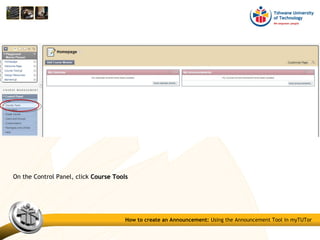
On the Control Panel, click Course ToolsCourse Tools
How to create an Announcement: Using the Announcement Tool in myTUTor
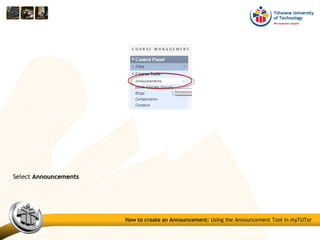
Select AnnouncementsAnnouncements
How to create an Announcement: Using the Announcement Tool in myTUTor
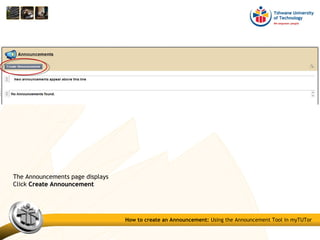
The Announcements page displays
Click Create AnnouncementCreate Announcement
How to create an Announcement: Using the Announcement Tool in myTUTor
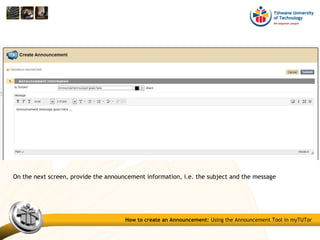
On the next screen, provide the announcement information, i.e. the subject and the message
How to create an Announcement: Using the Announcement Tool in myTUTor
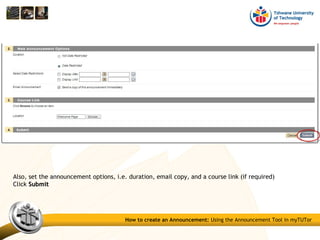
Also, set the announcement options, i.e. duration, email copy, and a course link (if required)
Click SubmitSubmit
How to create an Announcement: Using the Announcement Tool in myTUTor
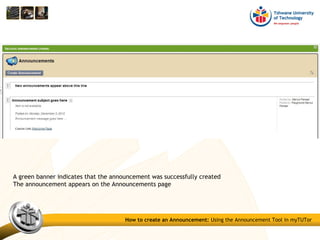
A green banner indicates that the announcement was successfully created
The announcement appears on the Announcements page
How to create an Announcement: Using the Announcement Tool in myTUTor
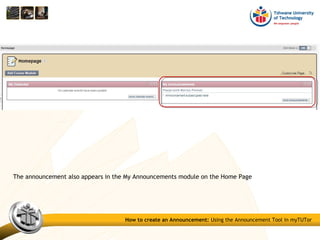
The announcement also appears in the My Announcements module on the Home Page
How to create an Announcement: Using the Announcement Tool in myTUTor
Compiled by Marius Pienaar: Instructional Designer
Contact details
Compiled by Marius Pienaar: Instructional Designer
Contact details

Blackboard training - How to create an announcement

  • 1.
    How to createan Announcement Using the Announcement Tool in myTUTor
  • 2.
    On the ControlPanel, click Course ToolsCourse Tools How to create an Announcement: Using the Announcement Tool in myTUTor
  • 3.
    Select AnnouncementsAnnouncements How tocreate an Announcement: Using the Announcement Tool in myTUTor
  • 4.
    The Announcements pagedisplays Click Create AnnouncementCreate Announcement How to create an Announcement: Using the Announcement Tool in myTUTor
  • 5.
    On the nextscreen, provide the announcement information, i.e. the subject and the message How to create an Announcement: Using the Announcement Tool in myTUTor
  • 6.
    Also, set theannouncement options, i.e. duration, email copy, and a course link (if required) Click SubmitSubmit How to create an Announcement: Using the Announcement Tool in myTUTor
  • 7.
    A green bannerindicates that the announcement was successfully created The announcement appears on the Announcements page How to create an Announcement: Using the Announcement Tool in myTUTor
  • 8.
    The announcement alsoappears in the My Announcements module on the Home Page How to create an Announcement: Using the Announcement Tool in myTUTor
  • 9.
    Compiled by MariusPienaar: Instructional Designer Contact details
  • 10.
    Compiled by MariusPienaar: Instructional Designer Contact details