POSTER ASSIGNMENT BIRDMAN MOVIE POSTER
A BIT ABOUT BIRDMAN (FILM
SYNOPSIS)
Former cinema superhero Riggan Thomson (Michael
Keaton) is mounting an ambitious Broadway
production that he hopes will breathe new life into
his stagnant career. It's risky, but he hopes that his
creative gamble will prove that he's a real artist and
not just a washed-up movie star. As opening night
approaches, a castmate is injured, forcing Riggan to
hire an actor (Edward Norton) who is guaranteed to
shake things up. Meanwhile, Riggan must deal with
his girlfriend, daughter and ex-wife.
BIRDMAN (THE POSTER)
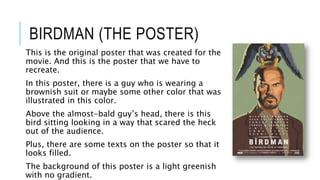
This is the original poster that was created for the
movie. And this is the poster that we have to
recreate.
In this poster, there is a guy who is wearing a
brownish suit or maybe some other color that was
illustrated in this color.
Above the almost-bald guy’s head, there is this
bird sitting looking in a way that scared the heck
out of the audience.
Plus, there are some texts on the poster so that it
looks filled.
The background of this poster is a light greenish
with no gradient.
BIRDMAN POSTER’S MODEL SHOOT
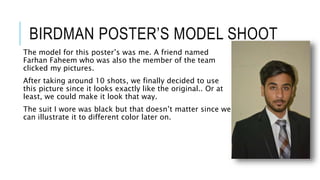
The model for this poster’s was me. A friend named
Farhan Faheem who was also the member of the team
clicked my pictures.
After taking around 10 shots, we finally decided to use
this picture since it looks exactly like the original.. Or at
least, we could make it look that way.
The suit I wore was black but that doesn’t matter since we
can illustrate it to different color later on.
BIRDMAN MODEL’S ILLUSTRATED
PICTURE
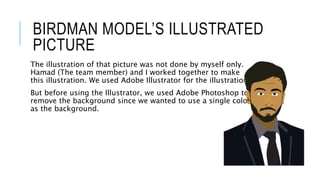
The illustration of that picture was not done by myself only.
Hamad (The team member) and I worked together to make
this illustration. We used Adobe Illustrator for the illustration.
But before using the Illustrator, we used Adobe Photoshop to
remove the background since we wanted to use a single color
as the background.
BIRD ILLUSTRATION FOR THE
POSTER
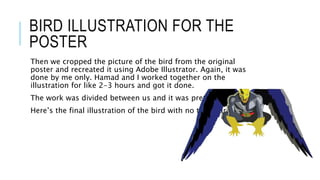
Then we cropped the picture of the bird from the original
poster and recreated it using Adobe Illustrator. Again, it was
done by me only. Hamad and I worked together on the
illustration for like 2-3 hours and got it done.
The work was divided between us and it was pretty fun.
Here’s the final illustration of the bird with no transparency.
FINAL PRODUCT – BIRDMAN
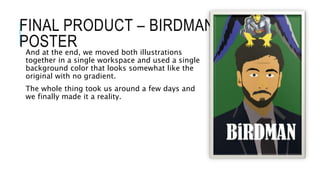
POSTERAnd at the end, we moved both illustrations
together in a single workspace and used a single
background color that looks somewhat like the
original with no gradient.
The whole thing took us around a few days and
we finally made it a reality.

Birdman Movie Poster- Presentation

  • 1.
  • 2.
    A BIT ABOUTBIRDMAN (FILM SYNOPSIS) Former cinema superhero Riggan Thomson (Michael Keaton) is mounting an ambitious Broadway production that he hopes will breathe new life into his stagnant career. It's risky, but he hopes that his creative gamble will prove that he's a real artist and not just a washed-up movie star. As opening night approaches, a castmate is injured, forcing Riggan to hire an actor (Edward Norton) who is guaranteed to shake things up. Meanwhile, Riggan must deal with his girlfriend, daughter and ex-wife.
  • 3.
    BIRDMAN (THE POSTER) Thisis the original poster that was created for the movie. And this is the poster that we have to recreate. In this poster, there is a guy who is wearing a brownish suit or maybe some other color that was illustrated in this color. Above the almost-bald guy’s head, there is this bird sitting looking in a way that scared the heck out of the audience. Plus, there are some texts on the poster so that it looks filled. The background of this poster is a light greenish with no gradient.
  • 4.
    BIRDMAN POSTER’S MODELSHOOT The model for this poster’s was me. A friend named Farhan Faheem who was also the member of the team clicked my pictures. After taking around 10 shots, we finally decided to use this picture since it looks exactly like the original.. Or at least, we could make it look that way. The suit I wore was black but that doesn’t matter since we can illustrate it to different color later on.
  • 5.
    BIRDMAN MODEL’S ILLUSTRATED PICTURE Theillustration of that picture was not done by myself only. Hamad (The team member) and I worked together to make this illustration. We used Adobe Illustrator for the illustration. But before using the Illustrator, we used Adobe Photoshop to remove the background since we wanted to use a single color as the background.
  • 6.
    BIRD ILLUSTRATION FORTHE POSTER Then we cropped the picture of the bird from the original poster and recreated it using Adobe Illustrator. Again, it was done by me only. Hamad and I worked together on the illustration for like 2-3 hours and got it done. The work was divided between us and it was pretty fun. Here’s the final illustration of the bird with no transparency.
  • 7.
    FINAL PRODUCT –BIRDMAN POSTERAnd at the end, we moved both illustrations together in a single workspace and used a single background color that looks somewhat like the original with no gradient. The whole thing took us around a few days and we finally made it a reality.