Dr. Anuraag Awasthi
anuraag_awasthi@hotmail.com / 9810068709
Business Intelligence And
Computer Applications In
Management
INTRODUCTIONS
Ground Rules
- Participation
- Questions and suggestions, any time
- Full Attendance
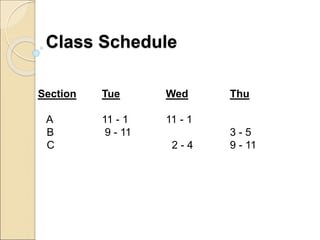
Section Tue Wed Thu
A 11 - 1 11 - 1
B 9 - 11 3 - 5
C 2 - 4 9 - 11
Class Schedule
Unit : I
An introduction to computers, Computers in Business,
Indian Computer Environment, Elements of Computer
System, Generations of Computers, Introduction to
the role of information in the functioning of modern
organizations, Information systems literacy,
Contemporary approaches to Information Systems,
The digital firm, Challenges of Information Systems.
Business Intelligence and
Computer Applications in
Management
• What is Business?
• How do we run a business?
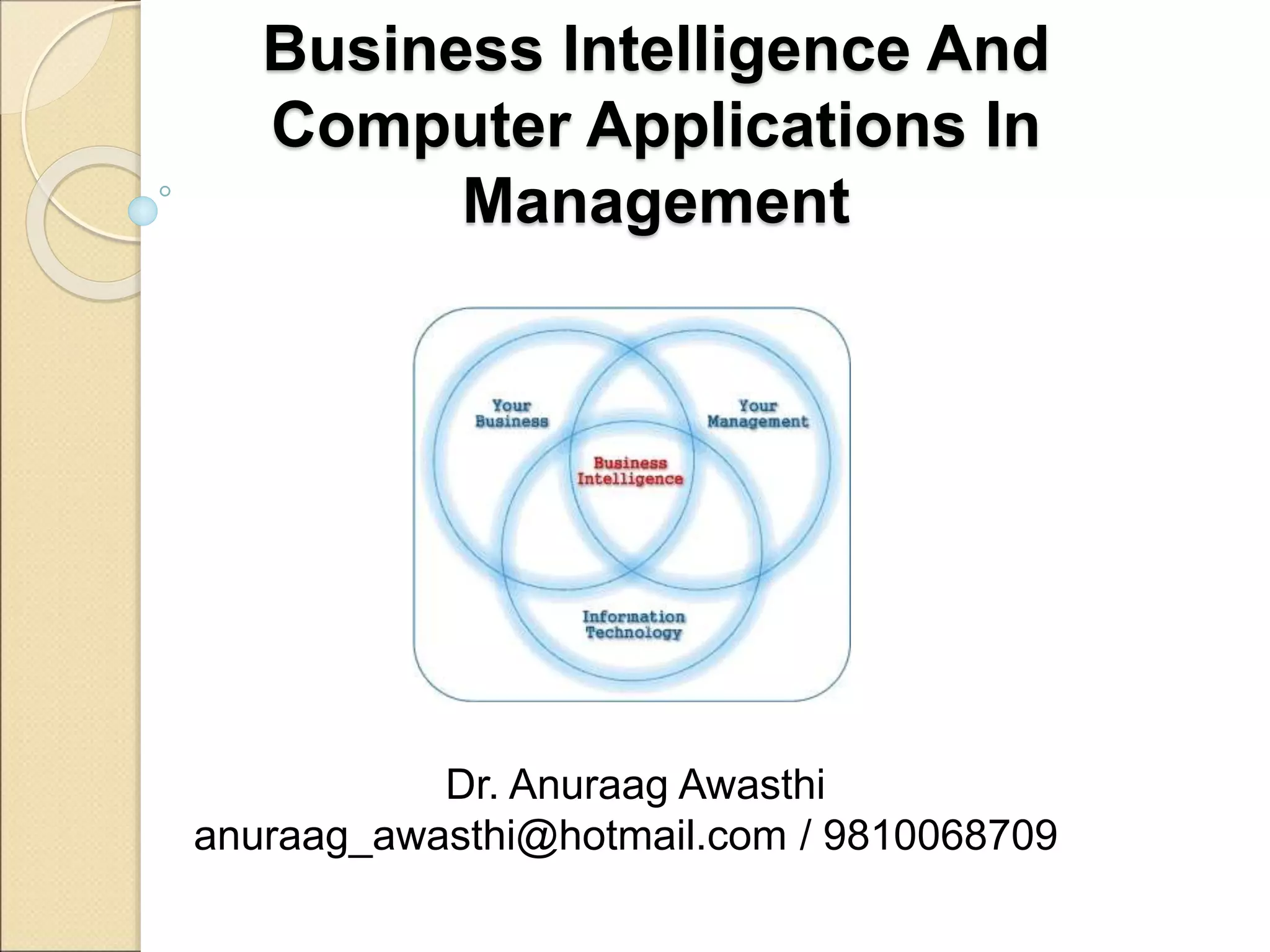
• What is Business Intelligence?
• What is the relevance of Computer
applications?
What is Business?
The term "business" has at least three usages,
depending on the scope :
- the singular usage to mean a particular
organization
- the generalized usage to refer to a particular
market sector, "the music business" and
compound forms such as agribusiness
- the broadest meaning, which encompasses all
activity by the community of suppliers of
goods and services.
What is Business?
A business (also known as enterprise or firm) is
an organization involved in the manufacturing,
trade of goods, services, or all of these to
consumers.
Businesses are predominant in capitalist
economies, where most of them are privately
owned and administered to provide service to
its customers. Businesses may also be not-for-
profit or state-owned.
Forms of Business
Sole proprietorship: A sole proprietorship is a
business owned by one person for-profit. The
owner may operate the business alone or may
employ others. The owner of the business has
unlimited liability for the debts incurred by the
business.
Partnership: A partnership is a business owned
by two or more people. In most forms of
partnerships, each partner has unlimited liability
for the debts incurred by the business.
Forms of Business
Corporation: A corporation is a limited
liability business that has a separate legal
personality from its members. Corporations can
be either government-owned or privately owned,
and corporations can organize either for-profit
or not-for-profit. A privately owned, for-profit
corporation is owned by shareholders who elect
a board of directors to direct the corporation and
hire its managerial staff.
Forms of Business
Cooperative: Often referred to as a "co-op",
a cooperative is a limited liability business that
can organize for-profit or not-for-profit. A
cooperative differs from a for-profit corporation
in that it has members, as opposed to
shareholders, who share decision-making
authority. Cooperatives are typically classified
as either consumer cooperatives or worker
cooperatives.
Forms of Business
Franchise: Where the rights to market a range
of products or services are purchased from a
parent company who become a supplier to the
franchise. Giving the franchisee access to the
back up of an often well known company.
Forms of Business
"Direct Selling or Network Marketing": A legal
multi level business system offering the benefits
of a franchise often at a fraction of the cost.
Allowing the independent business owner the
opportunity to create a residual income stream
by introducing other people to the parent
company, this provides a passive income after a
while and residual income. This business model
is ethical and currently growing fast around the
world.
Business Intelligence and
Computer Applications in
Management
• What is Business?
• How do we run a business?
• What is Business Intelligence?
• What is the relevance of Computer
applications?
How do we run a Business?
A business is run to maximize the profits.
Which means maximum output for minimum
input.
Profits = Sales price – Cost Price
To become profitable and maximize profits, the
Sales price should increase, and Cost price
should decrease.
Cost Price includes cost of raw materials,
building, salaries, machines, sales cost etc.
How do we run a Business?
Profits = Sales price – Cost Price
It is not possible to control ‘Sales Price’… the
only thing in our hand is ‘Cost Price’.
A business is driven and controlled by numbers.
Some of these are :
- Sales
- Revenue
- Profits
- Productivity
How do we run a Business?
What are the functions in a typical organiztaion?
Suggest some numbers that are used to drive a
business?
Business Intelligence and
Computer Applications in
Management
• What is Business?
• How do we run a business?
• What is Business Intelligence?
• What is the relevance of Computer
applications?
Business Intelligence (BI)
"BI“ is an umbrella
term
to describe
a set of concepts
and methods
to
improve
business decision-
making
by
using fact-based
support systems.
Business Intelligence (BI)
BI refers to
application and
technology,
which is used
to gather, provide
access to, and
analyze
data and information
about the company
operations.
What is Business Intelligence?
 “Business Intelligence (BI) applications
are decision support tools that enable
real-time, interactive access, analysis
and manipulation of mission-critical
corporate information.”
What is a Computer?
Introduction To Computers
• Definition:
• Its an electronic Device that is used for
information Processing.
• Computer.. Latin word.. compute
• Calculation Machine
• A computer system includes a
computer, peripheral devices, and
software
Introduction To Computers
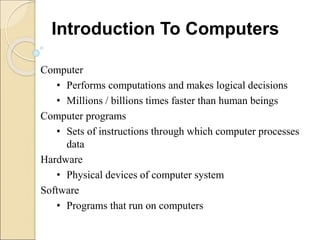
Computer
• Performs computations and makes logical decisions
• Millions / billions times faster than human beings
Computer programs
• Sets of instructions through which computer processes
data
Hardware
• Physical devices of computer system
Software
• Programs that run on computers
Introduction To Computers
• Definition:
• Introduction To Computer Software
• Operating system
• Problem solving Techniques
• Computer Prog ramming languages
• Computer Threats
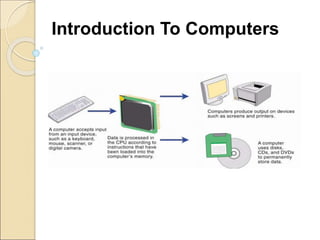
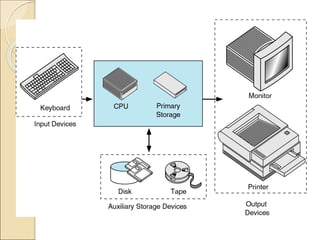
• Accepts input, processes data, stores data, and produces
output
• Input refers to whatever is sent to a Computer system
• Data refers to the symbols that represent facts, objects, and
ideas
• Processing is the way that a computer manipulates data
• A computer processes data in a device called the central
processing unit (CPU)
Introduction To Computers
• Memory is an area of a computer that holds data that is
waiting to be processed, stored, or output
• Storage is the area where data can be left on a permanent
basis
• Computer output is the result produced by the computer
• An output device displays, prints or transmits the results of
processing
Introduction To Computers
• Characteristics of Computers
• Huge Data Storage
• High Processing Speed
• Accuracy
• Reliability
• Versatility
Introduction To Computers
Generations of Computers
• First Generation - Vacuum Tubes (1946-59)
• Second Generation - Transistors (1957-64)
• Third Generation – Integrated Circuits (1965-70)
• Fourth Generation – Microprocessors (1970-90)
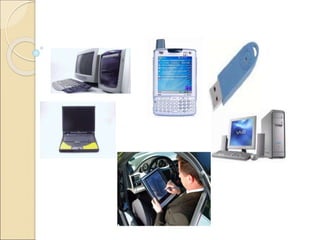
• Fifth Generation (1990 till date)
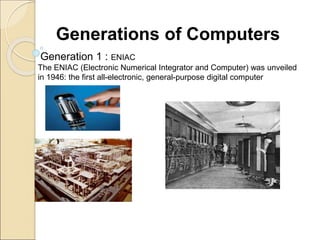
Generation 1 : ENIAC
The ENIAC (Electronic Numerical Integrator and Computer) was unveiled
in 1946: the first all-electronic, general-purpose digital computer
Generations of Computers
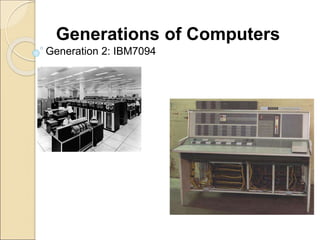
Generation 2: IBM7094
Generations of Computers
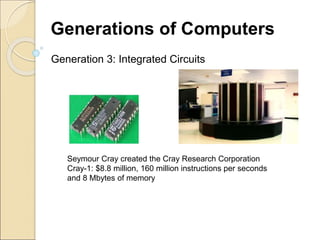
Generation 3: Integrated Circuits
Seymour Cray created the Cray Research Corporation
Cray-1: $8.8 million, 160 million instructions per seconds
and 8 Mbytes of memory
Generations of Computers
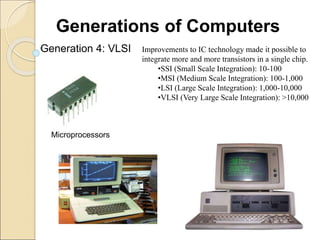
Generation 4: VLSI Improvements to IC technology made it possible to
integrate more and more transistors in a single chip.
•SSI (Small Scale Integration): 10-100
•MSI (Medium Scale Integration): 100-1,000
•LSI (Large Scale Integration): 1,000-10,000
•VLSI (Very Large Scale Integration): >10,000
Microprocessors
Generations of Computers
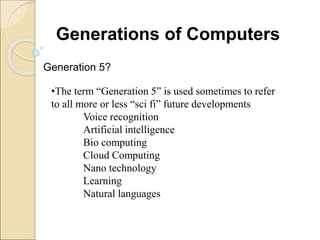
Generation 5?
•The term “Generation 5” is used sometimes to refer
to all more or less “sci fi” future developments
Voice recognition
Artificial intelligence
Bio computing
Cloud Computing
Nano technology
Learning
Natural languages
Generations of Computers
Use of Computers
 Make groups
 Group-wise, identify possible computer
applications for a large scale organization,
and possibility of using internet in :
◦ Government
◦ Bank
◦ Factory
◦ Agriculture
◦ Educational Institution
◦ Retail Shop
◦ Pharma Company
◦ Insurance Company
Indian Computer Environment
 Business Organizations
 Industrial Organizations
 Educational Organizations
 Government Organizations
 Medical Organizations
 Entertainment Organizations
 Scientific Research
Computing In Business
 Payroll Accounting
 Office Automation
 Stock Control
 Insurance
 Stock Broking
 Accounting
 Banking
Payroll Calculations
 Record-Keeping
 Wage-Calculations
 Monthly Budgetary
Calculations
Office Automation
 Evolution of E-Offices
 Record Maintenance
 Daily Transactions
 Electronic Filing
 Report Preparation
 Desktop Publishing
 Printing
Insurance
 Online Information
 Data Base Management
 Interest Calculations
 Bonuses
Stock broking
Database Management
Quick Retrieval of Records
Online up to date information
Accounting
Budget Preparation
Budget Calculation
Cost-Benefit Analysis
National Income Accounting
Tax - Calculations
Banking
ATM
Online-Banking
Electronic Payments
•Offers ATMS throughout India
•Largest bank network in India
•Online –Banking
•E-Payments
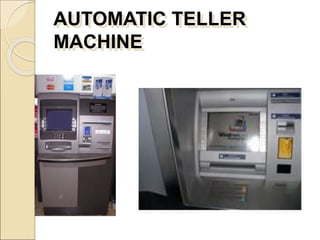
AUTOMATIC TELLER
MACHINE
AUTOMATIC TELLER
MACHINE
•Quick retrieval and deposition of
cash 24 hrs a day
•Electronic Funds transfer
•User-friendly Interface
•Efficient and Accurate Banking
E-Government
Electronic Data Interchange
Budgets
Network between District,
State and Central Government
National Informatics Center
Electronic Voting
Next Generation Services
 Certifying Authority for Digital
Signatures
 Risk Management based Clearances
 Dematerialization of challans
 E- payments
 E-Registration for excise and service
tax
 E-filing of returns and refunds
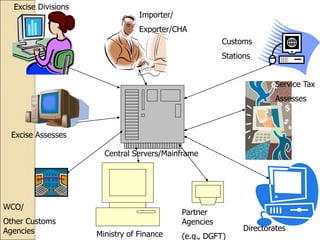
Importer/
Exporter/CHA
Customs
Stations
Excise Divisions
Excise Assesses
Service Tax
Assesses
Directorates
WCO/
Other Customs
Agencies
Central Servers/Mainframe
Partner
Agencies
(e.g., DGFT)
Ministry of Finance
Contemporary Approaches
to Information Systems
Contemporary Approaches to
Information Systems
Technical Approach
• The technical approach uses mathematical models
to test the capabilities of information systems.
These disciplines include:
• Computer Science - concerned with methods of
computability, computation, and data storage and
access.
• Management Science - emphasized the
development of models for decision making, and
management practices.
Contemporary Approaches to
Information Systems
Operations Research - focuses on mathematical
techniques for optimizing selected parameters of
organizations.(inventory control, transaction costs).
Contemporary Approaches to
Information Systems
Behavioral Approach
• Deals with behavioral issues that arise in the
development, and long term maintenance of the
information system.
• Different disciplines, such as psychologists,
sociologists, Economists, study information systems,
and the impacts they have in the organizational
environment.
Behavioral changes can occur within the organization
during, and after information system development. The
key to this approach is to find the solution to the
behavior, which is not a technical issue.
Challenges of Information
Systems
Challenges of Information
Systems
 The Strategic Business Challenge:
◦ How can business use information technology to
design organizations that are competitive and
effective
 The Globalization Challenge:
◦ How can firms understand the business and
system requirements of a global economic
environment?
 The Information Architecture Challenge:
◦ How can organizations develop an information
architecture that supports their business goals
Challenges of Information
Systems
 The information systems investment
challenge:
◦ How can organizations determine the
business value of information systems
 The Responsibility and control
challenge:
◦ How can organization design systems that
people can control and understand?
◦ How can organization ensure that their
information systems are used in an ethically
and socially responsible manner?
Digital Firm
Digital Firm
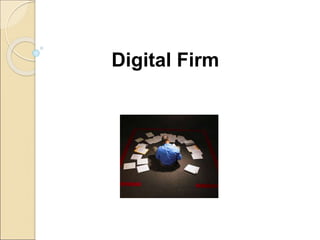
A digital firm is one in which nearly
all of the organization's significant
business relationships with
customers, suppliers, and employees
are digitally enabled and mediate.
Core business processes are
accomplished through digital networks
spanning the entire organization or
linking multiple organizations.
Digital Firm
Digital firms involve both time
sihfting and space shifting. Time
shifting refers to business being
conducted continuously, 24x7, rather
than in narrow "work day" time bands
of 9 a.m. to 5 p.m. Space shifting
means that work takes place in a
global workshop, as well as within
national boundaries.
Assignment
 Make groups of 5 students
 Identify an organization
 Identify all possible data that are used by
management to make decisions
 Possible departments are Human
Resource, Sales & Marketing, Stores,
Production, IT, Administration, Finance,
Support
Questions?

BI Unit 1(1).ppt

  • 1.
    Dr. Anuraag Awasthi anuraag_awasthi@hotmail.com/ 9810068709 Business Intelligence And Computer Applications In Management
  • 2.
  • 3.
    Ground Rules - Participation -Questions and suggestions, any time - Full Attendance
  • 4.
    Section Tue WedThu A 11 - 1 11 - 1 B 9 - 11 3 - 5 C 2 - 4 9 - 11 Class Schedule
  • 5.
    Unit : I Anintroduction to computers, Computers in Business, Indian Computer Environment, Elements of Computer System, Generations of Computers, Introduction to the role of information in the functioning of modern organizations, Information systems literacy, Contemporary approaches to Information Systems, The digital firm, Challenges of Information Systems.
  • 6.
    Business Intelligence and ComputerApplications in Management • What is Business? • How do we run a business? • What is Business Intelligence? • What is the relevance of Computer applications?
  • 7.
    What is Business? Theterm "business" has at least three usages, depending on the scope : - the singular usage to mean a particular organization - the generalized usage to refer to a particular market sector, "the music business" and compound forms such as agribusiness - the broadest meaning, which encompasses all activity by the community of suppliers of goods and services.
  • 8.
    What is Business? Abusiness (also known as enterprise or firm) is an organization involved in the manufacturing, trade of goods, services, or all of these to consumers. Businesses are predominant in capitalist economies, where most of them are privately owned and administered to provide service to its customers. Businesses may also be not-for- profit or state-owned.
  • 9.
    Forms of Business Soleproprietorship: A sole proprietorship is a business owned by one person for-profit. The owner may operate the business alone or may employ others. The owner of the business has unlimited liability for the debts incurred by the business. Partnership: A partnership is a business owned by two or more people. In most forms of partnerships, each partner has unlimited liability for the debts incurred by the business.
  • 10.
    Forms of Business Corporation:A corporation is a limited liability business that has a separate legal personality from its members. Corporations can be either government-owned or privately owned, and corporations can organize either for-profit or not-for-profit. A privately owned, for-profit corporation is owned by shareholders who elect a board of directors to direct the corporation and hire its managerial staff.
  • 11.
    Forms of Business Cooperative:Often referred to as a "co-op", a cooperative is a limited liability business that can organize for-profit or not-for-profit. A cooperative differs from a for-profit corporation in that it has members, as opposed to shareholders, who share decision-making authority. Cooperatives are typically classified as either consumer cooperatives or worker cooperatives.
  • 12.
    Forms of Business Franchise:Where the rights to market a range of products or services are purchased from a parent company who become a supplier to the franchise. Giving the franchisee access to the back up of an often well known company.
  • 13.
    Forms of Business "DirectSelling or Network Marketing": A legal multi level business system offering the benefits of a franchise often at a fraction of the cost. Allowing the independent business owner the opportunity to create a residual income stream by introducing other people to the parent company, this provides a passive income after a while and residual income. This business model is ethical and currently growing fast around the world.
  • 14.
    Business Intelligence and ComputerApplications in Management • What is Business? • How do we run a business? • What is Business Intelligence? • What is the relevance of Computer applications?
  • 15.
    How do werun a Business? A business is run to maximize the profits. Which means maximum output for minimum input. Profits = Sales price – Cost Price To become profitable and maximize profits, the Sales price should increase, and Cost price should decrease. Cost Price includes cost of raw materials, building, salaries, machines, sales cost etc.
  • 16.
    How do werun a Business? Profits = Sales price – Cost Price It is not possible to control ‘Sales Price’… the only thing in our hand is ‘Cost Price’. A business is driven and controlled by numbers. Some of these are : - Sales - Revenue - Profits - Productivity
  • 17.
    How do werun a Business? What are the functions in a typical organiztaion? Suggest some numbers that are used to drive a business?
  • 18.
    Business Intelligence and ComputerApplications in Management • What is Business? • How do we run a business? • What is Business Intelligence? • What is the relevance of Computer applications?
  • 19.
    Business Intelligence (BI) "BI“is an umbrella term to describe a set of concepts and methods to improve business decision- making by using fact-based support systems.
  • 20.
    Business Intelligence (BI) BIrefers to application and technology, which is used to gather, provide access to, and analyze data and information about the company operations.
  • 21.
    What is BusinessIntelligence?  “Business Intelligence (BI) applications are decision support tools that enable real-time, interactive access, analysis and manipulation of mission-critical corporate information.”
  • 22.
    What is aComputer?
  • 23.
    Introduction To Computers •Definition: • Its an electronic Device that is used for information Processing. • Computer.. Latin word.. compute • Calculation Machine • A computer system includes a computer, peripheral devices, and software
  • 24.
  • 25.
    Computer • Performs computationsand makes logical decisions • Millions / billions times faster than human beings Computer programs • Sets of instructions through which computer processes data Hardware • Physical devices of computer system Software • Programs that run on computers Introduction To Computers
  • 26.
    • Definition: • IntroductionTo Computer Software • Operating system • Problem solving Techniques • Computer Prog ramming languages • Computer Threats
  • 27.
    • Accepts input,processes data, stores data, and produces output • Input refers to whatever is sent to a Computer system • Data refers to the symbols that represent facts, objects, and ideas • Processing is the way that a computer manipulates data • A computer processes data in a device called the central processing unit (CPU) Introduction To Computers
  • 28.
    • Memory isan area of a computer that holds data that is waiting to be processed, stored, or output • Storage is the area where data can be left on a permanent basis • Computer output is the result produced by the computer • An output device displays, prints or transmits the results of processing Introduction To Computers
  • 29.
    • Characteristics ofComputers • Huge Data Storage • High Processing Speed • Accuracy • Reliability • Versatility Introduction To Computers
  • 30.
  • 31.
    Generations of Computers •First Generation - Vacuum Tubes (1946-59) • Second Generation - Transistors (1957-64) • Third Generation – Integrated Circuits (1965-70) • Fourth Generation – Microprocessors (1970-90) • Fifth Generation (1990 till date)
  • 32.
    Generation 1 :ENIAC The ENIAC (Electronic Numerical Integrator and Computer) was unveiled in 1946: the first all-electronic, general-purpose digital computer Generations of Computers
  • 33.
  • 34.
    Generation 3: IntegratedCircuits Seymour Cray created the Cray Research Corporation Cray-1: $8.8 million, 160 million instructions per seconds and 8 Mbytes of memory Generations of Computers
  • 35.
    Generation 4: VLSIImprovements to IC technology made it possible to integrate more and more transistors in a single chip. •SSI (Small Scale Integration): 10-100 •MSI (Medium Scale Integration): 100-1,000 •LSI (Large Scale Integration): 1,000-10,000 •VLSI (Very Large Scale Integration): >10,000 Microprocessors Generations of Computers
  • 36.
    Generation 5? •The term“Generation 5” is used sometimes to refer to all more or less “sci fi” future developments Voice recognition Artificial intelligence Bio computing Cloud Computing Nano technology Learning Natural languages Generations of Computers
  • 38.
    Use of Computers Make groups  Group-wise, identify possible computer applications for a large scale organization, and possibility of using internet in : ◦ Government ◦ Bank ◦ Factory ◦ Agriculture ◦ Educational Institution ◦ Retail Shop ◦ Pharma Company ◦ Insurance Company
  • 39.
    Indian Computer Environment Business Organizations  Industrial Organizations  Educational Organizations  Government Organizations  Medical Organizations  Entertainment Organizations  Scientific Research
  • 40.
    Computing In Business Payroll Accounting  Office Automation  Stock Control  Insurance  Stock Broking  Accounting  Banking
  • 41.
    Payroll Calculations  Record-Keeping Wage-Calculations  Monthly Budgetary Calculations
  • 42.
    Office Automation  Evolutionof E-Offices  Record Maintenance  Daily Transactions  Electronic Filing  Report Preparation  Desktop Publishing  Printing
  • 43.
    Insurance  Online Information Data Base Management  Interest Calculations  Bonuses
  • 44.
    Stock broking Database Management QuickRetrieval of Records Online up to date information
  • 45.
    Accounting Budget Preparation Budget Calculation Cost-BenefitAnalysis National Income Accounting Tax - Calculations
  • 46.
  • 47.
    •Offers ATMS throughoutIndia •Largest bank network in India •Online –Banking •E-Payments
  • 48.
  • 49.
    AUTOMATIC TELLER MACHINE •Quick retrievaland deposition of cash 24 hrs a day •Electronic Funds transfer •User-friendly Interface •Efficient and Accurate Banking
  • 50.
    E-Government Electronic Data Interchange Budgets Networkbetween District, State and Central Government National Informatics Center Electronic Voting
  • 51.
    Next Generation Services Certifying Authority for Digital Signatures  Risk Management based Clearances  Dematerialization of challans  E- payments  E-Registration for excise and service tax  E-filing of returns and refunds
  • 52.
    Importer/ Exporter/CHA Customs Stations Excise Divisions Excise Assesses ServiceTax Assesses Directorates WCO/ Other Customs Agencies Central Servers/Mainframe Partner Agencies (e.g., DGFT) Ministry of Finance
  • 53.
  • 54.
    Contemporary Approaches to InformationSystems Technical Approach • The technical approach uses mathematical models to test the capabilities of information systems. These disciplines include: • Computer Science - concerned with methods of computability, computation, and data storage and access. • Management Science - emphasized the development of models for decision making, and management practices.
  • 55.
    Contemporary Approaches to InformationSystems Operations Research - focuses on mathematical techniques for optimizing selected parameters of organizations.(inventory control, transaction costs).
  • 56.
    Contemporary Approaches to InformationSystems Behavioral Approach • Deals with behavioral issues that arise in the development, and long term maintenance of the information system. • Different disciplines, such as psychologists, sociologists, Economists, study information systems, and the impacts they have in the organizational environment. Behavioral changes can occur within the organization during, and after information system development. The key to this approach is to find the solution to the behavior, which is not a technical issue.
  • 57.
  • 58.
    Challenges of Information Systems The Strategic Business Challenge: ◦ How can business use information technology to design organizations that are competitive and effective  The Globalization Challenge: ◦ How can firms understand the business and system requirements of a global economic environment?  The Information Architecture Challenge: ◦ How can organizations develop an information architecture that supports their business goals
  • 59.
    Challenges of Information Systems The information systems investment challenge: ◦ How can organizations determine the business value of information systems  The Responsibility and control challenge: ◦ How can organization design systems that people can control and understand? ◦ How can organization ensure that their information systems are used in an ethically and socially responsible manner?
  • 60.
  • 61.
    Digital Firm A digitalfirm is one in which nearly all of the organization's significant business relationships with customers, suppliers, and employees are digitally enabled and mediate. Core business processes are accomplished through digital networks spanning the entire organization or linking multiple organizations.
  • 62.
    Digital Firm Digital firmsinvolve both time sihfting and space shifting. Time shifting refers to business being conducted continuously, 24x7, rather than in narrow "work day" time bands of 9 a.m. to 5 p.m. Space shifting means that work takes place in a global workshop, as well as within national boundaries.
  • 63.
    Assignment  Make groupsof 5 students  Identify an organization  Identify all possible data that are used by management to make decisions  Possible departments are Human Resource, Sales & Marketing, Stores, Production, IT, Administration, Finance, Support
  • 64.