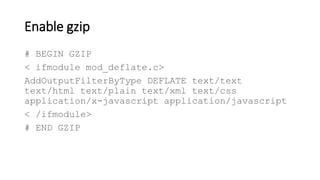
Enable gzip
# BEGIN GZIP
< ifmodule mod_deflate.c>
AddOutputFilterByType DEFLATE text/text
text/html text/plain text/xml text/css
application/x-javascript application/javascript
< /ifmodule>
# END GZIP
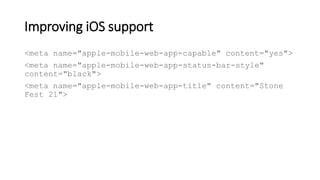
Improving iOS support
<meta name="apple-mobile-web-app-capable" content="yes">
<meta name="apple-mobile-web-app-status-bar-style"
content="black">
<meta name="apple-mobile-web-app-title" content="Stone
Fest 21">
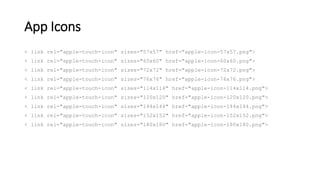
App Icons
< link rel="apple-touch-icon" sizes="57x57" href="apple-icon-57x57.png">
< link rel="apple-touch-icon" sizes="60x60" href="apple-icon-60x60.png">
< link rel="apple-touch-icon" sizes="72x72" href="apple-icon-72x72.png">
< link rel="apple-touch-icon" sizes="76x76" href="apple-icon-76x76.png">
< link rel="apple-touch-icon" sizes="114x114" href="apple-icon-114x114.png">
< link rel="apple-touch-icon" sizes="120x120" href="apple-icon-120x120.png">
< link rel="apple-touch-icon" sizes="144x144" href="apple-icon-144x144.png">
< link rel="apple-touch-icon" sizes="152x152" href="apple-icon-152x152.png">
< link rel="apple-touch-icon" sizes="180x180" href="apple-icon-180x180.png">
Updating the BODY tag
< body style="background-color: #1c1b17;
background-image: url('assets/imgs/logo.jpg');
background-position: center; background-repeat:
no-repeat;">
Handling the no JavaScript case
<noscript>
<h1>Stone Fest 21 requires JavaScript< /h1>
</noscript>
Removing Cordova Plugins
• cordova-plugin-console
• cordova-plugin-device
• cordova-plugin-splashscreen
• cordova-plugin-statusbar
• cordova-plugin-whitelist
• and ionic-plugin-keyboard
Removing Cordova & Ionic Native Modules
• cordova-ios
• cordova-android
• @ionic-native/core
Image Paths
<img src="https://aj-
software.com/apps/stone/assets/breweries/{{brewery.logo}}"
alt="Company Logo">
Enabling the Serviceworker.js code
if ('serviceWorker' in navigator) {
navigator.serviceWorker.register('service-
worker.js')
.then(() => console.log('service worker
installed'))
.catch(err => console.error('Error', err));
}
Updating the manifest.json file
{
"name": "Stone Fest 21",
"short_name": "Stone Fest",
"start_url": "index.html",
"display": "standalone",
"icons": [{
"src": "assets/imgs/logo.jpg",
"sizes": "512x512",
"type": "image/jpg"
}],
"background_color": "#1c1b17",
"theme_color": "#1c1b17",
"orientation": "portrait"
}
Ionic Native Mocks
Installation
NPM
• npm install @ionic-native-mocks/[plug-in] –save
Manual
• https://github.com/chrisgriffith/ionic-native-mocks
Ionic Native Mocks
// app.module.ts
import { Camera } from '@ionic-native/camera';
import { CameraMock } from '@ionic-native-mocks/camera';
...
@NgModule({
...
providers: [
...
{ provide: Camera, useClass: CameraMock }
...
]
...
})
export class AppModule { }
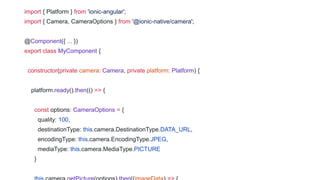
import { Platform } from 'ionic-angular';
import { Camera, CameraOptions } from '@ionic-native/camera';
@Component({ ... })
export class MyComponent {
constructor(private camera: Camera, private platform: Platform) {
platform.ready().then(() => {
const options: CameraOptions = {
quality: 100,
destinationType: this.camera.DestinationType.DATA_URL,
encodingType: this.camera.EncodingType.JPEG,
mediaType: this.camera.MediaType.PICTURE
}
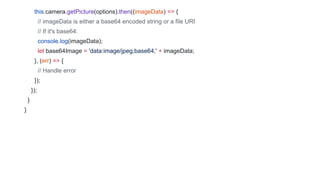
this.camera.getPicture(options).then((imageData) => {
// imageData is either a base64 encoded string or a file URI
// If it's base64:
console.log(imageData);
let base64Image = 'data:image/jpeg;base64,' + imageData;
}, (err) => {
// Handle error
});
});
}
}
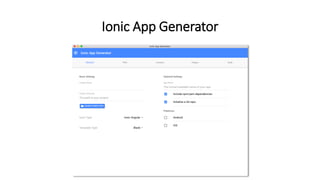
Ionic App Generator
http://bit.ly/2wlRrVa http://bit.ly/2xILll5
Download
Beyond Ionic

Beyond Ionic

  • 20.
    Enable gzip # BEGINGZIP < ifmodule mod_deflate.c> AddOutputFilterByType DEFLATE text/text text/html text/plain text/xml text/css application/x-javascript application/javascript < /ifmodule> # END GZIP
  • 21.
    Improving iOS support <metaname="apple-mobile-web-app-capable" content="yes"> <meta name="apple-mobile-web-app-status-bar-style" content="black"> <meta name="apple-mobile-web-app-title" content="Stone Fest 21">
  • 22.
    App Icons < linkrel="apple-touch-icon" sizes="57x57" href="apple-icon-57x57.png"> < link rel="apple-touch-icon" sizes="60x60" href="apple-icon-60x60.png"> < link rel="apple-touch-icon" sizes="72x72" href="apple-icon-72x72.png"> < link rel="apple-touch-icon" sizes="76x76" href="apple-icon-76x76.png"> < link rel="apple-touch-icon" sizes="114x114" href="apple-icon-114x114.png"> < link rel="apple-touch-icon" sizes="120x120" href="apple-icon-120x120.png"> < link rel="apple-touch-icon" sizes="144x144" href="apple-icon-144x144.png"> < link rel="apple-touch-icon" sizes="152x152" href="apple-icon-152x152.png"> < link rel="apple-touch-icon" sizes="180x180" href="apple-icon-180x180.png">
  • 23.
    Updating the BODYtag < body style="background-color: #1c1b17; background-image: url('assets/imgs/logo.jpg'); background-position: center; background-repeat: no-repeat;">
  • 24.
    Handling the noJavaScript case <noscript> <h1>Stone Fest 21 requires JavaScript< /h1> </noscript>
  • 25.
    Removing Cordova Plugins •cordova-plugin-console • cordova-plugin-device • cordova-plugin-splashscreen • cordova-plugin-statusbar • cordova-plugin-whitelist • and ionic-plugin-keyboard
  • 26.
    Removing Cordova &Ionic Native Modules • cordova-ios • cordova-android • @ionic-native/core
  • 27.
  • 28.
    Enabling the Serviceworker.jscode if ('serviceWorker' in navigator) { navigator.serviceWorker.register('service- worker.js') .then(() => console.log('service worker installed')) .catch(err => console.error('Error', err)); }
  • 29.
    Updating the manifest.jsonfile { "name": "Stone Fest 21", "short_name": "Stone Fest", "start_url": "index.html", "display": "standalone", "icons": [{ "src": "assets/imgs/logo.jpg", "sizes": "512x512", "type": "image/jpg" }], "background_color": "#1c1b17", "theme_color": "#1c1b17", "orientation": "portrait" }
  • 31.
  • 32.
    Installation NPM • npm install@ionic-native-mocks/[plug-in] –save Manual • https://github.com/chrisgriffith/ionic-native-mocks
  • 33.
    Ionic Native Mocks //app.module.ts import { Camera } from '@ionic-native/camera'; import { CameraMock } from '@ionic-native-mocks/camera'; ... @NgModule({ ... providers: [ ... { provide: Camera, useClass: CameraMock } ... ] ... }) export class AppModule { }
  • 34.
    import { Platform} from 'ionic-angular'; import { Camera, CameraOptions } from '@ionic-native/camera'; @Component({ ... }) export class MyComponent { constructor(private camera: Camera, private platform: Platform) { platform.ready().then(() => { const options: CameraOptions = { quality: 100, destinationType: this.camera.DestinationType.DATA_URL, encodingType: this.camera.EncodingType.JPEG, mediaType: this.camera.MediaType.PICTURE }
  • 35.
    this.camera.getPicture(options).then((imageData) => { //imageData is either a base64 encoded string or a file URI // If it's base64: console.log(imageData); let base64Image = 'data:image/jpeg;base64,' + imageData; }, (err) => { // Handle error }); }); } }
  • 36.
  • 37.

Editor's Notes

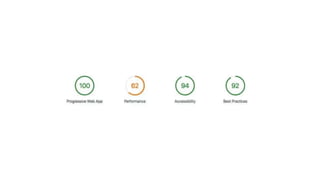
  • #24 One of the items that the Lighthouse test measures is “First Meaningful Paint”. For those who don’t know this term, First Meaningful Paint is the time when page’s primary content appeared on the screen. I added inline CSS to the body tag, so that the browser would render something while the app was starting.
  • #30 Update the name and short name. Note: the short name should not be more than 12 characters in length. Ensure there is an icon available in the proper directory and of the proper size. Update the theme and background colors to something that matched our app. Add an orientation value of portrait
  • #37 https://aj-software.com/ionic/generator/releases/Ionic%20Generator-1.0.2.dmg https://aj-software.com/ionic/generator/releases/Ionic%20Generator%20Setup%201.0.2.exe