






Roy Ganor | Zend Technologies
Better Together –
PHP and Ajax Best Practices
http://joind.in/2240
@since
Who Are You?
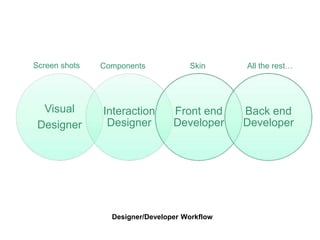
Designer/Developer Workflow
Visual
Designer
Interaction
Designer
Front end
Developer
Back end
Developer
Screen shots Components Skin All the rest…
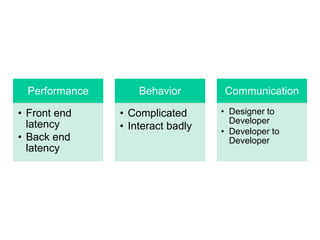
Performance
• Front end
latency
• Back end
latency
Behavior
• Complicated
• Interact badly
Communication
• Designer to
Developer
• Developer to
Developer
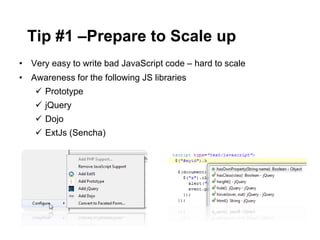
• Very easy to write bad JavaScript code – hard to scale
• Awareness for the following JS libraries
 Prototype
 jQuery
 Dojo
 ExtJs (Sencha)
Tip #1 –Prepare to Scale up
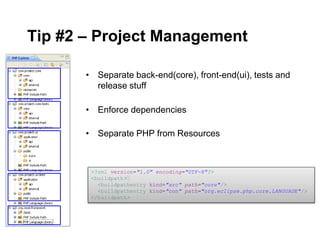
• Separate back-end(core), front-end(ui), tests and
release stuff
• Enforce dependencies
• Separate PHP from Resources
<?xml version="1.0" encoding="UTF-8"?>
<buildpath>
<buildpathentry kind="src" path="core"/>
<buildpathentry kind="con" path="org.eclipse.php.core.LANGUAGE"/>
</buildpath>
Tip #2 – Project Management
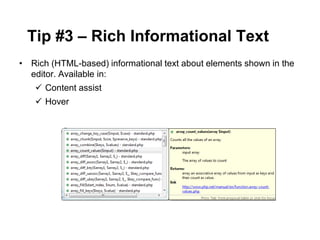
• Rich (HTML-based) informational text about elements shown in the
editor. Available in:
 Content assist
 Hover
Tip #3 – Rich Informational Text
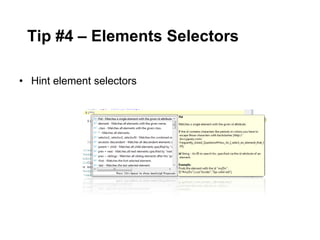
• Hint element selectors
Tip #4 – Elements Selectors
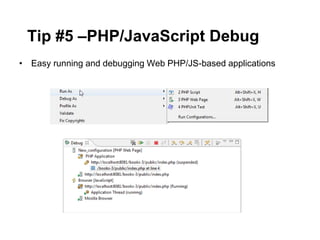
• Easy running and debugging Web PHP/JS-based applications
Tip #5 –PHP/JavaScript Debug
Plenty of tools for Web developers
Tip #6 – Web Browser
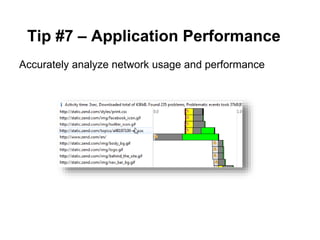
Accurately analyze network usage and performance
Tip #7 – Application Performance
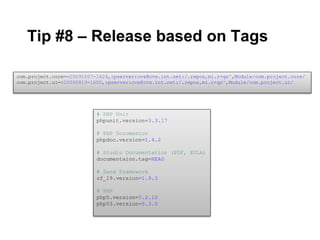
Tip #8 – Release based on Tags
# PHP Unit
phpunit.version=3.3.17
# PHP Documentor
phpdoc.version=1.4.2
# Studio Documentation (PDF, EULA)
documentaion.tag=HEAD
# Zend Framework
zf_19.version=1.9.3
# PHP
php5.version=5.2.10
php53.version=5.3.0
com.project.core=v20091007-1624,:pserver:cvs@cvs.int.net:/.repos,mi.r+qz^,Module/com.project.core/
com.project.ui=v20090819-1600,:pserver:cvs@cvs.int.net:/.repos,mi.r+qz^,Module/com.project.ui/
Demo
Mastering your tools is as important as mastering your code
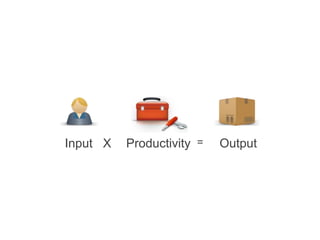
Productivity = OutputInput X

Better Together - PHP and JavaScript Best Practices with Zend Studio 8

  • 1.
    Roy Ganor |Zend Technologies Better Together – PHP and Ajax Best Practices http://joind.in/2240
  • 3.
  • 4.
  • 5.
  • 7.
    Performance • Front end latency •Back end latency Behavior • Complicated • Interact badly Communication • Designer to Developer • Developer to Developer
  • 9.
    • Very easyto write bad JavaScript code – hard to scale • Awareness for the following JS libraries  Prototype  jQuery  Dojo  ExtJs (Sencha) Tip #1 –Prepare to Scale up
  • 10.
    • Separate back-end(core),front-end(ui), tests and release stuff • Enforce dependencies • Separate PHP from Resources <?xml version="1.0" encoding="UTF-8"?> <buildpath> <buildpathentry kind="src" path="core"/> <buildpathentry kind="con" path="org.eclipse.php.core.LANGUAGE"/> </buildpath> Tip #2 – Project Management
  • 11.
    • Rich (HTML-based)informational text about elements shown in the editor. Available in:  Content assist  Hover Tip #3 – Rich Informational Text
  • 12.
    • Hint elementselectors Tip #4 – Elements Selectors
  • 13.
    • Easy runningand debugging Web PHP/JS-based applications Tip #5 –PHP/JavaScript Debug
  • 14.
    Plenty of toolsfor Web developers Tip #6 – Web Browser
  • 15.
    Accurately analyze networkusage and performance Tip #7 – Application Performance
  • 16.
    Tip #8 –Release based on Tags # PHP Unit phpunit.version=3.3.17 # PHP Documentor phpdoc.version=1.4.2 # Studio Documentation (PDF, EULA) documentaion.tag=HEAD # Zend Framework zf_19.version=1.9.3 # PHP php5.version=5.2.10 php53.version=5.3.0 com.project.core=v20091007-1624,:pserver:cvs@cvs.int.net:/.repos,mi.r+qz^,Module/com.project.core/ com.project.ui=v20090819-1600,:pserver:cvs@cvs.int.net:/.repos,mi.r+qz^,Module/com.project.ui/
  • 17.
  • 18.
    Mastering your toolsis as important as mastering your code
  • 19.

Editor's Notes

  • #6 Who are the players in the game?What are their roles?
  • #7 Who are the players in the game?What are their roles?
  • #8 No Interaction Designer  Bad behaviorNo accepted workflow  skipping essential stepsProblems with debugging a user use caseBad PerformancePersonal communication – same language