1
Best Practices for Supercharging Cloud
Analytics on Amazon Redshift
Tina Adams, Amazon Redshift
Brandon Davis, Cervello
Maneesh Joshi, SnapLogic
May 2014
2
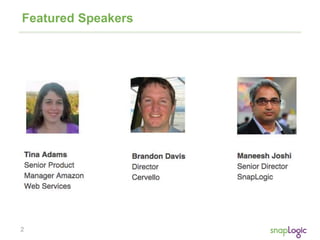
Featured Speakers
3
Agenda
• Amazon Redshift Feature and Market Update
• SnapLogic Case Studies with Amazon Redshift
• Demo: SnapLogic Free Trial for Amazon Redshift and
RDS
• Cervello: Implementation Best Practices
4
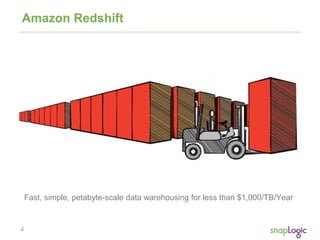
Fast, simple, petabyte-scale data warehousing for less than $1,000/TB/Year
Amazon Redshift
5
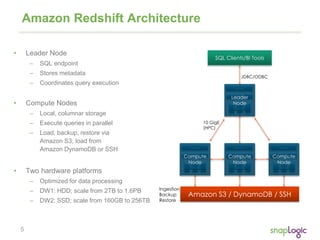
Amazon Redshift Architecture
• Leader Node
– SQL endpoint
– Stores metadata
– Coordinates query execution
• Compute Nodes
– Local, columnar storage
– Execute queries in parallel
– Load, backup, restore via
Amazon S3; load from
Amazon DynamoDB or SSH
• Two hardware platforms
– Optimized for data processing
– DW1: HDD; scale from 2TB to 1.6PB
– DW2: SSD; scale from 160GB to 256TB
10 GigE
(HPC)
Ingestion
Backup
Restore
JDBC/ODBC
6
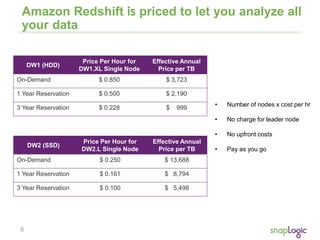
Amazon Redshift is priced to let you analyze all
your data
• Number of nodes x cost per hr
• No charge for leader node
• No upfront costs
• Pay as you go
DW1 (HDD)
Price Per Hour for
DW1.XL Single Node
Effective Annual
Price per TB
On-Demand $ 0.850 $ 3,723
1 Year Reservation $ 0.500 $ 2,190
3 Year Reservation $ 0.228 $ 999
DW2 (SSD)
Price Per Hour for
DW2.L Single Node
Effective Annual
Price per TB
On-Demand $ 0.250 $ 13,688
1 Year Reservation $ 0.161 $ 8,794
3 Year Reservation $ 0.100 $ 5,498
7
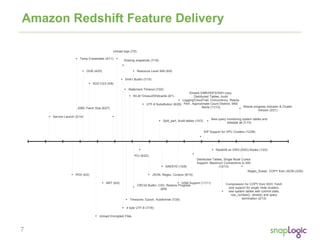
Amazon Redshift Feature Delivery
Service Launch (2/14)
PDX (4/2)
Temp Credentials (4/11)
Unload Encrypted Files
DUB (4/25)
NRT (6/5)
JDBC Fetch Size (6/27)
Unload logs (7/5)
4 byte UTF-8 (7/18)
Statement Timeout (7/22)
SHA1 Builtin (7/15)
Timezone, Epoch, Autoformat (7/25)
WLM Timeout/Wildcards (8/1)
CRC32 Builtin, CSV, Restore Progress
(8/9)
UTF-8 Substitution (8/29)
JSON, Regex, Cursors (9/10)
Split_part, Audit tables (10/3)
SIN/SYD (10/8)
HSM Support (11/11)
Kinesis EMR/HDFS/SSH copy,
Distributed Tables, Audit
Logging/CloudTrail, Concurrency, Resize
Perf., Approximate Count Distinct, SNS
Alerts (11/13)
SOC1/2/3 (5/8)
Sharing snapshots (7/18)
Resource Level IAM (8/9)
PCI (8/22)
Distributed Tables, Single Node Cursor
Support, Maximum Connections to 500
(12/13)
EIP Support for VPC Clusters (12/28)
New query monitoring system tables and
diststyle all (1/13)
Redshift on DW2 (SSD) Nodes (1/23)
Compression for COPY from SSH, Fetch
size support for single node clusters,
new system tables with commit stats,
row_number(), strotol() and query
termination (2/13)
Resize progress indicator & Cluster
Version (3/21)
Regex_Substr, COPY from JSON (3/25)
8
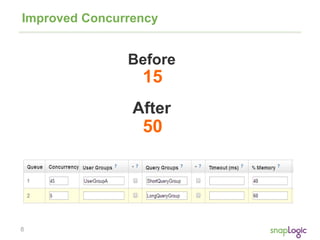
Improved Concurrency
15
50
9
COPY from JSON
{
"jsonpaths":
[
"$['id']",
"$['name']",
"$['location'][0]",
"$['location'][1]",
"$['seats']"
]
}
COPY venue FROM 's3://mybucket/venue.json'
credentials 'aws_access_key_id=<access-key-id>; aws_secret_access_key=<secret-
access-key>'
JSON AS 's3://mybucket/venue_jsonpaths.json';
10
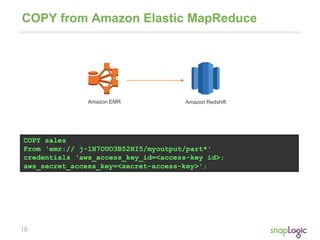
COPY from Amazon Elastic MapReduce
COPY sales
From ‘emr:// j-1H7OUO3B52HI5/myoutput/part*'
credentials ‘aws_access_key_id=<access-key id>;
aws_secret_access_key=<secret-access-key>';
Amazon EMR Amazon Redshift
11
REGEX_SUBSTR()
select email, regexp_substr(email,'@[^.]*')
from users limit 5;
email | regexp_substr
--------------------------------------------+----------------
Suspendisse.tristique@nonnisiAenean.edu | @nonnisiAenean
sed@lacusUtnec.ca | @lacusUtnec
elementum@semperpretiumneque.ca | @semperpretiumneque
Integer.mollis.Integer@tristiquealiquet.org | @tristiquealiquet
Donec.fringilla@sodalesat.org | @sodalesat
12
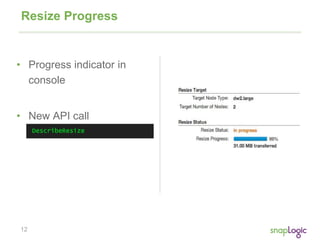
Resize Progress
• Progress indicator in
console
• New API call
13
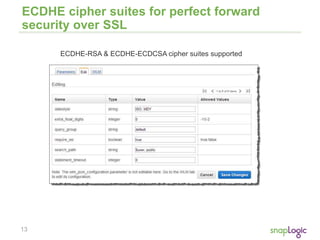
ECDHE cipher suites for perfect forward
security over SSL
ECDHE-RSA & ECDHE-ECDCSA cipher suites supported
14
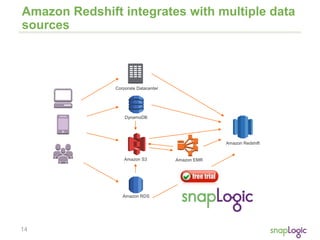
Amazon Redshift integrates with multiple data
sources
Amazon S3 Amazon EMR
Amazon Redshift
DynamoDB
Amazon RDS
Corporate Datacenter
15
Agenda
• Amazon Redshift Feature and Market Update
• SnapLogic Case Studies with Amazon Redshift
• Demo: SnapLogic Free Trial for Amazon Redshift and
RDS
• Cervello: Implementation Best Practices
16
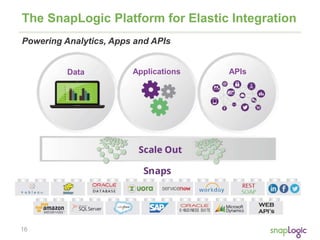
The SnapLogic Platform for Elastic Integration
Powering Analytics, Apps and APIs
Data Applications APIs
17
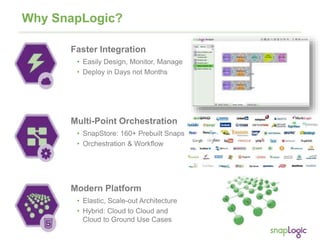
Why SnapLogic?
Multi-Point Orchestration
• SnapStore: 160+ Prebuilt Snaps
• Orchestration & Workflow
Modern Platform
• Elastic, Scale-out Architecture
• Hybrid: Cloud to Cloud and
Cloud to Ground Use Cases
Faster Integration
• Easily Design, Monitor, Manage
• Deploy in Days not Months
18
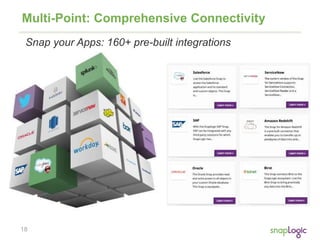
Multi-Point: Comprehensive Connectivity
Snap your Apps: 160+ pre-built integrations
19
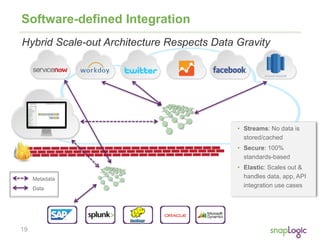
Software-defined Integration
Metadata
Data
• Streams: No data is
stored/cached
• Secure: 100%
standards-based
• Elastic: Scales out &
handles data, app, API
integration use cases
Hybrid Scale-out Architecture Respects Data Gravity
20
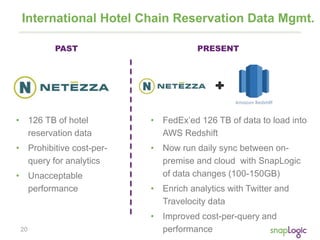
International Hotel Chain Reservation Data Mgmt.
• 126 TB of hotel
reservation data
• Prohibitive cost-per-
query for analytics
• Unacceptable
performance
PAST PRESENT
• FedEx’ed 126 TB of data to load into
AWS Redshift
• Now run daily sync between on-
premise and cloud with SnapLogic
of data changes (100-150GB)
• Enrich analytics with Twitter and
Travelocity data
• Improved cost-per-query and
performance
21
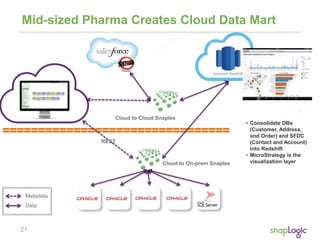
Mid-sized Pharma Creates Cloud Data Mart
Cloud to On-prem Snaplex
REST
Cloud to Cloud Snaplex
Metadata
Data
• Consolidate DBs
(Customer, Address,
and Order) and SFDC
(Contact and Account)
into Redshift
• MicroStrategy is the
visualization layer
22
Agenda
• Amazon Redshift Feature and Market Update
• SnapLogic Case Studies with Amazon Redshift
• Demo: SnapLogic Free Trial for Amazon Redshift
and RDS
• Cervello: Implementation Best Practices
23
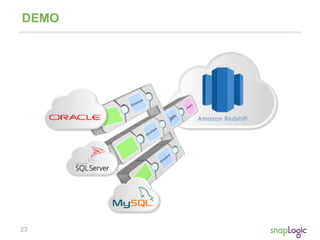
DEMO
24
Agenda
• Amazon Redshift Feature and Market Update
• SnapLogic Case Studies with Amazon Redshift
• Demo: SnapLogic Free Trial for Amazon Redshift and
RDS
• Cervello: Implementation Best Practices
25
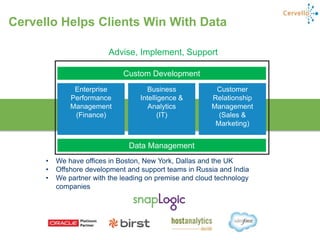
Enterprise
Performance
Management
(Finance)
Customer
Relationship
Management
(Sales &
Marketing)
Data Management
Custom Development
Business
Intelligence &
Analytics
(IT)
• We have offices in Boston, New York, Dallas and the UK
• Offshore development and support teams in Russia and India
• We partner with the leading on premise and cloud technology
companies
Advise, Implement, Support
Cervello Helps Clients Win With Data
26
Implementation Case Study
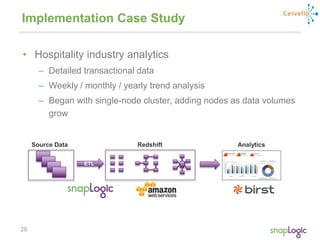
• Hospitality industry analytics
– Detailed transactional data
– Weekly / monthly / yearly trend analysis
– Began with single-node cluster, adding nodes as data volumes
grow
Source Data Redshift Analytics
ETL
27
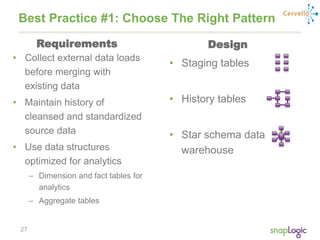
• Collect external data loads
before merging with
existing data
• Maintain history of
cleansed and standardized
source data
• Use data structures
optimized for analytics
– Dimension and fact tables for
analytics
– Aggregate tables
Best Practice #1: Choose The Right Pattern
• Staging tables
• History tables
• Star schema data
warehouse
Requirements Design
28
Best Practice #2: Select the Right Node Type
• Performance was good with
initial volumes and small
data sets on single node
• Evaluated dense storage
(dw1) and dense compute
(dw2) nodes
• More opportunity to
optimize design as volumes
grew
• Increased nodes to handle
larger volumes
– Solution leverages dense
storage (dw1) nodes
– Expected to stabilize between
10-20TB
• Have also seen smaller
volumes that work really well
in dense compute (dw2) nodes
Early Stages Mature Stage
29
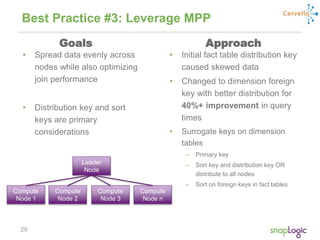
Best Practice #3: Leverage MPP
• Spread data evenly across
nodes while also optimizing
join performance
• Distribution key and sort
keys are primary
considerations
Leader
Node
Compute
Node 1
Compute
Node 2
Compute
Node n
Compute
Node 3
• Initial fact table distribution key
caused skewed data
• Changed to dimension foreign
key with better distribution for
40%+ improvement in query
times
• Surrogate keys on dimension
tables
– Primary key
– Sort key and distribution key OR
distribute to all nodes
– Sort on foreign keys in fact tables
Goals Approach
30
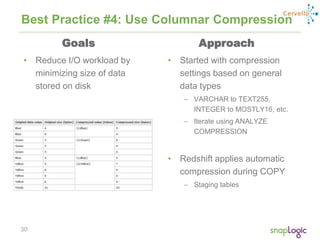
Best Practice #4: Use Columnar Compression
• Started with compression
settings based on general
data types
– VARCHAR to TEXT255,
INTEGER to MOSTLY16, etc.
– Iterate using ANALYZE
COMPRESSION
• Redshift applies automatic
compression during COPY
– Staging tables
• Reduce I/O workload by
minimizing size of data
stored on disk
Goals Approach
31
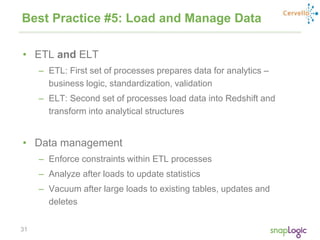
Best Practice #5: Load and Manage Data
• ETL and ELT
– ETL: First set of processes prepares data for analytics –
business logic, standardization, validation
– ELT: Second set of processes load data into Redshift and
transform into analytical structures
• Data management
– Enforce constraints within ETL processes
– Analyze after loads to update statistics
– Vacuum after large loads to existing tables, updates and
deletes
32
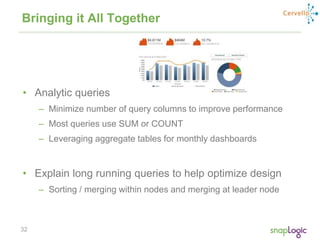
Bringing it All Together
• Analytic queries
– Minimize number of query columns to improve performance
– Most queries use SUM or COUNT
– Leveraging aggregate tables for monthly dashboards
• Explain long running queries to help optimize design
– Sorting / merging within nodes and merging at leader node
33
Learn more…
1. Try out the SnapLogic Free Trial for Amazon Redshift:
http://snaplogic.com/redshift-trial
2. Learn more about Amazon Redshift at:
http://aws.amazon.com/redshift
3. Learn more about Cervello at:
http://mycervello.com/

Best Practices for Supercharging Cloud Analytics on Amazon Redshift

  • 1.
    1 Best Practices forSupercharging Cloud Analytics on Amazon Redshift Tina Adams, Amazon Redshift Brandon Davis, Cervello Maneesh Joshi, SnapLogic May 2014
  • 2.
  • 3.
    3 Agenda • Amazon RedshiftFeature and Market Update • SnapLogic Case Studies with Amazon Redshift • Demo: SnapLogic Free Trial for Amazon Redshift and RDS • Cervello: Implementation Best Practices
  • 4.
    4 Fast, simple, petabyte-scaledata warehousing for less than $1,000/TB/Year Amazon Redshift
  • 5.
    5 Amazon Redshift Architecture •Leader Node – SQL endpoint – Stores metadata – Coordinates query execution • Compute Nodes – Local, columnar storage – Execute queries in parallel – Load, backup, restore via Amazon S3; load from Amazon DynamoDB or SSH • Two hardware platforms – Optimized for data processing – DW1: HDD; scale from 2TB to 1.6PB – DW2: SSD; scale from 160GB to 256TB 10 GigE (HPC) Ingestion Backup Restore JDBC/ODBC
  • 6.
    6 Amazon Redshift ispriced to let you analyze all your data • Number of nodes x cost per hr • No charge for leader node • No upfront costs • Pay as you go DW1 (HDD) Price Per Hour for DW1.XL Single Node Effective Annual Price per TB On-Demand $ 0.850 $ 3,723 1 Year Reservation $ 0.500 $ 2,190 3 Year Reservation $ 0.228 $ 999 DW2 (SSD) Price Per Hour for DW2.L Single Node Effective Annual Price per TB On-Demand $ 0.250 $ 13,688 1 Year Reservation $ 0.161 $ 8,794 3 Year Reservation $ 0.100 $ 5,498
  • 7.
    7 Amazon Redshift FeatureDelivery Service Launch (2/14) PDX (4/2) Temp Credentials (4/11) Unload Encrypted Files DUB (4/25) NRT (6/5) JDBC Fetch Size (6/27) Unload logs (7/5) 4 byte UTF-8 (7/18) Statement Timeout (7/22) SHA1 Builtin (7/15) Timezone, Epoch, Autoformat (7/25) WLM Timeout/Wildcards (8/1) CRC32 Builtin, CSV, Restore Progress (8/9) UTF-8 Substitution (8/29) JSON, Regex, Cursors (9/10) Split_part, Audit tables (10/3) SIN/SYD (10/8) HSM Support (11/11) Kinesis EMR/HDFS/SSH copy, Distributed Tables, Audit Logging/CloudTrail, Concurrency, Resize Perf., Approximate Count Distinct, SNS Alerts (11/13) SOC1/2/3 (5/8) Sharing snapshots (7/18) Resource Level IAM (8/9) PCI (8/22) Distributed Tables, Single Node Cursor Support, Maximum Connections to 500 (12/13) EIP Support for VPC Clusters (12/28) New query monitoring system tables and diststyle all (1/13) Redshift on DW2 (SSD) Nodes (1/23) Compression for COPY from SSH, Fetch size support for single node clusters, new system tables with commit stats, row_number(), strotol() and query termination (2/13) Resize progress indicator & Cluster Version (3/21) Regex_Substr, COPY from JSON (3/25)
  • 8.
  • 9.
    9 COPY from JSON { "jsonpaths": [ "$['id']", "$['name']", "$['location'][0]", "$['location'][1]", "$['seats']" ] } COPYvenue FROM 's3://mybucket/venue.json' credentials 'aws_access_key_id=<access-key-id>; aws_secret_access_key=<secret- access-key>' JSON AS 's3://mybucket/venue_jsonpaths.json';
  • 10.
    10 COPY from AmazonElastic MapReduce COPY sales From ‘emr:// j-1H7OUO3B52HI5/myoutput/part*' credentials ‘aws_access_key_id=<access-key id>; aws_secret_access_key=<secret-access-key>'; Amazon EMR Amazon Redshift
  • 11.
    11 REGEX_SUBSTR() select email, regexp_substr(email,'@[^.]*') fromusers limit 5; email | regexp_substr --------------------------------------------+---------------- Suspendisse.tristique@nonnisiAenean.edu | @nonnisiAenean sed@lacusUtnec.ca | @lacusUtnec elementum@semperpretiumneque.ca | @semperpretiumneque Integer.mollis.Integer@tristiquealiquet.org | @tristiquealiquet Donec.fringilla@sodalesat.org | @sodalesat
  • 12.
    12 Resize Progress • Progressindicator in console • New API call
  • 13.
    13 ECDHE cipher suitesfor perfect forward security over SSL ECDHE-RSA & ECDHE-ECDCSA cipher suites supported
  • 14.
    14 Amazon Redshift integrateswith multiple data sources Amazon S3 Amazon EMR Amazon Redshift DynamoDB Amazon RDS Corporate Datacenter
  • 15.
    15 Agenda • Amazon RedshiftFeature and Market Update • SnapLogic Case Studies with Amazon Redshift • Demo: SnapLogic Free Trial for Amazon Redshift and RDS • Cervello: Implementation Best Practices
  • 16.
    16 The SnapLogic Platformfor Elastic Integration Powering Analytics, Apps and APIs Data Applications APIs
  • 17.
    17 Why SnapLogic? Multi-Point Orchestration •SnapStore: 160+ Prebuilt Snaps • Orchestration & Workflow Modern Platform • Elastic, Scale-out Architecture • Hybrid: Cloud to Cloud and Cloud to Ground Use Cases Faster Integration • Easily Design, Monitor, Manage • Deploy in Days not Months
  • 18.
    18 Multi-Point: Comprehensive Connectivity Snapyour Apps: 160+ pre-built integrations
  • 19.
    19 Software-defined Integration Metadata Data • Streams:No data is stored/cached • Secure: 100% standards-based • Elastic: Scales out & handles data, app, API integration use cases Hybrid Scale-out Architecture Respects Data Gravity
  • 20.
    20 International Hotel ChainReservation Data Mgmt. • 126 TB of hotel reservation data • Prohibitive cost-per- query for analytics • Unacceptable performance PAST PRESENT • FedEx’ed 126 TB of data to load into AWS Redshift • Now run daily sync between on- premise and cloud with SnapLogic of data changes (100-150GB) • Enrich analytics with Twitter and Travelocity data • Improved cost-per-query and performance
  • 21.
    21 Mid-sized Pharma CreatesCloud Data Mart Cloud to On-prem Snaplex REST Cloud to Cloud Snaplex Metadata Data • Consolidate DBs (Customer, Address, and Order) and SFDC (Contact and Account) into Redshift • MicroStrategy is the visualization layer
  • 22.
    22 Agenda • Amazon RedshiftFeature and Market Update • SnapLogic Case Studies with Amazon Redshift • Demo: SnapLogic Free Trial for Amazon Redshift and RDS • Cervello: Implementation Best Practices
  • 23.
  • 24.
    24 Agenda • Amazon RedshiftFeature and Market Update • SnapLogic Case Studies with Amazon Redshift • Demo: SnapLogic Free Trial for Amazon Redshift and RDS • Cervello: Implementation Best Practices
  • 25.
    25 Enterprise Performance Management (Finance) Customer Relationship Management (Sales & Marketing) Data Management CustomDevelopment Business Intelligence & Analytics (IT) • We have offices in Boston, New York, Dallas and the UK • Offshore development and support teams in Russia and India • We partner with the leading on premise and cloud technology companies Advise, Implement, Support Cervello Helps Clients Win With Data
  • 26.
    26 Implementation Case Study •Hospitality industry analytics – Detailed transactional data – Weekly / monthly / yearly trend analysis – Began with single-node cluster, adding nodes as data volumes grow Source Data Redshift Analytics ETL
  • 27.
    27 • Collect externaldata loads before merging with existing data • Maintain history of cleansed and standardized source data • Use data structures optimized for analytics – Dimension and fact tables for analytics – Aggregate tables Best Practice #1: Choose The Right Pattern • Staging tables • History tables • Star schema data warehouse Requirements Design
  • 28.
    28 Best Practice #2:Select the Right Node Type • Performance was good with initial volumes and small data sets on single node • Evaluated dense storage (dw1) and dense compute (dw2) nodes • More opportunity to optimize design as volumes grew • Increased nodes to handle larger volumes – Solution leverages dense storage (dw1) nodes – Expected to stabilize between 10-20TB • Have also seen smaller volumes that work really well in dense compute (dw2) nodes Early Stages Mature Stage
  • 29.
    29 Best Practice #3:Leverage MPP • Spread data evenly across nodes while also optimizing join performance • Distribution key and sort keys are primary considerations Leader Node Compute Node 1 Compute Node 2 Compute Node n Compute Node 3 • Initial fact table distribution key caused skewed data • Changed to dimension foreign key with better distribution for 40%+ improvement in query times • Surrogate keys on dimension tables – Primary key – Sort key and distribution key OR distribute to all nodes – Sort on foreign keys in fact tables Goals Approach
  • 30.
    30 Best Practice #4:Use Columnar Compression • Started with compression settings based on general data types – VARCHAR to TEXT255, INTEGER to MOSTLY16, etc. – Iterate using ANALYZE COMPRESSION • Redshift applies automatic compression during COPY – Staging tables • Reduce I/O workload by minimizing size of data stored on disk Goals Approach
  • 31.
    31 Best Practice #5:Load and Manage Data • ETL and ELT – ETL: First set of processes prepares data for analytics – business logic, standardization, validation – ELT: Second set of processes load data into Redshift and transform into analytical structures • Data management – Enforce constraints within ETL processes – Analyze after loads to update statistics – Vacuum after large loads to existing tables, updates and deletes
  • 32.
    32 Bringing it AllTogether • Analytic queries – Minimize number of query columns to improve performance – Most queries use SUM or COUNT – Leveraging aggregate tables for monthly dashboards • Explain long running queries to help optimize design – Sorting / merging within nodes and merging at leader node
  • 33.
    33 Learn more… 1. Tryout the SnapLogic Free Trial for Amazon Redshift: http://snaplogic.com/redshift-trial 2. Learn more about Amazon Redshift at: http://aws.amazon.com/redshift 3. Learn more about Cervello at: http://mycervello.com/