
The new way handling of Software
Updates explained in Configuration
Manager 2012 SP1
Microsoft NDA Confidential
Multiple SUPs per Site with cross-forest SUP support
Source top level SUP off of internal WSUS servers
Optional client content download from Windows
Update
Windows Embedded support
3X delivery of definitions through software updates
• WSUS 3.0 SP2
 WSUS-KB2720211
 WSUS-KB2734608
• You are allowed to put your WSUS db on the same SQL box
as where your CM db lives.
• Use a custom Web site during WSUS 3.0 installation
• Installing SP1 will reset custom ports to 80/433
• Store Updates locally = License agreement
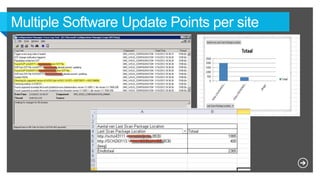
• Add multiple SUP’s per site (8 per Site)
• You can add SUP’s cross-forest
• NLB no longer required (but still supported through the SDK
or PowerShell)
• Clients will automatically fail over to additional SUPs in the
same forest if scan fails (same mechanism as MP)
Optional client content from WU/MU
• Support for using Windows Update / Microsoft Update as an
update content source for clients
• Local content sources (distribution points) are still prioritized
• Architectural changes to improve SUP synch and client scans
to support delivering Endpoint Protection definition updates
3X per day (delta synchs and category scans)
• Simplified out of box templates for :
 Endpoint Protection Auto Deployment
 Patch Tuesday
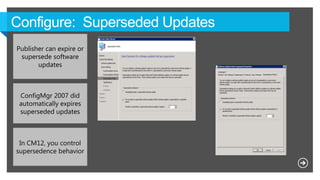
Publisher can expire or
supersede software
updates
ConfigMgr 2007 did
automatically expires
superseded updates
In CM12, you control
supersedence behavior
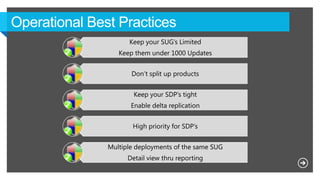
Keep your SUG’s Limited
Keep them under 1000 Updates
Don’t split up products
Keep your SDP’s tight
Enable delta replication
High priority for SDP’s
Multiple deployments of the same SUG
Detail view thru reporting
• Don’t split up SUG into products.
• Split up per year and then per month !
• Stay under 1000 updates per SUG
• Don’t split up all SDP per month.
• Split up per year and save all updates in that SDP !
• Enable “delta updates” for Distribution points
• Do the work once, also for yearly maintenance.
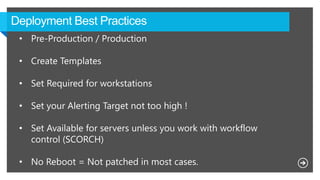
• Pre-Production / Production
• Create Templates
• Set Required for workstations
• Set your Alerting Target not too high !
• Set Available for servers unless you work with workflow
control (SCORCH)
• No Reboot = Not patched in most cases.
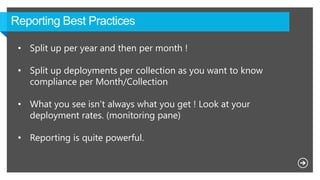
• Split up per year and then per month !
• Split up deployments per collection as you want to know
compliance per Month/Collection
• What you see isn’t always what you get ! Look at your
deployment rates. (monitoring pane)
• Reporting is quite powerful.
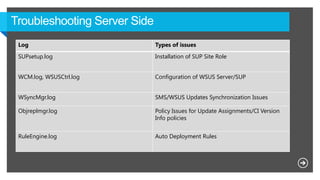
Log Types of issues
SUPsetup.log Installation of SUP Site Role
WCM.log, WSUSCtrl.log Configuration of WSUS Server/SUP
WSyncMgr.log SMS/WSUS Updates Synchronization Issues
Objreplmgr.log Policy Issues for Update Assignments/CI Version
Info policies
RuleEngine.log Auto Deployment Rules
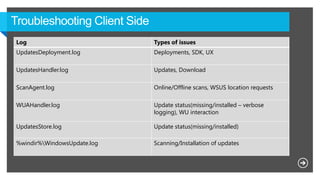
Log Types of issues
UpdatesDeployment.log Deployments, SDK, UX
UpdatesHandler.log Updates, Download
ScanAgent.log Online/Offline scans, WSUS location requests
WUAHandler.log Update status(missing/installed – verbose
logging), WU interaction
UpdatesStore.log Update status(missing/installed)
%windir%WindowsUpdate.log Scanning/Installation of updates
Best ofmms2013 kb_managing_software_updates_part3

Best ofmms2013 kb_managing_software_updates_part3

  • 1.
    The new wayhandling of Software Updates explained in Configuration Manager 2012 SP1
  • 2.
  • 4.
    Multiple SUPs perSite with cross-forest SUP support Source top level SUP off of internal WSUS servers Optional client content download from Windows Update Windows Embedded support 3X delivery of definitions through software updates
  • 5.
    • WSUS 3.0SP2  WSUS-KB2720211  WSUS-KB2734608 • You are allowed to put your WSUS db on the same SQL box as where your CM db lives. • Use a custom Web site during WSUS 3.0 installation • Installing SP1 will reset custom ports to 80/433 • Store Updates locally = License agreement
  • 6.
    • Add multipleSUP’s per site (8 per Site) • You can add SUP’s cross-forest • NLB no longer required (but still supported through the SDK or PowerShell) • Clients will automatically fail over to additional SUPs in the same forest if scan fails (same mechanism as MP)
  • 8.
    Optional client contentfrom WU/MU • Support for using Windows Update / Microsoft Update as an update content source for clients • Local content sources (distribution points) are still prioritized
  • 9.
    • Architectural changesto improve SUP synch and client scans to support delivering Endpoint Protection definition updates 3X per day (delta synchs and category scans) • Simplified out of box templates for :  Endpoint Protection Auto Deployment  Patch Tuesday
  • 11.
    Publisher can expireor supersede software updates ConfigMgr 2007 did automatically expires superseded updates In CM12, you control supersedence behavior
  • 12.
    Keep your SUG’sLimited Keep them under 1000 Updates Don’t split up products Keep your SDP’s tight Enable delta replication High priority for SDP’s Multiple deployments of the same SUG Detail view thru reporting
  • 13.
    • Don’t splitup SUG into products. • Split up per year and then per month ! • Stay under 1000 updates per SUG
  • 14.
    • Don’t splitup all SDP per month. • Split up per year and save all updates in that SDP ! • Enable “delta updates” for Distribution points • Do the work once, also for yearly maintenance.
  • 15.
    • Pre-Production /Production • Create Templates • Set Required for workstations • Set your Alerting Target not too high ! • Set Available for servers unless you work with workflow control (SCORCH) • No Reboot = Not patched in most cases.
  • 16.
    • Split upper year and then per month ! • Split up deployments per collection as you want to know compliance per Month/Collection • What you see isn’t always what you get ! Look at your deployment rates. (monitoring pane) • Reporting is quite powerful.
  • 17.
    Log Types ofissues SUPsetup.log Installation of SUP Site Role WCM.log, WSUSCtrl.log Configuration of WSUS Server/SUP WSyncMgr.log SMS/WSUS Updates Synchronization Issues Objreplmgr.log Policy Issues for Update Assignments/CI Version Info policies RuleEngine.log Auto Deployment Rules
  • 18.
    Log Types ofissues UpdatesDeployment.log Deployments, SDK, UX UpdatesHandler.log Updates, Download ScanAgent.log Online/Offline scans, WSUS location requests WUAHandler.log Update status(missing/installed – verbose logging), WU interaction UpdatesStore.log Update status(missing/installed) %windir%WindowsUpdate.log Scanning/Installation of updates