Melonie R. Wallace
      Barbe Elementary
Calcasieu Parish School Board
        February 2011
 melonie.wallace@cpsb.org


  John W. Spikes
         Principal
   Johnw.spikes@cpsb.org
Knowledge of the Digital
Environment
                Common Problems
1. Computer frozen
2. Computer screen goes black
3. No Volume
Common problems are based on extended use and because of
hardware acceleration graphic performance ( too much work
or not enough work on the graphic card).
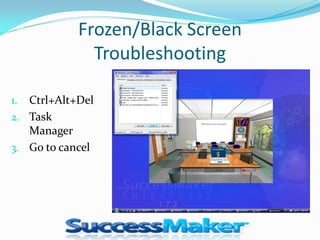
Frozen/Black Screen
              Troubleshooting

1. Ctrl+Alt+Del
2. Task
   Manager
3. Go to cancel
Frozen/Black Screen
              Troubleshooting
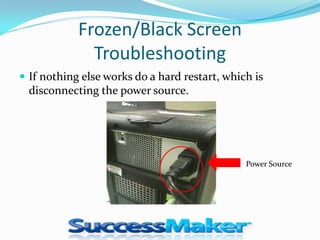
 If nothing else works do a hard restart, which is
  disconnecting the power source.


                                               Power Source
NO Volume/Sound
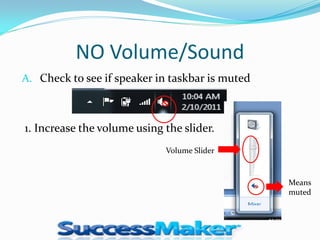
A. Check to see if speaker in taskbar is muted


1. Increase the volume using the slider.
                             Volume Slider


                                                 Means
                                                 muted
No Sound /Volume
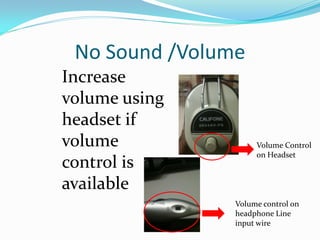
Increase
volume using
headset if
volume               Volume Control
                     on Headset
control is
available
                Volume control on
                headphone Line
                input wire

Being Computer Literate In A Successmaker Lab

  • 1.
    Melonie R. Wallace Barbe Elementary Calcasieu Parish School Board February 2011 melonie.wallace@cpsb.org John W. Spikes Principal Johnw.spikes@cpsb.org
  • 2.
    Knowledge of theDigital Environment Common Problems 1. Computer frozen 2. Computer screen goes black 3. No Volume Common problems are based on extended use and because of hardware acceleration graphic performance ( too much work or not enough work on the graphic card).
  • 3.
    Frozen/Black Screen Troubleshooting 1. Ctrl+Alt+Del 2. Task Manager 3. Go to cancel
  • 4.
    Frozen/Black Screen Troubleshooting  If nothing else works do a hard restart, which is disconnecting the power source. Power Source
  • 5.
    NO Volume/Sound A. Checkto see if speaker in taskbar is muted 1. Increase the volume using the slider. Volume Slider Means muted
  • 6.
    No Sound /Volume Increase volumeusing headset if volume Volume Control on Headset control is available Volume control on headphone Line input wire