Behavior Driven
Development with
Calabash for Android
Teresa Holfeld | Ubilabs
Credits
Teresa Holfeld
Head of Mobile @ Ubilabs
@TeresaHolfeld
Selim Salman
Android Evangelist Engineer
@A_SelimS
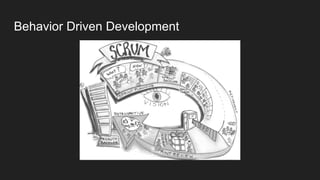
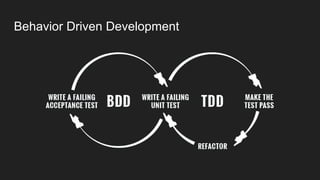
Behavior Driven Development
We want to do Scrum.
We have a Product Owner who can’t code.
This Product Owner has to write Acceptance Criteria for our tickets.
We have to show them that the Acceptance Criteria are met.
Can we agree on some format that makes it easier for both of us?
Behavior Driven Development
Ruby: Cucumber
Language: Gherkin
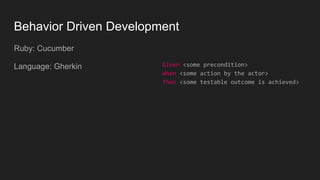
Behavior Driven Development
Ruby: Cucumber
Language: Gherkin Given <some precondition>
When <some action by the actor>
Then <some testable outcome is achieved>
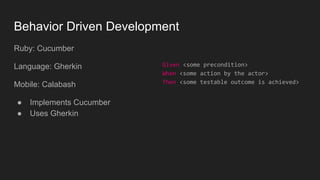
Behavior Driven Development
Ruby: Cucumber
Language: Gherkin
Mobile: Calabash
● Implements Cucumber
● Uses Gherkin
Given <some precondition>
When <some action by the actor>
Then <some testable outcome is achieved>
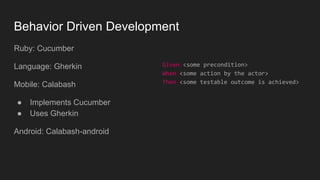
Behavior Driven Development
Ruby: Cucumber
Language: Gherkin
Mobile: Calabash
● Implements Cucumber
● Uses Gherkin
Android: Calabash-android
Given <some precondition>
When <some action by the actor>
Then <some testable outcome is achieved>
Gherkin
Gherkin
● Simple Domain Specific Language (DSL) with
natural language constructs
Gherkin
● Simple Domain Specific Language (DSL) with
natural language constructs
Given <some precondition>
When <some action by the actor>
Then <some testable outcome is achieved>
Gherkin
● Simple Domain Specific Language (DSL) with
natural language constructs
Scenario: Multiple Givens
Given one thing
Given another thing
Given yet another thing
When I open my eyes
Then I see something
Then I don't see something else
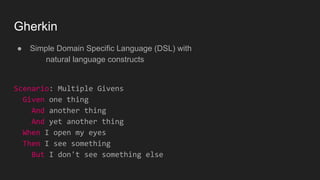
Gherkin
● Simple Domain Specific Language (DSL) with
natural language constructs
Scenario: Multiple Givens
Given one thing
And another thing
And yet another thing
When I open my eyes
Then I see something
But I don't see something else
Cucumber
Cucumber
Cucumber:
● Software tool for writing automated acceptance tests in BDD
● Gherkin: Given - When - Then
● Origin: Ruby
Cucumber
Cucumber:
● Software tool for writing automated acceptance tests in BDD
● Gherkin: Given - When - Then
● Origin: Ruby
● Java, JavaScript, C#, PHP
Cucumber
Keywords:
● Feature
● Scenario
● Given, When, Then, And, But
● Background
● Scenario Outline
● Examples
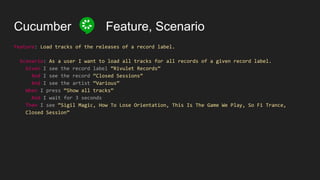
Cucumber Feature, Scenario
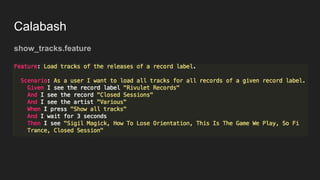
Feature: Load tracks of the releases of a record label.
Scenario: As a user I want to load all tracks for all records of a given record label.
Given I see the record label “Rivulet Records”
And I see the record “Closed Sessions”
And I see the artist “Various”
When I press “Show all tracks”
And I wait for 3 seconds
Then I see “Sigil Magic, How To Lose Orientation, This Is The Game We Play, So Fi Trance,
Closed Session”
Cucumber Background
Feature: Load tracks of the releases of a record label.
Background:
Given I see a search field
When I type “Rivulet Records” into the search field
And I wait for 3 seconds
Then I see “Rivulet Records” # this is the record label
And I see “Closed Sessions” # this is the album
Scenario: As a user I want to load all tracks for all records of a given record label.
Given I see the record label “Rivulet Records”
And I see the record “Closed Sessions”
And I see the artist “Various”
When I press “Show all tracks”
[...]
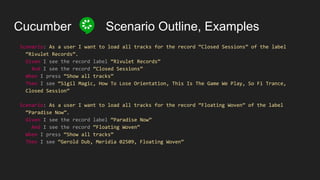
Cucumber Scenario Outline, Examples
Scenario: As a user I want to load all tracks for the record “Closed Sessions” of the label
“Rivulet Records”.
Given I see the record label “Rivulet Records”
And I see the record “Closed Sessions”
When I press “Show all tracks”
Then I see “Sigil Magic, How To Lose Orientation, This Is The Game We Play, So Fi Trance,
Closed Session”
Scenario: As a user I want to load all tracks for the record “Floating Woven” of the label
“Paradise Now”.
Given I see the record label “Paradise Now”
And I see the record “Floating Woven”
When I press “Show all tracks”
Then I see “Gerold Dub, Meridia 02509, Floating Woven”
Cucumber Scenario Outline, Examples
Scenario: As a user I want to load all tracks for the record “Closed Sessions” of the label
“Rivulet Records”.
Given I see the record label “Rivulet Records”
And I see the record “Closed Sessions”
When I press “Show all tracks”
Then I see “Sigil Magic, How To Lose Orientation, This Is The Game We Play, So Fi Trance,
Closed Session”
Scenario: As a user I want to load all tracks for the record “Floating Woven” of the label
“Paradise Now”.
Given I see the record label “Paradise Now”
And I see the record “Floating Woven”
When I press “Show all tracks”
Then I see “Gerold Dub, Meridia 02509, Floating Woven”
Cucumber Scenario Outline, Examples
Scenario Outline: As a user I want to load all tracks for a given record of a given label.
Given I see the record label <label>
And I see the record <record>
When I press “Show all tracks”
Then I see <tracks>
Examples:
| label | record | tracks |
| Rivulet Records | Closed Sessions | Sigil Magic, [...] |
| Paradise Now | Floating Woven | Gerold Dub, [...] |
https://cucumber.io/docs/reference
Cucumber Step Definitions
Scenario: As a user I want to load all tracks for all records of a given record label.
Given I see the record label “Rivulet Records”
Given(/I see the record label “([^”]*)”$/) do |label|
puts “Record label: #{label}”
end
Calabash
Calabash
Calabash
Calabash
Calabash
Calabash:
● Framework for automated acceptance tests for iOS and Android
● By Xamarin
Calabash-android:
● Calabash testing framework for Android
● Uses Cucumber + Gherkin
● Ruby
Calabash
How does it work?
Android app wrapper around Robotium
Exposes view hierarchy as HTML server
Calabash Ruby framework talks to this HTML server
Calabash
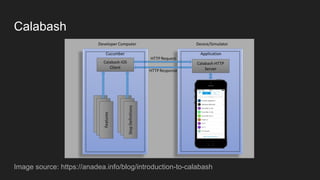
Image source: https://anadea.info/blog/introduction-to-calabash
Calabash
Calabash
show_tracks.feature
Calabash
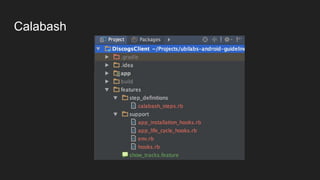
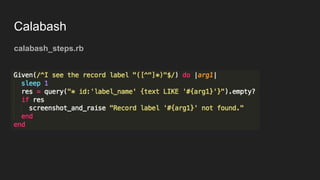
calabash_steps.rb
Calabash
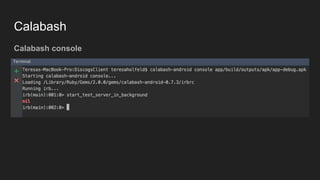
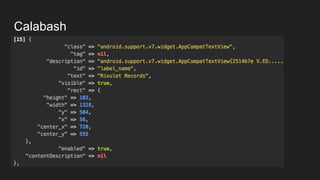
Calabash console
Calabash
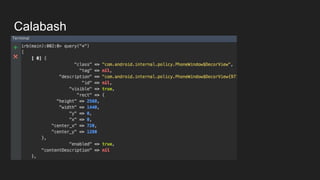
Calabash console
Calabash
Calabash console
Calabash
Canned steps:
steps the framework already implemented for you
Step Definitions:
how to define your own steps
Ruby API:
what you can use for implementing your own steps
Calabash - Canned Steps
Check if text is there:
Then /^I see "([^"]*)"$/
Then /^I should see "([^"]*)"$/
Calabash - Canned Steps
Check if text is there:
Then /^I see "([^"]*)"$/
Then /^I should see "([^"]*)"$/
Check if text is not there:
Then /^I should not see "([^"]*)"$/
Then /^I don't see "([^"]*)"$/
Calabash - Canned Steps
Input actions:
Then /^I toggle checkbox number (d+)$/ do |index|
Then /^I enter "([^"]*)" into input field number (d+)$/ do |text, index|
Calabash - Canned Steps
Input actions:
Then /^I toggle checkbox number (d+)$/ do |index|
Then /^I enter "([^"]*)" into input field number (d+)$/ do |text, index|
Touching:
Then /^I press the "([^"]*)" button$/ do |text|
Then /^I click on screen (d+)% from the left and (d+)% from the top$/ do |x, y|
Calabash - Canned Steps
Input actions:
Then /^I toggle checkbox number (d+)$/ do |index|
Then /^I enter "([^"]*)" into input field number (d+)$/ do |text, index|
Touching:
Then /^I press the "([^"]*)" button$/ do |text|
Then /^I click on screen (d+)% from the left and (d+)% from the top$/ do |x, y|
Buttons:
Then /^I go back$/
Then /^I press the menu key$/
Calabash - Canned Steps
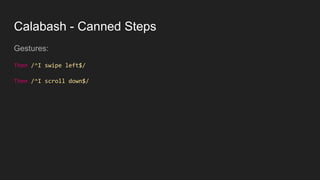
Gestures:
Then /^I swipe left$/
Then /^I scroll down$/
Calabash - Canned Steps
Gestures:
Then /^I swipe left$/
Then /^I scroll down$/
Waiting:
Then /^I wait for (d+) seconds$/ do |seconds|
Then /^I wait up to (d+) seconds for "([^"]*)" to appear$/ do |timeout, text|
Calabash - Canned Steps
Even more:
https://github.com/calabash/calabash-android/blob/master/ruby-gem/lib/calabash-
android/canned_steps.md
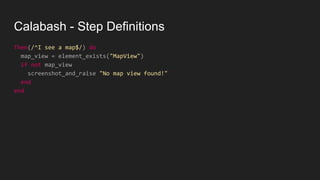
Calabash - Step Definitions
Then(/^I see a map$/) do
map_view = element_exists("MapView")
if not map_view
screenshot_and_raise "No map view found!"
end
end
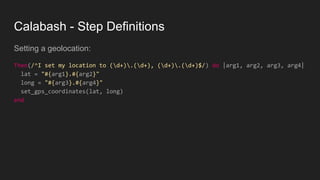
Calabash - Step Definitions
Setting a geolocation:
Then(/^I set my location to (d+).(d+), (d+).(d+)$/) do |arg1, arg2, arg3, arg4|
lat = "#{arg1}.#{arg2}"
long = "#{arg3}.#{arg4}"
set_gps_coordinates(lat, long)
end
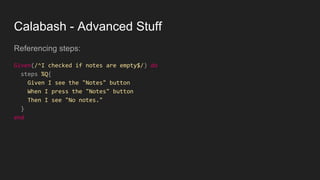
Calabash - Advanced Stuff
Referencing steps:
Given(/^I checked if notes are empty$/) do
steps %Q{
Given I see the "Notes" button
When I press the "Notes" button
Then I see "No notes."
}
end
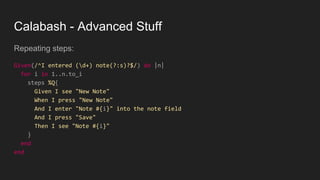
Calabash - Advanced Stuff
Repeating steps:
Given(/^I entered (d+) note(?:s)?$/) do |n|
for i in 1..n.to_i
steps %Q{
Given I see "New Note"
When I press "New Note"
And I enter "Note #{i}" into the note field
And I press "Save"
Then I see "Note #{i}"
}
end
end
Calabash - Ruby API
> query("FrameLayout index:0")
[
[0] {
"id" => "content",
"enabled" => true,
"contentDescription" => nil,
"class" => "android.widget.FrameLayout",
"rect" => {
"center_y" => 617.0,
"center_x" => 384.0,
"height" => 1134,
"y" => 50,
"width" => 768,
"x" => 0
},
"description" => "android.widget.FrameLayout{41f40dc0 V.E..... ........ 0,50-768,1184 #1020002
android:id/content}"
}
]
Calabash - Ruby API
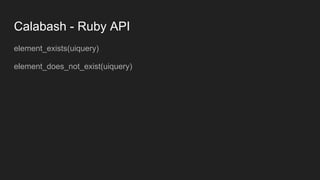
element_exists(uiquery)
element_does_not_exist(uiquery)
Calabash - Ruby API
element_exists(uiquery)
element_does_not_exist(uiquery)
wait_for_elements_exist(elements_arr, options={})
wait_for_elements_exist( ["button marked:'OK'", "* marked:'Cancel'"], :timeout => 2)
Calabash - Ruby API
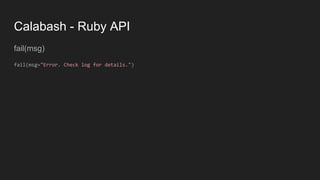
fail(msg)
fail(msg="Error. Check log for details.")
Calabash - Ruby API
fail(msg)
fail(msg="Error. Check log for details.")
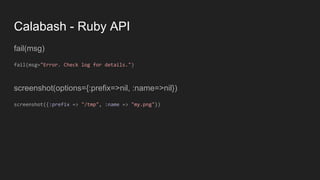
screenshot(options={:prefix=>nil, :name=>nil})
screenshot({:prefix => "/tmp", :name => "my.png"})
Calabash - Ruby API
fail(msg)
fail(msg="Error. Check log for details.")
screenshot(options={:prefix=>nil, :name=>nil})
screenshot({:prefix => "/tmp", :name => "my.png"})
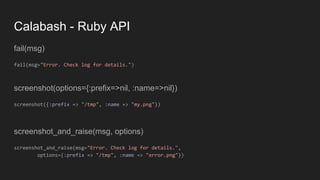
screenshot_and_raise(msg, options)
screenshot_and_raise(msg="Error. Check log for details.",
options={:prefix => "/tmp", :name => "error.png"})
Calabash - Ruby API
And much more:
https://github.com/calabash/calabash-android/blob/master/documentation/ruby_ap
i.md
Calabash - Documentation and Tutorials
Calabash Android GitHub:
https://github.com/calabash/calabash-android
Calabash Ruby API:
https://github.com/calabash/calabash-android/blob/master/documentation/ruby_ap
i.md
Calabash Developer Site:
https://developer.xamarin.com/guides/testcloud/calabash/
Testmunk Documentation and Tutorials:
https://testmunk.readthedocs.io/en/latest/
Behavior Driven Development
Alternatives
● Cucumber-android + Espresso
● Espresso and comments
● JBehave
● Concordion
● JDave
● Easyb
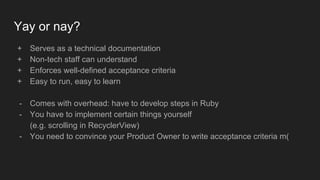
Yay or nay?
+ Serves as a technical documentation
+ Non-tech staff can understand
+ Enforces well-defined acceptance criteria
+ Easy to run, easy to learn
- Comes with overhead: have to develop steps in Ruby
- You have to implement certain things yourself
(e.g. scrolling in RecyclerView)
- You need to convince your Product Owner to write acceptance criteria m(
Teresa Holfeld
Head of Mobile @ Ubilabs
@TeresaHolfeld
www.ubilabs.net/jobs
And also thank you for listening.
Questions welcome!
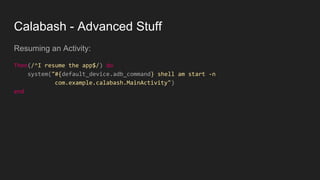
Calabash - Advanced Stuff
Resuming an Activity:
Then(/^I resume the app$/) do
system("#{default_device.adb_command} shell am start -n
com.example.calabash.MainActivity")
end
Calabash - Canned Steps
Gestures:
Then /^I swipe left$/
Then /^I swipe right$/
Then /^I scroll down$/
Then /^I scroll up$/
Then /^I select "([^"]*)" from the menu$/ do |identifier|
Then /^I drag from (d+):(d+) to (d+):(d+) moving with (d+) steps$/ do
|from_x, from_y, to_x, to_y, steps|
x:y co-ordinates are expressed as percentages of the screen width:height.
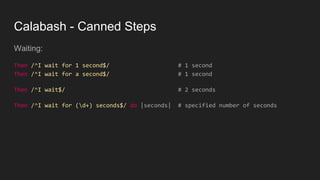
Calabash - Canned Steps
Waiting:
Then /^I wait for 1 second$/ # 1 second
Then /^I wait for a second$/ # 1 second
Then /^I wait$/ # 2 seconds
Then /^I wait for (d+) seconds$/ do |seconds| # specified number of seconds
Calabash - Canned Steps
Waiting:
Then /^I wait for 1 second$/ # 1 second
Then /^I wait for a second$/ # 1 second
Then /^I wait$/ # 2 seconds
Then /^I wait for (d+) seconds$/ do |seconds| # specified number of seconds
Then /^I wait for "([^"]*)" to appear$/ do |text|
Then /^I wait up to (d+) seconds for "([^"]*)" to appear$/ do |timeout, text|
Then /^I wait up to (d+) seconds to see "([^"]*)"$/ do |timeout, †ext|

Behavior driven development with calabash for android

  • 1.
    Behavior Driven Development with Calabashfor Android Teresa Holfeld | Ubilabs
  • 2.
    Credits Teresa Holfeld Head ofMobile @ Ubilabs @TeresaHolfeld Selim Salman Android Evangelist Engineer @A_SelimS
  • 3.
  • 4.
    Behavior Driven Development Wewant to do Scrum. We have a Product Owner who can’t code. This Product Owner has to write Acceptance Criteria for our tickets. We have to show them that the Acceptance Criteria are met. Can we agree on some format that makes it easier for both of us?
  • 5.
    Behavior Driven Development Ruby:Cucumber Language: Gherkin
  • 6.
    Behavior Driven Development Ruby:Cucumber Language: Gherkin Given <some precondition> When <some action by the actor> Then <some testable outcome is achieved>
  • 7.
    Behavior Driven Development Ruby:Cucumber Language: Gherkin Mobile: Calabash ● Implements Cucumber ● Uses Gherkin Given <some precondition> When <some action by the actor> Then <some testable outcome is achieved>
  • 8.
    Behavior Driven Development Ruby:Cucumber Language: Gherkin Mobile: Calabash ● Implements Cucumber ● Uses Gherkin Android: Calabash-android Given <some precondition> When <some action by the actor> Then <some testable outcome is achieved>
  • 9.
  • 10.
    Gherkin ● Simple DomainSpecific Language (DSL) with natural language constructs
  • 11.
    Gherkin ● Simple DomainSpecific Language (DSL) with natural language constructs Given <some precondition> When <some action by the actor> Then <some testable outcome is achieved>
  • 12.
    Gherkin ● Simple DomainSpecific Language (DSL) with natural language constructs Scenario: Multiple Givens Given one thing Given another thing Given yet another thing When I open my eyes Then I see something Then I don't see something else
  • 13.
    Gherkin ● Simple DomainSpecific Language (DSL) with natural language constructs Scenario: Multiple Givens Given one thing And another thing And yet another thing When I open my eyes Then I see something But I don't see something else
  • 14.
  • 15.
    Cucumber Cucumber: ● Software toolfor writing automated acceptance tests in BDD ● Gherkin: Given - When - Then ● Origin: Ruby
  • 16.
    Cucumber Cucumber: ● Software toolfor writing automated acceptance tests in BDD ● Gherkin: Given - When - Then ● Origin: Ruby ● Java, JavaScript, C#, PHP
  • 17.
    Cucumber Keywords: ● Feature ● Scenario ●Given, When, Then, And, But ● Background ● Scenario Outline ● Examples
  • 18.
    Cucumber Feature, Scenario Feature:Load tracks of the releases of a record label. Scenario: As a user I want to load all tracks for all records of a given record label. Given I see the record label “Rivulet Records” And I see the record “Closed Sessions” And I see the artist “Various” When I press “Show all tracks” And I wait for 3 seconds Then I see “Sigil Magic, How To Lose Orientation, This Is The Game We Play, So Fi Trance, Closed Session”
  • 19.
    Cucumber Background Feature: Loadtracks of the releases of a record label. Background: Given I see a search field When I type “Rivulet Records” into the search field And I wait for 3 seconds Then I see “Rivulet Records” # this is the record label And I see “Closed Sessions” # this is the album Scenario: As a user I want to load all tracks for all records of a given record label. Given I see the record label “Rivulet Records” And I see the record “Closed Sessions” And I see the artist “Various” When I press “Show all tracks” [...]
  • 20.
    Cucumber Scenario Outline,Examples Scenario: As a user I want to load all tracks for the record “Closed Sessions” of the label “Rivulet Records”. Given I see the record label “Rivulet Records” And I see the record “Closed Sessions” When I press “Show all tracks” Then I see “Sigil Magic, How To Lose Orientation, This Is The Game We Play, So Fi Trance, Closed Session” Scenario: As a user I want to load all tracks for the record “Floating Woven” of the label “Paradise Now”. Given I see the record label “Paradise Now” And I see the record “Floating Woven” When I press “Show all tracks” Then I see “Gerold Dub, Meridia 02509, Floating Woven”
  • 21.
    Cucumber Scenario Outline,Examples Scenario: As a user I want to load all tracks for the record “Closed Sessions” of the label “Rivulet Records”. Given I see the record label “Rivulet Records” And I see the record “Closed Sessions” When I press “Show all tracks” Then I see “Sigil Magic, How To Lose Orientation, This Is The Game We Play, So Fi Trance, Closed Session” Scenario: As a user I want to load all tracks for the record “Floating Woven” of the label “Paradise Now”. Given I see the record label “Paradise Now” And I see the record “Floating Woven” When I press “Show all tracks” Then I see “Gerold Dub, Meridia 02509, Floating Woven”
  • 22.
    Cucumber Scenario Outline,Examples Scenario Outline: As a user I want to load all tracks for a given record of a given label. Given I see the record label <label> And I see the record <record> When I press “Show all tracks” Then I see <tracks> Examples: | label | record | tracks | | Rivulet Records | Closed Sessions | Sigil Magic, [...] | | Paradise Now | Floating Woven | Gerold Dub, [...] | https://cucumber.io/docs/reference
  • 23.
    Cucumber Step Definitions Scenario:As a user I want to load all tracks for all records of a given record label. Given I see the record label “Rivulet Records” Given(/I see the record label “([^”]*)”$/) do |label| puts “Record label: #{label}” end
  • 24.
  • 25.
  • 26.
  • 27.
  • 28.
    Calabash Calabash: ● Framework forautomated acceptance tests for iOS and Android ● By Xamarin Calabash-android: ● Calabash testing framework for Android ● Uses Cucumber + Gherkin ● Ruby
  • 29.
    Calabash How does itwork? Android app wrapper around Robotium Exposes view hierarchy as HTML server Calabash Ruby framework talks to this HTML server
  • 30.
  • 31.
  • 32.
  • 33.
  • 35.
  • 36.
  • 37.
  • 38.
    Calabash Canned steps: steps theframework already implemented for you Step Definitions: how to define your own steps Ruby API: what you can use for implementing your own steps
  • 39.
    Calabash - CannedSteps Check if text is there: Then /^I see "([^"]*)"$/ Then /^I should see "([^"]*)"$/
  • 40.
    Calabash - CannedSteps Check if text is there: Then /^I see "([^"]*)"$/ Then /^I should see "([^"]*)"$/ Check if text is not there: Then /^I should not see "([^"]*)"$/ Then /^I don't see "([^"]*)"$/
  • 41.
    Calabash - CannedSteps Input actions: Then /^I toggle checkbox number (d+)$/ do |index| Then /^I enter "([^"]*)" into input field number (d+)$/ do |text, index|
  • 42.
    Calabash - CannedSteps Input actions: Then /^I toggle checkbox number (d+)$/ do |index| Then /^I enter "([^"]*)" into input field number (d+)$/ do |text, index| Touching: Then /^I press the "([^"]*)" button$/ do |text| Then /^I click on screen (d+)% from the left and (d+)% from the top$/ do |x, y|
  • 43.
    Calabash - CannedSteps Input actions: Then /^I toggle checkbox number (d+)$/ do |index| Then /^I enter "([^"]*)" into input field number (d+)$/ do |text, index| Touching: Then /^I press the "([^"]*)" button$/ do |text| Then /^I click on screen (d+)% from the left and (d+)% from the top$/ do |x, y| Buttons: Then /^I go back$/ Then /^I press the menu key$/
  • 44.
    Calabash - CannedSteps Gestures: Then /^I swipe left$/ Then /^I scroll down$/
  • 45.
    Calabash - CannedSteps Gestures: Then /^I swipe left$/ Then /^I scroll down$/ Waiting: Then /^I wait for (d+) seconds$/ do |seconds| Then /^I wait up to (d+) seconds for "([^"]*)" to appear$/ do |timeout, text|
  • 46.
    Calabash - CannedSteps Even more: https://github.com/calabash/calabash-android/blob/master/ruby-gem/lib/calabash- android/canned_steps.md
  • 47.
    Calabash - StepDefinitions Then(/^I see a map$/) do map_view = element_exists("MapView") if not map_view screenshot_and_raise "No map view found!" end end
  • 48.
    Calabash - StepDefinitions Setting a geolocation: Then(/^I set my location to (d+).(d+), (d+).(d+)$/) do |arg1, arg2, arg3, arg4| lat = "#{arg1}.#{arg2}" long = "#{arg3}.#{arg4}" set_gps_coordinates(lat, long) end
  • 49.
    Calabash - AdvancedStuff Referencing steps: Given(/^I checked if notes are empty$/) do steps %Q{ Given I see the "Notes" button When I press the "Notes" button Then I see "No notes." } end
  • 50.
    Calabash - AdvancedStuff Repeating steps: Given(/^I entered (d+) note(?:s)?$/) do |n| for i in 1..n.to_i steps %Q{ Given I see "New Note" When I press "New Note" And I enter "Note #{i}" into the note field And I press "Save" Then I see "Note #{i}" } end end
  • 51.
    Calabash - RubyAPI > query("FrameLayout index:0") [ [0] { "id" => "content", "enabled" => true, "contentDescription" => nil, "class" => "android.widget.FrameLayout", "rect" => { "center_y" => 617.0, "center_x" => 384.0, "height" => 1134, "y" => 50, "width" => 768, "x" => 0 }, "description" => "android.widget.FrameLayout{41f40dc0 V.E..... ........ 0,50-768,1184 #1020002 android:id/content}" } ]
  • 52.
    Calabash - RubyAPI element_exists(uiquery) element_does_not_exist(uiquery)
  • 53.
    Calabash - RubyAPI element_exists(uiquery) element_does_not_exist(uiquery) wait_for_elements_exist(elements_arr, options={}) wait_for_elements_exist( ["button marked:'OK'", "* marked:'Cancel'"], :timeout => 2)
  • 54.
    Calabash - RubyAPI fail(msg) fail(msg="Error. Check log for details.")
  • 55.
    Calabash - RubyAPI fail(msg) fail(msg="Error. Check log for details.") screenshot(options={:prefix=>nil, :name=>nil}) screenshot({:prefix => "/tmp", :name => "my.png"})
  • 56.
    Calabash - RubyAPI fail(msg) fail(msg="Error. Check log for details.") screenshot(options={:prefix=>nil, :name=>nil}) screenshot({:prefix => "/tmp", :name => "my.png"}) screenshot_and_raise(msg, options) screenshot_and_raise(msg="Error. Check log for details.", options={:prefix => "/tmp", :name => "error.png"})
  • 57.
    Calabash - RubyAPI And much more: https://github.com/calabash/calabash-android/blob/master/documentation/ruby_ap i.md
  • 58.
    Calabash - Documentationand Tutorials Calabash Android GitHub: https://github.com/calabash/calabash-android Calabash Ruby API: https://github.com/calabash/calabash-android/blob/master/documentation/ruby_ap i.md Calabash Developer Site: https://developer.xamarin.com/guides/testcloud/calabash/ Testmunk Documentation and Tutorials: https://testmunk.readthedocs.io/en/latest/
  • 59.
  • 60.
    Alternatives ● Cucumber-android +Espresso ● Espresso and comments ● JBehave ● Concordion ● JDave ● Easyb
  • 61.
    Yay or nay? +Serves as a technical documentation + Non-tech staff can understand + Enforces well-defined acceptance criteria + Easy to run, easy to learn - Comes with overhead: have to develop steps in Ruby - You have to implement certain things yourself (e.g. scrolling in RecyclerView) - You need to convince your Product Owner to write acceptance criteria m(
  • 62.
    Teresa Holfeld Head ofMobile @ Ubilabs @TeresaHolfeld
  • 64.
    www.ubilabs.net/jobs And also thankyou for listening. Questions welcome!
  • 65.
    Calabash - AdvancedStuff Resuming an Activity: Then(/^I resume the app$/) do system("#{default_device.adb_command} shell am start -n com.example.calabash.MainActivity") end
  • 66.
    Calabash - CannedSteps Gestures: Then /^I swipe left$/ Then /^I swipe right$/ Then /^I scroll down$/ Then /^I scroll up$/ Then /^I select "([^"]*)" from the menu$/ do |identifier| Then /^I drag from (d+):(d+) to (d+):(d+) moving with (d+) steps$/ do |from_x, from_y, to_x, to_y, steps| x:y co-ordinates are expressed as percentages of the screen width:height.
  • 67.
    Calabash - CannedSteps Waiting: Then /^I wait for 1 second$/ # 1 second Then /^I wait for a second$/ # 1 second Then /^I wait$/ # 2 seconds Then /^I wait for (d+) seconds$/ do |seconds| # specified number of seconds
  • 68.
    Calabash - CannedSteps Waiting: Then /^I wait for 1 second$/ # 1 second Then /^I wait for a second$/ # 1 second Then /^I wait$/ # 2 seconds Then /^I wait for (d+) seconds$/ do |seconds| # specified number of seconds Then /^I wait for "([^"]*)" to appear$/ do |text| Then /^I wait up to (d+) seconds for "([^"]*)" to appear$/ do |timeout, text| Then /^I wait up to (d+) seconds to see "([^"]*)"$/ do |timeout, †ext|