BEACON EXPLORERS
OVERVIEW
January 2015
BEACONS: OVERVIEW
Beacons turn the physical world into
a new digital channel. They bring
digital content and engagement
closer to the point of purchase.
WHAT IS A BEACON
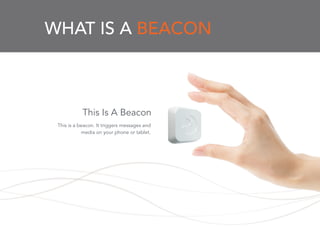
This is a beacon. It triggers messages and
media on your phone or tablet.
This Is A Beacon
WHAT IS A BEACON
Beacon technology transmits small packets of
data using Bluetooth Low Energy. When a
customer’s phone “hears” the beacon it knows
how close it is and we can then send a
message, a notice, a piece of media or other
information.
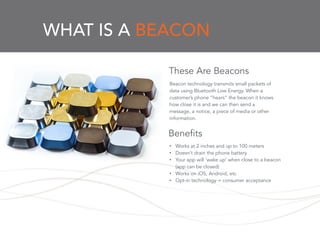
These Are Beacons
• Works at 2 inches and up to 100 meters
• Doesn’t drain the phone battery
• Your app will ‘wake up’ when close to a beacon
(app can be closed)
• Works on iOS, Android, etc
• Opt-in technology = consumer acceptance
Benefits
WHAT IS A BEACON
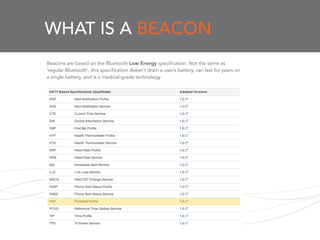
Beacons are based on the Bluetooth Low Energy specification. Not the same as
‘regular Bluetooth’, this specification doesn’t drain a user’s battery, can last for years on
a single battery, and is a medical-grade technology.
WHAT IS A BEACON
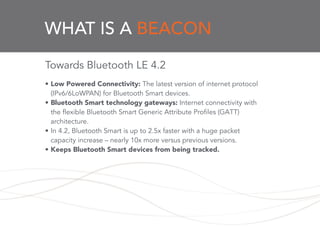
Towards Bluetooth LE 4.2
!
• Low Powered Connectivity: The latest version of internet protocol
(IPv6/6LoWPAN) for Bluetooth Smart devices.
• Bluetooth Smart technology gateways: Internet connectivity with
the flexible Bluetooth Smart Generic Attribute Profiles (GATT)
architecture.
• In 4.2, Bluetooth Smart is up to 2.5x faster with a huge packet
capacity increase – nearly 10x more versus previous versions.
• Keeps Bluetooth Smart devices from being tracked.
BEACONS INSIDE
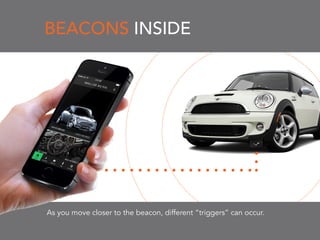
As you move closer to the beacon, different “triggers” can occur.
BEACONS INSIDE
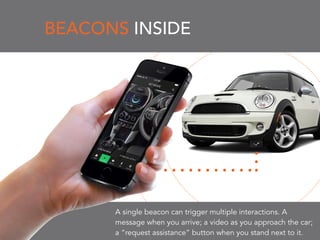
A single beacon can trigger multiple interactions. A
message when you arrive; a video as you approach the car;
a “request assistance” button when you stand next to it.
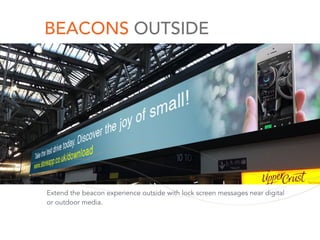
BEACONS OUTSIDE
Extend the beacon experience outside with lock screen messages near digital
or outdoor media.
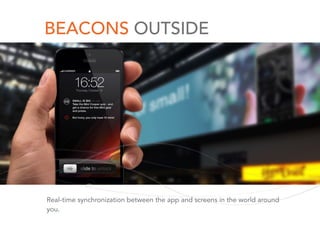
BEACONS OUTSIDE
Real-time synchronization between the app and screens in the world around
you.
BEACON DEVELOPMENT
DESIGN EXPERIENCES
Beacons extend how we think
about digital development. We
can now more easily design digital
engagement for the physical
world.
HotSpot Parking - and referral/data and hand-over
networks.
Before and After
Don’t think of beacons as stationary. Think of them as
moving. There’s nothing “locked” about a beacon. A
sales associate, car, dog or product can be a beacon.
We’re All Beacons
Think of content as exclusive. Stuff that you can only
get close to a beacon, or even at a specific time. Let
your customers collect these little media snippets or
experiences and create their own take-home
magazines or passbooks.
Lock and Collect
You don’t want to slam your customers with coupons
or offers the minute they walk in the store. Tease them,
seduce them - give them a valuable tip, an insight,
some advice. And as they get closer to the beacon,
get them closer to a sale.
Seduction
Give tools to the front-line staff. Posting content to a
beacon - a product on sale, say, or just a joke of the
day, is as easy as a few clicks on an app or web site.
Front Line Counts
Tweet a shop window. Pin a product in a store. Share a
shelf with friends. Think of the things you can do online
and now apply them to physical things. With beacons,
a store item is like a web page….and just like a web
page, you can turn physical products into
opportunities for social sharing.
Make It Social
Beacons go way beyond retail. They’re found in
industrial, education, and warehouse settings. They’re
helping us to ‘see’ the world in a new way.
Track People & Things
Beacons can collect thousands, even millions of data
points. Time spent, number of people, heat maps,
media clicked, social sharing.
Big, Smart Data
!
5 COMMON QUESTIONS
5 COMMON QUESTIONS
5 COMMON QUESTIONS
5 COMMON QUESTIONS
5 COMMON QUESTIONS
5 COMMON QUESTIONS
OTHER TECHNOLOGIES
UX/UI: RISK/REWARD
UX DESIGN:
The Real World
START WITH REAL WORLD DESIGN
• Your experience will be magic because it creates a
tangible experience connecting your user’s phone to the
physical world.
!
• Challenge: we rarely design apps based on physical
context.
• Solution: map what your user does, what do they look at,
what’s their sense of place, what are the sign posts?
!
!
UX DESIGN:
The Real World (2)
There’s no error console for physical space
• You need to plan carefully for different scenarios from
signal interference to differences in response rates for
different phones.
!
• Challenge: how an app responds to beacons can vary.
Design experiences to account for that.
• Solution: unlike most other apps, you’ll need more
methods for ‘failing gracefully’
!
!
UX DESIGN:
The Real World (3)
UX DESIGN:
The Real World (3)
Beacons go missing
!
• Challenge: beacons go missing, get moved or run out of
battery.
• Solution: plan for failure and look at robust cloud
monitoring or variance tracking.
!
!
UX DESIGN:
The Real World (4)
Bargain beacons?
There can be significant variance in beacons. There’s a ton
of work that goes into creating a great beacon. Use that
expertise.
!
• Challenge: your app won’t respond the same way if the
beacon itself isn’t well configured.
• Solution: rely on decent beacons.
!
!
UX TENSION POINTS
•Invisible vs Visible Beacons
•Contextual or Push app interactions
•Creepy vs. Useful
•Big data driven or user choice
!
!
QUICK TIPS
SOME TIPS
It WILL Happen:
!
•Your Bluetooth is OFF
•You’ll get a LOT of exercise
•You’ll hide beacons in a filing cabinet
SOME TIPS
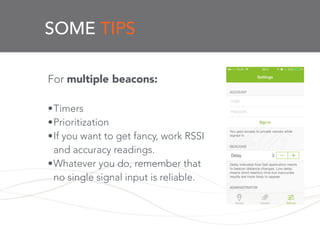
For multiple beacons:
!
•Timers
•Prioritization
•If you want to get fancy, work RSSI
and accuracy readings.
•Whatever you do, remember that
no single signal input is reliable.
SOME TIPS
Do NOT use
background modes!
!
SOME TIPS
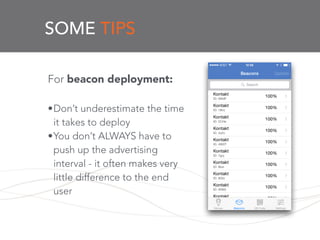
For beacon deployment:
!
•Don’t underestimate the time
it takes to deploy
•You don’t ALWAYS have to
push up the advertising
interval - it often makes very
little difference to the end
user
!
SOME TIPS
And remember the badger:
!
!
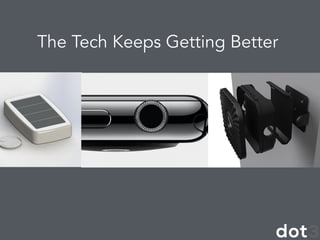
The Tech Keeps Getting Better
!
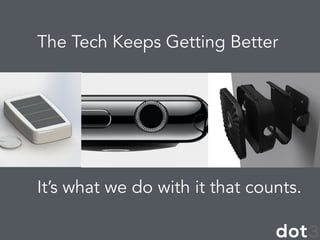
The Tech Keeps Getting Better
!
It’s what we do with it that counts.
!
BeaconBeThe
beekn.net
@dusanwriter
doug@dot-3.net
THANK YOU
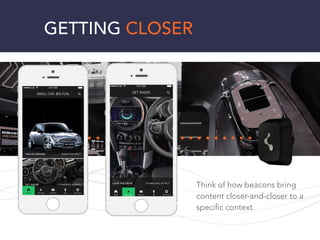
Think of how beacons bring
content closer-and-closer to a
specific context.
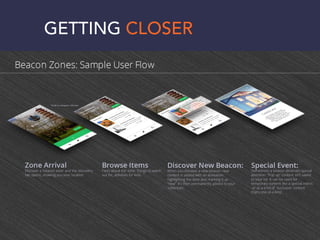
GETTING CLOSER
GETTING CLOSER

Beacon Explorers: Beacon Week San Francisco

  • 1.
  • 2.
    BEACONS: OVERVIEW Beacons turnthe physical world into a new digital channel. They bring digital content and engagement closer to the point of purchase.
  • 3.
    WHAT IS ABEACON This is a beacon. It triggers messages and media on your phone or tablet. This Is A Beacon
  • 4.
    WHAT IS ABEACON Beacon technology transmits small packets of data using Bluetooth Low Energy. When a customer’s phone “hears” the beacon it knows how close it is and we can then send a message, a notice, a piece of media or other information. These Are Beacons • Works at 2 inches and up to 100 meters • Doesn’t drain the phone battery • Your app will ‘wake up’ when close to a beacon (app can be closed) • Works on iOS, Android, etc • Opt-in technology = consumer acceptance Benefits
  • 5.
    WHAT IS ABEACON Beacons are based on the Bluetooth Low Energy specification. Not the same as ‘regular Bluetooth’, this specification doesn’t drain a user’s battery, can last for years on a single battery, and is a medical-grade technology.
  • 6.
    WHAT IS ABEACON Towards Bluetooth LE 4.2 ! • Low Powered Connectivity: The latest version of internet protocol (IPv6/6LoWPAN) for Bluetooth Smart devices. • Bluetooth Smart technology gateways: Internet connectivity with the flexible Bluetooth Smart Generic Attribute Profiles (GATT) architecture. • In 4.2, Bluetooth Smart is up to 2.5x faster with a huge packet capacity increase – nearly 10x more versus previous versions. • Keeps Bluetooth Smart devices from being tracked.
  • 7.
    BEACONS INSIDE As youmove closer to the beacon, different “triggers” can occur.
  • 8.
    BEACONS INSIDE A singlebeacon can trigger multiple interactions. A message when you arrive; a video as you approach the car; a “request assistance” button when you stand next to it.
  • 9.
    BEACONS OUTSIDE Extend thebeacon experience outside with lock screen messages near digital or outdoor media.
  • 10.
    BEACONS OUTSIDE Real-time synchronizationbetween the app and screens in the world around you.
  • 11.
    BEACON DEVELOPMENT DESIGN EXPERIENCES Beaconsextend how we think about digital development. We can now more easily design digital engagement for the physical world.
  • 12.
    HotSpot Parking -and referral/data and hand-over networks. Before and After
  • 13.
    Don’t think ofbeacons as stationary. Think of them as moving. There’s nothing “locked” about a beacon. A sales associate, car, dog or product can be a beacon. We’re All Beacons
  • 14.
    Think of contentas exclusive. Stuff that you can only get close to a beacon, or even at a specific time. Let your customers collect these little media snippets or experiences and create their own take-home magazines or passbooks. Lock and Collect
  • 15.
    You don’t wantto slam your customers with coupons or offers the minute they walk in the store. Tease them, seduce them - give them a valuable tip, an insight, some advice. And as they get closer to the beacon, get them closer to a sale. Seduction
  • 16.
    Give tools tothe front-line staff. Posting content to a beacon - a product on sale, say, or just a joke of the day, is as easy as a few clicks on an app or web site. Front Line Counts
  • 17.
    Tweet a shopwindow. Pin a product in a store. Share a shelf with friends. Think of the things you can do online and now apply them to physical things. With beacons, a store item is like a web page….and just like a web page, you can turn physical products into opportunities for social sharing. Make It Social
  • 18.
    Beacons go waybeyond retail. They’re found in industrial, education, and warehouse settings. They’re helping us to ‘see’ the world in a new way. Track People & Things
  • 19.
    Beacons can collectthousands, even millions of data points. Time spent, number of people, heat maps, media clicked, social sharing. Big, Smart Data !
  • 20.
  • 21.
  • 22.
  • 23.
  • 24.
  • 25.
  • 26.
  • 27.
  • 28.
    UX DESIGN: The RealWorld START WITH REAL WORLD DESIGN • Your experience will be magic because it creates a tangible experience connecting your user’s phone to the physical world. ! • Challenge: we rarely design apps based on physical context. • Solution: map what your user does, what do they look at, what’s their sense of place, what are the sign posts? ! !
  • 29.
    UX DESIGN: The RealWorld (2) There’s no error console for physical space • You need to plan carefully for different scenarios from signal interference to differences in response rates for different phones. ! • Challenge: how an app responds to beacons can vary. Design experiences to account for that. • Solution: unlike most other apps, you’ll need more methods for ‘failing gracefully’ ! !
  • 30.
  • 31.
    UX DESIGN: The RealWorld (3) Beacons go missing ! • Challenge: beacons go missing, get moved or run out of battery. • Solution: plan for failure and look at robust cloud monitoring or variance tracking. ! !
  • 32.
    UX DESIGN: The RealWorld (4) Bargain beacons? There can be significant variance in beacons. There’s a ton of work that goes into creating a great beacon. Use that expertise. ! • Challenge: your app won’t respond the same way if the beacon itself isn’t well configured. • Solution: rely on decent beacons. ! !
  • 33.
    UX TENSION POINTS •Invisiblevs Visible Beacons •Contextual or Push app interactions •Creepy vs. Useful •Big data driven or user choice ! !
  • 34.
  • 35.
    SOME TIPS It WILLHappen: ! •Your Bluetooth is OFF •You’ll get a LOT of exercise •You’ll hide beacons in a filing cabinet
  • 36.
    SOME TIPS For multiplebeacons: ! •Timers •Prioritization •If you want to get fancy, work RSSI and accuracy readings. •Whatever you do, remember that no single signal input is reliable.
  • 37.
    SOME TIPS Do NOTuse background modes! !
  • 38.
    SOME TIPS For beacondeployment: ! •Don’t underestimate the time it takes to deploy •You don’t ALWAYS have to push up the advertising interval - it often makes very little difference to the end user !
  • 39.
    SOME TIPS And rememberthe badger: ! !
  • 40.
    The Tech KeepsGetting Better !
  • 41.
    The Tech KeepsGetting Better ! It’s what we do with it that counts. !
  • 42.
  • 43.
  • 44.
    Think of howbeacons bring content closer-and-closer to a specific context. GETTING CLOSER
  • 45.