Basics of Computer
Difference between PL,MUL,SL?
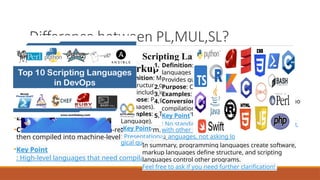
Programming Language:
•Definition: Programming languages consist of
instructions or code that tell a computer what
tasks to perform. They provide logic for software
development.
•Purpose: Used to create software, drivers, and
applications.
•Examples: Java, C, C++, C#.
•Conversion: Written in human-readable form,
then compiled into machine-level language.
•Key Point
: High-level languages that need compilation
Markup Language:
•Definition: Markup languages define
the structure or design of a page. They
don’t include logic or algorithms.
•Purpose: Prepare the look of data (e.g.,
web pages).
•Examples: HTML (Hypertext Markup
Language).
•Key Point
: Presentational languages, not asking lo
gical questions
Scripting Language:
1. Definition: Subcategory of programming
languages used to control other programs.
Provides guidance to another program.
2. Purpose: Create websites, connect languages.
3. Examples: JavaScript, PHP, Python.
4. Conversion: Interpreted (scanned line by line, no
compilation).
5. Key Point
: No standalone execution; works in conjunction
with other languages
12
.
In summary, programming languages create software,
markup languages define structure, and scripting
languages control other programs.
Feel free to ask if you need further clarification!
Difference between WB,SE,WS,WP?
1.Web Page:
1. A web page is a document that
can be displayed in a web
browser (such as Firefox, Chrome,
or Safari).
2. Think of it as a single page within
a book. Each web page has a
unique location (URL) and
contains content like text, images,
videos, and links.
3. Web pages are the building
blocks of websites.
1.Website:
1. A website is a collection of
related web pages grouped
together and usually connected
in various ways.
2. Imagine a book containing
multiple pages. These pages are
the individual web pages within
a website.
3. Websites can be small (with just
a few pages) or large (with
hundreds or thousands of
pages).
Ex: https://www.dbcyelagiri.edu.in/
1.Web Server:
1. A web server is a
computer that hosts a
website on the Internet.
2. It stores the web pages
and serves them to users
when they request them
through their browsers.
3. Think of it as the library
that houses the books
(web pages) and allows
people to access them.
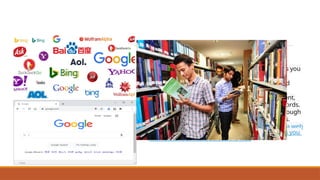
1.Search Engine:
1. A search engine is a web service that helps you
find other web pages.
2. Examples include Google, Bing, Yahoo, and
DuckDuckGo.
3. Search engines crawl the web, index content,
and provide search results based on keywords.
4. You can access search engines directly through
a web browser or by visiting their websites.
In summary, a web browser displays web pages, a web
server hosts websites, and a search engine helps you
find relevant content across the web
Web Browser
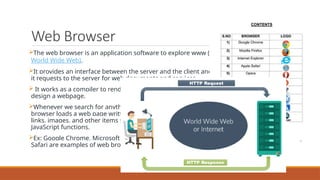
The web browser is an application software to explore www (
World Wide Web).
It provides an interface between the server and the client and
it requests to the server for web documents and services.
 It works as a compiler to render HTML which is used to
design a webpage.
Whenever we search for anything on the internet, the
browser loads a web page written in HTML, including text,
links, images, and other items such as style sheets and
JavaScript functions.
Ex: Google Chrome, Microsoft Edge, Mozilla Firefox, and
Safari are examples of web browsers.
Objectives of the Course
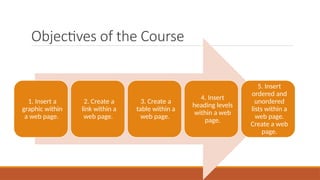
1. Insert a
graphic within
a web page.
2. Create a
link within a
web page.
3. Create a
table within a
web page.
4. Insert
heading levels
within a web
page.
5. Insert
ordered and
unordered
lists within a
web page.
Create a web
page.
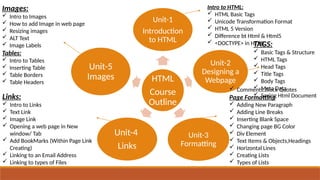
HTML
Course
Outline
Unit-1
Introduction
to HTML
Unit-2
Designing a
Webpage
Unit-3
Formatting
Unit-4
Links
Unit-5
Images
Intro to HTML:
 HTML Basic Tags
 Unicode Transformation Format
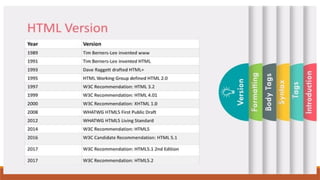
 HTML 5 Version
 Difference bt Html & Html5
 <DOCTYPE> in HTML
TAGS:
 Basic Tags & Structure
 HTML Tags
 Head Tags
 Title Tags
 Body Tags
 Meta Data
 Saving Html Document
 Comments,Block Quotes
Page Formatting
 Adding New Paragraph
 Adding Line Breaks
 Inserting Blank Space
 Changing page BG Color
 Div Element
 Text Items & Objects,Headings
 Horizontal Lines
 Creating Lists
 Types of Lists
Links:
 Intro to Links
 Text Link
 Image Link
 Opening a web page in New
window/ Tab
 Add BookMarks (Within Page Link
Creating)
 Linking to an Email Address
 Linking to types of Files
Images:
 Intro to Images
 How to add Image in web page
 Resizing images
 ALT Text
 Image Labels
Tables:
 Intro to Tables
 Inserting Table
 Table Borders
 Table Headers
What is HTML?
H – Hyper
T – Text
M— MarkUP
L— Language
•HTML stands for Hyper Text Markup Language
•HTML is the standard markup language for creating
Web pages
•HTML describes the structure of a Web page
•HTML consists of a series of elements
•HTML elements tell the browser how to display the
content
•HTML elements label pieces of content such as "this
is a heading", "this is a paragraph", "this is a link",
etc.
What is the structure?
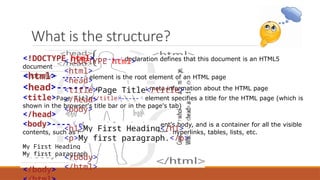
<!DOCTYPE html> ----declaration defines that this document is an HTML5
document
<html> ------element is the root element of an HTML page
<head>------element contains meta information about the HTML page
<title>Page Title</title>-----element specifies a title for the HTML page (which is
shown in the browser's title bar or in the page's tab)
</head>
<body>----element defines the document's body, and is a container for all the visible
contents, such as headings, paragraphs, images, hyperlinks, tables, lists, etc.
My First Heading
My first paragraph
</body>
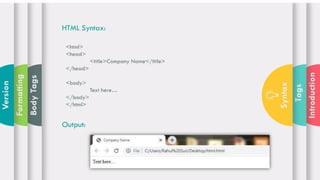
<!DOCTYPE html>
<html>
<head>
<title>Page Title</title>
</head>
<body>
<h1>My First Heading</h1>
<p>My first paragraph.</p>
</body>
</html>
Introduction to HTML
•HTML (HyperText Markup Language): The standard language for creating web pages.
•Purpose: HTML structures content on the web, allowing the creation of web pages that can be
displayed in a web browser.
•Basic Concept: HTML uses tags to enclose different parts of the content to make it appear or act
a certain way.
Opening for Writing HTML
<!DOCTYPE html>: Declaration defines the document type and
version of HTML (HTML5 in this case).
<html>...</html>: Root element that encloses all HTML content.
<head>...</head>: Contains meta-information about the HTML
document, such as title, character set, and links to stylesheets.
<body>...</body>: Contains the content of the HTML document,
such as text, images, links, and other media.
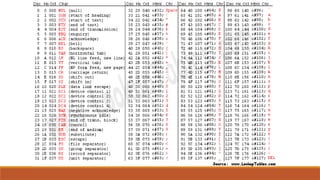
Unicode Transformation Format [UTF]
What is Unicode?
Unicode is a computing industry standard designed to consistently and uniquely encode,
represent, and handle text expressed in most of the world's writing systems. It assigns a unique
number (code point) to every character, no matter the platform, program, or language.
Unicode Code Points
•Code Points: The unique numbers assigned to each character in the Unicode standard. They
range from U+0000 to U+10FFFF.
UTF (Unicode Transformation Format)
UTF encodings are methods of transforming Unicode code points into a sequence of bytes.
Different UTF encodings vary in how they map these code points to bytes.
UTF-8
Overview
•UTF-8: A variable-width character encoding that can represent every character in the Unicode
character set using one to four bytes.
•Compatibility: Backward-compatible with ASCII, meaning any valid ASCII text is also valid UTF-8
encoded text.
•Efficiency: Commonly used characters (e.g., ASCII characters) are encoded in one byte, making it
space-efficient for texts with many such characters.
How UTF-8 Works
UTF-8 uses one to four bytes to encode Unicode characters. Each byte has a specific
pattern to indicate whether it is a single-byte character or part of a multi-byte sequence.
•Single-byte (ASCII): Characters in the range U+0000 to U+007F are encoded in one byte.
• 0xxxxxxx (where x is a bit of the character).
•Multi-byte: Characters beyond the ASCII range use two to four bytes.
• 2 bytes: U+0080 to U+07FF
• 110xxxxx 10xxxxxx
• 3 bytes: U+0800 to U+FFFF
• 1110xxxx 10xxxxxx 10xxxxxx
• 4 bytes: U+10000 to U+10FFFF
• 11110xxx 10xxxxxx 10xxxxxx 10xxxxxx
Examples
1.Character 'A' (U+0041):
1. Binary: 01000001
2. UTF-8 Encoding: 01000001 (1 byte, same as ASCII)
2.Character 'é' (U+00E9):
1. Binary: 11101001
2. UTF-8 Encoding: 11000011 10101001 (2 bytes)
HTML 5 Resources
•HTML5 Resources: Online resources like MDN Web Docs, W3Schools, and HTML5 Rocks provide
extensive documentation and tutorials on HTML5.
•Libraries and Frameworks: Tools like Bootstrap, jQuery, and Modernizr help streamline HTML5
development.
What's Different in HTML 5?
•New Semantic Elements: <article>, <section>, <nav>, <header>, <footer>, and more.
•Form Enhancements: New input types like date, email, and range.
•Multimedia Support: <audio> and <video> tags for embedding media.
•APIs and Features: Geolocation, local storage, canvas for drawing, and web workers for
background tasks.
https://chatgpt.com/c/b0984b18-648a-49a0-86f3-f61f5a0f0f3a
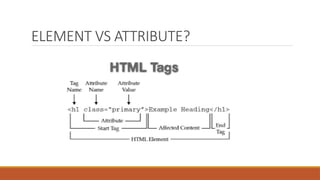
ELEMENT VS ATTRIBUTE?

Basics of html , basic of computer , html tags

  • 1.
  • 2.
    Difference between PL,MUL,SL? ProgrammingLanguage: •Definition: Programming languages consist of instructions or code that tell a computer what tasks to perform. They provide logic for software development. •Purpose: Used to create software, drivers, and applications. •Examples: Java, C, C++, C#. •Conversion: Written in human-readable form, then compiled into machine-level language. •Key Point : High-level languages that need compilation Markup Language: •Definition: Markup languages define the structure or design of a page. They don’t include logic or algorithms. •Purpose: Prepare the look of data (e.g., web pages). •Examples: HTML (Hypertext Markup Language). •Key Point : Presentational languages, not asking lo gical questions Scripting Language: 1. Definition: Subcategory of programming languages used to control other programs. Provides guidance to another program. 2. Purpose: Create websites, connect languages. 3. Examples: JavaScript, PHP, Python. 4. Conversion: Interpreted (scanned line by line, no compilation). 5. Key Point : No standalone execution; works in conjunction with other languages 12 . In summary, programming languages create software, markup languages define structure, and scripting languages control other programs. Feel free to ask if you need further clarification!
  • 3.
    Difference between WB,SE,WS,WP? 1.WebPage: 1. A web page is a document that can be displayed in a web browser (such as Firefox, Chrome, or Safari). 2. Think of it as a single page within a book. Each web page has a unique location (URL) and contains content like text, images, videos, and links. 3. Web pages are the building blocks of websites. 1.Website: 1. A website is a collection of related web pages grouped together and usually connected in various ways. 2. Imagine a book containing multiple pages. These pages are the individual web pages within a website. 3. Websites can be small (with just a few pages) or large (with hundreds or thousands of pages). Ex: https://www.dbcyelagiri.edu.in/
  • 4.
    1.Web Server: 1. Aweb server is a computer that hosts a website on the Internet. 2. It stores the web pages and serves them to users when they request them through their browsers. 3. Think of it as the library that houses the books (web pages) and allows people to access them. 1.Search Engine: 1. A search engine is a web service that helps you find other web pages. 2. Examples include Google, Bing, Yahoo, and DuckDuckGo. 3. Search engines crawl the web, index content, and provide search results based on keywords. 4. You can access search engines directly through a web browser or by visiting their websites. In summary, a web browser displays web pages, a web server hosts websites, and a search engine helps you find relevant content across the web
  • 5.
    Web Browser The webbrowser is an application software to explore www ( World Wide Web). It provides an interface between the server and the client and it requests to the server for web documents and services.  It works as a compiler to render HTML which is used to design a webpage. Whenever we search for anything on the internet, the browser loads a web page written in HTML, including text, links, images, and other items such as style sheets and JavaScript functions. Ex: Google Chrome, Microsoft Edge, Mozilla Firefox, and Safari are examples of web browsers.
  • 6.
    Objectives of theCourse 1. Insert a graphic within a web page. 2. Create a link within a web page. 3. Create a table within a web page. 4. Insert heading levels within a web page. 5. Insert ordered and unordered lists within a web page. Create a web page.
  • 7.
    HTML Course Outline Unit-1 Introduction to HTML Unit-2 Designing a Webpage Unit-3 Formatting Unit-4 Links Unit-5 Images Introto HTML:  HTML Basic Tags  Unicode Transformation Format  HTML 5 Version  Difference bt Html & Html5  <DOCTYPE> in HTML TAGS:  Basic Tags & Structure  HTML Tags  Head Tags  Title Tags  Body Tags  Meta Data  Saving Html Document  Comments,Block Quotes Page Formatting  Adding New Paragraph  Adding Line Breaks  Inserting Blank Space  Changing page BG Color  Div Element  Text Items & Objects,Headings  Horizontal Lines  Creating Lists  Types of Lists Links:  Intro to Links  Text Link  Image Link  Opening a web page in New window/ Tab  Add BookMarks (Within Page Link Creating)  Linking to an Email Address  Linking to types of Files Images:  Intro to Images  How to add Image in web page  Resizing images  ALT Text  Image Labels Tables:  Intro to Tables  Inserting Table  Table Borders  Table Headers
  • 8.
    What is HTML? H– Hyper T – Text M— MarkUP L— Language •HTML stands for Hyper Text Markup Language •HTML is the standard markup language for creating Web pages •HTML describes the structure of a Web page •HTML consists of a series of elements •HTML elements tell the browser how to display the content •HTML elements label pieces of content such as "this is a heading", "this is a paragraph", "this is a link", etc.
  • 11.
    What is thestructure? <!DOCTYPE html> ----declaration defines that this document is an HTML5 document <html> ------element is the root element of an HTML page <head>------element contains meta information about the HTML page <title>Page Title</title>-----element specifies a title for the HTML page (which is shown in the browser's title bar or in the page's tab) </head> <body>----element defines the document's body, and is a container for all the visible contents, such as headings, paragraphs, images, hyperlinks, tables, lists, etc. My First Heading My first paragraph </body> <!DOCTYPE html> <html> <head> <title>Page Title</title> </head> <body> <h1>My First Heading</h1> <p>My first paragraph.</p> </body> </html>
  • 13.
    Introduction to HTML Introductionto HTML •HTML (HyperText Markup Language): The standard language for creating web pages. •Purpose: HTML structures content on the web, allowing the creation of web pages that can be displayed in a web browser. •Basic Concept: HTML uses tags to enclose different parts of the content to make it appear or act a certain way.
  • 14.
    Opening for WritingHTML <!DOCTYPE html>: Declaration defines the document type and version of HTML (HTML5 in this case). <html>...</html>: Root element that encloses all HTML content. <head>...</head>: Contains meta-information about the HTML document, such as title, character set, and links to stylesheets. <body>...</body>: Contains the content of the HTML document, such as text, images, links, and other media.
  • 15.
    Unicode Transformation Format[UTF] What is Unicode? Unicode is a computing industry standard designed to consistently and uniquely encode, represent, and handle text expressed in most of the world's writing systems. It assigns a unique number (code point) to every character, no matter the platform, program, or language. Unicode Code Points •Code Points: The unique numbers assigned to each character in the Unicode standard. They range from U+0000 to U+10FFFF. UTF (Unicode Transformation Format) UTF encodings are methods of transforming Unicode code points into a sequence of bytes. Different UTF encodings vary in how they map these code points to bytes.
  • 16.
    UTF-8 Overview •UTF-8: A variable-widthcharacter encoding that can represent every character in the Unicode character set using one to four bytes. •Compatibility: Backward-compatible with ASCII, meaning any valid ASCII text is also valid UTF-8 encoded text. •Efficiency: Commonly used characters (e.g., ASCII characters) are encoded in one byte, making it space-efficient for texts with many such characters.
  • 17.
    How UTF-8 Works UTF-8uses one to four bytes to encode Unicode characters. Each byte has a specific pattern to indicate whether it is a single-byte character or part of a multi-byte sequence. •Single-byte (ASCII): Characters in the range U+0000 to U+007F are encoded in one byte. • 0xxxxxxx (where x is a bit of the character). •Multi-byte: Characters beyond the ASCII range use two to four bytes. • 2 bytes: U+0080 to U+07FF • 110xxxxx 10xxxxxx • 3 bytes: U+0800 to U+FFFF • 1110xxxx 10xxxxxx 10xxxxxx • 4 bytes: U+10000 to U+10FFFF • 11110xxx 10xxxxxx 10xxxxxx 10xxxxxx Examples 1.Character 'A' (U+0041): 1. Binary: 01000001 2. UTF-8 Encoding: 01000001 (1 byte, same as ASCII) 2.Character 'é' (U+00E9): 1. Binary: 11101001 2. UTF-8 Encoding: 11000011 10101001 (2 bytes)
  • 19.
    HTML 5 Resources •HTML5Resources: Online resources like MDN Web Docs, W3Schools, and HTML5 Rocks provide extensive documentation and tutorials on HTML5. •Libraries and Frameworks: Tools like Bootstrap, jQuery, and Modernizr help streamline HTML5 development.
  • 20.
    What's Different inHTML 5? •New Semantic Elements: <article>, <section>, <nav>, <header>, <footer>, and more. •Form Enhancements: New input types like date, email, and range. •Multimedia Support: <audio> and <video> tags for embedding media. •APIs and Features: Geolocation, local storage, canvas for drawing, and web workers for background tasks. https://chatgpt.com/c/b0984b18-648a-49a0-86f3-f61f5a0f0f3a
  • 21.