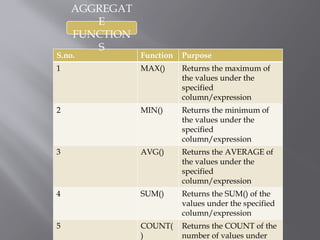
S.no. Function Purpose
1MAX() Returns the maximum of
the values under the
specified
column/expression
2 MIN() Returns the minimum of
the values under the
specified
column/expression
3 AVG() Returns the AVERAGE of
the values under the
specified
column/expression
4 SUM() Returns the SUM() of the
values under the specified
column/expression
5 COUNT(
)
Returns the COUNT of the
number of values under
AGGREGAT
E
FUNCTION
S
4.
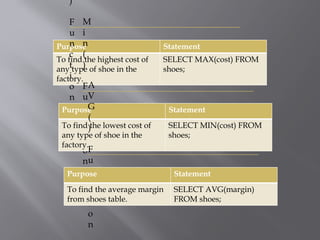
Purpose Statement
To findthe highest cost of
any type of shoe in the
factory.
SELECT MAX(cost) FROM
shoes;
)
F
u
n
c
t
i
o
n
M
i
n
(
)
F
u
n
c
t
i
o
n
Purpose Statement
To find the lowest cost of
any type of shoe in the
factory.
SELECT MIN(cost) FROM
shoes;
A
V
G
(
)
F
u
n
c
t
i
o
n
Purpose Statement
To find the average margin
from shoes table.
SELECT AVG(margin)
FROM shoes;
5.
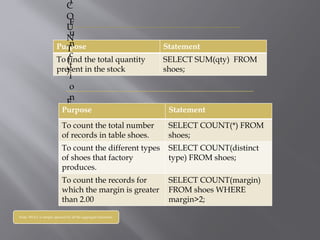
Purpose Statement
To findthe total quantity
present in the stock
SELECT SUM(qty) FROM
shoes;
)
F
u
n
c
t
i
o
n
C
O
U
N
T
(
)
F
u
n
c
t
i
o
n
Purpose Statement
To count the total number
of records in table shoes.
SELECT COUNT(*) FROM
shoes;
To count the different types
of shoes that factory
produces.
SELECT COUNT(distinct
type) FROM shoes;
To count the records for
which the margin is greater
than 2.00
SELECT COUNT(margin)
FROM shoes WHERE
margin>2;
Note- NULL is simply ignored by all the aggregate functions.
6.
GROUP BY
CLAUSE
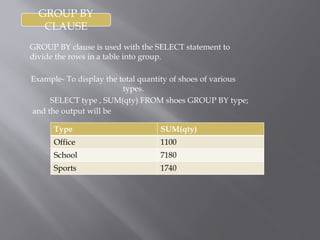
GROUP BYclause is used with the SELECT statement to
divide the rows in a table into group.
Example- To display the total quantity of shoes of various
types.
SELECT type , SUM(qty) FROM shoes GROUP BY type;
Type SUM(qty)
Office 1100
School 7180
Sports 1740
and the output will be
7.
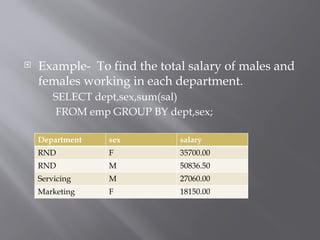
Example- Tofind the total salary of males and
females working in each department.
SELECT dept,sex,sum(sal)
FROM emp GROUP BY dept,sex;
Department sex salary
RND F 35700.00
RND M 50836.50
Servicing M 27060.00
Marketing F 18150.00
8.
H
A
V
I
N
G
C
L
A
U
S
E
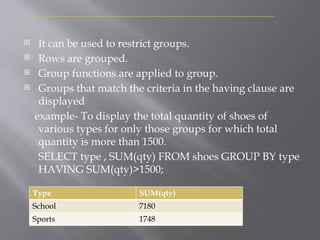
It canbe used to restrict groups.
Rows are grouped.
Group functions are applied to group.
Groups that match the criteria in the having clause are
displayed
example- To display the total quantity of shoes of
various types for only those groups for which total
quantity is more than 1500.
SELECT type , SUM(qty) FROM shoes GROUP BY type
HAVING SUM(qty)>1500;
Type SUM(qty)
School 7180
Sports 1748
9.
V
S
H
A
V
I
N
G
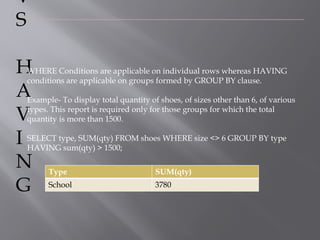
WHERE Conditions areapplicable on individual rows whereas HAVING
conditions are applicable on groups formed by GROUP BY clause.
Example- To display total quantity of shoes, of sizes other than 6, of various
types. This report is required only for those groups for which the total
quantity is more than 1500.
SELECT type, SUM(qty) FROM shoes WHERE size <> 6 GROUP BY type
HAVING sum(qty) > 1500;
Type SUM(qty)
School 3780
C
A
R
T
E
S
I
A
N
P
R
O
D
U
C
T
O
R
C
R
O
S
S
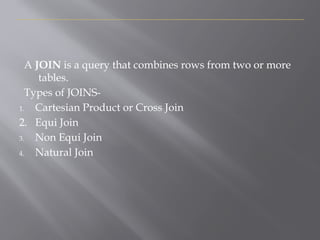
J
O
I
N
Cross join oftwo tables is a table obtained by
pairing up each row of one table with each row
of the other table.
If a table T1 contains 3 rows and 2 columns. A
table t2 contains 4 rows and 3 columns, then
their cartesian product will contain 12 (3*4)
rows and 5 (2+3) columns.
12.
I
J
O
I
N
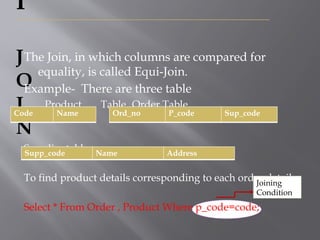
The Join, inwhich columns are compared for
equality, is called Equi-Join.
Example- There are three table
Product Table Order Table
Supplier table
To find product details corresponding to each order details,
Select * From Order , Product Where p_code=code;
Code Name Ord_no P_code Sup_code
Supp_code Name Address
Joining
Condition
13.
Q
U
I
J
O
I
N
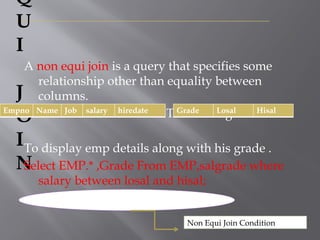
A non equijoin is a query that specifies some
relationship other than equality between
columns.
Table1- EMP Table2- salgrade
To display emp details along with his grade .
Select EMP.* ,Grade From EMP,salgrade where
salary between losal and hisal;
Empno Name Job salary hiredate Grade Losal Hisal
Non Equi Join Condition
14.
NATURAL JOIN
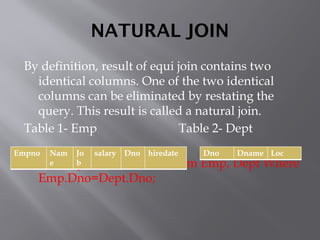
By definition,result of equi join contains two
identical columns. One of the two identical
columns can be eliminated by restating the
query. This result is called a natural join.
Table 1- Emp Table 2- Dept
Select Emp.*, Dname, Loc From Emp, Dept Where
Emp.Dno=Dept.Dno;
Empno Nam
e
Jo
b
salary Dno hiredate Dno Dname Loc
15.
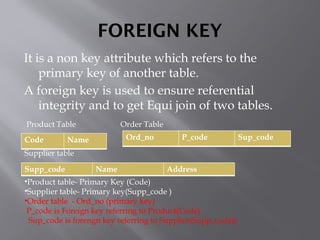
FOREIGN KEY
It isa non key attribute which refers to the
primary key of another table.
A foreign key is used to ensure referential
integrity and to get Equi join of two tables.
Product Table Order Table
Supplier table
•Product table- Primary Key (Code)
•Supplier table- Primary key(Supp_code )
•Order table - Ord_no (primary key)
P_code is Foreign key referring to Product(Code)
Sup_code is forengn key referring to Supplier(Supp_code))
Code Name Ord_no P_code Sup_code
Supp_code Name Address
16.
REFERENTIAL INTEGRITY
This propertyof a relational database which
ensures that no entry in a foreign key column
of a table can be made unless it matches a
primary key value in a corresponding related
table is called Referential Integrity.
17.
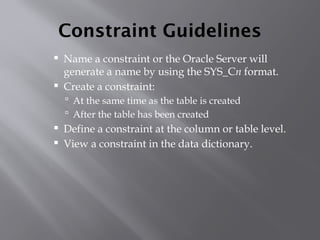
Constraint Guidelines
Namea constraint or the Oracle Server will
generate a name by using the SYS_Cn format.
Create a constraint:
At the same time as the table is created
After the table has been created
Define a constraint at the column or table level.
View a constraint in the data dictionary.
18.
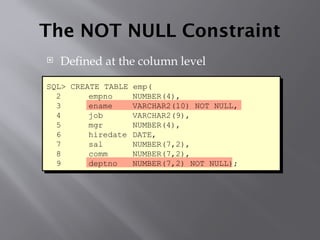
The NOT NULLConstraint
Defined at the column level
SQL> CREATE TABLE emp(
2 empno NUMBER(4),
3 ename VARCHAR2(10) NOT NULL,
4 job VARCHAR2(9),
5 mgr NUMBER(4),
6 hiredate DATE,
7 sal NUMBER(7,2),
8 comm NUMBER(7,2),
9 deptno NUMBER(7,2) NOT NULL);
19.
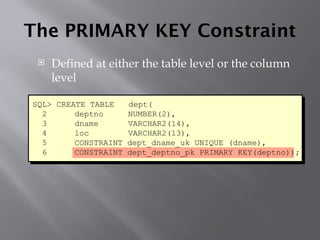
The PRIMARY KEYConstraint
Defined at either the table level or the column
level
SQL> CREATE TABLE dept(
2 deptno NUMBER(2),
3 dname VARCHAR2(14),
4 loc VARCHAR2(13),
5 CONSTRAINT dept_dname_uk UNIQUE (dname),
6 CONSTRAINT dept_deptno_pk PRIMARY KEY(deptno));
20.
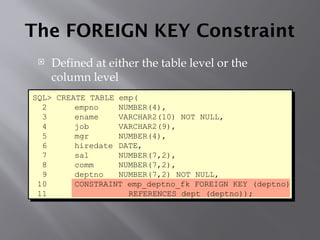
The FOREIGN KEYConstraint
Defined at either the table level or the
column level
SQL> CREATE TABLE emp(
2 empno NUMBER(4),
3 ename VARCHAR2(10) NOT NULL,
4 job VARCHAR2(9),
5 mgr NUMBER(4),
6 hiredate DATE,
7 sal NUMBER(7,2),
8 comm NUMBER(7,2),
9 deptno NUMBER(7,2) NOT NULL,
10 CONSTRAINT emp_deptno_fk FOREIGN KEY (deptno)
11 REFERENCES dept (deptno));
21.
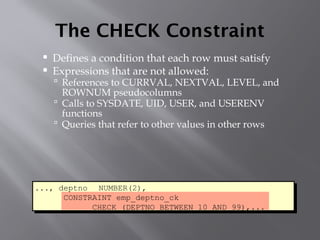
The CHECK Constraint
Defines a condition that each row must satisfy
Expressions that are not allowed:
References to CURRVAL, NEXTVAL, LEVEL, and
ROWNUM pseudocolumns
Calls to SYSDATE, UID, USER, and USERENV
functions
Queries that refer to other values in other rows
..., deptno NUMBER(2),
CONSTRAINT emp_deptno_ck
CHECK (DEPTNO BETWEEN 10 AND 99),...
22.
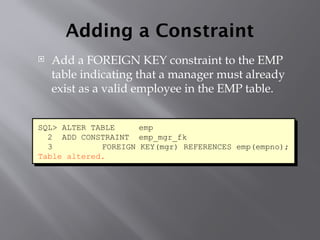
Adding a Constraint
Add a FOREIGN KEY constraint to the EMP
table indicating that a manager must already
exist as a valid employee in the EMP table.
SQL> ALTER TABLE emp
2 ADD CONSTRAINT emp_mgr_fk
3 FOREIGN KEY(mgr) REFERENCES emp(empno);
Table altered.
23.
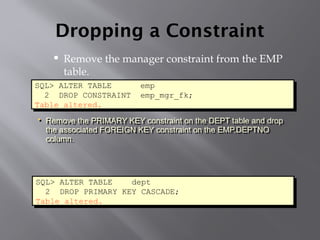
Dropping a Constraint
Remove the manager constraint from the EMP
table.
SQL> ALTER TABLE emp
2 DROP CONSTRAINT emp_mgr_fk;
Table altered.
• Remove the PRIMARY KEY constraint on the DEPT table and drop
the associated FOREIGN KEY constraint on the EMP.DEPTNO
column.
SQL> ALTER TABLE dept
2 DROP PRIMARY KEY CASCADE;
Table altered.
24.
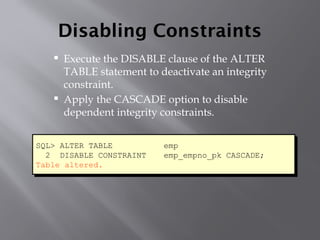
Disabling Constraints
Executethe DISABLE clause of the ALTER
TABLE statement to deactivate an integrity
constraint.
Apply the CASCADE option to disable
dependent integrity constraints.
SQL> ALTER TABLE emp
2 DISABLE CONSTRAINT emp_empno_pk CASCADE;
Table altered.
25.
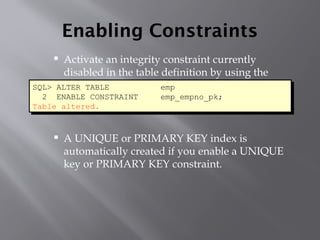
Enabling Constraints
Activatean integrity constraint currently
disabled in the table definition by using the
ENABLE clause.
A UNIQUE or PRIMARY KEY index is
automatically created if you enable a UNIQUE
key or PRIMARY KEY constraint.
SQL> ALTER TABLE emp
2 ENABLE CONSTRAINT emp_empno_pk;
Table altered.
Editor's Notes
#17 Constraint Guidelines
All constraints are stored in the data dictionary. Constraints are easy to reference if you give them a meaningful name. Constraint names must follow the standard object-naming rules. If you do not name your constraint, Oracle generates a name with the format SYS_Cn, where n is an integer to create a unique constraint name.
Constraints can be defined at the time of table creation or after the table has been created.
You can view the constraints defined for a specific table by looking at the USER_CONSTRAINTS data dictionary table.
#18 The NOT NULL Constraint (continued)
The NOT NULL constraint can be specified only at the column level, not at the table level.
The slide example applies the NOT NULL constraint to the ENAME and DEPTNO columns of the EMP table. Because these constraints are unnamed, the Oracle Server will create names for them.
You can specify the name of the constraint while specifying the constraint.
Note: All the constraint examples described in this lesson may not be present in the sample tables provided with the course. If desired, these constraints can be added to the tables.
#19 The PRIMARY KEY Constraint (continued)
PRIMARY KEY constraints can be defined at the column level or table level. A composite PRIMARY KEY is created by using the table level definition.
The example on the slide defines a PRIMARY KEY constraint on the DEPTNO column of the DEPT table. The name of the constraint is DEPT_DEPTNO_PK.
Note: A UNIQUE index is automatically created for a PRIMARY KEY column.
#20 The FOREIGN KEY Constraint (continued)
FOREIGN KEY constraints can be defined at the column or table constraint level. A composite foreign key must be created by using the table-level definition.
The example on the slide defines a FOREIGN KEY constraint on the DEPTNO column of the EMP table, using table level syntax. The name of the constraint is EMP_DEPTNO_FK.
#21 The CHECK Constraint
The CHECK constraint defines a condition that each row must satisfy. The condition can use the same constructs as query conditions, with the following exceptions:
References to the CURRVAL, NEXTVAL, LEVEL, and ROWNUM pseudocolumns
Calls to SYSDATE, UID, USER, and USERENV functions
Queries that refer to other values in other rows
A single column can have multiple CHECK constraints that reference the column in its definition. There is no limit to the number of CHECK constraints that you can define on a column.
CHECK constraints can be defined at the column level or table level.
Class Management Note
You can defer checking constraints for validity until the end of the transaction.
A constraint is deferred if the system checks that it is satisfied only on commit. If a deferred constraint is violated, then commit causes the transaction to roll back.
A constraint is immediate if it is checked at the end of each statement. If it is violated, the statement is rolled back immediately.
#22 Adding a Constraint (continued)
The example on the slide creates a FOREIGN KEY constraint on the EMP table. The constraint ensures that a manager exists as a valid employee in the EMP table.
#23 Dropping a Constraint
To drop a constraint, you can identify the constraint name from the USER_CONSTRAINTS and USER_CONS_COLUMNS data dictionary views. Then use the ALTER TABLE statement with the DROP clause. The CASCADE option of the DROP clause causes any dependent constraints also to be dropped.
Syntax
ALTER TABLE table
DROP PRIMARY KEY | UNIQUE (column) |
CONSTRAINT constraint [CASCADE];
where: table is the name of the table
column is the name of the column affected by the constraint
constraint is the name of the constraint
When you drop an integrity constraint, that constraint is no longer enforced by the Oracle Server and is no longer available in the data dictionary.
#24 Disabling a Constraint
You can disable a constraint without dropping it or recreating it by using the ALTER TABLE statement with the DISABLE clause.
Syntax
ALTER TABLE table
DISABLE CONSTRAINT constraint [CASCADE];
where: table is the name of the table
constraint is the name of the constraint
Guidelines
You can use the DISABLE clause in both the CREATE TABLE statement and the ALTER TABLE statement.
The CASCADE clause disables dependent integrity constraints.
Class Management Note
The DISABLE option in the definition of an integrity constraint means that the Oracle Server does not enforce the constraint and simply documents it. Enable the constraint by using the ENABLE clause.
Oracle8i provides new options for the ENABLE and DISABLE clauses: VALIDATE and NONVALIDATE.
#25 Enabling a Constraint
You can enable a constraint without dropping it or re-creating it by using the ALTER TABLE statement with the ENABLE clause.
Syntax
ALTER TABLE table
ENABLE CONSTRAINT constraint;
where: table is the name of the table
constraint is the name of the constraint
Guidelines
If you enable a constraint, that constraint applies to all the data in the table. All the data in the table must fit the constraint.
If you enable a UNIQUE key or PRIMARY KEY constraint, a UNIQUE or PRIMARY KEY index is automatically created.
You can use the ENABLE clause in both the CREATE TABLE statement and the ALTER TABLE statement.