Basic Concepts of
Computer Networking
PUSHPA GUJRAL SCIENCE CITY, KAPURTHALA
Nitin Sharma
Technical Assistant
1. Introduction
2. Advantages & Disadvantages of Computer Network
3. Basic Terminology Used in Computer Network
4. Types of Network
5. Classification of Network Architecture
6. Network Protocols
7. Network Topology
8. NIC (Network Interface Card)
9. Transmission Media/Cables
10. Hub vs Switch vs Router
11. Server and Its Types
12. Firewall and its Types
13. References PUSHPA GUJRAL SCIENCE CITY, KAPURTHALA
CONCEPT
PUSHPA GUJRAL SCIENCE CITY, KAPURTHALA
A computer network is a telecommunications network that
allows computers to exchange data.
The physical connection between networked computing
devices is established using either cable media or wireless
media.
The best-known computer network is the internet.
PUSHPA GUJRAL SCIENCE CITY, KAPURTHALA
ADVANTAGES OF COMPUTER NETWORKS
FILE SHARING : A person sitting at one workstation of a network can easily see the files
present on the other workstation, provided he is authorized to do so.
RESOURCE SHARING : All computers in a office can be interconnected using a network and
one printer can efficiently provide the services to all four members.
INCREASE STORAGE CAPACIY : A standalone computer might fall short of storage memory,
but when many computers are on a network, memory of different computers can be used in
such case.
INCREASE COST EFFICIENCY : Computer networks resolve this issue as the software can be
stored or installed on a system or a server and can be used by the different workstations
PUSHPA GUJRAL SCIENCE CITY, KAPURTHALA
DISADVANTAGES OF COMPUTER NETWORKS
SECURITY ISSUES : A computer hacker can get unauthorized access by using different tools.
In case of big organizations, various network security softwares are used to prevent the theft of
any confidential and classified data.
RAPID SPREAD OF COMPUTER VIRUSES : If any computer system in a network gets
affected by computer virus, there is a possible threat of other systems getting affected too.
EXPENSIVE SETUP: Costly devices like routers, switches, hubs, etc., can add up to the bills of
a person trying to install a computer network.
DEPENNDECY ON MAIN SERVER : In case the main File Server of a computer network
breaks down, the system becomes useless. In case of big networks, the File Server should be a
powerful computer, which often makes it expensive.
PUSHPA GUJRAL SCIENCE CITY, KAPURTHALA
BASIC TERMINOLOGY USED IN COMPUTER NETWORK
Packet : Collection of data that can be used by computers which need to communicate with
each other, usually as part of a network.
Frame : consists of a sequence of bits or symbols that indicate to the receiver the beginning and
end of the payload data within the stream of symbols or bits it receives.
SERVER : Server refers to the "nerve center" of any network. It typically needs to be much
more high-powered than a regular desktop workstation.
Workstation : This refers to each person's computer. Your front and back office staff computers
and the machines in the examination room will be workstations on the network.
Cat-5 cable : This term refers to "category 5" cable used when your network is hard-wired.
PUSHPA GUJRAL SCIENCE CITY, KAPURTHALA
BASIC TERMINOLOGY USED IN COMPUTER NETWORK
Hard-wired : This means that all the workstations in the office plug into a network outlet using
physical cabling to transport data to and from the server.
Network Interface : is a software interface to networking hardware. For instance, if you have
two network cards in your computer, you can control and configure each network interface
associated with them individually.
Connection : refers to pieces of related information that are transfered through a network.
Gateway : A gateway is a device that routes traffic between networks. For example, at home,
your router is your gateway. It provides a “gateway” between your LAN and WAN.
Bandwidth : Bandwidth refers to a capacity of line means how much data transfer through a
cable or line.
PUSHPA GUJRAL SCIENCE CITY, KAPURTHALA
Based on the size and the coverage area, networks are categorized into
the following types:
Personal Area Networks (PAN)
Local Area Networks (LAN)
Metropolitan Area Networks (MAN)
Wide Area Networks (WAN)
PUSHPA GUJRAL SCIENCE CITY, KAPURTHALA
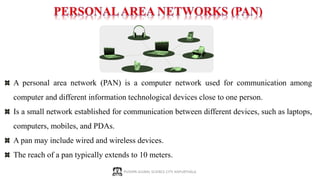
A personal area network (PAN) is a computer network used for communication among
computer and different information technological devices close to one person.
Is a small network established for communication between different devices, such as laptops,
computers, mobiles, and PDAs.
A pan may include wired and wireless devices.
The reach of a pan typically extends to 10 meters.
PUSHPA GUJRAL SCIENCE CITY, KAPURTHALA
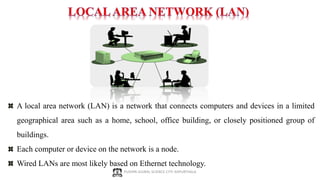
A local area network (LAN) is a network that connects computers and devices in a limited
geographical area such as a home, school, office building, or closely positioned group of
buildings.
Each computer or device on the network is a node.
Wired LANs are most likely based on Ethernet technology.
PUSHPA GUJRAL SCIENCE CITY, KAPURTHALA
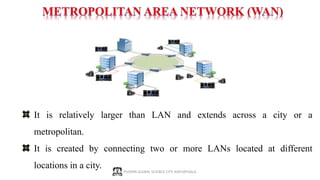
It is relatively larger than LAN and extends across a city or a
metropolitan.
It is created by connecting two or more LANs located at different
locations in a city.
PUSHPA GUJRAL SCIENCE CITY, KAPURTHALA
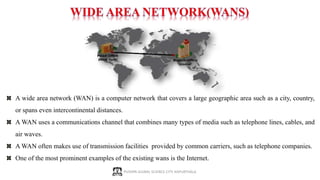
A wide area network (WAN) is a computer network that covers a large geographic area such as a city, country,
or spans even intercontinental distances.
A WAN uses a communications channel that combines many types of media such as telephone lines, cables, and
air waves.
A WAN often makes use of transmission facilities provided by common carriers, such as telephone companies.
One of the most prominent examples of the existing wans is the Internet.
PUSHPA GUJRAL SCIENCE CITY, KAPURTHALA
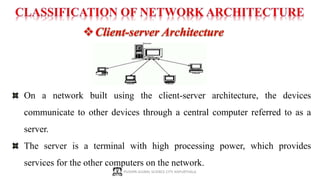
On a network built using the client-server architecture, the devices
communicate to other devices through a central computer referred to as a
server.
The server is a terminal with high processing power, which provides
services for the other computers on the network.
PUSHPA GUJRAL SCIENCE CITY, KAPURTHALA
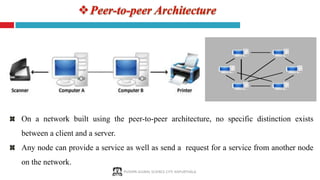
On a network built using the peer-to-peer architecture, no specific distinction exists
between a client and a server.
Any node can provide a service as well as send a request for a service from another node
on the network.
PUSHPA GUJRAL SCIENCE CITY, KAPURTHALA
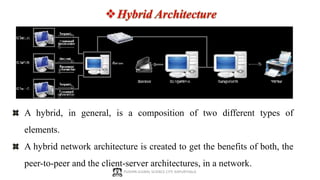
A hybrid, in general, is a composition of two different types of
elements.
A hybrid network architecture is created to get the benefits of both, the
peer-to-peer and the client-server architectures, in a network.
Network protocols are formal standards and policies made up of rules,
procedures and formats that defines communication between two or more
devices over a network. Network protocols conducts the action, policies, and
affairs of the end-to-end process of timely, secured and managed data or network
communication.
The Main different types of Network Protocols are:
 Internet Protocol
 TCP
 HTTP
 FTP
 TelNet
 SMTP
 POP
 SNMP
 IMAP
 HTTPS or SSL PUSHPA GUJRAL SCIENCE CITY, KAPURTHALA
PUSHPA GUJRAL SCIENCE CITY, KAPURTHALA
NETWORKS PROTOCOLS
INTERNET PROTOCOL (IP) : The Internet Protocol is the principal protocol in the Internet protocol
suite for relaying data across networks. Its routing function essentially establishes the internet.
Historically it was the connectionless datagram service in the original Transmission Control Program;
the other being the connection oriented protocol(TCP). Therefore, the Internet protocol suite is referred
as TCP/IP.
TRANSMISSION CONTROL PROTOCOL (TCP) : TCP provides reliable delivery of a stream of octets
over an IP network. Ordering and error-checking are main characteristics of the TCP. All major Internet
applications such as World Wide Web, email and file transfer rely on TCP.
Hypertext Transfer Protocol (HTTP) : The HTTP is the foundation of data communication for the World
Wide Web. The hypertext is structured text that uses hyperlinks between nodes containing texts. The
HTTP is the application protocol for distributed and collaborative hypermedia information system. Its
Default Port is 80
File Transfer Protocol (FTP) : The FTP is the most common protocol used in the file transferring in the
Internet and within private networks. The default port of FTP is 20/21.
PUSHPA GUJRAL SCIENCE CITY, KAPURTHALA
NETWORKS PROTOCOLS … Contd
TelNet : TelNet Stand for Telecommunication Network. Telnet is the primary method used to
manage network devices at the command level. Telnet does not provide a secure connection.
The default port of Telnet is 23.
Simple Mail Transfer Protocol (SMTP) : SMTP is used for two primary functions. It is used to
transfer email from source to destination between mail servers and it is used to transfer email
from end users to a mail system. The default port of SMTP is 25.
Post Office Protocol (POP) : The Post Office Protocol is one of the two main protocols used to
retrieve mail from the internet. It is very simple as it allows the client to retrieve complete
content from the server mail box and deletes contents from the server. The default port of POP3
is 110
Internet Message Access Protocol (IMAP) : IMAP version 3 is another main protocol that used
to retrieve mail from a server. IMAP does not delete the content from the mail box of the server.
The default port of IMAP is 143
PUSHPA GUJRAL SCIENCE CITY, KAPURTHALA
NETWORKS PROTOCOLS … Contd
Simple Network Management Protocol (SNMP) :The Simple Network Management Protocol is
used to manage networks. It has abilities to monitor, configure and control network devices.
SNMP traps can also be configured on network devices to notify a central server when specific
action are occurring. The default port of SNMP is 161/162.
Hypertext Transfer Protocol Secure (HTTPS) : It is also Known as Secure socket Link. HTTPS
is used with HTTP to provide same services, but with a secured connection which is provided
by SSL or TLS. The default port of HTTPS is 443.
Internet Control Message Protocol (ICMP) : This protocol is used by network devices,
including Router to send error messages and operational information indicating success and
failure when communicating with another IP address.
The pattern of interconnection of nodes in a network is called the Topology.
This layout also determines the manner in which information is exchanged
within the network.
The different types of network topologies that can be used to set up a network
are:
 Bus Topology
 Ring Topology
 Star Topology
 Mesh Topology
 Tree Topology
 Hybrid Topology
PUSHPA GUJRAL SCIENCE CITY, KAPURTHALA
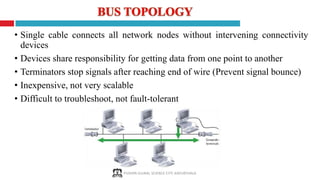
• Single cable connects all network nodes without intervening connectivity
devices
• Devices share responsibility for getting data from one point to another
• Terminators stop signals after reaching end of wire (Prevent signal bounce)
• Inexpensive, not very scalable
• Difficult to troubleshoot, not fault-tolerant
PUSHPA GUJRAL SCIENCE CITY, KAPURTHALA
Advantages
• Works well for small networks
• Relatively inexpensive to implement
• Easy to add to it
Disadvantages
• Works well for small networks
• Relatively inexpensive to implement
• Easy to add to it
Advantages & Disadvantages of
Bus Topology
PUSHPA GUJRAL SCIENCE CITY, KAPURTHALA
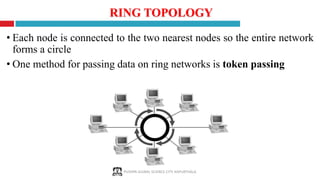
• Each node is connected to the two nearest nodes so the entire network
forms a circle
• One method for passing data on ring networks is token passing
RING TOPOLOGY
PUSHPA GUJRAL SCIENCE CITY, KAPURTHALA
Advantages
Disadvantages
• Expensive
• Requires more cable and network equipment at the start
• Not used as widely as bus topology
• Fewer equipment options
• Fewer options for expansion to high-speed communication
Advantages & Disadvantages of
Ring Topology
• Easier to manage; easier to locate a defective node or cable problem
• Well-suited for transmitting signals over long distances on a LAN
• Handles high-volume network traffic
• Enables reliable communication
PUSHPA GUJRAL SCIENCE CITY, KAPURTHALA
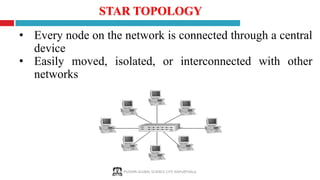
• Every node on the network is connected through a central
device
• Easily moved, isolated, or interconnected with other
networks
STAR TOPOLOGY
PUSHPA GUJRAL SCIENCE CITY, KAPURTHALA
Advantages
Disadvantages
Advantages & Disadvantages of
Star Topology
• Good option for modern networks
• Low startup costs
• Easy to manage
• Offers opportunities for expansion
• Most popular topology in use; wide variety of equipment available
• Hub is a single point of failure
• Requires more cable than the bus
PUSHPA GUJRAL SCIENCE CITY, KAPURTHALA
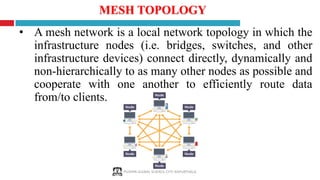
• A mesh network is a local network topology in which the
infrastructure nodes (i.e. bridges, switches, and other
infrastructure devices) connect directly, dynamically and
non-hierarchically to as many other nodes as possible and
cooperate with one another to efficiently route data
from/to clients.
MESH TOPOLOGY
PUSHPA GUJRAL SCIENCE CITY, KAPURTHALA
Advantages
Disadvantages
Advantages & Disadvantages of
Mesh Topology
• full mesh networks can be impractical to set up because of the high number of connections
needed many connections require a lot of maintenance
• messages can be received more quickly if the route to the intended recipient is short
• messages should always get through as they have many possible routes on which to travel
• multiple connections mean each node can transmit to and receive from more than one node
at the same time
• new nodes can be added without interruption or interfering with other nodes
PUSHPA GUJRAL SCIENCE CITY, KAPURTHALA
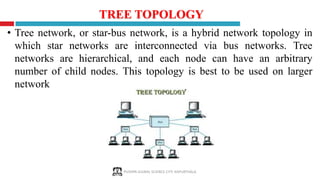
• Tree network, or star-bus network, is a hybrid network topology in
which star networks are interconnected via bus networks. Tree
networks are hierarchical, and each node can have an arbitrary
number of child nodes. This topology is best to be used on larger
network
TREE TOPOLOGY
PUSHPA GUJRAL SCIENCE CITY, KAPURTHALA
Advantages
Disadvantages
Advantages & Disadvantages of
Tree Topology
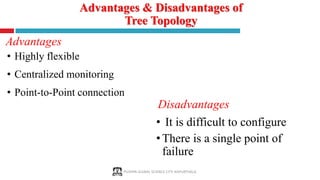
• It is difficult to configure
•There is a single point of
failure
• Highly flexible
• Centralized monitoring
• Point-to-Point connection
PUSHPA GUJRAL SCIENCE CITY, KAPURTHALA
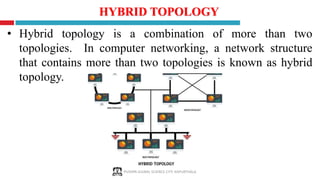
• Hybrid topology is a combination of more than two
topologies. In computer networking, a network structure
that contains more than two topologies is known as hybrid
topology.
HYBRID TOPOLOGY
PUSHPA GUJRAL SCIENCE CITY, KAPURTHALA
Advantages
Disadvantages
Advantages & Disadvantages of
Hybrid Topology
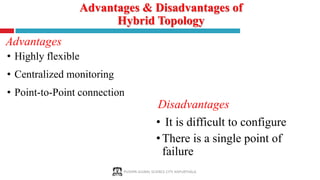
• It is difficult to configure
•There is a single point of
failure
• Highly flexible
• Centralized monitoring
• Point-to-Point connection
PUSHPA GUJRAL SCIENCE CITY, KAPURTHALA
NIC (Network Interface Card)
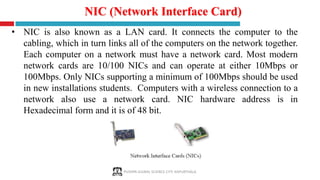
• NIC is also known as a LAN card. It connects the computer to the
cabling, which in turn links all of the computers on the network together.
Each computer on a network must have a network card. Most modern
network cards are 10/100 NICs and can operate at either 10Mbps or
100Mbps. Only NICs supporting a minimum of 100Mbps should be used
in new installations students. Computers with a wireless connection to a
network also use a network card. NIC hardware address is in
Hexadecimal form and it is of 48 bit.
PUSHPA GUJRAL SCIENCE CITY, KAPURTHALA
Cable is the medium through which information usually moves
from one network device to another. There are several types of
cable which are commonly used with LANs. In some cases, a
network will utilize only one type of cable, other networks will use
a variety of cable types. The type of cable chosen for a network is
related to the network's topology, protocol, and size. Understanding
the characteristics of different types of cable and how they relate to
other aspects of a network is necessary for the development of a
successful network.
NETWORK CABLING
PUSHPA GUJRAL SCIENCE CITY, KAPURTHALA
TRANSMISSION MEDIA/CABLES
Two main categories:
1. Guided ― wires/cables
2. Unguided ― wireless transmission, e.g. radio, microwave, infrared,
sound, sonar
We will concentrate on Guided Media here:
Twisted-Pair cables:
 Unshielded Twisted-Pair (UTP) cables
 Shielded Twisted-Pair (STP) cables
Coaxial cables
Fiber-optic cables
PUSHPA GUJRAL SCIENCE CITY, KAPURTHALA
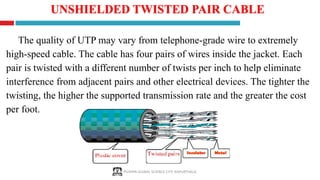
The quality of UTP may vary from telephone-grade wire to extremely
high-speed cable. The cable has four pairs of wires inside the jacket. Each
pair is twisted with a different number of twists per inch to help eliminate
interference from adjacent pairs and other electrical devices. The tighter the
twisting, the higher the supported transmission rate and the greater the cost
per foot.
UNSHIELDED TWISTED PAIR CABLE
PUSHPA GUJRAL SCIENCE CITY, KAPURTHALA
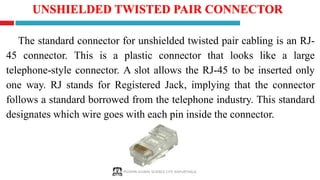
The standard connector for unshielded twisted pair cabling is an RJ-
45 connector. This is a plastic connector that looks like a large
telephone-style connector. A slot allows the RJ-45 to be inserted only
one way. RJ stands for Registered Jack, implying that the connector
follows a standard borrowed from the telephone industry. This standard
designates which wire goes with each pin inside the connector.
UNSHIELDED TWISTED PAIR CONNECTOR
PUSHPA GUJRAL SCIENCE CITY, KAPURTHALA
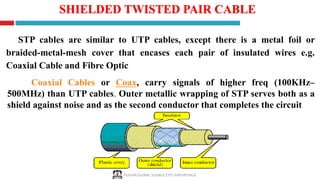
STP cables are similar to UTP cables, except there is a metal foil or
braided-metal-mesh cover that encases each pair of insulated wires e.g.
Coaxial Cable and Fibre Optic
SHIELDED TWISTED PAIR CABLE
Coaxial Cables or Coax, carry signals of higher freq (100KHz–
500MHz) than UTP cables. Outer metallic wrapping of STP serves both as a
shield against noise and as the second conductor that completes the circuit
PUSHPA GUJRAL SCIENCE CITY, KAPURTHALA
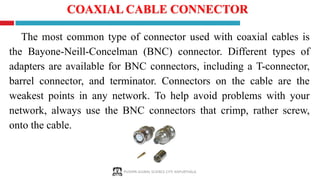
COAXIAL CABLE CONNECTOR
The most common type of connector used with coaxial cables is
the Bayone-Neill-Concelman (BNC) connector. Different types of
adapters are available for BNC connectors, including a T-connector,
barrel connector, and terminator. Connectors on the cable are the
weakest points in any network. To help avoid problems with your
network, always use the BNC connectors that crimp, rather screw,
onto the cable.
PUSHPA GUJRAL SCIENCE CITY, KAPURTHALA
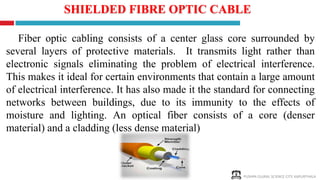
Fiber optic cabling consists of a center glass core surrounded by
several layers of protective materials. It transmits light rather than
electronic signals eliminating the problem of electrical interference.
This makes it ideal for certain environments that contain a large amount
of electrical interference. It has also made it the standard for connecting
networks between buildings, due to its immunity to the effects of
moisture and lighting. An optical fiber consists of a core (denser
material) and a cladding (less dense material)
SHIELDED FIBRE OPTIC CABLE
PUSHPA GUJRAL SCIENCE CITY, KAPURTHALA
Advantage
• Fiber optic cable has the ability to transmit signals over much longer
distances than coaxial and twisted pair.
• It also has the capability to carry information at vastly greater
speeds. This capacity broadens communication possibilities to
include services such as video conferencing and interactive services.
Disadvantage
• The cost of fiber optic cabling is comparable to copper cabling.
• It is more difficult to install and modify.
ADVANTAGES & DISADVANTAGES FIBRE OPTIC CABLE
PUSHPA GUJRAL SCIENCE CITY, KAPURTHALA
WIRELESS NETWORKS (UNGUIDED MEDIA)
Wireless LANs use high frequency radio signals, infrared light beams, or
lasers to communicate between the workstations, servers, or hubs. Each
workstation and file server on a wireless network has some sort of
transceiver/antenna to send and receive the data. Information is relayed between
transceivers as if they were physically connected. For longer distance, wireless
communications can also take place through cellular telephone technology,
microwave transmission, or by satellite.
Wireless networks are often referred to as WiFi (Wireless Fidelity).
PUSHPA GUJRAL SCIENCE CITY, KAPURTHALA
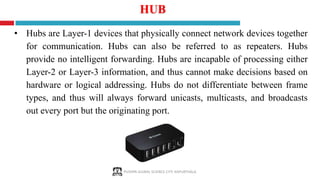
HUB
• Hubs are Layer-1 devices that physically connect network devices together
for communication. Hubs can also be referred to as repeaters. Hubs
provide no intelligent forwarding. Hubs are incapable of processing either
Layer-2 or Layer-3 information, and thus cannot make decisions based on
hardware or logical addressing. Hubs do not differentiate between frame
types, and thus will always forward unicasts, multicasts, and broadcasts
out every port but the originating port.
PUSHPA GUJRAL SCIENCE CITY, KAPURTHALA
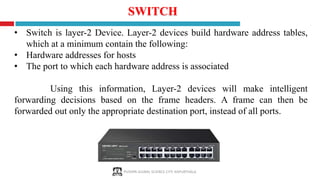
SWITCH
• Switch is layer-2 Device. Layer-2 devices build hardware address tables,
which at a minimum contain the following:
• Hardware addresses for hosts
• The port to which each hardware address is associated
Using this information, Layer-2 devices will make intelligent
forwarding decisions based on the frame headers. A frame can then be
forwarded out only the appropriate destination port, instead of all ports.
PUSHPA GUJRAL SCIENCE CITY, KAPURTHALA
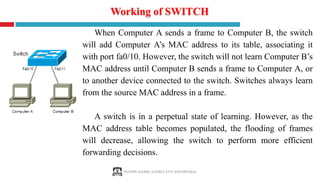
Working of SWITCH
When Computer A sends a frame to Computer B, the switch
will add Computer A’s MAC address to its table, associating it
with port fa0/10. However, the switch will not learn Computer B’s
MAC address until Computer B sends a frame to Computer A, or
to another device connected to the switch. Switches always learn
from the source MAC address in a frame.
A switch is in a perpetual state of learning. However, as the
MAC address table becomes populated, the flooding of frames
will decrease, allowing the switch to perform more efficient
forwarding decisions.
PUSHPA GUJRAL SCIENCE CITY, KAPURTHALA
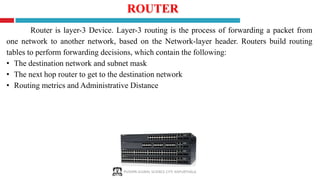
ROUTER
Router is layer-3 Device. Layer-3 routing is the process of forwarding a packet from
one network to another network, based on the Network-layer header. Routers build routing
tables to perform forwarding decisions, which contain the following:
• The destination network and subnet mask
• The next hop router to get to the destination network
• Routing metrics and Administrative Distance
SERVER AND ITS WORKING
SERVER : Server is a computer or system that provides resources, data, services, or
programs to other computers, known as clients, over a network. Whenever Any
computers share its resources with client machines they are considered servers. There
are many types of servers, including web servers, mail servers, and virtual servers.
WORKING OF SERVER : To function as a server, a device must be configured
to listen to requests from clients on a network connection. When a client requires data or
functionality from a server, it sends a request over the network. The server receives this
request and responds with the appropriate information. This is the request and response
model of client-server networking, also known as the call and response model.
PUSHPA GUJRAL SCIENCE CITY, KAPURTHALA
TYPES OF SERVER
FILE SERVER : File servers store and distribute files. Multiple clients or users
may share files stored on a server. In addition, centrally storing files offers easier
backup or fault tolerance solutions than attempting to provide security and
integrity for files on every device in an organization
PRINT SERVER : Print servers allow for the management and distribution of
printing functionality. Rather than attaching a printer to every workstation, a
single print server can respond to printing requests from numerous clients.
PUSHPA GUJRAL SCIENCE CITY, KAPURTHALA
TYPES OF SERVER … Contd
APPLICATION SERVER : Application servers run applications in lieu of client
computers running applications locally. Application servers often run resource-intensive
applications that are shared by a large number of users. Doing so removes the need for
each client to have sufficient resources to run the applications.
DNS SERVER : Domain Name System (DNS) servers are application servers that
provide name resolution to client computers by converting names easily understood by
humans into machine-readable IP addresses. The DNS system is a widely distributed
database of names and other DNS servers, each of which can be used to request an
otherwise unknown computer name..
PUSHPA GUJRAL SCIENCE CITY, KAPURTHALA
TYPES OF SERVER … Contd
MAIL SERVER : Mail servers receive emails sent to a user and store them until
requested by a client on behalf of said user. It is then ready to send and receive messages
rather than requiring every client machine to have its own email subsystem continuously
running.
WEB SERVER : A web server is a special kind of application server that hosts programs
and data requested by users across the Internet or an intranet. Web servers respond to
requests from browsers running on client computers for web pages, or other web-based
services. Common web servers include Apache web servers, Microsoft Internet
Information Services (IIS) servers and Nginx servers.
PUSHPA GUJRAL SCIENCE CITY, KAPURTHALA
TYPES OF SERVER … Contd
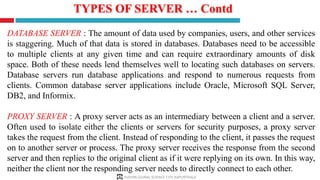
DATABASE SERVER : The amount of data used by companies, users, and other services
is staggering. Much of that data is stored in databases. Databases need to be accessible
to multiple clients at any given time and can require extraordinary amounts of disk
space. Both of these needs lend themselves well to locating such databases on servers.
Database servers run database applications and respond to numerous requests from
clients. Common database server applications include Oracle, Microsoft SQL Server,
DB2, and Informix.
PROXY SERVER : A proxy server acts as an intermediary between a client and a server.
Often used to isolate either the clients or servers for security purposes, a proxy server
takes the request from the client. Instead of responding to the client, it passes the request
on to another server or process. The proxy server receives the response from the second
server and then replies to the original client as if it were replying on its own. In this way,
neither the client nor the responding server needs to directly connect to each other.
PUSHPA GUJRAL SCIENCE CITY, KAPURTHALA
TYPES OF SERVER … Contd
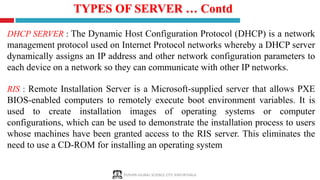
DHCP SERVER : The Dynamic Host Configuration Protocol (DHCP) is a network
management protocol used on Internet Protocol networks whereby a DHCP server
dynamically assigns an IP address and other network configuration parameters to
each device on a network so they can communicate with other IP networks.
RIS : Remote Installation Server is a Microsoft-supplied server that allows PXE
BIOS-enabled computers to remotely execute boot environment variables. It is
used to create installation images of operating systems or computer
configurations, which can be used to demonstrate the installation process to users
whose machines have been granted access to the RIS server. This eliminates the
need to use a CD-ROM for installing an operating system
PUSHPA GUJRAL SCIENCE CITY, KAPURTHALA
FIREWALL
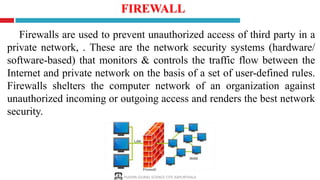
Firewalls are used to prevent unauthorized access of third party in a
private network, . These are the network security systems (hardware/
software-based) that monitors & controls the traffic flow between the
Internet and private network on the basis of a set of user-defined rules.
Firewalls shelters the computer network of an organization against
unauthorized incoming or outgoing access and renders the best network
security.
PUSHPA GUJRAL SCIENCE CITY, KAPURTHALA
Reference Sources
• www.google.com
• www.wikipedia.com
• www.studymafia.org
• www.pptplanet.com
• www. Fcit.usf.edu
• https://bts-consulting.biz
PUSHPA GUJRAL SCIENCE CITY, KAPURTHALA
THANKS
PUSHPA GUJRAL SCIENCE CITY, KAPURTHALA

Basic concepts of computer networking.pdf

  • 1.
    Basic Concepts of ComputerNetworking PUSHPA GUJRAL SCIENCE CITY, KAPURTHALA Nitin Sharma Technical Assistant
  • 2.
    1. Introduction 2. Advantages& Disadvantages of Computer Network 3. Basic Terminology Used in Computer Network 4. Types of Network 5. Classification of Network Architecture 6. Network Protocols 7. Network Topology 8. NIC (Network Interface Card) 9. Transmission Media/Cables 10. Hub vs Switch vs Router 11. Server and Its Types 12. Firewall and its Types 13. References PUSHPA GUJRAL SCIENCE CITY, KAPURTHALA CONCEPT
  • 3.
    PUSHPA GUJRAL SCIENCECITY, KAPURTHALA A computer network is a telecommunications network that allows computers to exchange data. The physical connection between networked computing devices is established using either cable media or wireless media. The best-known computer network is the internet.
  • 4.
    PUSHPA GUJRAL SCIENCECITY, KAPURTHALA ADVANTAGES OF COMPUTER NETWORKS FILE SHARING : A person sitting at one workstation of a network can easily see the files present on the other workstation, provided he is authorized to do so. RESOURCE SHARING : All computers in a office can be interconnected using a network and one printer can efficiently provide the services to all four members. INCREASE STORAGE CAPACIY : A standalone computer might fall short of storage memory, but when many computers are on a network, memory of different computers can be used in such case. INCREASE COST EFFICIENCY : Computer networks resolve this issue as the software can be stored or installed on a system or a server and can be used by the different workstations
  • 5.
    PUSHPA GUJRAL SCIENCECITY, KAPURTHALA DISADVANTAGES OF COMPUTER NETWORKS SECURITY ISSUES : A computer hacker can get unauthorized access by using different tools. In case of big organizations, various network security softwares are used to prevent the theft of any confidential and classified data. RAPID SPREAD OF COMPUTER VIRUSES : If any computer system in a network gets affected by computer virus, there is a possible threat of other systems getting affected too. EXPENSIVE SETUP: Costly devices like routers, switches, hubs, etc., can add up to the bills of a person trying to install a computer network. DEPENNDECY ON MAIN SERVER : In case the main File Server of a computer network breaks down, the system becomes useless. In case of big networks, the File Server should be a powerful computer, which often makes it expensive.
  • 6.
    PUSHPA GUJRAL SCIENCECITY, KAPURTHALA BASIC TERMINOLOGY USED IN COMPUTER NETWORK Packet : Collection of data that can be used by computers which need to communicate with each other, usually as part of a network. Frame : consists of a sequence of bits or symbols that indicate to the receiver the beginning and end of the payload data within the stream of symbols or bits it receives. SERVER : Server refers to the "nerve center" of any network. It typically needs to be much more high-powered than a regular desktop workstation. Workstation : This refers to each person's computer. Your front and back office staff computers and the machines in the examination room will be workstations on the network. Cat-5 cable : This term refers to "category 5" cable used when your network is hard-wired.
  • 7.
    PUSHPA GUJRAL SCIENCECITY, KAPURTHALA BASIC TERMINOLOGY USED IN COMPUTER NETWORK Hard-wired : This means that all the workstations in the office plug into a network outlet using physical cabling to transport data to and from the server. Network Interface : is a software interface to networking hardware. For instance, if you have two network cards in your computer, you can control and configure each network interface associated with them individually. Connection : refers to pieces of related information that are transfered through a network. Gateway : A gateway is a device that routes traffic between networks. For example, at home, your router is your gateway. It provides a “gateway” between your LAN and WAN. Bandwidth : Bandwidth refers to a capacity of line means how much data transfer through a cable or line.
  • 8.
    PUSHPA GUJRAL SCIENCECITY, KAPURTHALA Based on the size and the coverage area, networks are categorized into the following types: Personal Area Networks (PAN) Local Area Networks (LAN) Metropolitan Area Networks (MAN) Wide Area Networks (WAN)
  • 9.
    PUSHPA GUJRAL SCIENCECITY, KAPURTHALA A personal area network (PAN) is a computer network used for communication among computer and different information technological devices close to one person. Is a small network established for communication between different devices, such as laptops, computers, mobiles, and PDAs. A pan may include wired and wireless devices. The reach of a pan typically extends to 10 meters.
  • 10.
    PUSHPA GUJRAL SCIENCECITY, KAPURTHALA A local area network (LAN) is a network that connects computers and devices in a limited geographical area such as a home, school, office building, or closely positioned group of buildings. Each computer or device on the network is a node. Wired LANs are most likely based on Ethernet technology.
  • 11.
    PUSHPA GUJRAL SCIENCECITY, KAPURTHALA It is relatively larger than LAN and extends across a city or a metropolitan. It is created by connecting two or more LANs located at different locations in a city.
  • 12.
    PUSHPA GUJRAL SCIENCECITY, KAPURTHALA A wide area network (WAN) is a computer network that covers a large geographic area such as a city, country, or spans even intercontinental distances. A WAN uses a communications channel that combines many types of media such as telephone lines, cables, and air waves. A WAN often makes use of transmission facilities provided by common carriers, such as telephone companies. One of the most prominent examples of the existing wans is the Internet.
  • 13.
    PUSHPA GUJRAL SCIENCECITY, KAPURTHALA On a network built using the client-server architecture, the devices communicate to other devices through a central computer referred to as a server. The server is a terminal with high processing power, which provides services for the other computers on the network.
  • 14.
    PUSHPA GUJRAL SCIENCECITY, KAPURTHALA On a network built using the peer-to-peer architecture, no specific distinction exists between a client and a server. Any node can provide a service as well as send a request for a service from another node on the network.
  • 15.
    PUSHPA GUJRAL SCIENCECITY, KAPURTHALA A hybrid, in general, is a composition of two different types of elements. A hybrid network architecture is created to get the benefits of both, the peer-to-peer and the client-server architectures, in a network.
  • 16.
    Network protocols areformal standards and policies made up of rules, procedures and formats that defines communication between two or more devices over a network. Network protocols conducts the action, policies, and affairs of the end-to-end process of timely, secured and managed data or network communication. The Main different types of Network Protocols are:  Internet Protocol  TCP  HTTP  FTP  TelNet  SMTP  POP  SNMP  IMAP  HTTPS or SSL PUSHPA GUJRAL SCIENCE CITY, KAPURTHALA
  • 17.
    PUSHPA GUJRAL SCIENCECITY, KAPURTHALA NETWORKS PROTOCOLS INTERNET PROTOCOL (IP) : The Internet Protocol is the principal protocol in the Internet protocol suite for relaying data across networks. Its routing function essentially establishes the internet. Historically it was the connectionless datagram service in the original Transmission Control Program; the other being the connection oriented protocol(TCP). Therefore, the Internet protocol suite is referred as TCP/IP. TRANSMISSION CONTROL PROTOCOL (TCP) : TCP provides reliable delivery of a stream of octets over an IP network. Ordering and error-checking are main characteristics of the TCP. All major Internet applications such as World Wide Web, email and file transfer rely on TCP. Hypertext Transfer Protocol (HTTP) : The HTTP is the foundation of data communication for the World Wide Web. The hypertext is structured text that uses hyperlinks between nodes containing texts. The HTTP is the application protocol for distributed and collaborative hypermedia information system. Its Default Port is 80 File Transfer Protocol (FTP) : The FTP is the most common protocol used in the file transferring in the Internet and within private networks. The default port of FTP is 20/21.
  • 18.
    PUSHPA GUJRAL SCIENCECITY, KAPURTHALA NETWORKS PROTOCOLS … Contd TelNet : TelNet Stand for Telecommunication Network. Telnet is the primary method used to manage network devices at the command level. Telnet does not provide a secure connection. The default port of Telnet is 23. Simple Mail Transfer Protocol (SMTP) : SMTP is used for two primary functions. It is used to transfer email from source to destination between mail servers and it is used to transfer email from end users to a mail system. The default port of SMTP is 25. Post Office Protocol (POP) : The Post Office Protocol is one of the two main protocols used to retrieve mail from the internet. It is very simple as it allows the client to retrieve complete content from the server mail box and deletes contents from the server. The default port of POP3 is 110 Internet Message Access Protocol (IMAP) : IMAP version 3 is another main protocol that used to retrieve mail from a server. IMAP does not delete the content from the mail box of the server. The default port of IMAP is 143
  • 19.
    PUSHPA GUJRAL SCIENCECITY, KAPURTHALA NETWORKS PROTOCOLS … Contd Simple Network Management Protocol (SNMP) :The Simple Network Management Protocol is used to manage networks. It has abilities to monitor, configure and control network devices. SNMP traps can also be configured on network devices to notify a central server when specific action are occurring. The default port of SNMP is 161/162. Hypertext Transfer Protocol Secure (HTTPS) : It is also Known as Secure socket Link. HTTPS is used with HTTP to provide same services, but with a secured connection which is provided by SSL or TLS. The default port of HTTPS is 443. Internet Control Message Protocol (ICMP) : This protocol is used by network devices, including Router to send error messages and operational information indicating success and failure when communicating with another IP address.
  • 20.
    The pattern ofinterconnection of nodes in a network is called the Topology. This layout also determines the manner in which information is exchanged within the network. The different types of network topologies that can be used to set up a network are:  Bus Topology  Ring Topology  Star Topology  Mesh Topology  Tree Topology  Hybrid Topology PUSHPA GUJRAL SCIENCE CITY, KAPURTHALA
  • 21.
    PUSHPA GUJRAL SCIENCECITY, KAPURTHALA • Single cable connects all network nodes without intervening connectivity devices • Devices share responsibility for getting data from one point to another • Terminators stop signals after reaching end of wire (Prevent signal bounce) • Inexpensive, not very scalable • Difficult to troubleshoot, not fault-tolerant
  • 22.
    PUSHPA GUJRAL SCIENCECITY, KAPURTHALA Advantages • Works well for small networks • Relatively inexpensive to implement • Easy to add to it Disadvantages • Works well for small networks • Relatively inexpensive to implement • Easy to add to it Advantages & Disadvantages of Bus Topology
  • 23.
    PUSHPA GUJRAL SCIENCECITY, KAPURTHALA • Each node is connected to the two nearest nodes so the entire network forms a circle • One method for passing data on ring networks is token passing RING TOPOLOGY
  • 24.
    PUSHPA GUJRAL SCIENCECITY, KAPURTHALA Advantages Disadvantages • Expensive • Requires more cable and network equipment at the start • Not used as widely as bus topology • Fewer equipment options • Fewer options for expansion to high-speed communication Advantages & Disadvantages of Ring Topology • Easier to manage; easier to locate a defective node or cable problem • Well-suited for transmitting signals over long distances on a LAN • Handles high-volume network traffic • Enables reliable communication
  • 25.
    PUSHPA GUJRAL SCIENCECITY, KAPURTHALA • Every node on the network is connected through a central device • Easily moved, isolated, or interconnected with other networks STAR TOPOLOGY
  • 26.
    PUSHPA GUJRAL SCIENCECITY, KAPURTHALA Advantages Disadvantages Advantages & Disadvantages of Star Topology • Good option for modern networks • Low startup costs • Easy to manage • Offers opportunities for expansion • Most popular topology in use; wide variety of equipment available • Hub is a single point of failure • Requires more cable than the bus
  • 27.
    PUSHPA GUJRAL SCIENCECITY, KAPURTHALA • A mesh network is a local network topology in which the infrastructure nodes (i.e. bridges, switches, and other infrastructure devices) connect directly, dynamically and non-hierarchically to as many other nodes as possible and cooperate with one another to efficiently route data from/to clients. MESH TOPOLOGY
  • 28.
    PUSHPA GUJRAL SCIENCECITY, KAPURTHALA Advantages Disadvantages Advantages & Disadvantages of Mesh Topology • full mesh networks can be impractical to set up because of the high number of connections needed many connections require a lot of maintenance • messages can be received more quickly if the route to the intended recipient is short • messages should always get through as they have many possible routes on which to travel • multiple connections mean each node can transmit to and receive from more than one node at the same time • new nodes can be added without interruption or interfering with other nodes
  • 29.
    PUSHPA GUJRAL SCIENCECITY, KAPURTHALA • Tree network, or star-bus network, is a hybrid network topology in which star networks are interconnected via bus networks. Tree networks are hierarchical, and each node can have an arbitrary number of child nodes. This topology is best to be used on larger network TREE TOPOLOGY
  • 30.
    PUSHPA GUJRAL SCIENCECITY, KAPURTHALA Advantages Disadvantages Advantages & Disadvantages of Tree Topology • It is difficult to configure •There is a single point of failure • Highly flexible • Centralized monitoring • Point-to-Point connection
  • 31.
    PUSHPA GUJRAL SCIENCECITY, KAPURTHALA • Hybrid topology is a combination of more than two topologies. In computer networking, a network structure that contains more than two topologies is known as hybrid topology. HYBRID TOPOLOGY
  • 32.
    PUSHPA GUJRAL SCIENCECITY, KAPURTHALA Advantages Disadvantages Advantages & Disadvantages of Hybrid Topology • It is difficult to configure •There is a single point of failure • Highly flexible • Centralized monitoring • Point-to-Point connection
  • 33.
    PUSHPA GUJRAL SCIENCECITY, KAPURTHALA NIC (Network Interface Card) • NIC is also known as a LAN card. It connects the computer to the cabling, which in turn links all of the computers on the network together. Each computer on a network must have a network card. Most modern network cards are 10/100 NICs and can operate at either 10Mbps or 100Mbps. Only NICs supporting a minimum of 100Mbps should be used in new installations students. Computers with a wireless connection to a network also use a network card. NIC hardware address is in Hexadecimal form and it is of 48 bit.
  • 34.
    PUSHPA GUJRAL SCIENCECITY, KAPURTHALA Cable is the medium through which information usually moves from one network device to another. There are several types of cable which are commonly used with LANs. In some cases, a network will utilize only one type of cable, other networks will use a variety of cable types. The type of cable chosen for a network is related to the network's topology, protocol, and size. Understanding the characteristics of different types of cable and how they relate to other aspects of a network is necessary for the development of a successful network. NETWORK CABLING
  • 35.
    PUSHPA GUJRAL SCIENCECITY, KAPURTHALA TRANSMISSION MEDIA/CABLES Two main categories: 1. Guided ― wires/cables 2. Unguided ― wireless transmission, e.g. radio, microwave, infrared, sound, sonar We will concentrate on Guided Media here: Twisted-Pair cables:  Unshielded Twisted-Pair (UTP) cables  Shielded Twisted-Pair (STP) cables Coaxial cables Fiber-optic cables
  • 36.
    PUSHPA GUJRAL SCIENCECITY, KAPURTHALA The quality of UTP may vary from telephone-grade wire to extremely high-speed cable. The cable has four pairs of wires inside the jacket. Each pair is twisted with a different number of twists per inch to help eliminate interference from adjacent pairs and other electrical devices. The tighter the twisting, the higher the supported transmission rate and the greater the cost per foot. UNSHIELDED TWISTED PAIR CABLE
  • 37.
    PUSHPA GUJRAL SCIENCECITY, KAPURTHALA The standard connector for unshielded twisted pair cabling is an RJ- 45 connector. This is a plastic connector that looks like a large telephone-style connector. A slot allows the RJ-45 to be inserted only one way. RJ stands for Registered Jack, implying that the connector follows a standard borrowed from the telephone industry. This standard designates which wire goes with each pin inside the connector. UNSHIELDED TWISTED PAIR CONNECTOR
  • 38.
    PUSHPA GUJRAL SCIENCECITY, KAPURTHALA STP cables are similar to UTP cables, except there is a metal foil or braided-metal-mesh cover that encases each pair of insulated wires e.g. Coaxial Cable and Fibre Optic SHIELDED TWISTED PAIR CABLE Coaxial Cables or Coax, carry signals of higher freq (100KHz– 500MHz) than UTP cables. Outer metallic wrapping of STP serves both as a shield against noise and as the second conductor that completes the circuit
  • 39.
    PUSHPA GUJRAL SCIENCECITY, KAPURTHALA COAXIAL CABLE CONNECTOR The most common type of connector used with coaxial cables is the Bayone-Neill-Concelman (BNC) connector. Different types of adapters are available for BNC connectors, including a T-connector, barrel connector, and terminator. Connectors on the cable are the weakest points in any network. To help avoid problems with your network, always use the BNC connectors that crimp, rather screw, onto the cable.
  • 40.
    PUSHPA GUJRAL SCIENCECITY, KAPURTHALA Fiber optic cabling consists of a center glass core surrounded by several layers of protective materials. It transmits light rather than electronic signals eliminating the problem of electrical interference. This makes it ideal for certain environments that contain a large amount of electrical interference. It has also made it the standard for connecting networks between buildings, due to its immunity to the effects of moisture and lighting. An optical fiber consists of a core (denser material) and a cladding (less dense material) SHIELDED FIBRE OPTIC CABLE
  • 41.
    PUSHPA GUJRAL SCIENCECITY, KAPURTHALA Advantage • Fiber optic cable has the ability to transmit signals over much longer distances than coaxial and twisted pair. • It also has the capability to carry information at vastly greater speeds. This capacity broadens communication possibilities to include services such as video conferencing and interactive services. Disadvantage • The cost of fiber optic cabling is comparable to copper cabling. • It is more difficult to install and modify. ADVANTAGES & DISADVANTAGES FIBRE OPTIC CABLE
  • 42.
    PUSHPA GUJRAL SCIENCECITY, KAPURTHALA WIRELESS NETWORKS (UNGUIDED MEDIA) Wireless LANs use high frequency radio signals, infrared light beams, or lasers to communicate between the workstations, servers, or hubs. Each workstation and file server on a wireless network has some sort of transceiver/antenna to send and receive the data. Information is relayed between transceivers as if they were physically connected. For longer distance, wireless communications can also take place through cellular telephone technology, microwave transmission, or by satellite. Wireless networks are often referred to as WiFi (Wireless Fidelity).
  • 43.
    PUSHPA GUJRAL SCIENCECITY, KAPURTHALA HUB • Hubs are Layer-1 devices that physically connect network devices together for communication. Hubs can also be referred to as repeaters. Hubs provide no intelligent forwarding. Hubs are incapable of processing either Layer-2 or Layer-3 information, and thus cannot make decisions based on hardware or logical addressing. Hubs do not differentiate between frame types, and thus will always forward unicasts, multicasts, and broadcasts out every port but the originating port.
  • 44.
    PUSHPA GUJRAL SCIENCECITY, KAPURTHALA SWITCH • Switch is layer-2 Device. Layer-2 devices build hardware address tables, which at a minimum contain the following: • Hardware addresses for hosts • The port to which each hardware address is associated Using this information, Layer-2 devices will make intelligent forwarding decisions based on the frame headers. A frame can then be forwarded out only the appropriate destination port, instead of all ports.
  • 45.
    PUSHPA GUJRAL SCIENCECITY, KAPURTHALA Working of SWITCH When Computer A sends a frame to Computer B, the switch will add Computer A’s MAC address to its table, associating it with port fa0/10. However, the switch will not learn Computer B’s MAC address until Computer B sends a frame to Computer A, or to another device connected to the switch. Switches always learn from the source MAC address in a frame. A switch is in a perpetual state of learning. However, as the MAC address table becomes populated, the flooding of frames will decrease, allowing the switch to perform more efficient forwarding decisions.
  • 46.
    PUSHPA GUJRAL SCIENCECITY, KAPURTHALA ROUTER Router is layer-3 Device. Layer-3 routing is the process of forwarding a packet from one network to another network, based on the Network-layer header. Routers build routing tables to perform forwarding decisions, which contain the following: • The destination network and subnet mask • The next hop router to get to the destination network • Routing metrics and Administrative Distance
  • 47.
    SERVER AND ITSWORKING SERVER : Server is a computer or system that provides resources, data, services, or programs to other computers, known as clients, over a network. Whenever Any computers share its resources with client machines they are considered servers. There are many types of servers, including web servers, mail servers, and virtual servers. WORKING OF SERVER : To function as a server, a device must be configured to listen to requests from clients on a network connection. When a client requires data or functionality from a server, it sends a request over the network. The server receives this request and responds with the appropriate information. This is the request and response model of client-server networking, also known as the call and response model. PUSHPA GUJRAL SCIENCE CITY, KAPURTHALA
  • 48.
    TYPES OF SERVER FILESERVER : File servers store and distribute files. Multiple clients or users may share files stored on a server. In addition, centrally storing files offers easier backup or fault tolerance solutions than attempting to provide security and integrity for files on every device in an organization PRINT SERVER : Print servers allow for the management and distribution of printing functionality. Rather than attaching a printer to every workstation, a single print server can respond to printing requests from numerous clients. PUSHPA GUJRAL SCIENCE CITY, KAPURTHALA
  • 49.
    TYPES OF SERVER… Contd APPLICATION SERVER : Application servers run applications in lieu of client computers running applications locally. Application servers often run resource-intensive applications that are shared by a large number of users. Doing so removes the need for each client to have sufficient resources to run the applications. DNS SERVER : Domain Name System (DNS) servers are application servers that provide name resolution to client computers by converting names easily understood by humans into machine-readable IP addresses. The DNS system is a widely distributed database of names and other DNS servers, each of which can be used to request an otherwise unknown computer name.. PUSHPA GUJRAL SCIENCE CITY, KAPURTHALA
  • 50.
    TYPES OF SERVER… Contd MAIL SERVER : Mail servers receive emails sent to a user and store them until requested by a client on behalf of said user. It is then ready to send and receive messages rather than requiring every client machine to have its own email subsystem continuously running. WEB SERVER : A web server is a special kind of application server that hosts programs and data requested by users across the Internet or an intranet. Web servers respond to requests from browsers running on client computers for web pages, or other web-based services. Common web servers include Apache web servers, Microsoft Internet Information Services (IIS) servers and Nginx servers. PUSHPA GUJRAL SCIENCE CITY, KAPURTHALA
  • 51.
    TYPES OF SERVER… Contd DATABASE SERVER : The amount of data used by companies, users, and other services is staggering. Much of that data is stored in databases. Databases need to be accessible to multiple clients at any given time and can require extraordinary amounts of disk space. Both of these needs lend themselves well to locating such databases on servers. Database servers run database applications and respond to numerous requests from clients. Common database server applications include Oracle, Microsoft SQL Server, DB2, and Informix. PROXY SERVER : A proxy server acts as an intermediary between a client and a server. Often used to isolate either the clients or servers for security purposes, a proxy server takes the request from the client. Instead of responding to the client, it passes the request on to another server or process. The proxy server receives the response from the second server and then replies to the original client as if it were replying on its own. In this way, neither the client nor the responding server needs to directly connect to each other. PUSHPA GUJRAL SCIENCE CITY, KAPURTHALA
  • 52.
    TYPES OF SERVER… Contd DHCP SERVER : The Dynamic Host Configuration Protocol (DHCP) is a network management protocol used on Internet Protocol networks whereby a DHCP server dynamically assigns an IP address and other network configuration parameters to each device on a network so they can communicate with other IP networks. RIS : Remote Installation Server is a Microsoft-supplied server that allows PXE BIOS-enabled computers to remotely execute boot environment variables. It is used to create installation images of operating systems or computer configurations, which can be used to demonstrate the installation process to users whose machines have been granted access to the RIS server. This eliminates the need to use a CD-ROM for installing an operating system PUSHPA GUJRAL SCIENCE CITY, KAPURTHALA
  • 53.
    FIREWALL Firewalls are usedto prevent unauthorized access of third party in a private network, . These are the network security systems (hardware/ software-based) that monitors & controls the traffic flow between the Internet and private network on the basis of a set of user-defined rules. Firewalls shelters the computer network of an organization against unauthorized incoming or outgoing access and renders the best network security. PUSHPA GUJRAL SCIENCE CITY, KAPURTHALA
  • 54.
    Reference Sources • www.google.com •www.wikipedia.com • www.studymafia.org • www.pptplanet.com • www. Fcit.usf.edu • https://bts-consulting.biz PUSHPA GUJRAL SCIENCE CITY, KAPURTHALA
  • 55.