Amazon
  CloudSearch
          Chris Moyer
VP of Technology @ Newstex, LLC
Who am I?
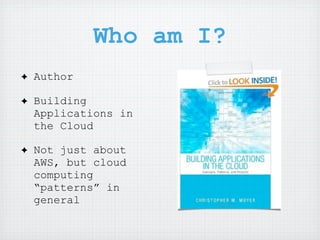
✦   Author

✦   Building
    Applications in
    the Cloud

✦   Not just about
    AWS, but cloud
    computing
    “patterns” in
    general
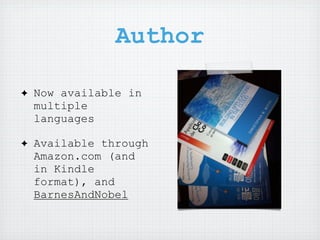
Author

✦   Now available in
    multiple
    languages

✦   Available through
    Amazon.com (and
    in Kindle
    format), and
    BarnesAndNobel
Newstex VP
✦   VP of Technology:
    Newstex, LLC

✦   Took Newstex from
    a datacenter to
    AWS

✦   All applications
    run entirely
    within AWS
Indexing with
          DynamoDB!

✦   DynamoDB is a
    NoSQL Engine

✦   Not Indexed
Oh wait...


Officially Released Thursday (4/11)
Reverse...
Introducing
         CloudSearch
✦   Powered by “a9” search engine

✦   Same search used by Amazon.com

✦   Similar to Apache Solr

✦   Managed Service, Auto scale based on
    usage and storage

✦   Searches full-text and metadata

✦   Customized Schema
What is
       CloudSearch?
✦   Search Domains

✦   Full text indexing of documents and
    Metadata

✦   Simple Document API

✦   Rich API to search - no AWS
    Credentials required

✦   “Search Facets”

✦   “Result Field”
Search Domains
✦   Single set of Endpoints

✦   Completely Isolated

✦   Can not search across domains

✦   Set of instances

✦   Set of permissions

✦   Specific Schema
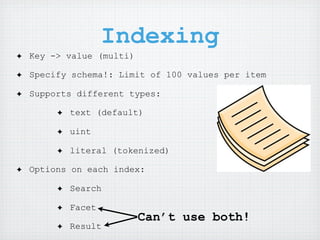
Indexing
✦   Key -> value (multi)

✦   Specify schema!: Limit of 100 values per item

✦   Supports different types:

         ✦   text (default)

         ✦   uint

         ✦   literal (tokenized)

✦   Options on each index:

         ✦   Search

         ✦   Facet
                           Can’t use both!
         ✦   Result
Advanced Indexing
         Settings
✦   Rank expressions: how to determine
    match results

✦   Stopwords - Words to remove and not
    index: “the”, “a” “an” “and”

✦   Stemming: Reduce a given word to its
    “root form”: “Learning”: “learn”

✦   Synonyms: Transform one word into
    another “google”: “search”
Document API
✦   REST-Style API

✦   Not signed requests

✦   Permissions by IP

✦   Can also upload via the Console

✦   Add via SDF (Search Document Format)

✦   Batch operations, add and delete

✦   Each document has an ID and a Version
Search API
  ✦   Authorized by IP address (or
      CIDR range)

  ✦   Supports “simple” and
      “boolean” query searches

  ✦   Search across all indexed
      fields, or specific fields, or
      both

  ✦   Returns simple JSON or XML
      output

  ✦   Also allows returning of
      Facets.
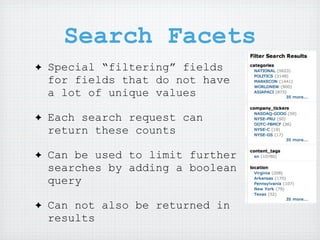
Search Facets
✦   Special “filtering” fields
    for fields that do not have
    a lot of unique values

✦   Each search request can
    return these counts

✦   Can be used to limit further
    searches by adding a boolean
    query

✦   Can not also be returned in
    results
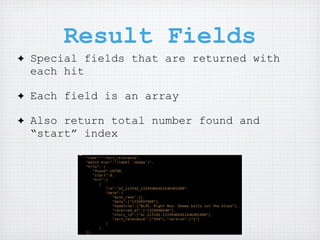
Result Fields
✦   Special fields that are returned with
    each hit

✦   Each field is an array

✦   Also return total number found and
    “start” index
How does this help
  with DynamoDB?
✦   DynamoDB is non-indexed

✦   Stores Metadata only

✦   Can be used to store full metadata
    for objects that are indexed in
    CloudSearch

✦   Both are exceptionally fast and
    scalable
Its not cheap

✦   Priced per instance
    and instance type

✦   You do not control
    scaling, Amazon does

✦   At minimum,
    approximately $100
    per “domain”
Pricing
   ✦   $0.12/hour - 1 million
       documents $87/month

   ✦   $0.48/hour - 4 million
       documents $346/month

   ✦   $0.68/hour - 8 million
       documents $490/month

   ✦   $0.10 per 1,000 Batch
       Put requests
What to take away
    from this
✦   CloudSearch is expensive,
    but saves development time
✦   CloudSearch provides
    powerful features that
    would take time to
    implement yourself
✦   Just like everything else
    Amazon releases, the price
    will decrease eventually.
Resources
✦   http://aws.amazon.com/
    cloudsearch
✦   https://github.com/boto/boto
✦   https://bitbucket.org/cmoyer/
    botoweb
✦   http://blog.coredumped.org
Console Demo

BarCamp cloudsearch

  • 1.
    Amazon CloudSearch Chris Moyer VP of Technology @ Newstex, LLC
  • 2.
    Who am I? ✦ Author ✦ Building Applications in the Cloud ✦ Not just about AWS, but cloud computing “patterns” in general
  • 3.
    Author ✦ Now available in multiple languages ✦ Available through Amazon.com (and in Kindle format), and BarnesAndNobel
  • 4.
    Newstex VP ✦ VP of Technology: Newstex, LLC ✦ Took Newstex from a datacenter to AWS ✦ All applications run entirely within AWS
  • 5.
    Indexing with DynamoDB! ✦ DynamoDB is a NoSQL Engine ✦ Not Indexed
  • 6.
  • 7.
  • 8.
    Introducing CloudSearch ✦ Powered by “a9” search engine ✦ Same search used by Amazon.com ✦ Similar to Apache Solr ✦ Managed Service, Auto scale based on usage and storage ✦ Searches full-text and metadata ✦ Customized Schema
  • 9.
    What is CloudSearch? ✦ Search Domains ✦ Full text indexing of documents and Metadata ✦ Simple Document API ✦ Rich API to search - no AWS Credentials required ✦ “Search Facets” ✦ “Result Field”
  • 10.
    Search Domains ✦ Single set of Endpoints ✦ Completely Isolated ✦ Can not search across domains ✦ Set of instances ✦ Set of permissions ✦ Specific Schema
  • 11.
    Indexing ✦ Key -> value (multi) ✦ Specify schema!: Limit of 100 values per item ✦ Supports different types: ✦ text (default) ✦ uint ✦ literal (tokenized) ✦ Options on each index: ✦ Search ✦ Facet Can’t use both! ✦ Result
  • 12.
    Advanced Indexing Settings ✦ Rank expressions: how to determine match results ✦ Stopwords - Words to remove and not index: “the”, “a” “an” “and” ✦ Stemming: Reduce a given word to its “root form”: “Learning”: “learn” ✦ Synonyms: Transform one word into another “google”: “search”
  • 13.
    Document API ✦ REST-Style API ✦ Not signed requests ✦ Permissions by IP ✦ Can also upload via the Console ✦ Add via SDF (Search Document Format) ✦ Batch operations, add and delete ✦ Each document has an ID and a Version
  • 14.
    Search API ✦ Authorized by IP address (or CIDR range) ✦ Supports “simple” and “boolean” query searches ✦ Search across all indexed fields, or specific fields, or both ✦ Returns simple JSON or XML output ✦ Also allows returning of Facets.
  • 15.
    Search Facets ✦ Special “filtering” fields for fields that do not have a lot of unique values ✦ Each search request can return these counts ✦ Can be used to limit further searches by adding a boolean query ✦ Can not also be returned in results
  • 16.
    Result Fields ✦ Special fields that are returned with each hit ✦ Each field is an array ✦ Also return total number found and “start” index
  • 17.
    How does thishelp with DynamoDB? ✦ DynamoDB is non-indexed ✦ Stores Metadata only ✦ Can be used to store full metadata for objects that are indexed in CloudSearch ✦ Both are exceptionally fast and scalable
  • 18.
    Its not cheap ✦ Priced per instance and instance type ✦ You do not control scaling, Amazon does ✦ At minimum, approximately $100 per “domain”
  • 19.
    Pricing ✦ $0.12/hour - 1 million documents $87/month ✦ $0.48/hour - 4 million documents $346/month ✦ $0.68/hour - 8 million documents $490/month ✦ $0.10 per 1,000 Batch Put requests
  • 20.
    What to takeaway from this ✦ CloudSearch is expensive, but saves development time ✦ CloudSearch provides powerful features that would take time to implement yourself ✦ Just like everything else Amazon releases, the price will decrease eventually.
  • 21.
    Resources ✦ http://aws.amazon.com/ cloudsearch ✦ https://github.com/boto/boto ✦ https://bitbucket.org/cmoyer/ botoweb ✦ http://blog.coredumped.org
  • 22.