BANK MANAGEMNT
SYSTEM
PRESENTED BY
AZHZGIRISHANKAR K
REG NO: 2132k0014
INTRODUCTION
In this project, the Bank management System Python Project
using Tkinter, the user can create an account by entering information
such as his or her username, opening balance, and pin number. The
user must then submit those data in order to gain access to their
account. The user can see transaction information, balance inquiries,
credit and debit amounts, and more. The user can credit or debit sums
by merely specifying a specific amount.
ABSTRACT
Bank Management System Project in Python is a
straightforward GUI-based program that is simple to grasp and utilize.
The GUI is created with the Tkinter package. When it comes to the
application, users may easily register an account and log in to manage
their bank accounts.
FEAUTURES
• Bank Management System Project in Python, let us take a look at
the features our UI will have:
• Login/Create a bank account
• Credit and debit amount
• Balance inquiry
• View transaction logs
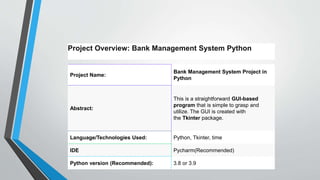
Project Name:
Bank Management System Project in
Python
Abstract:
This is a straightforward GUI-based
program that is simple to grasp and
utilize. The GUI is created with
the Tkinter package.
Language/Technologies Used: Python, Tkinter, time
IDE Pycharm(Recommended)
Python version (Recommended): 3.8 or 3.9
Project Overview: Bank Management System Python
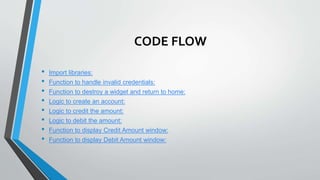
CODE FLOW
• Import libraries:
• Function to handle invalid credentials:
• Function to destroy a widget and return to home:
• Logic to create an account:
• Logic to credit the amount:
• Logic to debit the amount:
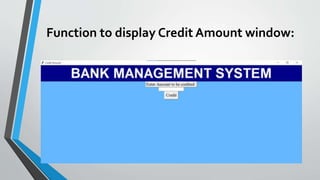
• Function to display Credit Amount window:
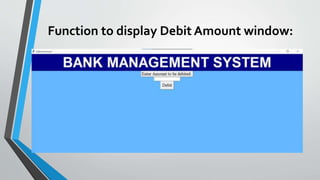
• Function to display Debit Amount window:
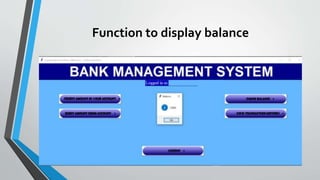
• Function to display Balance:
• Function to display Transaction History window:
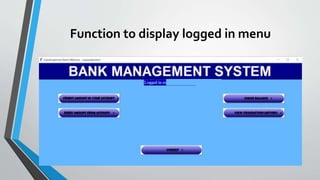
• Function to display Logged In Menu:
• Function to handle Login and Logout:
• Function to display Login window:
• Function to display Create New Account window:
• Function to display Main Menu window & call to Main_Menu():
SAMPLE FORMS
Function to display logged in menu
Function to display balance
Function to display Credit Amount window:
Function to display Debit Amount window:
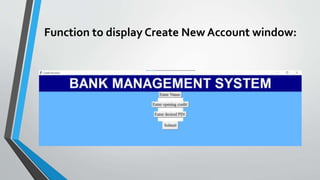
Function to display Create New Account window:
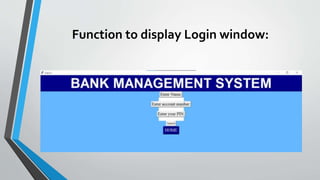
Function to display Login window:
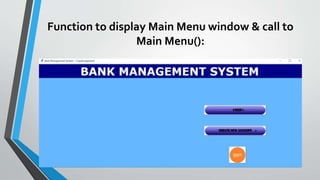
Function to display Main Menu window & call to
Main Menu():
THANKYOU.

BANK MANAGEMNT SYSTEM.pptx

  • 1.
  • 2.
    INTRODUCTION In this project,the Bank management System Python Project using Tkinter, the user can create an account by entering information such as his or her username, opening balance, and pin number. The user must then submit those data in order to gain access to their account. The user can see transaction information, balance inquiries, credit and debit amounts, and more. The user can credit or debit sums by merely specifying a specific amount.
  • 3.
    ABSTRACT Bank Management SystemProject in Python is a straightforward GUI-based program that is simple to grasp and utilize. The GUI is created with the Tkinter package. When it comes to the application, users may easily register an account and log in to manage their bank accounts.
  • 4.
    FEAUTURES • Bank ManagementSystem Project in Python, let us take a look at the features our UI will have: • Login/Create a bank account • Credit and debit amount • Balance inquiry • View transaction logs
  • 5.
    Project Name: Bank ManagementSystem Project in Python Abstract: This is a straightforward GUI-based program that is simple to grasp and utilize. The GUI is created with the Tkinter package. Language/Technologies Used: Python, Tkinter, time IDE Pycharm(Recommended) Python version (Recommended): 3.8 or 3.9 Project Overview: Bank Management System Python
  • 6.
    CODE FLOW • Importlibraries: • Function to handle invalid credentials: • Function to destroy a widget and return to home: • Logic to create an account: • Logic to credit the amount: • Logic to debit the amount: • Function to display Credit Amount window: • Function to display Debit Amount window:
  • 7.
    • Function todisplay Balance: • Function to display Transaction History window: • Function to display Logged In Menu: • Function to handle Login and Logout: • Function to display Login window: • Function to display Create New Account window: • Function to display Main Menu window & call to Main_Menu():
  • 8.
  • 9.
    Function to displaylogged in menu
  • 10.
  • 11.
    Function to displayCredit Amount window:
  • 12.
    Function to displayDebit Amount window:
  • 13.
    Function to displayCreate New Account window:
  • 14.
    Function to displayLogin window:
  • 15.
    Function to displayMain Menu window & call to Main Menu():
  • 16.